AWS
AWS Microsoft Azure
 Google Cloud


The real decision is whether enough eligible usage will remain stable throughout the commitment period.
A mixed SQL fleet may include provisioned vCore databases, serverless workloads, elastic pools, Hyperscale, and databases already receiving commitment benefits.
After existing coverage, ineligible costs, and known workload changes are accounted for, how much Azure SQL usage is actually safe to commit?
Start by separating the SQL fleet
Do not assume every Azure SQL workload can use the same financial benefit.Microsoft states that Azure Hybrid Benefit for Azure SQL Database applies to eligible provisioned vCore workloads. It does not apply to DTU or serverless. See Microsoft’s Azure Hybrid Benefit documentation.
Before sizing another commitment, separate the fleet by:
DTU or vCore
provisioned or serverless
service tier
region
elastic pool or single database
Hyperscale where applicable
existing commitment coverage
planned resizing, migrations, or shutdowns
Evaluate reserved capacity against stable vCore usage
Azure SQL reserved capacity is configuration-specific.When purchasing reserved capacity, buyers need to account for attributes such as region, deployment type, performance tier, reservation type, term, quantity, and benefit scope. Azure SQL reservations are available for one or three years. See Microsoft’s Azure SQL reservation guidance.
A broad benefit scope does not make incompatible workloads eligible.
If a workload changes to a configuration that no longer matches the reservation requirements, broader scope alone does not solve that mismatch.
A database that has run at 16 vCores for months may therefore look like an obvious reservation candidate. But if Engineering plans to resize it, change regions, change tiers, consolidate it, or retire it during the term, historical usage overstates the durable baseline.
Reserved capacity also discounts qualifying compute rather than every cost on the Azure SQL bill.
For broader reservation mechanics, see our Azure Reservations guide.
Compare Savings Plan for Databases with residual spend
The Savings Plan for Databases works differently.Instead of reserving a particular database configuration, the buyer commits to a fixed amount of eligible database spend per hour. Azure then applies the benefit to qualifying usage within the selected scope.
Microsoft currently documents Savings Plan for Databases as a one-year commitment.
There is another important difference: the plan is not limited to Azure SQL Database usage.
Other eligible database services within the selected scope can consume the same hourly commitment. Microsoft’s documented coverage includes qualifying Azure database services and other eligible database usage.
That means an Azure SQL-only baseline could overstate how much Savings Plan capacity will remain available specifically for Azure SQL.
Our Azure Savings Plan for Databases guide covers the product mechanics in more detail.
Remove existing coverage before buying more
This is where commitment sizing often goes wrong.Suppose the selected scope has $30 per hour of eligible database usage.
That does not mean you should buy another $30/hour commitment.
Microsoft’s reservation recommendations account for existing reservations and Savings Plans. See Microsoft’s reservation recommendation methodology.
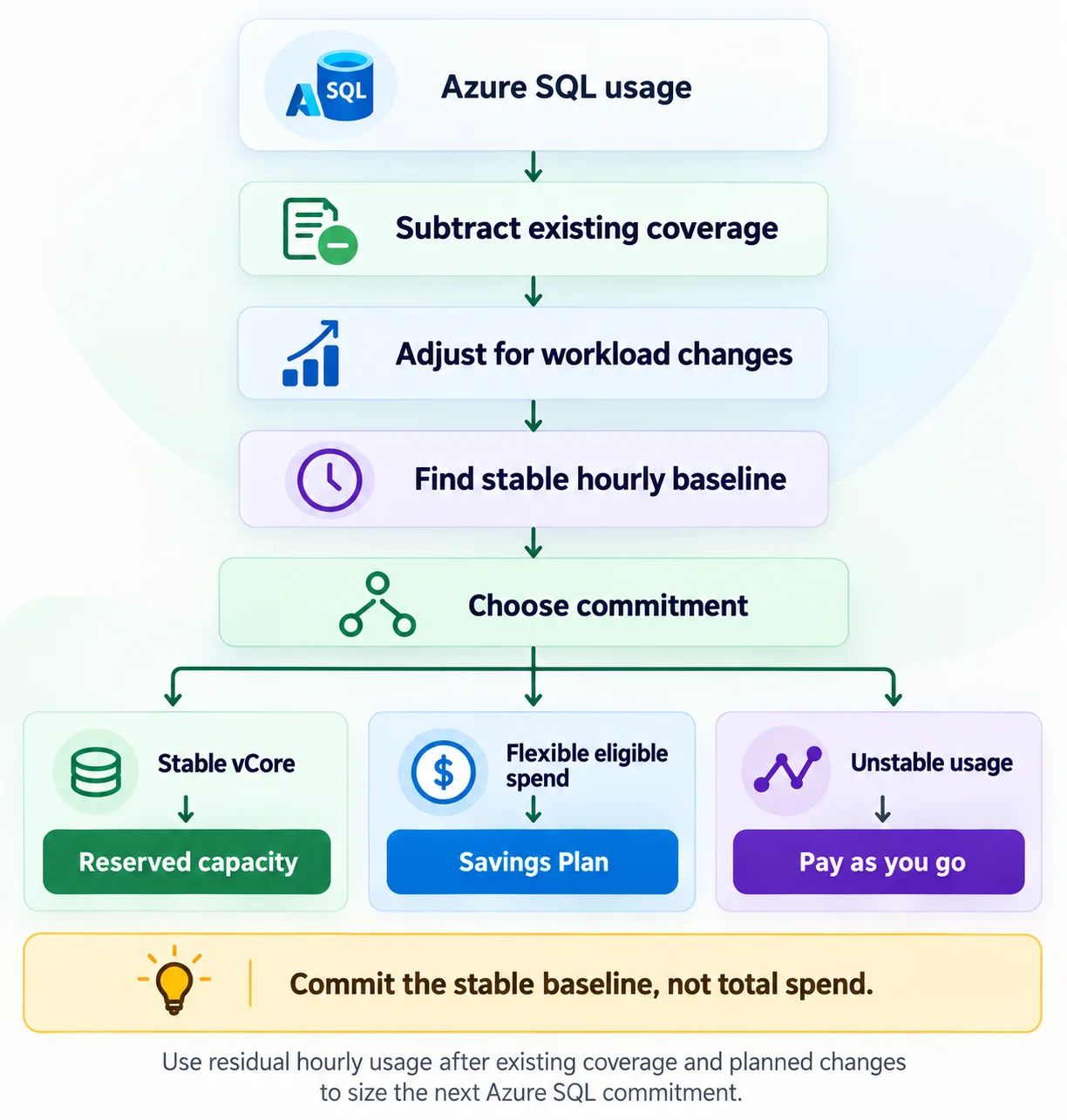
The practical sequence is:
− existing reservation coverage
− usage already covered by existing Savings Plans
= residual eligible usage
Then adjust that residual for changes you already know are coming.
How to size your next Azure SQL Database commitment
Assume your selected scope currently has:Existing reservation coverage: $12/hour
Existing Savings Plan coverage: $5/hour
Residual eligible usage: $13/hour
Now assume Engineering confirms a planned migration that should remove approximately $3/hour of usage.
The remaining workload is therefore closer to $10/hour.
But historical low-demand periods regularly fall to around $8/hour.
That $8/hour level is a more conservative starting point for the next commitment evaluation than either $30/hour or $13/hour.
This is an illustrative method, not a universal purchase recommendation. Actual sizing depends on eligibility, rates, scope, usage patterns, and future workload plans.
Use the hourly floor, not the monthly average
Monthly averages can hide commitment risk.Two environments might each spend $20,000 per month.
One may remain close to the same usage level every hour. The other may drop sharply overnight and spike during business hours.
Their monthly totals look similar. Their commitment profiles do not.
Microsoft’s Savings Plan recommendation methodology uses historical hourly eligible usage and simulations across candidate commitment amounts. See Microsoft’s Savings Plan recommendation methodology.
For your own decision, look for the residual eligible usage that persists during normal low-demand hours.
That hourly floor is usually a more defensible starting point than peak usage or a monthly average.
Check Azure Hybrid Benefit separately
Azure Hybrid Benefit is a licensing benefit, not part of the reservation discount.For Azure SQL Database, Microsoft limits AHB to the provisioned vCore purchasing model. It does not apply to DTU or serverless.
If your organization has qualifying SQL Server licenses with active Software Assurance or qualifying subscription licenses, include AHB in the effective-cost calculation.
But keep its financial effect separate from reservation or Savings Plan savings.
That makes it easier for Finance to see whether savings are coming from:
licensing
the Azure commitment
or both
Model what is about to change
Historical billing data cannot see your architecture roadmap.Before approving another commitment, ask Engineering about:
scheduled database shutdowns
consolidation
vCore resizing
region changes
service-tier changes
serverless adoption
elastic-pool changes
Hyperscale migrations
approved growth plans
If an affected workload is moving to another configuration, size the commitment against the expected destination rather than the historical Fsv2 configuration.
Factor in the February 2027 reservation policy change
Reservation flexibility is also changing.Microsoft states that beginning February 1, 2027, reservations purchased after the policy change for services supported by Savings Plans, including Azure SQL Database, will no longer receive normal reservation exchange flexibility.
Eligible reservations purchased before the change retain one final exchange, while Microsoft’s reservation-to-Savings-Plan trade-in path remains available.
See Microsoft’s reservation exchange policy update.
That makes configuration stability even more important when evaluating a longer Azure SQL reservation.
Reservation or Savings Plan for Databases?
Remember that Savings Plan for Databases can be consumed by eligible database usage across the selected scope, not only Azure SQL Database.| Evaluate | Azure SQL reserved capacity | Savings Plan for Databases |
|---|---|---|
| Commitment basis | Matching qualifying vCore usage | Eligible hourly spend across covered database services |
| Term | 1 or 3 years | 1 year |
| Good fit | Stable workload configuration | Durable eligible spend with more flexibility |
| Serverless | Reserved capacity does not apply | Supported where eligible |
| Scope behavior | Matching usage consumes the reservation benefit | Eligible covered database services in scope can consume the plan |
| Main utilization risk | Matching usage falls | Eligible hourly spend falls |
You may reserve a durable provisioned vCore baseline, use a Savings Plan for Databases for another pool of eligible spend, and leave uncertain usage uncommitted.
The objective is not maximum coverage.
It is useful coverage without avoidable underutilization.
Azure SQL Database commitment checklist
Before purchasing another commitment, confirm:Existing coverage: Have current Reservations and Savings Plans already been accounted for?
Eligibility and scope: Have you identified all eligible database usage that could consume the commitment?
Residual hourly baseline: Are you sizing against stable, uncovered usage instead of total or average spend?
Workload changes: Have planned migrations, resizing, shutdowns, and region or tier changes been included?
Commitment fit: Have you compared reservation matching requirements with the broader spend-based Savings Plan model?
Review monthly: Who will monitor utilization, uncovered pay-as-you-go spend, upcoming architecture changes, and ownership between FinOps and Engineering?
Where Usage.ai fits
For Azure SQL Database commitment management, the important question is how much incremental commitment remains after existing coverage and expected workload changes are taken into account.We help teams review Azure commitment coverage, identify remaining eligible spend, and assess whether the usage baseline is stable enough to support another commitment.
At Usage.ai, we help teams manage the commitment layer as usage changes. With Flex Insured Commitments, teams can get the Up to 67% savings of a 1- or 3-year commitment with none of the commitment risk.
If an eligible Flex Commitment costs more than equivalent pay-as-you-go usage because of a qualifying usage change, cashback protection can help cover the difference, subject to current program eligibility and terms. See our cashback documentation for the current protection mechanics.
If the next question is how much of this ongoing process should remain manual, see our Azure commitment automation guide.
Evaluate your incremental SQL commitment opportunity
Review existing Azure SQL commitments, eligible workload coverage, Azure Hybrid Benefit, planned workload changes, and residual hourly usage before adding another commitment.Review SQL commitments, coverage, AHB, and residual usage before committing more.
Frequently asked questions
How much Azure SQL Database usage should I commit?
Start with stable, eligible hourly usage after subtracting existing commitment coverage and accounting for known workload changes. Do not size the purchase from the total Azure SQL bill or monthly averages alone.
Can Azure SQL Database serverless use reserved capacity?
No. Microsoft states that Azure Reservation discounts and Azure Hybrid Benefit do not apply to Azure SQL Database serverless.
Can Savings Plan for Databases cover Azure SQL serverless?
Yes, where the usage meets Microsoft's Savings Plan for Databases eligibility requirements. Other eligible database services inside the selected scope may also consume the hourly commitment.
Can Azure Hybrid Benefit be combined with reserved capacity?
For an eligible provisioned vCore workload, Azure Hybrid Benefit addresses qualifying SQL licensing while reserved capacity discounts eligible compute. Model the two mechanisms separately when calculating effective cost.
Should I purchase exactly what Azure recommends?
Treat Azure's recommendation as an important input, not an automatic purchase instruction. Azure recommendations are based on historical usage, while your Engineering team may already know about future migrations, resizing, shutdowns, or architecture changes that do not yet appear in billing history.