.png)
 AWS
AWS Microsoft Azure
 Google Cloud


The useful question is narrower: for the usage you expect to run, will the proposed approach lower your total cost compared with what you already pay?
The Short Answer
Evaluate each tool against your current optimized cost, using the same usage, accounts, and period on both sides. Apply your actual pricing terms, retain the costs of commitments you already own, and include every new commitment charge in the proposed cost.The difference in provider cost is only the starting point. Compare vendor fees and operating costs on both sides, then check whether the result survives a realistic drop in usage and the terms you would sign.
Establish the Pricing Baseline You Actually Pay
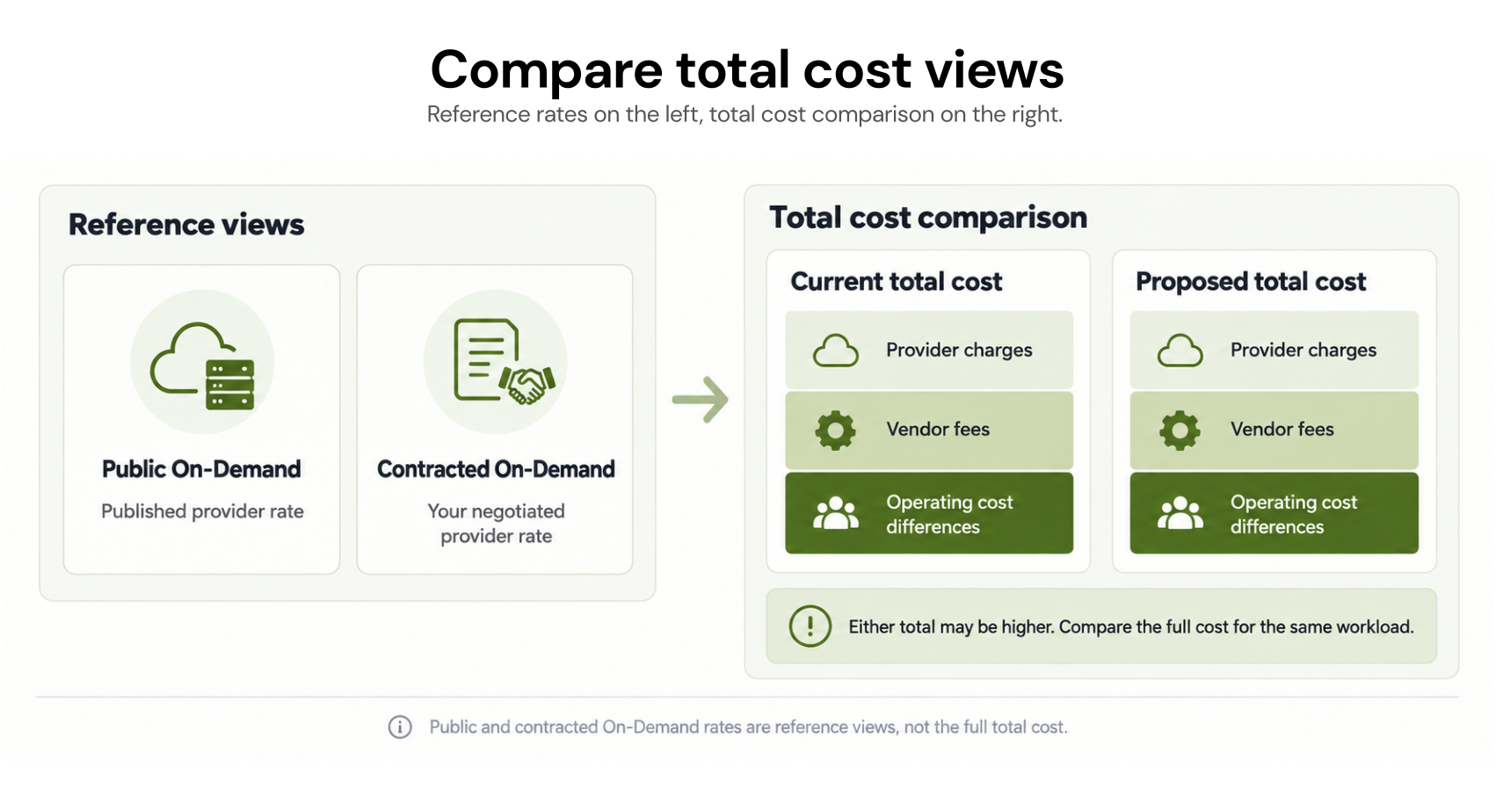
Ask the vendor to identify three different numbers for the usage it proposes to manage:Public On-Demand equivalent: what that usage would cost at public rates, before your negotiated pricing or commitments.
Your contracted On-Demand equivalent: what the same eligible usage would cost under your private rates without commitment benefits.
Your current optimized cost: what you pay after existing commitments and other relevant benefits, including the cost of unused commitments allocated to the period.
Get the rates for the correct billing account, service, SKU, region, and effective dates. A private agreement may change On-Demand rates, commitment rates, or how particular discounts interact.
Calculate the Incremental Net Benefit
Give every shortlisted vendor the same usage period and future workload assumptions. Compare what your organization would spend if it continued its current approach with what it would spend under the proposed one.Here is a monthly illustration, not a forecast or Usage.ai result. The current approach has no vendor fee; both columns omit operating costs that stay the same. The proposed $400 represents assumed additional operating expenditure, not just estimated staff time. No protection payment is included:
| Measure | Current approach | Proposed tool | How to read it |
|---|---|---|---|
| Public On-Demand equivalent | $100,000 | $100,000 | Same usage at list rates |
| Contracted On-Demand equivalent | $80,000 | $80,000 | Same usage at assumed private rates |
| Provider cost with commitments | $70,000 | $64,000 | Includes commitment charges and unused portions allocated to the month |
| Vendor fee | $0 | $1,200 | Illustrative quoted fee |
| Additional operating expenditure | $0 | $400 | Incremental expenditure assumed for this example |
| Total compared cost | $70,000 | $65,600 | $4,400 modeled incremental benefit |
Here, the proposal improves provider cost by $6,000; after the assumed fee and added expenditure, the modeled benefit is $4,400.
The provider-cost row already includes unused commitment cost. Subtracting “underutilization exposure” again from that row would count the same cost twice. Instead, show which commitment creates the exposure and model how its cost changes if usage declines.
A monthly example also cannot settle a one- or three-year purchase. Before approving a new commitment, extend both scenarios across its full remaining term, including purchases already made, planned expirations, material rate changes, workload changes, and any amount still payable after a tool contract ends.
The FinOps Foundation’s rate-optimization guidance likewise places commitment choices alongside validated demand and negotiated pricing.
Check What the Vendor Charges For and What Protection Covers
“Percentage of savings” is not a complete fee definition. Ask the vendor to write down the savings baseline, covered services and accounts, fee percentage, calculation period, and treatment of commitments you purchased before signing.Confirm whether the fee applies to projected savings, realized commitment savings, inherited savings, or another defined amount. That distinction can change the quote even when two vendors recommend similar purchases.
Treat financial protection as a separate line in the evaluation. Ask which purchases qualify, what event creates a covered loss, how the amount is calculated, when payment occurs, and whether protection continues after termination. A forecasted rebate does not reduce today’s provider bill; show it separately until it qualifies and is settled in cash or as a credit. Count the benefit only once.
Also check the private cloud agreement, not just the tool agreement. If lower provider spend changes progress toward a minimum spending commitment, Finance needs to understand the effect over that agreement’s term. Do not assume the tool’s fee counts toward the cloud commitment because it appears on a provider or Marketplace invoice.
For Azure, for example, Microsoft provides a MACC tracker that identifies commitment progress and eligible spending; the buyer’s own terms govern the result.
Verify the Proposal With Your Billing Data and a Usage-Change Scenario
A credible projection should let your team reproduce the main numbers. Ask the vendor for:The accounts, services, SKUs, regions, dates, and usage included or excluded.
The contracted rates used, their source and effective dates, and how private discounts interact with the proposed commitments.
Your existing commitment inventory and the exact new purchases assumed.
Current and proposed provider costs, commitment fees and unused amounts, the vendor-fee calculation, and a reconciliation to billing records.
A second result in which a material workload shrinks, migrates, or stops.
Azure’s MCA price-sheet fields distinguish market and negotiated unit prices by price type, term, and unit; a reservation entry is a term price, not an hourly usage rate. Google Cloud’s billing export fields distinguish prices under the default and applicable consumption models, including negotiated discounts where present. Check field availability for your export and period. These records help test a proposal, but no single field substitutes for reconciling the full bill.
In the lower-usage scenario, keep the comparison fair: run both approaches against the same revised workload. Include commitment charges that continue when usage disappears. Check whether other qualifying usage can absorb the commitment and whether planned purchases would still be made.
Keep a potential protection recovery in its own line, subject to its terms, rather than using it to erase a known provider charge in the projection.
If the vendor cannot reproduce a material figure, mark it as an assumption rather than a verified saving.
Confirm Purchasing Control, Operating Work, and Exit Responsibility
Once the economics are credible, examine how the result would be delivered. A tool that reports an opportunity, a tool that queues purchases for approval, and one authorized to buy automatically require different customer work and controls.Ask who approves each commitment, what purchase limits apply, which account holds it, and what permissions the tool needs. Confirm who monitors utilization, investigates billing differences, and decides what to do when a workload changes.
Add the implementation and recurring work your team would actually perform to the comparison; a fast recommendation does not necessarily mean a fast realized saving.
Finally, read the exit terms alongside the provider commitment inventory. Stopping a tool does not, by itself, remove commitments bought in your cloud account. Check what reporting you can export, whether the vendor has a final or continuing fee, who manages renewals, and whether any protection remains in force.
Our cloud cost optimization software evaluation scorecard offers broader controls and evidence criteria; for this decision, keep the test centered on the purchases and costs in the proposal.
How We Would Test This at Usage.ai
With private pricing and existing commitments, we need to test whether another commitment would improve your net costs using your rates. Our read-only Savings Test examines your current coverage and remaining opportunity before you enable purchases. Confirm the rate inputs and effective dates behind its estimate. If you proceed, you can approve recommendations or authorize Autopilot.With Flex Insured Commitments, teams can access 30–50% savings through eligible one- or three-year cloud commitments with none of the commitment risk.
If an eligible Flex Commitment costs more than equivalent On-Demand usage, we provide cashback protection to help cover the difference, subject to program terms. Commitments you already own are not automatically covered.
For customers on our savings-based model, our fee is an agreed percentage of realized savings, billed monthly in arrears after provider billing data is finalized. If those commitments generate no applicable savings, there is no savings-based fee; your agreement defines the fee base.
Final Verdict: Choose the Proposal That Improves Your Net Position
Choose a commitment tool when its proposal improves your current position under your actual rates, its numbers reconcile with provider billing, and the benefit still makes sense under a plausible change in usage. The fee definition, purchasing control, remaining provider obligations, and private-pricing agreement all belong in that decision.Review your rates, existing commitments, and a clearly labeled estimate of incremental savings with our team.
Frequently asked questions
Should a tool calculate savings from public list prices or our negotiated rates?
Public rates can illustrate a provider discount, but they do not establish your incremental benefit. Ask for the calculation using your contracted rates and your current commitment-adjusted cost. Keep both baselines labeled so a list-price discount cannot be mistaken for a reduction in your actual bill.
Can a vendor charge for savings from commitments we already own?
It depends on the vendor’s signed fee definition. Some models distinguish inherited from newly managed savings, while others define the fee base differently. Ask the vendor to mark every existing commitment in its calculation and show whether any associated savings attract a fee before accepting the quote.
Does private pricing always combine with Savings Plans, reservations, or CUDs?
No universal stacking rule applies to every agreement, service, and provider. Check the affected rates, benefit order, and exclusions in your contract and billing data. For instance, Azure documents how savings plans interact with reservations and Azure consumption discounts; that behavior should not be generalized to an AWS or Google Cloud agreement.