.png)



That makes this a control decision, not simply a feature comparison. Buyers need to know what a product can execute, which permissions it needs, where approval remains, and who absorbs the consequences when demand changes.
This guide evaluates ten tools against those questions. We are Usage.ai, the publisher of this article and one of the platforms evaluated. The list is organized by buyer fit rather than presented as a universal performance ranking.
Short Answer
The best automated cloud cost optimization tool is the one that can safely execute your highest-value recurring task.Usage.ai, ProsperOps, nOps, and Archera focus strongly on commitment management; CloudFix and Harness address broader remediation; CAST AI and Zesty automate Kubernetes optimization; Vantage pairs FinOps visibility with AWS Savings Plans automation; and native cloud tools are strongest when teams want recommendations with customer-controlled execution.
What Does Automated Cloud Cost Optimization Mean?
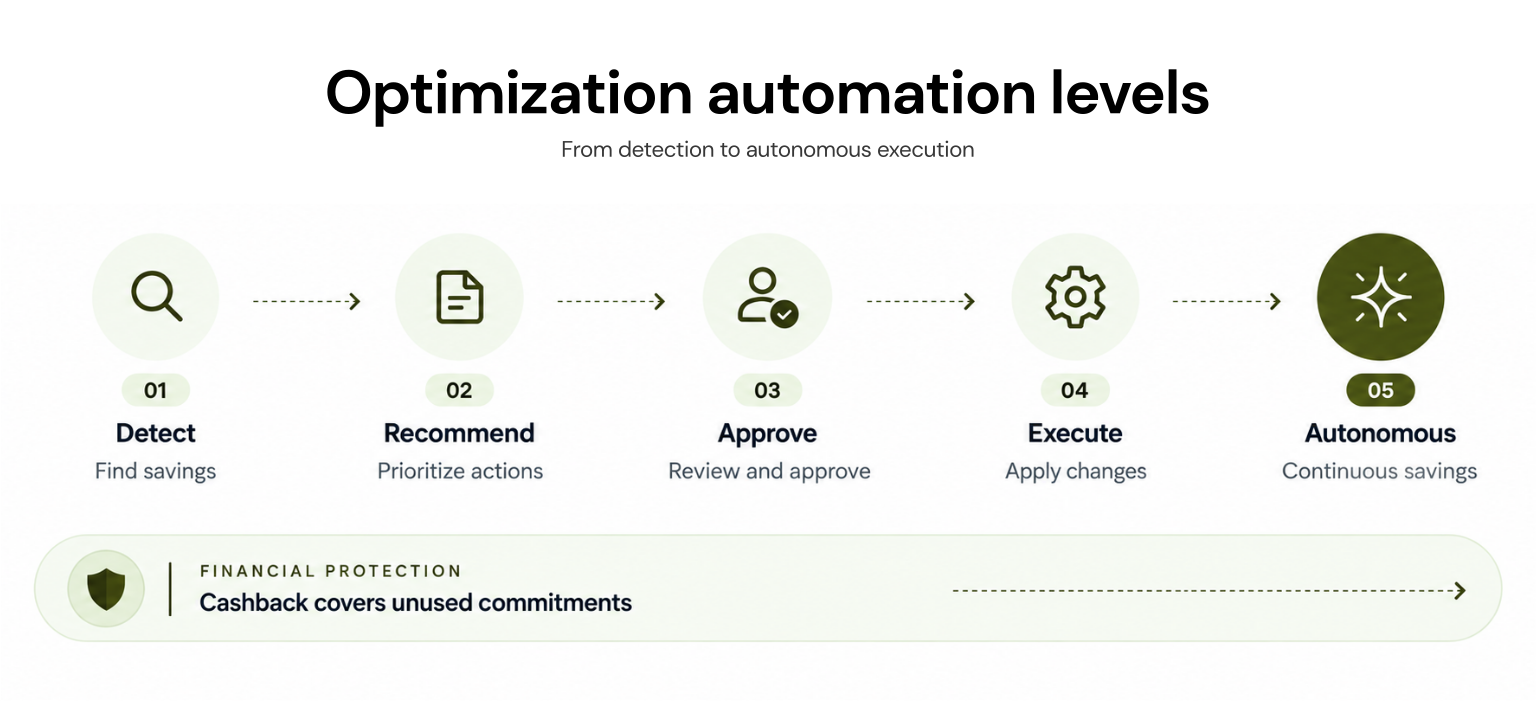
Automated cloud cost optimization is software-driven identification and execution of cost-saving actions within defined policies. The execution can occur at the billing layer such as purchasing or adjusting commitments or at the resource layer through scheduling, rightsizing, storage changes, autoscaling, or spot orchestration.The important distinction is automation depth. A dashboard that detects waste is not equivalent to a platform that prepares an action for approval, and neither is equivalent to autonomous execution. Financial protection is another layer: it may limit the downside of an eligible commitment, but it does not eliminate every source of cloud-spend risk.
How We Evaluated the Tools
We used consistent, buyer-relevant criteria: the action automated; whether the product recommends, requests approval, or executes; required access; supported clouds and services; governance controls; commitment downside; and the work retained by the customer.We also separated multi-cloud reporting from multi-cloud execution. Feature breadth mattered only when the capability solved a distinct operating problem and was supported by current first-party documentation.
Automated Cloud Cost Optimization Tools at a Glance
| Tool | What it automates | Execution, control, and access | Automation scope | What the customer still owns |
|---|---|---|---|---|
| Usage.ai | Commitment analysis, purchase, and management | Manual or Autopilot; billing and commitment read, limited optimization metadata, and purchase role | AWS, Azure, Google Cloud commitments | Policy choice and ineligible exposure |
| ProsperOps | Commitment portfolio adjustments | Autonomous; least-privileged billing and commitment role | AWS, Azure, Google Cloud commitments | Governance and risk settings |
| nOps | Commitments plus selected resource optimization | Cloud-dependent; minimal IAM, optional agent | AWS, Azure, Google Cloud; execution varies | Policies and uncovered actions |
| Archera | Commitment purchase and renewal | Read-only analysis; approval or threshold-based execution | AWS, Azure, Google Cloud commitments | Thresholds and optional protection terms |
| Zesty | Commitments and Kubernetes efficiency | Module-specific IAM or cluster permissions | AWS/Azure commitments; Kubernetes | Workload constraints and policy |
| Harness | Commitments, idle resources, and Kubernetes efficiency | Approval/RBAC; provider-specific connectors and permissions | Multi-cloud commitment orchestration; resource automation varies by provider and module | Rollout policy and application risk |
| Vantage | AWS Savings Plans purchases | Opt-in; AWS billing and purchase permissions | AWS Autopilot; broader reporting is multi-cloud | Configuration and non-Savings Plan actions |
| CloudFix | AWS resource remediation | Read-only finders; fixes through Change Manager | AWS | Approval and post-change validation |
| CAST AI | Kubernetes rightsizing and capacity actions | Read-only analysis; extended cluster access for automation | EKS, AKS, GKE, and OCI; additional environments through CAST AI Anywhere with different automation scope | Workload requirements and guardrails |
| Native cloud tools | Recommendations; limited action support | Provider IAM; mostly customer-reviewed execution | Provider-specific | Evaluation, implementation, and monitoring |
The 10 Best Automated Cloud Cost Optimization Tools
1. Usage.ai: Best for Commitment Automation With Downside Protection
Commitment management is a strong automation target because purchases recur while demand remains uncertain.With our Flex Insured Commitment Program, we analyze billing-layer usage, recommend commitments, and call the provider API after approval or through Autopilot.
Commitments remain visible in the customer account, and eligible Flex Commitments include cashback protection under applicable terms.
Our security model uses billing-layer data and specific instance metadata, with scoped permissions to manage commitments, not to start, stop, or modify production resources. Pricing is a percentage of realized savings, billed monthly in arrears.
Key considerations: The commitment types we support, the billing and commitment data we use, the scoped purchase permissions we require, how our realized-savings pricing works, when our cashback protection applies, and how we calculate and report realized savings.
2. ProsperOps: Best for Autonomous Commitment Portfolios
ProsperOps continuously adjusts discount portfolios based on usage and risk rather than leaving teams with periodic purchase projects.It supports AWS, Azure, and Google Cloud with least-privileged access. Buyers should validate supported instruments, risk settings, and how its savings-share pricing affects net savings.
Key considerations: Supported commitment instruments by cloud, least-privileged access requirements, configured risk settings, savings-share charges, and cancellation or final-charge treatment.
3. nOps: Best for Commitments and Broader Cloud Optimization
nOps commitment management combines commitment inventory and automation with broader optimization. It fits AWS-heavy teams wanting rate and resource-efficiency workflows while tracking commitments across major clouds.Confirm execution by cloud and service. Rate optimization uses a share of realized savings; visibility uses a spend-based fixed fee.
Key considerations: Automation scope by cloud and service, required IAM permissions, optional agent requirements, share-of-savings versus fixed-fee pricing, and savings attribution.
4. Archera: Best for Configurable Commitment Automation
Archera Commitment Manager supports AWS, Azure, and Google Cloud, with approval-based purchases or automation tied to customer-defined savings thresholds.Its core platform is free, while optional guaranteed commitments carry separate financial terms. Buyers should verify the permissions and terms applying to their selected mode.
Key considerations: Read-only versus purchase permissions, automatic-purchase thresholds, free-platform boundaries, Guaranteed Commitment pricing and terms, and rebate conditions.
5. Zesty: Best for Commitments and Kubernetes Efficiency
Zesty’s platform spans commitment optimization and Kubernetes resource optimization, including persistent-volume autoscaling.Each module requires different access and a separate savings baseline; AWS Commitment Manager can require RI Marketplace permissions. Pricing is based on usage and realized savings.
Key considerations: Supported modules and commitment products, module-specific IAM or cluster permissions, AWS RI Marketplace requirements where applicable, savings attribution, and usage-based pricing.
6. Harness: Best for Governance-Controlled Automation
Harness Cloud Cost Management combines visibility with idle-resource, commitment, and Kubernetes actions.RBAC, approvals, and auditability support controlled execution. Required connectors and permissions vary by cloud provider and module, so buyers should confirm the supported commitment instruments and execution model for each environment. Cloud cost management is sold through Harness’s modular enterprise plan.
Key considerations: Automation scope by cloud and module, provider-specific connectors and permissions, manual versus automatic approval settings, rollback ownership, and modular enterprise pricing.
7. Vantage: Best for FinOps Visibility With AWS Automation
Vantage Autopilot uses an auditable AWS policy to view billing data and purchase Compute and Database Savings Plans. Automatic purchasing is opt-in; other listed RI recommendations remain manual.It fits teams wanting multi-cloud reporting with AWS-only Autopilot. Fixed-rate paid plans include access to Autopilot, which separately charges 5% of realized savings; customers configure lookback and payment preferences.
Key considerations: AWS-only Autopilot scope, automatic Savings Plans purchases versus manual RI recommendations, required AWS permissions, lookback and purchase settings, applicable paid plan, and Autopilot’s 5% realized-savings fee.
8. CloudFix: Best for Controlled AWS Waste Remediation
CloudFix identifies AWS opportunities through read-only “finders,” then routes fixes through AWS Systems Manager Change Manager and runbooks. Its coverage includes EC2, EBS, S3, and RDS.Customers can approve fixes individually or configure automatic deployment through AWS Systems Manager Change Manager, while retaining responsibility for rollout controls and post-change validation. Fixed pricing scales by annual AWS spend after a free scan.
Key considerations: Available finders and fixers, read-only scanning versus AWS Systems Manager permissions, individual versus automatic approvals, post-change validation, and spend-based pricing tier.
9. CAST AI: Best for Autonomous Kubernetes Optimization
CAST AI rightsizes workloads, autoscales and selects nodes, bin-packs, and uses Spot capacity across major clouds. Analysis begins with a read-only agent; automation requires extended permissions and takes over node lifecycle management.Buyers should test disruption controls and fallback behavior. Pricing requires an environment-specific quote.
Key considerations: Supported cluster modes, read-only and extended automation permissions, compatibility with existing autoscalers, disruption and fallback controls, and environment-specific pricing.
10. Native Cloud Tools: Best for Recommendations and Customer-Controlled Actions
AWS Compute Optimizer, Azure Advisor, and Google Cloud Active Assist provide first-party recommendations based on provider telemetry. Some actions can be simplified or automated, but customer review and implementation remain central.Native tools are a sensible baseline when teams prefer provider-native controls and have engineering capacity to execute and monitor changes.
Key considerations: Provider-specific recommendation coverage, telemetry and enablement requirements, available execution options, required IAM permissions, engineering ownership, and any applicable provider charges.
How to Choose the Right Automation Model
Start with the recurring work that creates the largest verified gap:For multi-cloud commitment automation with eligible downside protection, assess Usage.ai.
For autonomous commitment portfolios, compare Usage.ai, ProsperOps, nOps, and Archera.
For broader AWS remediation, evaluate nOps, Harness, and CloudFix.
For Kubernetes efficiency, compare CAST AI and Zesty against your disruption tolerance.
For customer-controlled recommendations, begin with native cloud tools.
Buyers narrowing the commitment category can use our comparisons of cloud commitment management platforms and AWS Savings Plans management tools to examine those products at a more specific level.
Final Verdict: Automate the Bottleneck, Not Everything
No product is “most automated” in every layer. Select the tool that executes your most persistent, measurable bottleneck with permissions and controls your organization can defend.Run a proof of value against a documented baseline, calculate realized savings net of fees, and separate rate savings from usage reductions to avoid double counting. Expand automation only after the operating owner, exception path, and downside are clear.
See how billing analysis becomes approved commitments and measured savings.
Frequently asked questions
What is an automated cloud cost optimization tool?
It is software that identifies and, at some level, operationalizes cloud savings actions. The level matters: some tools only recommend; others create approval workflows, purchase commitments, modify resources, or continuously adjust Kubernetes capacity within policy.
Which cloud cost optimization tasks can be automated?
Common candidates include commitment purchases and renewals, resource scheduling, rightsizing, storage optimization, Kubernetes bin packing and autoscaling, and Spot orchestration. Suitability depends on action reversibility, workload sensitivity, permissions, and whether reliable policy guardrails exist.
Are automated cloud cost optimization tools safe for production?
They can be, but safety is capability-specific. Billing-layer purchases create financial exposure; resource-layer actions can affect performance or availability. Use least-privileged access, approval thresholds, audit logs, rollback or fallback controls, staged rollout, and named operational ownership.
How should buyers compare projected cloud savings?
Require a written baseline, time window, excluded costs, fee treatment, and attribution method. Compare realized net savings rather than headline percentages, and ask how the vendor prevents overlap between commitment discounts, rightsizing, negotiated pricing, and savings that would have occurred without the tool.