.png)



AWS already provides Savings Plans recommendations, purchasing tools, utilization reporting, and commitment management through Cost Explorer. A management platform needs to add value beyond simply buying the same AWS commitment.
Which approach gives us the right balance of savings, purchasing control, and commitment risk?
That means comparing the economics and operating model, not just a savings percentage.
If you want a broader product overview first, see our AWS Savings Plans management tools comparison.
Start with the AWS baseline
Before comparing platforms, understand what AWS already provides.AWS currently offers four Savings Plans types:
Compute Savings Plans
EC2 Instance Savings Plans
Database Savings Plans
SageMaker AI Savings Plans
See the current AWS Savings Plans documentation.
So the question for a management platform is not:
Can it buy a Savings Plan?
It is:
What does it add around sizing, automation, ongoing management, and downside risk?
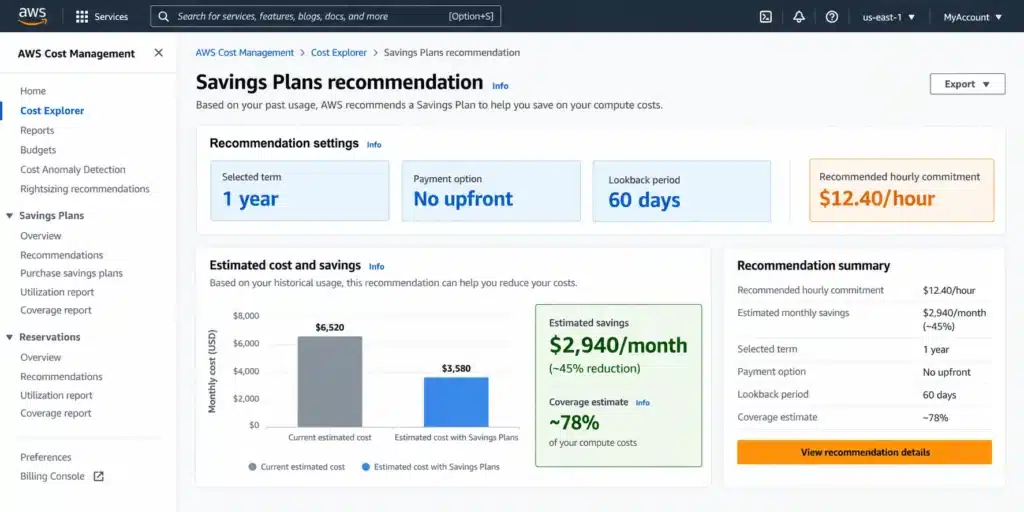
See the AWS Savings Plans return policy.
That return window is useful for correcting a recent purchase. It should not be treated as a general exit mechanism for long-term commitments.
Compare what you actually keep
A headline savings percentage does not tell you how much economic value stays with your organization.A practical comparison is:
The key word is incremental.
If you already own Savings Plans or Reserved Instances, the savings they were producing before a new platform arrived should be separated from the new value created by that platform.
Suppose a new commitment strategy produces $30,000 in realized savings for a month.
If the applicable management fee were an illustrative 20%:
For a deeper look at this calculation, see how we calculate savings, fees, and cashback.
Ask the provider to show the baseline, savings it created, applicable fee, remaining downside, and final customer benefit.
If Finance cannot reproduce the economics, the headline savings number is not enough.
Check existing commitments first
Most AWS environments do not start with zero commitment coverage.You may already have Savings Plans, Reserved Instances, or both.
That matters because the platform should distinguish existing coverage from new commitment opportunities.
Ask:
ProsperOps describes a Savings Share model that uses several savings categories. Its current AWS pricing documentation includes customer-procured commitments within its defined savings categories. Review the current ProsperOps pricing methodology when comparing the fee base.
Vantage says Autopilot accounts for existing Reserved Instances and Savings Plans and targets remaining uncovered spend. Its current Autopilot materials state a fee of 5% of realized savings generated by Autopilot. See the Vantage Autopilot documentation.
At Usage.ai, we keep customer-owned commitments separate from the Flex Commitments we manage. That gives you a clearer view of what was already in place and what is being managed through our program. See how Usage.ai works with existing and new commitments.
existing commitment coverage;
uncovered eligible usage;
new commitments being proposed; and
incremental savings attributed to those commitments.
Decide who can purchase
Automation can remove repetitive FinOps work, but purchasing authority matters because a commitment creates a financial obligation.The important question is:
Who can commit our AWS spend, and under what approval model?
The answer varies by provider.
Vantage documents automatic and approval-based Autopilot purchases.
The current nOps Compute & Database Commitment Management agreement states that, for spend allocated to its program, nOps has discretion over commitment quantity and length and authority to purchase commitments on the subscriber’s behalf.
With Usage.ai, the operating model can separate evaluation from purchasing. A read-only Savings Test lets you review the commitment opportunity before purchasing authority is enabled.
Depending on the configured Usage.ai workflow, eligible recommendations can then move into managed commitment execution.
which accounts and services are in scope;
who can approve purchases;
whether human approval is required for the workflow you choose;
what AWS permissions are granted; and
how purchasing authority can be changed or removed.
Compare downside protection
The word protection can describe very different mechanisms.That makes a simple “Protection: Yes/No” comparison misleading.
Archera distinguishes native commitment management from optional Guaranteed Commitments. Its current pricing materials describe a Rebate Guarantee for underutilization and a Release Guarantee that can allow eligible Guaranteed Commitments to be removed early. See the Archera pricing page.
Zesty’s billing documentation describes Eligible Refunds under its buy-back guarantee and shows those refunds reducing the amount owed to Zesty. See the Zesty billing definitions.
For eligible Usage.ai Flex Commitments, our cashback mechanism addresses qualifying financial downside when the commitment costs more than equivalent On-Demand usage, subject to current program requirements. See how our cashback works.
When comparing them, ask:
What triggers the protection?
How is the financial loss calculated?
Is the remedy cashback, refund, credit, release, or something else?
What is excluded?
When is the benefit settled?
What happens when the service relationship ends?
Compare the operating models
Use a comparison table for orientation, then verify the details in current provider documentation and your proposed agreement.| Tool | Current approach to examine | What to verify |
|---|---|---|
| AWS native | Recommendations, purchasing, coverage, and utilization tools | Sizing and long-term underutilization risk |
| Usage.ai | Managed Flex Commitments with eligible cashback protection | Fee base, workflow, eligibility, and permissions |
| ProsperOps | Automated commitment management with Savings Share pricing | Savings categories and existing-commitment treatment |
| Vantage | Autopilot with automatic or approval-based purchasing | Fee base, purchasing mode, and supported commitments |
| nOps | Automated compute and database commitment management | Authority over allocated spend and agreement terms |
| Archera | Native management plus optional Guaranteed Commitments | Guarantee premium, coverage, and release/rebate terms |
| Zesty | Commitment management with buy-back refund mechanics | Eligibility, refunds, fees, and commitment scope |
Use it to identify the contract, product, and economic questions that need evidence.
Run the same test
Vendor case studies are difficult to compare because each starts with a different customer environment.A cleaner evaluation is to give each shortlisted provider the same scenarios.
Stable usage
Provide the same AWS spend, existing commitments, workload mix, and target coverage. Compare incremental savings, fees, and retained value.
Usage drops
Model a meaningful reduction in committed usage. Ask how much financial downside remains and whether any protection applies.
Architecture changes
Test a change in instance family, Region, service, or database architecture. Determine whether the commitment remains useful after the change.
You leave the platform
Ask who owns the underlying AWS commitment, which fees continue, what happens to protection, and what operational responsibility comes back to your team.
For more detail on this last question, see what happens to commitments when you change providers.
Ask for evidence
For each material claim, ask for something your Finance, FinOps, Engineering, or Procurement team can verify.| Claim | Evidence to request |
|---|---|
| Savings | Calculation using your AWS data |
| Existing coverage | Current commitment inventory |
| Fees | Written fee formula and fee base |
| Purchasing control | IAM permissions and approval model |
| Protection | Current program or contract terms |
| Exit | Commitment ownership and termination language |
Evaluate with your AWS data
At Usage.ai, we focus on the recurring work of cloud commitment optimization and management across AWS, Azure, and GCP.Our platform analyzes usage and billing data to identify commitment opportunities. Teams can review recommendations through CoPilot or use Autopilot to manage eligible commitment decisions as usage changes.
For covered workloads, customers typically see 30–50% savings compared with on-demand pricing. We work alongside commitments you already own and manage, including AWS Savings Plans and Reserved Instances, Azure commitments, and GCP CUDs.
Eligible commitments managed through our Flex Insured Commitment Program can also include cashback protection if committed usage falls below expectations. That helps reduce the downside of overcommitting while still capturing commitment savings. See how Usage.ai calculates savings, fees, and cashback.
Before we enable purchasing, you can use the Usage.ai Savings Test with read-only access to see where additional commitment savings may exist in your current environment.
Review coverage, opportunities, purchasing, and risk before choosing your AWS commitment strategy.
Frequently asked questions
Can the lowest management fee still produce worse economics?
Yes. Compare the fee together with incremental savings, underutilization exposure, and any applicable protection. The lowest fee alone does not determine net retained value.
Should we compare providers using our existing commitments?
Yes. Existing Savings Plans and Reserved Instances affect uncovered usage and the amount of new commitment opportunity available.
Can we evaluate a platform before giving it purchasing authority?
That depends on the provider. With Usage.ai, our read-only Savings Test lets you review the commitment opportunity before enabling purchasing authority.