.png)
 AWS
AWS Microsoft Azure
 Google Cloud


For teams that can make timely purchasing decisions and monitor commitments with those native tools, another management layer needs a clear reason to exist.
Managed automation becomes more relevant when recurring sizing, approvals, purchasing, monitoring, or reconciliation consume meaningful effort. The evaluation should focus on the specific work a platform takes over, the controls your team keeps, and the incremental value after fees.
A larger or faster-changing environment creates more decisions. It does not automatically justify more commitments.
Start with the GCP commitment you are actually managing
Google Cloud broadly separates committed use discounts into resource-based and spend-based models. The term, eligible usage, scope, and purchasing mechanics depend on the product. See the Google Cloud CUD overview.Resource-based CUDs
Resource-based CUDs are available for Compute Engine and commit you to eligible resources such as vCPU, memory, GPUs, Local SSD, and certain licenses.These commitments are resource-specific, and scope can depend on factors such as region, project, resource type, and CUD-sharing configuration.
Some resource-based Compute Engine commitments can run longer than three years, so verify the current term for the product you plan to purchase.
Spend-based CUDs
Spend-based CUDs commit you to eligible spend under a defined product.Some are service-specific. Google currently lists separate spend-based commitments for services such as Cloud SQL, AlloyDB, Spanner, Bigtable, Dataflow, Memorystore, and others.
Compute Flexible commitments are different. One Compute Flexible commitment can cover eligible usage across Compute Engine, GKE, and Cloud Run, subject to Google’s documented eligible services and SKUs. See Google Cloud’s Compute Flexible CUD analysis documentation.
Start by identifying the commitment product, eligible usage, scope, and term. Then verify whether the managed workflow you are evaluating supports that commitment and the action you need.
What Google Cloud already handles
Google’s CUD recommender already accounts for historical usage and existing commitments for supported products.Its stable-usage model focuses on continuously active demand. Its optimal-savings model can also consider intermittent usage when the economics clear a financial break-even threshold.
Google uses the previous 30 days by default, while scenario modeling lets you adjust factors such as the historical analysis period, commitment term, coverage, and atypical usage dates. Review the model and settings behind a recommendation before deciding what to buy. See the Google Cloud CUD recommender documentation.
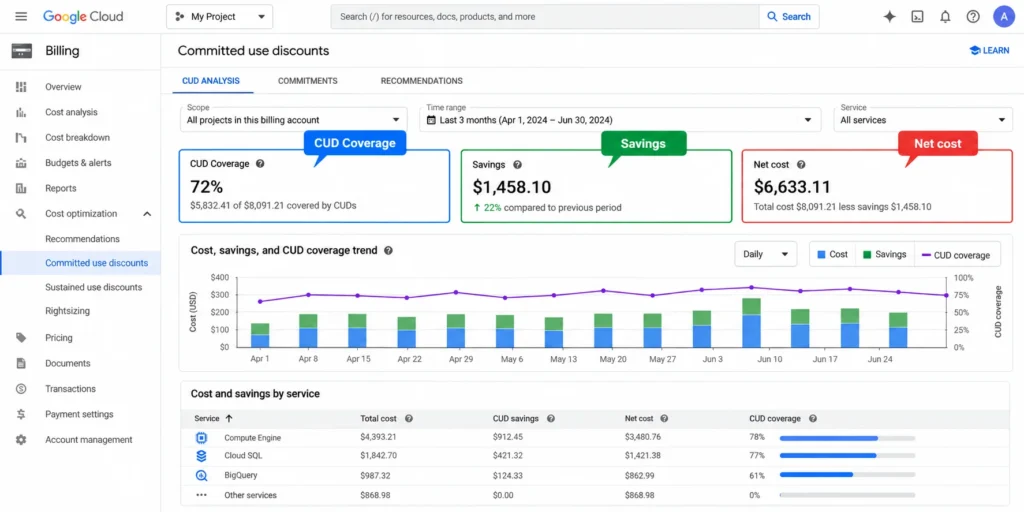
After purchase, Google’s CUD Analysis can show:
coverage;
utilization;
eligible cost not covered;
commitment cost;
effective discount;
savings;
net cost.
Evaluate the work that remains after native recommendations
Before another commitment is purchased, your team still needs to validate the business context behind historical usage:existing commitment coverage;
planned migrations or rightsizing;
workload shutdowns or architecture changes;
durable eligible demand;
commitment eligibility and scope;
upcoming expirations;
purchasing authority.
| Current situation | What to evaluate |
|---|---|
| Few commitments and stable eligible demand | Check whether periodic native review already supports timely decisions. |
| Existing commitments are well utilized | Review uncovered eligible usage and retained savings before adding coverage. |
| Purchases require repeated approvals or analysis | Identify which steps a managed platform performs and which stay with your team. |
| Workloads change frequently | Test whether automation reduces review work, but reduce or defer commitment if future eligible demand is uncertain. |
Frequent work can justify evaluating automation. It does not prove that a particular platform removes enough work or creates enough incremental value.
Read coverage and utilization together
Coverage and utilization answer different questions.Coverage shows how much eligible usage receives commitment pricing.
Utilization shows how much of the purchased commitment is consumed.
Compare them for a defined product, scope, and period.
| Coverage | Utilization | What to check next |
|---|---|---|
| High | High | Verify retained savings and whether demand remains durable. |
| Low | High | Inspect remaining eligible uncovered usage before increasing commitment. |
| High | Low | Inspect unused cost by product and scope, then check whether eligible demand can consume what is already committed. |
| Low | Low | Review uncovered usage and unused commitments separately. |
Google also notes that utilization cannot be aggregated meaningfully when the underlying CUD resource units are incompatible.
Measure the incremental value of management
Higher coverage does not establish higher retained savings when unused commitment cost or management fees rise.For a managed-platform decision, compare the proposed approach with what you already do:
Keep existing commitments in the current scenario. In the managed scenario, include provider costs, existing obligations, any new commitment cost, unused commitment cost, applicable management fees, and other cash expenditure that changes because of the management approach.
Count each cost once. Track staff time separately unless it changes actual spending.
Current approach total cost: $100,000
Managed provider cost, including commitment costs: $94,000
Applicable management fee: $2,000
Managed total cost: $96,000
Incremental financial benefit:
$100,000 − $96,000 = $4,000
This is an illustrative example, not a customer result. The same calculation should also be tested at lower eligible usage.
Keep analysis and purchasing authority separate
Our current GCP integration guide describes billing-data access through a dedicated GCP service account.A read-only Usage.ai Savings Test is separate from purchasing authority. Supported commitment execution requires additional permissions and authorization. Our permissions guide explains that distinction.
Before enabling execution, confirm:
who approves purchases;
which identity performs the action;
which projects and products are in scope;
which permissions are granted;
how access is removed when it is no longer required.
Five checks before adding managed GCP commitment automation
Is the eligible baseline durable?
Commit against usage expected to remain, not simply historical peaks.
Are existing commitments included?
Measure additional opportunity around the portfolio you already have.
Is recurring management work material?
Identify which work the proposed platform actually removes.
Are purchasing controls defined?
Separate analysis, approval, and execution authority.
Does the added value justify the management layer?
Compare incremental financial benefit, retained work, fees, integration requirements, and required controls.
If native tools already support timely and controlled decisions, keep that workflow. Re-evaluate when your commitment portfolio or operating burden changes.
Managing GCP commitments with Usage.ai
We analyze connected GCP billing data and existing commitments to identify additional eligible commitment opportunities.We help teams identify and manage eligible GCP commitment opportunities based on actual usage patterns.With Flex Insured Commitments, teams can capture commitment-based savings while reducing the risk of unused capacity. Our Flex Commitments reduce cloud spend by 30–50% on average across covered workloads, while qualifying commitments include cashback protection for eligible underutilization.
For GCP teams, we analyze billing data to identify stable usage that may be suitable for commitments, help determine an appropriate commitment level, and support eligible commitment actions.
This helps teams capture more of the savings available through GCP commitments without taking on the traditional risk of unused capacity.
Compare commitments, eligible usage, and purchasing before choosing managed optimization.
Frequently asked questions
Does Google Cloud recommend CUD purchases?
Yes. Google generates recommendations for supported resource-based and spend-based CUD products using historical usage and existing commitments. Recommendations still require review before purchase.
Are resource-based and spend-based CUDs the same?
No. Resource-based CUDs commit to eligible Compute Engine resources. Spend-based CUDs commit to eligible spend under the applicable product rules.
What is the difference between CUD coverage and utilization?
Coverage measures how much eligible usage receives commitment pricing. Utilization measures how much of the purchased commitment is consumed.
When does managed GCP CUD automation make sense?
It is worth evaluating when a supported platform can take over recurring commitment work or improve the financial outcome enough to justify its fees, integration requirements, and controls.
Does Usage.ai support every Google Cloud commitment?
Do not assume universal support. Confirm the specific GCP service, commitment type, eligibility, and supported action with us before enabling commitment execution.