AWS
AWS Microsoft Azure
 Google Cloud

The better option depends on how stable your workload is, how much usage you can confidently commit to, and whether the potential discount outweighs the risk of paying for unused capacity.
Short answer:
Choose Sustained Use Discounts when eligible Compute Engine usage is variable and you want automatic savings with no commitment. Choose a Committed Use Discount when a predictable baseline can remain highly utilized for one or three years. CUDs can provide deeper discounts, but unused commitment can erase that advantage.How sustained use discounts work
For eligible usage in self-serve (online) Cloud Billing accounts, a GCP Sustained Use Discount (SUD) automatically reduces the cost of eligible Compute Engine resources used for more than 25% of a billing month. There is no purchase or term commitment.According to Google Cloud’s SUD documentation, eligible resources include vCPU and memory for N1, N2, N2D, C2, M1, and M2 machine series, plus certain sole-tenant and N1 GPU usage. The maximum monthly SUD depends on the resource:
- N2, N2D, and C2: up to 20%
- N1, M1, and M2: up to 30%
- f1-micro, g1-small, and eligible GPUs attached to N1: up to 30%
| Monthly sustained usage | Overall SUD at threshold |
|---|---|
| 25% | 0% |
| 50% | 10% |
| 75% | 20% |
| 100% | 30% |
SUD does not apply to eligible resource usage already covered by another discount, except that eligible sole-tenant premium costs can still receive SUDs when the underlying vCPU and memory usage is covered by CUDs.
How committed use discounts work
A GCP Committed Use Discount (CUD) exchanges a one-year or three-year commitment for a lower rate on eligible usage. For Compute Engine, the two main models are resource-based CUDs and Compute Flexible CUDs.Resource-based CUDs commit to eligible resources such as vCPU and memory in a region; coverage is limited to the purchasing project unless billing-account CUD sharing is enabled.
Compute Flexible CUDs are spend-based and can apply across eligible usage in multiple projects, regions, machine families, and supported services within the billing account.
Google Cloud’s Compute Engine pricing lists resource-based savings of up to 37% for one year, up to 55% for three years on most machine types, and up to 70% for three-year memory-optimized machine types. Current Flexible CUD rates vary by eligible resource and service. For many common general-purpose and compute-optimized VM families, Google lists 28% for one year and 46% for three years.
Once purchased, a CUD remains payable for its term even if eligible usage drops.
Resource-based CUD scope also requires a specific check. Since June 16, 2026, new Cloud Billing accounts default to billing-account CUD sharing. Older accounts without active resource-based commitments were moved to billing-account scope on that date, while accounts with active resource-based commitments retained their existing scope. Verify the current setting before assuming cross-project coverage in Google Cloud’s CUD sharing guidance.
For a broader view of commitment types and rates, see our GCP Committed Use Discounts guide.
Choose SUD, resource-based CUD, or Compute Flexible CUD
Before calculating break-even, decide which pricing model actually matches the workload.| Workload pattern | Best starting point | Why |
|---|---|---|
| Eligible usage is variable and no term is acceptable | SUD | Automatic savings with no commitment |
| Machine family and region are stable | Resource-based CUD | Deeper discount tied to specific regional resources |
| Eligible spend moves across families, regions, or supported services | Compute Flexible CUD | More portable coverage across eligible billing-account spend |
A resource-based CUD break-even result is not automatically transferable to a Flexible CUD because the rate, scope, and commitment unit can differ.
Break-even analysis by utilization
There is no single GCP CUD vs Sustained Use Discount break-even percentage. It changes with the machine family, SUD tier schedule, CUD type, term, coverage level, and actual usage pattern.Consider this illustrative calculation, not current Google Cloud pricing.
Assumptions
- Full-month on-demand equivalent baseline: $10,000
- Resource is eligible for a maximum 30% SUD
- Three-year resource-based CUD discount used for illustration: 55%
- Commitment covers the full baseline
- Simplified committed monthly cost: $4,500
| Usage level | Effective SUD at threshold | Illustrative SUD cost | Illustrative CUD cost |
|---|---|---|---|
| 100% | 30% | $7,000 | $4,500 |
| 75% | 20% | $6,000 | $4,500 |
| 50% | 10% | $4,500 | $4,500 |
| 40% | Progressive tier calculation | $3,700 | $4,500 |
Break-even formula for your own model
For a commitment covering the full baseline:- On-demand usage cost = full-month baseline × utilization
- SUD cost = on-demand usage cost × (1 – effective SUD at that utilization)
- CUD cost = full-month baseline × (1 – CUD discount)
- Break-even = the utilization where SUD cost equals CUD cost
20%-maximum SUD check: N2, N2D, and C2 use a different SUD progression. Google documents a 6.6% overall SUD at 50% usage and 13.3% at 75%. If you also change the commitment assumption to a 37% one-year resource-based CUD, the simplified break-even moves to roughly 72%. This is illustrative, but it shows why the 50% result above cannot be reused across machine families and terms.
A practical CUD vs SUD workflow
Use a repeatable process instead of committing from a monthly average.- Confirm eligibility and scope. Identify the machine series, region, billing-account sharing setting, and whether SUD, resource-based CUD, or Flexible CUD applies.
- Measure current savings. In Google Cloud Billing, use the Cost breakdown report to see how SUDs and CUDs affect gross on-demand cost.
- Find the durable floor. Review low-usage hours, nights, weekends, scaling events, migrations, and planned rightsizing. Commit against consistently present demand, not the average peak.
- Run your break-even model. Test low, typical, and high utilization rather than relying on a single monthly average.
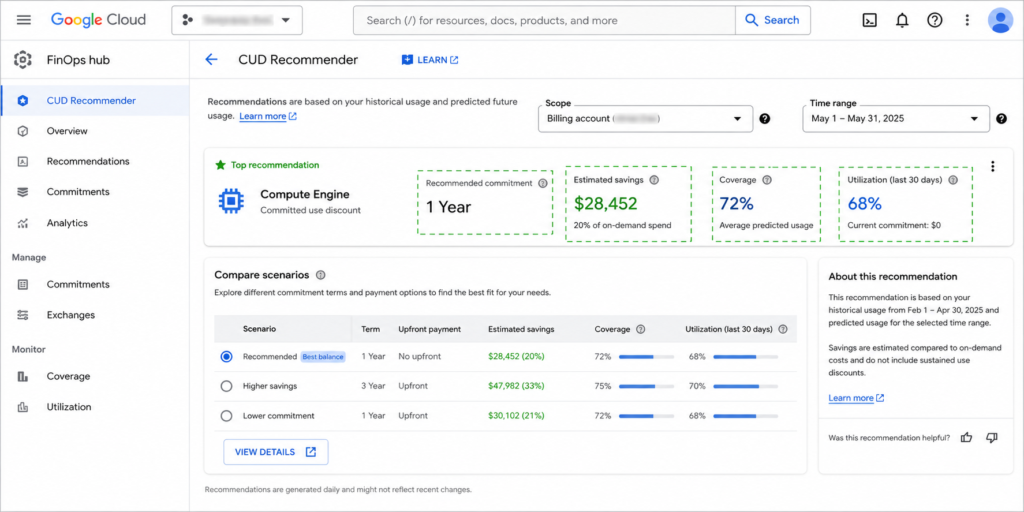
- Compare with Google’s CUD recommendations. Google Cloud’s CUD Recommender analyzes the previous 30 days and supports stable-usage and optimal-savings recommendation models. For supported recommendations, the FinOps hub also lets you create scenarios that adjust term, coverage, and usage history.
- Commit only the stable portion. Leave uncertain or seasonal demand flexible unless the model supports additional coverage.
Reporting note:
Recent commitment charges, CUD credits, and SUD credits can be delayed by up to about one and a half days. Google warns that this can make current or previous-day costs look temporarily higher. Confirm recent data in the CUD analysis report before acting on a short-term utilization change.
How to monitor commitment drift
A correctly sized CUD can become oversized after rightsizing, migrations, autoscaling changes, regional moves, or service redesigns reduce the stable baseline.Track three things:
- Utilization: how much of the purchased commitment is actually used
- Coverage: how much eligible usage is receiving commitment benefits
- Baseline drift: whether the lowest repeatable usage level is moving down
Review commitments after infrastructure changes, not only on a quarterly calendar. Cloud cost monitoring vs cost control explains the visibility-to-action gap, while cloud resource optimization helps prevent rightsizing from stranding committed capacity.
The decision in practice
SUD is the safer default for eligible usage that remains variable because the discount follows sustained usage without a term commitment. Resource-based CUDs fit stable regional resources, while Compute Flexible CUDs fit eligible spend that needs more portability.The strongest strategy is often mixed: commit the durable core, leave uncertain eligible usage flexible, and recalculate coverage whenever the workload changes.
With Flex Insured Commitments, teams can capture commitment-based savings while reducing the risk of unused capacity. Our Flex Commitments reduce cloud spend by 30–50% on average across covered workloads, while qualifying commitments include cashback protection for eligible underutilization.
For GCP teams, we analyze billing data to identify stable usage that may be suitable for commitments, help determine an appropriate commitment level, and support eligible commitment actions.
This helps teams capture more of the savings available through GCP commitments without taking on the traditional risk of unused capacity.
Review your GCP baseline, coverage, and commitment risk before increasing commitment.
Frequently asked questions
What is the difference between resource-based and Flexible CUDs?
Resource-based CUDs commit to specific eligible resources in a region and can offer deeper discounts. Compute Flexible CUDs are spend-based and can follow eligible usage across supported machine families, regions, projects, and services. The right choice depends on stability versus portability.
Can resource-based and Flexible CUDs coexist?
Yes. Google Cloud can apply resource-based commitment benefits first and then apply eligible Flexible CUD benefits to remaining qualifying usage. The same usage does not receive both commitment discounts at once.
What happens to SUD after I buy a CUD?
SUD does not apply to the portion of eligible resource usage already covered by a CUD. Remaining eligible usage can still accrue SUD according to the normal sustained-use rules.
How do I check CUD utilization and savings?
Use Google Cloud's CUD analysis report to review utilization, coverage, savings, and underutilization. For very recent periods, remember that commitment and discount data can arrive late, so avoid making a commitment decision from incomplete current-day reporting.
Is a CUD always cheaper than SUD?
No. A CUD can have a deeper nominal discount, but underutilization can make its effective cost worse. Compare the fixed commitment cost with SUD-adjusted cost at realistic low, typical, and high usage levels before purchasing.