AWS
AWS Microsoft Azure
 Google Cloud
A dashboard can reveal overspend without fixing it. Teams need monitoring to understand the environment and controls to turn reliable cost signals into safer infrastructure and pricing decisions.
What cloud cost monitoring does
Cloud cost monitoring collects, attributes, analyzes, and visualizes billing and usage data. It answers questions such as: What did we spend? Which account, workload, or service caused it? How did the spend change?Most monitoring systems combine five building blocks:
Billing and usage ingestion: Provider billing exports and usage records become the source data.
Aggregation and trend analysis: Daily, weekly, and monthly views expose changes and regressions.
Attribution and allocation: Accounts, projects, tags, teams, and cost centers establish ownership.
Alerts and anomaly detection: Rules or models flag unusual cost behavior.
Reporting and visualization: Dashboards make trends and ownership easier to communicate.
Monitoring supports variance analysis, attribution, anomaly investigation, and identifying cost drivers. But it usually stops at insight. An alert can show that spending jumped without deciding what should change.
What cloud cost control changes
Cloud cost control uses cost information to influence future spend. It changes provisioning, runtime behavior, policy, or pricing decisions.Common control mechanisms include:
Budgets with actions: Thresholds can trigger notifications or configured actions.
Policies and guardrails: Organization rules can restrict regions, resource types, or configurations.
Lifecycle automation: Schedules can stop, scale down, or remove resources when they are not needed.
Pricing commitments: Reservations, Savings Plans, and committed use discounts trade flexibility for lower eligible rates.
Do not assume an automated stop action is safe or effective for Auto Scaling workloads. AWS notes that if a budget action stops an EC2 instance in an Auto Scaling group, Amazon EC2 Auto Scaling can restart it or launch a replacement. Our AWS cloud cost governance framework connects budgets and alerts with ownership, approval, and action.
Cloud cost monitoring vs cost control: when to use monitoring, control, or both
| Dimension | Cloud cost monitoring | Cloud cost control |
|---|---|---|
| Primary question | Where did the money go? | What should change next? |
| Orientation | Retrospective | Forward-looking |
| Typical output | Dashboards, reports, alerts | Policies, automation, pricing decisions |
| Changes infrastructure or pricing | Usually no | Often yes |
| Reversibility | Usually high | Varies by mechanism |
| Financial risk | Low | Can be material |
| Time horizon | Current and historical spend | Future spend and commitments |
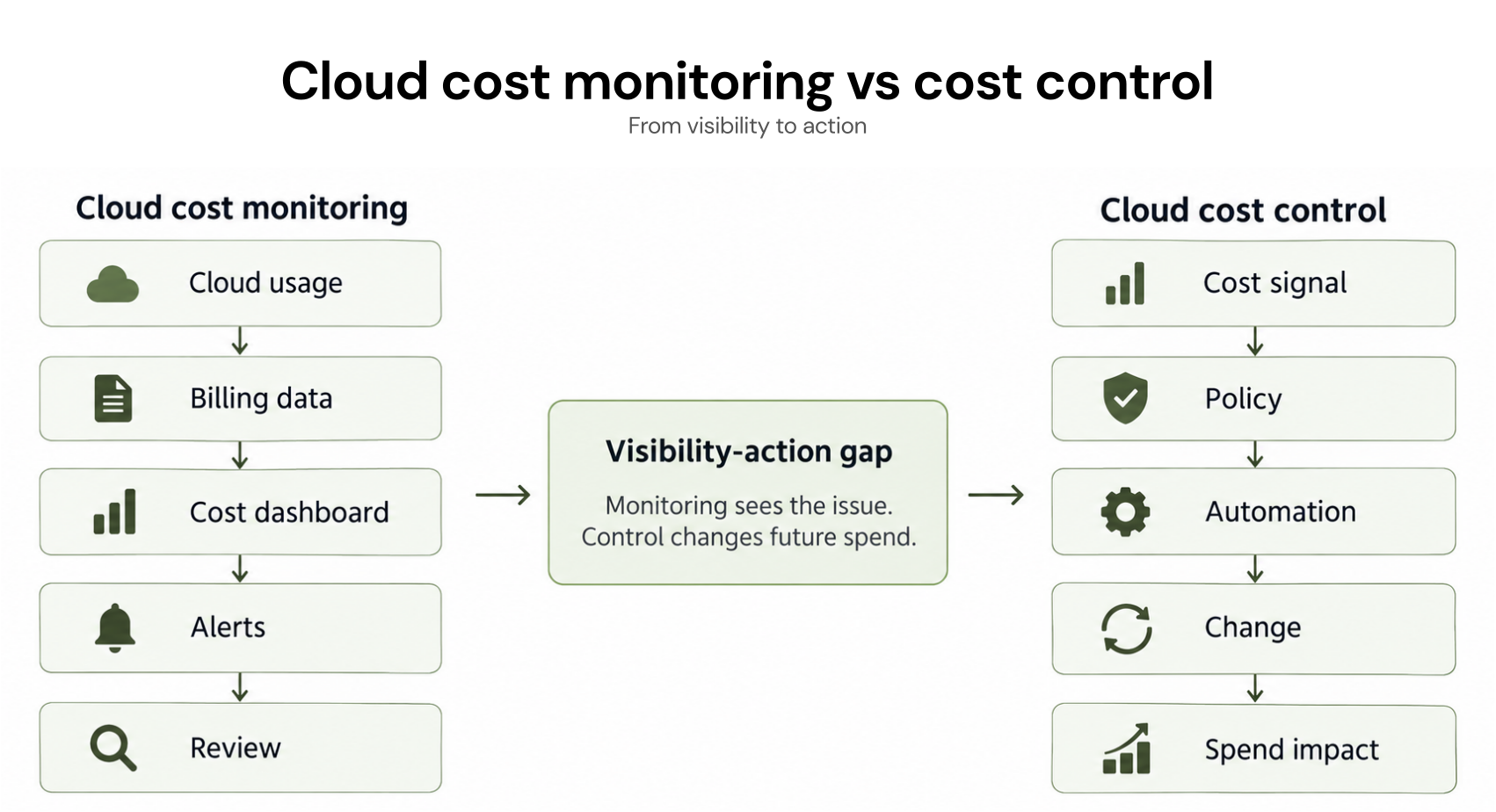
Why visibility does not lower spend
The visibility-action gap appears when a useful cost signal exists but no one changes the system or pricing choice behind it. Decision latency, unclear ownership, and competing engineering priorities can all keep savings from materializing.Our cloud cost analysis guide explains how to turn billing data into actionable findings, while our guide to why cloud resource optimization alone does not fix cloud costs shows why rightsizing alone cannot change the price paid for stable capacity.
Commitments change cloud unit costs
Pricing commitments are a control mechanism because they change the rate applied to eligible future usage. The rules differ by provider and product.| Provider mechanism | Typical term | Verified provider guidance |
|---|---|---|
| AWS Compute Savings Plans | 1 or 3 years | Up to 66% off On-Demand for eligible usage |
| AWS EC2 Instance Savings Plans | 1 or 3 years | Up to 72% off On-Demand for eligible usage |
| Azure savings plan for compute | 1 or 3 years | Up to 65% off pay-as-you-go prices for select compute services |
| Azure Reserved VM Instances | 1 or 3 years | Up to 72% versus pay-as-you-go, depending on configuration and usage |
| Google Cloud CUDs | Commonly 1 or 3 years | Discount varies by commitment type, resource, and service |
For Azure Reserved VM Instances, confirm that the VM series is still available for new purchase or renewal. Microsoft ended new purchases and renewals for specified legacy VM series on July 1, 2026. Existing affected reservations continue through the end of their term. Review Microsoft’s Azure Reserved VM Instance transition guidance before making a new reservation decision.
Google Cloud publishes different committed use discount rates based on resource, commitment type, and term rather than one universal rate.
Provider percentages are maximums, not guaranteed outcomes. Region, service, configuration, existing discounts, and utilization can change the result. This table compares headline terms and savings ceilings, not portability, scope, cancellation policy, or eligible-service breadth. For a broader workflow, see our cloud cost optimization guide.
AWS also documents that Savings Plans cannot be cancelled during the term. Google Cloud requires payment according to the applicable commitment terms even when committed resources are not fully used. A commitment is therefore a financial control decision, not simply a discount.
Coverage and utilization are different
Coverage asks how much eligible usage receives commitment pricing. Utilization asks how much of the commitment you consume.Illustrative example:
If a team has a $10 per hour commitment and uses $9.50 of it in an hour:
A team can have high utilization but low coverage, or high coverage with deteriorating utilization. The first leaves eligible usage on on-demand pricing. The second can create underutilization exposure.
How to manage commitment risk
Commitment risk comes from the gap between historical stability and future reality. Traffic can drop, services can migrate, and architectures can become more efficient. A commitment that looked safe at purchase time can later become underutilized.Use this decision framework:
Remove obvious waste first. Do not commit to resources you plan to eliminate.
Identify the stable baseline. Separate persistent demand from spikes and short-lived projects.
Model coverage and utilization separately. Higher coverage helps only when the commitment remains well utilized.
Check provider flexibility. Scope, term, exchange rules, cancellation limits, and eligible services differ.
Reassess after material changes. Migrations, product launches, architecture changes, and traffic shifts can invalidate an earlier baseline.
What AI actually changes
AI can assist with pattern detection, forecasting, anomaly investigation, and recommendation prioritization, but the right use case depends on data quality, operating maturity, and the consequence of acting on the output.Upcoming migrations or architecture changes may not appear in historical billing data. Long-lived commitments and production controls still need approval or safeguards. AI is most useful when it shortens the path from signal to a decision teams can verify.
How we fit into the control layer
We focus on commitment optimization across AWS, Azure, and Google Cloud. We built Flex Commitment Program for exactly that lever: get the 30–50% savings of cloud commitments across AWS, Azure, and GCP with zero commitment.Eligibility matters. Cashback protection applies to eligible Flex Commitments that we optimize, manage, generate savings from, and bill under the program. It does not automatically apply to customer-owned Reserved Instances, Savings Plans, or committed use discounts. Review our Flex Commitment eligibility requirements before applying to the program.
Actual savings depend on workload mix, existing coverage, provider pricing, utilization, and eligibility. Our pricing model is based on realized savings.
The bottom line
Cloud cost monitoring and cloud cost control solve different problems. Monitoring tells you what happened. Control changes what happens next.The goal is not to replace dashboards with automation. It is to connect trustworthy cost signals to owned, reversible actions where possible and use stronger safeguards when a decision can affect production or create longer-term financial exposure.
For AWS teams, this becomes especially important when moving from cost visibility into Savings Plans or Reserved Instance decisions. Right-size first, establish a stable baseline, then model how much eligible usage is safe to cover.
Review AWS spend, baseline, and coverage opportunities while reducing eligible commitment risk.
Frequently asked questions
What is cloud cost monitoring?
Cloud cost monitoring collects and analyzes billing and usage data to show how much is being spent, where the spend comes from, and how it changes over time. Its primary role is visibility.
What is the difference between cloud cost monitoring and cloud cost management?
Cloud cost monitoring is one part of cloud cost management. Cost management also includes budgeting, allocation, optimization, governance, commitment strategy, and processes that influence future spend.
Can cloud cost monitoring reduce cloud costs by itself?
Usually not. Monitoring can reveal waste, anomalies, and low coverage, but savings require an action such as rightsizing, scheduling, policy enforcement, architecture changes, or commitment management.
Why can commitments become expensive when usage drops?
If eligible usage falls below the committed level, part of the commitment can go unused while the customer remains responsible for the provider's applicable terms.
How should teams move from monitoring to control?
Start with accurate attribution, identify the cost signal, assign an owner, choose a control that matches the problem, define safeguards, and verify the result. For commitments, track both coverage and utilization.