.png)



An effective AWS cloud cost governance framework connects those pieces. Budgets establish financial boundaries, alerts identify when spending moves off track, anomaly detection highlights unusual changes, and defined response processes turn those signals into action.
In this guide, we’ll walk through how to set up that framework, from defining cost ownership and establishing budget thresholds to configuring alerts, detecting anomalies, and creating a safe response process.
We’ll also look at where AWS commitment management fits once you have a reliable spending baseline.
The goal is not to create more alerts. It is to make sure the right person sees the right signal early enough to investigate and respond safely.
The short answer
AWS Budgets can track actual and forecasted costs and usage, while also monitoring Savings Plans and Reserved Instances coverage and utilization. Budget Actions can apply certain controls when configured thresholds are reached.
However, AWS Budgets is not a real-time spending cutoff: AWS says budget information is updated up to three times a day, typically 8–12 hours after the previous update.
What does an AWS cost governance framework include?
| Control | Question it answers | Example |
|---|---|---|
| Ownership | Who is accountable? | Product or platform team |
| Budget | What are we planning to spend? | Monthly workload budget |
| Forecast | Where are we likely to finish? | Forecast exceeds target |
| Anomaly detection | Has spending changed unexpectedly? | Sudden daily-spend increase |
| Response | What happens next? | Investigate, approve, or automate |
| Commitment management | Is eligible usage priced efficiently? | Savings Plans coverage |
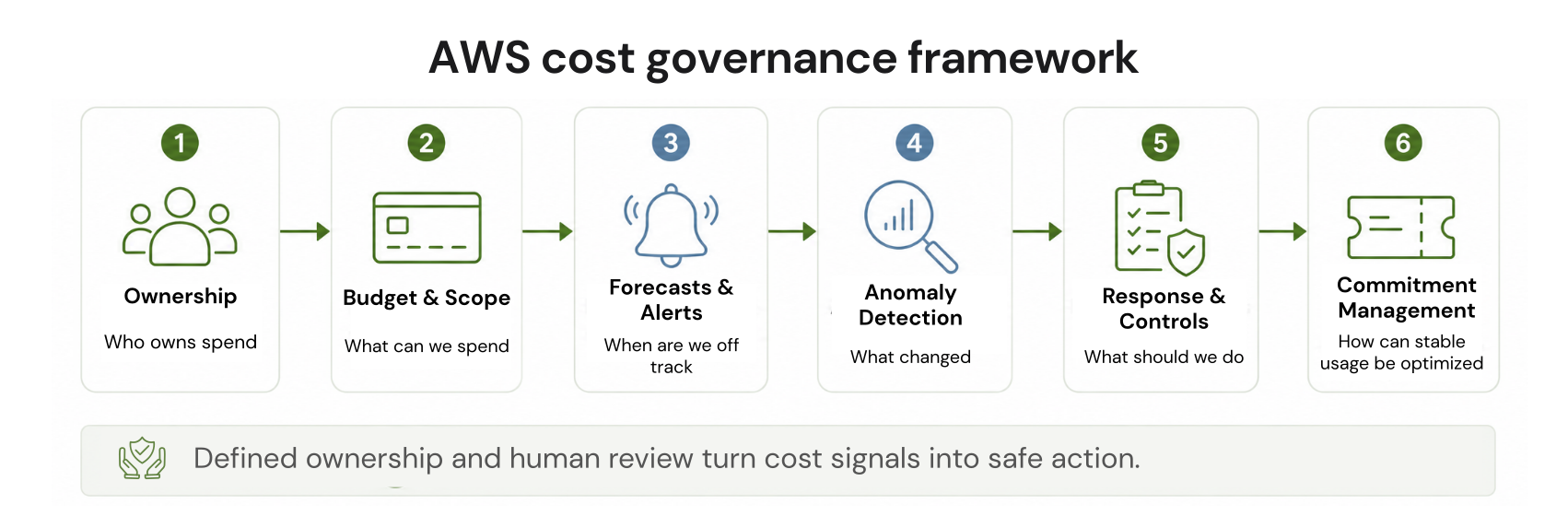
How to set up AWS cost governance
Define ownership and cost scope
AWS budgets can be scoped using available dimensions such as linked accounts, services, Regions, tags, and Cost Categories.
Choose scopes that match how your organization manages spending. For example,
- product engineering may own application workloads,
- platform may own shared infrastructure,
- FinOps may own organizational reporting.
For example, if a shared platform account supports five product teams, allocating the entire account to “Platform” may hide the actual cost of each product. A Cost Category and appropriate allocation rule can provide a more useful ownership view. See Managing your costs with AWS Cost Categories.
Establish a defensible baseline
Start with recent actual spend and account for known growth, seasonality, migrations, new workloads, and architecture changes.
Also decide which cost basis the budget should use. AWS Budgets supports blended, unblended, net unblended, amortized, and net amortized costs, so two budgets using different cost bases can produce different results.
For a production workload, document the baseline, assumptions, owner, and review date. Revisit the baseline when the workload changes materially.
Configure actual and forecast alerts
| Alert | Starting heuristic | Response |
|---|---|---|
| Early warning | 50–60% actual | Confirm run rate |
| Investigation | 75–80% actual | Identify variance |
| Forecast risk | 90–100% forecast | Re-forecast or remediate |
| Escalation | 100% actual | Review approved variance |
AWS Budgets supports both actual and forecasted alerts. However, forecast alerts have an important limitation.
AWS requires approximately five weeks of usage data to generate budget forecasts. New accounts and workloads therefore need actual-spend monitoring and other operational controls before forecast-based alerts become useful. See Best practices for AWS Budgets.
Add anomaly detection
- Budget: Are we approaching the amount we planned to spend?
- Anomaly: Has spending changed in a way that is unusual?
New service subscriptions also require historical data before anomalies can be detected. That means anomaly detection should not be treated as a real-time incident-control mechanism.
For workloads where minutes matter, use application telemetry, service-level monitoring, quotas, or preventive access controls alongside AWS cost monitoring. See Detecting unusual spend with AWS Cost Anomaly Detection.
Define the response before enabling automation
A simple runbook can look like this:
| Alert | Owner | First checks | Escalation |
|---|---|---|---|
| Budget warning | Workload owner | Usage, deployments, forecast | FinOps |
| Forecast breach | Workload owner + FinOps | Growth, new services, baseline | Finance |
| Cost anomaly | Engineering | Deployment, traffic, data transfer | Platform |
| Commitment utilization issue | FinOps | Utilization, coverage, workload changes | Procurement / finance |
AWS Budget Actions can apply an IAM policy or SCP, or target certain EC2 and RDS resources. Actions can be configured for automatic execution or manual approval.
Review commitment performance separately
AWS Budgets can monitor Savings Plans coverage and utilization. Coverage indicates how much eligible usage is covered, while utilization indicates how much of the purchased commitment is being consumed.
Before increasing commitment coverage, check:
AWS Purchase Analyzer uses historical usage for its analysis and does not forecast future usage. That makes the underlying baseline and your forward-looking workload assumptions important when deciding whether to commit.
What AWS cost controls cannot do in real time
- AWS Budgets: billing information can be delayed; AWS says Budgets updates occur up to three times daily.
- Budget forecasts: require approximately five weeks of usage data.
- Cost Anomaly Detection: runs approximately three times daily and can take up to 24 hours to detect an anomaly.
- Preventive controls: IAM, SCPs, quotas, deployment controls, and application-level safeguards operate at different layers and should be used when immediate prevention is required.
Also read: What is Cloud Cost Visibility? Tools, Tips and Best Practices
Where Usage.ai fits
At Usage.ai, we focus on the commitment layer. We identify eligible AWS commitment opportunities and, once you approve a recommendation, automatically initiate the commitment purchase. The commitment is then managed through our Flex Commitment Program. Learn more about Flex Commitment eligibility
With Flex Commitments, teams can access up to 57% savings associated with a 3-year AWS commitment without taking on the long-term commitment risk. If a commitment becomes more expensive than the equivalent On-Demand usage, Usage.ai provides cashback protection to help cover the difference.
The two layers work together: AWS cost governance helps you understand and control spending, while Usage.ai can automate eligible commitment management and help optimize the pricing of stable AWS usage.
Establishing ownership, budgets, and a reliable usage baseline first makes those commitment decisions more informed.
A practical review cadence
| Cadence | Review |
|---|---|
| Daily / automated | Critical alerts and anomalies |
| Weekly | Material variances and commitment utilization |
| Monthly | Budget vs. actual, forecast, ownership |
| Quarterly | Baselines, allocation, policies, commitment strategy |
Common mistakes to avoid
- Creating one organization-wide budget with no workload ownership.
- Treating 50%, 80%, or 100% thresholds as universal AWS recommendations.
- Treating AWS Budgets or anomaly detection as real-time spending caps.
- Automating destructive actions before testing their workload impact.
- Buying commitments before establishing a stable baseline.
- Measuring commitment coverage without checking utilization.
You’ve built the foundation with budgets, alerts, and cost ownership. Now see where your AWS usage may have eligible commitment savings opportunities.
Frequently asked questions
Are AWS Budgets spending limits?
No. AWS Budgets provides monitoring, notifications, and configurable Budget Actions. Because billing data and notifications are subject to processing delays, it should not be treated as a real-time hard spending cap.
Should AWS budgets use actual or forecasted spend?
Use both where appropriate. Actual thresholds show what has already accrued, while forecast thresholds can warn that the current trajectory may exceed the budget.
What is a good AWS budget threshold?
There is no universal threshold. A practical starting point is 50–60% for early warning, 75–80% for investigation, and 90–100% forecasted spend for intervention. Adjust these levels according to workload volatility and response time.
Do AWS Budgets replace cost optimization?
No. Budgets measure performance against financial targets. Cost optimization addresses the underlying cost of workloads through usage efficiency, architecture, and appropriate commitment strategies.