.png)


Choosing correctly between the two principal Compute Engine commitment models, resource-based or Flex is the difference between maximizing the discount and paying for committed capacity that doesn’t match your usage.
This guide covers both commitment models with typical rates from Google Cloud’s official pricing documentation, the September 2025 Flex expansion, the billing migration, and a decision framework per workload.
The short answer
That’s a starting point, not a verdict. Neither type can be cancelled, so organizations running both stable and variable workloads may benefit from layering the two the framework below shows how.
Resource-Based CUDs:
How They Work
Google Cloud applies the commitment to your usage continuously, and the discounted charges are reflected on your monthly bill whether or not you use those resources.
That is the central trade-off: the discount is tied to specific resource types in a specific region. If your workload changes machine family, moves regions, or shrinks below the committed level, you keep paying for the full term. The commitment also does not reserve capacity (more on that below).
Typical discount rates
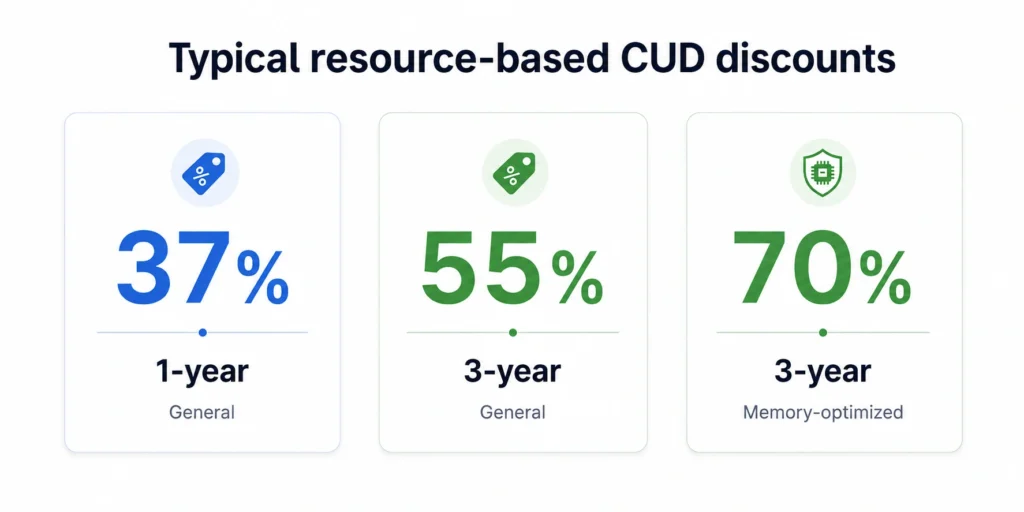
- General-purpose, compute-optimized, accelerator-optimized: typically 37% (1-yr) / 55% (3-yr)
- Memory-optimized: up to 70% (3-yr)
Discounts are calculated from the on-demand price on the day the commitment becomes active; if on-demand prices change after purchase, your commitment fee does not change.
What can be committed
- Hardware: vCPUs, memory, GPUs, Local SSD storage, sole-tenant nodes
- Software licenses: applicable premium OS licenses (purchased separately from hardware)
- Custom machine types: incur a 5% premium over standard CUD prices
- Not eligible: preemptible (Spot) VMs, N1 shared-core machine types (f1-micro, g1-small), extended memory
Billing and term mechanics
You pay the monthly commitment fee even if you don’t use all committed resources. Standard hardware commitments run 1- or 3-year terms, and Google Cloud now supports custom term extensions: a 1-year commitment can be extended to any duration under 3 years, and a 3-year commitment to any duration under 6 years, while keeping the plan’s original discount rate. Auto-renewal is also available.
You cannot cancel a resource-based CUD Google Cloud’s CUD overview states you must pay the agreed monthly amount for the full duration. If you purchased one by mistake, contact Cloud Billing Support; there is no self-service cancellation path.
CUD sharing: the June 2026 default change
CUD sharing extends resource-based discounts to eligible usage across all projects in the same Cloud Billing account, instead of only the purchasing project.
On June 16, 2026, the default CUD scope changed from Project to Billing account for most accounts:
- Accounts created on or after June 16, 2026: CUD sharing is enabled by default.
- Accounts created earlier, with no active resource-based commitments on June 16: automatically switched to billing-account scope on that date.
- Accounts created earlier, with active resource-based commitments on June 16: existing scope (Project or Billing account) was preserved to review your current setting before purchasing new commitments.
If your commitment strategy spans AWS or Azure alongside GCP, see: [Multi-Cloud Savings Plan Strategy: AWS, Azure, and GCP Compared]
Flex CUDs: How They Work
One detail that trips up sizing: under the current billing model, the commitment is denominated in discounted resource cost, not raw on-demand spend. A $100/hour, 3-year commitment (46% discount) covers up to roughly $185.19/hour of corresponding on-demand usage ($100 / (1 − 0.46)).
Google Cloud applies the discount automatically across eligible usage in your billing account according to its commitment allocation rules, regardless of VM family, region, or service.
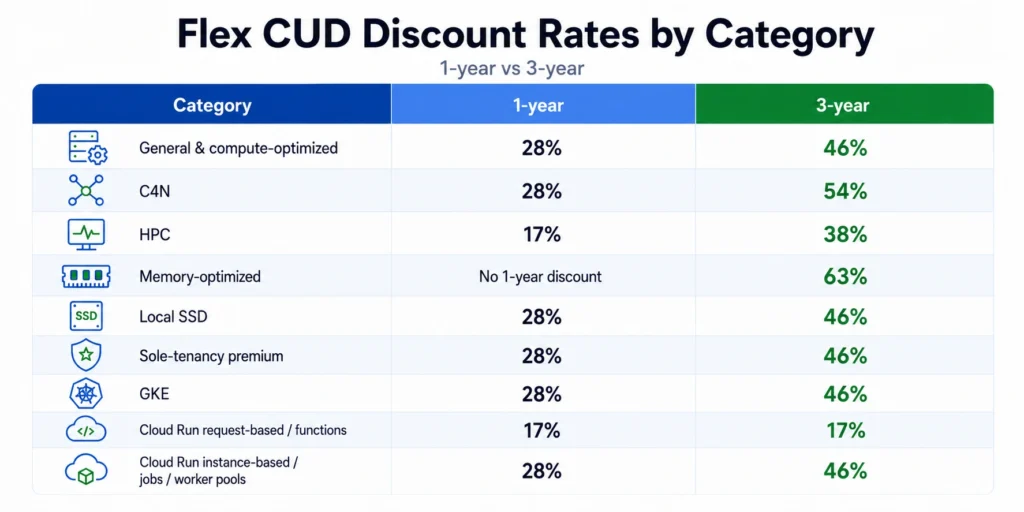
Typical discount rates
| Eligible Flex usage | 1-year | 3-year |
|---|---|---|
| Common general/compute-optimized series | 28% | 46% |
| C4N | 28% | 54% |
| H3 and H4D | 17% | 38% |
| M1–M4 (memory-optimized) | No discount* | 63% |
| Local SSD | 28% | 46% |
| Sole-tenancy premium | 28% | 46% |
| GKE Standard and Autopilot eligible usage | 28% | 46% |
| Cloud Run request-based and functions | 17% | 17% |
| Cloud Run instance-based, jobs, and worker pools | 28% | 46% |
Warning:
on a 1-year term, eligible M1–M4 spend still burns down your otherwise-unused Flex commitment while receiving no discount. If you run memory-optimized workloads, either commit for 3 years or cover them with a resource-based CUD.
What Flex does not cover: GPUs are not Flex-eligible; they can only be discounted through resource-based commitments, making resource-based the only CUD option for GPU-heavy ML workloads (GPUs can still run at on-demand or spot pricing, just without CUD coverage).
Cancellation and the hourly check
How to Choose Between
Resource-Based and Flex CUDs
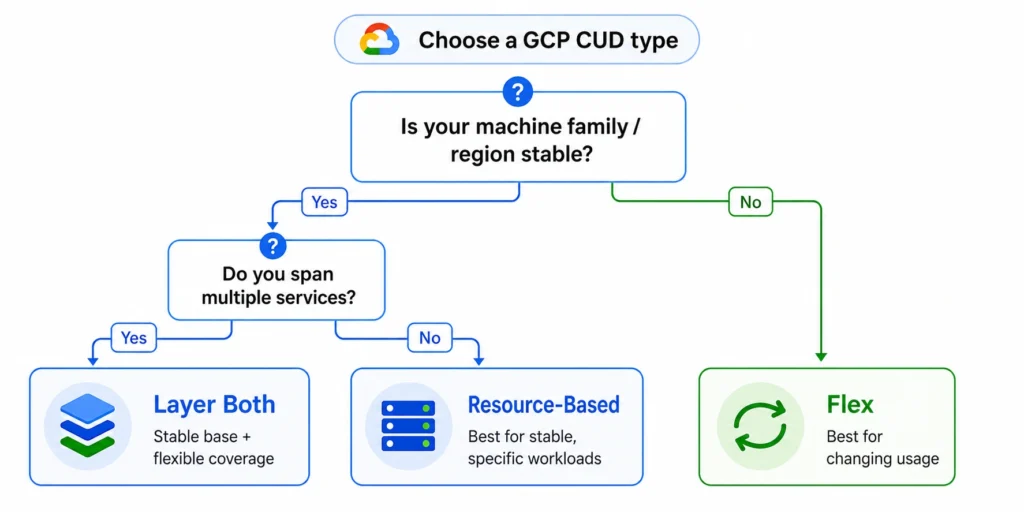
The right CUD type depends on three factors: how stable your machine family and region are, whether your workload spans multiple services or VM families, and how much discount depth matters relative to flexibility.
| Workload characteristic | Resource-based CUD | Flex CUD |
|---|---|---|
| Single VM family, stable region, 12+ months unchanged | Best fit, deepest discount | Lower discount for no added benefit |
| Multi-family fleet or frequent machine upgrades (e.g., N2 → N4) | Commitment strands on migration | Best fit, discount follows spend automatically |
| Mixed compute: VMs + GKE + Cloud Run | Requires separate commitments per service | Best fit, single commitment covers all eligible usage |
| Memory-optimized workloads (M-series), 3-year term | Best fit, up to 70% discount | Covered since Sept 2025 expansion (63%) |
| Memory-optimized workloads, 1-year term | Best fit, resource-based applies | No discount — and M1–M4 spend burns down unused commitment without any discount |
| Uncertain usage baseline or rapid growth | Risk of underutilization | Best fit, easier to size conservatively across spend |
The rate gap in dollars: n2-standard-8 example
| Pricing model | Monthly cost | Savings |
|---|---|---|
| On-demand | $283.58 | — |
| Flex CUD, 1-yr (28%) | $204.18 | $79/mo |
| Resource-based, 1-yr (37%) | $178.66 | $105/mo |
| Flex CUD, 3-yr (46%) | $153.13 | $130/mo |
| Resource-based, 3-yr (55%) | $127.61 | $156/mo |
- Memory-optimized workloads (M1–M4) on a 3-year term, the gap is only 7 points (70% vs. 63%), but on a 1-year term Flex gives no memory-optimized discount and eligible M-series spend still consumes the commitment.
- SAP HANA and memory-intensive analytics on a stable machine family, the deepest discount of any major cloud.
- Workloads spanning multiple machine families, regions, or a mix of VMs and serverless.
- Migrations in progress (N2 → C3, or a move to Cloud Run), the discount keeps applying automatically, with no new commitment and no stranded spend.
- Mixed estates: a single 3-year Flex CUD can cover an N2 fleet, a GKE cluster, and Cloud Run traffic simultaneously.
How Resource-Based and Flex CUDs Apply Together
Sustained Use Discounts then apply sequentially, only to eligible usage no CUD covered; anything left bills on-demand. Nothing is double-discounted. This ordering is what makes the layered strategy work: resource-based on the stable core, Flex on everything that moves.
What Changed in 2025–2026
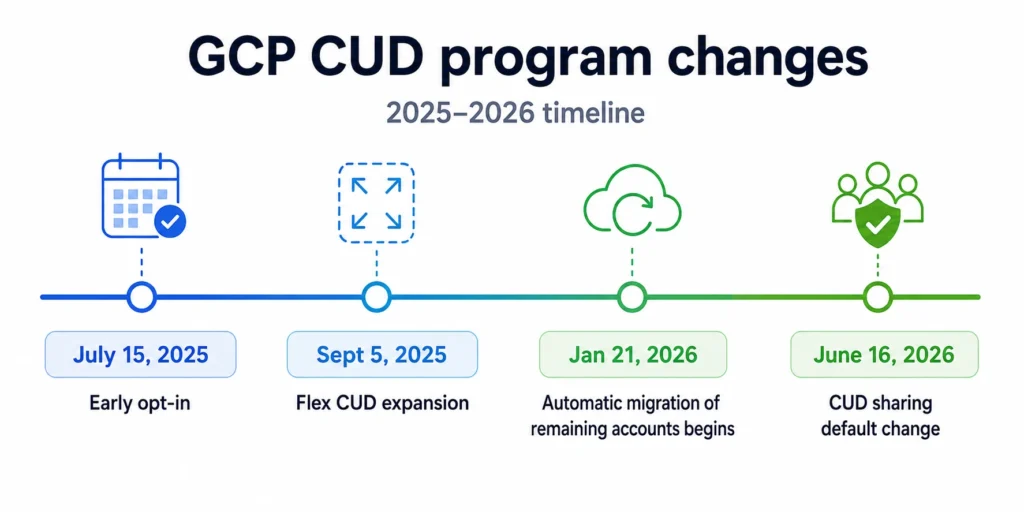
- September 5, 2025: Flex coverage expansion. Memory-optimized (M1–M4) and HPC (H3/H4D) VM families, Cloud Run request-based billing, and Cloud Functions became Flex-eligible (rates in the Flex section above).
- January 21, 2026: billing migration of remaining accounts began. Flex CUDs originally used a credits-based model: usage billed at full list price with savings shown as credit offsets. Google Cloud moved Flex CUDs to a direct discount model, charging the discounted rate directly on eligible usage detailed in the spend-based CUDs program improvements page. New billing accounts (July 15, 2025 onward) started on the new model; automatic migration of remaining accounts began January 21, 2026 check your Billing Overview notification for your account’s actual migration date. Watch this if you do cost reporting: billing data looks different on either side of the migration, so comparing periods across it without normalizing produces misleading savings figures.
- June 16, 2026: CUD sharing became the default scope for new billing accounts and existing accounts without active commitments (details in the CUD sharing section above).
CUDs Are Not Capacity Reservations
Purchasing a CUD does not reserve capacity. A commitment for 100 N2 vCPUs in us-central1 guarantees a discounted price not that those vCPUs will be available during a surge. Google Cloud draws a clear line:
- A commitment (CUD): a discounted price agreement, no capacity guarantee
- A reservation: guaranteed capacity in a specific zone, even if the reserved VMs aren’t running
If capacity is a hard operational requirement, pair the CUD with a zonal reservation. The two are separate mechanisms, a reservation itself doesn’t create a discount, but eligible usage running on reserved resources still receives your existing CUD discount.
GPU commitments require attached reservations; most Local SSD commitments do too, though local Titanium SSD commitments for certain newer machine series (the C4 family, H4D, Z3) can be purchased without attached reservations see Google’s reservations-with-commitments documentation for the current list.
For the full GCP CUD program overview including BigQuery and Cloud SQL commitment types not covered here see [GCP Committed Use Discounts: Complete Guide to Types, Pricing & Savings]
Sizing and Monitoring CUD Commitments: A Conservative Framework
- Resource-based: commit to the minimum quantity of vCPUs and memory consistently running in each machine family and region, including overnights and weekends. Coverage applies continuously to the committed resource quantities.
- Flex: commit to the minimum hourly discounted spend across all hours, including low-utilization periods. Remember the denomination: a $100/hour commitment at 46% covers ~$185.19/hour of on-demand-equivalent usage sizing off raw on-demand spend would over-commit dramatically. Utilization is evaluated hourly, so monthly averages mask overnight gaps below the floor.
The floor rule is the conservative approach, not the only one. Google provides two recommendation models: “stable usage” (the floor) and “optimal savings,” which uses the financial break-even threshold and can recommend committing above the absolute minimum when the additional discounted usage produces greater net savings.
Google Cloud’s built-in CUD recommendations in the Cloud Billing console are a good automated starting point for both.
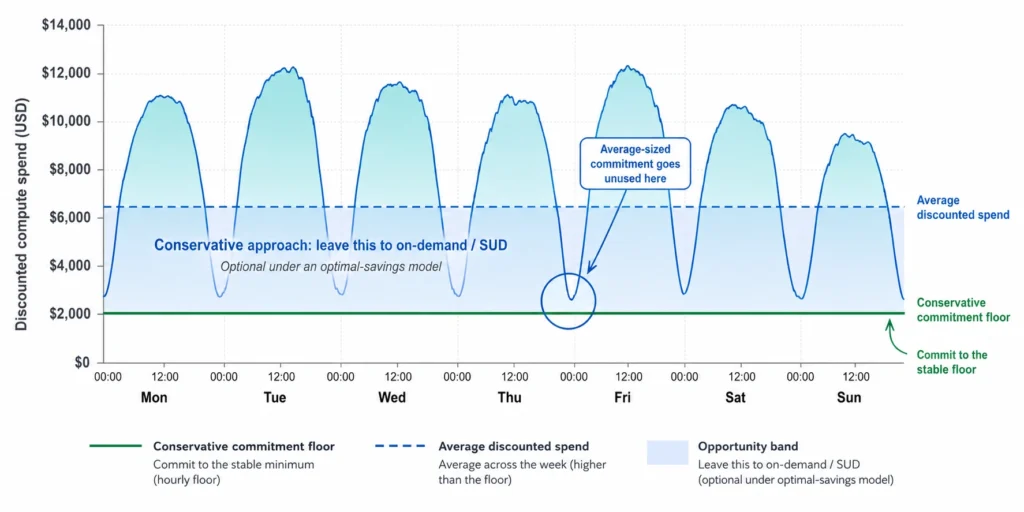
The actual break-even depends on the commitment’s discount rate: a 46% Flex CUD, for instance, remains profitable well below 90% utilization. Calculate your own break-even before acting on a threshold. For Flex, always review at hourly granularity.
Managing CUD Risk at Scale
The two failure modes this article covers: over-committing to a machine series that migrates, and under-committing because the baseline is hard to estimate recur every time infrastructure changes.
Teams handle them manually in the Cloud Console, with GCP’s Recommender API, or with an automated commitment management platform.
Usage.ai’s GCP commitment automation purchases and rebalances resource-based and Flex CUDs on a 24-hour cycle, sized against your actual billing data.
Because non-cancellability is the core reason teams under-commit, its Insured Flex Commitments remove that risk with a buyback guarantee: if a committed workload is decommissioned, the unused portion is bought back as cashback, so teams commit at the accurate level instead of hedging.
Connect in 15 minutes. No contracts, no infrastructure changes. See your savings before committing.
Frequently asked questions
What are Google Cloud Committed Use Discounts?
Compute Engine offers two principal commitment models: resource-based (specific resources in a specific region typically 37%/55% general, up to 70% memory-optimized) and Flex (a minimum hourly discounted-spend commitment across eligible services 28%/46% general; rates vary by category, see table above). Other Google Cloud services offer their own spend-based CUDs.
Can you cancel a Google Cloud CUD?
No. Both CUD types are non-cancellable for the full term, see "Billing and term mechanics" above for what to do if you purchased one by mistake.
What is the difference between resource-based and Flex CUDs?
Resource-based CUDs win on discount depth; Flex CUDs win on flexibility when your machine family, region, or service mix isn't fixed. Organizations with both stable and variable usage may benefit from layering the two see the decision framework above.
What expanded in the September 2025 Flex CUD update?
Google Cloud extended Flex CUD coverage to memory-optimized VM families, H3/H4D HPC families, Cloud Run request-based billing, and Cloud Functions. It also began migrating Flex CUD billing from credits to direct discounts, with automatic migration of remaining accounts starting January 21, 2026.
Do GCP CUDs reserve compute capacity?
No see "CUDs Are Not Capacity Reservations" above. You need a separate zonal reservation for guaranteed capacity.
How do Sustained Use Discounts interact with CUDs?
They apply sequentially, never on the same usage: SUDs apply automatically only to eligible usage not already covered by a CUD, per Google's sustained use discounts documentation.