.png)


Most cloud cost optimization guides treat each provider in isolation. That works if you operate on a single cloud. It breaks down completely when your infrastructure is split across AWS, Azure, and GCP — which is the reality for the majority of enterprise engineering organizations in 2026.
The fundamental problem: AWS, Azure, and GCP use different commitment models with different billing units, different flexibility mechanics, and different lock-in risks. Applying the same purchasing strategy across all three clouds leads to systematic over-commitment on some, under-commitment on others, and coverage gaps that only become visible when you compare all three commitment positions simultaneously.
This guide covers the commitment mechanics for each cloud, the key structural differences that determine strategy, the specific mistakes multi-cloud teams make, and how to build a unified savings plan approach that maximizes discount coverage without locking in more than your workloads justify.
See exactly what you’re overpaying across AWS, Azure, and GCP in under 60 seconds. Try the Calculator for free →
Commitment Mechanics: How Each Cloud Structures Discounts
AWS: Spend-Based Commitments, Maximum Flexibility
AWS offers two savings plan types for compute. The Compute Savings Plan commits to a dollar amount per hour and applies the discount automatically across EC2, AWS Fargate, and AWS Lambda — across any region, any instance family, any size, any operating system, and any tenancy. This is the most flexible commitment model of the three major clouds. If you migrate an EC2 workload from c5 to c6g, move it from us-east-1 to eu-west-1, or shift it from EC2 to Fargate, the same Compute Savings Plan continues covering it. Source: AWS official Savings Plans documentation.
The EC2 Instance Savings Plan is narrower: it locks to a specific instance family and region (for example, m6i in us-east-1) but delivers a deeper discount on those instances. Flexible workloads belong on Compute Savings Plans. Stable, family-locked production workloads where the deeper discount is worth the reduced flexibility belong on EC2 Instance Savings Plans. Source: AWS official.
AWS discount rates: Compute Savings Plans up to 66% (1-year No Upfront) and up to 72% (3-year All Upfront) versus on-demand. EC2 Instance Savings Plans deliver slightly deeper discounts on the covered family. Source: AWS official pricing.
Azure: Two Parallel Commitment Models
Azure runs two parallel commitment models for compute. Azure Savings Plans for Compute commit to a $/hr spend level across eligible compute (Virtual Machines, Azure Kubernetes Service, App Service Premium v3 and Isolated v2, Azure Container Instances, Azure Functions Premium). Like AWS Compute Savings Plans, the discount applies regardless of VM series, region, or OS. Four scope options: resource group, subscription, management group, and shared (billing account-wide). Source: Microsoft Azure official pricing page.
Azure Reserved VM Instances commit to a specific VM size and region for 1 or 3 years — a model closer to AWS EC2 Instance Savings Plans or EC2 Reserved Instances. Reserved VM Instances can be exchanged or refunded under certain conditions, providing some flexibility if workload requirements change. Up to 72% savings (3-year All Upfront). Source: Microsoft Azure official pricing.
Azure discount rates: Savings Plans 1-year 20-45%, 3-year 25-50%. Reserved VM Instances up to 37% (1-year), up to 66-72% (3-year). Best-in-class Azure discount: layer Savings Plans + Reserved VM Instances + Azure Hybrid Benefit (if holding Windows Server or SQL Server Software Assurance licenses). Source: Azure official pricing and vendorbenchmark.com enterprise benchmark data (April 2026).
GCP: Resource-Based CUDs and Automatic SUDs
Google Cloud Committed Use Discounts (CUDs) commit to specific vCPU and GB memory quantities in a specific region for 1 or 3 years. The discount applies to any VM instance consuming those resources, regardless of machine type or series. Discount rates: 37% off 1-year, 55% off 3-year. Critically: GCP CUDs require no upfront payment — No Upfront is the only option, unlike AWS which offers All Upfront and Partial Upfront for deeper discounts.
GCP also offers Spend-based CUDs for certain services (Cloud Run, Cloud SQL) that work more like AWS Savings Plans — committing to a $/hr spend level rather than specific resource quantities.
GCP’s unique advantage: Sustained Use Discounts (SUDs). For any VM instance that runs more than 25% of the month, GCP automatically applies an incremental discount — no commitment, no purchase, no configuration. At full month utilization, the SUD reaches approximately 30% off on-demand. No equivalent discount mechanism exists on AWS or Azure for on-demand workloads. Source: LeanOps (May 2026), TechPlained (May 2026), multiple sources. This means GCP’s effective on-demand rate for sustained workloads is already 30% below list — a baseline discount advantage that should be factored into any honest cross-cloud comparison.
Also read: AWS Savings Plans: complete guide to types, pricing, and buying strategy
The Three Commitment Models Side by Side
All rates: June 2026. Verify at each provider’s official pricing page — rates change.
| Dimension | AWS | Azure | GCP |
| Commitment unit | $/hr spend | $/hr spend (SP) or specific VM size (RI) | vCPU + GB memory in region (CUD) or $/hr (spend-based CUD) |
| Flexibility | Highest — any region, family, OS, size | High for SP; medium for RI (exchangeable) | Medium — region-locked for resource CUDs |
| Max 1-yr discount | Up to 66% (Compute SP, No Upfront) | Up to 45% (SP); up to 37% (RI) | 37% (CUD, no upfront required) |
| Max 3-yr discount | Up to 72% (All Upfront) | Up to 50% (SP); up to 72% (RI, All Upfront) | 55% (CUD, no upfront required) |
| Zero-commitment discount | None | None | Yes — SUD up to 30% for instances running >25% of month |
| Upfront payment options | All Upfront / Partial / No Upfront | All Upfront / Monthly | No Upfront only (standard CUDs) |
| Term options | 1-year or 3-year | 1-year or 3-year | 1-year or 3-year |
| Scope / coverage | Account or organization level | Resource group / Subscription / Management Group / Shared (billing account) | Project-level (resource CUDs); billing account (spend CUDs) |
| Native recommendation tool | AWS Cost Explorer (72-hr refresh) | Azure Advisor (30-day look-back) | GCP Cost Recommender (30-day look-back) |
| Cross-cloud visibility | AWS only | Azure only | GCP only |
Sources: AWS official Savings Plans docs; Azure official pricing page and Microsoft Learn; GCP official CUD pricing; LeanOps (May 2026), DEV Community (April 2026), opsiocloud.com (March 2026). All figures approximate — verify at each provider’s pricing page before purchasing commitments.
The Four Multi-Cloud Commitment Mistakes
Mistake 1: Treating each cloud independently with separate FinOps processes
The most common multi-cloud commitment mistake is siloed management: one team owns AWS Cost Explorer recommendations, another handles Azure Advisor, a third watches GCP Cost Recommender. Each team optimizes for their cloud in isolation, using native tools that share no interface and express coverage in incomparable units (AWS in $/hr, GCP in vCPU+GB, Azure in $/hr or VM size). Coverage gaps at the seams between clouds are invisible in this model.
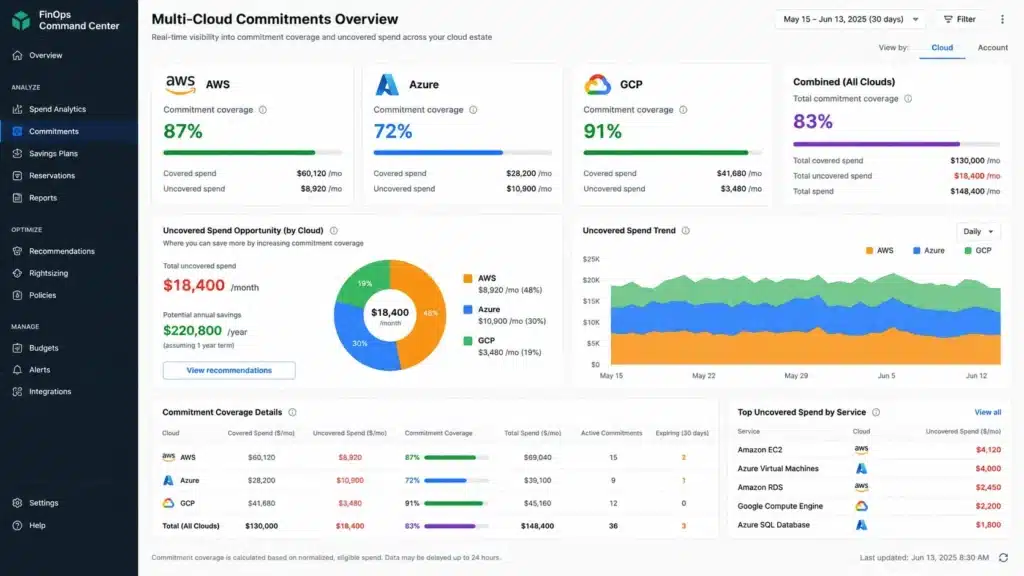
A team that has achieved 87% commitment coverage on AWS, 72% on Azure, and 91% on GCP is collectively at approximately 82% — but the FinOps leads for each cloud are reporting ‘good coverage’ based on their individual dashboards. The combined opportunity is $X/month in additional discount, distributed across all three, that no single native dashboard surfaces. Source: analysis of multi-cloud commitment management patterns, consistent with holori.com (March 2026) citing this exact challenge.
Mistake 2: Applying AWS-style $/hr commitment thinking to GCP
Teams that are used to AWS Compute Savings Plans sometimes try to manage GCP CUDs with the same mental model: ‘what is my hourly spend floor, and I’ll commit that amount.’ But GCP resource-based CUDs are not $/hr commitments — they are vCPU and GB memory commitments in a specific region. The correct sizing question for GCP CUDs is ‘what is the minimum number of vCPUs and GBs of memory that are continuously occupied in this region?’ not ‘what is my minimum hourly spend?’
Over-committing vCPUs in a region where workloads are variable leads to stranded GCP CUDs with low utilization — particularly for teams that scale down in off-peak hours or redistribute workloads across regions. GCP’s SUD partially mitigates this because variable workloads that don’t fully justify a CUD still receive SUDs automatically. For highly variable GCP workloads, the correct strategy is often: no CUDs, let SUDs provide automatic 20-30% discounts, and revisit CUDs when sustained utilization is confirmed. Source: LeanOps (May 2026) and TechPlained (May 2026).
Mistake 3: Ignoring Azure Hybrid Benefit when scoping commitments
For organizations running Windows Server or SQL Server workloads with existing Software Assurance licenses, Azure Hybrid Benefit allows those licenses to be applied to Azure compute and database services — potentially cutting the effective VM cost by 40-85% for licensed workloads. Teams that scope Azure Savings Plans without accounting for Azure Hybrid Benefit commit to a higher $/hr than necessary, over-shooting the actual billable compute cost after license credits.
The correct Azure commitment sizing sequence: (1) apply Azure Hybrid Benefit to all eligible Windows/SQL workloads, (2) calculate the remaining on-demand cost after license credits, (3) size Savings Plans and Reserved VM Instances against the post-Hybrid-Benefit cost floor. Source: vendorbenchmark.com enterprise benchmark data (April 2026) and Azure official documentation.
Mistake 4: Buying commitment on workloads before right-sizing
This is cloud-agnostic but is amplified in multi-cloud environments because the right-sizing process must happen independently across three providers, each with different instance families and sizing tools. Buying a 1-year AWS Compute Savings Plan at $5/hr, a GCP CUD for 100 vCPUs, and an Azure Reserved VM Instance for 20 D8s_v5 instances before right-sizing locks in cost at current over-provisioned levels. If a subsequent right-sizing exercise reduces AWS eligible spend by 30%, the savings plan covers 30% more than the workload generates — meaning a third of the committed dollars buy nothing.
Right-size first, confirm the new stable utilization pattern, then commit. For each cloud: (1) run the native cost optimization recommendations (AWS Compute Optimizer, Azure Advisor right-sizing, GCP VM Recommender), (2) implement the right-sizing, (3) monitor for 30 days to confirm the new utilization floor, (4) purchase commitments sized to that confirmed floor. Source: consistent with AWS, Azure, and GCP official best practices documentation.
The Unified Multi-Cloud Savings Plan Strategy
Step 1: Normalize spend to a common unit
The first step in a unified multi-cloud commitment strategy is expressing all three clouds’ eligible compute spend in a common unit: $/hr committed and $/hr eligible. This requires translating GCP’s vCPU+memory CUD commitments back into their $/hr equivalent cost. Most FinOps teams do this in their billing data export (AWS CUR, Azure cost export, GCP BigQuery billing export) by joining commitment records with usage records and calculating effective hourly spend per cloud.
Step 2: Identify the stable floor per cloud separately
The correct commitment level for each cloud is the consistent floor of hourly eligible compute spend — the level that is reliably met in every hour, including overnight, weekends, and seasonal low periods. This floor is calculated separately per cloud because each cloud’s workload patterns differ. AWS may have a steady $8/hr floor from production EC2. Azure may have a variable pattern with a $2/hr floor because dev workloads scale down on weekends. GCP may have stable 80 vCPUs in us-central1 at all times for data pipeline workloads.
Commit to each cloud’s floor independently. Do not average floors across clouds or transfer unused commitment headroom between providers — savings plans are provider-specific instruments.
Step 3: Match commitment type to workload stability per cloud
AWS: use Compute Savings Plans for workloads with variable instance type and region mix. Use EC2 Instance Savings Plans only for production workloads with a confirmed, stable instance family and region that will not change for 1-3 years.
Azure: use Savings Plans for variable workload environments where VM series or region might change. Use Reserved VM Instances only for production VMs with confirmed stable VM size and region. Apply Azure Hybrid Benefit before sizing either commitment type. Use Shared scope for maximum utilization across a multi-subscription billing account.
GCP: use resource-based CUDs only for workloads with stable, confirmed vCPU and memory demand in a specific region. For variable workloads, let SUDs provide automatic discounts and avoid CUD over-commitment. Use spend-based CUDs for Cloud Run and Cloud SQL where applicable.
Step 4: Apply the 60-day confirmation window before committing
After any right-sizing or workload migration, wait 60 days before purchasing or renewing commitments. The first 30 days often show temporary utilization patterns as caches warm, traffic settles, and teams adjust. Day 31-60 provides a cleaner signal of the new stable floor. Source: consistent with AWS official recommendation guidance and Usage.ai internal methodology.
Step 5: Monitor and adjust continuously — not annually
Multi-cloud commitment positions go stale. AWS workloads shift to Fargate or Lambda. Azure VMs scale out. GCP adds a new region. Native tools refresh every 30-72 hours per provider, in separate interfaces. A commitment position that was correctly sized 6 months ago may be materially wrong today.
The gap between AWS Cost Explorer’s 72-hour refresh and actual hourly usage is well-documented: at $6-12K/day in uncovered spend, a 3-day recommendation lag compounds to $18-36K+ before the recommendation reflects current usage. Multiplied across three clouds, recommendation staleness is a material cost driver in multi-cloud environments.
How Usage.ai Handles Multi-Cloud Commitment Optimization
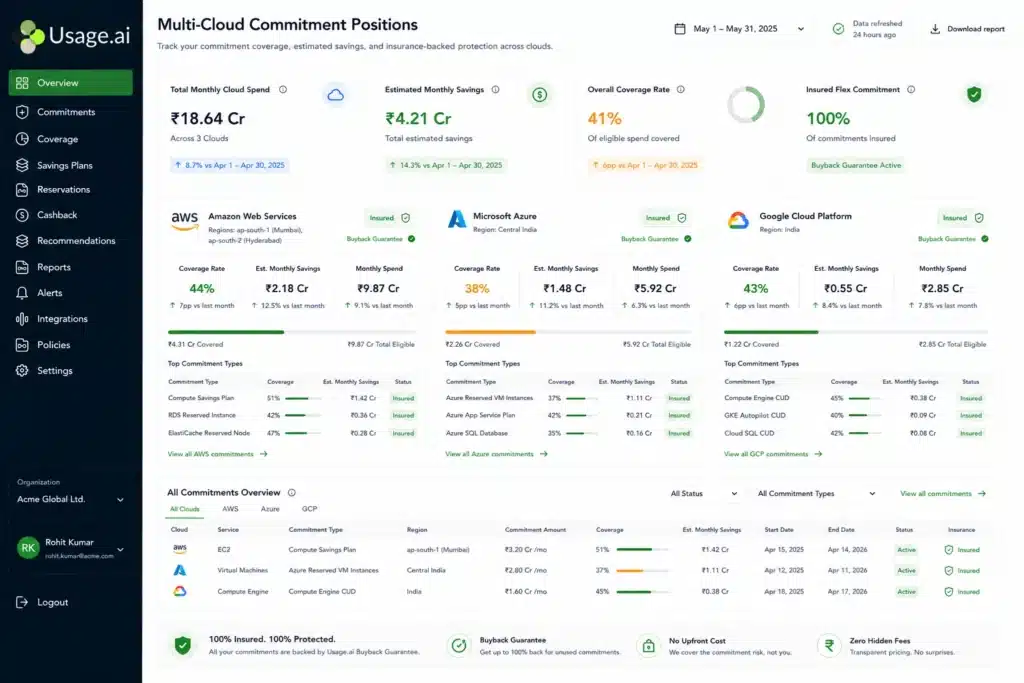
Usage.ai supports AWS, Azure, and GCP under a single platform. The same commitment optimization methodology — 24-hour recommendation refresh, floor-based commitment sizing, Insured Flex Commitments, and cashback on underutilization — applies across all three clouds in a unified dashboard.
For AWS: Usage.ai purchases Insured Flex Commitments (Savings Plans and Reserved Instances) with a buyback guarantee. If usage drops below the committed level — because of workload changes, architecture shifts, or organizational decisions — Usage.ai buys back the underutilized commitment and returns the value as cashback in real money. Not credits. Usage Flex Savings Plan covers EC2, Fargate, and Lambda with 40-60% savings. Usage Flex DB Savings Plan covers managed database services with 20-35% savings. Usage Flex Reserved Instances cover RDS, ElastiCache, OpenSearch, Redshift, and DynamoDB with 30-40% savings.
For Azure: Usage.ai analyzes Azure billing export data to identify Savings Plan and Reserved VM Instance opportunities, scopes recommendations at the shared billing account level for maximum pooling, and incorporates Azure Hybrid Benefit eligibility into commitment sizing before recommending a $/hr commitment level.
For GCP: Usage.ai distinguishes between resource-based CUD opportunities (stable vCPU+memory demand in specific regions) and SUD-covered workloads (variable demand where commitment is not justified), avoiding the GCP-specific trap of over-committing vCPUs in variable workloads.
24-hour refresh across all three clouds: AWS Cost Explorer refreshes every 72+ hours. Azure Advisor recommendations update every 30 days. GCP Cost Recommender refreshes every 24 hours but is still a separate interface. Usage.ai refreshes commitment recommendations every 24 hours across all three clouds in a single dashboard, ensuring coverage gaps surface before they compound into weeks of uncovered spend. Source: Usage.ai platform documentation.
The buyback guarantee applies to all three clouds: any commitment purchased through Usage.ai that becomes underutilized — for any reason, including multi-cloud workload migration — is bought back and returned as cashback. This eliminates the lock-in risk that makes FinOps teams under-commit to avoid over-commitment scenarios. Zero lock-in. $0 upfront. Fee: percentage of realized savings only.
See how Usage.ai optimizes commitment coverage across AWS, Azure, and GCP simultaneously
Usage.ai Insured Flex Commitments: Zero Lock-In Across All Three Clouds
The fundamental problem with multi-cloud commitment management is that each cloud’s native commitment mechanism has some form of lock-in: AWS Savings Plans have no cancellation option, GCP CUDs are binding for 1-3 years, and Azure Reserved VM Instances allow limited exchanges but not outright cancellation.
Usage.ai Insured Flex Commitments solve the lock-in problem with three guarantees: (1) cancel anytime — the buyback guarantee means you are never stranded in a commitment that no longer reflects your usage; (2) cashback on underutilization — if any commitment goes underutilized, the unused value is returned as real money, not credits; (3) quarterly adjustment — commitment levels are reviewed and adjusted quarterly as usage patterns evolve, without penalty.
This changes the commitment decision calculus entirely. The standard FinOps advice — ‘commit conservatively and leave some on-demand coverage’ — exists because over-commitment without a buyback guarantee means paying for unused discount. With a buyback guarantee, the correct commitment level is the accurate one, not the conservative one. You commit to what the data says, and if the data changes, the commitment adjusts. Source: Usage.ai platform documentation and verified customer outcomes.
Usage.ai is the only platform offering cashback — real money, not credits — on underutilized commitments purchased through the platform. Competitors offer credits only. At scale, the difference between receiving $X in cash and $X in credits to spend with the same cloud provider is material: cash can offset commitments on different providers, fund team budgets, or reduce actual cloud spend across the org.
See exactly what you’re overpaying across AWS, Azure, and GCP in under 60 seconds. Try the Calculator for free →
Frequently Asked Questions
1. What is the difference between AWS, Azure, and GCP commitment discounts?
AWS Compute Savings Plans commit to a $/hr spend level applying across EC2, Fargate, and Lambda regardless of region or instance family — the most flexible model. GCP resource-based Committed Use Discounts commit to specific vCPU and GB memory quantities in a region (37% 1-yr, 55% 3-yr, no upfront required). GCP also provides automatic Sustained Use Discounts of up to 30% with no commitment for instances running more than 25% of a month. Azure offers both $/hr Savings Plans (up to 65%) and VM-specific Reserved Instances (up to 72%). Source: AWS official, Azure official, GCP official pricing documentation.
2. How do you manage savings plans across multiple clouds?
The core steps: (1) normalize all cloud spend to a common $/hr unit for apples-to-apples comparison; (2) calculate each cloud’s stable floor spend independently over 60 days; (3) match the commitment type to workload stability per cloud (Compute SP for variable AWS, resource CUDs only for stable GCP regions, Azure SP for variable Azure); (4) right-size before committing; (5) use a platform with cross-cloud visibility and 24-hour refresh rather than three separate native tools. The biggest risk is managing each cloud in isolation and missing coverage gaps at the seams.
3. Does GCP have a savings plan equivalent?
GCP’s closest equivalent to AWS Compute Savings Plans is the spend-based Committed Use Discount, available for Cloud Run and Cloud SQL. For general VM compute, GCP uses resource-based CUDs (commit to vCPU + memory in a region for 37% 1-yr or 55% 3-yr discount). GCP also provides Sustained Use Discounts — automatic discounts up to 30% for any instance running more than 25% of the month with zero commitment. AWS and Azure have no equivalent automatic zero-commitment discount. Source: LeanOps (May 2026), DEV Community (April 2026) citing GCP official.
4. What makes multi-cloud commitment management hard?
Three specific challenges: (1) different billing units — AWS in $/hr, GCP in vCPU+GB, Azure in $/hr or VM size — make cross-cloud coverage comparison non-trivial; (2) separate native tools (AWS Cost Explorer, Azure Advisor, GCP Cost Recommender) with different refresh cycles (72hr, 30-day, 24hr) and no shared interface; (3) cloud-specific commitment mechanics — GCP’s SUD advantage, Azure’s Hybrid Benefit, AWS’s organizational-level pooling — that require provider-specific strategy rather than a single universal approach.
5. How does Usage.ai handle multi-cloud savings plans?
Usage.ai supports AWS, Azure, and GCP under a single platform with 24-hour recommendation refresh across all three. For AWS: Insured Flex Commitments with buyback guarantee and cashback on underutilization. For Azure: Savings Plan and RI recommendations scoped to shared billing account level. For GCP: distinguishes CUD opportunities from SUD-covered workloads to avoid over-commitment. Cashback (real money, not credits) on any underutilized commitment across all three clouds. Fee: percentage of realized savings only. Source: Usage.ai platform documentation.