
 AWS
 Microsoft Azure
 Google Cloud
Customers can query cloud savings, review recommendations and approve actions through conversation, with existing permissions and approval controls.
New York, USA, November 12, 2026: Usage.ai, a cloud commitment management platform, today announced the launch of its Model Context Protocol (MCP) server, enabling customers to access cloud savings data and approve commitment recommendations through compatible AI assistants.
The new connection lets customers ask questions about savings, billing, commitments and recommendations in plain English. Instead of navigating dashboard views and manually compiling reports, users can ask questions such as “What did we save last month?” or “Which commitments expire in the next 90 days?” and request follow-up breakdowns or summaries.
The MCP server draws on the same data and calculations used in the Usage.ai dashboard, bringing existing account information into customers’ conversational workflows.
“We wanted teams to be able to manage cloud savings as naturally as asking a question,” says Kaveh Khorram, CEO of Usage.ai.
“We’ve brought savings reporting, commitment insights and recommendation approvals into the AI tools they already use, so they can move from understanding costs to taking action in one conversation, with their existing permissions and approval controls.”
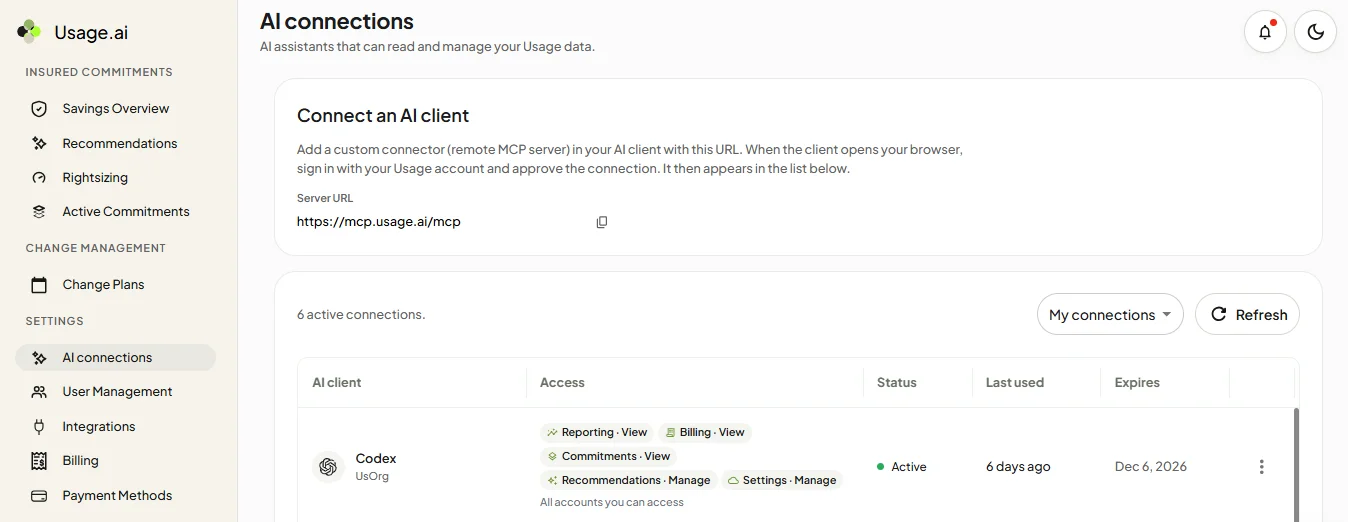
Image: Usage.ai’s AI connections dashboard lets users view connected AI assistants, their access permissions, connection status and expiration dates.
From reporting to approved action
Beyond retrieving information, the Usage.ai MCP server enables authorized users to approve commitment recommendations and organization Admins to change Autopilot settings.
Before applying either change, the assistant presents a preview and requests explicit confirmation. Approving a recommendation instructs Usage.ai to purchase the commitment. Enabling Autopilot approves the selected product’s pending recommendations and automatically approves new recommendations for that product.
Approvals and settings changes are recorded in Usage.ai’s audit log.
Guided setup across AWS, Azure and Google Cloud
Organization Admins can also use the assistant to guide them through connecting AWS, Azure and Google Cloud accounts to Usage.ai.
The assistant provides setup links or commands and checks progress, while Admins complete the required steps in their cloud environments. Passwords, access keys and client secrets are not entered into the conversation. Azure client secrets are submitted directly through the Usage.ai dashboard.
Access governed by existing permissions
Access through the MCP server follows each user’s existing Usage.ai dashboard role. During authorization, users can select View or Manage permissions across Reporting, Billing, Commitments, Recommendations and Settings.
The connection does not grant permissions beyond those available in the dashboard, and users can revoke access through Usage.ai’s AI connections settings.
Getting Started
The Usage.ai MCP server is available to organizations with approved AI access. Organization Admins can request access through Settings → AI connections in the Usage.ai dashboard, then connect a compatible assistant such as Claude, Codex or Cursor.
To see how teams can explore cloud savings and approve commitment recommendations through conversation, book a demo.
About Usage.ai
Usage.ai helps businesses save 30–50% on eligible On-Demand cloud spend across AWS, Azure and Google Cloud through automated commitment management. The platform analyzes usage, identifies savings opportunities and manages commitment purchases through Autopilot automation or Copilot approvals. Its Flex Insured Commitments offer Cashback protection for eligible underutilization. Usage.ai operates at the billing layer, without requiring agents or application changes. Learn more at usage.ai.
For more information, contact: