 AWS
 Microsoft Azure
 Google Cloud


A monthly bill cannot reliably answer either question. Before buying, reconcile Premium meters, existing benefits, and the hourly allocation pattern with engineering’s plans. A discount applied to capacity you expect to remove can turn a sensible-looking recommendation into an expensive obligation.
Short Answer
Azure Functions Premium supports Azure Savings Plan for Compute. Choose an hourly commitment based on eligible vCPU and memory charges after existing discounts, prioritizing usage that remains consistent during quiet hours.Compare potential savings against unused commitment costs and planned workload changes before purchasing a one or three year plan.
Which Functions Premium Charges Can Consume a Savings Plan?
Microsoft’s compute Savings Plan coverage includes Functions Premium. Its hosting configuration is Elastic Premium: EP1, EP2, or EP3. Dedicated App Service plans with P-prefixed SKUs are different configurations.The Functions pricing table identifies vCPU duration and memory duration. Premium bills allocated cores and memory over time, with no execution charge. Every active plan retains at least one billed instance, even when functions are idle.
| Charge or capacity | Treatment before purchase | Evidence to check |
|---|---|---|
| Allocated Premium cores and memory | Include quantities whose meters qualify | Plan SKU, region, meter, rate, allocation time |
| Always-ready capacity | Include eligible billed allocation during idle and active hours | Minimum-instance configuration and billed quantities |
| Prewarmed and burst capacity | Include eligible allocation when it occurs; assess its persistence separately | Actual allocation pattern |
| Storage, networking, monitoring, connected services | Keep outside the Premium compute calculation | Separate charge lines |
| Consumption, Flex Consumption, Dedicated hosting | Assess separately from this Premium baseline | Hosting type and its own meters |
Multiple apps can share plan instances. Reconcile at the plan level so the same capacity is not counted repeatedly. Use your Savings Plan price sheet to confirm eligible meters and term-specific prices.
Calculate the Eligible Premium Spend Remaining Each Hour
Build two aligned views: Premium allocation and eligible demand across the intended benefit scope. Other services may consume a shared commitment, so a whole-scope recommendation is not automatically a Premium-only opportunity.For each eligible meter, calculate:
Illustrative: usage costing $0.14/hour under an ACD versus $0.16/hour at Savings Plan rates consumes $0.14 of commitment, without an additional discount.
That discounted cost consumes the hourly commitment; usage beyond its coverage remains on demand.
Keep quantities and price units consistent. One EP1 instance allocated for an hour represents 3,600 core-seconds and 12,600 GB-seconds, based on its one core and 3.5 GB allocation. Convert units when the price sheet uses different rates. Execution duration and observed memory use do not replace allocated capacity.
Microsoft’s cost-details documentation describes daily records. Dividing those totals by 24 hides the variation you need to assess.
The Benefit Recommendations API can return hourly on-demand charges through properties/usage, along with candidate savings and wastage through properties/allRecommendationDetails.
These are scope-level inputs, not resource-level core and memory quantities. If an existing resource group’s only Savings Plan-eligible compute is Premium, request resource-group recommendations to isolate its hourly on-demand charge series.
For mixed scopes, evaluate the eligible portfolio at its intended benefit scope and establish Premium attribution separately using allocation evidence reconciled to billing. If attribution remains unresolved, do not present the result as a measured Premium-only baseline.
Inventory existing compute Savings Plans by amount, scope, term, expiration, and usage. Model how their benefits apply before adding another purchase. Azure prioritizes eligible usage with the greatest discount, so a shared plan is not earmarked exclusively for Premium.
Where other compute has matching reservations, Azure applies those benefits first, changing the demand available to shared Savings Plans. Do not assume App Service reservations cover EP instances.
Use your actual negotiated on-demand rates for comparison; utilization alone does not prove additional savings.
Microsoft’s Savings Plan recommendation methodology explains the broader hourly sizing approach; this calculation identifies the Premium demand a new purchase must justify.
Test Commitment Amounts Against Quiet Hours and Planned Changes
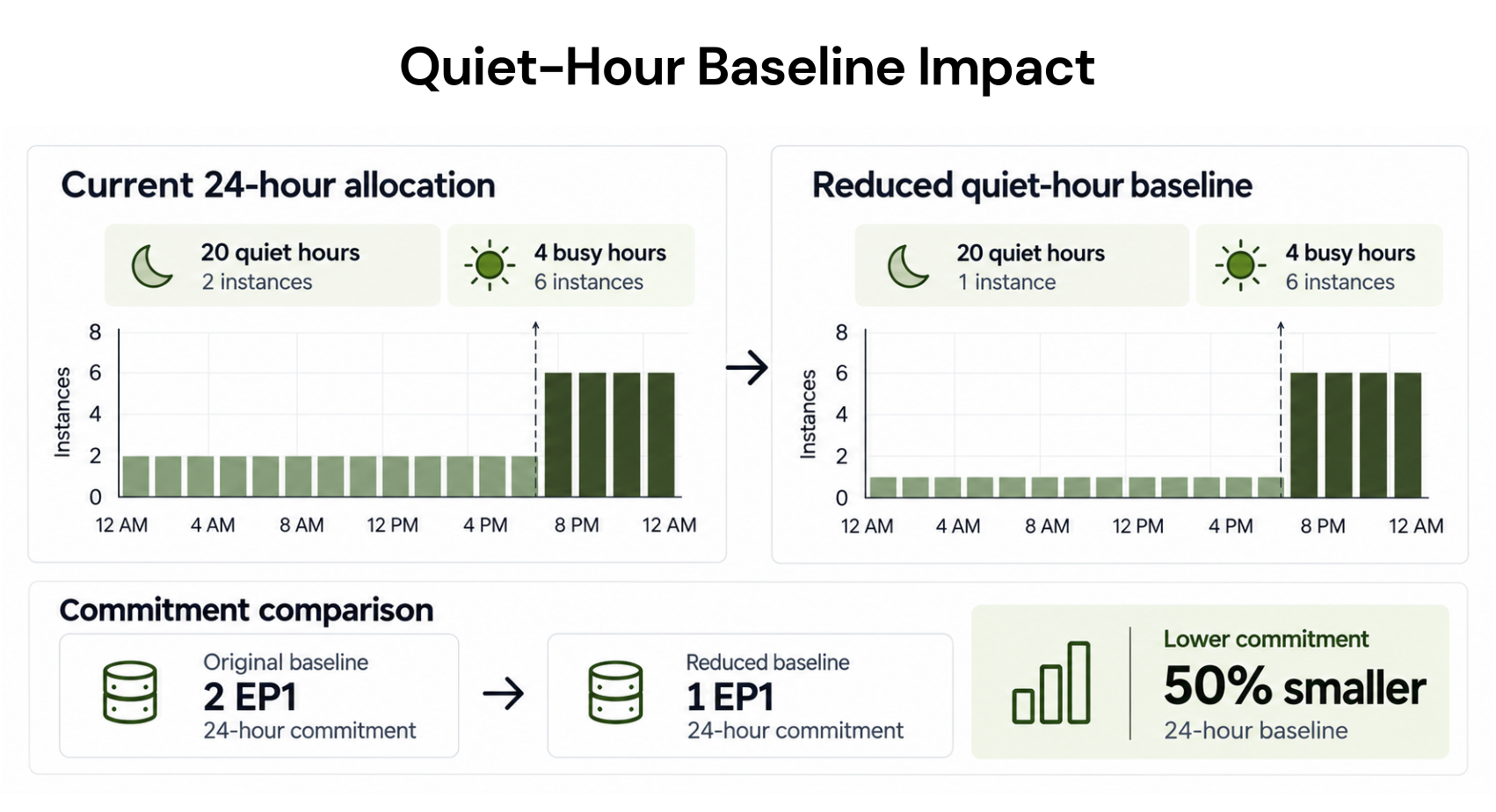
Compare each candidate with no new purchase using the same scope, rates, existing commitments, and workload forecast. Include the full commitment payment and residual on-demand usage. Unused commitment is already part of that payment, so do not add it again as another cost.Consider an illustrative EP1 plan running two allocated instances for 20 quiet hours and six for four busy hours. That is 64 instance-hours a day. Assume no existing commitments or other eligible usage in scope. The invented combined core-and-memory prices are $0.20 per allocated instance-hour on demand and $0.16 at the selected Savings Plan rates.
| Purchase candidate | Quiet-hour outcome | Daily compute cost | Savings versus no purchase |
|---|---|---|---|
| No new commitment | Two instances cost $0.40/hour | $12.80 | — |
| $0.32/hour commitment | Two instances consume it fully | $10.88 | $1.92 |
| $0.48/hour commitment | $0.16/hour remains unused | $13.92 | −$1.12 |
Now suppose engineering expects only one instance during quiet hours. On-demand cost falls to $8.80 daily, while the $0.32 commitment still totals $10.88. Under these assumptions, a $0.16 commitment costs $7.84 daily. Test the reduced footprint before buying; an existing commitment cannot simply shrink afterward.
Savings Plan usage rates can change during the term while the hourly commitment stays fixed, so revisit the model when rates change.
Microsoft’s commitment recommendations highlight historical savings: Advisor and the portal use 30 days, while the API supports 7, 30, and 60 days. Historical recommendations cannot establish future application demand. Deduct relevant management fees when evaluating retained value.
Purchase Checklist: Confirm Scope, Terms, and Permissions
Keep the approved calculation with these checks:Confirm product and agreement. Select Savings Plan for Compute and verify eligible EA, MCA, or MPA subscriptions and offer types. Partner purchasing follows its supported route.
Confirm benefit scope. Choose resource group, subscription, management group, or shared scope. Microsoft's scope rules limit shared benefits to the relevant EA enrollment or MCA billing profile; management-group eligibility also intersects that billing boundary.
Confirm purchasing authority. Check the required purchaser permissions and purchase policies. Billing-reader access alone is insufficient. Record the billing subscription separately from where benefits apply.
Approve the amount and term. Record eligible meters, actual rates, downside assumptions, existing coverage, and engineering's forecast owner.
Approve payment and renewal. Upfront and monthly payments have the same total cost. Monthly payments do not create a monthly cancellation option, and non-USD MCA amounts can vary with exchange rates. Confirm the auto-renew setting in the applicable purchase flow before completing the order.
After approval, follow the Azure purchase steps and review the order before completing it.
The hourly amount, term, and billing frequency are fixed after purchase, although scope can change. Purchases cannot be cancelled or refunded. Where both instruments can benefit from the same usage, Microsoft advises waiting at least seven days after buying a Savings Plan or reservation before considering the other so recommendations can update.
What to Verify After Purchase
Assign a billing owner to compare results with the approved case. Initial Savings Plan utilization reporting can take up to 48 hours to appear.Use amortized cost and usage details to identify benefiting resources and unused commitment, then reconcile actual cost with invoices. Track commitment consumption, Premium coverage, and incremental savings separately.
A shared plan can be fully used without covering every Premium charge. Review allocation changes and expirations, and investigate falling utilization before purchasing more. Our incremental Azure savings methodology helps retain existing discounts in the baseline and distinguish modeled opportunity from realized results.
How We Help Review Functions Premium Commitments
We can help evaluate the commitment opportunity while your engineering and billing teams align allocation forecasts, existing benefits, and purchase approvals.Our Azure commitment service supports Functions Premium. We analyze usage and existing commitments, recommend supported purchases, and execute them in your account with authorization.
Our read-only Savings Test evaluates potential savings without purchasing commitments. We require separately enabled purchasing permissions to act on an approved recommendation, and we operate at the billing and commitment layer.
With Flex Insured Commitments, teams can access up to 65% savings of an eligible three-year Azure compute Savings Plan with Cashback protection for qualifying losses under the applicable agreement.
If a covered Flex Commitment costs more than equivalent on-demand usage, cashback covers the qualifying difference. Cashback does not cancel the Azure commitment or automatically protect commitments you purchased independently. We cannot start, stop, or resize production resources.
Our fee is an agreed percentage of realized savings, billed monthly in arrears after provider billing data is finalized.
Usage.ai is a multicloud cost optimization platform for AWS, Microsoft Azure and Google Cloud. Commitments are purchased in customer cloud accounts and remain customer-owned; provider terms and payment obligations continue. Usage.ai manages eligible purchases and renewals within approved controls. Read-only assessment is separate from authorized purchasing, and daily analysis does not require daily purchases. Cashback applies only to qualifying losses on eligible Flex Commitments under the applicable agreement, including eligibility, exclusions, notice, credits or offsets, payout timing and service-exit treatment. Ending managed service does not cancel native commitments or automatically refund unused value. Provider charges are separate from Usage.ai fees.
Final Verdict: Is the Hourly Commitment Justified?
Purchase when verified eligible demand supports the amount and the comparison remains favorable after realistic allocation changes. Choose a smaller amount or different term when the opportunity exists but the forecast is less dependable. Wait when meters, existing coverage, or future demand remain unresolved.To validate the case before buying, book a demo with our team and request a Functions Premium eligible-meter savings assessment.
Review eligible compute, existing commitments, and hourly demand before choosing a Savings Plan amount.
Frequently asked questions
Does idle Functions Premium capacity consume a compute Savings Plan?
Yes, when its billed compute meters and subscription qualify and it is within scope. Premium charges allocated cores and memory even when functions are idle. Commitment consumption depends on those charges, not on whether application code is executing.
Does a Savings Plan commitment limit Functions Premium scaling?
No. A Savings Plan is a billing offer. Premium's configured scaling limits remain separate, and eligible usage beyond commitment coverage is billed at applicable on-demand rates. It does not guarantee compute capacity.
Can I reduce or cancel the commitment if we move away from Premium?
No. Microsoft's post-purchase restrictions prevent reducing the hourly amount or cancelling the plan. Other eligible compute may consume it within scope, and scope can change, but the financial obligation remains. Model the migration before purchasing.