
 AWS
 Microsoft Azure
 Google Cloud

What Is AI Cost Optimization?
AI cost optimization is the process of identifying and reducing unnecessary expenses throughout the AI lifecycle, from development and model training to production inference.AI applications consume resources differently from traditional cloud applications. Training jobs may require powerful GPUs for several hours or days, while production inference services often need continuous availability and low response times.
These differences make cost management more complicated.
For example, a company might reduce its model’s token consumption but continue paying for oversized GPU instances. Another organization might purchase discounted compute commitments only to discover that its infrastructure requirements have changed.
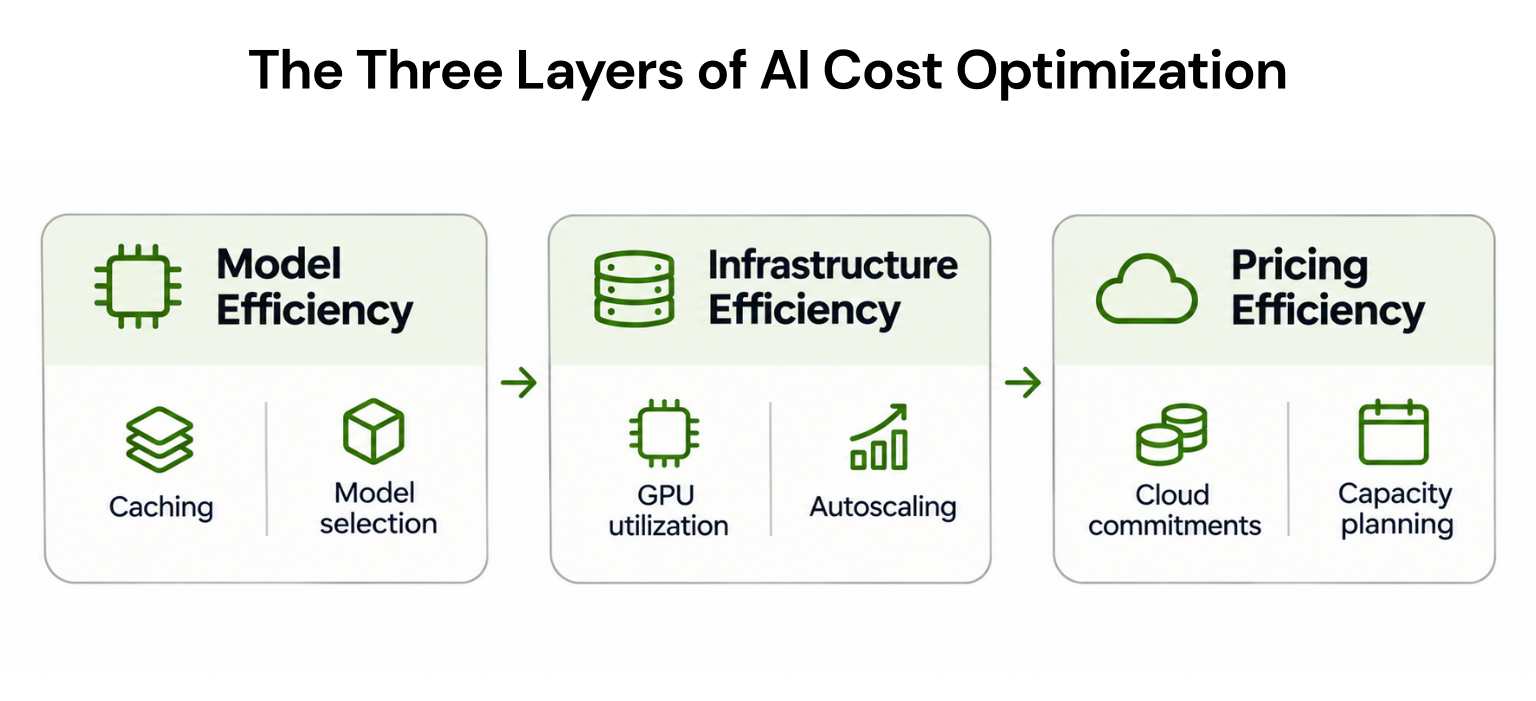
Effective AI cost optimization addresses three areas:
| Optimization Area | Objective | Common Techniques |
|---|---|---|
| Model efficiency | Reduce computation required | Caching, quantization, model selection |
| Infrastructure efficiency | Improve resource utilization | GPU rightsizing, autoscaling, scheduling |
| Pricing efficiency | Reduce infrastructure rates | Spot capacity, Savings Plans, reservations |
What Makes AI Workloads Expensive?
AI infrastructure costs depend on the models being used, how frequently they run, and the resources required to support them.For self-hosted AI applications, GPUs are often a major expense. However, compute is only one component of the total cost.
| Cost Component | Primary Cost Driver | Common Source of Waste |
|---|---|---|
| GPU compute | Instance operating hours | Idle or oversized GPUs |
| Model training | Training duration and hardware | Repeated experiments |
| Inference | Requests, tokens, or compute | Inefficient model execution |
| Storage | Datasets and model checkpoints | Unused stored data |
| Networking | Data transferred | Unnecessary cross-region traffic |
| Managed AI services | Tokens or provisioned capacity | Unused throughput |
| Monitoring | Logs and telemetry | Excessive data retention |
A production application might require eight GPUs during peak traffic but only three during normal operating hours. If all eight run continuously, the organization pays for capacity that may not be necessary throughout the day.
However, low GPU utilization does not always indicate waste. Some inference workloads require substantial GPU memory even when compute utilization appears low.
Teams should evaluate memory consumption, throughput, latency, and workload availability before reducing resources.
How to Calculate AI Infrastructure Costs
Before implementing optimization strategies, organizations should establish their current spending baseline.A basic formula is:
| Metric | Value |
|---|---|
| GPU instances | 4 |
| Hourly price per instance | $5 |
| Monthly operating hours | 730 |
| Monthly GPU cost | $14,600 |
| Additional infrastructure expenses | $1,400 |
| Total monthly cost | $16,000 |
The new monthly GPU cost becomes:
If the remaining eligible compute receives an additional illustrative 20% effective rate reduction, the GPU cost decreases to $8,760.
Assuming other infrastructure expenses remain unchanged:
| Scenario | Monthly Cost |
|---|---|
| Original infrastructure | $16,000 |
| After GPU optimization | $12,350 |
| After additional pricing optimization | $10,160 |
| Total monthly reduction | $5,840 |
| Total savings | 36.5% |
The example demonstrates why reducing resource consumption and improving infrastructure pricing should be considered together.
10 AI Cost Optimization Strategies
1. Measure Cost per Successful AI Request
Many organizations monitor AI spending per request or token without measuring whether the application produces useful results.A cheaper model may require additional attempts to complete the same task.
A more meaningful metric is:
| Metric | Model A | Model B |
|---|---|---|
| Cost per request | $0.010 | $0.006 |
| Success rate | 98% | 75% |
| Cost per successful request | $0.0102 | $0.0080 |
However, the calculation changes if failed requests require additional attempts or more expensive fallback models.
Organizations should include retries, validation calls, and tool execution when calculating the cost of completing a workflow.
Best practice: Monitor cost per completed task alongside response quality, latency, and reliability.
2. Use Smaller Models for Simpler Tasks
Not every AI request requires the most powerful model available.A customer support application might use a smaller model for classifying messages and reserve a more capable model for complex reasoning.
This approach is commonly called model routing.
For example, suppose an application processes one million requests monthly.
If 70% can use a model costing $0.002 per request and the remaining 30% require a model costing $0.010, the total cost becomes:
The theoretical reduction is $5,600 monthly, excluding routing and retry overhead.
Model routing should be evaluated against actual task quality. Using smaller models is beneficial only when they meet the application’s accuracy and reliability requirements.
3. Reduce Token Usage With Prompt Optimization and Caching
Every token sent to or generated by a model adds to the cost. Many applications send more than they need.Simple ways to reduce token usage:
Shorten system prompts: Remove repeated instructions, long examples, and unnecessary formatting rules.
Limit output length: Set maximum output tokens so the model doesn’t generate more than the task needs.
Trim context: In RAG applications, send only the most relevant document chunks instead of entire files.
Summarize conversation history: In long chats, replace older messages with a short summary instead of resending everything.
Once prompts are lean, caching can reduce the cost of the content that still repeats.
AI applications frequently process the same instructions, documents, or reference information across multiple requests.
Without caching, the application may repeatedly pay to process identical content.
Prompt caching allows supported models to reuse previously processed prompt information, potentially reducing token costs and response latency.
For example, Amazon Bedrock prompt caching supports caching eligible repeated prompt prefixes.
Caching is particularly useful for applications that repeatedly process long system instructions, documentation, or shared reference material.
However, savings depend on cache hit rates, expiration policies, supported models, and pricing.
Organizations should calculate net savings after accounting for cache writes and uncached requests rather than assuming every repeated prompt produces a discount.
4. Improve Inference Throughput Before Adding GPUs
When inference traffic increases, adding more GPU instances may appear to be the easiest solution.However, inefficient request scheduling or memory management can limit throughput even when additional hardware is available.
Several techniques can improve inference efficiency:
Continuous batching: Processes compatible requests together to improve GPU utilization.
Quantization: Reduces model precision and memory requirements where acceptable.
Paged attention: Improves memory management during language-model inference.
Optimized serving engines: Improve request scheduling and token generation efficiency.
Before increasing capacity, teams should benchmark requests per second, tokens per second, GPU memory usage, and response latency.
The objective is to process more useful requests with existing infrastructure while maintaining application performance.
5. Eliminate Idle GPUs and Development Environments
Unused GPU instances can generate substantial costs when development environments remain active after experiments finish.Common examples include abandoned notebooks, inactive testing clusters, and model endpoints that continue running outside working hours.
Consider a GPU instance costing $4 per hour.
Running continuously for 730 hours costs approximately $2,920 monthly.
If the instance is only needed for eight hours across 22 business days, its compute cost would be $704.
That represents a theoretical monthly reduction of $2,216.
Organizations can implement automatic shutdown policies, development environment schedules, and alerts for unused resources.
However, shutdown policies should account for startup delays, persistent storage requirements, and services requiring continuous availability.
6. Use Batch Processing for Nonurgent AI Workloads
Not every AI task requires an immediate response.Document classification, dataset enrichment, offline evaluations, and large-scale summarization can often run asynchronously.
Batch processing allows organizations to process these requests without maintaining the same latency requirements as real-time applications.
Some managed AI providers also offer discounted batch execution.
For example, Google’s Gemini API documentation describes processing options designed to improve cost efficiency for eligible workloads.
| Workload | Recommended Processing |
|---|---|
| Customer support chatbot | Real-time inference |
| Overnight document classification | Batch processing |
| Fraud detection requiring immediate action | Real-time inference |
| Weekly dataset enrichment | Batch processing |
| Offline model evaluation | Batch processing |
7. Choose the Right GPU Purchasing Model
AI infrastructure purchasing decisions should reflect workload duration, predictability, and interruption tolerance.Cloud providers offer several pricing models, but their eligibility rules differ.
| Pricing Model | Suitable Workload | Main Limitation |
|---|---|---|
| On-Demand | Experiments and unpredictable demand | Higher standard rates |
| Spot | Interruptible training and batch jobs | Capacity can be reclaimed |
| Capacity Blocks | Scheduled GPU workloads | Fixed reservation window |
| Eligible Savings Plans | Predictable supported compute | Financial commitment |
| Eligible Reserved Instances | Stable supported infrastructure | Reduced flexibility |
Importantly, AWS Savings Plans and Reserved Instance discounts do not apply to EC2 Capacity Blocks.
This distinction matters when comparing purchasing options.
A discounted hourly rate does not automatically produce savings if reserved capacity remains unused.
8. Avoid Overprovisioning Managed AI Throughput
Managed AI platforms may charge for provisioned processing capacity rather than individual requests.This can create unnecessary expenses when organizations allocate more throughput than their applications require.
For example, Microsoft Foundry provisioned throughput deployments use provisioned throughput units, or PTUs.
According to Microsoft’s documentation, provisioned deployments can incur charges for allocated capacity regardless of whether requests are being processed.
Consider an illustrative deployment with 100 provisioned units costing $0.50 per unit-hour.
Monthly cost:
However, teams must account for peak traffic, availability, latency requirements, and reservation terms before making changes.
9. Automate Eligible Cloud Commitment Optimization
Once organizations have optimized their AI workloads, they should evaluate the effective rates paid for the remaining infrastructure.Savings Plans, Reserved Instances, and committed use discounts can reduce eligible cloud costs.
However, AI workloads can change rapidly as models evolve, traffic fluctuates, or teams migrate between instance families.
Purchasing commitments based on temporary infrastructure demand can create unnecessary financial exposure.
A better approach is to identify predictable baseline usage, evaluate discount eligibility, and continuously monitor commitment utilization.
For example, a company may reduce compute requirements after introducing a more efficient inference engine.
If commitments were purchased for the original infrastructure baseline, some committed spending could become underutilized.
Automated commitment management can help organizations respond to changing demand, although it cannot eliminate all commitment risk.
For additional guidance, see Usage.ai’s GPU instance cost optimization guide.
10. Monitor AI Costs Continuously
AI cost optimization should be an ongoing process rather than a one-time infrastructure review.Models, application traffic, and cloud pricing can change over time.
Organizations should monitor:
| Metric | Purpose |
|---|---|
| Total AI spending | Track overall expenses |
| Cost per successful task | Measure economic efficiency |
| GPU utilization | Identify capacity inefficiencies |
| Inference throughput | Evaluate serving performance |
| Cache hit rate | Measure caching effectiveness |
| Idle infrastructure cost | Identify unnecessary resources |
| Commitment utilization | Monitor financial efficiency |
| Forecasted spending | Support capacity planning |
For a broader framework, see Usage.ai’s FinOps for AI practitioner playbook.
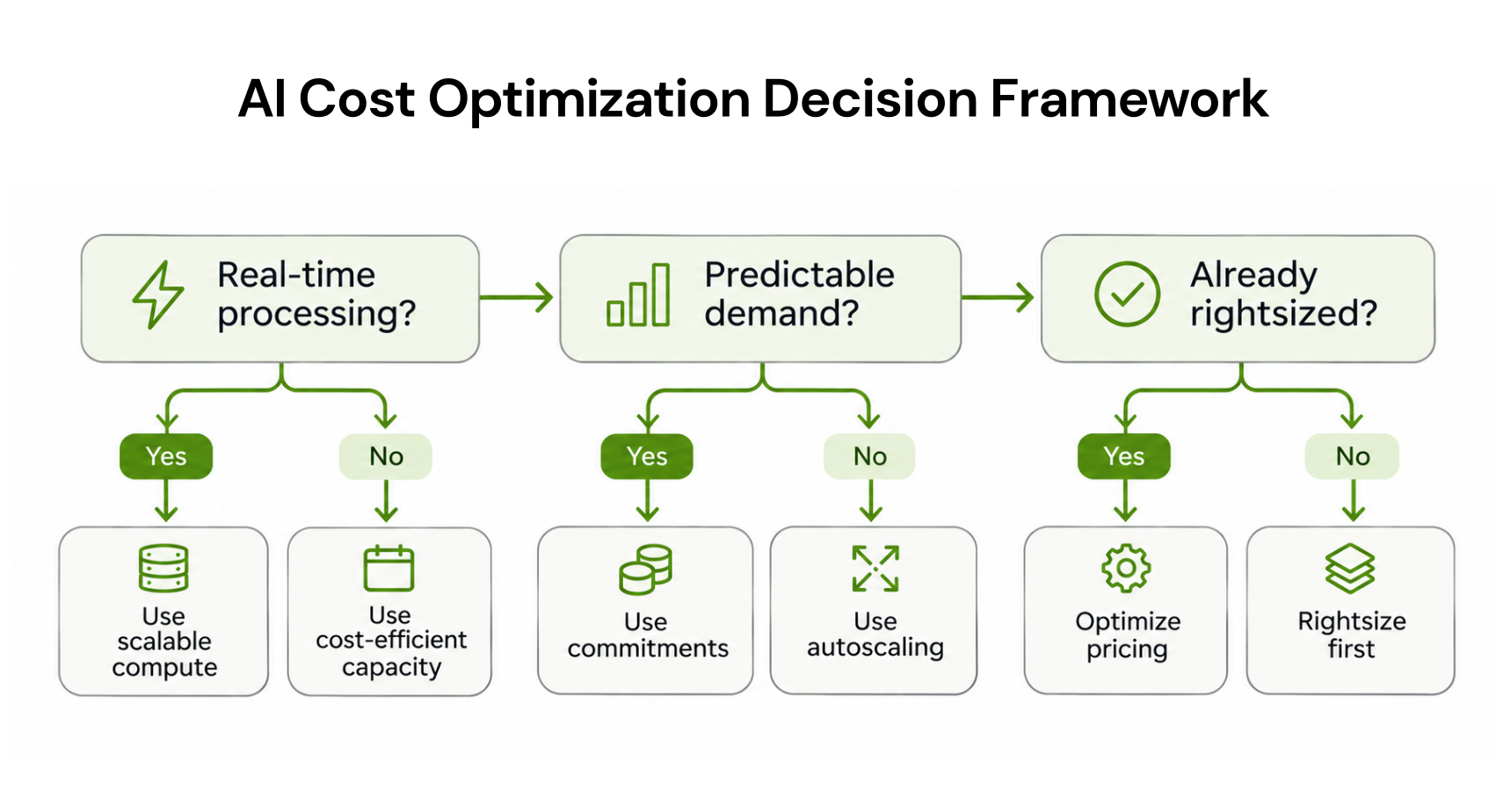
Which AI Cost Optimization Strategy Should You Use?
The right approach depends on the type of AI workload.| AI Workload | Primary Optimization | Secondary Optimization |
|---|---|---|
| Experimental training | Eliminate idle capacity | Spot or scheduled GPU capacity |
| Batch inference | Asynchronous processing | Flexible capacity pricing |
| Real-time LLM application | Model routing and caching | Inference optimization |
| Self-hosted production models | GPU utilization | Eligible cloud commitments |
| Managed AI APIs | Token optimization | Provider pricing options |
| AI agents | Reduce retries and tool calls | Model selection |
| Stable AI infrastructure | Rightsizing | Commitment automation |
This sequence reduces the risk of purchasing commitments for resources that may no longer be required.
Common AI Cost Optimization Mistakes
Even technically successful optimization projects may fail to reduce total spending.Focusing only on GPU hourly prices: A cheaper instance may deliver lower throughput, increasing the cost of completing a workload.
Purchasing commitments before rightsizing: Discounting oversized infrastructure can preserve unnecessary spending.
Ignoring retries and failed requests: Applications may appear inexpensive per request while generating substantial costs through repeated execution.
Using one pricing model for every workload: Experimental training, batch processing, and production inference have different infrastructure requirements.
Reducing costs without measuring quality: Model compression, routing, and batching can affect accuracy, latency, or reliability.
Optimization decisions should be validated against both financial and operational metrics.
How Usage.ai Helps Reduce AI Infrastructure Costs
Usage.ai helps businesses reduce eligible AI infrastructure costs across AWS, Azure, and Google Cloud through automated cloud commitment optimization. It continuously analyzes usage patterns to identify savings opportunities while reducing the need for manual commitment management.With Autopilot, Usage.ai automates supported commitment purchases based on workload demand, while CoPilot allows teams to review and approve recommendations before execution.
Usage.ai’s Flex Insured Commitments offer conditional Cashback protection against eligible unused commitments when infrastructure demand changes. Its savings-based pricing model means businesses pay a share of verified realized savings rather than a fixed platform fee.
Whether you’re managing GPU workloads or scaling AI applications, Usage.ai can help optimize eligible cloud commitments without requiring infrastructure changes.
Read-only analysis. No infrastructure changes.
Conclusion
AI cost optimization requires more than choosing cheaper GPUs or reducing token usage. Organizations need to eliminate unnecessary computation, improve infrastructure utilization, and select pricing models that match actual workload requirements.Combining model efficiency, infrastructure optimization, and automated management of eligible cloud commitments can help businesses control AI spending while maintaining performance and flexibility.
Frequently asked questions
What is AI cost optimization?
AI cost optimization involves reducing expenses associated with model training, inference, GPUs, APIs, and supporting infrastructure while maintaining required performance and output quality.
How can companies reduce AI infrastructure costs?
Companies can reduce costs through GPU rightsizing, prompt caching, model routing, batch processing, idle resource elimination, and appropriate cloud purchasing strategies.
What is the difference between AI cost optimization and AI-powered cloud cost optimization?
AI cost optimization reduces the expense of operating AI workloads. AI-powered cloud cost optimization uses artificial intelligence or automation to reduce broader cloud infrastructure spending.
Can Savings Plans reduce GPU costs?
Some GPU-backed compute usage may qualify for cloud discount programs, depending on the provider, instance family, service, and commitment type. Eligibility must be verified before purchasing commitments.
What is the best metric for measuring AI cost efficiency?
Cost per successful AI task is a useful metric because it connects spending to completed outcomes. It should be monitored alongside accuracy, latency, throughput, and reliability.