
 AWS
AWS Microsoft Azure
 Google Cloud


Why right-size before buying an RI
A Reserved Instance discounts matching RDS instance usage. It does not fix an oversized database. AWS says RDS Reserved Instances can save up to 69% compared with On-Demand rates for steady-state workloads, depending on the engine, class, Region, term, payment option, and available offering.AWS offers one-year and three-year RDS RI terms. All Upfront and Partial Upfront are available for one or three years, while No Upfront is one year only and may be subject to AWS approval. You remain responsible for the commitment cost through the term even if matching usage falls away. AWS explains these payment and commitment rules in its Reserved DB instance documentation.
This guide focuses on RDS Reserved Instances. If your workload needs more flexibility across eligible database services, sizes, or Regions, compare RIs with AWS Database Savings Plans, which use a one-year no-upfront hourly spend commitment for eligible database usage.
Use four signal groups together
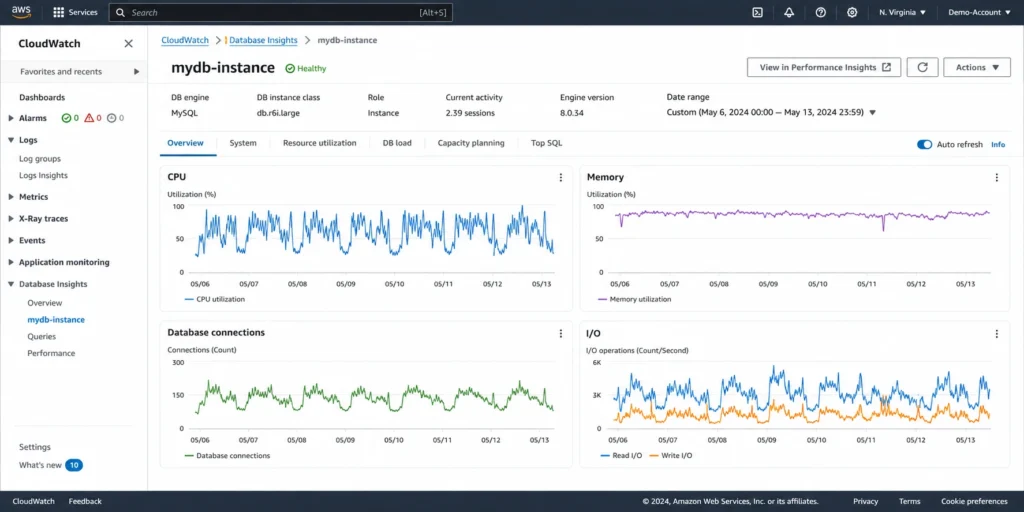
No single CloudWatch metric proves a downsize is safe. Start with at least 30 days of representative data, then expand the window for monthly, quarterly, or seasonal peaks.CPUUtilization: Look for sustained patterns, not one spike. Low CPU supports a downsize hypothesis, while repeated saturation can indicate insufficient compute or a query problem.
FreeableMemory and SwapUsage: Falling free memory combined with meaningful swap activity is a warning against reducing memory without deeper testing.
DatabaseConnections: Compare peak client connections with the effective max_connections on the proposed target. AWS documents DatabaseConnections as a standard Amazon RDS CloudWatch metric.
ReadIOPS and WriteIOPS: Confirm the target DB class and storage configuration can sustain read and write peaks.
Check MySQL connection headroom
For RDS MySQL, AWS documents the default max_connections formula as:{DBInstanceClassMemory / 12582880}
Do not substitute advertised RAM directly. AWS states that DBInstanceClassMemory is smaller because memory is reserved for the operating system and RDS management processes. In AWS’s example, an 8 GiB db.m7g.large works out to roughly 630 default connections instead of 683 from raw advertised memory. See the RDS quotas and connection-limit documentation.
Check your effective value before resizing:
SHOW GLOBAL VARIABLES LIKE ‘max_connections’;
If connection churn is the issue, RDS Proxy can pool and reuse database connections, reducing connection-management overhead and the chance of too-many-connections errors. It is not a substitute for capacity validation: test whether the target still accommodates peak query execution, memory demand, and storage I/O.
For the cost side of that decision, see our RDS Proxy pricing and connection-pooling guide.
Keep family selection evidence-based
Memory-optimized R classes and general-purpose M classes serve different workload balances. Compare the exact candidate classes, effective MySQL limits, buffer-pool behavior, and real workload performance instead of switching families from a generic ratio or assumed saving.Use this right-sizing decision matrix
| Signal pattern | Likely interpretation | Next action | Validate with |
|---|---|---|---|
| CPU has headroom, memory is comfortable, swap is quiet, I/O is below limits | Possible over-provisioning | Test one smaller class | p95 latency during peak |
| CPU repeatedly saturates, memory has headroom | Compute or query pressure | Tune queries or keep compute | Top SQL and DB load |
| FreeableMemory is tight and swap is active | Memory pressure | Do not reduce memory yet | Buffer-pool counters |
| Connections approach target limit | Connection constraint | Pool or retain headroom | Effective max_connections |
| I/O approaches target limits | Storage or I/O constraint | Keep class or redesign I/O | Peak IOPS and throughput |
Follow a safer resizing workflow
Step 1: Build a representative baseline
Capture CPU, FreeableMemory, SwapUsage, DatabaseConnections, ReadIOPS, and WriteIOPS across normal traffic and known peaks.Step 2: Validate MySQL-specific limits
Check effective max_connections, parameter-group settings, buffer-pool behavior, storage throughput, and connection pools.Step 3: Test the proposed target
Compare current AWS specifications for the target class and test it under realistic load. Treat a family change as a separate performance decision.Step 4: Change the class deliberately
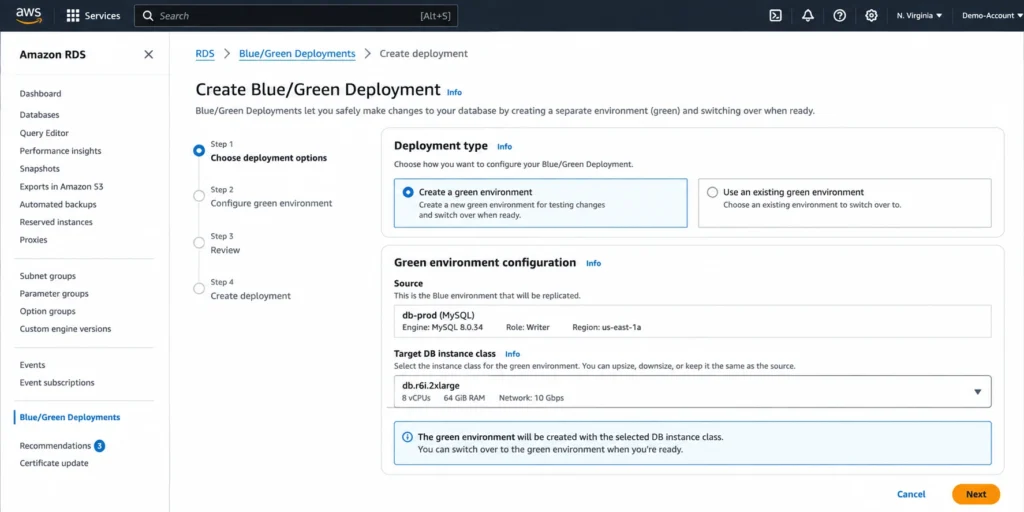
Use the RDS Modify workflow or a controlled staging path. AWS supports RDS MySQL 5.7, 8.0, and 8.4 for Blue/Green Deployments, and says switchover downtime is typically under one minute. Our RDS Blue/Green cost guide covers the temporary duplicate-environment cost.Before using Blue/Green, verify:
Automated backups are enabled.
The engine version and target class are compatible.
The intended parameter group is correct.
Read replicas are reviewed separately.
Switchover and rollback criteria are defined.
Step 5: Define a post-resize pass condition
Do not reserve immediately. First complete a normal production peak without sustained CPU saturation, memory or swap pressure, connection exhaustion, storage bottlenecks, or unacceptable latency regression. If the target passes, it is a stronger commitment baseline.How much RDS RI coverage should you buy?
After right-sizing, convert the validated stable baseline into normalized units. AWS’s size-flexible Reserved DB instance rules assign normalized units by size and deployment configuration.Use three steps:
Identify normalized units for validated steady-state RDS MySQL usage.
Subtract normalized units already covered by matching RIs.
Reserve only the remaining baseline expected to persist through the term.
Multi-AZ example: A Multi-AZ DB instance deployment on a large class represents 8 normalized units per hour. Two stable large Multi-AZ deployments represent 16 units. If 8 matching units are already reserved, the remaining stable baseline is 8 units.
Do not reserve the highest observed hour. Reserve the portion of normalized usage stable enough to justify the commitment. See how RDS MySQL RI size flexibility works for the full matching model.
Know what RI flexibility cannot fix
RDS MySQL size flexibility works across sizes only within the same AWS Region, database engine, and DB instance class type. AWS gives the example that a db.r6i reservation can apply to db.r6i sizes but not db.r6id or db.r7g. Flexibility can also apply across Single-AZ and Multi-AZ configurations when normalized units and matching rules align.The RI discount covers instance usage only. Storage, backups, and I/O remain separate charges. Review current offerings before purchasing because not every class supports every payment option. Our RDS Reserved Instance pricing guide covers term and payment mechanics.
Cross-check with Compute Optimizer
AWS Compute Optimizer is useful as a second opinion. AWS lists CPUUtilization, DatabaseConnections, network, read/write IOPS, throughput, and storage metrics among the signals it analyzes for RDS databases. With the required database monitoring data, it can also use DB load and OS swap metrics.Treat its recommendation as another input, not automatic approval to resize. Validate MySQL limits, application peaks, target constraints, and latency first.
Avoid these sizing mistakes
Downsizing from low average CPU without checking peaks.
Calculating max_connections from advertised RAM.
Treating RDS Proxy as proof that a smaller instance is safe.
Changing instance class type and assuming the old RI will follow.
Reserving before the resized class survives a normal peak.
Failing to recalculate normalized RI coverage after resizing.
How we help manage RDS commitments
We automates RDS commitment management by analyzing eligible database spend and managing commitments on your behalf. Instead of relying on manual forecasting and one-time purchasing decisions, Usage.ai continuously optimizes commitments as usage evolves.After right-sizing your RDS MySQL workload, the next step is deciding how much stable usage to commit.With our Flex Commitment Program, eligible teams can access savings associated with a three-year AWS commitment, up to 57% in applicable AWS Reserved Instance scenarios, while reducing long-term commitment exposure. Our AWS commitment model guide explains how this approach works.
If a qualifying commitment costs more than equivalent On-Demand usage, our cashback protection helps cover the difference, subject to program eligibility and terms.
The sequence stays simple: Right-size first, validate the workload, then Commit.
Upload your AWS invoice or Cost Explorer CSV for per-service savings estimates before deeper commitment analysis.
Frequently asked questions
What should I check before resizing RDS MySQL?
Review CPUUtilization, FreeableMemory, SwapUsage, DatabaseConnections, ReadIOPS, and WriteIOPS across a representative period. Then validate connection limits, memory behavior, target I/O capacity, and application latency.
Does an RDS MySQL RI still apply after downsizing?
It can when resized usage stays within the same qualifying Region, engine, and DB instance class type. AWS uses normalized units so larger reservations can cover proportional smaller matching usage.
What is the RDS MySQL max_connections formula?
AWS documents the default as {DBInstanceClassMemory/12582880}. DBInstanceClassMemory excludes memory reserved for the operating system and RDS management processes.
Does Compute Optimizer check database connections?
Yes. AWS includes DatabaseConnections among the RDS metrics analyzed by Compute Optimizer, together with CPU, network, I/O, throughput, and other signals.
Can Blue/Green reduce resize downtime?
Yes. RDS Blue/Green Deployments let you test a synchronized green environment before switchover. AWS says downtime is typically under one minute, but workload conditions and readiness checks can make it longer.
Right-sizing before reserving separates two decisions: how much database capacity the workload needs and how much stable capacity you are willing to commit to. Recheck both before every RI purchase or renewal.




