
 AWS
AWS Microsoft Azure
 Google Cloud

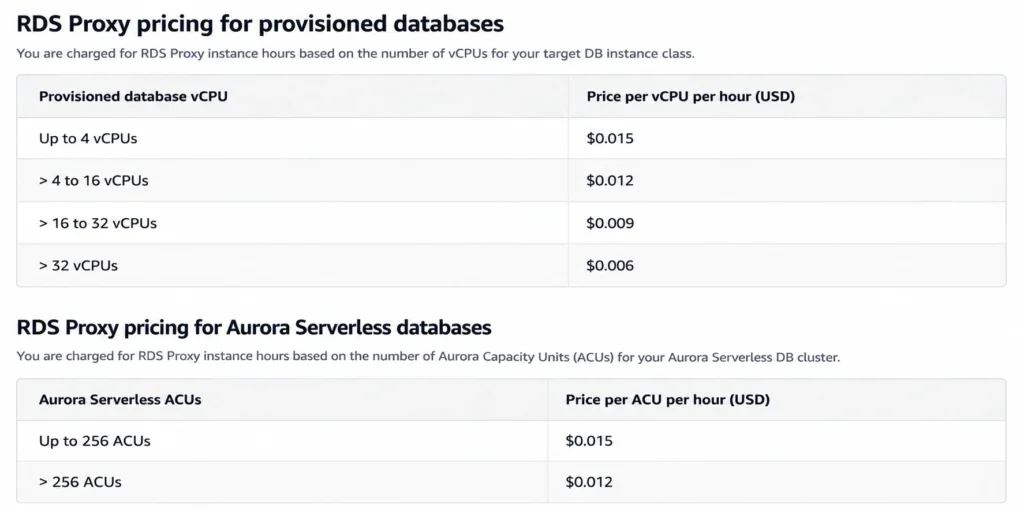
Amazon RDS Proxy is a fully managed database proxy that pools and shares established database connections. According to AWS RDS Proxy pricing, supported provisioned databases in US East (N. Virginia) are priced at $0.015 per vCPU-hour, with a two-vCPU minimum per database. Aurora Serverless is charged $0.015 per ACU-hour, with an eight-ACU minimum per database. Rates can vary by Region.
The important question is not simply how much RDS Proxy costs. It is whether connection pooling, smoother failover, authentication options, and reduced proxy-management work deliver enough value to justify the additional line item.
How RDS Proxy pricing works
For supported provisioned databases, the basic monthly calculation is:
| Database size | Calculation | Illustrative monthly proxy cost |
|---|---|---|
| 2 vCPUs | 2 × $0.015 × 730 | $21.90 |
| 4 vCPUs | 4 × $0.015 × 730 | $43.80 |
| 8 vCPUs | 8 × $0.015 × 730 | $87.60 |
| 16 vCPUs | 16 × $0.015 × 730 | $175.20 |
What RDS Proxy pricing does not include
RDS Proxy is a separate capacity charge, not a replacement for the rest of the database bill.Model these costs separately:
- Underlying RDS instance or Aurora capacity
- Database storage, I/O, and backups
- Applicable data transfer
- AWS Secrets Manager usage
- PrivateLink charges for user-defined proxy endpoints
The default proxy endpoint does not have a separate endpoint charge. Additional user-defined endpoints provision AWS PrivateLink interface endpoints and can generate corresponding charges. You can review the current behavior in the AWS RDS Proxy endpoint documentation.
For a broader database calculation, our RDS pricing calculator guide explains how to separate compute, storage, backup, and other RDS components.
Why database size changes the math
For provisioned instances, the proxy charge follows underlying vCPU capacity rather than the number of client connections using the proxy.A 16-vCPU database can therefore generate a much larger RDS Proxy bill than a 2-vCPU database even if their application connection counts are similar.
That does not automatically make RDS Proxy poor value on large databases. Instead, compare the charge with the problems it solves:
- Is connection churn creating CPU or memory pressure?
- Does traffic spike unexpectedly?
- Does failover speed affect user experience?
- Do you need AWS-native authentication?
- What would a highly available self-managed pooler cost?
- Is session pinning limiting connection reuse?
Which database engines are supported
RDS Proxy eligibility depends on engine, engine version, and Region.Current AWS RDS Proxy engine support documentation lists support for Aurora MySQL, Aurora PostgreSQL, RDS for MariaDB, MySQL, PostgreSQL, and selected SQL Server versions. RDS for Oracle and Db2 are not supported.
| Database | RDS Proxy status | Important check |
|---|---|---|
| Aurora MySQL | Supported | Verify version and Region |
| Aurora PostgreSQL | Supported | Verify version and Region |
| RDS for MariaDB | Supported | Verify version and Region |
| RDS for MySQL | Supported | Verify version and Region |
| RDS for PostgreSQL | Supported | Verify version and Region |
| RDS for SQL Server | 2016, 2017, 2019 supported | 2014 and 2022 are not listed |
| RDS for Oracle | Not supported | Use another pooling approach |
| RDS for Db2 | Not supported | RDS Proxy unavailable |
| RDS Custom for SQL Server | Not supported | Explicit AWS limitation |
RDS Proxy vs self-managed poolers
For PostgreSQL, PgBouncer is a common self-managed alternative. For MySQL and MariaDB, ProxySQL is often considered when teams need connection multiplexing with additional routing controls.| Factor | RDS Proxy | PgBouncer | ProxySQL |
|---|---|---|---|
| Service model | AWS managed | Self-managed | Self-managed |
| Main engine fit | Supported RDS/Aurora engines | PostgreSQL | MySQL/MariaDB |
| Cost model | Capacity-based | Infrastructure + operations | Infrastructure + operations |
| HA responsibility | AWS managed | Your team | Your team |
| IAM integration | AWS-native options | Custom | Custom |
| Query routing | Limited | Limited | Strong |
| Patching | Managed | Your team | Your team |
Illustrative break-even example
Suppose a 16-vCPU database incurs $175.20 per month in RDS Proxy charges using the US East example.If a self-managed highly available pooler costs $47 per month in infrastructure and requires two engineering hours per month at an internal value of $100 per hour:
A team that already runs PgBouncer at scale with minimal incremental maintenance could reach the opposite conclusion. Replace every assumption with your actual infrastructure and engineering costs.
When RDS Proxy earns its cost
Bursty and serverless connections
AWS identifies unpredictable traffic and workloads that frequently open new connections as strong candidates for RDS Proxy.Lambda is a common example because concurrency can rise rapidly. RDS Proxy maintains established database connections that applications can reuse instead of repeatedly opening new connections directly against the database.
That can reduce connection-management pressure, but it does not mean every Lambda workload requires RDS Proxy.
If Aurora scaling is also part of the decision, our Aurora Serverless v2 guide explains the broader capacity and cost model.
Failover-sensitive applications
RDS Proxy can also improve how applications experience database failover.AWS states in its RDS Proxy planning guidance that RDS Proxy can reduce failover times for Amazon RDS Multi-AZ databases by up to 66% by bypassing DNS caches.
Do not assume the maximum improvement will apply to every application. Test failover with your database engine, application driver, connection configuration, and retry behavior.
Authentication and credentials
RDS Proxy supports AWS IAM authentication for client connections and can work with AWS Secrets Manager depending on the engine and authentication setup.Secrets Manager costs are separate from the proxy rate, so include them when calculating the complete architecture cost.
When RDS Proxy may not pay back
Existing application-side pooling
If an application already has mature, predictable connection pooling, RDS Proxy may provide less incremental value.The important question is whether the additional managed layer materially improves connection pressure, resilience, authentication, or operations.
If connections remain comfortably below database limits and failover already meets application requirements, adding another paid proxy layer may be difficult to justify.
Heavy session pinning
RDS Proxy works best when underlying database connections can be reused between transactions.A session becomes pinned when RDS Proxy determines that later requests depend on session-specific state. Once pinned, that database connection cannot be freely reused by other clients until the pinning condition ends.
AWS notes in its RDS Proxy pinning guidance that excessive pinning reduces multiplexing efficiency.
Engine-specific pinning checks
For PostgreSQL, test session variables, temporary objects, prepared statements, and cursor use.For MySQL and MariaDB, test temporary tables, prepared statements, named or explicit table locks, user or system variable changes, and session-setting behavior.
For SQL Server, test multiple active result sets, distributed transactions, temporary tables, cursors, prepared statements, transactions, and session-level SET operations.
Across supported engine families, AWS documents statements larger than 16 KB as a condition that causes session pinning. Review the engine-specific RDS Proxy pinning guidance before assuming transaction-level multiplexing will remain effective.
Monitor DatabaseConnectionsCurrentlySessionPinned in CloudWatch. AWS also provides RDS Proxy monitoring views that help teams see whether pinned sessions are limiting effective connection reuse.
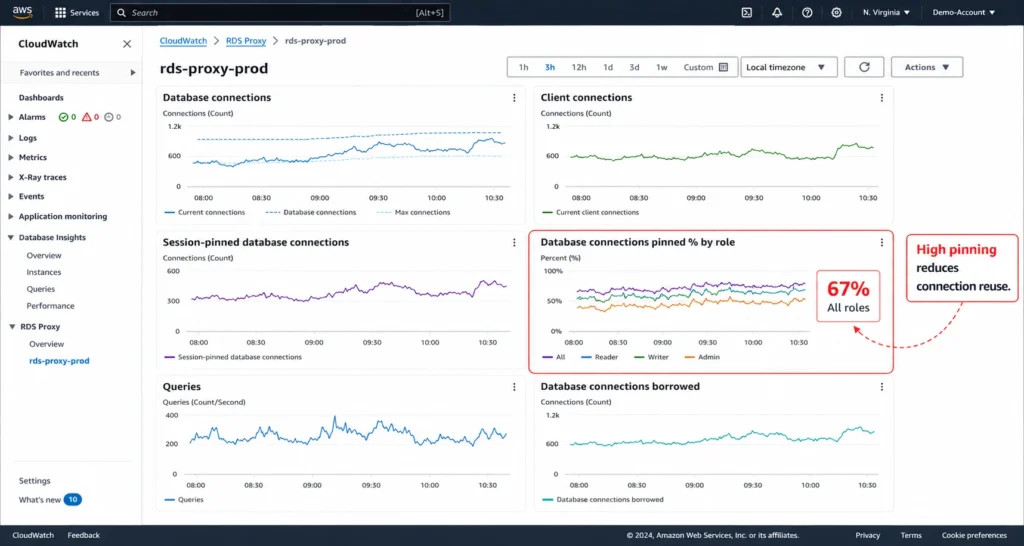
Do not disable normal pinning safeguards simply to improve the metric. AWS warns that session pinning filters bypass default safety behavior and can produce incorrect application behavior when queries depend on session state.
Aurora Serverless proxy pricing
Aurora Serverless uses a different RDS Proxy billing basis.
Instead of provisioned vCPUs, AWS charges RDS Proxy per ACU-hour consumed by the Aurora Serverless database, subject to an eight-ACU minimum for each hour, as shown on the AWS RDS Proxy pricing page.
At the US East example rate of $0.015 per ACU-hour:
Do not model an 8-ACU RDS Proxy minimum as an official AWS pricing rule. AWS currently describes proxy billing based on ACUs consumed by the Aurora Serverless database and does not publish an 8-ACU hard minimum on its pricing page.
Is RDS Proxy worth it?
Use workload evidence rather than a universal yes or no.| Question | Stronger RDS Proxy case | Weaker case |
|---|---|---|
| Connection attempts | Frequent spikes | Low and predictable |
| Connection headroom | Often tight | Comfortable |
| Existing pooling | Weak or difficult | Mature and effective |
| Failover sensitivity | High | Low |
| AWS-native authentication | Important | Not needed |
| Session pinning | Low | High |
| Self-managed operations | Expensive | Already standardized |
| Proxy cost vs value | Small and justified | Material with little gain |
Measure client connection attempts and database connections.
Identify the exact problem you want RDS Proxy to solve.
Verify engine, version, and Region eligibility.
Calculate the direct RDS Proxy charge.
Compare it with full self-managed TCO.
Measure session pinning under realistic traffic.
Test database failover.
Make the decision per workload.
Optimize the surrounding RDS cost
RDS Proxy is only one part of the database bill.Right-sizing the underlying provisioned database can reduce both database cost and proxy cost when the move lowers the number of vCPUs. Do not right-size based only on the average CPU. Include memory, IOPS, throughput, latency, connection behavior, peaks, and recovery requirements.
Commitment discounts are a separate decision.
Stable workloads that fit specific configurations can use Reserved DB Instances, including three-year options. For eligible database usage, AWS Database Savings Plans provide a one-year, No Upfront commitment model with savings of up to 35%. AWS says these plans automatically apply across eligible serverless and provisioned database usage and can move across supported services, Regions, instance families, sizes, and deployment options.
Database Savings Plans and Reserved Instance discounts do not stack on the same workload. One discount can cover one workload while another commitment covers different eligible usage. RDS Proxy charges remain separate from both mechanisms.
For more detail, see our AWS Database Savings Plans guide and RDS Reserved Instances guide.
How Usage.ai fits into the cost strategy
RDS Proxy optimization and commitment optimization solve different problems.RDS Proxy focuses on connection management and application resilience. Our role at Usage.ai is to help teams evaluate and manage eligible cloud commitments after the underlying workload has been right-sized and the stable usage baseline is understood.
With our Flex Commitment Program, we help teams manage eligible cloud commitments based on actual usage patterns while reducing the long-term commitment exposure they would otherwise carry directly.
For eligible covered commitments, cashback protection applies according to current program eligibility and agreed terms when the commitment becomes more expensive than equivalent On-Demand usage.
This protection applies to eligible commitments we manage. It does not turn RDS Proxy charges into commitment-discountable usage.
Review RDS Proxy costs, database spend, and commitment opportunities separately.
Frequently asked questions
What is RDS Proxy pricing?
RDS Proxy pricing is capacity-based. For supported provisioned databases in US East (N. Virginia), the rate used in this guide is $0.015 per vCPU-hour. The minimum is two vCPUs per provisioned database. Aurora Serverless is $0.015 per consumed ACU-hour with an eight-ACU hourly minimum per database. Rates can vary by Region, so verify the current AWS RDS Proxy pricing before finalizing a cost model.
Is RDS Proxy required for Lambda?
No. Lambda is a strong RDS Proxy use case when rapid concurrency creates substantial database connection pressure, but it is not mandatory for every Lambda workload. Measure connection churn and database headroom first.
What are the main RDS Proxy limitations?
Support varies by database engine, version, and Region. RDS Proxy does not support RDS for Oracle or Db2, and RDS Custom for SQL Server is unsupported. Current AWS RDS Proxy support documentation lists SQL Server 2016, 2017, and 2019.
Does RDS Proxy reduce database cost?
Not directly. RDS Proxy adds a separate charge. Its financial value comes from benefits such as connection reuse, managed operations, authentication options, and failover handling when those benefits are valuable enough to offset its price.
Is PgBouncer cheaper than RDS Proxy?
It can be cheaper on direct infrastructure cost. A complete comparison should include high availability, networking, monitoring, patching, incident response, and engineering time. Teams that already operate PgBouncer efficiently may favor it, while others may prefer the managed RDS Proxy model.




