
 AWS
 Microsoft Azure
 Google Cloud


What Redshift UNLOAD pricing includes
AWS states in its Amazon Redshift pricing documentation that there is no charge for data transferred between Redshift and S3 in the same Region for backup, restore, load, and unload operations.Cross-Region UNLOAD is different. Standard AWS data transfer rates apply, and the REGION parameter is required when the S3 bucket is in a different Region from the Redshift database. See the Amazon Redshift UNLOAD documentation.
Even when transfer is free, four cost categories can remain:
Redshift compute used to execute UNLOAD.
S3 request charges for objects written.
S3 storage for retained export files.
Downstream Athena or Redshift Spectrum query charges.
Enhanced VPC Routing cost risk
Enhanced VPC Routing itself does not add an AWS feature charge. The risk is the network path around it.When Enhanced VPC Routing is enabled, COPY and UNLOAD traffic moves through your VPC. For same-Region Amazon S3 traffic, an S3 gateway VPC endpoint can route traffic without an hourly endpoint charge or per-GB gateway endpoint processing charge. AWS explains this behavior in its Enhanced VPC Routing documentation.
If traffic instead passes through a NAT Gateway, NAT processing charges apply. In US East (N. Virginia), AWS pricing examples use $0.045 per GB processed. For an export modeled as 1,000 GB, that is about $45 in processing charges per run.
NAT Gateway hourly and public IPv4 charges can also apply. Include them when your organization allocates those standing costs to UNLOAD. Check current rates on the AWS VPC pricing page.
For a deeper look at network charges, see our AWS network costs guide.
What a 1 TB nightly UNLOAD costs
AWS uses $3.26 per hour for ra3.4xlarge in a US East pricing example. S3 Standard PUT requests are $0.005 per 1,000 requests in the relevant request tier. Verify current rates before using these assumptions in a production budget.
| Cost component | NAT path | S3 gateway endpoint |
|---|---|---|
| Same-Region Redshift to S3 transfer | $0 | $0 |
| NAT processing, 1,000 GB × $0.045 | $45.00 | $0 |
| Allocated cluster compute, 2 × $3.26 | $6.52 | $6.52 |
| About 1,000 S3 PUT requests | $0.005 | $0.005 |
| Approximate variable cost per run | $51.53, plus applicable NAT Gateway hourly and public IPv4 charges | $6.53 |
This is an illustrative allocation model, not a complete NAT architecture bill. Shared NAT hourly and IPv4 charges may span several workloads. If the cluster already runs for other work, the $6.52 compute amount is allocated rather than necessarily incremental.
Format and partitioning drive scan cost
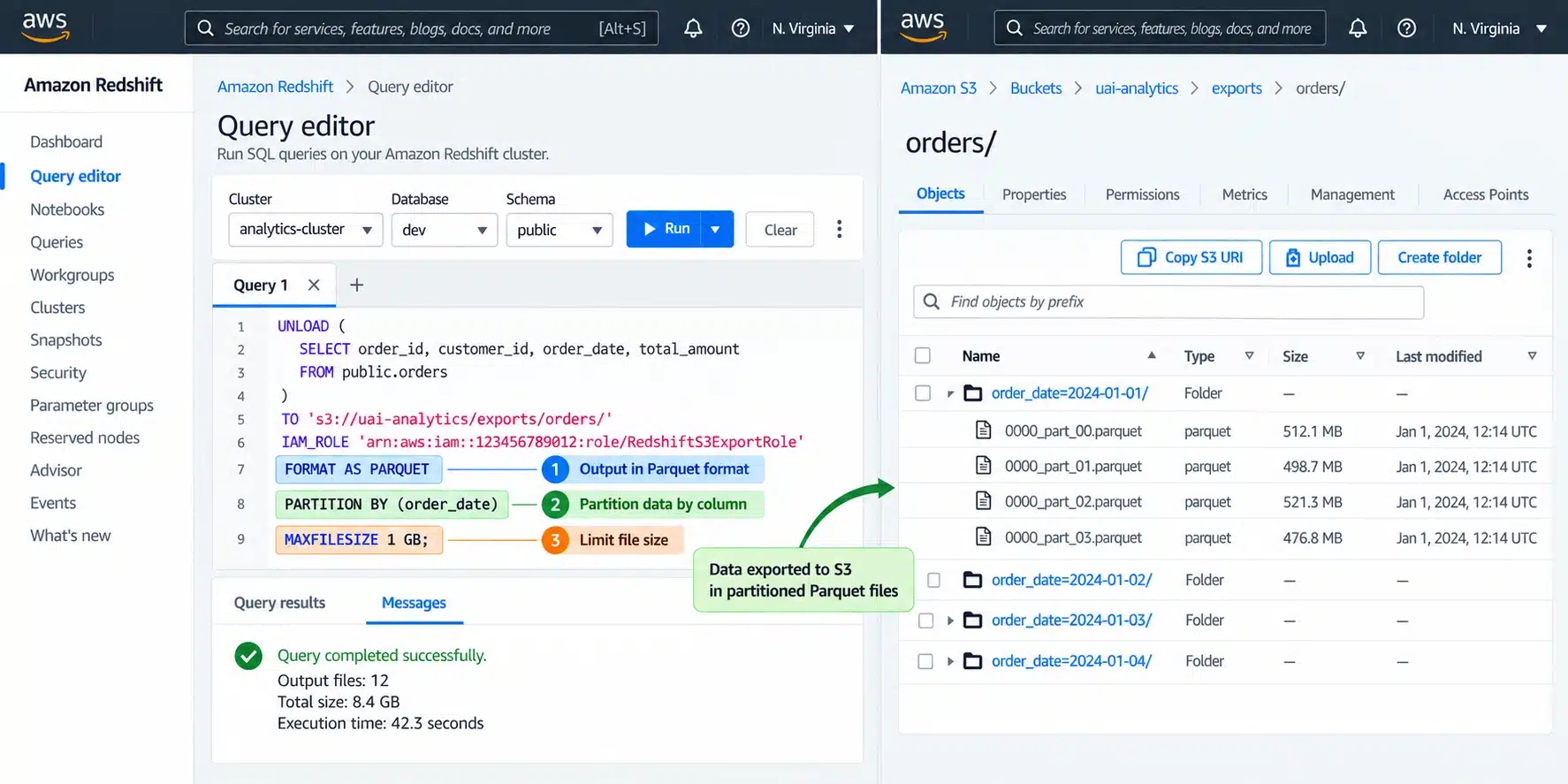
The export format can have a larger long-term effect than the UNLOAD operation itself.AWS documents that Apache Parquet output can be up to 2x faster to unload and consume up to 6x less S3 storage than text formats. The default UNLOAD format is pipe-delimited text. These are AWS-documented upper bounds, not guaranteed results for every dataset. See the UNLOAD command reference.
Parquet is columnar, so analytical engines can avoid reading unnecessary columns. PARTITION BY lets supported query engines skip unrelated partitions when filters match partition keys such as date or region.
That matters because Athena and Redshift Spectrum costs can depend on bytes scanned. A 6x storage reduction does not mean every query is 6x cheaper. Compression, selected columns, predicates, and partition pruning determine the actual reduction.
Choose partition keys around common selective filters and avoid excessive tiny partitions.
File size and S3 retention costs
UNLOAD writes one or more files per slice by default. Highly fragmented output can increase object counts and create inefficient downstream scans.MAXFILESIZE controls the maximum output size. AWS supports values from 5 MB to 6.2 GB, with 6.2 GB as the default maximum when MAXFILESIZE is not specified. PARALLEL OFF writes serially to fewer files, but disabling parallelism can increase export time.
Choose file size based on downstream query behavior, object count, and write parallelism. PUT charges are usually small compared with recurring compute, storage, or scan costs.
A nightly export retained indefinitely creates a growing S3 bill even when transfer remains free. Before automating it, define:
How long each export must be retained.
Who owns cleanup and lifecycle policies.
Whether older files should transition to another storage class.
Whether every historical export is still needed by downstream teams.
Redshift Serverless UNLOAD pricing
Redshift Serverless follows the same same-Region transfer rule, but compute billing differs. Active compute is billed in RPU-hours on a per-second basis with a 60-second minimum, while Redshift Managed Storage is billed separately.At $0.375 per RPU-hour, a 30-minute job consuming 64 RPUs is:
For intermittent exports, compare Serverless RPU-hours and managed storage with the incremental cost of provisioned capacity. The lower-cost option depends on duration, scaling, and existing utilization.
AWS currently documents one-year Serverless Reservations with discounts up to 24%, depending on payment option. AWS also announced a three-year Serverless Reservation option on February 23, 2026, with savings up to 45%.
Usage beyond the reserved RPU level is charged at standard on-demand rates. See the current Redshift Serverless billing documentation and AWS three-year Reservation announcement for current availability.
If the provisioned cluster already runs continuously, do not assume Serverless is cheaper. Compare its incremental cost with Serverless compute, storage, and scaling.
Choosing your UNLOAD configuration
Use this matrix before the next large export.| Decision | Usually safer starting point | Cost consequence if ignored |
|---|---|---|
| Destination Region | Same Region as Redshift | Cross-Region transfer charges |
| Enhanced VPC Routing path | S3 gateway endpoint for same-Region S3 | NAT processing and related standing costs |
| Analytical format | Parquet | More storage and potentially more bytes scanned |
| Partitioning | Common selective filters | Repeated broad scans |
| File size | Tune MAXFILESIZE to consumer behavior | Too many objects or reduced parallelism |
| Retention | Explicit lifecycle policy | Storage grows indefinitely |
| Compute model | Compare provisioned and Serverless using actual workload shape | Idle capacity or higher active compute cost |
How UNLOAD fits Redshift cost strategy
Once routing, format, partitioning, file sizing, and retention are correct, the larger recurring decision is how you pay for a stable Redshift compute.AWS recommends RG for provisioned clusters. When assessing an existing RA3 deployment or comparing node families, evaluate required performance, data size, and expected data growth. Right-size the cluster first, then evaluate commitment coverage after the configuration is stable.
For the commitment layer, our Redshift Reserved Node pricing guide explains node types, payment options and native commitment obligations.
Usage.ai is a multicloud cost optimization platform for AWS, Microsoft Azure and Google Cloud. In this Redshift example, it manages eligible commitment purchases and renewals in your AWS account within your approved controls. Your organization retains ownership, and AWS terms and payment obligations continue to apply.
Eligible Flex Insured Commitments may receive Cashback protection for qualifying losses under the applicable agreement. A loss is assessed against the On-Demand cost of the same covered usage; unused capacity does not automatically qualify for reimbursement. Eligibility, exclusions, required notice, credits or offsets, payout timing and service-exit effects follow your agreement.
Our fee is a percentage of realized savings only. If we don’t save you money, you don’t pay anything.
Review your Redshift baseline, reserved coverage, and commitment risk after optimization.
Frequently asked questions
Is Redshift UNLOAD to S3 free?
Same-Region data transfer between Redshift and S3 is free for unload operations. You can still pay for Redshift compute, S3 requests and storage, NAT processing if traffic takes that path, and downstream query costs.
Does a cross-account S3 bucket add transfer charges?
Not by itself. The transfer rule is based on Region. A cross-account S3 destination in the same Region can use the same-Region transfer exemption, but bucket policy, IAM role, and object permissions must allow the write.
Can I UNLOAD to encrypted S3?
Yes. UNLOAD uses SSE-S3 by default and supports SSE-KMS. Client-side encryption for COPY and UNLOAD is no longer supported after April 30, 2026. With customer-managed KMS keys, standard KMS charges can also apply.
What is the maximum UNLOAD file size?
MAXFILESIZE accepts values from 5 MB to 6.2 GB. If it is not specified, the default maximum is 6.2 GB. Choose the value based on downstream behavior rather than PUT-request cost alone.
Does pausing a provisioned cluster stop UNLOAD billing?
A paused provisioned cluster cannot execute UNLOAD queries. Pausing suspends on-demand compute billing while storage charges continue. If UNLOAD is the only reason the cluster stays active off-hours, schedule the job during the normal operating window before keeping extra runtime.