
 AWS
AWS Microsoft Azure
 Google Cloud

How Much Does DynamoDB Export to S3 Cost?
In US East (N. Virginia), full and incremental DynamoDB exports are $0.10/GB in the checked catalog. Full exports bill table data and local secondary indexes at the selected snapshot; incremental exports bill change data processed from PITR, subject to a 10 MB minimum per export. Neither charge is calculated from compressed S3 output size. Pricing checked October 15, 2026. Source: AWS DynamoDB pricing.
That $0.10/GB line item is not the total cost. Every export workflow has four cost components running in parallel:
| Cost Component | How It’s Billed | Approximate Rate (US East, October 15, 2026) |
|---|---|---|
| DynamoDB Export Fee | Full: snapshot data; incremental: processed change data | $0.10 per GB |
| PITR (Continuous Backup) | Per GB-month of current table size | $0.20 per GB-month |
| S3 Storage | Per GB-month stored in S3 | $0.023 per GB-month (Standard) |
| S3 PUT Requests | Per 1,000 PUT requests | $0.005 per 1,000 requests |
Note: Athena query costs apply separately if you query the exported data — $5.00 per TB scanned (US East, October 15, 2026 — verify at aws.amazon.com/athena/pricing). Data transfer between DynamoDB and S3 within the same AWS Region is $0.00. Cross-region transfers incur standard data transfer fees.
What Changed From Last Year: November 2024 DynamoDB Price Cut
AWS reduced DynamoDB on-demand throughput pricing by 50% in November 2024. Export pricing ($0.10/GB) was not changed. PITR pricing ($0.20/GB-month) was not changed. For teams evaluating whether to switch from on-demand to provisioned capacity in light of the price cut, the backup and export cost stack remains identical — only the throughput component of your bill changed.
The practical implication: at higher table sizes, PITR cost is now proportionally larger relative to throughput cost than it was before November 2024. A 500 GB table with PITR enabled costs $100/month in PITR fees alone. That cost is unchanged and should be weighed carefully when deciding whether to keep PITR enabled solely to unlock the export feature.
Also read: DynamoDB Reserved Capacity: Pricing for Read & Write Throughput
Full Export vs Incremental Export: Cost Comparison at Every Scale
Full Export: Exports the entire table state at a specified point in time within your PITR window. Billed on total table size. Each full export creates a complete snapshot in S3.
Incremental Export: Exports only the changes (inserts, updates, deletes) between two specified timestamps. The time window must be between 15 minutes and 24 hours. Billed on the size of change data processed from PITR backups. Has a minimum charge of 10 MB per export.
The correct choice depends on how much of your table changes between export runs. A table where 5% of items change per day looks very different from an append-only event table where 100% of data is new each day.
Worked Example: 100 GB Table, Daily Export Frequency
Assume a constant 100 GB table and 30 exports in a modeled month. Full exports cost 100 × $0.10 × 30 = $300. If each incremental run processes 5 GB, incremental export fees are 5 × $0.10 × 30 = $15. Both incur $20 of monthly PITR at a constant 100 GB. The export-fee saving is $285/month.
S3 charges depend on actual compressed output, retention and average stored bytes, not just the final day’s cumulative output. For an explicitly steady-state illustration with 30 full 100-GB output snapshots continuously retained, S3 storage is 3,000 × $0.023 = $69/month. If the incremental approach continuously retains a 100-GB base snapshot plus thirty 5-GB change files, its 250-GB footprint costs $5.75/month. Under these separate output-size assumptions, the subtotals are $389 versus $40.75, a $348.25 difference before PUT requests, initial exports, reconstruction, queries, transfer and tax.
Output sizes above are assumptions, not guaranteed compression results. In the first month, a growing archive has lower average storage than its month-end footprint. Incremental files also need a suitable base state when reconstructing full snapshots.
At 80 GB of processed changes per run, thirty incremental exports cost $240, versus $300 for thirty full exports: $60 less in export fees. Count processed change bytes and minimum charges; the percentage of items touched alone is insufficient.
PITR Is Required: What It Costs and What You’re Actually Paying For
PITR (Point-In-Time Recovery) is a prerequisite for DynamoDB Export to S3. You cannot export without it. PITR is billed at $0.20 per GB-month based on the current size of your table (table data plus local secondary indexes) as of October 15, 2026. This is a continuous charge — it runs every second your table exists with PITR enabled.
For teams considering PITR purely as the mechanism to unlock S3 export, the economics look like this:
| Table Size | Monthly PITR Cost | Annual PITR Cost |
|---|---|---|
| 10 GB | $2.00 | $24.00 |
| 50 GB | $10.00 | $120.00 |
| 100 GB | $20.00 | $240.00 |
| 500 GB | $100.00 | $1,200.00 |
| 1 TB | $200.00 | $2,400.00 |
| 5 TB | $1,000.00 | $12,000.00 |
For large tables where PITR is enabled only for the export capability — not for actual disaster recovery use, this cost deserves scrutiny. If you are running weekly exports on a 1 TB table but have no intention of using PITR for table restoration, you are paying $200/month for the PITR feature to be available.
The alternative for scheduled archival without PITR is on-demand backups ($0.10/GB-month for the backup storage, billed on total backup size), but on-demand backups do not support the native export to S3 feature. The export API exclusively uses PITR. If cost management is the goal, the decision is: $0.20/GB-month for PITR versus the engineering cost of building a custom export pipeline using DynamoDB Streams.
At table sizes below 100 GB, PITR cost is typically immaterial and the convenience of native export wins. Above 500 GB, the $100/month-plus PITR cost becomes a line item worth tracking.
How to Export Data from DynamoDB to S3
Prerequisites:
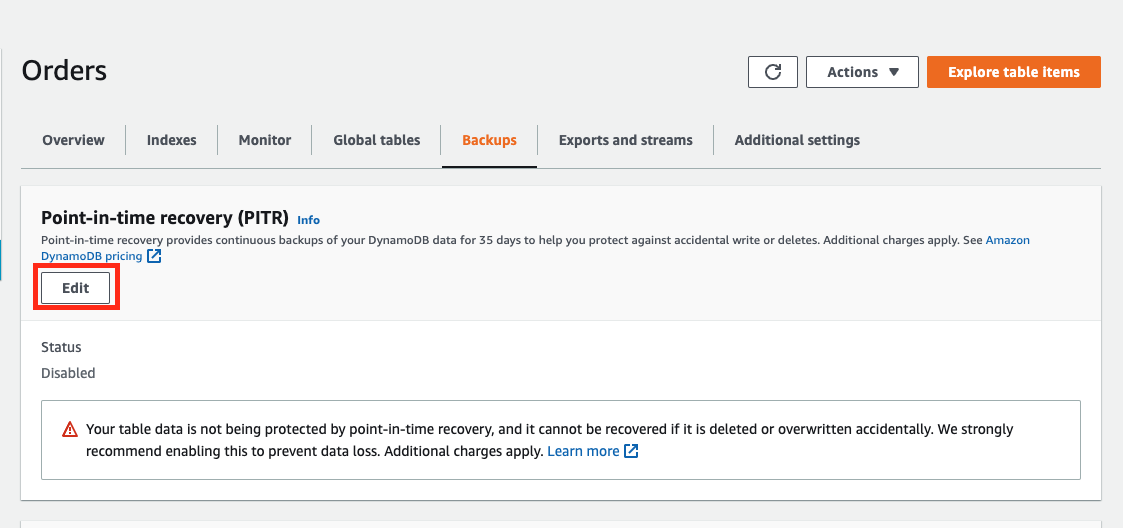
- PITR must be enabled on the source DynamoDB table
- An S3 bucket in the same AWS account or a target account
- IAM permissions: dynamodb:ExportTableToPointInTime and s3:PutObject, s3:AbortMultipartUpload, s3:PutObjectAcl on the destination bucket
- The S3 bucket does not need to be in the same region as the DynamoDB table, but cross-region transfers incur data transfer fees
Step 1: Enable PITR on the table (if not already enabled)
–table-name YOUR_TABLE_NAME \
–point-in-time-recovery-specification PointInTimeRecoveryEnabled=true
Step 2: Initiate a full export
–table-arn arn:aws:dynamodb:us-east-1:123456789012:table/YOUR_TABLE_NAME \
–s3-bucket your-export-bucket \
–s3-prefix dynamodb-exports/your-table/ \
–export-time “2026-04-01T00:00:00Z” \
–export-format DYNAMODB_JSON
Supported export formats: DYNAMODB_JSON and ION. Use ION if you intend to query the data with Amazon Athena using the Ion SerDe, it produces more compact output and parses faster in Athena. Use DYNAMODB_JSON for compatibility with AWS Glue, SageMaker, and custom processing pipelines.
Step 3: Initiate an incremental export
–table-arn arn:aws:dynamodb:us-east-1:123456789012:table/YOUR_TABLE_NAME \
–s3-bucket your-export-bucket \
–s3-prefix dynamodb-exports/your-table/incremental/ \
–incremental-export-specification ‘{
“ExportFromTime”: “2026-04-01T00:00:00Z”,
“ExportToTime”: “2026-04-02T00:00:00Z”,
“ExportViewType”: “NEW_AND_OLD_IMAGES”
}’
The ExportViewType parameter accepts two values: NEW_IMAGE (only the item state after the change) and NEW_AND_OLD_IMAGES (both the before and after state). Use NEW_AND_OLD_IMAGES for CDC-style analytics pipelines where you need to track what changed and what the previous value was. Use NEW_IMAGE for simpler data lake ingestion where only current state matters, this produces smaller output files and lower S3 storage costs.
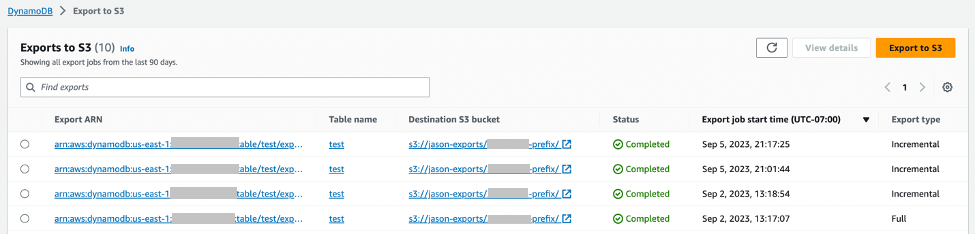
Step 4: Verify the export completed successfully
–export-arn arn:aws:dynamodb:us-east-1:123456789012:table/YOUR_TABLE_NAME/export/01234567890123-abc12345
A successful export returns “ExportStatus”: “COMPLETED” with “ExportedItemCount” and “ItemCount” fields. If the export fails, the “FailureCode” and “FailureMessage” fields contain the error detail.
What to do if the export fails:
The most common failure is INVALID_S3_PREFIX: verify your bucket exists, is in a supported region, and that the IAM role has s3:PutObject on the specific prefix. The second most common failure is POINT_IN_TIME_RECOVERY_NOT_ENABLED: PITR must be active at the time of the export, not just at the time you run the command. If PITR was disabled and re-enabled between your last export and the current one, you will lose the continuous backup window and must run a full export before incremental exports can resume.
How Long Does It Take to Export DynamoDB to S3?
Export duration scales with table size and is handled asynchronously by AWS infrastructure; you do not pay for compute while the export runs. The export does not consume your table’s read capacity units during this time. Based on AWS documentation and community reporting (verify with your own workloads):
| Table Size | Approximate Full Export Duration |
|---|---|
| Under 1 GB | 2 to 10 minutes |
| 10 GB | 5 to 20 minutes |
| 100 GB | 20 to 60 minutes |
| 500 GB | 1 to 3 hours |
| 1 TB | 2 to 5 hours |
| 5 TB | 5 to 12 hours |
These are estimates based on AWS blog posts and community reports. Actual duration depends on partition count, item size distribution, and current AWS regional capacity. AWS does not publish an SLA for export duration.
Incremental exports over short time windows (15 minutes to a few hours) complete significantly faster than full exports, typically within 2 to 15 minutes, regardless of overall table size, because they only process the changed data volume.
If your use case requires near-real-time data in S3: latency under 15 minutes, DynamoDB Streams with a Kinesis Data Firehose delivery stream is the correct architecture. Export to S3 is a batch mechanism, not a streaming one.
Also read: AWS Savings Plan Buying Strategy: Layering, Timing & Right-Sizing Commitment
S3 Export Output Format and What It Costs to Query with Athena
Each DynamoDB Export to S3 lands as gzip-compressed files in your S3 bucket. Output files are organized under a prefix structure: s3://your-bucket/prefix/AWSDynamoDB/ExportId/data/
Each file contains one DynamoDB item per line in JSON or Ion format. Files are partitioned by DynamoDB table partition- on-demand capacity tables have a minimum of 4 partitions, each producing one output file. Larger tables with more partitions produce more files.
S3 PUT request cost: For a 100 GB table with 100 partitions, you get approximately 100 files per export. At $0.005 per 1,000 PUT requests, 100 files = $0.0005 per export, effectively zero. S3 PUT costs are negligible for DynamoDB exports.
Athena query cost: Athena charges $5.00 per TB scanned (US East, October 15, 2026, verify at aws.amazon.com/athena/pricing). Because DynamoDB exports are gzip-compressed, Athena reads compressed bytes, which reduces the scan cost relative to uncompressed data.
For a 100 GB uncompressed DynamoDB table exported as gzip, expect roughly 40 to 60 GB of compressed output (DynamoDB JSON compresses at approximately 40 to 60% of the original size for typical workloads). An Athena query scanning all output files costs approximately 0.05 TB x $5.00 = $0.25 per full-table query.
Using columnar formats (Parquet via AWS Glue conversion after export) reduces Athena scan costs by 60 to 90% for column-selective queries, relevant for large tables with wide schemas where analytics only touches a few attributes.
Total Cost of Ownership: DynamoDB Export vs DynamoDB Scan vs Custom Stream Pipeline
FinOps teams often evaluate three architectures for moving DynamoDB data to an analytics layer. The correct choice depends on table size, update frequency, and acceptable data latency.
| Architecture | Export Fee | PITR Required | RCU Impact | Data Freshness | Monthly Cost (100 GB table, daily refresh) |
|---|---|---|---|---|---|
| Native Export to S3 (full) | $0.10/GB | Yes ($20/mo) | Zero | Up to 35 days ago, batch | $320 + S3 and requests |
| Native Export to S3 (incremental daily) | $0.10/GB on changes | Yes ($20/mo) | Zero | Daily batch | $35 + S3 and requests (5 GB processed per daily run) |
| DynamoDB Scan via Glue/EMR | None | No | Full RCU consumption | Real-time to hours | High — RCU costs dominate |
| DynamoDB Streams + Kinesis Firehose | Stream read units | No | Reads from stream | Sub-minute | Variable by write rate |
Choose the export method using measured table size, processed changes, output retention and equivalent query requirements. Native exports avoid table read-capacity charges, but PITR, export fees, S3, reconstruction and query costs can change which architecture is cheapest. There is no universal 10-GB or freshness threshold that proves one method always wins.
For sub-15-minute data freshness requirements, DynamoDB Streams with Kinesis Firehose is the correct architecture. Export to S3 is asynchronous and batch: it cannot substitute for streaming.
What Is Cheaper, DynamoDB or S3?
This is a frequently asked question that conflates two very different services. DynamoDB is a low-latency NoSQL database billed per read and write operation plus storage. S3 is object storage billed per GB-month plus request count. They serve different purposes and the cost comparison depends entirely on the use case.
For storing data that needs millisecond-latency key-based lookup: DynamoDB is the correct choice. For storing data that will be read in large batches, infrequently, or by analytics services: S3 at $0.023/GB-month is dramatically cheaper than DynamoDB storage at $0.25/GB-month. Exporting historical or infrequently accessed DynamoDB data to S3 and querying it with Athena reduces storage cost by more than 90% on the data that moves.
This is precisely the cost optimization pattern that DynamoDB Export to S3 enables: keep hot data in DynamoDB for low-latency access, move cold or historical data to S3, query it cheaply with Athena. A 1 TB historical dataset stored in DynamoDB costs $250/month in storage alone. The same dataset in S3 Standard costs $23/month, a $227/month reduction per terabyte, before any query cost savings.
DynamoDB Reserved Capacity and Its Relationship to Export Costs
DynamoDB Reserved Capacity (DynamoDB Reserved Instances, available through Usage.ai’s platform) reduces the cost of provisioned read and write capacity units by 30 to 40% depending on term. Export costs, PITR costs, and S3 costs are entirely separate and are not covered by Reserved Capacity commitments.
The strategic interaction matters: teams running large provisioned DynamoDB tables should evaluate their export and PITR costs as part of their total DynamoDB cost picture, not just their throughput costs. At 1 TB, your monthly cost stack might look like this before any optimization:
- Throughput (provisioned): $X per month (depends on WCU/RCU levels)
- Storage: $250/month
- PITR: $200/month
- Export to S3 (weekly full): $400/month (1 TB x $0.10 x 4 runs)
- S3 storage (export archive): $23/month per TB retained
For a 1,000-GB table, four full exports cost $400. Thirty daily incremental exports processing 100 GB each cost $300, an export-fee difference of $100 under that modeled month. A 10% daily change rate does not justify multiplying a weekly export bill by 10%; the compared frequencies and processed change volumes must match.
Usage.ai’s platform covers DynamoDB throughput cost via Flex Reserved Instances, delivering 30 to 40% savings on provisioned capacity with no multi-year lock-in and cashback protection on underutilized commitments. If your DynamoDB provisioned throughput spend exceeds $3,000 per month, that is a higher-magnitude cost reduction than export optimization — but both should be in your FinOps playbook.
See DynamoDB Reserved Capacity: Pricing for Read and Write Throughput for the throughput cost analysis.
For teams evaluating whether to move cold data out of DynamoDB entirely, the backup and export cost stack is often the trigger. A modeled 5,000-GB table paying $1,000/month in PITR plus $1,250/month in Standard storage before free allowances has a strong economic case for cold-tier migration. See DynamoDB Standard vs Standard-IA Table Class: When to Switch for the storage class cost analysis.
Worked Example: Full Monthly Cost for a 500 GB Table with Four Exports
Assume a constant 500 GB table, four full exports, PITR throughout the month, a measured average 2,000 GB of billable S3 output storage, 2,000 PUTs, and 40 Athena queries scanning 0.25 TB each after compression. This is a modeled four-export month; a calendar year has about 52 weeks, not 48. Source rates are US East (N. Virginia).
| Line item | Calculation | Modeled monthly cost |
|---|---|---|
| Export fees | 500 GB × $0.10 × 4 | $200.00 |
| PITR | 500 GB × $0.20 | $100.00 |
| Average S3 storage | 2,000 GB × $0.023 | $46.00 |
| S3 PUTs | 2,000 / 1,000 × $0.005 | $0.01 |
| Athena | 40 × 0.25 TB × $5/TB | $50.00 |
| Total for listed components | Before other applicable charges | $396.01 |
The Athena calculation is 10 TB scanned in total, costing $50; it is not $250. S3 storage is a separate measured average: query compression does not by itself determine the whole archive footprint.
For comparison, 30 daily incremental exports processing 50 GB each cost $150, plus the same $100 PITR. Add the actual base snapshot and change-file storage, PUTs, reconstruction and query costs. Scanning only change sets answers a different question from scanning a full table; the earlier $286.51 “saving” compared different query workloads and is not a valid like-for-like result.
Use AWS Athena pricing, S3 pricing and measured scanned bytes to calculate a comparable total. All amounts are illustrative and exclude credits, tax and unlisted services.




