.png)



AWS Reserved Instances (RIs) are a billing discount model that allows you to commit to a specific EC2 instance type in a particular AWS Region for a 1-year or 3-year term. In exchange for that commitment, AWS offers a significant discount of up to 72%, compared to standard On-Demand pricing. Reserved Instances do not represent physical servers; they are a pricing construct applied to eligible On-Demand usage in your account.
It is essential to understand what AWSReserved Instances are not. They are not pre-provisioned capacity (unless you use Capacity Reservations alongside them), and they do not guarantee that instances will always be available. What they guarantee is a billing discount whenever your usage matches the RI parameters you committed to.
Reserved Instances are purely a discount mechanism. If your account runs a matching On-Demand instance, the RI discount is automatically applied. If you purchase an RI but do not run matching instances, you still pay the RI fee, making right-sizing and utilization monitoring critical.
How Reserved Instances Work
When you purchase an AWS Reserved Instance, you specify several parameters: instance family, instance size, operating system, tenancy, and AWS Region (or Availability Zone for zonal RIs). AWS then applies the corresponding discount automatically whenever your running instances match those attributes. The discount applies continuously for the duration of the term, 24 hours a day, 7 days a week.
The discount rate depends on three factors: the term length (1-year vs 3-year), the payment option (No Upfront, Partial Upfront, or All Upfront), and the RI type (Standard vs Convertible). We explore each of these in detail throughout this guide.
On-Demand vs Reserved Instances: The Core Trade-off
On-Demand instances offer complete flexibility; you pay by the hour (or second) with no commitments. This flexibility is valuable for unpredictable workloads, testing environments, or new applications whose resource requirements are uncertain. However, that flexibility comes at a premium price.
AWS Reserved Instances require commitment to a specific configuration for 1 or 3 years. The longer and more committed you are, the more AWS rewards you. The fundamental question for any engineering or finance team is: which portion of our workload is stable enough to commit to? That baseline steady-state usage is the optimal RI candidate.
Table: The three main EC2 pricing models and their primary use cases.
Read more: “On-Demand vs Reserved vs Spot Instances: Which Should You Use?”
Standard, Convertible & Scheduled Reserved Instances
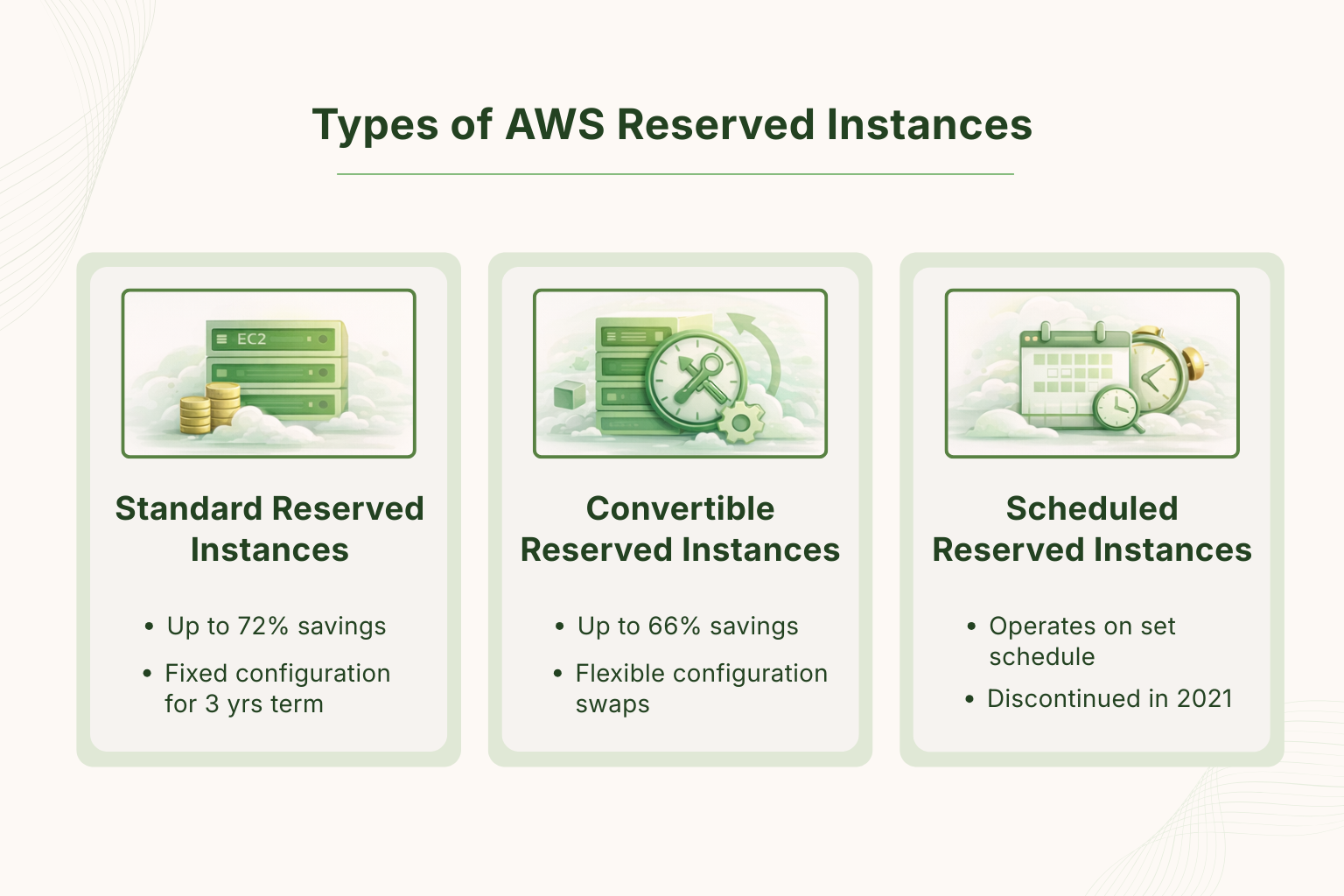
AWS offers three distinct types of AWS Reserved Instances, each designed for a different usage pattern. Understanding the differences, especially between Standard and Convertible, is the most important decision in your RI strategy.
Standard Reserved Instances
Standard RIs offer the largest discount (up to 72% for a 3-year All Upfront). The trade-off is inflexibility: once purchased, you cannot change the instance family, operating system, or tenancy. You can modify the instance size within the same family and change the Availability Zone, but the core attributes are locked.
Standard RIs are ideal for mature, well-understood workloads where you have high confidence in both the instance type and the sustained usage level. Production databases, web servers running well-defined applications, and data pipeline workers that have been stable for many months are good candidates.
You can also sell unused Standard RIs on the AWS Reserved Instance Marketplace, which provides a partial exit option if your needs change.
Convertible Reserved Instances
Convertible RIs trade a portion of the discount (up to 66% for 3-year All Upfront) for significant flexibility. You can exchange a Convertible RI for a different instance family, operating system, tenancy, or even a different AWS Region. This makes Convertible RIs suitable for organizations that anticipate architectural changes, OS migrations, or workload evolution over the 3-year term.
The exchange process requires that the new RI be of equal or greater value than the original. If the new RI is more expensive, you pay the difference. This ‘always upgrading, never downgrading’ constraint is an important consideration in conversion planning.
Convertible RIs cannot be sold on the AWS RI Marketplace. If you need an exit option, Standard RIs give you that, but at the cost of flexibility.
Scheduled Reserved Instances
Scheduled RIs were designed for workloads that only run on a predictable recurring schedule. However, AWS officially discontinued Scheduled RI purchasing as of October 31, 2021. AWS now recommends On-Demand Capacity Reservations with Savings Plans as a replacement.
Table: Standard vs Convertible Reserved Instances, full feature comparison. Green indicates the stronger option for that attribute.
Read more: AWS Savings Plans vs Reserved Instances
RI Pricing Models & Payment Options Explained
AWS Reserved Instances are priced across two dimensions: the term length and the payment option. These two variables determine both the level of discount and your cash-flow commitment. Understanding the interplay between these dimensions is essential to building a financially optimal RI portfolio.
Term Length: 1-Year vs 3-Year
Choosing the right commitment term can be a challenging task. A 1-year term offers a lower upfront commitment and more flexibility to re-evaluate your infrastructure annually. The discount is smaller, typically 40% for Standard All Upfront vs 72% for a 3-year commitment. For fast-moving engineering organizations, the 1-year term reduces the risk of being locked into instance types that may become obsolete.
A 3-year term maximizes savings but requires confidence in the longevity of your workload. Given AWS’s track record of releasing new instance generations every 2-3 years, a Convertible RI over 3 years is often the smarter path for those seeking maximum savings without inflexibility.
Payment Options: No Upfront, Partial Upfront, All Upfront
Within each term, you have three payment options. No Upfront requires no initial payment, you pay a fixed hourly or monthly rate throughout the term. Partial Upfront splits the cost: a lump sum at purchase and lower hourly charges for the remainder. All Upfront means you pay the entire term cost at purchase and receive the maximum discount.
All Upfront consistently delivers the best effective hourly rate. Whether that rate advantage exceeds the opportunity cost of capital depends on your organization’s internal cost of money. If your RI savings percentage exceeds your alternative investment yield, All Upfront wins.
Original EC2 Reserved Instance Pricing Table
The table below presents original pricing data for common EC2 instance types. Prices are for Linux/UNIX, Shared Tenancy in US East (N. Virginia). On-Demand rates are used as the discount baseline.
Table 1: Original EC2 Standard RI pricing data, us-east-1, Linux/UNIX, Shared Tenancy. Source: AWS EC2 Pricing API. Effective hourly rate = total upfront cost divided by total term hours.
Read more: On-Demand vs Reserved vs Spot Instances
AWS Savings Plans vs Reserved Instances
AWS introduced Savings Plans in 2019 as a more flexible alternative to AWS Reserved Instances. Rather than committing to a specific instance type, Savings Plans commit to a consistent dollar amount of usage per hour. Understanding when to use Savings Plans vs RIs, or how to combine both, is one of the most important cost optimization decisions in AWS.
The Three Savings Plan Types
AWS currently offers three Savings Plan types, each with distinct scope and discount characteristics. Compute Savings Plans are the most flexible: they apply to any EC2 instance regardless of region, instance family, OS, or tenancy, and also cover AWS Fargate and Lambda usage.
EC2 Instance Savings Plans are more restrictive but offer higher savings and apply to a specific instance family within a region. SageMaker Savings Plans apply exclusively to SageMaker ML instance usage.
AWS Savings Plans: All Types with Pricing Data
Table 2: All AWS Savings Plan types and RI types compared, scope, maximum discount, and flexibility. Data sourced from AWS official pricing documentation.
When to Use Savings Plans vs AWS Reserved Instances
The choice between Savings Plans and RIs is not binary. Most mature AWS environments use both: Savings Plans for broad coverage across services and EC2 families, and Standard RIs for the highest-savings workloads with the most predictable profiles.
A common enterprise pattern: Compute Savings Plans covering 60-70% of baseline EC2 spend, Standard RIs covering 20-30% for the most predictable instance types, and On-Demand or Spot covering the variable remainder.
The AWS Reserved Instance Marketplace
The AWS Reserved Instance Marketplace is a platform where AWS customers can buy and sell Standard RIs that they no longer need. If your infrastructure needs change, due to a migration, architecture refactor, or business shift, you can list your unused Standard RIs on the Marketplace and receive a portion of the remaining term value.
Selling on the RI Marketplace
To list an RI, you must have a US bank account registered with AWS (for sellers), the RI must have at least 1 month remaining on its term, and the RI must be a Standard RI (Convertible RIs are not eligible). AWS charges a 12% service fee on the sale price. You set your own price, the market is competitive, and underpriced listings sell faster.
Buying on the RI Marketplace
Buyers benefit from purchasing third-party RIs at prices often lower than AWS’s direct pricing, or with shorter remaining terms if they only need coverage for a specific window. The discount relative to AWS’s own price depends on market supply and demand, but it can be meaningful for short-term RIs.
Important: The RI Marketplace requires a US bank account for sellers. Non-US organizations often find this a barrier to selling unused RIs. This is one of the reasons Convertible RIs, which allow exchanges rather than sales, can be more practical for global organizations.
RI Purchase Strategy & Best Practices
Purchasing AWS Reserved Instances without a strategy is one of the most common sources of AWS waste. Organizations buy RIs based on current usage without accounting for growth trends, architectural changes, or seasonal patterns, then find themselves with underutilized commitments and escalating On-Demand costs simultaneously.
The Baseline Analysis Framework
Before purchasing any RI, analyze at least 90 days of historical usage data. The goal is to identify your minimum consistent On-Demand usage, the floor of your resource consumption. This floor is your RI candidate. Savings Plans, Spot instances, or On-Demand should cover everything above the floor. A common mistake is purchasing RIs to cover peak or average usage, which leads to underutilization during off-peak periods.
Table 3: RI coverage targets by organization maturity stage. These are indicative benchmarks; actual targets depend on workload predictability and risk tolerance.
Staggering RI Expiry Dates
One of the most overlooked aspects of RI management is expiry scheduling. If all your RIs expire in the same month, you face a massive decision point and a potential gap in coverage if procurement is delayed. A best practice is to deliberately stagger purchases so that no more than 20-25% of your RI portfolio expires in any single quarter.
Cross-Account RI Sharing
Within an AWS Organizations setup, AWS Reserved Instances purchased in any member account automatically share their discount to match usage across all accounts in the organization by default. This is a critical feature: you can centralize RI purchasing in a dedicated payer account, and all workloads across business units benefit automatically, improving portfolio utilization without manual allocation.
RDS, ElastiCache & Redshift RI Pricing
AWSReserved Instances are not exclusive to EC2. AWS offers RI pricing for Amazon RDS (relational databases), Amazon ElastiCache (in-memory caching), Amazon Redshift (data warehouse), Amazon OpenSearch Service, and more. The same discount structure applies: 1 or 3 year terms, multiple payment options, and meaningful savings compared to On-Demand rates.
Table 4: Amazon RDS Reserved Instance pricing:us-east-1. Source: AWS RDS Pricing.
Table 5: Amazon ElastiCache Reserved Node pricing. Source: AWS ElastiCache Pricing.
Table 6: Amazon Redshift Reserved Node pricing. Source: AWS Redshift Pricing.
Read more: How Usage.ai Works: RIs, SPs & Zero-Risk Savings
Complete Comparison: All AWS Discount Options
The table below covers every major AWS pricing option in a single view. From On-Demand to Spot to every RI and Savings Plan type. Use this as the definitive reference for choosing the right discount mechanism for each workload type in your environment.
Table 7: Master comparison of all AWS EC2 pricing options, discount levels, flexibility, scope, and ideal use cases.
How Usage.ai Automates Your Entire RI Lifecycle
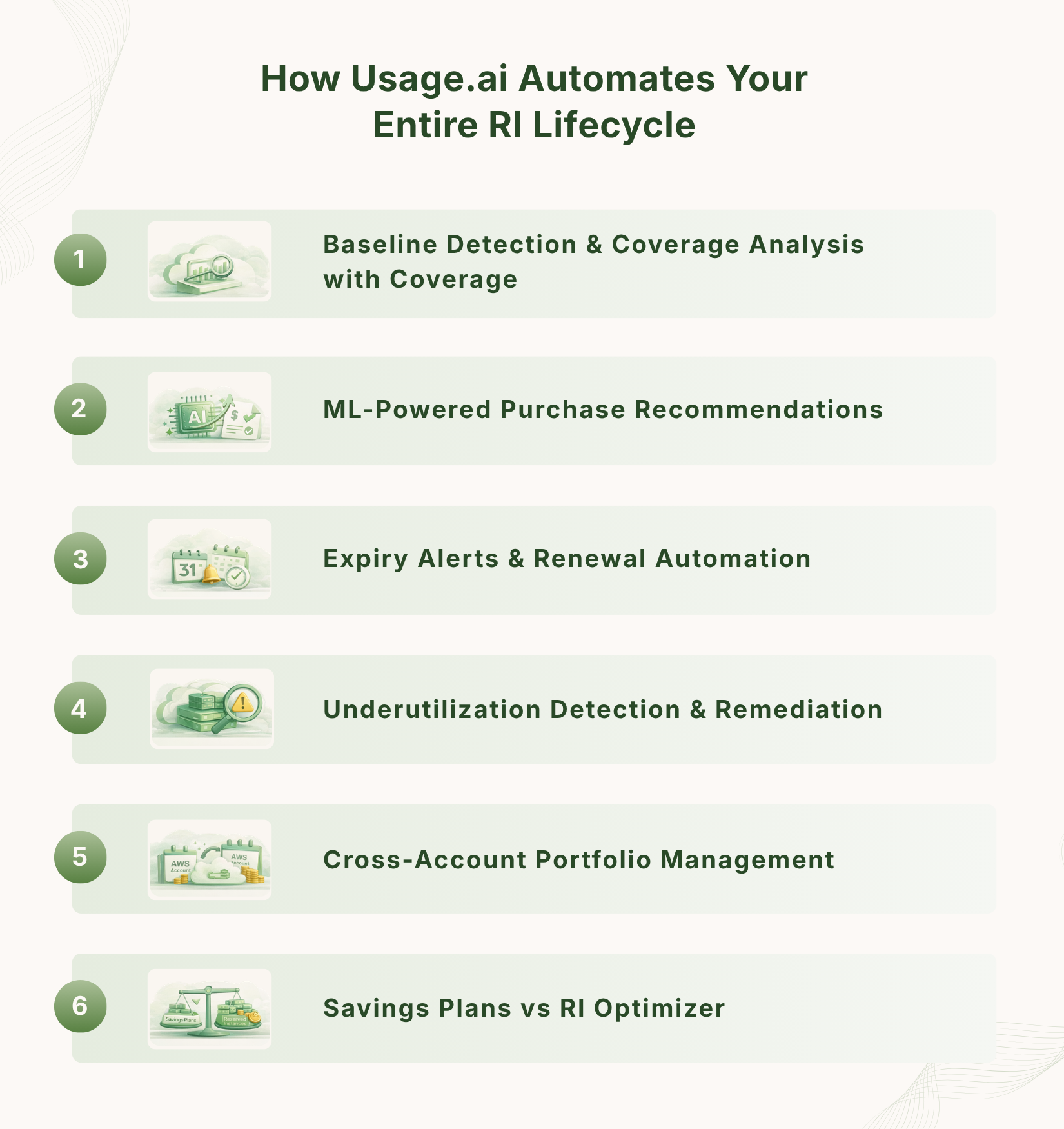
Managing AWS Reserved Instances manually and even with AWS’s native tools means constant spreadsheets, missed renewal dates, underutilization surprises, and suboptimal purchasing decisions. Usage.ai replaces this operational burden with an automated, ML-powered RI management platform that covers the complete RI lifecycle from purchase planning to expiry renewal.
Baseline Detection & Coverage Analysis
Usage.ai analyzes 90+ days of EC2 usage across all linked accounts to identify your true baseline. It separates On-Demand waste from RI candidates with statistical confidence scores, so every recommendation is backed by data, not guesswork.
ML-Powered Purchase Recommendations
The platform generates RI purchase recommendations, including type, term, and payment option is optimized for your specific cost-of-capital, risk tolerance, and workload growth trajectory. Recommendations include projected ROI and payback period.
Expiry Alerts & Renewal Automation
Usage.ai tracks every RI expiry date across your portfolio and sends alerts at 90, 60, and 30 days. Auto-renewal recommendations are generated based on current usage data, eliminating the ‘RI cliff’ that happens when teams miss renewal windows.
Underutilization Detection & Remediation
Every RI in your portfolio is monitored for utilization daily. When an RI drops below your target threshold, Usage.ai alerts you and recommends specific remediation, whether that’s selling on the Marketplace, modifying the scope, or right-sizing matched instances.
Cross-Account Portfolio Management
Usage.ai natively supports AWS Organizations, aggregating RI utilization across all member accounts. You see the full portfolio picture, not siloed per-account views, making it easy to identify cross-account sharing opportunities and portfolio gaps.
Savings Plans vs RI Optimizer
Usage.ai compares Savings Plans and AWS Reserved Instances for every eligible workload, showing the optimal blend of both. The platform calculates the exact split point where adding a Savings Plan outperforms adding more Standard RIs, accounting for coverage and flexibility trade-offs.
See Usage.ai in Action
Start saving in under 30 minutes. Usage.ai analyzes your AWS environment, identifies every RI opportunity, and manages the full lifecycle automatically. Book a Free Demo.
Explore the Full RI Knowledge Hub
Every pillar page below goes deeper into a specific aspect of AWS Reserved Instances. Navigate directly to the topic you need:
Frequently Asked Questions
1. What is the difference between a Reserved Instance and a Savings Plan?
AWS Reserved Instances commit you to a specific EC2 instance configuration (type, OS, region) in exchange for a billing discount. Savings Plans commit you to a minimum dollar-per-hour spend on compute and apply the discount to any matching usage, without locking you to a specific instance type. Savings Plans are generally more flexible; Standard RIs can offer slightly higher savings for the most stable, predictable workloads. Many organizations use both simultaneously.
2. Can I cancel an AWS Reserved Instance?
AWS Reserved Instances cannot be cancelled once purchased. However, Standard RIs can be listed and sold on the AWS Reserved Instance Marketplace (subject to a 12% service fee). If you have a Convertible RI, you can exchange it for a different RI configuration rather than selling it. If neither applies, you will continue to pay the RI cost whether you use it or not, which is why pre-purchase utilization analysis is essential.
3. What happens when an AWS Reserved Instance expires?
When an RI expires, the associated billing discount stops automatically. Your matching EC2 instances continue to run but revert to On-Demand pricing immediately at expiry. AWS sends notifications 90, 60, and 30 days before expiry. If you want to continue the discount, you must purchase a new RI. Tools like Usage.ai automate expiry tracking and generate renewal recommendations before the expiry window closes.
4. Do AWS Reserved Instances apply across multiple AWS accounts?
Yes. Within an AWS Organizations consolidated billing setup, RI discounts automatically share across all member accounts. If the account that purchased the RI does not consume its full capacity, the discount applies to matching usage in other accounts within the same organization. RI sharing is enabled by default, but can be disabled per account if needed.
5. How do I know which EC2 instances qualify for an RI discount?
An RI discount applies when a running On-Demand instance matches the attributes of your purchased RI: instance family and size, operating system, tenancy, and region or availability zone. For Regional RIs, the discount applies regardless of the AZ within the region. For Zonal RIs, the discount and capacity reservation are tied to a specific AZ.
6. What is RI utilization, and why does it matter?
RI utilization measures what percentage of your purchased RI capacity is actually being used by matching On-Demand instances. A utilization rate below 100% means you are paying for RI capacity that is not delivering savings. AWS recommends targeting 80%+ utilization, though best-in-class organizations typically achieve 90-95%+ through active monitoring and right-sizing.
7. What is RI coverage, and how is it different from utilization?
Utilization and coverage measure two different things. Utilization measures how well your purchased RIs are being used. Coverage measures the percentage of your total eligible On-Demand usage that is receiving an RI discount. An organization can have high utilization but low coverage (few RIs, all fully used) or low utilization and high coverage (many RIs, some barely used). An optimal portfolio maximizes both.
8. Should I buy 1-year or 3-year Reserved Instances?
The answer depends on workload stability. A 3-year Standard RI offers up to 72% savings but requires confidence that the instance type will remain relevant. For fast-evolving architectures, a 3-year Convertible RI at 66% is safer; you can exchange the instance type as needed. A 1-year term is appropriate when you expect significant changes within 12-18 months or when testing a new workload pattern before a longer commitment.
9. Can Reserved Instances be used for services other than EC2?
Yes. AWS offers reserved pricing for Amazon RDS, Amazon ElastiCache, Amazon Redshift, Amazon OpenSearch Service, and Amazon DynamoDB. Each service has its own RI structure, for example, RDS RIs are tied to a specific DB engine, instance class, and Multi-AZ configuration. The discount principles are similar to EC2.
10. What is the AWS RI Marketplace and how does it work?
The AWS Reserved Instance Marketplace is a secondary market where customers can sell Standard RIs they no longer need. Sellers set their own price, and AWS facilitates the transaction, charging a 12% service fee on the sale. Buyers can purchase RIs with varying remaining terms, sometimes at below AWS direct prices. Only Standard RIs (not Convertible) can be sold, and sellers need a registered US bank account.
11. How does AWS apply Reserved Instance discounts? Is it automatic?
Yes, RI discounts are applied automatically by AWS. You do not need to manually assign RIs to specific instances. When AWS generates your bill, it scans your running On-Demand usage and applies the matching RI discount wherever the instance attributes align. This happens regardless of which account in your organization is running the instance (assuming RI sharing is enabled).
12. What is a ‘convertible RI exchange’ and how do I perform one?
A Convertible RI exchange allows you to trade one or more Convertible RIs for a different set of Convertible RIs with different attributes. The new RI must be of equal or greater value. If the new configuration costs more, you pay the difference. Exchanges are performed in the AWS console under EC2 > Reserved Instances > Exchange Reserved Instances. AWS processes exchanges within minutes, and your original term end date carries over to the new RI.