
 AWS
AWS Microsoft Azure
 Google Cloud
Two tools. Two completely different questions. Most teams use one when they should be using the other.
The AWS Pricing Calculator answers: “What will this new architecture cost before I build it?” The Usage.ai AWS Savings Calculator answers: “What is my existing AWS environment overpaying right now?”
AWS has two relevant calculator experiences. The public calculator estimates configurations you enter; the in-console AWS Pricing Calculator can import historical usage and model bill changes, including commitment assumptions. Usage.ai’s uploaded-bill estimate is another way to assess potential savings without connecting an account.
This guide compares both tools across every dimension that matters for FinOps teams, engineering leads, and cloud finance practitioners, with zero fluff, factual accuracy on every claim, and a decision framework at the end so you can close the tab knowing exactly which tool to use.
The Core Difference: Forward-Looking vs Backward-Looking
Before comparing features, the most important thing to understand is the fundamental directional difference between these tools.
The AWS Pricing Calculator is forward-looking. You configure resources that do not exist yet, like instance types, storage sizes, data transfer volumes and it estimates a future monthly cost based on AWS list prices. It is excellent for pre-deployment budgeting, architecture comparisons, and finance approval processes.
The Usage.ai AWS Savings Calculator is backward-looking. You provide your real AWS bill or a Cost Explorer CSV export, and it calculates the gap between what you are currently paying and what you would pay with the right commitment strategy applied to your actual usage. It does not estimate a hypothetical future. It reads your present.
This distinction determines which tool is correct for your situation. Most teams searching for a “cloud cost calculator” need the second question answered, not the first, because they are already running in production and overpaying every month.
Side-by-Side Comparison: AWS Pricing Calculator vs Usage.ai Savings Calculator
| Dimension | AWS Pricing Calculator | Usage.ai AWS Savings Calculator |
| Direction | Forward-looking (plan future costs) | Backward-looking (identify current overspend) |
| Input required | Manual service configuration | Your actual AWS invoice or Cost Explorer CSV |
| AWS account required | No (public at calculator.aws) | No (for the savings calculator) |
| Expertise required | Medium-High (must know instance types, regions, hours) | None (upload your bill or CSV) |
| What it answers | What will this cost if I build it? | What am I wasting right now? |
| Services covered | 150+ AWS services | EC2, RDS, ElastiCache, Redshift, DynamoDB, Lambda, OpenSearch, ECS, SageMaker |
| Accuracy | Depends on quality of manual inputs | Directional estimates; reliability depends on input detail and validation |
| Time to result | 15-30 minutes to configure accurately | Under 60 seconds (live), under 30 seconds (invoice/CSV) |
| Savings Plan modeling | Manual entry only (you define the commitment) | Automatic (models your actual fleet) |
| Real usage data | No | Yes |
| Cost | Free | Free |
| Lock-in / account connection | N/A | None required for the calculator |
What Is the AWS Pricing Calculator?
The AWS Pricing Calculator is Amazon’s free, browser-based cost estimation tool. No AWS account required. You add services, configure their parameters, and receive a monthly cost estimate using current AWS list prices.
It supports over 150 AWS services including EC2, RDS, S3, Lambda, EKS, CloudFront, DynamoDB, ElastiCache, and more. For each service, you set the parameters that drive cost, like instance type, storage size, region, pricing model, hours per month and the calculator returns a line-item monthly estimate.
Two Modes in the AWS Pricing Calculator
- Workload estimates (free, no account needed): model specific applications or new deployments from scratch. This is what most users access at calculator.aws.
- Bill estimates (requires management account, $2 each after 5 per month): model your entire consolidated AWS bill. You can import historical Cost Explorer data and model the impact of changing Savings Plan or Reserved Instance coverage. This mode requires sign-in and is only available in the in-console version.
For pre-deployment planning, the public workload estimator is the right choice. For modeling changes to your existing commitment strategy, the in-console bill estimate mode is more useful, though it still requires you to manually define what changes to model.
What the AWS Pricing Calculator Does Well
It is the definitive tool for one scenario: you are planning a new deployment and need to estimate costs before building. Architecture comparisons, Reserved Instance vs on-demand modeling, and finance approval estimates are all legitimate use cases where the AWS Pricing Calculator delivers accurate, useful output.
The five-step setup is straightforward once you know the common pitfalls (data transfer must be added manually, NAT Gateway costs are frequently forgotten, CloudWatch Logs ingestion charges are easy to omit). When configured correctly, estimates are accurate to AWS list prices which is exactly what you need for pre-deployment planning.
What the AWS Pricing Calculator Cannot Do
The public calculator does not automatically inspect your account. The in-console calculator can import historical usage and model changes to existing workloads and commitments. AWS Cost Explorer separately provides RI and Savings Plans recommendations.
For an existing environment, choose the in-console AWS bill estimator, Cost Explorer or a tool using your exported billing data. Compare equivalent usage, existing discounts, commitment fees and assumptions.
What Is the Usage.ai AWS Savings Calculator?
The Usage.ai AWS Savings Calculator is a free, no-login tool that takes your real AWS spending data and returns a per-service savings estimate, the dollar amount you are currently overpaying in under 60 seconds.
It offers three input methods with different levels of input detail:
Method 1: Live Calculator (Benchmark Estimate)
Enter your approximate monthly spend per AWS service using a slider interface. The tool applies industry benchmarks to estimate your potential savings. This is the fastest method, under a minute and useful for getting a directional number before deciding whether deeper analysis is worth it.
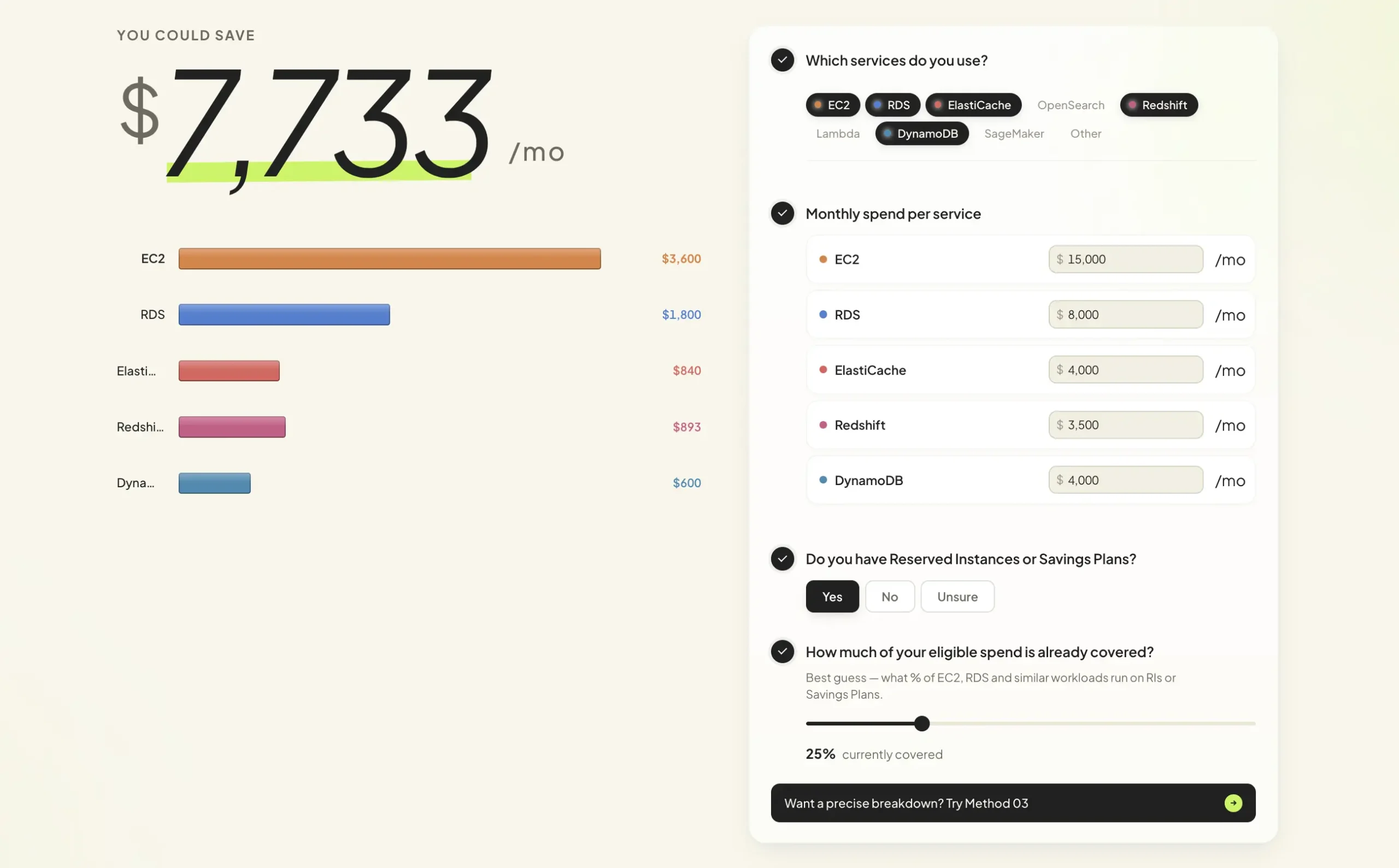
- Limitation: benchmark-based estimates do not account for your actual service mix, instance families, existing commitment coverage, or usage patterns. The number is a starting point, not a plan.
Method 2: Drop Your Invoice (Bill-Based Estimate)
Upload your AWS PDF invoice from the AWS Billing Console. The calculator reads your actual spend, not industry averages. No account connection required.
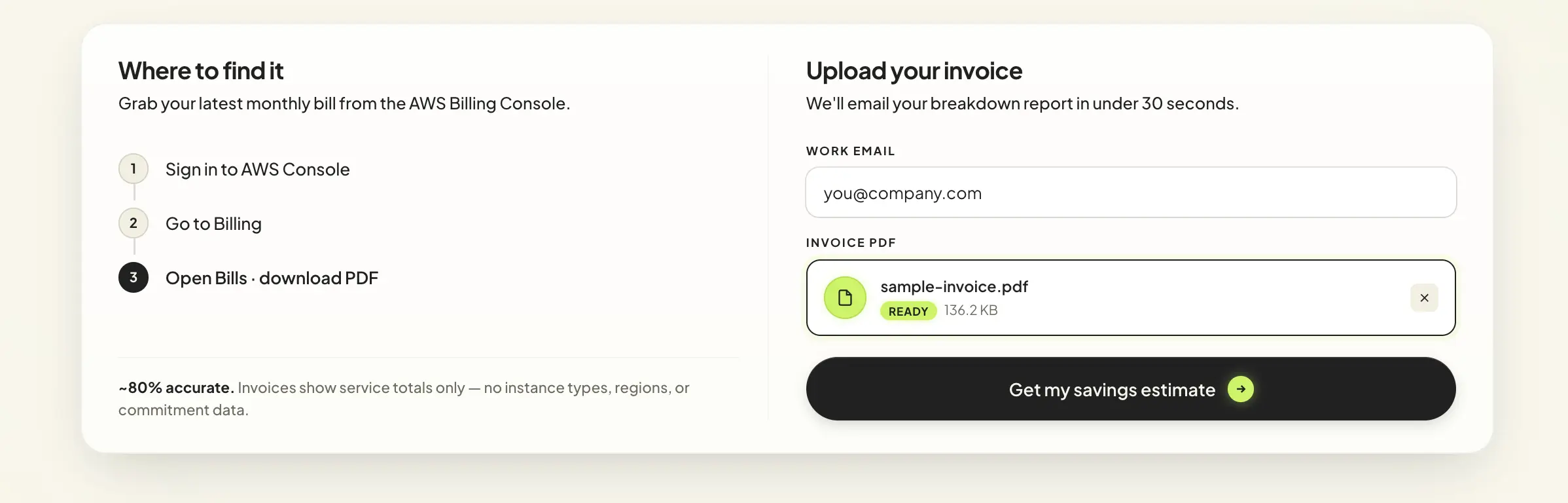
- Limitation: invoices show service totals only, without instance type, region, or commitment data. Accuracy improves significantly with Method 3.
Method 3: Cost Explorer CSV (Detailed Export Estimate)
Upload a suitably grouped Cost Explorer CSV for a more detailed savings estimate. Available service, Region, usage-type and instance-family detail depends on the export configuration. Validate the assumptions and eligibility before using the result to approve a commitment.
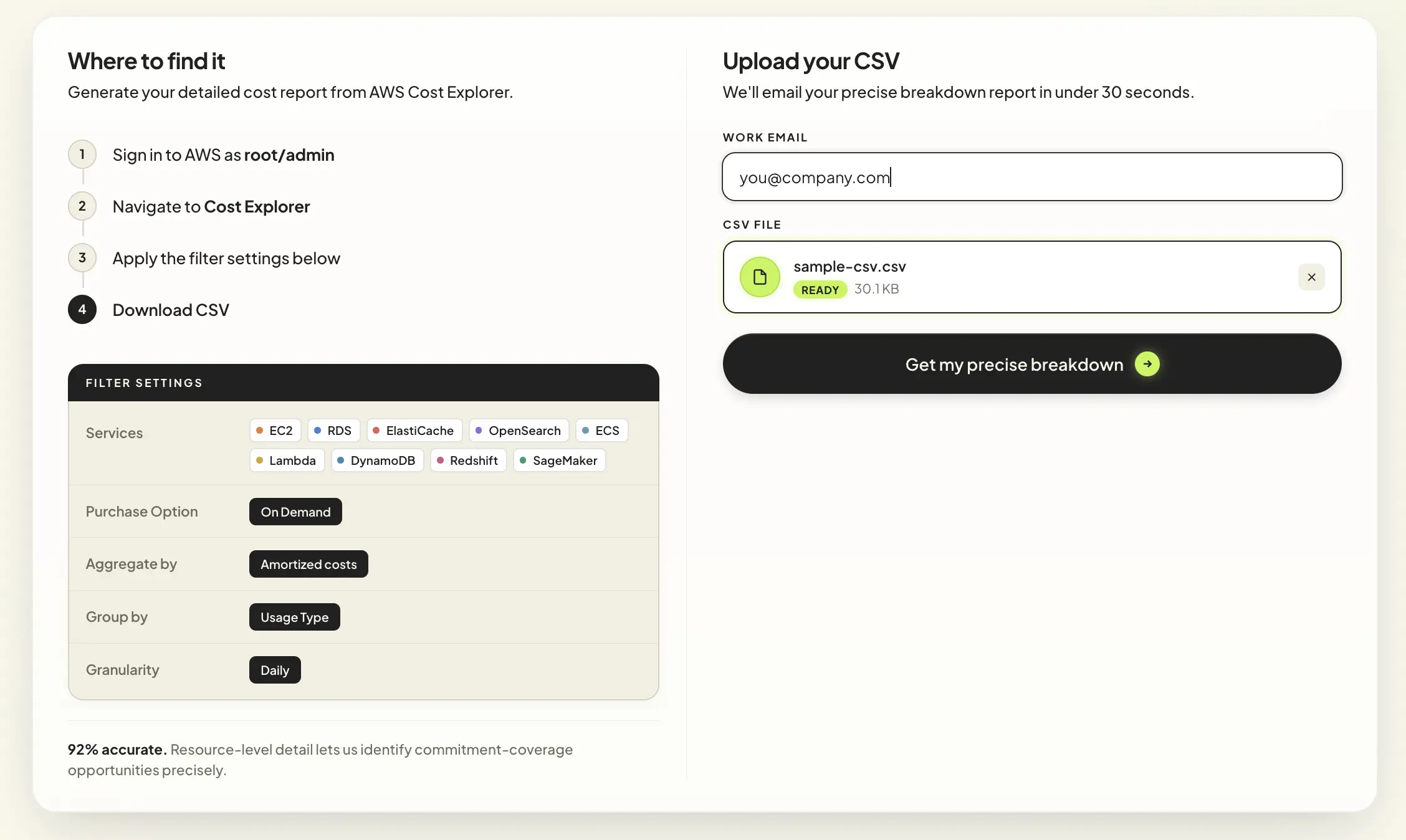
How to generate the Cost Explorer CSV (4 steps):
- Sign in to AWS as root or admin
- Navigate to Cost Explorer
- Apply these filter settings: Services = EC2, RDS, ElastiCache, OpenSearch, ECS, Lambda, DynamoDB, Redshift, SageMaker / Purchase Option = On Demand / Aggregate by = Amortized costs / Group by = Usage Type / Granularity = Daily
- Download CSV and upload to the Usage.ai calculator
No account connection. No IAM role. No infrastructure access. The CSV is your data, exported by you, analyzed by the calculator, deleted after processing.
Five Costs the AWS Pricing Calculator Misses by Default
Every team that has used the AWS Pricing Calculator has produced an estimate that understated their actual bill. The gaps are predictable:
- Data transfer costs. The calculator does not automatically include data transfer for most services. You must add it manually by searching for “Data Transfer.” Outbound traffic to the internet costs $0.09/GB for the first 10 TB/month in US East (verify at Amazon EC2 Pricing, rates change). Cross-AZ transfer is $0.01/GB in most regions. For applications with multi-AZ architectures or internet-facing workloads, data transfer is often 20-30% of the total bill.
- NAT Gateway charges. In N. Virginia, $0.045/hour × 730 + 500 GB × $0.045 = $55.35 before IPv4 and transfer. One public IPv4 adds $3.65, yielding $59.00. Private NAT has no public IPv4 fee.
- CloudWatch Logs ingestion. Log ingestion is $0.50/GB (verify at Amazon Cloudwatch Pricing, rates change). A verbose application at 100,000 requests per day writing 100,000 bytes per request over 30 days generates 300 billion bytes, approximately 279.40 GiB. At an assumed $0.50 per billed GB, that is approximately $139.70 before the shared 5-GB CloudWatch free allowance and other charges in a line item most teams never model.
- EBS snapshots and backup storage. RDS automated backups beyond 100% of provisioned storage, EBS snapshots, and S3 Glacier archival all generate costs that base service configurations do not include.
- Your negotiated rates. The public calculator uses AWS list prices. If your organization has an AWS Enterprise Discount Program agreement, your actual rates are lower. The in-console authenticated version can apply your negotiated rates (“After discount rates” pricing mode).
None of these are bugs in the calculator. They are structural limitations of a manual, forward-looking estimation tool. The Usage.ai calculator avoids all five because it reads actual billing data instead of accepting manual inputs.
How to Interpret Calculator Estimates
Savings estimates depend on the data supplied, current rates, existing discounts and future utilization. No validation methodology is provided here for a universal 60%, 80% or 92% accuracy guarantee. Treat the output as an estimate and confirm it against a current account-level assessment.
A percentage accuracy claim needs a defined error measure, test sample, evaluation period and comparison with realized net savings. A detailed CSV alone does not establish such a percentage.
What it does not mean: the calculator knows your exact savings to the dollar before any commitment is purchased. The actual savings depend on execution — specifically, how commitments are purchased, timed, and managed after the estimate.
Benchmark inputs are coarse; invoices provide billing detail; appropriately grouped CSV exports can reveal more usage dimensions. More detailed input can improve analysis, but is not a guaranteed error bound.
For evaluation purposes: use Method 3 if you want a number you can take to a budget meeting. Use Method 1 if you are in a 10-minute conversation and need a rough order of magnitude.
Decision Tree: Which Calculator Should You Use?
Use the following logic to pick the right tool for your situation.
Are you planning a NEW deployment that does not exist yet?
|
+– YES –> Use the AWS Pricing Calculator (calculator.aws)
| Configure services, compare pricing models,
| export as PDF or CSV for finance approval.
|
+– NO, I have an existing AWS environment
|
+– Do you want a savings estimate in under 60 seconds?
| +– YES (rough ballpark) –> Use Method 1: Usage.ai Live Calculator
| Go to usage.ai/savings-calculator, select Live Calculator,
| enter approximate spend per service, read your estimate.
|
+– Do you have your AWS invoice as a PDF?
| +– YES –> Use Method 2: Drop Your Invoice (bill-based estimate)
| Upload at usage.ai/savings-calculator.
| Result arrives by email in under 30 seconds.
|
+– Do you have 3 minutes for a defensible number?
+– YES –> Use Method 3: Cost Explorer CSV (detailed export estimate)
Sign in to Cost Explorer, apply filter settings,
download CSV, upload to usage.ai/savings-calculator.
Best input for a board-level conversation.
Are you planning CHANGES to your existing commitment strategy?
+– Use AWS Cost Explorer RI/SP Recommendations (in-console)
OR book a Savings Test with Usage.ai for automated execution
at usage.ai/book-demo
How AWS Cost Explorer Fits Into This Picture
The AWS Pricing Calculator and the Usage.ai Savings Calculator are not the only tools in this space. AWS Cost Explorer is a third distinct tool that many teams conflate with both.
Here is how they relate:
| Tool | What It Does | Direction | Account Required |
| AWS Pricing Calculator | Estimate costs before deployment | Forward | No |
| AWS Cost Explorer | Analyze actual past costs; surface RI/SP recommendations | Backward | Yes |
| Usage.ai Savings Calculator | Identify current overspend without account access | Backward | No |
AWS Cost Explorer is the closest AWS-native comparison to the Usage.ai Savings Calculator. Both are backward-looking and work from actual usage data. The key differences:
Account access requirement. Cost Explorer requires signing in with your AWS account. The Usage.ai Savings Calculator requires only a CSV export from Cost Explorer or a PDF invoice — no account connection, no IAM role, no permissions setup.
Output type. Cost Explorer shows you what you spent. The Usage.ai Savings Calculator shows you what you overpaid and quantifies the recoverable amount.
Time to result. Cost Explorer requires navigating dashboards, applying filters, and interpreting recommendation data. The Usage.ai calculator returns a formatted, per-service savings breakdown in under 60 seconds from the same underlying data.
Recommendation refresh rate. AWS Cost Explorer generates RI and Savings Plan recommendations on a 72+ hour refresh cycle. Usage.ai’s platform (not the free calculator, but the optimization platform) refreshes recommendations every 24 hours. At $6-12K/day in uncovered on-demand spend, a 3-day lag is a measurable cost.
What Happens After the Savings Calculator?
The Usage.ai Savings Calculator is a free diagnostic tool. It identifies overspend. It does not eliminate it.
For teams who want to act on the number the calculator surfaces, Usage.ai’s platform automates the purchasing and management of AWS Savings Plans and Reserved Instances. This is where the platform is distinct from the calculator.
Usage.ai Flex Commitments provide managed discounts under the applicable offer. Eligible cashback compares commitment cost with equivalent On-Demand cost for the same usage; it is not a refund of every unused dollar or cancellation of the provider commitment. Published payout timing is 90 days after accrual. Purchase permissions and protection terms require separate review.
The fee model is a percentage of realized savings only. If Usage.ai saves you nothing, you pay nothing.
For the specifics:
- Usage Flex Savings Plan (EC2, Fargate, Lambda): saves 40-60%
- Usage Flex DB Savings Plan (RDS, ElastiCache, DocumentDB): saves 20-35%
- Usage Flex Reserved Instances (RDS, ElastiCache, OpenSearch, Redshift, DynamoDB): saves 30-40%
The AWS Pricing Calculator has no equivalent post-estimate service. It is a standalone estimation tool.
Use the public AWS calculator for manually configured estimates, the in-console calculator for historical-usage bill scenarios, and Cost Explorer for native commitment recommendations. Usage.ai’s uploaded-data calculator offers an additional estimate without an account connection.
Real-World Context: Who Should Use Which Tool
The following scenarios are meant to be concrete and specific, not generic advice.
Scenario 1: Pre-deployment architecture planning. A team is migrating a self-hosted application to AWS. They need to estimate costs for EC2 + RDS + ALB + S3 before requesting budget approval from finance. Use the AWS Pricing Calculator. Build a grouped estimate by component, add data transfer and NAT Gateway manually, export as PDF. This is exactly what the tool is designed for.
Scenario 2: An existing AWS bill has grown. Use Cost Explorer to investigate drivers and compare in-console AWS bill scenarios with a detailed uploaded-data savings estimate. Validate recoverable savings before approving purchases.
Scenario 3: A board presentation on cloud costs. Document the input period, eligible usage, rates, existing discounts, fees and utilization assumptions. Present a range and validate it against account data rather than treating an unsupported accuracy percentage as assurance.
Scenario 4: Evaluating Reserved Instances vs Savings Plans for a new workload. Use the AWS Pricing Calculator’s in-console Bill Estimate mode (requires AWS management account). Configure both scenarios and compare effective monthly rates. This is a legitimate use case for the AWS native tool.
Scenario 5: Understanding whether commitment tools are worth the evaluation time. Use Method 1 of the Usage.ai Savings Calculator — the live calculator. If the rough estimate is under $2,000/month in potential savings, the ROI on further evaluation may not justify the time. If it is above $10,000/month, Method 3 and a Savings Test conversation are worth prioritizing.
Which Calculator Should You Walk Away With?
The AWS Pricing Calculator and the Usage.ai AWS Savings Calculator are not competing products. They solve different problems at different points in the cloud lifecycle.
If you are planning a new deployment, the AWS Pricing Calculator is the right tool. It is free, requires no account, supports 150+ services, and gives you a defensible pre-deployment cost estimate you can take to finance. Nothing else replaces it for that use case.
For production workloads, the in-console AWS Pricing Calculator can import historical usage and model bill changes. The public calculator remains a manually configured estimator. Select the experience that matches the task. AWS calculator documentation.
The Usage.ai Savings Calculator estimates potential commitment savings from supplied data. Compare its assumptions with AWS-native estimates and realized net savings rather than assuming all uncovered On-Demand spend is avoidable.
A Cost Explorer CSV can support a detailed per-service estimate without account access. The result depends on the export and assumptions; confirm it before committing spend.
If the number comes back at under $2,000/month in recoverable savings, the optimization ROI may not justify a deeper evaluation right now. If it comes back above $10,000/month, that is a budget conversation worth having before next quarter’s bill arrives.
Start with the question you are actually trying to answer. The right calculator follows from that.
See what your AWS environment is currently overpaying. Run the free Usage.ai Savings Calculator in under 60 seconds
Frequently Asked Questions
1. Is the AWS Pricing Calculator the same as a cloud cost calculator?
“Cloud cost calculator” is a broad category. The public AWS Pricing Calculator estimates manually configured resources, while the in-console calculator can import historical usage and model an existing bill. Usage.ai’s savings calculator estimates potential savings from data you provide. Choose based on the input and scenario you need.
2. Can the AWS Pricing Calculator tell me if I’m overpaying?
The public calculator uses manually entered configurations. The in-console AWS Pricing Calculator can import historical account usage and model changes, including commitment scenarios. Cost Explorer provides native RI and Savings Plans recommendations.
3. How should I assess the Usage.ai Savings Calculator’s accuracy?
Check the input period, grouping, covered services, rates, existing commitments, fees and utilization assumptions, then compare the estimate with an account-level analysis. This article does not provide a validated methodology for a universal percentage accuracy claim.
4. Does the Usage.ai Savings Calculator require connecting my AWS account?
No. The free savings calculator requires only your AWS invoice (as a PDF) or a Cost Explorer CSV export that you generate yourself. No IAM role, no account connection, no infrastructure access is required to get your savings estimate. If you proceed to the Usage.ai platform after the estimate, the platform uses read-only access for evaluation. Approved commitment purchases require additional financial permissions; workload changes are not required for that purchase workflow.
5. What is the difference between the AWS Pricing Calculator and AWS Cost Explorer?
AWS’s public calculator uses manual configurations; its in-console calculator can import historical usage to model bill changes. Cost Explorer analyzes actual costs and usage and provides native RI and Savings Plans recommendations. Usage.ai’s calculator estimates potential savings from uploaded or manually supplied data without an account connection.
6. How long does it take to set up Usage.ai after the savings estimate?
The savings calculator is instant under 60 seconds with the live calculator, under 30 seconds for invoice or CSV processing. The Usage.ai platform itself can be set up in 30 minutes with read-only access for evaluation; purchase automation requires separately approved financial permissions. The savings calculator is a diagnostic tool; it does not connect to your account and does not initiate any optimization actions. Acting on the estimate is a separate, optional step.
7. Can the AWS Pricing Calculator model Savings Plans for my existing fleet?
Yes, the in-console AWS Pricing Calculator can model existing bill scenarios using historical usage and Savings Plans assumptions. The public calculator uses manual configurations. For purchase recommendations based on actual usage, also review AWS Cost Explorer.




