.png)


Aurora DSQL uses a request-based pricing model. There are no instances, no capacity to provision, and no hourly charge when the database is idle. You pay for two things: the work the database does (DPUs) and the data you store (GB-month). That is it.
The DPU metric bundles everything that traditional databases bill separately — compute, I/O, memory — into a single usage-based number. For most teams this simplifies cost visibility: one metric on your CloudWatch dashboard tells you your cost trajectory, with five sub-components available if you need the breakdown.
See exactly what you’re overpaying in under 60 seconds. Try the Calculator for free →
Aurora DSQL Pricing at a Glance
| Component | Rate | Notes |
| DPU (all database activity) | $8.00/million | Covers compute, read I/O, write I/O, CDC streaming, and multi-region replication. Billed in real time. Zero when idle. |
| Storage | $0.33/GB-month | One logical copy per region. Billed continuously even when idle. Multi-region = billed in each region. |
| Multi-region write replication | 1x originating write DPU cost added | Writes replicated to a second region incur extra DPU equal to the originating write. Source: AWS official. |
| Idle state | $0.00 DPU | True scale-to-zero. No hourly minimum. Storage charges continue. |
| Free tier (permanent) | 100K DPUs + 1 GB/month | Applied automatically every month. No 12-month expiry. Sufficient for dev, small apps, side projects. |
| Data transfer in / same-region | $0.00 | No charge for data in or transfers between DSQL and other AWS services in same region. |
| Data transfer out (cross-region / internet) | Standard AWS rates | Cross-region replication in multi-region clusters is included in DPU charges — no separate transfer fee. |
| Backup / restore | Via AWS Backup | Billed through AWS Backup service. See aws.amazon.com/backup/pricing/. Not a DSQL line item. |
| Database Savings Plans | May be eligible | AWS official pricing page states DSQL usage ‘may be eligible for Database Savings Plans.’ Verify at aws.amazon.com/savingsplans/database-pricing/. |
All rates: June 8, 2026, from AWS official Aurora DSQL pricing page. Verify at aws.amazon.com/rds/aurora/dsql/pricing/ — rates change.
Source: AWS official Aurora DSQL pricing page (aws.amazon.com/rds/aurora/dsql/pricing/), verified June 8, 2026. All rates subject to change.
What Is a DPU?
A Distributed Processing Unit (DPU) measures how much work Aurora DSQL does to run your SQL workload. It bundles compute resources (query execution, joins, functions, aggregations), I/O (reads and writes to storage), CDC streaming when enabled, and multi-region replication — all into a single billing unit.
Aurora DSQL tracks DPU activity in real time. When your cluster is idle — no queries running, no background tasks — DPU usage drops to zero and you incur no compute charges. This is different from instance-based databases like RDS or Aurora Provisioned, which continue billing whether or not they are handling queries.
The Five DPU Sub-Components
Aurora DSQL reports DPU consumption in five sub-components in CloudWatch. These are for visibility and optimization only — you are billed on total DPUs, not on individual sub-components.
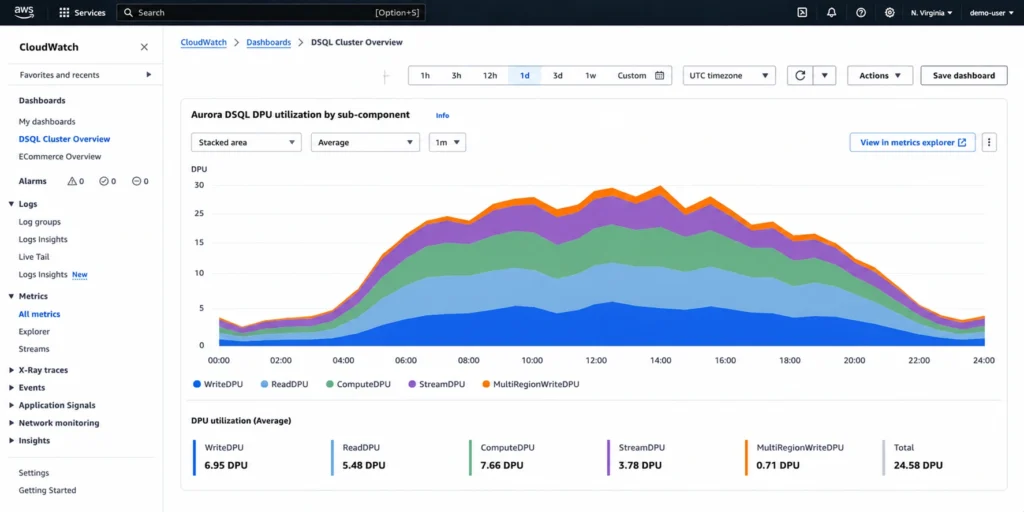
ComputeDPU: CPU work for executing query logic. Joins, aggregations, window functions, user-defined functions. Scales with query complexity. ReadDPU: I/O consumed reading data from storage. Scales with data scanned per query. WriteDPU: I/O consumed writing data to storage. Scales with rows written and data size. StreamDPU: work for change data capture (CDC) streaming when enabled. MultiRegionWriteDPU: extra DPU charged for replicating writes to a peered cluster in another region. Equals the originating WriteDPU cost.
Cost monitoring tip: check your CloudWatch DPU breakdown to understand what is driving your bill. If ComputeDPU is high relative to ReadDPU, complex query logic (expensive joins, aggregations) is the driver — consider query optimization. If ReadDPU is high, full table scans or missing indexes are likely. If MultiRegionWriteDPU is a large share, evaluate whether all tables need multi-region replication or whether a single-region cluster suffices for some workloads.
Multi-Region Pricing: How Write Replication Doubles Your DPU Cost
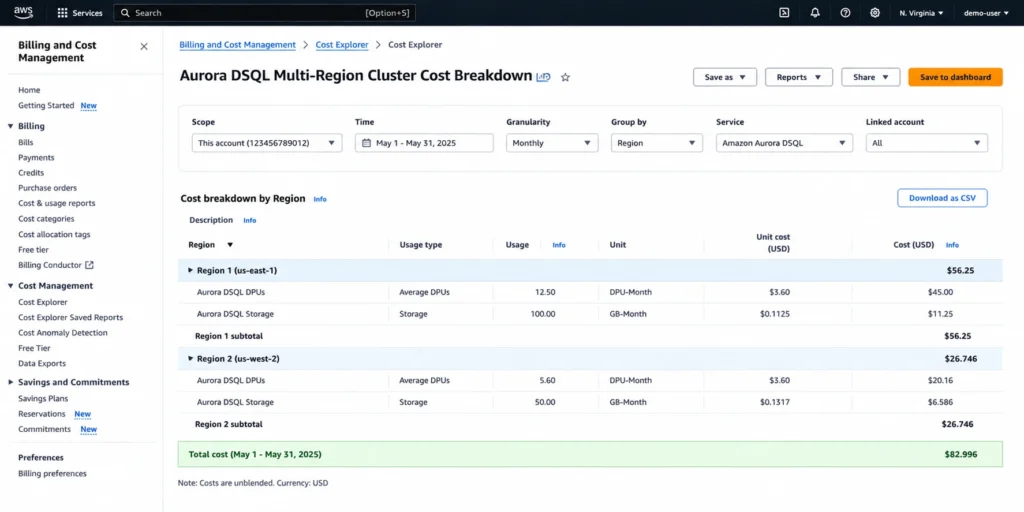
When you configure a multi-region Aurora DSQL cluster, every write transaction in the primary region triggers a corresponding replication to the peered region. This replication is billed as MultiRegionWriteDPU, at a cost equal to the originating WriteDPU. Source: AWS official pricing page.
The practical impact: a write that consumes 1M WriteDPUs in Region 1 also generates 1M MultiRegionWriteDPUs in Region 1, for a total of 2M DPUs for the write path. The read path in each region is local and unaffected by multi-region configuration. For workloads where writes are 20-30% of total traffic, the multi-region DPU premium is approximately 20-30% on top of the single-region cost. For write-heavy workloads at 50-50 read-write ratio, expect approximately 50% higher total DPU cost versus single-region.
Storage is also billed per region. A cluster storing 25 GB in a 2-region configuration incurs 25 GB x $0.33 = $8.25/month per region, for $16.50/month total storage.
Cross-region data transfer for native replication: $0. AWS includes the replication data transfer within the MultiRegionWriteDPU charge. No separate cross-region transfer line item for Aurora DSQL multi-region replication. Source: AWS official pricing page: ‘you won’t see separate data transfer charges for this cross-Region replication as those costs are included in your MultiRegionWriteDPU usage.’
Worked Example 1: Gaming Application (Single-Region)
Source: AWS official Aurora DSQL pricing page (aws.amazon.com/rds/aurora/dsql/pricing/), June 2026.
Scenario: gaming application with variable activity. Traffic peaks in evenings and weekends, drops during off-hours. Deployed in US East (Ohio). Average 0.5 DPUs/second, scaling up to 2 DPUs/second at peak and down to 0.1 DPUs/second during quiet periods.
| Usage | Calculation | Cost |
| DPU breakdown | 0.7M WriteDPU + 0.4M ReadDPU + 0.214M ComputeDPU = 1.314M total DPUs | 1.314M x $8/million |
| DPU charge | 1.314M total DPUs x $8.00/million | $10.512 |
| Storage | Average 15 GB over the month x $0.33/GB | $4.95 |
| Data transfer | None | $0.00 |
| Total | $15.46/month |
This workload is covered by the free tier (100,000 DPUs/month free). The 1.314M DPUs consumed exceed the free tier by 1.214M DPUs. At $8/million, the DPU cost above the free tier is $9.71. Total above-free-tier cost: approximately $9.71 + $4.62 (storage above 1 GB free) = $14.33/month effective cost accounting for the free tier. The AWS official example does not apply the free tier deduction in the calculation above — verify how the free tier applies to your account at the AWS pricing page. Source: AWS official Aurora DSQL pricing page.
Worked Example 2: Multi-Region Banking Application
Scenario: mission-critical banking application. Multi-region setup: Region 1 (US East, N. Virginia) handles all write activity. Region 2 (US East, Ohio) serves as a read replica for low-latency local reads.
| Usage | Calculation | Cost |
| Region 1 DPU breakdown | 2M WriteDPU + 2M MultiRegionWriteDPU + 0.5M ReadDPU + 1.5M ComputeDPU = 6M total DPUs | |
| Region 1 DPU charge | 6M DPUs x $8.00/million | $48.00 |
| Region 2 DPU breakdown | 1M ReadDPU + 1.312M ComputeDPU = 2.312M total DPUs | |
| Region 2 DPU charge | 2.312M DPUs x $8.00/million | $18.496 |
| Storage (Region 1) | 25 GB-months x $0.33/GB | $8.25 |
| Storage (Region 2) | 25 GB-months x $0.33/GB | $8.25 |
| Data transfer | Cross-region replication included in MultiRegionWriteDPU | $0.00 |
| Total | $87.996/month |
The 2M MultiRegionWriteDPU in Region 1 equals the originating 2M WriteDPU cost — multi-region replication exactly doubles the write DPU cost. No separate data transfer fee for cross-region replication. Source: AWS official Aurora DSQL pricing page.
The Free Tier: What 100,000 DPUs Gets You
AWS applies 100,000 free DPUs and 1 GB of free storage to your Aurora DSQL bill every month. This is permanent — it does not expire after 12 months like most AWS Free Tier benefits. Source: AWS official pricing page.
100,000 DPUs at $8.00/million = $0.80 in compute value per month. That covers: a personal blog with a contact form, a portfolio site, a lightweight CRM processing a few hundred transactions per day, development environments with intermittent load, or initial schema design and testing. These are direct examples from the AWS official pricing page.
For development workloads that stay within 100,000 DPUs/month, Aurora DSQL is effectively free on the compute side. You pay only for storage above 1 GB at $0.33/GB-month. A development database storing 5 GB costs $1.32/month in storage with $0 DPU charges if consumption stays within the free tier.
DSQL Serverless: Complete Guide to Aurora DSQL architecture, OCC, and when to use it
Aurora DSQL vs Aurora Serverless v2: Pricing Comparison
The two products use fundamentally different pricing models. Here is the comparison relevant to cost estimation.
| Dimension | Aurora DSQL | Aurora Serverless v2 | Implication |
| Compute billing | Per DPU ($8/million) | Per ACU-hour ($0.12/hr) | DSQL: pay per query. v2: pay per time scaled up. |
| I/O billing | Included in DPU | Separate ($0.20/million Standard) | DSQL pricing is simpler — no separate I/O line item. |
| Scale to zero | Yes. $0 DPU when idle. | Yes (v1.x eligible versions). ~15-sec resume. | Both scale to zero. DSQL has no resume latency overhead cost. |
| Storage | $0.33/GB-month | $0.10/GB-month (Standard) | v2 storage is 3x cheaper per GB. |
| Free tier | 100K DPUs + 1 GB, permanent | None ongoing | DSQL free tier is a meaningful ongoing benefit. |
| Multi-region | Active-active. +1x write DPU per replica region. | Not supported natively. | Multi-region writes: DSQL only. |
| Savings Plans | May be eligible (verify). | Yes, DSP up to 35%. | v2 has confirmed DSP discount. DSQL eligibility to verify. |
Source: AWS official pricing for both products (June 2026). Aurora Serverless v2 rates from prior verified research. DSQL rates from AWS official DSQL pricing page.
Also read: Aurora Serverless v2: Complete Pricing Guide
Database Savings Plans for Aurora DSQL
The AWS official Aurora DSQL pricing page states: ‘Your Aurora DSQL usage may be eligible for Database Savings Plans, a flexible pricing model that offers savings in exchange for a commitment to a specific amount of usage (measured in $/hour) over a 1-year term.’
The word ‘may’ reflects that DSP eligibility for DSQL is conditional — verify current eligibility at aws.amazon.com/savingsplans/database-pricing/ before purchasing a DSP with DSQL coverage in mind. For other services with confirmed DSP coverage (RDS, Aurora Serverless v2, Neptune, ElastiCache, DynamoDB, Keyspaces), the Usage.ai live DSP guide confirms eligibility details.
AWS Database Savings Plans: Complete Guide
How to Reduce Your Aurora DSQL Bill
1. Use the Free Tier for Dev and Staging
Keep development and staging DSQL clusters within 100,000 DPUs/month. Monitor CloudWatch total DPU consumption. For dev environments, this is straightforward — ad hoc queries and integration tests rarely approach 100K DPUs. The permanent free tier means zero compute cost for well-managed development environments.
2. Optimize Queries to Reduce ReadDPU
ReadDPU is the I/O component of DPU consumption. High ReadDPU means your queries are scanning large amounts of data. Add indexes on frequently filtered columns. Avoid SELECT * in favor of projecting only the columns needed. For analytical queries that must scan large datasets, consider whether Aurora DSQL is the right tool or whether a dedicated analytics service (Redshift, Athena) would be cheaper for that query class.
3. Reduce ComputeDPU With Query Simplification
ComputeDPU reflects query execution complexity. Multi-table joins, nested subqueries, and complex aggregations consume more ComputeDPU than simple primary key lookups. Review the top ComputeDPU queries from CloudWatch, identify queries with high DPU per execution, and evaluate whether they can be simplified, indexed differently, or moved to application-level computation.
4. Evaluate Single-Region vs Multi-Region Per Table
Not every table in your application needs multi-region replication. Reference data (product catalogs, configuration tables) that is rarely written and can tolerate slightly stale reads could be stored in a single region and read from that region. Reserving multi-region active-active for tables with genuine global write requirements reduces MultiRegionWriteDPU charges.
5. Monitor DPU Cost Trajectory Against Free Tier
Aurora DSQL is genuinely new — most teams deploying it have not yet seen multi-month bills. Set a CloudWatch alarm on total DPU consumption at 80,000 DPUs/month (80% of the free tier threshold) to receive advance warning before incurring charges. This prevents surprises as a development application scales toward production-level traffic.
See exactly what you’re overpaying in under 60 seconds. Try the Calculator for free →
How Usage.ai Handles Aurora DSQL Costs
Aurora DSQL does not yet have a confirmed Reserved Instance equivalent or a firmly established Database Savings Plans track, beyond the ‘may be eligible’ language on the pricing page. The primary cost optimization for DSQL is monitoring DPU consumption patterns and identifying query optimization opportunities — reducing DPUs consumed per transaction.
Usage.ai monitors CloudWatch DPU sub-component metrics for Aurora DSQL clusters and surfaces tables or query patterns driving disproportionate DPU consumption. The 24-hour refresh catches DPU cost growth before it compounds, and the platform’s database cost analysis covers DSQL alongside RDS, Aurora Serverless v2, Neptune, ElastiCache, and other managed database services.
For teams running DSQL alongside other database services, Usage.ai evaluates whether a Database Savings Plans commitment for the combined database portfolio — including DSQL if eligible — delivers a better net saving than service-specific commitments. Fee: percentage of realized savings only.
Frequently Asked Questions
1. How much does Aurora DSQL cost?
$8.00 per million DPUs for all database activity (compute + I/O combined) and $0.33/GB-month for storage. Scales to zero when idle — $0.00 DPU with no hourly minimum. Free tier: 100,000 DPUs and 1 GB storage per month permanently. Multi-region write replication adds extra DPU equal to the originating write cost. Source: AWS official pricing page, verified June 8, 2026.
2. What is a DPU in Aurora DSQL?
A Distributed Processing Unit measures all the work Aurora DSQL does to run your SQL workload — compute for query execution plus I/O for reading and writing data. Unlike other Aurora variants, there is no separate I/O billing line item. DPU sub-components (ComputeDPU, ReadDPU, WriteDPU, StreamDPU, MultiRegionWriteDPU) are visible in CloudWatch for monitoring but you are billed on total DPUs. Source: AWS official pricing page.
3. Is Aurora DSQL free?
Partially. AWS provides 100,000 free DPUs and 1 GB of free storage per month permanently — no 12-month expiry. For dev environments and small applications within these limits, Aurora DSQL incurs $0 in compute charges. Above the free tier, DPU charges apply at $8.00/million. Source: AWS official pricing page.
4. How does multi-region pricing work for Aurora DSQL?
Multi-region writes incur extra DPU charges equal to the originating write cost. A write consuming 1M WriteDPUs in Region 1 generates 1M additional MultiRegionWriteDPUs billed in Region 1 — effectively doubling the write DPU cost. Read traffic in each region is local and unaffected. Storage is billed in each region separately. Cross-region replication data transfer is included in the MultiRegionWriteDPU charge — no separate transfer fee.
5. Does Aurora DSQL have Database Savings Plans?
The AWS official pricing page states DSQL usage ‘may be eligible’ for Database Savings Plans. Verify current eligibility at aws.amazon.com/savingsplans/database-pricing/ before purchasing a commitment. Source: AWS official Aurora DSQL pricing page, June 8, 2026.