.png)


Important 2026 update: Timestream for LiveAnalytics closed to new customers on June 20, 2025. It is in maintenance mode. Existing customers continue to be supported, but AWS officially recommends migrating to Timestream for InfluxDB. If you are evaluating Timestream for a new deployment, Timestream for InfluxDB is the correct product to evaluate.
AWS Timestream is a managed time-series database service. Time-series databases are a category of purpose-built databases optimized for a specific access pattern: storing data points that are indexed by time, and querying that data with time-based filters, aggregations, and analytical functions.
A relational database can store timestamped data. A time-series database stores and queries it differently — at the hardware and storage level, time is a first-class dimension. Queries that ask ‘what was the average CPU utilization over the past 30 minutes, grouped in 5-minute windows’ or ‘find all sensor readings where temperature exceeded the threshold in the past 7 days’ are native operations in a time-series database. They are expensive workarounds in a relational database at scale.
Timestream’s two products cover different points on the time-series spectrum: Timestream for InfluxDB provides instance-based infrastructure for real-time queries at single-digit millisecond latency, while Timestream for LiveAnalytics (for existing customers only) provided a serverless model for high-volume ingestion and historical analytics over terabytes of data.
See exactly what you’re overpaying in under 60 seconds. Try the Calculator for free →
What Is Time-Series Data and Why Does It Need a Dedicated Database?
Time-series data is any data where the timestamp is the primary dimension — not an attribute of a record, but the organizing principle of the entire dataset. Examples: server CPU utilization sampled every 10 seconds, IoT temperature sensor readings every 30 seconds, stock price tick data, application error rates by minute, energy consumption by hour, network latency by 5-minute interval, user clickstream events.
The defining characteristic of time-series data is that it is append-only. You do not update yesterday’s CPU reading — you append today’s. Records are almost never modified after creation. And queries are almost always temporal: give me the last N records, give me records within a time range, aggregate records over time windows, show me the rate of change between time intervals.
General-purpose relational databases handle time-series workloads poorly at scale for three reasons. First, indexing: a B-tree index on a timestamp column works for simple lookups but degrades as table size grows to billions of rows, which is common in time-series workloads (a single IoT device reporting every second generates 86,400 rows per day). Second, compression: relational databases store each row independently; time-series databases exploit the repetitive structure of time-ordered data to compress sequences of similar values by 90% or more. Third, retention management: old time-series data is often less valuable than recent data; time-series databases have native retention policies that automatically expire and delete old data without manual intervention.
Concrete sizing comparison: a standard relational database storing 1 year of 1-second telemetry from 1,000 devices (31.5 billion rows) at 100 bytes per row requires approximately 3 TB of raw storage. A time-series database storing the same data with native compression typically requires 50-300 GB. The 10-60x storage reduction directly reduces both storage cost and query scan cost. Source: based on general time-series compression benchmarks and AWS Timestream documentation principles.
Also read: AWS Database Savings Plans: Complete Guide
Amazon Timestream in 2026: Two Products, One Brand
Understanding what Timestream is in June 2026 requires understanding that the brand now covers two products with different architectures, billing models, and target use cases — and that one of them is no longer available to new customers.
Timestream for InfluxDB (Current Recommended Product)
Timestream for InfluxDB is a fully managed service that runs InfluxDB databases on AWS infrastructure. It launched in general availability in March 2024. AWS manages the infrastructure — hardware provisioning, software updates, backups, security patching — while you use InfluxDB APIs and tooling to interact with your time-series data.
Timestream for InfluxDB runs inside your VPC. It is billed per instance-hour, similar to Amazon RDS. You choose an instance class (from db.influx.medium for development to db.influx.16xlarge for high-throughput production), provision storage, and pay for the hours the instance runs. Source: AWS official Timestream for InfluxDB documentation.
The latest engine version is InfluxDB 3, which AWS made available on Timestream in 2026. InfluxDB 3 is architecturally different from prior InfluxDB versions: built in Rust for performance, using Apache Arrow for columnar data processing, Apache Parquet for efficient storage, and Apache Arrow Flight SQL for high-performance querying. Storage uses Amazon S3 as the backing object store, shared across all nodes in a cluster. InfluxDB 3 supports both SQL queries and InfluxQL (a custom SQL-like language with time-based functions).
InfluxDB 3 on Timestream is available in two editions: Core (open-source, no license fee, compute charges only) and Enterprise (compute plus an InfluxDB 3 Enterprise license activated via AWS Marketplace, enabling multi-node clustering, enhanced security, and production SLA features).
Timestream for LiveAnalytics (Existing Customers Only — Maintenance Mode)
Timestream for LiveAnalytics was the original Timestream product, launched in 2020. It was a serverless time-series database built by AWS from the ground up, designed for ingesting tens of gigabytes of data per minute and querying terabytes using SQL. It used a dual-tier storage architecture: a memory store for recent, frequently queried data and a magnetic store for historical data.
LiveAnalytics is now in maintenance mode. AWS closed it to new customers on June 20, 2025 and officially recommends that existing customers migrate to Timestream for InfluxDB. AWS stated it is developing migration tools to automate schema conversion, data transfer, and validation processes for the transition. Source: AWS official documentation history (May 20, 2025 announcement) and AWS Database Blog (August 2025).
Existing LiveAnalytics customers continue to be supported. The billing model (per ingestion, storage, and query) remains active for existing workloads. However, no new customers can create LiveAnalytics resources. For the remainder of this guide, coverage focuses on Timestream for InfluxDB as the current and recommended product.
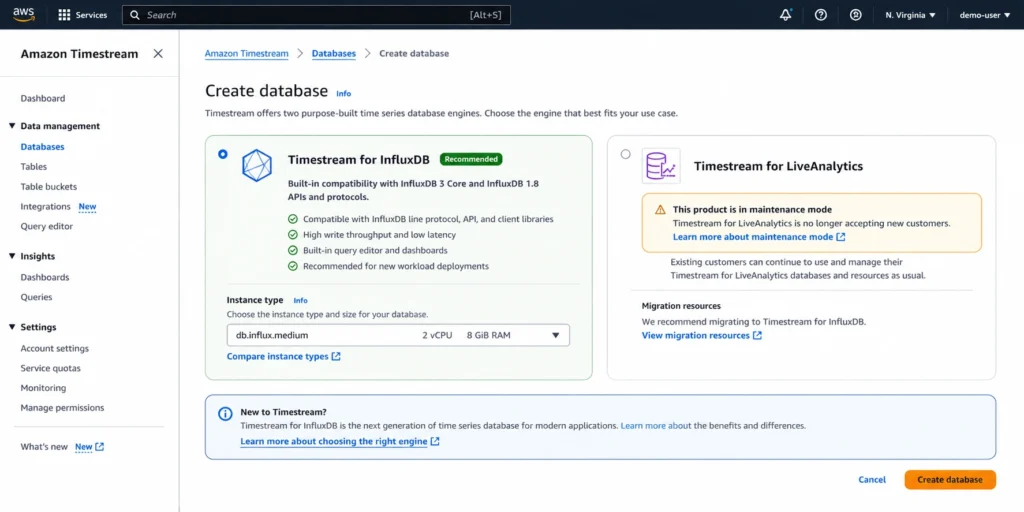
Timestream for InfluxDB: Architecture and How It Works
Timestream for InfluxDB manages InfluxDB database instances on AWS infrastructure within your VPC. The service creates and manages the underlying EC2 compute, EBS or S3 storage (depending on the InfluxDB version), networking, and security configuration.
Data Model: Measurements, Tags, Fields, and Timestamps
InfluxDB organizes time-series data into measurements (similar to tables), tags (indexed metadata dimensions used for filtering, stored as strings), fields (the actual measurement values, not indexed), and timestamps. A single data point consists of a measurement name, one or more tag key-value pairs, one or more field key-value pairs, and a timestamp.
Example: a server monitoring data point might have measurement=cpu_usage, tags: host=web-01, region=us-east-1, fields: user=34.2, system=8.7, idle=57.1, timestamp=2026-06-08T14:00:00Z. Tags are indexed and efficient for filtering (give me all CPU metrics for host=web-01). Fields are not indexed and are scanned. This distinction matters for query performance and is not intuitive for engineers coming from relational backgrounds.
Line Protocol: The Ingestion Format
InfluxDB uses line protocol as the primary ingestion format. Line protocol is a human-readable text format: measurement_name,tag_key=tag_value field_key=field_value timestamp. For example: cpu_usage,host=web-01,region=us-east-1 user=34.2,system=8.7 1718553600000000000. Line protocol is simple to generate from any programming language and is the standard input format for all InfluxDB clients, Telegraf (the data collection agent), and most monitoring tool integrations. Source: AWS Database Blog (May 2026).
Query Languages: SQL and InfluxQL
InfluxDB 3 supports two query interfaces. SQL: standard SQL with time-based extensions, familiar to any engineer with relational database experience. InfluxDB 3 also provides a v1-compatible InfluxQL endpoint alongside the SQL interface, allowing legacy applications built for InfluxDB 1.x to continue operating without modification. Source: AWS Database Blog (May 2026).
Example SQL query on InfluxDB 3: SELECT mean(user), mean(system) FROM cpu_usage WHERE host = ‘web-01’ AND time >= now() – interval ‘1 hour’ GROUP BY time(5 minutes) ORDER BY time. This query calculates 5-minute averages over the past hour for a specific host — a pattern that is native in time-series SQL but requires window functions and careful indexing in relational SQL.
InfluxDB 3 Storage Architecture
InfluxDB 3 on Timestream uses Amazon S3 as the storage layer — a significant architectural difference from prior InfluxDB versions and from RDS-style databases that use attached EBS volumes. S3 storage is shared across all nodes in a multi-node Enterprise cluster. This means compute and storage scale independently: you can add nodes to increase query throughput without duplicating storage. Storage is charged per GB at Amazon S3 rates ($0.023/GB for Enterprise per the AWS Database Blog example, May 2026). Source: AWS Database Blog (May 2026) and AWS official Timestream for InfluxDB 3 documentation.
Timestream for InfluxDB Pricing in 2026
| Instance Class | vCPU | RAM | Network | Compute/hr | Best For |
| db.influx.medium | 1 | 8 GB | Up to 10 Gbps | Low | Development, low-traffic testing |
| db.influx.large | 2 | 16 GB | Up to 10 Gbps | $0.264 | Small production, staging environments |
| db.influx.xlarge | 4 | 32 GB | Up to 10 Gbps | $0.528 | Medium production workloads |
| db.influx.2xlarge | 8 | 64 GB | Up to 12 Gbps | $1.056 | High-throughput production |
| db.influx.4xlarge | 16 | 128 GB | Up to 25 Gbps | $2.112 | High-concurrency query workloads |
| db.influx.16xlarge | 64 | 512 GB | Up to 100 Gbps | $8.448 | Maximum scale, 16x db.influx.xlarge |
Compute rates: db.influx.large $0.264/hr verified from AWS Database Blog (May 2026). Instance costs scale linearly — db.influx.2xlarge is exactly 2x db.influx.xlarge per AWS Prescriptive Guidance. db.influx class has similar memory-to-vCPU ratio as EC2 r7g (memory-optimized). Verify all current rates at aws.amazon.com/timestream/pricing — rates change.
InfluxDB 3 Enterprise cost structure: the Enterprise edition adds an InfluxDB license charge on top of the compute rate. Per the AWS Database Blog example (May 2026): license = 1.5x the compute rate. For a db.influx.large node at $0.264/hr compute: Enterprise license = $0.396/hr, total per node = $0.660/hr. A 3-node Enterprise cluster: $0.660 x 3 x 730 hours = $1,445.40/month (compute + license), plus S3 storage at $0.023/GB. Source: AWS Database Blog (May 2026). InfluxDB 3 Core has no license fee — compute charges only.
Multi-AZ Pricing
Timestream for InfluxDB supports Multi-AZ deployment for higher availability, automatically detecting failures and failing over to a different Availability Zone. Multi-AZ deployments incur instance charges for both the primary instance and replica instances. Billing commences as soon as the instance is available and continues until it is stopped or deleted, billed in 1-second increments with a 10-minute minimum charge after any billable status change. Source: AWS official Timestream for InfluxDB FAQ.
Storage Pricing
Timestream for InfluxDB offers multiple storage configurations. The Influx I/O-Included storage type bundles I/O operations within the compute pricing for db.influxIOIncluded instance classes, providing more predictable costs for I/O-heavy workloads. For InfluxDB 3, storage uses Amazon S3 at approximately $0.023/GB (Enterprise). Storage is provisioned per GB-month. Source: AWS Database Blog (May 2026) and AWS official Timestream documentation.
Database Savings Plans for Timestream
Database Savings Plans cover Timestream for InfluxDB and provide up to 20% savings when you commit to a consistent hourly spend over a 1-year term. Source: AWS official Timestream FAQ: ‘you can purchase a Database Savings Plans for your Amazon Timestream usage and reduce your costs by up to 20% when you commit to a consistent amount of usage over a 1-year term.’
The 20% DSP discount for Timestream is lower than DSP discounts for other services (Neptune: up to 35%, ElastiCache: up to 35%). This reflects the different pricing structure of InfluxDB instances versus other database services. For stable Timestream for InfluxDB workloads running at consistent utilization, the DSP commitment is still worth evaluating — at a $2,000/month Timestream bill, 20% savings = $400/month, $4,800/year with a 1-year no-upfront commitment.
Also read: ElastiCache Reserved Nodes: Complete Pricing Guide
Timestream for InfluxDB Use Cases
Infrastructure and Application Monitoring
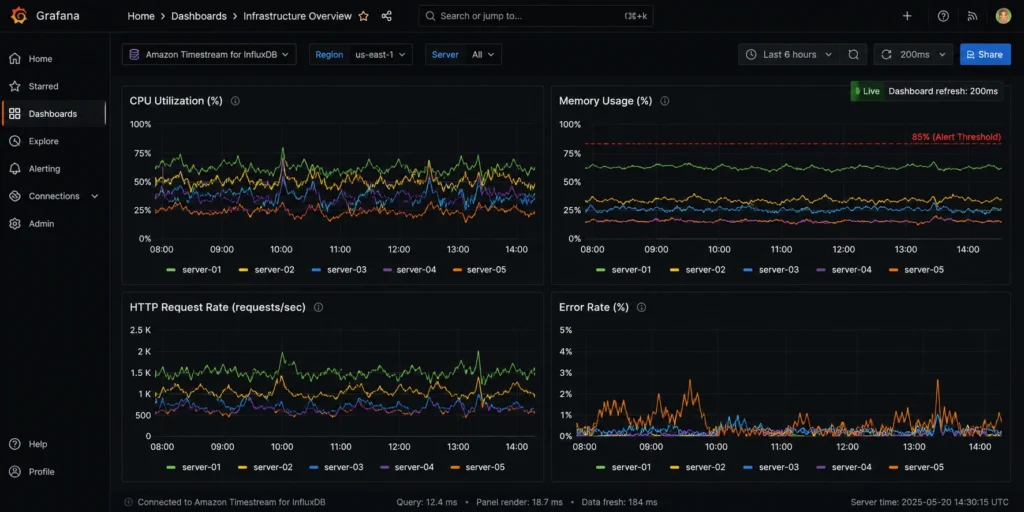
The most common Timestream for InfluxDB use case is infrastructure monitoring: CPU utilization, memory usage, disk I/O, network throughput, error rates, request latency — all timestamped metrics collected at regular intervals from servers, containers, and services. Telegraf (the InfluxDB data collection agent) has plugins for hundreds of monitoring sources including Linux system metrics, Docker, Kubernetes, AWS CloudWatch, NGINX, PostgreSQL, Redis, and more.
Timestream for InfluxDB handles 50,000 to more than 500,000 writes per second per instance. For infrastructure monitoring at scale — thousands of servers each reporting metrics every 10 seconds — this write throughput is sufficient for large production environments. Single-digit millisecond query response times mean dashboards (Grafana, the InfluxDB 3 Explorer) update with current data without perceptible delay. Source: AWS Prescriptive Guidance (cost optimization pillar for Timestream for InfluxDB).
IoT Sensor Data
Industrial IoT generates continuous streams of sensor readings: temperature, pressure, flow rate, vibration, power consumption — all timestamped, append-only, query patterns oriented around recent data and historical analysis. Timestream for InfluxDB’s line protocol makes it easy to ingest from any IoT device or gateway. The tag-based filtering model is natural for IoT: filter by device_id, location, sensor_type before querying field values.
A manufacturing plant with 10,000 sensors each reporting 10 measurements per second generates 100,000 data points per second — well within Timestream for InfluxDB’s single-instance throughput. Retention policies automatically expire data older than a configurable period, keeping storage costs manageable for multi-year IoT deployments.
Real-Time Alerting and Anomaly Detection
Timestream for InfluxDB integrates with the InfluxDB Tasks system for continuous processing — scheduled queries that run against the database, evaluate conditions, and trigger actions. A task can check whether any sensor reading in the past 5 minutes exceeded a threshold and write an alert event to a separate measurement. InfluxDB Tasks combined with the Telegraf output plugin enable alerting to PagerDuty, Slack, email, and other notification channels without external processing infrastructure. Source: AWS official Timestream for InfluxDB documentation.
Financial Market Data
Financial tick data — trade prices, bid/ask spreads, order book updates — is inherently time-series. InfluxDB’s single-digit millisecond query latency is suitable for real-time financial analytics: computing moving averages, detecting unusual price movements, calculating trading metrics over sliding time windows. The InfluxQL time-based functions (MOVING_AVERAGE(), DIFFERENCE(), ELAPSED()) are purpose-built for these patterns.
Clickstream and User Behavior Analytics
Web application event data — page views, button clicks, session starts, conversion events — is time-series data. Storing it in a time-series database rather than a relational database provides more efficient storage (compressed repeated event schemas) and faster time-window queries. AWS specifically calls out clickstream data analysis as a use case for Timestream. Source: AlternativeTo citing AWS official.
Timestream for LiveAnalytics: What It Was and Who Still Uses It
For completeness — and for existing LiveAnalytics customers evaluating their options — here is what Timestream for LiveAnalytics provided and why AWS placed it in maintenance mode.
Architecture: Dual-Tier Storage
LiveAnalytics used a two-tier storage model that automatically managed data across a memory store (recent data, sub-second query latency, higher storage cost) and a magnetic store (historical data, slower queries, lower storage cost). Data aged out of the memory store to the magnetic store based on configurable retention policies. This was AWS’s original architectural solution to the time-series challenge: keep hot data fast and cheap to query, move cold data to cheaper storage automatically.
Billing Model
LiveAnalytics billed on three dimensions: ingestion (approximately $0.50 per million records written), storage (approximately $0.036/GB-hour for memory store, approximately $0.03/GB-month for magnetic store), and query (approximately $0.01 per GB of data scanned). This serverless model meant no instance provisioning — you paid only for what you used.
Why It Was Closed to New Customers
AWS has not published a detailed explanation of the maintenance mode decision. The most likely factors: InfluxDB’s open-source ecosystem, tooling (Telegraf, Grafana, Chronograf), developer familiarity, and the pace of InfluxDB’s feature development made the managed InfluxDB offering more attractive to new customers than a proprietary AWS-built engine. The December 2024 announcement from InfluxData and AWS noted that the partnership enables InfluxDB to serve as ‘the ideal replacement for Amazon Timestream for LiveAnalytics.’ Source: InfluxData (December 2024) and AWS Database Blog (August 2025).
If you are an existing LiveAnalytics customer: AWS is developing migration tools to automate schema conversion, data transfer, and validation. InfluxDB 2.7 is available now for migration targets; InfluxDB 3 is the longer-term recommended target. The SQL interface in InfluxDB 3 provides a migration path for LiveAnalytics SQL query users. Your existing LiveAnalytics workloads continue to run and are billed at current rates — there is no announced end-of-life date for existing customers.
Timestream vs Other AWS Database Services: When to Use What
Time-series workloads do not always require a dedicated time-series database. The decision depends on data volume, write rate, query patterns, and required retention.
| Service | Data Model | Best Time-Series Scenario | Avoid When | Key Distinction |
| Timestream for InfluxDB | Time-series (measurements, tags, fields) | IoT, infrastructure metrics, real-time monitoring with millisecond latency | Complex relational joins, non-time-series access patterns | Purpose-built for time-series. Native compression. InfluxDB tooling. |
| Amazon RDS / Aurora | Relational tables | Low-volume timestamped records with complex relational joins | High-rate time-series ingestion (millions of points/minute) | Use RDS for relational data; Timestream for pure time-series scale |
| Amazon DynamoDB | Key-value / document | Latest-value queries per device, simple time-ordered lookups | Range queries over large time windows, aggregation functions | DynamoDB handles latest-state well; Timestream handles historical analysis |
| Amazon OpenSearch | Document / full-text | Log search and analysis, text-rich event data | High-rate numeric metric ingestion without text search | Use OpenSearch for log search; Timestream for pure numeric metrics |
| Amazon Redshift | Columnar data warehouse | Historical analytical queries over very large datasets | Real-time ingestion, sub-second query latency | Redshift for historical warehouse analytics; Timestream for operational metrics |
This comparison focuses on time-series use cases for each service. Many production architectures combine multiple services: Timestream for real-time metrics, Redshift for long-term historical analytics, DynamoDB for device state, OpenSearch for log analysis. Source: AWS official documentation for each service.
Security and Compliance
Timestream for InfluxDB runs inside your VPC with no public internet access by default. VPC security groups control network access to instances. Encryption at rest and in transit (TLS) are supported. IAM integration controls who can create, modify, and delete Timestream resources. AWS manages security patching and version updates for the managed service.
Timestream for InfluxDB does not allow direct host access — you interact through InfluxDB APIs, the Influx CLI, and the InfluxDB 3 Explorer GUI. This is consistent with other AWS managed database services (RDS, Neptune, ElastiCache). Source: AWS official Timestream for InfluxDB documentation.
Timestream supports compliance with HIPAA, PCI DSS, SOC 1/2/3, ISO 27001, and FedRAMP (subject to region availability). Verify current compliance certifications at aws.amazon.com/compliance/services-in-scope. For InfluxDB specifically: InfluxData maintains SOC 2 Type II and ISO 27001/27018 certifications across its product line. Source: InfluxData pricing and compliance page.
See exactly what you’re overpaying in under 60 seconds. Try the Calculator for free →
How Usage.ai Optimizes Timestream Costs
Timestream for InfluxDB is an instance-based service where the instance compute represents approximately 85% of total cost on average — per AWS Prescriptive Guidance for Timestream. Right-sizing the instance is the highest-leverage optimization. The gap between an over-provisioned db.influx.4xlarge and a correctly-sized db.influx.xlarge is $12,600/year on-demand in US East.
Usage.ai monitors CPU and memory utilization on Timestream for InfluxDB instances and surfaces right-sizing recommendations before commitment purchases. The platform distinguishes between instances that are correctly sized for peak load versus instances that are chronically underutilized — where the peak-to-average utilization ratio suggests a smaller instance class is sufficient.
For commitment purchasing, Usage.ai evaluates Database Savings Plans for Timestream workloads. The 20% DSP discount for Timestream applies automatically across instance changes — if you right-size from a larger to a smaller instance class, the DSP commitment continues applying. This flexibility makes DSP more practical than instance-specific commitments for teams actively right-sizing their Timestream deployments.
Usage.ai added native Database Savings Plans support in January 2026, covering Timestream alongside Neptune, ElastiCache, RDS, Aurora, DynamoDB, DocumentDB, and other eligible services. Teams running multiple database services can evaluate a single DSP commitment covering their full managed database spend rather than managing separate RI commitments per service. Source: Usage.ai live blog (aws.amazon.com/timestream/pricing). Fee: percentage of realized savings only.
See how Usage.ai optimizes Timestream, Neptune, ElastiCache, and other managed database costs
Frequently Asked Questions
1. What is Amazon Timestream?
Amazon Timestream is AWS’s managed time-series database service. As of June 2026, it consists of two products: Timestream for InfluxDB (the current recommended product, running fully managed InfluxDB on AWS infrastructure with single-digit millisecond query response times) and Timestream for LiveAnalytics (in maintenance mode, closed to new customers since June 20, 2025, serverless model for high-volume ingestion). A time-series database is purpose-built for storing and querying timestamped data — metrics, IoT sensor readings, application events, financial tick data — more efficiently than general-purpose databases. Source: AWS official Timestream documentation.
2. What happened to Timestream for LiveAnalytics?
Timestream for LiveAnalytics is in maintenance mode. It closed to new customers on June 20, 2025. Existing customers continue to be supported, but AWS officially recommends that existing LiveAnalytics customers migrate to Timestream for InfluxDB. AWS is developing automated migration tools for schema conversion, data transfer, and validation. There is no announced end-of-life date for existing customers. For any new time-series deployment on AWS, Timestream for InfluxDB is the correct product to use.
3. What is Timestream for InfluxDB?
Timestream for InfluxDB is a fully managed service that runs InfluxDB databases on AWS infrastructure within your VPC. AWS manages hardware provisioning, software updates, backups, security patching, and availability. You interact via InfluxDB APIs, the Influx CLI, Telegraf, Grafana, and InfluxDB 3 Explorer. It offers single-digit millisecond query response times, supports 50,000 to 500,000+ writes per second, and is available in InfluxDB 3 Core (no license fee) and Enterprise editions. Billed per instance-hour, similar to Amazon RDS.
4. What is InfluxDB 3 on Timestream?
InfluxDB 3 is the latest generation InfluxDB engine, available on Timestream since 2026. Built in Rust with Apache Arrow for columnar data processing, Apache Parquet for storage, and Amazon S3 as the backing object store. Supports both SQL and InfluxQL queries. Available in Core edition (open source, compute only, no license fee) and Enterprise edition (compute plus AWS Marketplace license, multi-node clustering, production SLA features). InfluxDB 3 is the recommended migration target for existing Timestream for LiveAnalytics customers.
5. What are the use cases for Amazon Timestream?
Primary use cases: infrastructure and application monitoring (server metrics, container metrics, Kubernetes telemetry), IoT sensor data ingestion and analysis, real-time alerting and anomaly detection, financial market data (tick data, price series, trading metrics), clickstream and user behavior analytics, energy consumption monitoring, and any workload generating high-frequency timestamped numeric data. Timestream for InfluxDB handles 50,000 to 500,000+ writes per second with sub-millisecond to single-digit millisecond query latency.
6. How much does Amazon Timestream cost?
Timestream for InfluxDB is billed per instance-hour. Example: db.influx.large (2 vCPU, 16 GB RAM) at $0.264/hr on-demand = approximately $193/month. InfluxDB 3 Enterprise adds a license at 1.5x the compute rate: total $0.660/hr per node. Storage for InfluxDB 3: approximately $0.023/GB (S3-based). Database Savings Plans provide up to 20% savings on a 1-year commitment. Instances represent approximately 85% of total cost. All rates US East (N. Virginia), June 2026. Verify at aws.amazon.com/timestream/pricing — rates change.
7. What is the difference between Timestream and RDS?
Timestream for InfluxDB is purpose-built for time-series data — timestamped measurements with native compression, retention policies, and time-based aggregation functions. RDS is a managed relational database for structured data with SQL queries, joins, and transactions. Timestream is not a relational database and does not support joins between measurements the way RDS supports joins between tables. Use Timestream when your primary access pattern is temporal queries over high-frequency metrics. Use RDS for transactional applications with relational data models.
8. Does Timestream have a free tier?
Timestream for InfluxDB does not currently offer a standard AWS free tier. Billing begins as soon as an instance is created and continues until it is stopped or deleted, with a 10-minute minimum charge after any billable status change. InfluxDB 3 Core (open source, self-managed on EC2 or other infrastructure) has no software cost, but Timestream for InfluxDB instances incur compute charges regardless of edition.