AWS
AWS Microsoft Azure
 Google Cloud

Savings Plans trade some discount for flexibility across families, sizes, and Regions, which fits workloads that shift or modernize over time. On-Demand stays best for spiky or short-lived usage where any commitment would sit idle. The right approach is usually a layered mix: cover your stable baseline with commitments and leave the variable top for On-Demand.
Short answer
AWS commitment management starts by identifying the usage you expect to remain stable throughout the commitment term. Use Compute Savings Plans when instance family, Region, or compute service may change; EC2 Instance Savings Plans when the family and Region are stable; Database Savings Plans for eligible managed databases; and Spot for interruptible workloads. Capacity assurance is a separate decision and can be handled with an On-Demand Capacity Reservation when required.AWS commitment management in five steps
A strong AWS savings setup is not a one-time purchase. It is a repeatable process for deciding what to commit, how much to cover, and when to adjust.1. Establish the stable baseline
Start with representative usage rather than last month’s total bill. AWS Savings Plans recommendations support 7, 30, and 60-day lookbacks, giving you different views of recent usage patterns.The goal is to identify recurring hourly consumption you have reasonable confidence will continue. A workload that ran continuously for the last 30 days may still be a poor commitment candidate if a migration or shutdown is already planned.
Use AWS Savings Plans recommendations as an analytical input rather than an automatic purchase instruction.
Output: A consistently recurring hourly usage baseline.
2. Remove avoidable waste first
Rightsize oversized resources and eliminate idle capacity before purchasing a commitment.A Savings Plan can lower the rate you pay, but it does not make unnecessary consumption efficient. If a workload can be reduced from ten instances to six, complete that work before sizing a commitment around ten.
Output: A cleaned baseline that represents resources you actually expect to keep running.
3. Forecast known changes
Review changes that could affect the baseline during the commitment term, including:Graviton migrations
Instance-family changes
Region moves
Container adoption
roduct launches or retirements
Major rightsizing projects
Planned service shutdowns
Output: A list of expected changes that could affect commitment utilization.
4. Select the commitment type
Match the commitment to the amount of flexibility the workload needs.There is no universal AWS coverage percentage that works for every environment. A stable production baseline may support higher coverage than a fast-changing application fleet.
Use your stable baseline, known architecture changes, AWS recommendations, and tolerance for unused commitment when deciding how much to purchase.
Output: Commitment type, term, payment option, and coverage target.
5. Monitor and adjust
Commitment management continues after purchase.Track coverage and utilization, review changes in the workload, and investigate declining utilization before adding more commitments. Your internal utilization threshold should reflect your own financial risk tolerance rather than being treated as an AWS requirement.
Output: Coverage target, utilization guardrail, and review cadence.
Why AWS commitment savings fail
According to AWS EC2 purchasing guidance, Compute Savings Plans provide up to 66% off eligible On-Demand rates and apply across EC2, Fargate, and Lambda. EC2 Instance Savings Plans can provide up to 72% off while targeting an instance family in a specific Region.The challenge is not finding a discount. It is predicting how much usage will remain eligible for that discount.
Teams rightsize resources, adopt new instance generations, change Regions, migrate to containers, or retire services. A commitment sized around yesterday’s architecture can become underutilized even when the engineering change itself saves money.
AWS now positions Savings Plans as the preferred commitment model for most EC2 workloads. Reserved Instances can still matter when a specific RI attribute is relevant. If you need capacity assurance in a particular Availability Zone, use an On-Demand Capacity Reservation separately.
Common mistake to avoid
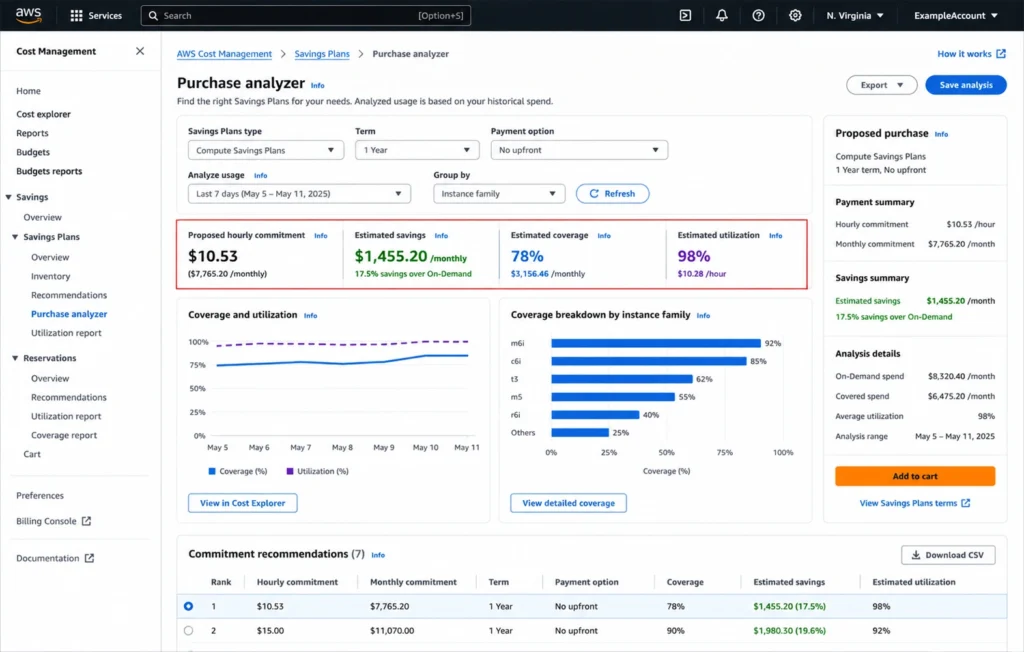
Do not calculate a Savings Plan purchase by simply multiplying last month’s On-Demand bill by an expected discount percentage.Savings Plans are purchased as a fixed dollar-per-hour commitment at Savings Plans rates. Model the stable usage first, then use AWS Purchase Analyzer or Savings Plans recommendations to evaluate commitment, coverage, utilization, and projected savings.
Which commitment fits each workload?
Use workload behavior first and the headline discount second.| Workload profile | Better starting point | Why |
|---|---|---|
| EC2 that may change instance family, Region, or compute service | Compute Savings Plan | Broadest flexibility across EC2, Fargate, and Lambda |
| Stable EC2 family in one Region, even if size or OS may change | EC2 Instance Savings Plan | Applies within the committed family and Region across instance sizes, operating systems, and supported tenancy changes |
| Very stable EC2 or capacity-sensitive workload | EC2 Instance Savings Plan; add an On-Demand Capacity Reservation separately when AZ capacity assurance is required | Savings Plans handle discounted pricing; On-Demand Capacity Reservations handle capacity assurance separately |
| RDS, Aurora, DynamoDB, ElastiCache for Valkey, OpenSearch, and other supported database services | Database Savings Plan | One-year No Upfront commitment with broad eligible database flexibility |
| Redshift | Reserved Nodes or Serverless Reservations | Redshift uses service-specific commitment models |
| Fault-tolerant interruptible compute | Spot Instances | Up to 90% off, with interruption risk |
Five services to prioritize
1. EC2
For highly stable EC2 configurations, begin with an EC2 Instance Savings Plan. Consider an RI only when a specific RI attribute makes it relevant. If Availability Zone capacity assurance is required, manage it separately with an On-Demand Capacity Reservation.EC2 Instance Savings Plans remain flexible across instance sizes and operating systems within the selected family and Region, along with supported tenancy changes.
Use Compute Savings Plans when the instance family, Region, or compute service may change. They provide the broadest compute flexibility.
2. RDS
AWS Database Savings Plans cover eligible RDS and Aurora usage through a one-year No Upfront commitment.RDS Reserved Instances still exist, but the decision should compare their configuration-specific economics with the broader flexibility of Database Savings Plans instead of assuming an RI should automatically be purchased.
3. ElastiCache and OpenSearch
ElastiCache for Valkey and Amazon OpenSearch Service are included in current Database Savings Plans coverage.This means eligible workloads can be evaluated within the broader database commitment strategy rather than treating every cache or search deployment as an isolated reservation decision.
4. Redshift
Provisioned Amazon Redshift uses Reserved Nodes, while Redshift Serverless has its own reservation model.Evaluate Redshift separately from EC2 Savings Plans. Term length, payment option, workload stability, node configuration, and expected architecture changes all influence the commitment decision.
5. Fargate
Fargate usage is eligible for Compute Savings Plans.Moving workloads from EC2 to ECS or EKS on Fargate therefore does not automatically eliminate commitment coverage. It can, however, change the stable hourly usage that should form the basis of the commitment.
Commitment readiness checklist
Before approving another AWS commitment, confirm:The baseline reflects recurring usage rather than a temporary peak.
Rightsizing and idle-resource cleanup are complete.
Planned migrations, Region changes, and architecture work are reflected in the forecast.
Existing RIs and Savings Plans are included before adding coverage.
Finance understands the term, payment option, utilization risk, and review cadence.
Related resources
For deeper commitment planning, use the business case for AWS Savings Plans to evaluate commitment economics and migration strategy.For compute workloads, compare the options in our EC2 pricing and cost optimization guide and EKS cost optimization guide.
For managed services, review our Database Savings Plans coverage guide and Redshift Reserved Nodes guide.
Native AWS vs. Flex Commitments
Native AWS commitments make sense when your team is comfortable selecting, purchasing, monitoring, and renewing commitments directly.You own the term, utilization risk, renewal timing, and financial impact if usage declines.
Flex Commitments are our managed commitment program, not another AWS pricing model.
At Usage.ai, we combine commitment management with cashback protection through Flex Commitments. After a customer approves an eligible savings recommendation, cashback may apply when a commitment costs more than equivalent On-Demand usage, subject to program terms. See how cashback works.
This addresses both sides of the commitment decision. We manage the commitment to keep it aligned with changing consumption, while the protection mechanism addresses the financial downside when an eligible commitment becomes more expensive than the equivalent On-Demand usage.
The result is a commitment strategy that can reduce customers’ retained financial exposure to eligible downside, subject to program terms.
Learn more about Flex Commitments.
Illustrative savings calculation
Assume a company has $50,000 per month of eligible EC2 On-Demand usage and identifies $35,000 as its stable baseline.| Item | Amount |
|---|---|
| Eligible On-Demand usage | $50,000/month |
| Stable On-Demand baseline | $35,000/month |
| Illustrative modeled SP commitment | $24,150/month (assumes a 31% modeled discount) |
| Illustrative monthly difference | $10,850 |
| Illustrative annual difference | $130,200 |
The 31% assumption is not tied to a specific Region, operating system, Savings Plan type, term, or payment option. A production calculation should specify those inputs and use current AWS pricing or Purchase Analyzer for the actual workload.
How we connect to AWS
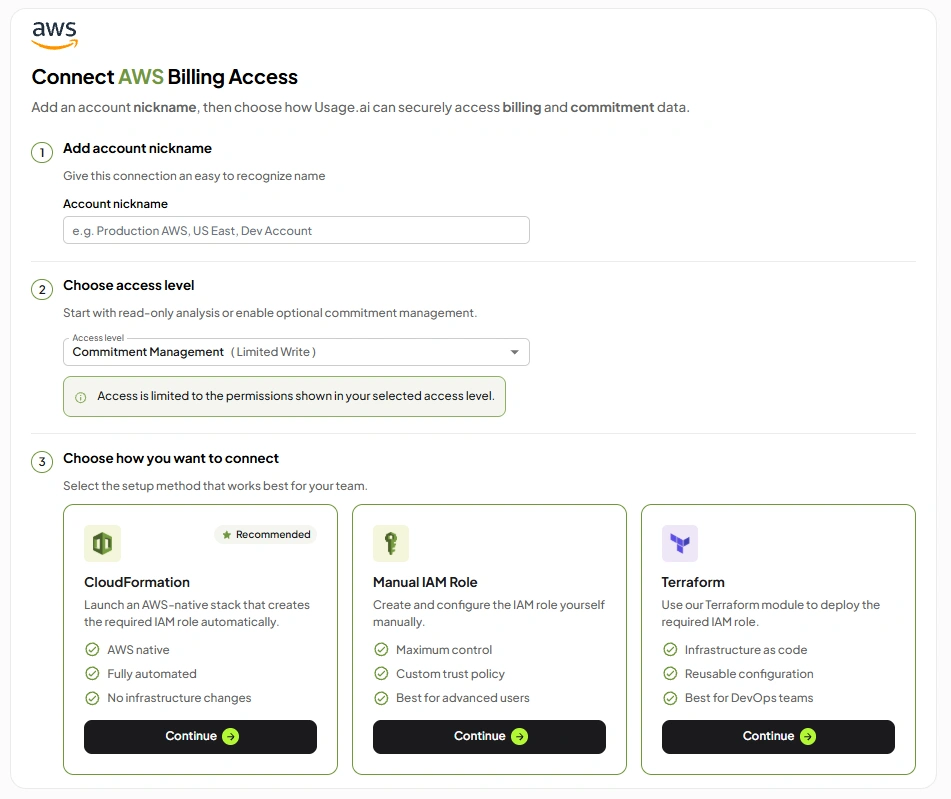
We connect to AWS using IAM-based access so we can analyze the billing and usage information required for the enabled workflow.Because integration requirements can change, use our current AWS integration guide for the exact setup steps, permissions, and multi-account onboarding process.
Get up to 57% savings with reduced commitment exposure and eligible cashback protection.
Frequently asked questions
Are Savings Plans better than Reserved Instances for EC2?
For most EC2 workloads, AWS recommends Savings Plans as the default commitment model. Use Compute Savings Plans when broad family, Region, or service flexibility is important, and EC2 Instance Savings Plans when the instance family and Region are stable. Use an RI when a specific RI attribute makes it appropriate.
What lookback should I use for AWS Savings Plans?
AWS provides 7, 30, and 60-day recommendation lookbacks. Choose a period that reflects the usage you reasonably expect to continue. A shorter period responds more quickly to recent changes, while a longer period can smooth temporary variation.
What AWS Savings Plans coverage target should I use?
There is no universal percentage. Start with the stable usage floor, account for known architecture changes, and use AWS recommendations to model the commitment. The appropriate target depends on how confident you are that the covered usage will continue throughout the term.
Can existing RIs and Savings Plans work together?
Yes. Existing RI benefits apply before Savings Plans to matching eligible usage. Include all current commitments before sizing another purchase so you do not create overlapping coverage.
How are Flex Commitments different from native AWS commitments?
Native AWS commitments are selected and managed directly by your team. With our Flex Commitments, we analyze usage, provide recommendations, and purchase and manage eligible approved commitments. Cashback protection applies to eligible Flex Commitments under current program terms.