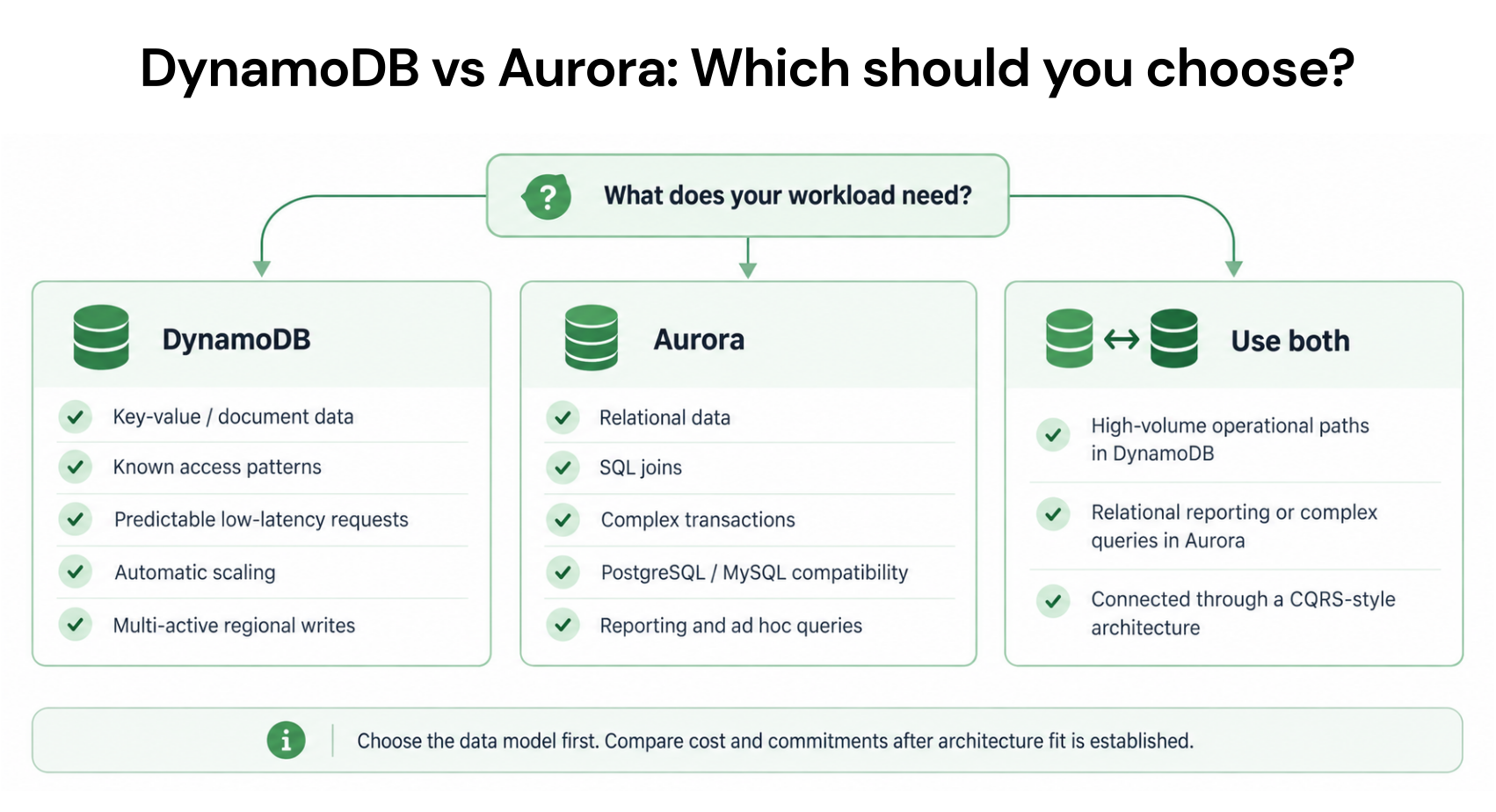
Choose DynamoDB for key-value and document workloads that need single-digit millisecond latency, zero idle cost, and automatic horizontal scaling without capacity planning. Choose Aurora for relational workloads that need SQL joins, complex queries, and ACID transactions, where Aurora’s throughput is 5-11x cheaper than DynamoDB at sustained high volumes. If your workload is under 10 million operations per month and intermittent, DynamoDB on-demand is almost always cheaper. If your workload exceeds 100 million operations per month with relational access patterns, Aurora with Reserved Instances is almost always cheaper.
![Architecture diagram comparing DynamoDB Global Tables (active-active, writes in all regions) versus Aurora Global Database (active-passive, writes in primary only, reads distributed)]](https://www.usage.ai/wp-content/uploads/2026/05/ChatGPT-Image-May-11-2026-10_31_41-AM-1-300x150.webp)
How Does DynamoDB vs Aurora Pricing Compare Side by Side?
Here is the complete Amazon Aurora vs DynamoDB pricing comparison for US East (N. Virginia) as of April 2026.
| Dimension | DynamoDB On-Demand | DynamoDB Provisioned | Aurora Provisioned | Aurora Serverless v2 | Winner |
| Storage cost | $0.25/GB-month | $0.25/GB-month | $0.10/GB-month + I/O | $0.10/GB-month + I/O | Aurora (60% cheaper storage) |
| Write cost | $1.25/M WRU | $0.00065/WCU-hr | Instance-hour (incl. in compute) | $0.12/ACU-hr (incl. in compute) | Aurora at high throughput |
| Read cost | $0.25/M RRU | $0.00013/RCU-hr | Instance-hour + I/O ($0.20/M) | ACU-hr + I/O ($0.20/M) | Aurora at high throughput |
| Idle cost (zero traffic) | $0.00/month | Provisioned WCU/RCU hourly | Full instance-hour cost | ~$43/month (0.5 ACU min) | DynamoDB on-demand ($0) |
| Max throughput | Millions of req/sec | Millions of req/sec | ~105K writes/sec (db.r3.8xl) | Scales to max ACU | DynamoDB (horizontal scale) |
| Query model | Key-value + Query by PK/SK | Key-value + Query by PK/SK | Full SQL (joins, subqueries) | Full SQL (joins, subqueries) | Aurora for relational queries |
| Schema | Schema-less (NoSQL) | Schema-less (NoSQL) | Schema-required (SQL) | Schema-required (SQL) | Depends on use case |
| ACID transactions | Multi-item (2x cost, 100 items max) | Multi-item (2x cost, 100 items max) | Full SQL transactions (no item limit) | Full SQL transactions | Aurora for complex transactions |
| Reserved/Commitment discounts | Database Savings Plans (18%) | Reserved Capacity (53-77%) + DSP | Reserved Instances (up to 66%) + DSP | Database Savings Plans (35%) | DynamoDB provisioned (deepest) |
| Multi-region | Global Tables (active-active) | Global Tables (active-active) | Aurora Global Database (active-passive) | N/A for Serverless v2 | DynamoDB for active-active |
How Does DynamoDB vs Aurora Cost Compare at the Same Workload?
Abstract pricing tables do not answer the real question: for my specific workload, which is cheaper? Here are four real-world workload profiles modeled on both DynamoDB and Aurora with exact dollar costs.
Workload 1: Low-Traffic API Backend (Startup / Dev)
1 million reads + 500K writes per month. 5 GB storage. Intermittent traffic with hours of zero activity.
DynamoDB on-demand: Writes: 0.5M x $1.25/M = $0.63. Reads: 1M x $0.25/M = $0.25. Storage: 5 GB (free tier). Total: $0.88/month.
Aurora Serverless v2 (0.5 ACU min): Compute: 0.5 ACU x $0.12/hr x 730 hrs = $43.80. Storage: 5 GB x $0.10 = $0.50. I/O: negligible. Total: $44.30/month.
DynamoDB vs Aurora cost winner: DynamoDB by 50x ($0.88 vs $44.30). Aurora’s minimum 0.5 ACU idle cost makes it uncompetitive for low-traffic workloads.
Workload 2: Mid-Traffic SaaS Application
50 million reads + 10 million writes per month. 100 GB storage. Steady traffic with predictable daily patterns.
DynamoDB on-demand: Writes: 10M x $1.25/M = $12.50. Reads: 50M x $0.25/M = $12.50. Storage: 100 GB x $0.25 = $25.00. Total: $50.00/month.
DynamoDB provisioned (70% utilization): WCU + RCU + storage = approximately $35.00/month.
Aurora provisioned (db.r7g.large): Instance: $0.29/hr x 730 = $211.70. Storage: 100 GB x $0.10 = $10.00. I/O: ~60M x $0.20/M = $12.00. Total: $233.70/month.
Aurora Serverless v2 (avg 4 ACU): 4 ACU x $0.12/hr x 730 = $350.40. Storage + I/O: $22.00. Total: $372.40/month.
DynamoDB vs Aurora cost winner: DynamoDB by 4.7x-10.6x ($35-50 vs $234-372). At this scale, DynamoDB’s per-request pricing is dramatically cheaper than Aurora’s instance-based pricing because the compute instance is over-provisioned relative to actual demand.

Also read: DynamoDB Global Tables Pricing
Workload 3: High-Throughput Relational System
500 million reads + 100 million writes per month. 500 GB storage. Steady, predictable traffic requiring SQL joins.
DynamoDB on-demand: Writes: 100M x $1.25/M = $125.00. Reads: 500M x $0.25/M = $125.00. Storage: 500 GB x $0.25 = $125.00. Total: $375.00/month. This is before PITR backup ($100/month for 500 GB), which brings the actual total to $475/month.
DynamoDB provisioned (70% utilization) + 1Y reserved: Approximately $145.00/month (after reserved capacity discounts). With PITR: $245/month. The reserved discount is the most aggressive lever available on DynamoDB, but it only applies to provisioned mode workloads with stable demand.
Aurora provisioned (db.r7g.xlarge) + 1Y RI: Instance (reserved): ~$150/month. Storage: 500 GB x $0.10 = $50.00. I/O: ~600M x $0.20/M = $120.00. Total: $320.00/month. Aurora I/O-Optimized: Instance (30% more): ~$195/month + Storage: $50.00. No I/O fees. Total: $245.00/month. Aurora PITR is included in the storage billing model, with no separate per-GB charge.
DynamoDB vs Aurora cost winner: At $245/month each (DynamoDB provisioned+reserved+PITR vs Aurora I/O-Optimized), the costs are nearly identical for this workload. DynamoDB wins on flexibility; Aurora wins on query capability. If your access patterns require SQL, Aurora at $245/month is your only option. If key-value access patterns suffice, DynamoDB provisioned with reserved capacity is competitive.
Workload 4: Massive Relational System (Enterprise)
2 billion reads + 500 million writes per month. 2 TB storage. Complex SQL queries with joins across 20+ tables.
DynamoDB on-demand: Writes: 500M x $1.25/M = $625.00. Reads: 2B x $0.25/M = $500.00. Storage: 2 TB x $0.25/GB = $500.00. Total: $1,625.00/month. DynamoDB cannot serve this workload efficiently due to the multi-table join requirement.
Aurora provisioned (db.r7g.2xlarge Multi-AZ) + 3Y RI: Instance (reserved): ~$300/month. Storage: 2 TB x $0.10 = $200.00. I/O-Optimized eliminates I/O fees. Total: ~$500/month.
Aurora vs DynamoDB cost winner: Aurora by 3.25x ($500 vs $1,625), and DynamoDB cannot even serve the relational query patterns. This is Aurora’s sweet spot: high-storage, high-throughput, complex relational workloads where instance-based pricing amortizes compute cost across billions of operations.
What Is the Exact DynamoDB vs Aurora Storage Cost Difference?
Storage cost is one of the clearest differentiators. DynamoDB Standard class charges $0.25 per GB-month. Aurora charges $0.10 per GB-month (60% cheaper). DynamoDB Standard-IA charges $0.10 per GB-month, matching Aurora’s storage rate but with 25% higher throughput costs.
At 100 GB: DynamoDB Standard = $25/month, DynamoDB Standard-IA = $10/month, Aurora = $10/month. At 500 GB: DynamoDB Standard = $125/month, Aurora = $50/month, difference = $75/month ($900/year). At 1 TB: DynamoDB Standard = $256/month, Aurora = $102/month, difference = $154/month ($1,848/year). At 10 TB: DynamoDB Standard = $2,560/month, Aurora = $1,024/month, difference = $1,536/month ($18,432/year).
For storage-heavy workloads above 500 GB, switching DynamoDB tables to Standard-IA ($0.10/GB) eliminates the storage cost gap versus Aurora entirely. However, Standard-IA increases throughput costs by 25% and removes access to reserved capacity discounts for that table. For tables where storage is the dominant cost driver (audit logs, historical records, archival data), DynamoDB Standard-IA is the right optimization and reduces the Aurora vs DynamoDB storage cost argument to zero.
DynamoDB also charges $0.20/GB-month for PITR continuous backup, applied to the table’s storage size. Aurora’s PITR is included in the standard storage billing, effectively adding no extra per-GB cost. For a 500 GB DynamoDB table with PITR enabled, total storage-related costs are $125 (Standard) + $100 (PITR) = $225/month versus Aurora’s $50/month. With PITR factored in, the true DynamoDB vs Aurora storage cost difference is $0.45/GB versus $0.10/GB, a 4.5x gap for Standard class tables with backup enabled.

When Does DynamoDB vs Aurora Throughput Cost Flip?
At low volumes, DynamoDB on-demand’s per-request pricing is cheaper because there is no minimum compute cost. Aurora’s instance-based pricing includes a fixed compute floor (minimum $43/month for Serverless v2, or $69+/month for the smallest provisioned instance). As operation volume grows, Aurora’s per-operation cost decreases because the fixed compute cost is amortized across more requests, while DynamoDB’s per-operation cost stays flat.
The crossover point depends on Aurora’s instance size and utilization. For a db.r7g.large instance ($211/month on-demand): Aurora becomes cheaper than DynamoDB on-demand when total DynamoDB on-demand cost exceeds $211/month, which occurs at approximately 140 million combined reads and writes per month (assuming 1 KB items, 50/50 read-write split, standard I/O). For Aurora I/O-Optimized (roughly $275/month all-in for db.r7g.large), the crossover is approximately 185 million combined operations per month.
For Aurora Serverless v2 at an average 2 ACU ($175/month): the crossover occurs at approximately 120 million combined operations per month. For Aurora Serverless v2 at average 4 ACU ($350/month): the crossover rises to approximately 240 million operations per month.
Below 100 million operations per month: DynamoDB on-demand is almost always cheaper, often by 5-50x depending on idle time. Between 100-200 million: the crossover zone where workload shape matters most, specifically the ratio of storage to throughput, item sizes, and whether access patterns require SQL. Above 200 million with relational patterns: Aurora provisioned with Reserved Instances typically wins on per-operation cost by 3-10x.
The November 2024 DynamoDB on-demand 50% price cut shifted these crossover thresholds significantly. Before November 2024, the crossover occurred at approximately 70 million operations per month. After the cut, it doubled to approximately 140 million. DynamoDB on-demand is now genuinely competitive for mid-scale workloads that would previously have been clear Aurora territory.
Also read: DynamoDB Contributor Insights Pricing
How Do Commitment Discounts Affect the DynamoDB vs Aurora Decision?
Both DynamoDB and Aurora have commitment-based discounts that change the cost comparison. Here is the full discount landscape.
DynamoDB Discounts
Reserved Capacity (provisioned mode only): 53% savings (1-year) to 77% (3-year). Purchased in 100 WCU/RCU blocks. Cannot be used with on-demand mode. Database Savings Plans: Up to 18% on on-demand, up to 12% on provisioned. 1-year term, No Upfront only. Covers all DynamoDB usage.
Aurora Discounts
Reserved Instances: Up to 45% (1-year) to 66% (3-year). Tied to specific instance type and region. Not available for Serverless v2. Database Savings Plans: Up to 35% for Serverless v2, up to 20% for provisioned Gen 7+ instances. 1-year term, No Upfront only. Covers across instance families and regions.
The deepest DynamoDB discount (77% on 3-year reserved) narrows the throughput cost gap significantly. At 77% off provisioned rates, DynamoDB’s effective per-operation cost approaches Aurora Reserved Instance pricing. The trade-off: the 77% discount requires a 3-year commitment to specific capacity in a specific region, introducing the same rigidity that makes Reserved Instances risky.
What About Aurora Serverless v2 vs DynamoDB for Serverless Workloads?
Both DynamoDB on-demand and Aurora Serverless v2 are marketed as serverless. The cost models differ significantly.
DynamoDB on-demand: True scale-to-zero. Zero traffic = $0.00 compute cost. You pay only for storage ($0.25/GB-month) when idle. Scales instantly to millions of requests per second.
Aurora Serverless v2: Scales down to 0.5 ACU minimum. Zero traffic = $43.80/month compute cost (0.5 ACU x $0.12/hr x 730 hrs). Storage and I/O charges apply on top. Does not scale to zero.
For applications with extended idle periods (development environments, staging, low-traffic microservices, event-driven backends), DynamoDB on-demand is dramatically cheaper because of the true zero-idle-cost model. For applications that always have some traffic but need relational queries, Aurora Serverless v2 provides auto-scaling without the complexity of provisioning, at a $43/month baseline.
How Do DynamoDB Global Tables Compare to Aurora Global Database?
Both services offer multi-region capabilities, but with different architectures and cost implications.
DynamoDB Global Tables: Active-active multi-region. Writes in any region, replicated everywhere. Replicated writes charged at standard WRU rates in each region. Storage charged per region. Cross-region transfer at $0.09/GB. Conflict resolution via last-writer-wins.
Aurora Global Database: Active-passive. One primary region handles writes; up to 5 read-replica regions serve reads. Writes are not distributed. Cross-region replication lag is typically under 1 second. Storage charged per region. No per-write replication fee (replication uses the storage layer, not the write path).
For workloads requiring writes from multiple geographic locations, DynamoDB Global Tables is the only option. For workloads needing low-latency reads globally with writes centralized to one region, Aurora Global Database is cheaper because it avoids the per-write replication charge.

How Does Aurora DSQL Fit Into the DynamoDB vs Aurora Decision?
Aurora DSQL is a newer distributed relational database from AWS announced at re:Invent 2024. It is worth understanding where it sits relative to DynamoDB and traditional Aurora.
Aurora DSQL bills on Distributed Processing Units (DPUs) at $8.00 per million DPUs in US East (verify at aws.amazon.com/rds/aurora/pricing — rates change). DPUs combine compute and I/O into a single metric with no separate I/O charges. Aurora DSQL scales to zero when idle, giving it the same zero-idle-cost advantage as DynamoDB on-demand. It has an ongoing free tier of 100,000 DPUs and 1 GB storage per month.
Aurora DSQL is designed for active-active multi-region relational workloads, which is the scenario where DynamoDB Global Tables has traditionally had no SQL alternative. It supports a subset of PostgreSQL but not all extensions or stored procedures. DSQL does not support Reserved Instances; Database Savings Plans (up to 35%) are the only discount path.
The positioning: use DynamoDB when you need NoSQL speed and schema flexibility. Use Aurora Serverless v2 when you need full PostgreSQL with auto-scaling. Use Aurora DSQL when you need active-active multi-region SQL and can accept its feature subset. Use Aurora provisioned when you need maximum throughput on relational workloads with predictable demand and want the deepest Reserved Instance discounts.
What Are the Hidden Costs of Each Service That Change the Comparison?
DynamoDB Hidden Costs
GSI write amplification: Every Global Secondary Index on a DynamoDB table consumes an additional write for every item modification. A table with 3 GSIs turns every 1 WRU write into 4 WRU (1 base + 3 GSI). At $1.25/M WRU on-demand, a table with 3 GSIs effectively costs $5.00/M writes, 4x the headline rate. This is the single most underestimated DynamoDB cost driver.
PITR backup: Continuous backup (PITR) costs $0.20/GB-month based on table size. For a 500 GB DynamoDB table, PITR adds $100/month on top of storage. Aurora PITR is included in the storage cost model. For large tables, this can add $50-200/month that does not appear in the per-operation pricing comparison.
DynamoDB Accelerator (DAX): If your application needs sub-millisecond reads at high volume, DAX caching costs $0.269/hour for a dax.r4.large node. A 3-node DAX cluster (recommended for production HA) costs approximately $591/month. Aurora’s built-in buffer pool cache provides similar read performance improvements with no additional charge.
Transaction 2x multiplier: TransactWriteItems and TransactGetItems consume 2x the standard WCU/RCU. An application that runs 100% transactional writes effectively pays $2.50/M writes instead of $1.25/M. For complex transactional systems, this doubles the DynamoDB cost versus Aurora’s standard transaction pricing.
Also read: DynamoDB Reserved Capacity: Pricing for Read & Write Throughput
Aurora Hidden Costs
I/O charges (Standard storage): Aurora Standard storage charges $0.20 per million I/O requests. For read-heavy analytical workloads, this can add $50-200/month on top of instance and storage costs. Aurora I/O-Optimized eliminates I/O charges at a ~30% higher instance and storage rate. For I/O-intensive workloads, I/O-Optimized is typically break-even at approximately 800K I/O requests per compute-hour.
Multi-AZ replica cost: Aurora Multi-AZ requires a read replica in a second Availability Zone for high availability. The replica is billed as a full additional instance at the same hourly rate as the primary. A db.r7g.large Multi-AZ setup costs approximately $423/month (2 instances x $211) versus $211/month for Single-AZ. Many workloads treat Multi-AZ as optional in development but required in production, creating a 2x compute cost difference that is not visible in the headline instance price.
Aurora Global Database transfer: Cross-region replication data transfer for Aurora Global Database is charged at standard AWS data transfer rates. For write-heavy global workloads, replication traffic can add $50-300/month in transfer fees depending on write volume and the number of replica regions.

How Do You Migrate From DynamoDB to Aurora or Vice Versa?
The DynamoDB vs Aurora decision is not permanent, but migration is expensive and time-consuming. Understanding the migration path before choosing is important.
Migrating from DynamoDB to Aurora
Use case: your access patterns have evolved to require SQL queries that DynamoDB cannot serve, or your data volume has grown to the point where Aurora’s storage and throughput costs are significantly cheaper.
Steps: Export DynamoDB data to S3 using the DynamoDB Export to S3 feature ($0.10/GB). Write a transformation script to convert DynamoDB’s JSON attribute format to relational table rows. Load transformed data into Aurora using AWS DMS or direct SQL import. Update application code to replace DynamoDB SDK calls with SQL queries. Migration time: 1-4 weeks for a typical application, longer for complex single-table designs. The data model redesign is the hardest part: DynamoDB single-table designs must be decomposed into normalized relational tables or denormalized to match new access patterns.
Migrating from Aurora to DynamoDB
Use case: your Aurora costs are growing linearly with data volume but access patterns are simple key-value lookups; or you need zero-idle-cost serverless scaling; or you need DynamoDB Global Tables for active-active multi-region writes.
Steps: Analyze Aurora query patterns to confirm all queries can be expressed as DynamoDB key-value or secondary index lookups. Design the DynamoDB table schema (primary key + sort key + GSIs) to support all required access patterns. Export Aurora data via pg_dump or AWS DMS. Write a transformation script to convert relational rows to DynamoDB items. Load data using DynamoDB BatchWriteItem or the import from S3 feature. Update application code from SQL to DynamoDB SDK calls.
The migration from Aurora to DynamoDB is technically harder because the data model must be redesigned from relational (rows and joins) to access-pattern-driven (partition key + sort key). Teams that attempt this without redesigning the data model end up with slow, expensive DynamoDB tables that scan instead of query. Consult the DynamoDB data modeling guides before starting.
How Does Usage.ai Optimize Costs for Both DynamoDB and Aurora?
The DynamoDB vs Aurora decision is a one-time architecture choice. The ongoing cost optimization for whichever service you choose is where the real savings accumulate over time.
Usage.ai Flex Reserved Instances and Database Savings Plans support cover both DynamoDB and Aurora. For DynamoDB, the platform monitors consumed WCU/RCU across all tables and purchases reserved capacity where utilization justifies the commitment. For Aurora, Usage.ai manages Reserved Instance purchases for provisioned instances and Database Savings Plans for Serverless v2 workloads.
The platform refreshes its analysis every 24 hours, compared to AWS Cost Explorer’s 72+ hour cycle. At $6-12K/day in uncovered database spend for enterprise deployments, that 3-day detection gap compounds to $18K+ per refresh cycle. If a reservation becomes underutilized because workload patterns shift, Usage.ai provides cashback and credits on the unused portion. The fee is a percentage of realized savings only.
See how much you can save on DynamoDB and Aurora with Usage.ai
Choose DynamoDB When… Choose Aurora When…
Choose DynamoDB When:
Your access patterns are key-value lookups or queries by partition key and sort key only. You need true zero-idle-cost serverless for intermittent or event-driven workloads. You need single-digit millisecond read and write latency at any scale. Your data model is schema-less or document-oriented. You need active-active multi-region writes (Global Tables). Your workload is under 100 million operations per month, where DynamoDB on-demand is almost always cheaper. You can design your data model around DynamoDB’s single-table or multi-table access patterns.
Choose Aurora When:
Your access patterns require SQL joins, subqueries, or ad-hoc analytical queries. You need full ACID transactions across arbitrary rows and tables without the 100-item or 2x cost limitation. Your workload exceeds 200 million operations per month with relational access patterns, where Aurora’s per-operation cost is 3-10x lower. You store over 500 GB of data, where Aurora’s $0.10/GB storage cost saves $0.15/GB versus DynamoDB Standard. Your team has relational database expertise and your application architecture depends on SQL. You need compatibility with MySQL or PostgreSQL ecosystems.
Consider Both (Polyglot Persistence) When:
Your application has both high-speed key-value lookups (user sessions, configuration data) and complex relational queries (order processing, reporting). Use DynamoDB for the key-value tier and Aurora for the relational tier. This pattern is common in modern architectures and allows each database to operate in its cost-optimal zone. Both services can be covered under a single Database Savings Plan commitment, simplifying the financial management of a dual-database architecture.
Frequently Asked Questions
Is DynamoDB cheaper than Aurora?
It depends on workload volume and access patterns. DynamoDB is cheaper for low-traffic workloads (under 100M ops/month) and intermittent workloads with zero-idle-cost needs. Aurora is cheaper for sustained high-throughput relational workloads above 200M ops/month, where instance-based pricing amortizes compute across billions of operations. Aurora storage is 60% cheaper at $0.10/GB vs DynamoDB’s $0.25/GB.
Can DynamoDB replace Aurora?
Only if your access patterns do not require SQL joins, subqueries, or ad-hoc queries. DynamoDB supports key-value lookups and queries by partition/sort key. If your application relies on relational queries, DynamoDB cannot serve as a direct replacement regardless of cost. For pure key-value or document workloads, DynamoDB can replace Aurora and is often cheaper.
Is DynamoDB faster than Aurora?
For key-value lookups, yes. DynamoDB delivers consistent single-digit millisecond latency at any scale. Aurora provisioned instances typically deliver 2-5 millisecond latency for simple queries and 10-100+ milliseconds for complex joins. Aurora Serverless v2 adds cold-start latency when scaling up. For raw key-value speed, DynamoDB wins. For complex SQL query performance, Aurora wins.
What is the DynamoDB vs Aurora storage cost difference?
DynamoDB Standard class charges $0.25/GB-month. Aurora charges $0.10/GB-month (60% cheaper). DynamoDB Standard-IA also charges $0.10/GB-month, matching Aurora but with 25% higher throughput costs. At 1 TB, the storage difference is $154/month ($1,848/year) between DynamoDB Standard and Aurora.
Does Aurora support serverless like DynamoDB?
Aurora Serverless v2 provides auto-scaling compute but does not scale to zero. The minimum is 0.5 ACU (~$43/month even when idle). DynamoDB on-demand scales to true zero with no compute cost when idle. For true zero-cost serverless, DynamoDB is the only AWS database option.
Can you use both DynamoDB and Aurora in the same application?
Yes. Polyglot persistence is a common pattern: DynamoDB for high-speed key-value access (sessions, config, counters) and Aurora for relational data (orders, inventory, reporting). A single Database Savings Plan commitment can cover both services. Many production applications use this dual-database architecture.
How do DynamoDB Global Tables compare to Aurora Global Database?
DynamoDB Global Tables provide active-active multi-region writes with conflict resolution. Aurora Global Database provides active-passive with one write region and up to 5 read-only regions. Choose DynamoDB for multi-region writes; choose Aurora for centralized writes with global read distribution.
What commitment discounts are available for DynamoDB vs Aurora?
DynamoDB: Reserved Capacity (53-77% on provisioned) and Database Savings Plans (up to 18% on-demand). Aurora: Reserved Instances (up to 66%) and Database Savings Plans (up to 35% for Serverless v2, up to 20% for provisioned). Both services are covered by Database Savings Plans, which can span a mixed DynamoDB + Aurora environment under one commitment.