RDS MariaDB vs MySQL: Feature Parity and Cost Comparison
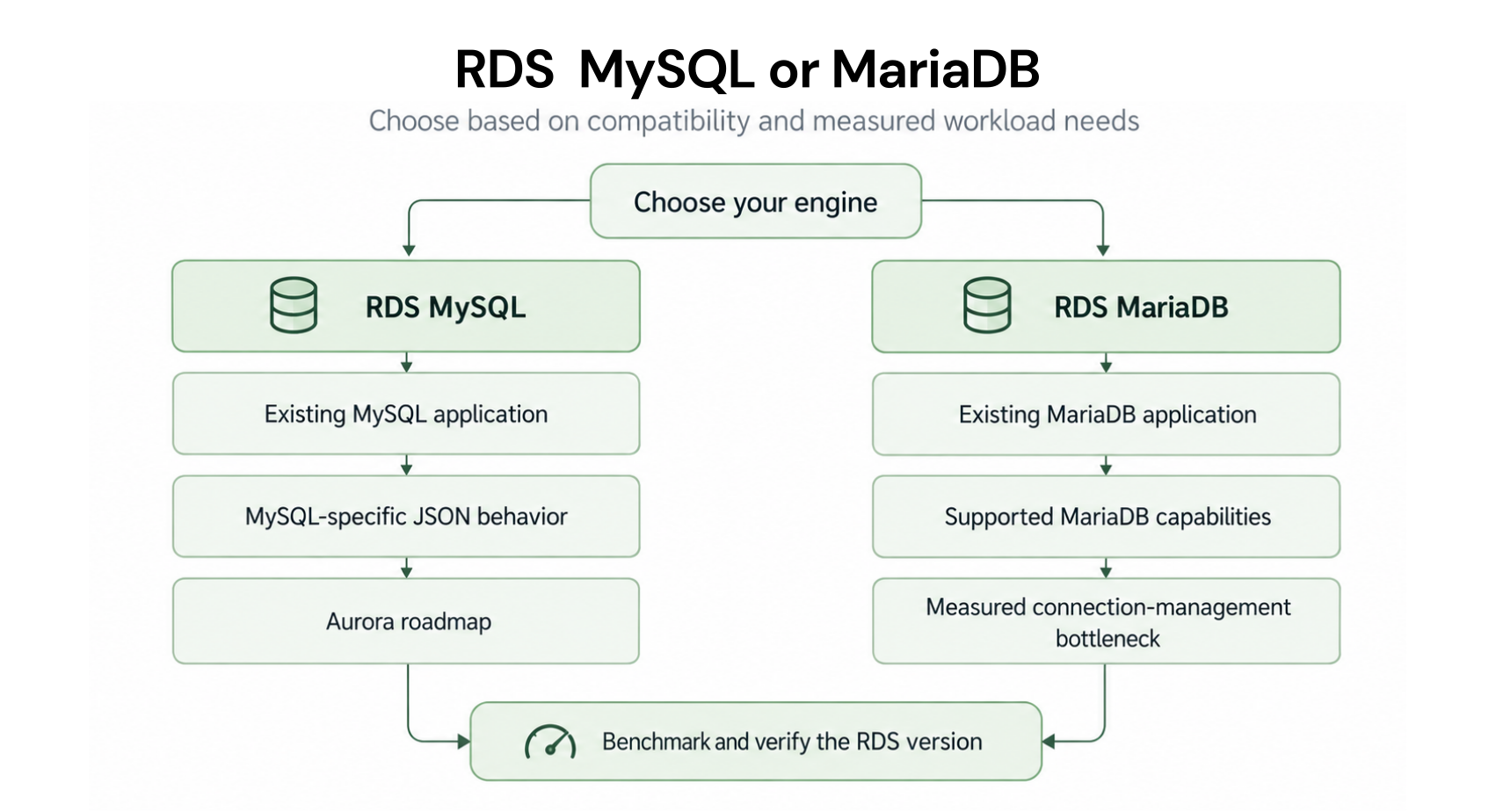
Choose RDS MySQL when your roadmap includes Aurora, when your team uses MySQL 8.0 JSON features heavily, or when avoiding any migration risk is the priority. Choose RDS MariaDB when your workload has high concurrent connections (200+), and you want native thread pooling to reduce the required instance size, or when you have specific MariaDB features like temporal tables, dynamic columns, or the Spider storage engine. On cost alone, the choice does not matter — both engines cost the same and save the same with reserved instances.
RDS MariaDB vs MySQL: Full Feature and Cost Comparison Table
Here is the side-by-side comparison across all dimensions relevant to a FinOps engineer or cloud architect making the MariaDB vs MySQL decision on AWS RDS (verify technical details at AWS documentation — features change with version updates).
| Dimension | RDS MariaDB | RDS MySQL | Cost Impact | Winner | Notes |
| On-demand pricing | Identical to MySQL | Identical to MariaDB | Zero difference | Tie | db.r8g.xlarge both $0.480/hr in US East |
| Reserved instance savings | 29-55% (same as MySQL) | 29-55% (same as MariaDB) | Zero difference | Tie | Same payment options, same rates |
| RI size flexibility | Yes (within same family) | Yes (within same family) | Zero difference | Tie | Same normalization unit system |
| Thread pool (Community Edition) | Yes — built-in | No — Enterprise only (not on RDS) | MariaDB may allow smaller instance | MariaDB | Key cost advantage at high concurrency |
| Aurora migration path | No direct path | Direct: Aurora MySQL-compatible | MySQL saves one migration step | MySQL | MariaDB requires MySQL migration first |
| JSON support (advanced) | JSON support, different syntax from MySQL 8.0 | Full MySQL 8.0 JSON_TABLE, JSON_PRETTY support | Application code difference, not cost | MySQL for MySQL 8.0 JSON users | Check syntax differences if migrating |
| Optimizer statistics | Enhanced (InnoDB engine stats) | Standard InnoDB statistics | Fewer slow query incidents | MariaDB | Less need for emergency resizing on query regression |
| Extended Support risk (current) | Separate lifecycle — verify version dates | MySQL 5.7: Year 3 ($0.20/vCPU-hr active) | MySQL 5.7 users paying $584/month extra on xlarge | MariaDB (current versions) | MySQL 8.0 EOL upcoming — verify AWS date |
| Blue/green deployments | Yes (supported) | Yes (supported) | Zero difference | Tie | Both support zero-downtime upgrades |
| Database Savings Plans | Eligible (verify at DSP page) | Eligible (Gen 7+) | Zero difference | Tie | Both eligible for DSP as alternative to RIs |
| Free tier eligibility | Yes (db.t3.micro, 750 hrs) | Yes (db.t3.micro, 750 hrs) | Zero difference | Tie | Both in 12-month free tier for new accounts |
| Cross-region read replicas | Yes | Yes | Same data transfer costs | Tie | $0.02/GB cross-region replication for both |
Also read: RDS Encryption: Does Encrypting Your Database Add Cost?
How Does the Thread Pool Cost Difference Actually Work?
Thread pool is the one MariaDB feature that can produce a direct cost difference between the two engines in specific workload scenarios. Understanding when it applies and when it does not is the key to making the right engine decision for cost-sensitive deployments.
How Thread Pool Works
In a standard MySQL or MariaDB without thread pool, each database connection gets its own dedicated OS thread. At 100 concurrent connections, you have 100 threads. At 500 connections, 500 threads. Each thread consumes memory (approximately 8-16 MB stack by default) and CPU scheduling overhead. At high concurrency, the thread context switching and memory pressure become the primary bottleneck, not the actual query workload.
MariaDB thread pool maintains a fixed pool of worker threads (configurable, typically equal to the number of CPU cores). Incoming connections are queued and handled by available worker threads. Under high concurrency, this means 500 connections can be served by 8 worker threads, with most connections waiting in the pool queue between queries rather than holding a dedicated OS thread. Memory consumption drops from approximately 500 x 12 MB = 6 GB to 8 x 12 MB + connection state overhead = well under 1 GB for thread state alone.
The Instance Sizing Implication
Without thread pool (MySQL Community on RDS), a web application with 400 concurrent database connections and 30 queries per second might require a db.r8g.2xlarge (8 vCPUs, 64 GB RAM) to manage thread overhead and buffer pool simultaneously. With MariaDB thread pool properly configured, the same application might run adequately on a db.r8g.xlarge (4 vCPUs, 32 GB RAM) because thread overhead is dramatically reduced.
Reserved instance cost comparison for this scenario:
MySQL db.r8g.2xlarge 3-year All Upfront: ~$0.432/hr effective, $316/month, $3,793/year. MariaDB db.r8g.xlarge 3-year All Upfront: ~$0.216/hr effective, $158/month, $1,893/year. Annual savings from using MariaDB at the smaller size: $1,900/year per instance. For a cluster with 6 such instances: $11,400/year in infrastructure savings, entirely attributable to the thread pool feature enabling a smaller instance size.
The important caveat: this savings scenario only applies if your workload is actually connection-bound rather than query-bound. If your bottleneck is CPU for complex queries, thread pool does not help and you need the larger instance regardless of engine. Profile your actual workload before making this decision.

What Is the Aurora Migration Cost Implication of Choosing MariaDB?
Aurora is the fastest-growing managed database service in the AWS ecosystem and is increasingly the default production database choice for teams building new applications on AWS. Aurora MySQL-compatible is a direct migration target from RDS MySQL. Aurora PostgreSQL-compatible is a direct migration target from RDS PostgreSQL.
There is no Aurora MariaDB-compatible variant. If you run RDS MariaDB today and want to migrate to Aurora in the future, the migration path requires two steps: MariaDB to MySQL migration first, then MySQL to Aurora migration. This adds one full migration project between your current state and Aurora.
What the Extra Migration Step Costs
A MariaDB to MySQL migration for a production database involves a compatibility assessment (1-3 days for a senior engineer), a DMS or mysqldump migration (a weekend or planned maintenance window), application testing (1-2 weeks), and a production cutover (one maintenance window). At $120/hr for a senior engineer working 40-80 hours total: $4,800-9,600 in labor cost for the migration. This is a one-time cost, but it is a real cost that teams adopting MariaDB today will face if their roadmap includes Aurora.
For teams with a defined Aurora migration on the 18-36 month horizon: the MariaDB thread pool savings ($1,900/year per instance) may not offset the future migration labor cost if the migration happens within 3 years. The math: $1,900/year thread pool savings x 3 years = $5,700 in infrastructure savings versus $4,800-9,600 in migration labor. The savings break even is roughly achieved, but there is significant execution risk and engineering time cost that the infrastructure savings do not fully capture.
When the Aurora Path Does Not Apply
If Aurora is not on your roadmap — your workload is on-premises-adjacent, your team has no plans to leverage Aurora-specific features (Serverless scaling, Global Database, I/O-Optimized mode), or your budget structure makes Aurora’s pricing model unattractive — the Aurora migration cost consideration is irrelevant. In that case, MariaDB’s thread pool advantage and lower Extended Support risk (for current versions) are unconstrained advantages.
How Does the MySQL Extended Support Situation Affect the RDS MariaDB vs MySQL Decision?
MySQL 5.7 entered Year 3 Extended Support pricing on March 1, 2026. The surcharge is $0.200 per vCPU-hour in US East, on top of the regular instance rate. For a db.r8g.xlarge MySQL 5.7 (4 vCPUs): the Extended Support surcharge is $0.80/hr = $584/month. This is currently active and applies to every team still running MySQL 5.7 on RDS.
MySQL 8.0 community end-of-life was April 2026. The AWS end-of-standard-support date for MySQL 8.0 on RDS has not been confirmed at the time of writing. Once AWS sets the MySQL 8.0 standard support end date, teams on MySQL 8.0 will face the same Extended Support pricing cycle.
MariaDB 10.4, 10.5, 10.6, and 10.11 are all within current AWS standard support. MariaDB follows its own version lifecycle and does not follow the MySQL 5.7/PostgreSQL 11 Extended Support schedule that triggered charges in 2024-2026. As of May 2026, no current MariaDB versions on RDS are in Extended Support under the $0.10-0.20/vCPU-hr pricing model.
The implication for teams on MySQL 5.7 specifically: if you are evaluating RDS MariaDB as an alternative to MySQL 5.7 to escape Extended Support charges, this is not the right path. The correct path is upgrading to MySQL 8.0 or 8.4 (once confirmed supported and not in Extended Support). MariaDB is API-compatible with MySQL 5.7 for most workloads, but a MySQL 5.7 to MariaDB migration is a migration for feature reasons, not a mechanism for avoiding Extended Support charges. Extended Support charges for MySQL 5.7 stop when you upgrade to a supported MySQL or MariaDB version — the engine switch is not the triggering factor, the version upgrade is.

Choose RDS MySQL When… Choose RDS MariaDB When…
Choose RDS MySQL When:
Your team plans to migrate to Aurora within the next 3 years. Aurora is MySQL-compatible, not MariaDB-compatible, and avoiding the extra migration step is worth the thread pool tradeoff for the majority of workloads that are not severely connection-bound. Your application uses MySQL 8.0+ specific JSON features (JSON_TABLE, JSON_PRETTY, the multi-valued index on JSON arrays) that have different syntax or behavior in MariaDB 10.x. Your team has invested heavily in MySQL operational tooling (Percona Toolkit, MySQL Shell, MySQL Enterprise backup) that has full MySQL compatibility but varying MariaDB support. Your workload has fewer than 150 concurrent connections and is not connection-bound, making thread pool irrelevant to performance and sizing. You are evaluating a managed database migration from an on-premises MySQL environment where a same-engine migration is lower risk than switching to MariaDB simultaneously.
Choose RDS MariaDB When:
Your workload regularly operates at 200+ concurrent database connections and connection overhead is a measurable bottleneck. Thread pool is the primary MariaDB advantage with direct cost implications. Aurora is not on your roadmap — your infrastructure will stay on provisioned RDS for the foreseeable future. You use MariaDB-specific features like the Aria storage engine for certain tables, temporal tables (WITH SYSTEM TIME), dynamic columns for flexible schema, or the Spider storage engine for horizontal sharding. Your team is already familiar with MariaDB from on-premises deployments and a same-engine migration to RDS is lower risk than switching to MySQL simultaneously. You run workloads where the enhanced MariaDB query optimizer statistics reduce the frequency of slow query incidents, reducing the operational cost of incident response and emergency scaling.
The Decision Does Not Matter When:
You are building a new greenfield application, you have no strong preference, and neither thread pool nor Aurora migration is a near-term consideration. In this case, choose either engine. The pricing, reserved instance mechanics, and operational management experience are identical. Pick the engine your team is more comfortable with and focus on right-sizing and RI optimization rather than the engine selection.
Also read: RDS Reserved Instances: 1-Year vs 3-Year Break-Even Across All Engines
How Do Reserved Instance Strategies Differ Between MariaDB and MySQL?
Since MariaDB and MySQL are priced identically and both support size flexibility, the reserved instance strategy is the same for both engines. The only differences are bookkeeping considerations when you have both engines running in the same AWS account.
Reservations Are Engine-Specific
A MariaDB reserved instance does not cover a MySQL instance, and vice versa. When you purchase an RI in the RDS console, you specify the engine as part of the purchase. AWS applies the discount only to running instances of the same engine. This matters for teams running a mixed fleet with some MariaDB and some MySQL instances — purchase reservations for each engine separately, even if the instance types and regions are identical.
No Conversion Between Engine Types
Once you purchase a MariaDB RI and decide to switch to MySQL, the MariaDB RI continues billing until the term expires and does not apply to the MySQL instance. There is no mechanism to convert or exchange an RI between engines. If you anticipate switching between MariaDB and MySQL within a reservation term, use 1-year terms rather than 3-year to limit the exposure. For the 3-year commitment, be confident in the engine choice before committing.
Fleet Reporting in AWS Cost Explorer
In AWS Cost Explorer and Cost and Usage Reports, MariaDB and MySQL instances appear as separate line items under the RDS service. Usage types follow the pattern: RDS:db.r8g.xlarge:Multi-AZ:MariaDB and RDS:db.r8g.xlarge:Multi-AZ:MySQL. When analyzing RI coverage reports, filter by engine to see coverage separately for each. A common operational oversight is reporting combined RDS RI utilization without separating by engine, which can mask under-coverage in one engine while showing over-coverage in another.
What Are the Practical Performance Differences on RDS?
For the majority of production CRUD workloads — web application backends, API databases, transactional systems with standard normalization — MariaDB and MySQL deliver equivalent performance. Both run on the same InnoDB storage engine for the default table type. Both use similar buffer pool management, query planning, and locking mechanics for standard operations.
Where MariaDB Performs Better
High-concurrency workloads where the connection count is the bottleneck. Thread pool reduces the CPU and memory overhead of maintaining many simultaneous connections. MariaDB’s enhanced optimizer statistics produce better query plans for complex queries with multiple JOINs, reducing the frequency of full table scans on large tables. The Aria storage engine outperforms MyISAM for read-heavy workloads with crash safety requirements.
Where MySQL 8.0 Performs Better
Workloads that heavily use JSON document storage with multi-valued indexes. MySQL 8.0 introduced index support on JSON arrays that MariaDB 10.x does not have an equivalent for. Applications using window functions, CTEs, or recursive queries introduced in MySQL 8.0 may find MySQL’s implementation more mature. InnoDB parallel query execution improvements in MySQL 8.0+ benefit large analytical scans.
For Most Production Workloads, the Difference Is Negligible
A db.r8g.xlarge serving a standard web application with 50-100 concurrent connections and a mix of reads and writes will not show a measurable performance difference between MariaDB and MySQL. The engine selection matters at the extremes: very high concurrency (MariaDB wins) or heavy JSON and advanced MySQL 8.0 features (MySQL wins). For the broad middle of typical web and API workloads, reserve the right instance size on whichever engine you choose and focus the optimization effort on query performance rather than engine selection.
Benchmarking on RDS Before Committing to an Engine
If you are genuinely uncertain which engine will perform better for your workload, the most efficient approach is to run a short benchmark on RDS before committing to either engine or purchasing reserved instances. Create two identically-sized RDS instances (one MySQL, one MariaDB) on-demand. Replay 24-48 hours of your actual production query load using pt-query-digest (from Percona Toolkit) to capture queries from a general log sample, then replay against both instances. Compare P95 and P99 query latencies. Enable thread pool on the MariaDB instance before benchmarking. The on-demand cost of this benchmark: 2 instances x 48 hours x the hourly rate. For db.r8g.xlarge: 2 x $0.480 x 48 = $46. A $46 benchmark that informs a 3-year RI commitment is money well spent.
Performance Monitoring After Engine Selection
Once you have chosen an engine and purchased reserved instances, monitor these CloudWatch metrics to validate performance over the first 30 days: DatabaseConnections (should stay under 70% of maximum), CPUUtilization (should average under 40% for comfortable headroom), FreeableMemory (should stay above 20-25% of total RAM), ReadLatency and WriteLatency (sudden increases indicate query plan regression or storage I/O bottleneck), and DatabaseLoadNonCPU (measures lock wait and I/O wait, should be below 1.0 for healthy operation). Any sustained deviation from these baselines after deployment is a signal to investigate before committing the reservation to a 3-year term.
Also read: RDS Reserved Instances: Engine-by-Engine Pricing and Commitment GuideÂ
What Is the Total Cost of Ownership Comparison: MariaDB vs MySQL on RDS?
Since direct infrastructure costs are identical, the total cost of ownership (TCO) difference between MariaDB and MySQL on RDS comes entirely from indirect factors: instance sizing from thread pool efficiency, migration labor costs, and operational incident frequency. Here is the full 3-year TCO model for a medium production workload.
Scenario: SaaS API Database (400 concurrent connections, 10 million queries/day)
MySQL db.r8g.2xlarge Multi-AZ path: Instance size needed without thread pool: db.r8g.2xlarge (8 vCPUs, 64 GB RAM) to handle 400 concurrent connections. 3-year All Upfront RI, Multi-AZ: ~$0.864/hr effective. Annual compute cost: $0.864 x 8,760 = $7,569/year. Storage (500 GB gp3 Multi-AZ): $115/month = $1,380/year. Total annual: $8,949. Three-year infrastructure cost: $26,847.
MariaDB db.r8g.xlarge Multi-AZ path (thread pool enabled): With thread pool, same 400 connections handled on db.r8g.xlarge (4 vCPUs, 32 GB RAM). 3-year All Upfront RI, Multi-AZ: ~$0.432/hr effective. Annual compute cost: $0.432 x 8,760 = $3,784/year. Storage (500 GB gp3 Multi-AZ): $1,380/year. Total annual: $5,164. Three-year infrastructure cost: $15,492.
Infrastructure cost difference over 3 years: $26,847 – $15,492 = $11,355 in favor of MariaDB, if thread pool genuinely enables the smaller instance size.
Aurora Migration Labor Cost (MySQL Advantage)
If the team migrates to Aurora at year 3: MySQL path to Aurora: direct migration, approximately 40 hours of senior engineer time at $120/hr = $4,800. MariaDB path to Aurora: MariaDB to MySQL first (40 hrs = $4,800) then MySQL to Aurora (40 hrs = $4,800) = $9,600 total migration labor.
Aurora migration labor difference: $9,600 – $4,800 = $4,800 extra cost for MariaDB path to Aurora.
Net 3-Year TCO for This Scenario
MariaDB: $15,492 (infrastructure) + $9,600 (Aurora migration) = $25,092 total. MySQL: $26,847 (infrastructure) + $4,800 (Aurora migration) = $31,647 total. Net: MariaDB is still $6,555 cheaper over 3 years in this scenario, even with the extra Aurora migration step factored in. The infrastructure savings from the thread pool advantage outweigh the migration labor cost for this workload profile.
This outcome changes if: the workload is not truly connection-bound (thread pool provides no sizing benefit, eliminating the $11,355 infrastructure advantage), or if Aurora migration happens at year 1-2 rather than year 3 (reducing the infrastructure savings window while migration labor cost is constant).
When MySQL Has Lower 3-Year TCO
MySQL has lower 3-year TCO when: the workload has under 150 concurrent connections (thread pool provides no sizing benefit and infrastructure costs are identical), or when Aurora migration is planned within 18 months (migration labor cost difference is not offset by short infrastructure savings window). For these scenarios, MySQL wins on TCO by the margin of the avoided extra migration labor cost: $4,800 for the MariaDB-to-MySQL step.
How Does Usage.ai Handle Mixed MariaDB and MySQL Fleets?
Production AWS environments often run both MariaDB and MySQL instances across different services, acquired codebases, and team preferences. Usage.ai Flex Reserved Instances monitors all RDS instances regardless of engine, analyzes utilization patterns separately for each engine, and purchases the optimal reservations for each engine type independently.
For teams running a mixed MariaDB and MySQL fleet, Usage.ai provides a unified view of reserved instance coverage and utilization across both engines. The platform refreshes analysis every 24 hours versus AWS Cost Explorer’s 72+ hour cycle, ensuring that newly created instances on either engine are evaluated for reservation eligibility quickly. If a MariaDB or MySQL reservation becomes underutilized because a cluster is resized or deprecated, Usage.ai provides cashback and credits on the unused portion. The fee is a percentage of realized savings only.
See how much you can save on RDS MariaDB and MySQL with Usage.ai
Frequently Asked Questions
What is the cost difference between RDS MariaDB and MySQL?
Zero. RDS MariaDB and RDS MySQL are priced identically for all instance types, regions, and deployment configurations. A db.r8g.xlarge MariaDB Single-AZ costs $0.480/hr in US East — the same as a db.r8g.xlarge MySQL Single-AZ. Reserved instance savings percentages are also identical: 29-34% on 1-year No Upfront, up to 55% on 3-year All Upfront (verify at aws.amazon.com/rds/mariadb/pricing — rates change).
What is better MariaDB or MySQL for AWS RDS?
For high-concurrency workloads (200+ connections): MariaDB, because thread pool is included in Community Edition. For workloads targeting Aurora migration: MySQL, because Aurora is MySQL-compatible and a direct migration path exists. For most standard web application workloads: either engine performs equivalently. The decision is technical, not financial.
Does MariaDB have better performance than MySQL?
At high concurrency, MariaDB thread pool reduces CPU and memory overhead versus MySQL Community Edition, which can allow a smaller instance size. For complex queries, MariaDB’s enhanced optimizer statistics reduce slow query incidents. For MySQL 8.0+ JSON features and multi-valued index workloads, MySQL has more mature feature support. For standard CRUD operations at moderate concurrency, performance is equivalent.
Can you use the same reserved instance for MariaDB and MySQL?
No. RDS reserved instances are engine-specific. A MariaDB RI does not cover MySQL instances and vice versa. In mixed fleets, purchase reservations separately for each engine. There is no conversion mechanism between engine-type reservations.
What is Amazon RDS MariaDB?
A fully managed relational database service running MariaDB, an open-source MySQL fork. Binary-compatible with MySQL at the client library level — same connection strings, drivers, and ORMs work without code changes. Priced identically to MySQL. Includes thread pooling in Community Edition, enhanced optimizer statistics, and Aria storage engine as differentiating features.
Is MariaDB compatible with MySQL on AWS?
Yes, at the client level. MySQL clients, JDBC drivers, Python mysql-connector, and most ORMs (SQLAlchemy, Hibernate, ActiveRecord) connect to MariaDB using MySQL connection strings and work without code changes. SQL syntax compatibility is very high for standard operations. Differences emerge at MySQL 8.0+ specific JSON features and some Advanced replication configurations. Test your specific workload before migrating in production.
What are the MySQL Extended Support charges on RDS?
MySQL 5.7 is in Year 3 Extended Support since March 1, 2026: $0.200 per vCPU-hour in US East, on top of the regular instance rate. For a 4-vCPU instance: $0.80/hr = $584/month surcharge. This does not apply to MariaDB current versions. MySQL 8.0 AWS EOL date is pending — verify at aws.amazon.com/rds/mysql/pricing. Reserved instance discounts do not reduce Extended Support charges.
Should I switch from MySQL to MariaDB to avoid Extended Support charges?
No. Extended Support charges for MySQL 5.7 apply because of the version EOL, not the engine choice. Upgrading to MySQL 8.0 or 8.4 eliminates the Extended Support charge without changing engines. Migrating to MariaDB also eliminates the charge but adds migration work. Choose the path based on your technical roadmap, not as an Extended Support escape strategy.