.png)



AWS managed keys have no monthly key fee, while customer managed keys incur monthly key-storage and usage charges.This guide breaks down RDS encryption costs, KMS pricing, key choices, performance impact, and the operational risks to consider.
Short answer
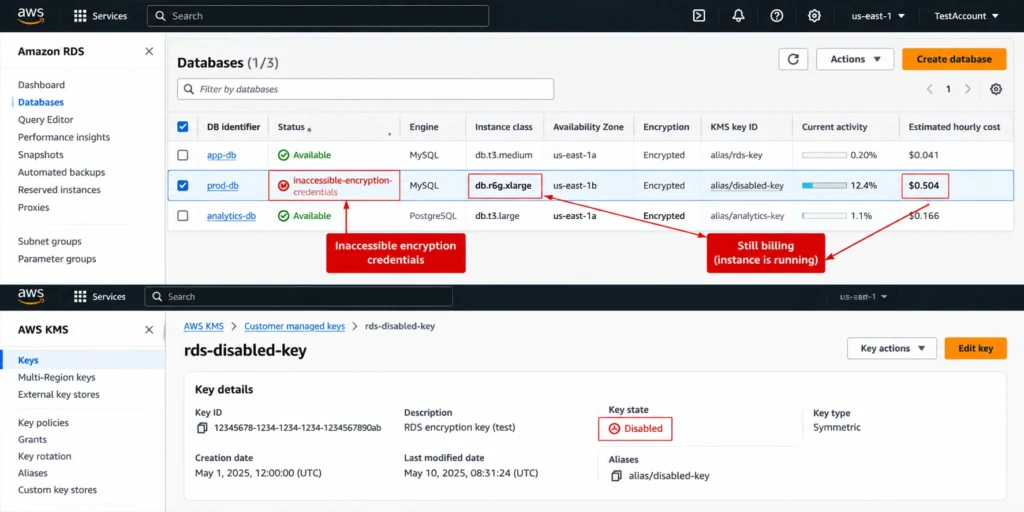
RDS encryption at rest is almost free. The AWS managed key (aws/rds) has no monthly key-storage charge, while a customer managed key costs $1 per month, with additional charges associated with automatic rotation, plus KMS API request charges.The real cost is operational. If an affected DB instance with backups enabled can stop, RDS moves it into a recoverable inaccessible-encryption-credentials-recoverable state two hours after detecting lost KMS-key access; the instance is unavailable and AWS bills for storage while it is stopped.
What RDS encryption actually covers
When you enable encryption at rest, RDS encrypts the data using AES-256. AWS handles encryption and decryption transparently, so database engines and applications do not need to implement the underlying storage encryption themselves. You can confirm the current scope in the AWS RDS encryption documentation.| Component | Encrypted? | Key used |
|---|---|---|
| Storage volume | Yes | Key set at creation |
| Automated backups and manual snapshots | Yes, automatically | Same key as the instance |
| Read replicas | Yes, mandatory | Same KMS key as the primary in the same Region; a KMS key in the replica Region for cross-Region replicas |
| Transaction logs and point-in-time recovery | Yes | Same key as the instance |
| Cross-Region snapshot copies | Yes | A KMS key in the destination Region |
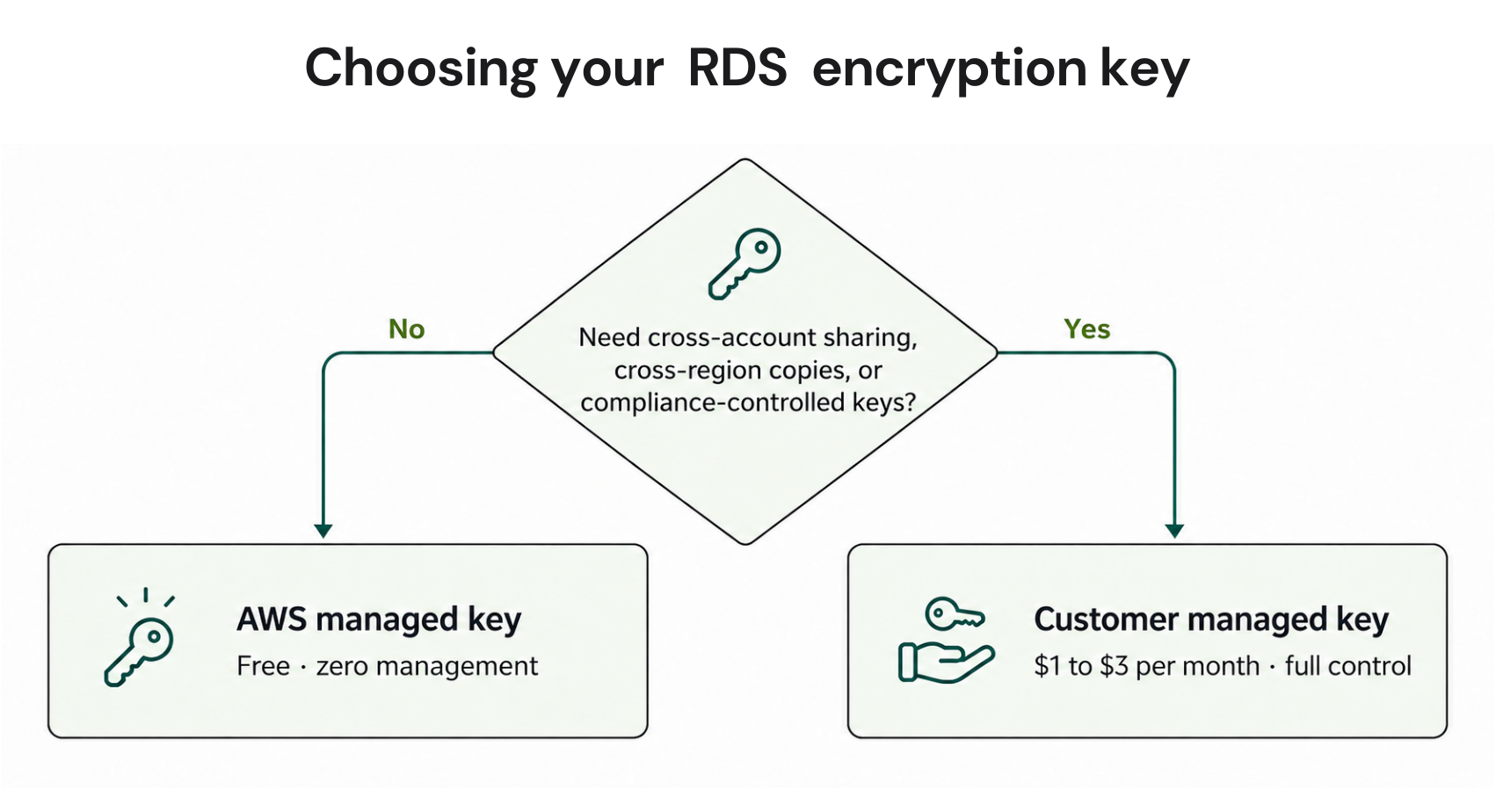
Cross-account snapshot sharing is different. Sharing an encrypted snapshot with another AWS account requires a customer managed KMS key because AWS managed keys cannot be shared across accounts.
What RDS encryption costs
Here is the full list of major KMS charges relevant to RDS encryption at current representative AWS list prices. Always confirm current rates on the AWS KMS pricing page, since pricing can change.| Cost component | AWS managed key | Customer managed key |
|---|---|---|
| Key storage | Free | $1 per month per key |
| Automatic or on-demand rotation | Not applicable | First and second automatic or on-demand rotations add $1 per month each; total key-storage charges cap at $3 per month |
| API calls | $0.03 per 10,000 requests | $0.03 per 10,000 requests |
| Free tier | 20,000 requests per month, account wide | 20,000 requests per month, account wide |
The rotation surcharge is also limited. The first and second automatic or on-demand rotations each add $1 per month. Later rotations do not add another monthly key-storage charge, so the total key-storage charge reaches a maximum of $3 per month for the key.
Worked example (illustrative, us-east-1 list prices): Twenty RDS instances sharing one customer managed key.
Key storage: $1 per month
Rotation-related key-storage charges: up to $2 additional per month
KMS API calls: depend on actual request volume
Maximum monthly key-storage charge after the first two rotations: $3 per month
CMK vs the AWS managed key: which to use
| Requirement | AWS managed key | Customer managed key |
|---|---|---|
| Cost | Free | $1 to $3 per month per key, plus applicable KMS request charges |
| Cross-account snapshot sharing | Not supported | Supported |
| Cross-Region snapshot copy | Requires a KMS key in the destination Region | Supported |
| Key policy control over who can decrypt | Limited | Full |
| Compliance mandates requiring customer-controlled keys | Usually insufficient | Required |
| Operational overhead | None | Key lifecycle management |
Choose a customer managed key when you need cross-account sharing, granular key-policy control, or compliance requirements for customer-controlled keys.
The same logic applies to other services, as the pattern in our breakdown of DynamoDB encryption key costs shows.
Does RDS encryption affect performance?
AWS states that RDS handles encryption and decryption transparently with minimal performance impact.Actual performance impact depends on the database engine, instance type, storage configuration, workload, and I/O pattern. Very I/O-intensive workloads can behave differently, so teams should validate performance with representative workloads rather than rely on a fixed percentage.
Encryption does not create a separate RDS charge for CPU overhead. Storage, compute, and other RDS resources continue to be billed according to their applicable pricing.
The inaccessible-credentials risk explained
When RDS detects that it has lost access to the KMS key for a DB instance with backups enabled that can stop, it moves the instance to inaccessible-encryption-credentials-recoverable two hours later.The instance remains stopped and unavailable for seven days. API calls can fail, and AWS bills for storage during that period.
The recovery action depends on restoring access to the KMS key. If the KMS key is disabled, enable the key first. After the key is enabled and RDS can access it again, restart the DB instance to recover it.
If the KMS key remains inaccessible through the seven-day recovery period, the instance transitions to the terminal inaccessible-encryption-credentials state. At that point, the instance cannot be recovered through the normal KMS-key recovery procedure.
A KMS key scheduled for deletion also creates a critical dependency. AWS KMS uses a configurable waiting period of 7 to 30 days before permanent deletion. Canceling the scheduled deletion during that period can preserve access to resources that depend on the key.
Once a KMS key is permanently deleted, encrypted data that depends on that key can become permanently inaccessible because the cryptographic material required to decrypt it is gone.
Use this checklist to reduce the risk:
Use separate keys for production and non-production so a development cleanup cannot affect production resources.
Tag every key with its purpose, environment, and owning team.
Before disabling or scheduling deletion of a key, check which RDS resources and snapshots depend on it.
Monitor KMS key-state changes and configure appropriate alerts using AWS monitoring capabilities.
Confirm that backup retention and recovery procedures provide enough time to detect and respond to a key-access problem.
Document the procedure for enabling the key and restarting affected DB instances.
How to encrypt an existing RDS instance
You cannot enable encryption on an existing unencrypted RDS instance in place. To encrypt an existing database, you generally create a snapshot, copy the snapshot with encryption enabled, restore a new encrypted instance, and then migrate the application connection to the new instance.Migration steps
Create a manual snapshot of the unencrypted instance.
Copy the snapshot with encryption enabled and specify the KMS key.
If copying across Regions, specify an appropriate KMS key in the destination Region.
Restore a new RDS instance from the encrypted snapshot.
Update application connection settings to the new endpoint and test.
Delete the old instance and any unnecessary unencrypted snapshot after validating the migration.
Migration duration depends on snapshot size, storage configuration, Region, instance configuration, and other factors. Do not rely on a fixed duration for a specific database size.
Run the migration during an appropriate maintenance window and plan the transition carefully.
For the backup-cost implications, see our RDS backup cost guide.
RDS encryption vs SQL Server TDE
On SQL Server, RDS native encryption at rest is not the only encryption option.RDS encryption at rest uses AWS KMS and protects the underlying storage. It does not require SQL Server-specific encryption configuration.
Transparent Data Encryption (TDE), by contrast, operates inside the SQL Server database engine and encrypts database files at the database level. TDE can be useful for workloads with specific database-level encryption requirements, including certain migration scenarios.
The two approaches address different layers and can be used together where appropriate. Teams should evaluate security requirements, operational complexity, supported SQL Server edition, licensing, and performance characteristics before choosing an approach.
Teams weighing editions and licensing can also review our RDS SQL Server Reserved Instance guide.
How encryption affects Reserved Instances
Encryption has no effect on Reserved Instance pricing or eligibility. An encrypted RDS instance can qualify for the same Reserved DB Instance discount as an otherwise matching instance, subject to the applicable matching attributes and AWS rules. See the complete RDS Reserved Instance guide for the matching requirements.The more important relationship is operational.
If an encrypted RDS instance becomes inaccessible because of a KMS key problem, the resources and usage covered by a commitment do not automatically disappear. The financial impact depends on the specific RDS pricing and commitment arrangement.
Before committing to a long-term RDS purchase, make sure your encryption keys, backup strategy, and recovery procedures are properly managed.
At usage.ai we run, Flex Insured Commitment Program.Teams can achieve up to 50% savings on covered cloud spend, on average, without taking on a three-year commitment risk. Our fee is a percentage of realized savings, and eligible commitments include cashback protection for underutilization.
The cloud provider still controls the underlying commitment products, pricing, eligibility rules, and billing mechanics. We operate the optimization and management layer around eligible commitments.
If you are comparing commitment terms, our breakdown of 1-year versus 3-year RDS break-even is a useful starting point.
Identify predictable RDS usage and evaluate commitment savings with changing usage in mind.
Frequently asked questions
Is RDS encryption enabled by default?
No. RDS encryption must be enabled when the DB instance is created. You cannot simply switch encryption on for an existing unencrypted DB instance. Organizations can enforce encryption requirements using AWS Organizations policies and other governance controls.
Does enabling automatic key rotation add cost?
For customer managed KMS keys, the first and second automatic or on-demand rotations each add $1 per month. Later rotations do not add another monthly key-storage charge, resulting in a maximum $3 monthly key-storage charge for the key.
AWS managed keys follow AWS's managed-key lifecycle and pricing model.
Does encrypting RDS increase storage cost?
RDS encryption does not create a separate per-GB encryption surcharge for the underlying RDS storage. However, associated snapshots, backups, data transfer, and KMS usage can still generate their normal charges.
What happens to snapshots if I delete the KMS key?
Snapshots encrypted with a KMS key depend on that key for decryption. If the key is scheduled for deletion, canceling the deletion during the waiting period can preserve access.
Once the KMS key is permanently deleted, encrypted data and snapshots that depend on that key can become permanently inaccessible.
Can I share encrypted RDS snapshots with another account?
Yes, but encrypted snapshot sharing requires a customer managed KMS key. AWS managed keys cannot be shared across accounts.
The key policy must grant the appropriate permissions to the target account. The target account can then copy the shared snapshot and re-encrypt it using a KMS key it controls.