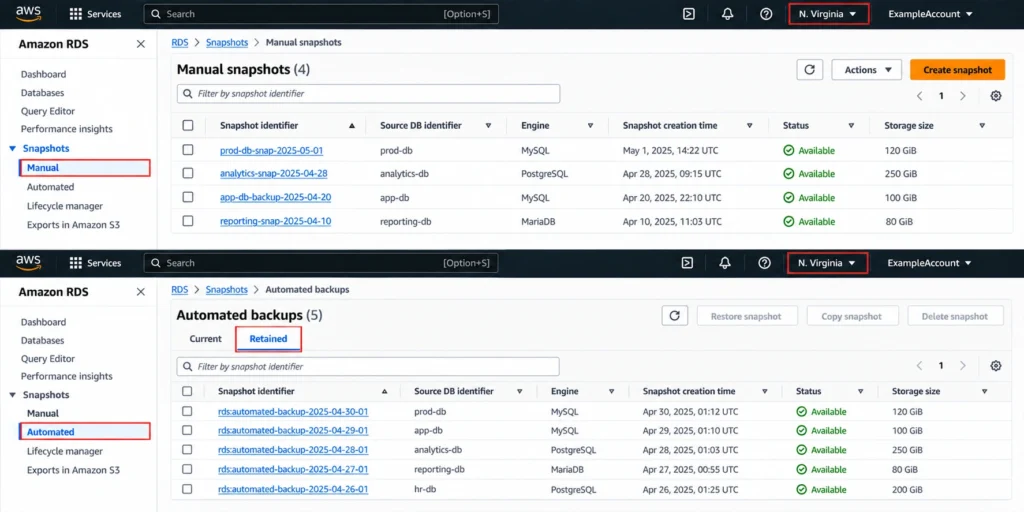

RDS backup storage is free up to 100% of your total provisioned database storage in a region, and AWS charges $0.095 per GB-month for anything above that. At face value this sounds manageable. The hidden complexity is in what counts toward both the free tier and the chargeable excess: automated backups, manual snapshots, and transaction log storage all pool together against a single regional quota. A team running ten 100 GB RDS instances in US East has 1,000 GB of free backup storage for the region. Their total backup footprint, across all automated backup windows and all manual snapshots, must stay under 1,000 GB to pay nothing. Exceed it by 500 GB and you pay $47.50/month, every month, until something is deleted.
This guide explains every cost component, the exact rate for each backup type (automated vs manual snapshot), the retention period math, the post-termination orphan snapshot trap, and how to audit and reduce your backup bill in an afternoon.
What Is the RDS Automated Backup Cost Structure?
RDS automated backups are built around a free storage allocation and a per-GB-month charge for anything beyond it. Here is every component.
Free Backup Storage Allocation
AWS provides free backup storage equal to 100% of your total provisioned database storage in each AWS Region. This allocation is regional and aggregate, meaning all your RDS instances in a region share one pool of free backup storage equal to the sum of their provisioned storage sizes.
Example: You have 3 RDS instances in US East. Instance A: 200 GB provisioned. Instance B: 500 GB provisioned. Instance C: 300 GB provisioned. Total provisioned storage: 1,000 GB. Free backup storage pool: 1,000 GB. Your total backup footprint (automated backups plus manual snapshots for all three instances) can reach 1,000 GB before any charge applies.
Excess Backup Storage Rate
Any backup storage above the free allocation is charged at $0.095 per GB-month in US East (N. Virginia). Verify at aws.amazon.com/rds/pricing — rates change. This rate applies to automated backup storage that exceeds the free tier. It does not apply to manual snapshots, which are billed differently (explained below).
Critical Distinction: Manual Snapshots vs Automated Backups
Manual RDS snapshots are stored in Amazon S3 and billed at Amazon S3 Standard storage rates: $0.023 per GB-month for the first 50 TB in US East. This is 76% cheaper than the $0.095/GB-month excess automated backup rate. If a team has 1 TB of manual snapshot storage and a FinOps engineer budgets $0.095/GB for it, they overestimate the cost by $72/month.
However, manual snapshots do count against your regional free backup storage quota alongside automated backups. If your automated backups fill the entire free pool, additional manual snapshots are charged at S3 rates. If the combined total (automated + manual) stays within the free pool, everything is free.
What Does the Complete RDS Backup Pricing Structure Look Like?
Here is every backup-related cost component for RDS in US East (N. Virginia) as of April 2026 (verify at aws.amazon.com/rds/pricing and aws.amazon.com/s3/pricing — rates change).
| Component | Rate | Free Tier | Storage Location | Expires? |
| Automated backup storage (within free tier) | $0.00 | 100% of provisioned DB storage / region | S3 (AWS-managed) | Yes — on instance deletion or retention expiry |
| Automated backup storage (excess) | $0.095/GB-month | After free tier exhausted | S3 (AWS-managed) | Yes — on instance deletion |
| Manual snapshot storage | $0.023/GB-month (S3 Standard rates) | Counts against regional free pool | Amazon S3 (user-accessible) | NO — persists until you delete them |
| Snapshot export to S3 (Parquet format) | $0.010/GB exported | None | S3 bucket you specify | Yes — you control S3 lifecycle |
| Cross-region snapshot copy | Standard snapshot rate in destination + $0.02/GB transfer | Separate free pool in destination region | Destination region S3 | Yes — on deletion |
| Post-termination automated backups | $0.095/GB-month | No free tier after instance deleted | S3 (AWS-managed) | Yes — after retention period expires |
| Manual snapshots of deleted instances | $0.023/GB-month (S3 rates) | No free tier after instance deleted | Amazon S3 | NO — persists indefinitely until deleted |
The most important column is ‘Expires?’ Manual snapshots never expire. They continue billing at $0.023/GB-month for every month they exist, whether or not the source instance still runs. A 500 GB manual snapshot created before a major version upgrade and forgotten costs $11.50/month, $138/year, indefinitely.
Also read: How AWS Savings Plans Share Across Consolidated Billing Accounts
How Does the RDS Automated Backup Retention Period Affect Cost?
The automated backup retention period is the most direct cost lever you control. It determines how many days of automated backups are kept, which directly determines how much backup storage your instance consumes above the free initial snapshot.
RDS automated backups work as follows: one full snapshot taken daily during your backup window, plus transaction logs uploaded to S3 every 5 minutes (enabling point-in-time recovery to any second within the retention window). Subsequent daily snapshots are incremental: only changed data blocks are stored. The total automated backup storage is approximately: full initial snapshot + (daily data change rate x retention period days).
For a 500 GB database with a 10% daily data change rate (50 GB of changed blocks per day): Retention 1 day: ~500 GB initial + ~50 GB incremental = ~550 GB. Retention 7 days: ~500 GB + (50 GB x 7) = ~850 GB. Retention 14 days: ~500 GB + (50 GB x 14) = ~1,200 GB. Retention 35 days (maximum): ~500 GB + (50 GB x 35) = ~2,250 GB.
If this is the only RDS instance in the region (free pool = 500 GB): At 1-day retention: 550 GB total, 50 GB excess, $4.75/month. At 7-day retention: 850 GB total, 350 GB excess, $33.25/month. At 14-day retention: 1,200 GB total, 700 GB excess, $66.50/month. At 35-day retention: 2,250 GB total, 1,750 GB excess, $166.25/month.
The cost difference between a 1-day and 35-day automated backup retention period on a single 500 GB database with a 10% daily change rate is $161.50/month, $1,938/year. That is a significant cost for what is often set as a default and never revisited.

What Is the RDS Automated Backup vs Manual Snapshot Cost Comparison?
Teams often treat automated backups and manual snapshots as equivalent backup mechanisms with the same cost. They are different in several important ways.
| Dimension | Automated Backups | Manual Snapshots | Best For | Cost Implication |
| Trigger | Daily, during backup window | User or script initiated | Automated: continuous RPO | Automated: predictable daily accumulation |
| Retention | 0-35 days, auto-deleted on expiry | Indefinite until you delete them | Manual: long-term archival | Manual: silent accumulation risk |
| Rate (beyond free tier) | $0.095/GB-month (excess only) | $0.023/GB-month (S3 Standard) | Manual cheaper per GB | Manual 76% cheaper per GB than excess automated |
| Point-in-time recovery | Yes — to any second within retention | No — only to snapshot moment | Automated: PITR requirement | Transaction logs included in automated only |
| Survives instance deletion | No — deleted automatically | Yes — survives forever | Manual: pre-deletion capture | Manual: orphan billing risk after deletion |
| Cross-account share | Not directly shareable | Yes — can share to other accounts | Manual: cross-account DR | Manual: more flexible for DR |
| Incremental storage | Yes — daily incrementals after full | Yes — incremental against last snapshot | Both: only changes cost extra | High change rate increases both types |
Where Are Amazon RDS Automated Backups Stored?
RDS automated backups and manual snapshots are stored in Amazon S3, managed by AWS. They do not appear in your S3 console or S3 bucket list because they are stored in AWS-managed S3 infrastructure, not in your own S3 buckets. The backup storage line item appears on your RDS bill, not your S3 bill.
Manual snapshots, while also stored in S3 infrastructure, are accessible through the RDS console under Snapshots. When you export a manual snapshot to S3 using the snapshot export feature, the exported Parquet files do appear in your own S3 bucket and are billed as standard S3 storage at $0.023/GB-month on your S3 bill.
Transaction logs for point-in-time recovery are uploaded to AWS-managed S3 every 5 minutes and count toward your automated backup storage quota. At a 10% daily change rate, transaction logs add approximately 10-20% to the daily backup storage growth beyond the daily snapshot alone.

Also read: Understanding Savings Plan Amortized Cost in AWS Cost Explorer
What Is the Post-Termination RDS Backup Cost Trap?
When you delete an RDS instance, AWS automatically deletes all automated backups associated with that instance. Your free backup storage pool shrinks by the deleted instance’s provisioned storage, but you pay nothing further for automated backups.
Manual snapshots are a completely different story. They are not deleted when you terminate the RDS instance. Every manual snapshot you ever took of that instance persists in Amazon S3, charged at $0.023/GB-month, until you explicitly delete it.
Real scenario: A team runs a 500 GB MySQL database for 2 years. They take manual snapshots monthly before each major upgrade, before quarterly releases, and before migration attempts. By the time they terminate the instance, they have 24 manual snapshots. First snapshot: 500 GB full. Subsequent snapshots: incremental, averaging 150 GB each. Total manual snapshot storage: 500 + (23 x 150) = 3,950 GB. Monthly charge after termination: 3,950 GB x $0.023 = $90.85/month, $1,090.20/year, automatically on their bill forever until someone notices.
The termination event removes the manual snapshots from the Instances list in the RDS console but they remain visible under Snapshots filtered by the deleted DB instance identifier. Many teams never check this. The cost appears as an S3 line item on the RDS bill, which is easy to miss in the noise of a busy AWS account.
Mitigation: Before terminating any RDS instance, inventory all manual snapshots associated with it. Decide which (if any) to retain for compliance or recovery purposes. Delete all others before termination. Set a reminder to audit RDS manual snapshots monthly for orphaned snapshots from deleted instances.
What Does RDS Backup Cost Look Like at Four Realistic Scales?
Abstract pricing tables are less useful than concrete examples. Here are four realistic RDS configurations with their full backup cost breakdown.
Scenario 1: Small SaaS Database (100 GB MySQL, 7-day retention)
Provisioned storage: 100 GB. Free backup pool: 100 GB. Daily change rate: 5 GB (5%). Automated backup storage after 7 days: 100 GB (first full) + 35 GB (7 x 5 GB incrementals) = 135 GB. Total against free pool: 135 GB. Pool remaining: 0 GB (exceeds 100 GB free tier by 35 GB). Monthly backup charge: 35 GB x $0.095 = $3.33/month. Manual snapshots: none. Total backup cost: $3.33/month. Annual backup cost: $39.96. Low cost but already above the free tier just from a 7-day retention period.
Scenario 2: Production PostgreSQL (500 GB, 14-day retention, 3 manual snapshots)
Provisioned storage: 500 GB. Free backup pool: 500 GB. Daily change rate: 50 GB (10%). Automated backup storage: 500 GB + (50 x 14) = 1,200 GB. Manual snapshot storage: 3 snapshots x ~200 GB average = 600 GB (at S3 rates). Total backup footprint: 1,800 GB. Free tier covers 500 GB. Excess: 1,300 GB. Excess automated backups: 700 GB x $0.095 = $66.50/month. Excess manual snapshots: 600 GB x $0.023 = $13.80/month. Total backup cost: $80.30/month, $963.60/year. This is a common profile for a production database with periodic manual snapshots for upgrade protection.
Scenario 3: Enterprise Multi-AZ Oracle (2 TB, 35-day retention)
Provisioned storage: 2,000 GB. Free backup pool: 2,000 GB. Daily change rate: 200 GB (10%). Automated backup storage: 2,000 + (200 x 35) = 9,000 GB. Total backup footprint: 9,000 GB. Free tier: 2,000 GB. Excess: 7,000 GB. Monthly charge: 7,000 GB x $0.095 = $665.00/month. Annual cost: $7,980. The 35-day retention on a large, high-change-rate database generates backup storage costs that approach the compute cost of smaller instance types. Reducing from 35-day to 14-day retention: 200 x (35-14) = 4,200 GB less excess. Monthly savings: 4,200 x $0.095 = $399/month, $4,788/year.
Scenario 4: Multi-Instance Account (Regional Pool Effect)
Three instances in US East: Instance A (100 GB MySQL dev, 7-day retention), Instance B (500 GB PostgreSQL prod, 14-day retention), Instance C (200 GB SQL Server dev, 7-day retention). Total provisioned: 800 GB. Free pool: 800 GB. Instance A backup storage: ~135 GB. Instance B backup storage: ~1,200 GB. Instance C backup storage: ~220 GB. Combined: ~1,555 GB. Excess above 800 GB free pool: 755 GB. Monthly charge: 755 GB x $0.095 = $71.73. If Instance A and C (dev) had their retention reduced to 1 day: Instance A: ~105 GB. Instance C: ~210 GB. Combined new total: ~1,515 GB. Excess: 715 GB. Monthly charge: $67.93. Savings: $3.80/month from changing two dev database retention periods. Small, but each dev database follows this pattern, and at 20 dev databases, the savings compound to $76/month.
How Does the RDS Automated Backup Frequency Affect Cost?
AWS RDS automated backups run once daily during your configured backup window. The frequency of automated backups cannot be changed from once per day. Transaction logs are uploaded every 5 minutes to enable point-in-time recovery, but these are part of the same automated backup quota.
The backup window (the daily time period when the full snapshot is taken) does not affect cost. A backup window of 03:00-04:00 costs the same as 12:00-13:00. The only cost impact from the backup window timing is whether the snapshot completes during low-traffic hours (reducing I/O contention on the database during the snapshot) or peak hours.
What does affect cost is the daily data change rate, which determines how much incremental data each subsequent snapshot must store. A heavily written OLTP database with a 30% daily change rate accumulates backup storage 3x faster than a read-heavy reporting database with a 10% change rate, for the same retention period.
Practical implication: If you are trying to reduce automated backup costs, extending the backup window does nothing. The two levers are reducing the retention period and reducing the volume of data changes (which is an application architecture concern, not a backup setting).
How Does RDS Automated Backups vs AWS Backup Compare on Cost?
AWS Backup is a centralized backup management service that can manage RDS snapshots alongside EBS, EFS, DynamoDB, and other services. Teams often ask whether using AWS Backup adds cost to their RDS backup bill.
Storage Cost: Identical
Snapshots taken by AWS Backup for RDS instances are stored using the same underlying mechanism as native RDS automated backups. They count against the same regional free storage pool. The $0.095/GB-month excess rate and the $0.023/GB-month manual snapshot rate apply identically whether the snapshot was triggered by native RDS automation or by an AWS Backup plan. AWS Backup does not add a storage cost surcharge.
Management Cost: AWS Backup Charges for Restore Testing
AWS Backup’s restore testing feature, which automatically restores snapshots to verify recoverability, does incur costs. A restore test spins up a full RDS instance for the duration of the test, billed at on-demand instance rates. For a db.r8g.xlarge MySQL instance, a 2-hour restore test costs approximately $0.480/hr x 2 hrs = $0.96 per test. Monthly restore testing on 10 instances: $9.60/month. Annual: $115.20. These are small costs for an important compliance function.
Advantage of AWS Backup: Lifecycle Policies
Native RDS manual snapshots have no built-in lifecycle management. They sit until you delete them. AWS Backup allows you to define lifecycle policies that automatically transition snapshots to cold storage or delete them after a configured retention period. This prevents the orphaned manual snapshot accumulation that silently bills $90+/month on deleted instances.
Recommendation: Use AWS Backup with lifecycle policies for any environment that takes manual snapshots for compliance, upgrade protection, or release management. The automated lifecycle management prevents the orphaned snapshot billing trap and adds negligible cost overhead.
Also read: AWS Database Savings Plans Explained for DB Teams
How Do You Calculate and Reduce Your RDS Backup Bill?
Step 1: Find Your Current Backup Storage
In the AWS Cost Explorer, filter by service = Amazon RDS and group by Usage Type. Look for usage types containing ‘BackupUsage’ or ‘StorageBackup’. This shows your GB-months of backup storage being billed above the free tier. Alternatively, check the AWS Cost and Usage Report for lines with usage_type matching ‘RDS:BackupUsage’.
Step 2: Identify Manual Snapshot Orphans
In the RDS console, navigate to Snapshots and filter by Type = Manual. Sort by Snapshot creation time, oldest first. For any manual snapshot where the source DB instance no longer exists (visible in the DB instance ID column), evaluate whether it is needed. For each orphan: calculate the cost (snapshot size in GB x $0.023). If the snapshot is older than your compliance retention requirement, delete it immediately.
Step 3: Audit Retention Periods
In the RDS console, navigate to Databases and check the Maintenance and Backups tab for each instance. Review the backup retention period. For development and staging databases, the default 7-day retention is often excessive. A 1-day retention period provides a 24-hour recovery window, which is typically sufficient for non-production environments. Reducing staging databases from 7-day to 1-day retention on a 500 GB database with 10% daily change rate saves approximately $28.50/month per instance.
Step 4: Evaluate Cross-Region Copy Necessity
Cross-region snapshot copies generate backup storage costs in the destination region, charged against that region’s separate free tier. If your DR strategy copies daily snapshots to a second region, verify whether automated failover RDS Multi-AZ already provides the availability guarantee you need. Multi-AZ provides synchronous replication within a region. Cross-region copies provide geographic isolation for region-level failures. If region-level failure is not in your risk model, cross-region snapshot copies are a cost without a corresponding risk benefit.
Step 5: Right-Size Manual Snapshot Frequency
Manual snapshots should be taken for specific, named reasons: before a major version upgrade, before a schema migration, before a significant data load. They should not be taken on a regular calendar schedule without a defined retention and deletion policy. For teams that take weekly manual snapshots as a habit, replacing that habit with a longer automated retention period (which already provides daily recovery points) eliminates duplicate storage costs.
How Does Usage.ai Help Reduce RDS Backup Costs?
Backup storage costs on RDS are a secondary line item compared to the compute and storage costs that reserved instances address. However, they compound quietly and are easy to miss in routine billing reviews. The orphaned manual snapshot issue in particular tends to accumulate for months before anyone notices.
Usage.ai Flex Reserved Instances optimize the primary RDS cost driver: compute. By automating reserved instance purchasing across all RDS engines and refreshing analysis every 24 hours, Usage.ai captures savings that the 72+ hour AWS Cost Explorer refresh cycle misses. For the backup storage costs, Usage.ai’s reporting surfaces unusual backup storage growth in the billing analysis, flagging accounts where backup storage spend is growing faster than provisioned storage (which indicates orphaned snapshots or over-extended retention periods). If a reserved instance becomes underutilized because an instance is resized or deprecated, Usage.ai provides cashback and credits. The fee is a percentage of realized savings only.
See how much you can save on RDS with Usage.ai

Frequently Asked Questions
1. How much does RDS backup storage cost?
RDS backup storage is free up to 100% of your total provisioned database storage per region. Automated backup storage above this threshold costs $0.095 per GB-month. Manual snapshots are stored in S3 at $0.023 per GB-month regardless of the free tier. Snapshot export to S3 (Parquet) costs $0.010 per GB exported. Verify at aws.amazon.com/rds/pricing — rates change.
2. What is the maximum retention period for RDS automated backups?
The maximum automated backup retention period for RDS is 35 days. The minimum is 0 days (which disables automated backups and deletes all existing automated backups for that instance). The default is 7 days for most instance types. Setting a longer retention period increases backup storage consumption and can push you above the free tier threshold.
3. Where are Amazon RDS automated backups stored?
RDS automated backups are stored in AWS-managed Amazon S3 infrastructure. They do not appear in your S3 bucket list in the S3 console. They are visible in the RDS console under Snapshots. Manual snapshots are also stored in AWS-managed S3 but are accessible through the RDS console and can be exported to your own S3 buckets using the snapshot export feature.
4. What is the difference between RDS automated backups and manual snapshots?
Automated backups run daily, enable point-in-time recovery, are deleted automatically on retention expiry or instance deletion. Manual snapshots are user-initiated, cannot do PITR, and never expire until you delete them. Automated backups are charged at $0.095/GB-month for excess. Manual snapshots are charged at $0.023/GB-month (S3 rates). Both count against the same regional free backup storage pool.
5. Do RDS manual snapshots expire automatically?
No. Manual RDS snapshots persist indefinitely until you explicitly delete them. They continue billing at $0.023 per GB-month even after you delete the source database instance. Orphaned manual snapshots from deleted instances are one of the most common sources of unexpected RDS backup charges. Review your manual snapshots monthly.
6. How do I disable RDS automated backups?
Set the backup retention period to 0 in the RDS console under Maintenance and Backups, or via the modify-db-instance CLI command with –backup-retention-period 0. This disables automated backups and deletes all existing automated backups for that instance. Note: disabling backups removes PITR capability and is not recommended for production databases.
7. How is RDS snapshot pricing calculated?
Snapshot storage is calculated as the GB-months of storage consumed per billing period. The first snapshot is a full backup of used data blocks. Subsequent snapshots are incremental. AWS bills for the average GB stored across the month. The rate depends on type: automated backup excess at $0.095/GB-month, manual snapshot at $0.023/GB-month (S3 rates). Exporting a snapshot to S3 in Parquet format costs an additional $0.010/GB.
8. What happens to RDS backups when an instance is deleted?
Automated backups are automatically deleted when you delete the RDS instance. The free tier pool shrinks by the deleted instance’s provisioned storage. Manual snapshots survive the deletion and continue billing at S3 rates indefinitely. Before deleting any RDS instance, inventory and clean up manual snapshots you no longer need to avoid ongoing orphan backup charges.