
RDS RI Payment Options: All Upfront vs Partial Upfront vs No Upfront

Updated May 1, 2026
18 min read
RDS RI Payment Options: All Upfront vs Partial Upfront vs No Upfront
On this page

For most FinOps teams, Partial Upfront on a 1-year RDS reserved instance is the right default: it saves 33-36% versus on-demand with a manageable upfront payment, and the 2-4% extra savings from All Upfront rarely justifies the larger capital commitment. If your organization can absorb a larger upfront for a 3-year term, All Upfront 3-year delivers the best lifetime savings at 55-69% depending on the engine. No Upfront is the right choice only when your organization has zero capital budget for database commitments or when you want to test reserved instance utilization before making a larger commitment.

What Are the Three RDS Reserved Instance Payment Options?

Every RDS reserved instance purchase requires choosing one of three payment structures. The choice affects your upfront cash outlay, your monthly invoice, and your total savings over the reservation term. The options do not affect instance performance, availability, or any technical behavior of your database.

All Upfront (AURI)

Pay the full reservation cost in a single payment at the time of purchase. No hourly charges for the duration of the term. This option offers the highest discount: approximately 34-38% savings on 1-year terms and up to 63-69% on 3-year terms depending on the engine. The upfront payment is non-refundable. If you need a way to think about this option: you are prepaying the entire electric bill for your database for the next 1-3 years, accepting a bulk discount in exchange for the commitment.

Partial Upfront (PURI)

Pay a lower amount upfront at purchase and a reduced hourly rate for the rest of the term. The upfront portion is typically 30-50% of the All Upfront price. The remainder is billed as a lower hourly rate each month. Total savings are approximately 33-36% on 1-year terms and 49-60% on 3-year terms. For 3-year Partial Upfront, you make one upfront payment and then pay reduced monthly charges for 36 months. This splits the commitment between upfront capital and ongoing operating expense.

No Upfront (NURI)

Pay nothing at purchase. The entire reservation cost is paid as a discounted hourly rate, billed monthly over the 1-year term. Savings are approximately 29-34% versus on-demand. Critically: No Upfront is only available for 1-year terms. There is no 3-year No Upfront option for RDS reserved instances. Teams that budget for a zero-capital 3-year commitment will discover at purchase time that they must choose between Partial Upfront and All Upfront. Plan accordingly.


Also read: How AWS Savings Plans Share Across Consolidated Billing Accounts

What Is the Exact Cost Difference Between All Three Payment Options?

Instance / Engine Option Upfront Hourly Rate 1-Year Total vs On-Demand
MySQL db.r8g.xlarge Single-AZ On-Demand (baseline) $0 $0.480 $4,205 0%
MySQL db.r8g.xlarge Single-AZ No Upfront (1-yr) $0 ~$0.341 ~$2,987 ~29%
MySQL db.r8g.xlarge Single-AZ Partial Upfront (1-yr) ~$730 ~$0.166 ~$2,183 ~35%
MySQL db.r8g.xlarge Single-AZ All Upfront (1-yr) ~$2,744 $0 ~$2,744 ~35% (*)
MySQL db.r8g.xlarge Single-AZ Partial Upfront (3-yr) ~$1,848 ~$0.098 ~$2,130/yr avg ~49%
MySQL db.r8g.xlarge Single-AZ All Upfront (3-yr) ~$5,680 $0 ~$1,893/yr avg ~55%

What Is the Real Savings Difference Between All Upfront and Partial Upfront?

The headline percentages (34% No Upfront, 35% Partial Upfront, 35-37% All Upfront) look nearly identical on the same term length. The actual dollar difference is small for 1-year terms but grows significantly for 3-year terms and large instance types.

For db.r8g.xlarge MySQL Single-AZ on a 1-year term: No Upfront saves $1,218 vs on-demand. Partial Upfront saves $1,461 vs on-demand. All Upfront saves approximately $1,500 vs on-demand. Difference between No Upfront and All Upfront: $282 on a $4,205 annual cost. That is a 6.7% improvement in savings for paying all upfront versus nothing upfront on a 1-year term. For a $4,000 decision, most FinOps teams correctly conclude the upfront payment complexity is not worth the $282.

The calculation changes dramatically on 3-year terms. For the same instance: No Upfront is not available (3-year only). Partial Upfront 3-year saves approximately $8,074 vs on-demand over 3 years. All Upfront 3-year saves approximately $8,935 over 3 years. Difference: $861 over 3 years ($287/year). Still modest in percentage terms but the absolute amount grows with instance size. For a db.r8g.4xlarge Multi-AZ PostgreSQL running 3 years, All Upfront vs Partial Upfront is a $3,400 difference over the term.

Bar chart showing total annual cost for MySQL db.r8g.xlarge Single-AZ across four payment options: on-demand at $4,205, No Upfront reserved at $2,987, Partial Upfront reserved at $2,183 (lowest bar), and All Upfront reserved at $2,744, demonstrating that Partial Upfront achieves the lowest total 1-year cost despite All Upfront having the higher headline savings percentage

Why Does Partial Upfront Sometimes Have Lower Total Cost Than All Upfront?

This surprises many engineers. On a 1-year term, Partial Upfront often produces a lower total payment than All Upfront, even though All Upfront has a slightly higher savings percentage.

The reason: AWS structures Partial Upfront so that the upfront + ongoing monthly payments sum to less than the All Upfront single payment in some cases. The All Upfront includes a slight premium for the simplicity and certainty of a single payment, while Partial Upfront distributes the billing across time. The result is that a team paying Partial Upfront may pay $2,183 total, while the same team paying All Upfront pays $2,744 upfront, a higher total for the full year.

This is not universal across all instance types and engines. For some configurations, All Upfront is genuinely cheaper in total. Always compute both: take the All Upfront fee, then separately calculate the Partial Upfront total (upfront + hourly rate x 8,760 hrs). Compare the two totals and choose the lower one. Never compare based on the percentage savings headline alone.

AWS provides an RI pricing calculator at aws.amazon.com/rds/pricing — use it to run the exact comparison for your specific instance type before purchasing.

When Is Each Payment Option the Right Choice?

All Upfront: Right When

Your organization has capital budget available for one-time database infrastructure purchases. You want to maximize every possible dollar of savings and have confirmed the instance will run for the full term. Your finance team treats cloud reservations as capital expenditure and prefers to close the full cost in the current fiscal year. The instance is a large, expensive type (db.r8g.4xlarge, db.r8g.8xlarge, or Oracle LI configurations) where the absolute dollar savings from All Upfront are large enough to justify the capital outlay. Your treasury management approach earns near-zero on idle capital, making the opportunity cost of the upfront negligible.

Partial Upfront: Right When

You want meaningful RI savings without committing all capital at purchase. Your budget has some upfront flexibility but not enough for the full All Upfront amount. You want to keep some costs as monthly operating expense rather than a one-time capital item. The instance may need resizing or migration within the term, and the partial upfront minimizes total loss if you have to abandon the reservation partway through. For most production databases at most companies, Partial Upfront is the rational default for both 1-year and 3-year terms.

No Upfront: Right When

Your organization has zero capital budget for reserved instances and all spending must be operating expense. You are testing whether a specific database instance qualifies for commitment before purchasing a longer term. You are a startup or early-stage company where capital preservation is more important than the $200-300 difference between No Upfront and Partial Upfront savings. The instance is borderline for reservation (utilization is stable but not high) and you want to observe another quarter of usage before committing more capital.

One important caveat: No Upfront saves approximately $200-400 less per year than Partial Upfront on a typical production database instance. If an organization has the ability to pay even a modest upfront amount, Partial Upfront almost always wins the total cost comparison.

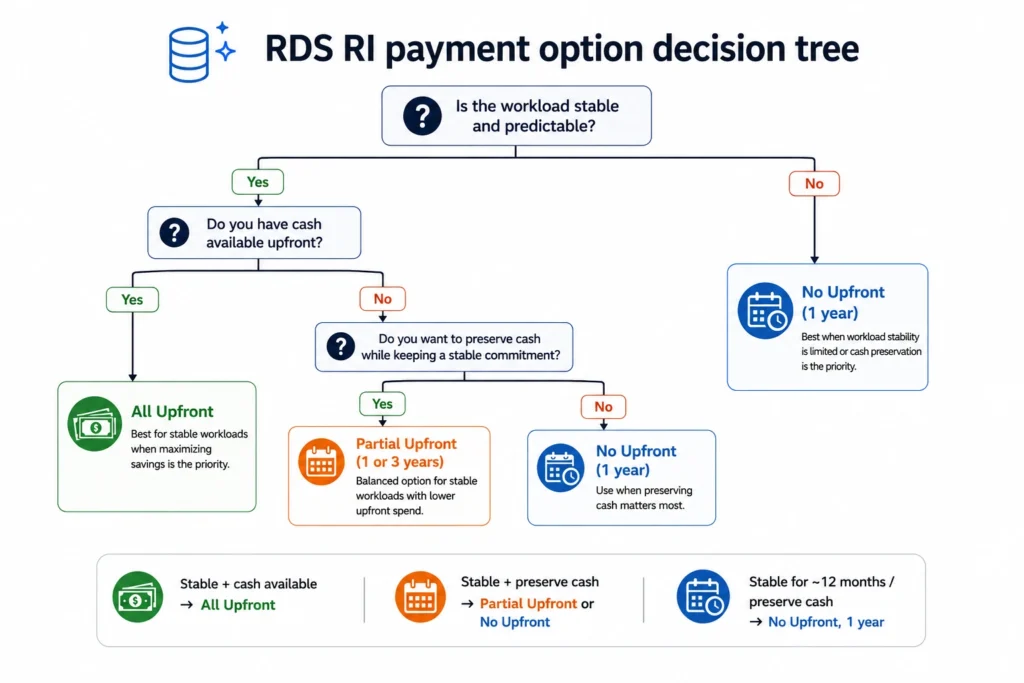
Decision tree flowchart for selecting an RDS reserved instance payment option, starting with a capital budget availability question branching into yes and no paths, with the no path leading to No Upfront recommendation, and the yes path asking about term length and stability confidence before recommending All Upfront for 3-year stable workloads and Partial Upfront as the default for most other scenarios

What Is the Opportunity Cost of All Upfront RDS Reserved Instances?

The All Upfront payment locks capital that could otherwise earn a return. For a 3-year All Upfront reservation on a large database, the opportunity cost is worth calculating.

Example: db.r8g.4xlarge Multi-AZ PostgreSQL, 3-year All Upfront. Upfront payment: approximately $44,000. If that $44,000 is instead kept in a money market fund yielding 4% annually: Year 1: $44,000 x 4% = $1,760 yield. Year 2: $1,760. Year 3: $1,760. Total opportunity cost: $5,280 over 3 years.

Compare to the extra savings from All Upfront vs Partial Upfront 3-year: approximately $3,400 more savings (as shown in the previous example). Opportunity cost: $5,280. Net: the 3-year All Upfront actually costs the organization $1,880 more in economic terms than the 3-year Partial Upfront when the opportunity cost of capital is factored in at 4%.

This analysis does not hold for smaller instances where the upfront is under $5,000, because the opportunity cost at 4% yield is only $200-400, which the All Upfront savings may exceed. The opportunity cost calculation becomes material for large instance types (db.r8g.4xlarge and above) or for teams with reserved capital earning significant returns.

Practical takeaway: for most team sizes and instance types, the opportunity cost of All Upfront is small enough to ignore. For enterprise teams reserving 10-20 large Multi-AZ instances, the All Upfront vs Partial Upfront analysis should include an opportunity cost line.


Also read: Understanding Savings Plan Amortized Cost in AWS Cost Explorer

How Does the CapEx vs OpEx Distinction Affect the Choice?

For many organizations, the payment option choice is driven by accounting treatment rather than pure savings optimization.

No Upfront and Partial Upfront: Mostly Operating Expense

No Upfront RDS reserved instances generate only monthly charges, treated as operational expense (OpEx). Partial Upfront generates a mixed treatment: the upfront portion may be treated as a prepaid asset amortized over the term, while the ongoing hourly charges are OpEx. Finance teams that prefer to keep cloud spending in operating budgets favor No Upfront or Partial Upfront for this reason.

All Upfront: Capital Expenditure in Many Frameworks

All Upfront reserved instance payments are often treated as capital expenditure (CapEx) because they represent a prepaid multi-year asset. In organizations with capital budget cycles, All Upfront purchases must go through capital approval processes that can take weeks or months. For teams trying to move quickly, No Upfront or Partial Upfront allow immediate purchasing without capital approval.

The accounting treatment varies by organization and should be confirmed with your finance team. AWS Cost and Usage Reports classify reserved instance charges differently from on-demand charges, allowing cost allocation regardless of payment option.

What Are the Exact Savings by Payment Option for Each Major RDS Engine?

Different engines have different on-demand base rates, which means the absolute dollar savings from each payment option vary widely. Here is the complete picture for the common engines.

MySQL and PostgreSQL (Open-Source Engines)

On-demand db.r8g.xlarge Single-AZ: $0.480/hr ($4,205/year). No Upfront 1-year: ~$0.341/hr ($2,987/year) saving $1,218/year. Partial Upfront 1-year: approximately $2,183/year total saving $2,022/year. 3-year Partial Upfront: approximately $2,130/year average saving $2,075/year vs on-demand. 3-year All Upfront: approximately $1,893/year average saving $2,312/year. For most MySQL and PostgreSQL workloads on medium instance types, the All Upfront vs No Upfront difference on a 1-year term is under $300 per year. The biggest lever is the 1-year versus 3-year decision, not the payment option within the same term.

SQL Server License Included

On-demand db.r8g.xlarge Single-AZ: approximately $1.224/hr ($10,722/year). The high base rate amplifies the absolute value of each payment option. No Upfront 1-year: ~25% savings = $8,042/year (saving $2,680/year). Partial Upfront 1-year: ~28% savings = $7,720/year (saving $3,002/year). All Upfront 1-year: ~30% savings = $7,505/year (saving $3,217/year). The difference between No Upfront and All Upfront on a 1-year term SQL Server reservation is $537/year. Still a relatively small difference in percentage terms, but larger in absolute dollars than open-source engines. For SQL Server, the All Upfront 1-year is more compelling because the absolute savings improvement is larger.

Oracle License Included

On-demand db.r8g.xlarge Single-AZ: approximately $1.562/hr ($13,683/year). Oracle LI is the most expensive single-engine RDS option. No Upfront 1-year: ~25% savings = $10,262/year (saving $3,421/year). Partial Upfront 1-year: ~28% = $9,852/year (saving $3,831/year). All Upfront 1-year: ~30% = $9,578/year (saving $4,105/year). Difference between No Upfront and All Upfront on a 1-year Oracle LI term: $684/year. At Oracle LI rates, the argument for All Upfront 1-year becomes more financially significant. For 3-year All Upfront Oracle LI: approximately 41% savings, saving $5,586/year versus on-demand on a single xlarge instance.

Oracle BYOL

Oracle BYOL db.r8g.xlarge runs at the same compute rate as PostgreSQL ($0.480/hr) since you supply your own license. The payment option analysis mirrors MySQL and PostgreSQL: the differences between options are modest in absolute terms on medium instance types. The key distinction for Oracle BYOL is that it supports size flexibility (unlike Oracle LI), making longer-term commitments less risky. For large Oracle BYOL clusters running multiple high-memory instances, the 3-year All Upfront with size flexibility is the highest-savings, lowest-risk combination.

Aurora MySQL and Aurora PostgreSQL

Aurora pricing is different from standard RDS: Aurora charges separately for compute (instance-hours) and storage (per-GB consumed). Aurora reserved instances discount only the compute portion. Aurora on-demand db.r8g.xlarge: $0.480/hr. Aurora 1-year No Upfront: ~$0.264/hr (~45% savings). Aurora 3-year All Upfront: ~$0.163/hr (~66% savings). Aurora delivers the highest percentage savings of any RDS engine via reserved instances, making the All Upfront vs No Upfront spread larger in percentage terms. For Aurora, the 3-year Partial Upfront is particularly attractive because the large percentage discount (approximately 60%) on a moderate upfront combines strong savings with manageable capital commitment.

What Happens to Your Payment If You Stop Using the Instance?

RDS reserved instances are non-refundable and non-cancellable regardless of payment option. The treatment differs by option:

No Upfront: you continue paying the reduced hourly rate for the full 1-year term even if the instance is stopped, resized, or deleted. For example, if you delete a MySQL db.r8g.xlarge in month 6 of a 1-year No Upfront reservation, you continue paying $0.341/hr for the remaining 6 months on an instance that no longer exists. Total wasted cost: $0.341 x 24 hrs x 180 days = $1,473. The reservation applies to any other matching instances in your account, so if you launch a replacement instance, the discount shifts there.

Partial Upfront: the upfront portion is sunk at the moment of purchase. The ongoing hourly charges continue until the term ends, applying to any matching instance. If no matching instance runs, you pay for unused hours.

All Upfront: the full payment is sunk at purchase. No ongoing charges, but the upfront is gone. If the instance is deprecated in month 6 of a 3-year All Upfront, you have paid for 36 months of an instance that ran for 6, with no refund. The unused reserved capacity can apply to matching instances in your account and region.

In all three cases, the reservation discount automatically applies to any new instance of the same engine, instance family, and region that you launch. Launching a replacement instance is the best mitigation for a deprecated reserved instance.


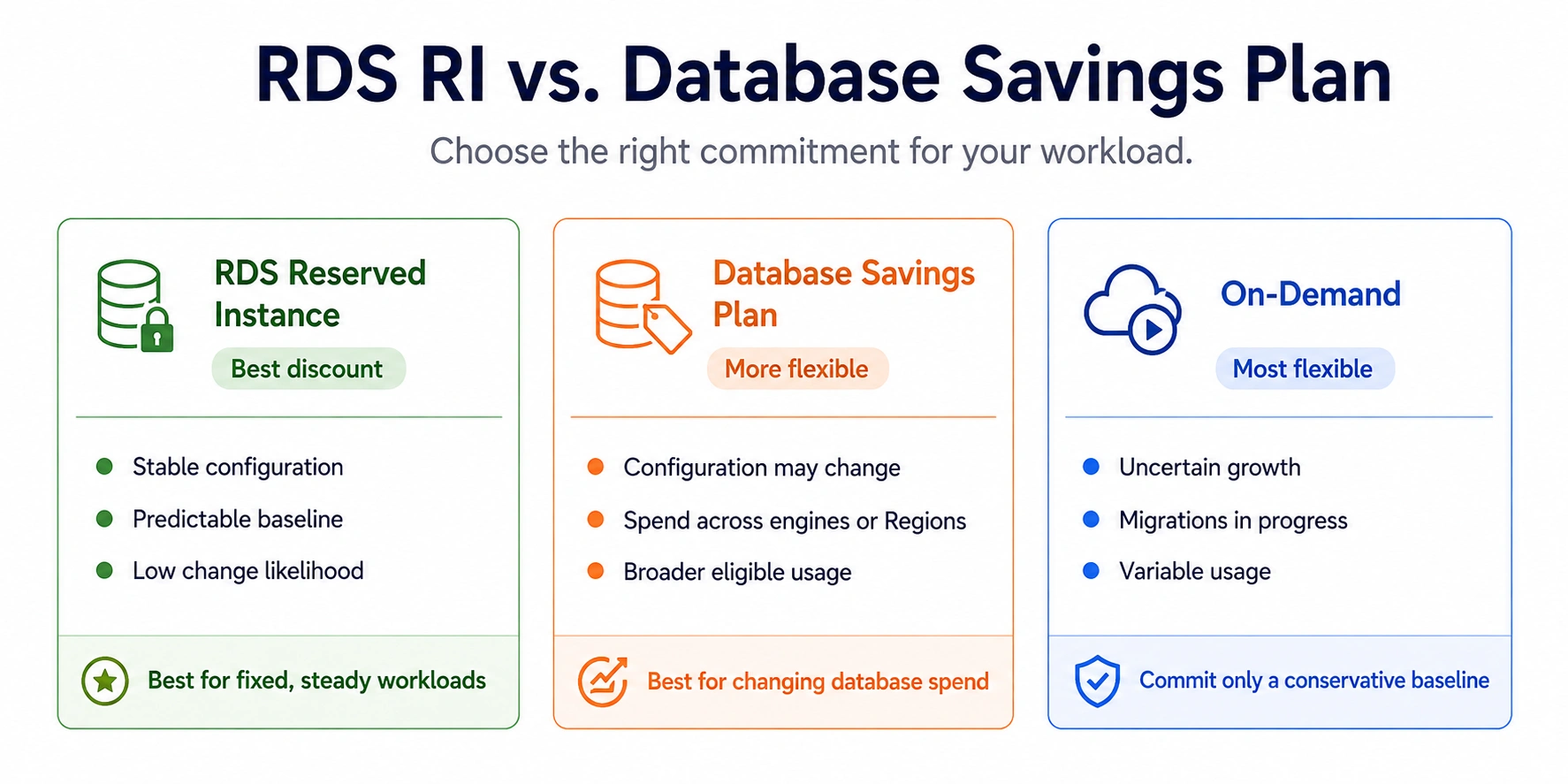
Also read: AWS Database Savings Plans Explained for DB Teams

How Does Size Flexibility Interact with Payment Options?

RDS RI size flexibility (available for MySQL, MariaDB, PostgreSQL, Aurora, and Oracle BYOL) applies equally to all three payment options. Buying a No Upfront db.r8g family reservation gives you the same size flexibility as buying a 3-year All Upfront reservation in the same family. The payment option has no effect on whether size flexibility applies.

This is relevant because size flexibility changes the risk profile of each payment option. With size flexibility, a Partial Upfront 3-year reservation on a db.r8g.xlarge can still partially cover a db.r8g.2xlarge if you scale up. The upfront payment for the xlarge is not wasted if you resize; it continues providing proportional coverage at the 2xlarge normalization units.

For SQL Server and Oracle LI (no size flexibility), the payment option choice carries more risk. A 3-year All Upfront on a db.r8g.xlarge SQL Server that later needs resizing to 2xlarge means the full upfront is sunk and provides no coverage for the new size. In this scenario, No Upfront or 1-year Partial Upfront are less risky, keeping the total stranded cost lower if a resize becomes necessary.

What Is the Full Six-Option Payment Matrix for RDS Reserved Instances?

Here is the complete six-option matrix (3 payment options x 2 term lengths) for a PostgreSQL db.r8g.xlarge Multi-AZ running in US East, showing total costs over a 3-year horizon.

Option Term Upfront Monthly 3-Year Total Cost
On-Demand (no RI) N/A $0 $700 $25,228
No Upfront 1-year (x3 renewals) $0 ~$497 ~$17,892
Partial Upfront 1-year (x3 renewals) ~$1,090/yr ~$240 ~$16,398
All Upfront 1-year (x3 renewals) ~$3,990/yr $0 ~$11,970
Partial Upfront 3-year (single term) ~$3,500 once ~$200 ~$10,700
All Upfront 3-year (single term) ~$11,360 once $0 ~$11,360

The counterintuitive finding: Three sequential 1-year All Upfront reservations ($11,970 total) cost more than one 3-year All Upfront ($11,360) and more than one 3-year Partial Upfront ($10,700). The 3-year Partial Upfront is the clear winner for teams that can stomach a 3-year commitment with a one-time moderate upfront.

How Does Usage.ai Optimize the Payment Option Selection?

The payment option decision looks straightforward until you run it across 20-50 RDS instances with different cash flow windows, different sizes, and different utilization trajectories. Getting the payment option right for each instance independently requires tracking capital budget availability, utilization data, engine version longevity, and the current reservation term status.

Usage.ai Flex Reserved Instances make the payment option recommendation as part of the reservation purchase recommendation. The platform analyses consumed capacity, term eligibility, and organizational cash flow preferences, then purchases the optimal payment option for each instance group. 

Analysis refreshes every 24 hours versus AWS Cost Explorer’s 72+ hour cycle. If a reservation becomes underutilized because an instance is deprecated or resized, Usage.ai provides cashback and credits on the unused portion regardless of which payment option was used. The fee is a percentage of realized savings only.

See how much you can save on RDS with Usage.ai


Set up Usage AI in 30 minutes. Save from day one.No infrastructure changes. No lock-in. If Usage.ai doesn’t save you money, you pay nothing.FIND MY SAVINGS

Frequently Asked Questions

1. What is the difference between partial upfront and no upfront reserved instances?

Partial Upfront requires a one-time payment at purchase (typically 30-50% of total cost) plus a reduced ongoing hourly rate. No Upfront requires zero payment at purchase and bills a slightly higher hourly rate monthly. Partial Upfront saves approximately 33-36% versus on-demand; No Upfront saves 29-34%. The total cost of Partial Upfront is usually lower over the full term. No Upfront is only available for 1-year terms.


2. What are RDS reserved instances?

RDS reserved instances are billing commitments that discount your RDS instance hourly rate by 29-69% in exchange for a 1-year or 3-year term. They apply automatically to matching running instances and are non-refundable. Three payment options are available: No Upfront (1-year only), Partial Upfront (1 or 3-year), and All Upfront (1 or 3-year). Verify at aws.amazon.com/rds/pricing — rates change.


3. Is No Upfront available for 3-year RDS reserved instances?

No. No Upfront is only available for 1-year RDS reserved instance terms. For a 3-year commitment, you must choose either Partial Upfront or All Upfront. This is not prominently documented by AWS and is one of the most common budget planning errors for teams expecting zero-capital 3-year commitments.


4. What is RDS payment?

RDS charges compute (hourly instance rate), storage ($0.115/GB-month for gp3), optional provisioned IOPS, backup storage, and data transfer. Reserved instances reduce the compute rate by 29-69% via a commitment. The reserved instance payment option (All/Partial/No Upfront) determines how the reduced compute cost is distributed between purchase time and monthly billing.


5. Which RDS RI payment option saves the most money?

3-year All Upfront saves the most in percentage terms (53-69%). For 1-year terms, All Upfront and Partial Upfront save nearly the same percentage (35-37% vs 33-36%), with Partial Upfront often having a lower total 1-year cost due to AWS’s pricing structure. Always compare the total cost, not just the savings percentage, using the AWS pricing calculator.


6. Can you change the payment option after purchasing an RDS reserved instance?

No. The payment option is set at purchase and cannot be changed. You cannot convert a No Upfront reservation to Partial Upfront, or vice versa. You can purchase additional reservations with a different payment option that will apply to any uncovered matching instances. The original reservation remains active until its term expires.


7. Does the payment option affect size flexibility?

No. Size flexibility for MySQL, PostgreSQL, Aurora, MariaDB, and Oracle BYOL applies equally to all three payment options. Buying No Upfront vs All Upfront does not change whether your reservation can cover different sizes within the same family via normalization units.


8. Which payment option is best for SQL Server RDS?

For SQL Server (no size flexibility), the payment option risk depends on instance stability. All Upfront maximizes savings but strands the full upfront if you resize. Partial Upfront strands less capital on a resize. No Upfront (1-year only) strands the least capital but saves the least. For SQL Server with any uncertainty about future instance size, Partial Upfront 1-year is the lowest-risk choice.

Cut cloud cost with automation
Latest from our blogs