 AWS
AWS Microsoft Azure
 Google Cloud

Short answer
RDS MySQL read replica reserved instances follow the same RI billing rules as any other RDS for MySQL instance. AWS applies the benefit automatically when usage matches the reservation’s engine, DB instance class type, and Region.
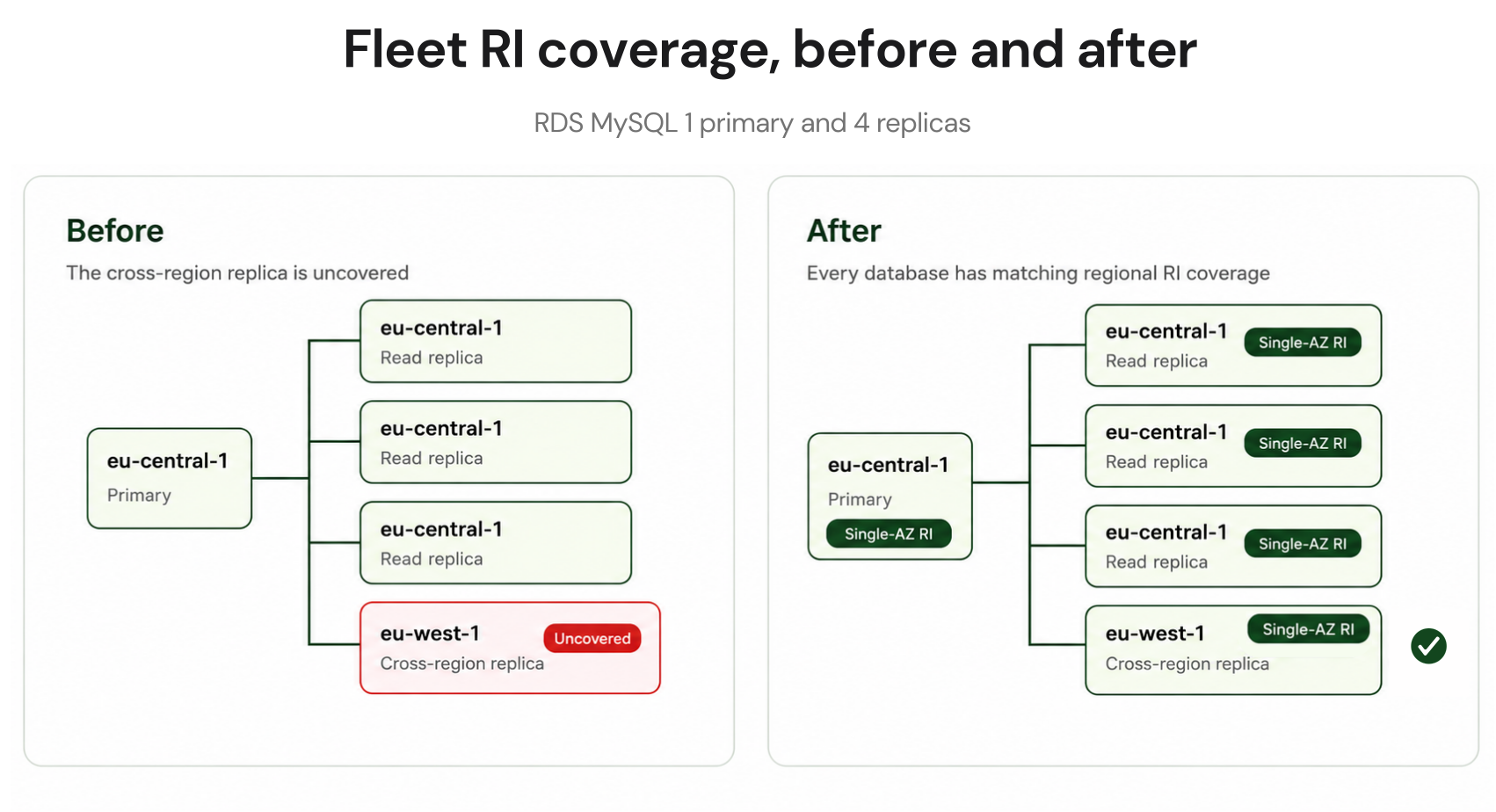
Because MySQL supports RI size flexibility, think in normalized units, which also cover Single-AZ and Multi-AZ configurations, not one same-size reservation per instance. The exception is cross-region replicas: RDS RIs are regional, so a primary in us-east-1 and a replica in eu-west-1 each need matching reserved capacity in their own Region.
Every replica is a separately billed instance and cannot inherit the primary’s reservation. Focus on three things: total normalized units, each replica’s Region, and whether each replica is sized for its workload.
Do RDS reserved instances cover read replicas?
Yes. AWS states that read replicas are billed as standard DB instances at the same rates for their configuration, and eligible Reserved Instance benefits are automatically applied to matching RDS usage.You do not tag an RI to a particular read replica or manually assign a reservation to a DB identifier.
Here is what matters for RDS for MySQL:
| Attribute | How it affects RI coverage for MySQL |
|---|---|
| Database engine | Must match. A MariaDB reservation does not cover RDS for MySQL |
| DB instance class type | Size flexibility stays within the same type, such as db.r8g |
| AWS Region | Must match. RDS RI benefits do not move between Regions |
| Instance size | Size-flexible within an eligible matching DB instance class type |
| Single-AZ vs Multi-AZ | RI benefits can apply across both configurations, but Multi-AZ consumes additional normalized units |
For more detail, see RDS MySQL RI size flexibility and normalization units.
How much RI coverage a replica fleet needs
Start with the total normalized units consumed by the primary and all continuously running replicas within each matching engine, DB instance class type, and Region.The replicas are not discounted simply because the primary has a reservation. Each replica generates its own DB instance usage, and AWS applies whatever eligible reserved capacity is available to that usage.
For a fleet made entirely of identically sized Single-AZ instances, the arithmetic can look similar to buying one same-sized RI per instance. Mixed sizes and Multi-AZ deployments are where that shortcut becomes unreliable.
Worked example: illustrative fleet and rates
Fleet: 1 primary plus 5 same-region replicas, all db.r8g.xlarge MySQL Single-AZ in us-east-1, running 24/7. Illustrative rates for comparison only. Confirm the current rate and available RI offering on the AWS RDS for MySQL pricing page before purchasing: On-Demand about $0.478/hr and a 1-year No Upfront RI about $0.320/hr.
| Instances | On-Demand/yr | RI/yr | Annual saving |
|---|---|---|---|
| Primary (1) | $4,187 | $2,803 | $1,384 |
| Replicas (5) | $20,936 | $14,016 | $6,920 |
| Total (6) | $25,124 | $16,819 | $8,304 |
The replica portion is large here simply because five of the six identically sized instances are replicas. Your actual opportunity will depend on replica count, instance sizes, running hours, Region, RI offering, and whether other matching RDS usage already consumes the available reservations.
For the wider engine picture, the complete RDS reserved instances guide walks through the same planning process across MySQL, PostgreSQL, and commercial database engines.
The cross-region read replica trap
Consider a primary running in us-east-1 with a cross-region read replica in eu-west-1.Buying additional RDS MySQL reserved capacity in us-east-1 will not cover the replica running in eu-west-1. RDS Reserved Instances are regional, so the replica needs matching reserved capacity in its own Region if you want RI coverage there.
Warning: Region is a hard boundary
A MySQL RI in us-east-1 cannot cover RDS usage running in eu-west-1, even when the engine, DB instance class type, and size are otherwise compatible. Calculate normalized-unit requirements independently for every Region where you want RI coverage.
This does not necessarily mean one individual RI purchase transaction for every replica. Size flexibility still applies within each Region. What matters is having enough matching reserved capacity for the eligible normalized usage running there.
Cross-region replication can also generate data-transfer charges. Those charges are separate from DB instance compute and are not reduced by an RDS RI.
Treat replication transfer and reserved compute as separate cost lines when modeling a cross-region architecture. The same regional RI rule applies to RDS PostgreSQL read replica RI coverage if you operate both engines.
Should replicas match the primary size?
Not necessarily.A replica should be sized for the workload it actually serves, rather than automatically copying the primary’s instance size.
For example, a replica used heavily for analytical reads may have different memory, CPU, I/O, and query-concurrency requirements from a write-oriented primary. A replica used for lighter reporting or disaster-recovery purposes may have a different resource profile again.
Do not assume that dataset size by itself determines the required DB instance class.
Use CloudWatch and database-level metrics to review the replica’s CPU utilization, available memory, replica lag, read latency, read I/O behavior, and workload pattern over a representative period. Performance Insights or other engine-level observations can help determine whether query behavior, memory pressure, or database design is driving the resource requirement.
Right-size first. Then reserve the normalized capacity you reasonably expect to keep running.
This sequence matters because a Reserved Instance discounts eligible capacity. It does not correct an oversized database.
RI strategy decision matrix
| Your situation | RI action |
|---|---|
| Primary and replicas are Single-AZ in the same Region | Calculate their combined normalized units by matching DB instance class type and reserve the stable requirement |
| Multi-AZ primary with Single-AZ replicas in the same Region | Include the Multi-AZ deployment's higher normalized-unit requirement when calculating total coverage |
| Cross-region replicas exist | Calculate and purchase matching reserved capacity independently in each Region |
| Replicas use db.t3 or db.t4g and regularly exceed CPU baseline | Review the burstable-instance design first because RI discounts do not cover CPU credit charges |
| Replica is sized differently from the primary | Reserve according to the replica's actual normalized-unit requirement |
| MySQL version is already in RDS Extended Support | Include Extended Support charges separately and evaluate upgrade timing before making a long commitment |
| Replica footprint changes frequently | Compare RIs with eligible Database Savings Plans before choosing the commitment model |
What RIs do not cover on replicas
The same exclusions that apply to other RDS DB instances also matter for read replicas. Including these charges in the model prevents you from overstating the value of an RI.- Burstable CPU credits. On db.t3 or db.t4g RDS for MySQL instances in Unlimited mode, AWS charges CPU credits when average utilization exceeds the baseline. AWS currently lists RDS MySQL T-family CPU credits at $0.075 per vCPU-hour, with the same CPU credit price across Regions. Reserved Instances do not cover these charges.
- Storage. Each replica has its own provisioned database storage. Storage pricing varies by AWS Region, deployment configuration, storage type, and provisioned capacity. Check the current RDS for MySQL pricing for the Region and storage configuration you actually use instead of applying one storage rate globally.
- Cross-region data transfer. An RDS Reserved Instance discounts eligible DB instance usage. It does not discount cross-region replication data-transfer charges.
- Extended Support. RDS Extended Support is billed separately from DB instance charges, and AWS states that RI discounts do not apply to it. Pricing depends on the engine version, AWS Region, number of vCPUs, and the applicable Extended Support year.
That does not mean Extended Support automatically eliminates the benefit of an RI. It means you need to calculate the two separately. A reservation can still reduce eligible DB instance compute charges while Extended Support remains an additional charge.
AWS also charges Extended Support for read replicas running an affected major version.
Read replica RI purchase guide
Work through this before purchasing reserved capacity for a fleet containing replicas:- Inventory every instance. Run aws rds describe-db-instances and record each primary, replica, and standalone database along with its DB instance class, Region, engine version, and deployment configuration.
- Check engine versions. Identify databases already in or approaching RDS Extended Support. Include those charges separately when comparing an RI purchase with an engine upgrade.
- Group matching capacity. Group eligible MySQL instances by Region and DB instance class type, then calculate the normalized units required in each group.
- Account for Multi-AZ correctly. A Multi-AZ configuration consumes more normalized units than the equivalent Single-AZ deployment. Do not count both as one identical block of capacity.
- Right-size each replica. Review a representative period of CloudWatch and database-level metrics before committing to its current footprint.
- Investigate persistent replica lag. If a replica is consistently behind, determine whether the issue is sizing, query load, replication throughput, or architecture before reserving more capacity.
- Compare available offerings. Check the actual RDS RI offerings available for the required Region, DB instance class type, term, and payment option before calculating savings.
- Separate Regions. Cross-region replicas need matching reserved capacity in the Region where each replica runs.
- Verify coverage after purchase. Use AWS’s RI Coverage and RI Utilization reporting together with your RDS inventory rather than assuming a purchase covered a specific named replica.
How Usage.ai Handles Read Replica RI Optimization
RDS MySQL read replicas can become a meaningful source of uncovered spend because each replica is billed as a separate DB instance and consumes its own compute capacity. Before committing, teams need to account for replica count, Region, normalized capacity, and whether that usage is stable enough to reserve.Through our Flex Insured Commitment Program, teams can achieve up to 50% savings on covered cloud spend, on average, without taking on a three-year commitment risk. Our fee is a percentage of realized savings, and eligible commitments include cashback protection for underutilization.
The cloud provider still controls the underlying commitment products, pricing, eligibility rules, and billing mechanics. We operate the optimization and management layer around eligible commitments.
If a qualifying Flex Commitment becomes more expensive than the equivalent On-Demand usage, our cashback protection helps cover the applicable loss according to current program eligibility and terms.
Add savings on top of RDS RI rates with eligible AWS Flex Commitments cashback protection covers you if a commitment ever costs more than On-Demand.s.
Frequently asked questions
What happens to RI coverage if I promote a read replica?
Promotion does not inherently remove RI coverage. If the promoted instance still matches the applicable engine, DB instance class type, Region, and normalized-unit requirements, eligible RI capacity can continue to cover it. Recalculate coverage if promotion expands the fleet.
Can I use a Database Savings Plan instead of RIs for read replicas?
Potentially. Database Savings Plans use a one-year, no-upfront commitment measured in dollars per hour and provide up to 35% savings on eligible database usage. They cover Generation 7 and newer provisioned instances across eligible services plus supported serverless usage, with flexibility across supported Regions, engines, families, sizes, and deployment options.
They cannot stack with an RDS RI on the same workload. Database Savings Plans offer more flexibility, while RIs can provide deeper discounts for stable configurations. See the Database Savings Plans guide for the broader comparison.
Do I need an RI for a replica that runs only during business hours?
Not automatically. RDS RIs bill across the full term whether matching usage runs or not. Compare the RI's full effective term cost with expected On-Demand usage. Database Savings Plans also require payment of the committed hourly amount.
Can a Multi-AZ RI cover a Single-AZ read replica?
For size-flexible RDS for MySQL usage, Reserved DB Instance benefits can apply across Single-AZ and Multi-AZ configurations within the same eligible DB instance class type and Region.
What matters is normalized capacity. An xlarge Single-AZ instance represents 8 normalized units per hour, while an xlarge Multi-AZ deployment with one standby represents 16. See RDS Multi-AZ vs Single-AZ RI mechanics for more detail.
How do I confirm my RIs are covering replicas?
Use AWS Cost Explorer's RI Coverage and RI Utilization reports and filter to Amazon RDS.
Coverage is an aggregate billing view, not reliable per-DB-identifier attribution. Compare Cost Explorer with your RDS inventory and investigate gaps by Region, engine, DB instance class type, and deployment configuration.