.png)



Running Amazon RDS for SQL Server in a Multi-AZ configuration provides automated failover, synchronous data replication, and enhanced durability. It also carries specific cost and operational constraints that differ from every other RDS engine. Understanding exactly what you pay for, what the licensing model covers, and what you cannot do with a Multi-AZ SQL Server instance is the starting point for any accurate cost model.
This guide covers the Multi-AZ cost components, the licensing reality under both LI and BYOM, the edition-gating that determines which Multi-AZ technology your instance uses, the cannot-stop constraint, and the Reserved Instance strategy for Multi-AZ configurations.
| See exactly what your RDS SQL Server Multi-AZ setup costs you vs single-AZ in under 60 seconds. |
What RDS SQL Server Multi-AZ Provisions and Bills
When you enable Multi-AZ for an RDS SQL Server instance, Amazon RDS automatically provisions and maintains a synchronous standby replica in a different Availability Zone within the same AWS Region. The standby is fully synchronized with the primary at all times through synchronous replication. In the event of a primary instance failure, AZ failure, or planned maintenance, RDS automatically fails over to the standby. The same DNS endpoint is maintained throughout — your application connection strings do not need to change.
Billing covers both the primary and standby instances at the Multi-AZ rate. The Multi-AZ rate for a given instance class and SQL Server edition is listed separately from the Single-AZ rate on the AWS pricing page — it is not simply the Single-AZ rate multiplied by two. The Multi-AZ rate is the consolidated per-instance-hour charge that covers both the primary and standby.
Cross-AZ data transfer for replication is free. You are not charged for the data transferred between the primary and standby during synchronous replication. Source: AWS official FAQs: you are not charged for the data transfer incurred in replicating data between your primary and standby.
The Licensing Reality: No Additional License Required
The most common misconception about RDS SQL Server Multi-AZ costs is that the standby requires additional SQL Server licenses. It does not. AWS official documentation is explicit: there are no additional licensing requirements for Multi-AZ deployments.
Under the License Included model, AWS has licensed the SQL Server software on your behalf. That license covers both the primary and standby instances. You pay the Multi-AZ LI hourly rate, which is the consolidated charge for compute, Windows OS, SQL Server license, and RDS management for both instances. You do not purchase a second SQL Server license separately.
Under the BYOM model, your existing SQL Server licenses with License Mobility through Software Assurance cover both the primary and standby under the same licensing agreement. Microsoft’s License Mobility rules allow the passive standby to be covered by the same license as the primary without requiring additional license purchase. You pay AWS for compute, storage, Windows OS, and I/O — but no SQL Server license fee from AWS for either instance.
The clear licensing answer: SQL Server Multi-AZ on RDS does not require additional Microsoft SQL Server licenses under either the LI or BYOM model. The Multi-AZ hourly rate under LI is higher than Single-AZ because it covers two instances, but that is an AWS infrastructure charge — not an additional Microsoft license charge.
Also read: RDS SQL Server Reserved Instances: Licensing, Editions, and Cost
The Cannot-Stop Constraint: The Most Expensive Operational Limitation
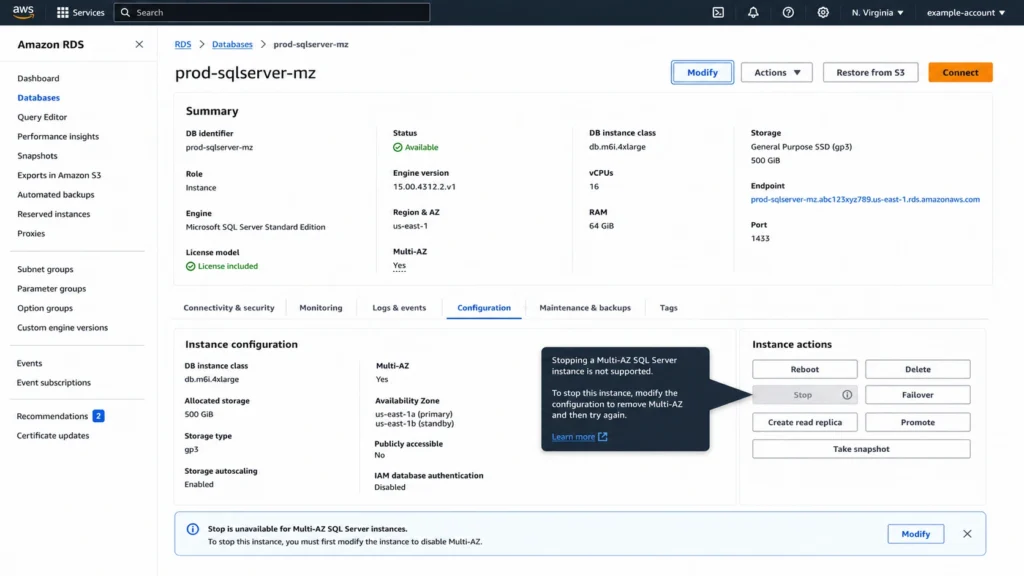
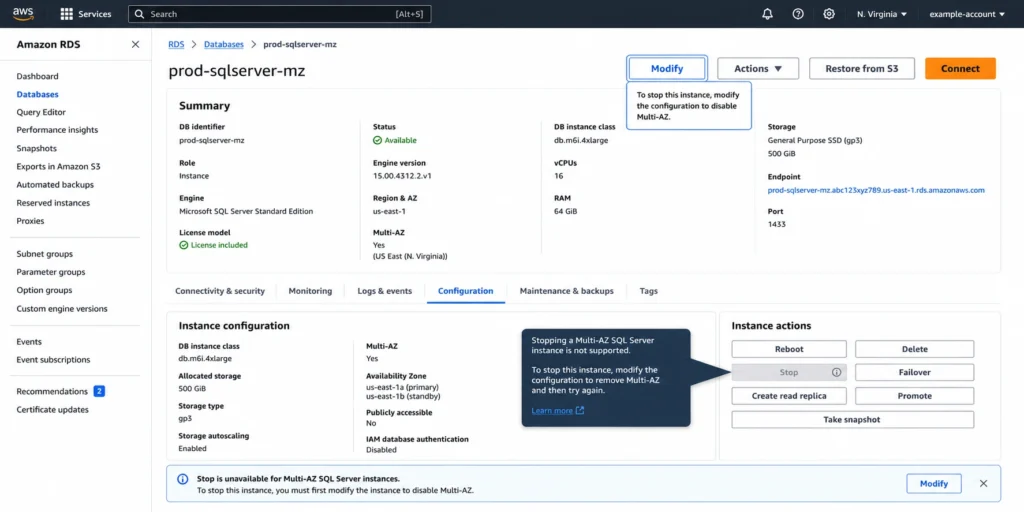
This is the operational constraint that creates the most unexpected cost for teams managing SQL Server Multi-AZ RDS instances: stopping an RDS for SQL Server DB instance in a Multi-AZ deployment is not supported. Source: AWS official SQL Server Multi-AZ limitations documentation.
For every other RDS engine, stopping the instance stops compute billing while preserving storage. A dev MySQL instance can be stopped every Friday evening and restarted Monday morning, eliminating five days of compute charges per week. For SQL Server Multi-AZ, this strategy is unavailable.
To pause compute billing on a Multi-AZ SQL Server instance, you must first remove the Multi-AZ configuration (by modifying the instance to Single-AZ), then stop the instance. Removing Multi-AZ itself takes time and briefly exposes the database to single-AZ risk during the conversion. After stopping and later restarting, you must re-enable Multi-AZ.
The operational implications for non-production environments: if your team runs Multi-AZ SQL Server instances for staging, QA, or pre-production environments, the cannot-stop constraint means those instances bill continuously at the Multi-AZ rate. The standard RDS cost optimization of scheduling dev/staging shutdowns on nights and weekends does not apply.
Cost implication for non-production Multi-AZ SQL Server: a db.r7i.xlarge Multi-AZ SQL Server Standard Edition instance runs 24/7 because it cannot be stopped. The correct cost optimization for non-production SQL Server Multi-AZ is not scheduling shutdowns — it is removing Multi-AZ from non-production instances entirely. Production requires Multi-AZ. Staging and dev rarely justify the cost. Remove Multi-AZ from every non-production SQL Server instance and accept Single-AZ for environments where a brief outage does not affect customer-facing services. Source: derived from AWS official Multi-AZ limitations documentation.
Write I/O Doubles in Multi-AZ: The Cost That Surprises High-Write Workloads
In a Multi-AZ deployment, synchronous replication means every write operation generates I/O on both the primary and the standby. AWS official documentation states this directly for SQL Server: write I/O usage doubles because Amazon RDS synchronously replicates your data to the standby DB instance.
For gp3 storage, the 3,000 baseline IOPS and 125 MB/s throughput included at no charge provide a buffer for moderate write workloads. When gp3 baseline is exceeded and Provisioned IOPS are charged, or when io2 storage is provisioned for high-throughput databases, the I/O doubling becomes a direct cost multiplier.
Worked example: a SQL Server database with a consistent write workload generating 5,000 IOPS. On Single-AZ gp3 with 5,000 provisioned IOPS: I/O charges on the primary only. On Multi-AZ: 5,000 IOPS of write workload generates approximately 10,000 total IOPS across primary and standby. The standby I/O charges are part of the Multi-AZ billing. Verify exact Provisioned IOPS rates for your region at aws.amazon.com/rds/sqlserver/pricing/ — rates change.
Read I/O is not affected by Multi-AZ. Reading from the database generates I/O only on the primary. The standby is passive — it receives replication traffic but does not serve read queries.
Storage cost itself also effectively doubles. The standby maintains a synchronized copy of the database storage. Both the primary and standby storage are included in the Multi-AZ billing. For large databases on high-cost storage types, the storage component of the Multi-AZ premium is material.
Also read: RDS Reserved Instances: Complete Guide to RI Discounts for all RDS Engines
Multi-AZ Technology by Edition: DBM vs AGs vs Block-Level Replication
RDS SQL Server Multi-AZ uses different underlying replication technologies depending on the SQL Server edition. This is not a choice you make — RDS selects the technology based on the edition and version of the instance.
Standard Edition: SQL Server Database Mirroring
Standard Edition Multi-AZ deployments use SQL Server Database Mirroring (DBM). DBM provides synchronous replication to a single standby replica in a second AZ. Automatic failover is included. The standby is passive — it cannot serve read queries.
DBM limitation with in-memory optimization: if an existing SQL Server 2016 or 2017 Enterprise Edition instance has in-memory optimization enabled and you want to enable Multi-AZ with DBM (not AGs), you must disable in-memory optimization before enabling Multi-AZ. Source: AWS official SQL Server Multi-AZ documentation. This is a planning consideration for teams considering changing the Multi-AZ configuration on an existing Enterprise instance.
DBM supports up to a specific number of databases per instance. The maximum database count varies by instance class size — larger instance classes support more databases under DBM than smaller ones. Source: AWS official SQL Server documentation. Verify the database count limits for your target instance class before enabling Multi-AZ if you are running a large number of databases on one instance.
Enterprise Edition: Always On Availability Groups
Enterprise Edition Multi-AZ deployments use Always On Availability Groups (AGs). AGs provide synchronous replication to a single standby replica and support in-memory optimization without restrictions. This is one of the functional differentiators between Standard Edition Multi-AZ (DBM) and Enterprise Edition Multi-AZ (AGs) in the RDS context.
AGs on RDS do not support Kerberos authentication for the availability group listener. Source: AWS official SQL Server Multi-AZ limitations. This is because the listener has no Service Principal Name (SPN). For workloads requiring Kerberos-based AG listener authentication, this is a known RDS limitation.
AGs also support in-memory optimization, which DBM on SQL Server 2016/2017 Enterprise does not. If your workload uses memory-optimized tables and requires Multi-AZ, Enterprise Edition with AGs is the correct configuration.
Web Edition: Block-Level Replication
Web Edition Multi-AZ deployments use block-level replication. This was introduced in November 2025 for SQL Server 2022 Web Edition, extending high-availability capabilities to Web Edition for the first time. Block-level replication operates at the storage layer, replicating all data on the storage volumes — including server-level objects and configurations — rather than at the SQL Server application layer.
Web Edition block-level replication is only available for SQL Server Web Edition. It is not available for Standard or Enterprise Edition. Source: AWS official: Multi-AZ with block level replication is currently only supported for SQL Server Web Edition instances.
Web Edition usage restriction remains in effect regardless of Multi-AZ: Web Edition is designed for public internet-accessible web pages, websites, web applications, and web services per Section 10.5 of the AWS Service Terms.
Express Edition: Multi-AZ not supported
Express Edition does not support Multi-AZ deployments on RDS. If your workload requires high availability, Express Edition is not an appropriate edition choice on RDS. Upgrade to Standard Edition, which supports Multi-AZ with DBM.
Failover: What Happens, How Long It Takes, What You Cannot Do
When a failover occurs — whether triggered by a primary instance failure, AZ failure, network partition, or a manual reboot with failover — RDS promotes the standby to primary. The DNS endpoint transitions to the new primary instance. Applications using the RDS endpoint reconnect to the new primary without configuration changes.
Failover typically completes within 60-120 seconds. Large transactions or a lengthy recovery process can increase failover time. Source: AWS official SQL Server Multi-AZ documentation. This is the RTO (Recovery Time Objective) you can plan around for Multi-AZ SQL Server.
During failover, you will see brief connection interruptions. Applications using connection pooling will need to establish new connections after failover. Design applications to retry on connection failure to minimize the operational impact.
What failover does not provide: read offloading. The standby is passive and cannot be configured to accept database read activity. This is an explicit limitation from AWS official documentation. Unlike Aurora Replicas which can serve reads, or Multi-AZ with two readable standbys for MySQL/PostgreSQL, SQL Server Multi-AZ standby is failover-only.
The standby AZ cannot be selected. RDS automatically provisions the standby in a different AZ within the same Region. You cannot choose which AZ the standby occupies. Source: AWS official SQL Server Multi-AZ limitations: you cannot select the Availability Zone for the secondary instance. AWS recommends that you balance your application hosts across all AZs in the given Region so your application continues to function even if it ends up in a different AZ from the database after failover.
Converting Single-AZ to Multi-AZ: Zero Downtime, Temporary I/O Impact
Converting an existing Single-AZ RDS SQL Server instance to Multi-AZ does not require downtime. The conversion process: RDS takes a snapshot of the primary instance, creates a new standby instance in a different AZ from the snapshot, and configures synchronous replication between primary and standby. During the synchronization phase, you may see increased latency on the primary while the standby catches up.
The conversion is triggered through the RDS console: on the Modify DB instance page, change Multi-AZ deployment to Yes (Mirroring / Always On / Block Level Replication). The change can be applied immediately or during the next maintenance window.
Reversing the conversion — removing Multi-AZ — is also supported. On the Modify DB instance page, change Multi-AZ deployment to No. This removes the standby instance and the instance returns to Single-AZ billing. After removing Multi-AZ, the instance can be stopped.
Reserved Instances for Multi-AZ SQL Server: The Four-Attribute Match
Reserved Instances for Multi-AZ SQL Server deployments follow the same mechanics as Single-AZ RIs, with one critical distinction: the RI purchase must match the Multi-AZ option. Source: AWS official FAQs: purchase a DB instance reservation with the same DB instance class, DB engine, Multi-AZ option, and License Model within the same Region as the DB instance you are currently running.
A Single-AZ RI does not cover a Multi-AZ deployment. A Multi-AZ RI does not cover a Single-AZ deployment. If you toggle Multi-AZ on an instance mid-RI-term, the existing RI stops matching that instance.
Practical implication: teams that have purchased Single-AZ RIs and later enable Multi-AZ for production promotion will find their existing RIs no longer apply to the promoted instances. The Single-AZ RI sits unused while the Multi-AZ instances pay On-Demand rates.
Correct sequencing: determine the production Multi-AZ requirement before purchasing long-term RIs. For production instances running Multi-AZ, purchase Multi-AZ RIs. For dev/staging instances running Single-AZ (because you have removed Multi-AZ from non-production), purchase Single-AZ RIs. The two populations require two separate RI purchases.
No-size-flexibility applies to Multi-AZ SQL Server RIs exactly as it does to Single-AZ. A Multi-AZ db.r7i.xlarge Standard Edition LI RI covers only Multi-AZ db.r7i.xlarge Standard Edition LI. No normalization across sizes. Source: AWS official Reserved Instances documentation.
Still buying RDS Reserved Instances manually?See how Usage.ai matches the right RI to your SQL Server edition, license model, and Multi-AZ configuration—without expensive mistakes. |
Database Naming Restriction Under Multi-AZ
A specific operational limitation that affects maintenance procedures: you cannot rename a database on a SQL Server DB instance that is in a Multi-AZ deployment. Source: AWS official SQL Server Multi-AZ limitations. If you need to rename a database, you must first remove Multi-AZ from the instance, rename the database, and then re-enable Multi-AZ.
This three-step process — remove Multi-AZ, rename, re-enable Multi-AZ — briefly exposes the instance to Single-AZ risk during the maintenance window. Plan database rename operations during scheduled maintenance windows and monitor instance health throughout the process.
Server-Level Objects and Multi-AZ Replication
Multi-AZ replication covers database-level objects. Server-level objects — SQL Server logins, agent jobs, linked servers, credentials — are replicated differently depending on the Multi-AZ technology in use.
With DBM and AGs: server-level objects are partially replicated. Certain server-level objects are replicated automatically; others require manual recreation on the standby or will not be present until after failover. The AWS official documentation provides a comparison table of what is replicated under DBM/AGs versus block-level replication. Review this table before relying on server-level objects being available immediately after failover.
With block-level replication (Web Edition): block-level replication operates at the storage layer and replicates all data on the storage volumes, including server-level objects and configurations. After failover, the promoted standby has complete parity with the pre-failover primary state.
RDS creates specific SQL Server logins for Multi-AZ management: for AGs and DBM, logins with the pattern db_dbiResourceId_node1_login, db_dbiResourceId_node2_login, and db_dbiResourceId_witness_login. These logins are created automatically and support the Multi-AZ infrastructure. Do not delete or modify these logins.
T3 Instances and Multi-AZ SQL Server: An Important CPU Credit Note
T3 RDS SQL Server instances in Multi-AZ configurations are subject to the same Unlimited mode CPU credit behavior as Single-AZ T3 instances. CPU credit charges apply at $0.144 per vCPU-Hour when average CPU utilization over a rolling 24-hour period exceeds the instance baseline. Source: AWS official SQL Server pricing page.
For Multi-AZ T3 instances, CPU credit charges apply independently on the primary. The synchronous replication to the standby generates additional I/O load on the primary during write-intensive periods. For T3 instances, this additional write I/O can contribute to elevated CPU utilization on the primary, increasing the frequency and magnitude of CPU credit charges.
Teams running Multi-AZ T3 SQL Server instances should audit CPU credit consumption patterns to determine whether the T3 burstable model is appropriate for the workload. Sustained write activity that keeps CPU above the T3 baseline will accumulate $0.144/vCPU-hr in credit charges on top of the Multi-AZ instance rate.
How Usage.ai Handles RDS SQL Server Multi-AZ Optimization
Usage.ai applies two specific optimizations to RDS SQL Server Multi-AZ configurations.
Non-production Multi-AZ identification: Usage.ai identifies RDS SQL Server instances tagged as staging, QA, dev, or pre-production that are running Multi-AZ configurations. For each identified instance, the platform surfaces the exact monthly Multi-AZ premium — the difference between the running Multi-AZ rate and the equivalent Single-AZ rate. For teams that have applied Multi-AZ uniformly across all environments without distinguishing production from non-production, this often surfaces unexpected savings. The cannot-stop constraint means removing Multi-AZ from non-production is the only path to compute savings on those instances.
RI purchasing aligned to Multi-AZ configuration: Usage.ai purchases Reserved Instances for Multi-AZ SQL Server instances with the Multi-AZ option explicitly specified at the correct instance class and SQL Server edition. A production SQL Server Standard Edition Multi-AZ db.r7i.xlarge receives a Multi-AZ Standard Edition LI db.r7i.xlarge RI recommendation — not a Single-AZ RI that would fail to match after the first Multi-AZ modification. The 30-day stability check verifies the instance has been running Multi-AZ continuously before generating a Multi-AZ RI purchase.
Buyback guarantee: Usage.ai Insured Flex Reserved Instances include a buyback guarantee for Multi-AZ SQL Server RIs. If an instance’s Multi-AZ configuration changes during the RI term — for example, if a production database is decommissioned or migrated to Aurora — the unused Multi-AZ RI is bought back and the value returned as cashback in real money. This addresses the common scenario where a team purchases a 3-year Multi-AZ RI for a production SQL Server instance and then migrates the workload before the term expires.
Fee: percentage of realized savings only. $0 if Usage.ai saves nothing. 30-minute setup, billing-layer access only.
| Think Multi-AZ is worth the premium? See exactly what your RDS SQL Server Multi-AZ setup costs compared to Single-AZ—in under 60 seconds.Try the Free Calculator → |
Frequently Asked Questions
1. Does RDS SQL Server Multi-AZ require additional SQL Server licenses?
No. AWS official licensing documentation is explicit: there are no additional licensing requirements for Multi-AZ deployments. Under License Included, AWS has licensed the SQL Server software for both the primary and standby as part of the Multi-AZ hourly rate. Under BYOM (Bring Your Own Media), your existing SQL Server licenses with License Mobility through Software Assurance cover both the primary and standby under the same licensing agreement. You pay the higher Multi-AZ compute rate to AWS, but this is an infrastructure charge — not a separate SQL Server license purchase.
2. Can you stop an RDS SQL Server Multi-AZ instance to save money?
No. Stopping an RDS for SQL Server DB instance in a Multi-AZ deployment is not supported. Source: AWS official SQL Server Multi-AZ limitations documentation. To pause compute billing, you must first modify the instance to remove Multi-AZ (change to Single-AZ), and then stop the instance. Re-enabling Multi-AZ after restart requires another modification. This means the standard RDS cost optimization of scheduling non-production shutdowns does not apply to SQL Server Multi-AZ instances. The correct optimization for non-production SQL Server is removing Multi-AZ from non-production environments entirely.
3. What Multi-AZ technology does RDS SQL Server use?
Three technologies, each tied to a specific edition. Standard Edition uses SQL Server Database Mirroring (DBM). Enterprise Edition uses Always On Availability Groups (AGs). Web Edition uses block-level replication (available since November 2025 for SQL Server 2022 Web Edition). Express Edition does not support Multi-AZ. The technology is selected automatically by RDS based on the edition — you do not choose between DBM and AGs. AGs support in-memory optimization; DBM on SQL Server 2016/2017 Enterprise requires disabling in-memory optimization before enabling Multi-AZ. Source: AWS official SQL Server Multi-AZ documentation.
4. Can the Multi-AZ standby accept read queries?
No. The standby is passive. AWS official documentation states explicitly: you cannot configure the secondary DB instance to accept database read activity. The standby exists for failover purposes only and cannot serve reads during normal operation. This differs from other RDS Multi-AZ options (MySQL/PostgreSQL Multi-AZ with two readable standbys) and from Aurora Replicas, which support read offloading. For read scaling on SQL Server, consider Read Replicas (supported for Standard and Enterprise editions) rather than expecting the Multi-AZ standby to serve reads.
5. How long does RDS SQL Server Multi-AZ failover take?
Failover typically completes within 60-120 seconds. Large uncommitted transactions or a lengthy recovery process can increase this time. Source: AWS official SQL Server Multi-AZ documentation. During failover, the same DNS endpoint is maintained. Applications reconnect to the new primary after the failover completes without requiring configuration changes. Design applications to retry on connection failure to handle the brief interruption during the failover window.
6. How do Reserved Instances work for Multi-AZ SQL Server?
RIs for Multi-AZ SQL Server must explicitly match the Multi-AZ option at purchase. The RI purchase requires matching the exact DB instance class, DB engine, Multi-AZ option, and License Model within the same Region. A Single-AZ RI does not cover a Multi-AZ deployment. SQL Server RIs have no size flexibility — the RI covers only the exact instance class, edition, and Multi-AZ configuration it was purchased for. If you enable Multi-AZ on an instance mid-RI-term, the existing Single-AZ RI no longer matches that instance.