.png)
 AWS
AWS Microsoft Azure
 Google Cloud


Amazon RDS offers multiple storage types, including gp3, io1, and io2 Block Express. Each storage option uses a different pricing model and supports different performance characteristics.
Storage costs can also increase when you provision additional IOPS, add throughput, use a Multi-AZ architecture, or retain large amounts of backup data.
Many teams focus on DB instance costs while overlooking storage configuration. In practice, overprovisioned IOPS, unsuitable storage choices, and outdated pricing assumptions can create unnecessary database spend.
This guide explains how Amazon RDS storage pricing works, compares gp3, io1, and io2 Block Express, and provides a practical framework for selecting storage based on measured workload requirements.
The Short Answer
Start with gp3 if it satisfies your measured latency, IOPS, throughput, and durability requirements.For workloads that require consistently high IOPS, predictable low-latency performance, or enhanced durability guarantees, evaluate io2 Block Express.
AWS positions Provisioned IOPS storage for I/O-intensive workloads that require consistent performance and low latency.
Moreso, Magnetic storage has been fully deprecated. According to the Amazon RDS storage documentation, Amazon RDS has completed migration of existing magnetic storage volumes to gp3, and snapshots can no longer be restored to magnetic storage.
How RDS Storage Costs Are Calculated
RDS storage pricing depends on multiple components, not just allocated storage.Depending on the storage type and deployment configuration, your monthly storage-related bill can include:
- Allocated storage, measured in GB-month
- Provisioned IOPS
- Provisioned throughput
- Multi-AZ deployment-related storage charges
- Backup storage beyond the included allocation
- Data transfer and other service-specific charges
The current AWS pricing structure is published on the Amazon RDS pricing page.
Our Amazon RDS Reserved Instances guide explains how Reserved DB Instances work and where they fit into an RDS cost strategy.
Example RDS Storage Cost Calculation
Consider an Amazon RDS for PostgreSQL Single-AZ deployment in US East (N. Virginia) using io2 Block Express with 1,024 GiB of storage and 3,000 provisioned IOPS.Using the published rates of $0.125 per GiB-month for storage and $0.10 per provisioned IOPS-month, the estimated monthly storage charge is:
| Component | Calculation | Monthly Cost |
|---|---|---|
| Storage | 1,024 GiB × $0.125 | $128 |
| Provisioned IOPS | 3,000 × $0.10 | $300 |
| Total storage-related cost | $428 |
For io2 Block Express, maximum throughput depends on provisioned IOPS, I/O size, database engine, storage size, and DB instance limits rather than a separately provisioned throughput setting. See Amazon RDS storage specifications
For gp3, configuration limits must be checked before calculating cost. For example, at 2 TiB, RDS for PostgreSQL has a 12,000-IOPS and 500-MiB/s baseline, so an 8,000-IOPS configuration cannot be modeled as “3,000 included + 5,000 additional IOPS.”
For a different gp3 configuration, calculate the storage and provisioned-performance components using the applicable engine, Region, storage size, deployment type, IOPS, and throughput. See Amazon RDS for PostgreSQL pricing.
For a different configuration, use the AWS Pricing Calculator to model the applicable storage, IOPS, deployment, engine, and instance costs.
Why Multi-AZ Matters
Deployment architecture also affects storage economics.Multi-AZ deployments maintain redundant database infrastructure across Availability Zones. Consequently, the storage-related cost structure differs from a Single-AZ deployment.
When building an RDS cost model, include the actual deployment architecture rather than multiplying a Single-AZ storage estimate across a production environment.
The Most Common RDS Storage Pricing Mistake
One common modeling error is using Amazon EBS pricing when estimating RDS storage costs.Although Amazon RDS uses AWS storage infrastructure, RDS storage pricing is not simply the same as standalone EBS pricing.
For example, RDS gp3 has its own pricing structure and included performance characteristics. A spreadsheet based directly on EBS rates can therefore produce an incorrect RDS cost estimate.
Also read: EBS Snapshot Cost and ELB Pricing: What You Are Actually Paying For
Understanding RDS Storage Types
gp3: General Purpose SSD Storage
gp3 is AWS’s recommended general-purpose SSD storage option for Amazon RDS.It provides a predictable performance baseline and, in supported configurations, allows storage, IOPS, and throughput to be managed independently.
Key characteristics include:
- SSD-backed storage
- Included baseline performance
- Independent scaling of storage and performance in supported configurations
- Broad applicability across development, test, staging, and production workloads
io1: Provisioned IOPS SSD Storage
io1 is designed for workloads that require provisioned storage performance. Unlike gp3, io1 charges for provisioned IOPS from the first IOPS rather than providing the same included performance baseline.io1 has historically been used for production databases requiring predictable storage performance.
For new high-performance deployments, however, io2 Block Express should also be evaluated because it provides higher durability and higher performance limits in supported configurations.
io2 Block Express
io2 Block Express is a Provisioned IOPS storage option designed for demanding RDS workloads.According to the Amazon RDS storage documentation, supported configurations can provide:
- Up to 256,000 IOPS
- Up to 16,000 MiB/s throughput in supported engine, storage-size, I/O-size, and DB instance configurations
- Sub-millisecond latency
- 99.999% durability
For existing io1 workloads, supported configurations can also be migrated to io2 Block Express without changing the database engine.
If you are comparing RDS with another AWS database architecture, see our RDS vs. Aurora cost comparison for the broader cost considerations.
Storage Limits Vary by Engine and Configuration
Storage performance limits are not universal across Amazon RDS. Maximum IOPS and throughput can vary according to:- Database engine
- Storage type
- Allocated storage
- DB instance class
- Nitro support
- Deployment architecture
- I/O size
A Practical Tip:
Before selecting a storage type, consult the Amazon RDS storage specifications and limitations for the specific engine and configuration.
Which RDS Storage Type Should You Choose?
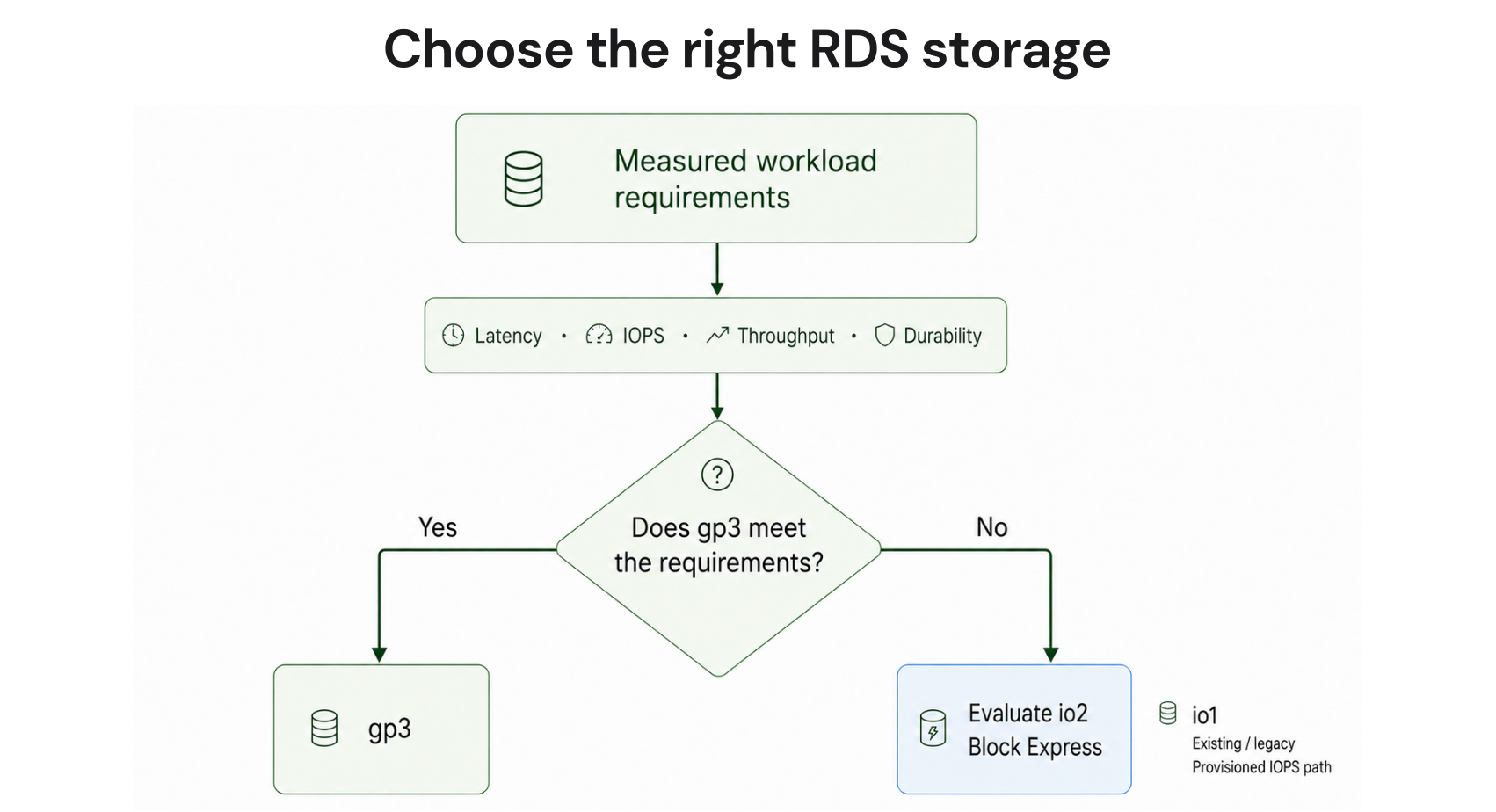
Start with these questions
- What latency target must the application meet?
- What are peak and sustained IOPS requirements?
- What throughput is required during peak activity?
- Does the workload require enhanced durability characteristics?
- Is storage actually the performance bottleneck?
- Is the DB instance class capable of delivering the required storage performance?
- Are there engine-specific storage limits that affect the configuration?
Decision framework
| Requirement | Starting point |
|---|---|
| Workload fits within gp3 performance characteristics | gp3 |
| Consistently high IOPS requirements | io2 Block Express |
| Strict low-latency requirements | io2 Block Express |
| Enhanced durability requirements | io2 Block Express |
| Existing io1 deployment | Evaluate io2 Block Express |
For example, a PostgreSQL workload that consistently requires very high IOPS and strict latency targets may justify io2 Block Express. Another production database may perform well on gp3 if its measured requirements remain within gp3’s capabilities.
The decision should follow observed workload behavior rather than the environment being labeled “production.”
If you are comparing broader database economics, our Amazon RDS pricing guide provides additional context on RDS pricing and commitment options.
Common Mistakes That Increase RDS Storage Costs
Overprovisioning IOPS
Provisioning substantially more IOPS than the workload consumes can increase storage costs without improving application performance.Review database and storage performance metrics before increasing provisioned IOPS. Confirm that storage performance is actually limiting the workload.
Ignoring the DB Instance Class
Storage does not operate independently from the rest of the database configuration.A storage configuration may support a particular IOPS or throughput level while the selected DB instance class imposes a lower practical ceiling.
Evaluate the storage and instance configuration together.
Focusing Only on Storage Size
Allocated storage is only one component of RDS cost.Provisioned IOPS, throughput, backup storage, and deployment architecture can materially change the final bill.
Using Outdated Storage Assumptions
Magnetic storage is no longer available for new deployments or snapshot restores.If an older cost model still includes magnetic storage assumptions, update the model to reflect the current RDS storage options documented by AWS.
How Usage.ai Fits
Choosing the right storage type helps establish an efficient technical baseline. Once you’ve optimized storage, IOPS, throughput, and deployment architecture, the next question is whether predictable RDS usage should be covered by a commitment.At Usage.ai, we help teams manage eligible Amazon RDS commitments as usage changes over time. Rather than relying on manual forecasting and one-time purchasing decisions, Usage.ai continuously evaluates commitment coverage and commitment risk.
With Flex Insured Commitments, teams can get the up to 69% savings of a 3-year Amazon RDS Reserved Instance commitment with none of the commitment.
If an eligible Flex Commitment costs more than equivalent pay-as-you-go usage, we provide cashback protection to help cover the difference. See our cashback documentation for details.
The result is a managed commitment strategy that helps organizations pursue available AWS database discounts while reducing long-term commitment exposure.
Choose the right storage, performance, and cost balance for your RDS workloads—with confidence.
Frequently asked questions
What affects RDS storage cost?
RDS storage cost can include allocated storage, provisioned IOPS, provisioned throughput, deployment architecture, backup storage, and other applicable service charges. The exact components depend on the storage type and configuration.
Is gp3 cheaper than io1?
gp3 and io1 use different pricing structures. gp3 includes baseline performance, while io1 charges for provisioned IOPS. Which option costs less depends on storage size and the performance requirements of the workload.
Should I choose io1 or io2?
For new Provisioned IOPS deployments, io2 Block Express should be evaluated where the workload requires high IOPS, low latency, or enhanced durability. Existing io1 deployments can also be evaluated for migration where the configuration supports io2.
Does Multi-AZ increase RDS storage costs?
Multi-AZ changes the infrastructure and storage cost structure because database resources are maintained across Availability Zones. Cost models should therefore use the actual deployment architecture rather than a Single-AZ assumption.
How do I choose between gp3 and io2?
Start with measured latency, IOPS, throughput, and durability requirements. Choose gp3 when it satisfies those requirements. Evaluate io2 Block Express when the workload needs performance or durability characteristics beyond what gp3 can provide.