
 AWS
AWS Microsoft Azure
 Google Cloud

The debate between Amazon RDS and self-managed databases on Amazon EC2 is frequently framed as a cost question when it is actually a make-vs-buy question about database administration labor. EC2 is cheaper on the AWS bill. RDS costs more on the AWS bill. The question is whether the difference in AWS spend is larger or smaller than the cost of building and maintaining what RDS provides automatically.
This guide works through that comparison using AWS official pricing for every rate cited, identifies the specific operational tasks RDS handles versus what EC2 requires, provides the infrastructure cost math for a typical production configuration, and ends with the five questions that determine which deployment is correct for your specific situation.
Pricing review: US East (N. Virginia), October 15, 2026. Source: AWS official pricing pages. Verify at aws.amazon.com/rds/pricing/ and aws.amazon.com/ebs/pricing/ — rates change.
See exactly what you’re overpaying on RDS in under 60 seconds. Try the Calculator for free →
The Infrastructure Cost Gap: What Is Actually Cheaper on EC2
Build the managed-database side of your comparison with the AWS RDS pricing guide and calculator. Include compute, allocated storage, backups and availability costs before comparing that bill with EC2 infrastructure and administration costs.
Compute
An Amazon EC2 instance and an RDS instance using the same underlying hardware (same vCPU count, same memory) are billed at different rates. The RDS instance rate includes a managed service premium that covers the operational infrastructure AWS provides: automated patching, backup systems, Multi-AZ standby provisioning, storage management, and monitoring integration. The EC2 rate covers only the compute.
The practical implication: for an EC2 instance and an RDS DB instance of the same compute specifications, the EC2 on-demand rate is lower. The gap between them represents what AWS charges for the managed database layer. Verify current rates at aws.amazon.com/ec2/pricing/on-demand/ for EC2 and aws.amazon.com/rds/postgresql/pricing/ or aws.amazon.com/rds/mysql/pricing/ for RDS before comparing — specific rates change and vary by instance family.
Storage
EC2 self-managed database storage uses Amazon EBS volumes. The recommended general-purpose SSD volume type is gp3, priced at $0.08 per GB-month in US East (N. Virginia). Source: AWS official EBS pricing page (aws.amazon.com/ebs/pricing/). gp3 includes 3,000 IOPS and 125 MB/s throughput at no additional charge within the baseline.
For Single-AZ MySQL, PostgreSQL and MariaDB in N. Virginia, RDS gp3 storage is $0.115/GB-month versus EBS gp3 at $0.08/GB-month. Multi-AZ RDS storage has a different rate. At 1,000 GB, storage alone is $115 versus $80 per month: a $35/month or $420/year difference. RDS is 43.75% higher than EBS on that storage-only baseline; EBS is 30.43% lower than RDS. These percentages have different denominators. For these RDS engines, gp3 at 400 GB or more includes 12,000 IOPS and 500 MiB/s, while the EBS baseline is 3,000 IOPS and 125 MiB/s, so compare equivalent performance before deciding which is cheaper.
At 1 TB of database storage, the storage cost difference between EC2 EBS gp3 and RDS storage is material and scales linearly with data volume. For organizations managing multi-TB datasets, this storage premium is a real and growing component of the managed service cost.
Backup storage
Amazon RDS provides automated backup storage equal to 100 percent of your provisioned database storage at no additional charge. This is stated directly on the AWS official RDS pricing page: automated backups and database snapshots up to the size of your provisioned database storage are free. Additional backup storage beyond the free tier is charged at the standard backup storage rate. Source: aws.amazon.com/rds/pricing/.
On EC2, all backup storage is charged at standard AWS storage rates. If you back up a 500 GB EC2 database to S3 with 7-day retention, you pay for every GB of backup data stored — the free tier equivalent that RDS provides does not apply to custom EC2 backup solutions.
Multi-AZ standby
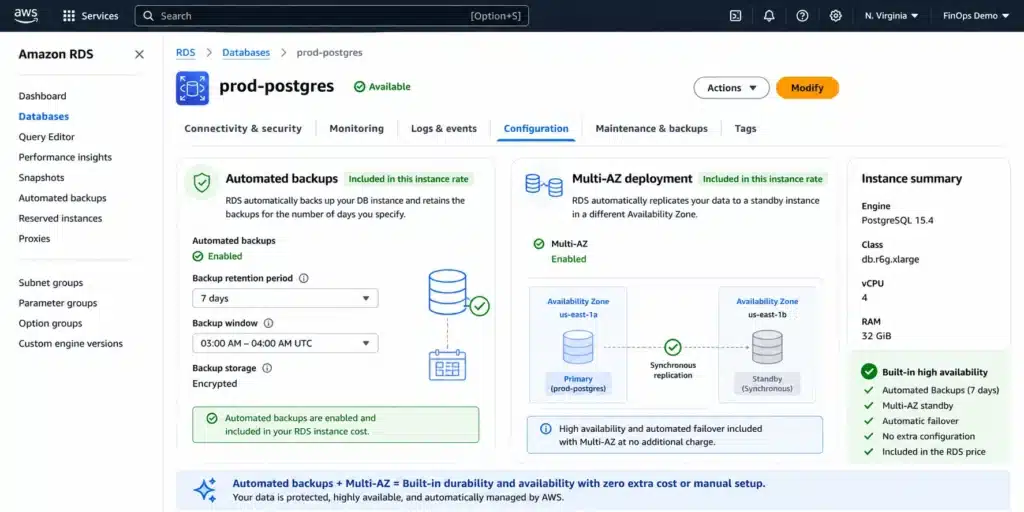
RDS Multi-AZ deployments provision a synchronous standby replica in a second Availability Zone and provide automatic failover in the event of an instance or AZ failure. The Multi-AZ deployment doubles the compute cost — the standby instance bills at the same rate as the primary. Source: AWS official RDS pricing. This cost is straightforward: you are paying for a second instance.
On EC2, achieving equivalent standby-based failover requires provisioning a second EC2 instance running the same database engine in a second AZ, configuring synchronous replication between them (PostgreSQL streaming replication or MySQL GTID replication), implementing a failover mechanism (AWS Route 53 health checks with DNS failover, or a tool like Patroni for PostgreSQL), and testing the failover process end-to-end. The EC2 infrastructure cost for this configuration — two instances plus the EBS volumes — is broadly comparable to RDS Multi-AZ. The difference is the configuration, testing, and ongoing maintenance that RDS handles automatically.
Also read: Amazon EC2 Pricing Explained
What RDS Automates: The Managed Service Value Itemized
The RDS pricing premium over equivalent EC2 compute covers a specific set of managed services that AWS describes in its official RDS documentation. Understanding each one is necessary to evaluate whether the premium is worth paying for your specific team and workload.
Automated backups and point-in-time recovery
Amazon RDS automatically creates daily backups during the configured backup window and continuously archives transaction logs to enable point-in-time recovery to any second within the retention period (1-35 days). Source: AWS official RDS documentation. No configuration is required beyond setting the backup window and retention period.
On EC2, implementing equivalent backup coverage requires: writing backup scripts that capture consistent database snapshots (using pg_basebackup for PostgreSQL or mysqldump/xtrabackup for MySQL), configuring those scripts to run on schedule via cron or AWS Systems Manager, archiving transaction logs continuously to S3 for point-in-time recovery capability, testing the restore process to verify recovery works under time pressure, and monitoring backup completion and alerting on failure. Each step requires initial engineering time and ongoing maintenance.
Automated OS and engine patching
RDS handles OS security patches and minor database engine version updates within configurable maintenance windows. AWS applies patches and performs updates with minimal downtime — for Multi-AZ deployments, patching occurs on the standby first, then a failover is performed, then the former primary is patched. Applications typically see brief downtime measured in seconds. Source: AWS official RDS maintenance documentation.
On EC2, the database administrator is responsible for applying OS patches, testing compatibility with the database engine, applying database engine minor version patches, scheduling maintenance windows, and verifying the database is healthy after patching. For each database instance, this is a recurring monthly or quarterly task. For a fleet of 10 EC2 database instances, the time investment scales with the fleet size.
Storage auto-scaling
RDS can be configured to automatically expand storage capacity when available space falls below a threshold. Source: AWS official RDS storage documentation. You set a maximum storage limit and RDS handles the expansion without any manual action.
On EC2, the database administrator monitors disk utilization (using CloudWatch alarms on the EBS volume), identifies when storage is approaching capacity, manually resizes the EBS volume, and in some cases must resize the filesystem within the OS as well. A storage-full event that occurs at 2am because the monitoring threshold was set too low — or because write volume unexpectedly spiked — requires immediate intervention. On RDS, this scenario does not occur because auto-scaling handles it automatically within the configured maximum.
Multi-AZ failover
For Multi-AZ RDS deployments, automatic failover to the standby instance occurs without manual intervention in the event of primary instance failure, AZ failure, or storage failure. AWS describes typical failover times as 60-120 seconds for most engines, with Aurora providing sub-30-second failover. Source: AWS official RDS Multi-AZ documentation.
On EC2, failover from a primary instance to a standby requires a mechanism to detect the primary failure, promote the standby, and redirect application connections to the new primary. For PostgreSQL, Patroni with etcd or Consul provides this automation but requires installation, configuration, and operational expertise. For MySQL, tools like MHA (MySQL High Availability) or Orchestrator provide similar functionality. Both require engineering effort to implement correctly and ongoing testing to verify they work under real failure conditions.
Database Insights and Enhanced Monitoring
CloudWatch Database Insights Standard provides seven days of database performance history without an additional Database Insights charge for supported engines. Advanced mode and related monitoring services can add fees. Enhanced Monitoring sends metrics to CloudWatch Logs, whose charges can also apply. Monitoring is therefore not universally included in the instance rate. Source: AWS Database Insights documentation.
On EC2, database-level query performance analysis requires installing and configuring additional tooling — pg_stat_statements for PostgreSQL, Performance Schema for MySQL — and either exporting metrics to a visualization platform or accessing them directly via database connections. OS-level monitoring requires the CloudWatch agent to be installed and configured. None of this is complex, but each piece requires initial configuration and ongoing maintenance.
Automated minor version upgrades
RDS supports automatic minor version upgrades, which can be enabled to apply minor database engine updates automatically during the maintenance window. Source: AWS official RDS documentation. Major version upgrades require explicit action but AWS provides tooling (Blue/Green Deployments for MySQL and MariaDB) to facilitate zero-downtime major version upgrades.
On EC2, every minor and major version upgrade requires manual action: downloading the new version, following the appropriate upgrade procedure for the engine, testing the upgrade in a staging environment, scheduling the production upgrade window, and verifying database health after the upgrade.
The Operational Cost: What EC2 Requires That Does Not Appear on the Bill
The tasks described in the previous section are real engineering work. Each requires initial setup time and ongoing maintenance time. The total operational overhead depends on the number of database instances managed, the complexity of the backup and HA requirements, and the frequency of patching and version upgrades.
AWS itself, in the AWS Well-Architected Framework operational excellence pillar, describes the importance of minimizing unplanned work and maximizing the use of managed services to reduce operational burden. The Framework specifically identifies database administration as a high-overhead operational domain for teams without dedicated DBA expertise. Source: AWS Well-Architected Framework documentation (aws.amazon.com/architecture/well-architected/).
The key point for a TCO comparison: when a team evaluates EC2 versus RDS purely on AWS infrastructure cost, they are comparing only the direct billing dimensions. They are not accounting for the engineer-hours required to build and maintain on EC2 what RDS provides automatically. Those engineer-hours have a cost — whether they are paid to a dedicated DBA, absorbed by a senior engineer diverting time from application development, or simply not done (creating operational risk rather than direct cost).
The two populations where EC2 is the correct answer: (1) organizations with a mature, dedicated DBA platform team that already manages multiple self-hosted databases and can absorb the incremental overhead of additional EC2 instances at low marginal cost; (2) workloads with specific technical requirements that RDS cannot satisfy — custom OS configuration, database plugins requiring superuser or OS-level access, or storage requirements beyond what RDS provides. Outside these two populations, RDS’s managed service premium is typically recovered by the operational time it saves.
The One Table: Direct Infrastructure Cost Comparison
This table covers the direct AWS billing dimensions only — no operational labor included. All rates from AWS official pricing pages, US East (N. Virginia), October 15, 2026. Verify at aws.amazon.com/rds/pricing/ and aws.amazon.com/ebs/pricing/ — rates change.
| Cost Component | Self-Managed on EC2 | Amazon RDS (Managed) |
| Compute instance | Lower on-demand rate (EC2 rate only) | Higher on-demand rate (includes managed service premium). Verify at aws.amazon.com/rds/pricing/. |
| Storage (gp3, per GB) | $0.08/GB-month (AWS official EBS pricing) | $0.115/GB-month for the modeled Single-AZ open-source engines; included performance differs from EBS. |
| Automated backups | Manual setup required. All storage billed at S3 rates. | Included. Free up to 100% of provisioned DB storage. Source: aws.amazon.com/rds/pricing/. |
| Automated OS/engine patching | Manual. Engineer time required for every patch cycle. | Included. Applied during maintenance window. Source: AWS official RDS documentation. |
| Multi-AZ standby instance | Manual setup. Second EC2 instance + EBS + replication config + failover tooling required. | Click to enable. Doubles compute cost. Automatic failover included. Source: aws.amazon.com/rds/pricing/. |
| Storage auto-scaling | Manual. Monitor disk, resize EBS, extend filesystem. | Included. Configure maximum storage threshold. Source: AWS official RDS documentation. |
| Database Insights | Not included. Additional tooling required. | Standard: seven days for supported engines. Advanced mode and related CloudWatch usage can add fees. |
| Extended Support | No charge from AWS. Engine upgrade is manual and entirely your responsibility. | $0.200/vCPU-hr for MySQL 5.7 Year 3 (from March 1, 2026). Source: aws.amazon.com/rds/mysql/pricing/. |
| Blue/Green Deployment | Not available. Manual upgrade process required. | Supported for MySQL and MariaDB. Near-zero-downtime major version upgrades. Source: AWS official RDS documentation. |
Source: AWS official pricing pages (aws.amazon.com/rds/pricing/, aws.amazon.com/ebs/pricing/) and AWS official RDS documentation. All rates as of June 2026. Verify current rates before estimating.
Extended Support: The Hidden Cost That Can Make RDS Cheaper Than EC2
One scenario where the standard cost framework inverts: teams running MySQL 5.7 or PostgreSQL 11 on RDS who are evaluating a migration to EC2 as a cost-saving measure.
MySQL 5.7 reached end of standard support on February 29, 2024. Amazon RDS Extended Support allows continued operation of MySQL 5.7 with AWS-provided security patches, at an additional charge. From March 1, 2026, the Extended Support charge for MySQL 5.7 in US East is $0.200 per vCPU-hour. Source: AWS official: ‘Starting March 1, 2026, you will be charged $0.200 per vCPU-hr.’ (aws.amazon.com/rds/mysql/pricing/)
For a 4-vCPU RDS instance on MySQL 5.7: Extended Support adds 4 x $0.200 = $0.800/hr on top of the standard instance rate. At 730 hours/month: $584/month in Extended Support charges, every month, until the MySQL version is upgraded.
Teams considering EC2 as an escape from Extended Support charges are making a category error. The Extended Support charge is for AWS-provided security patches. On EC2 with MySQL 5.7, there are no AWS-provided security patches — the community EOL is what it is. You can run MySQL 5.7 on EC2 indefinitely, but you are responsible for all security vulnerabilities. The correct action in both cases is to upgrade to MySQL 8.0, which eliminates the Extended Support charge on RDS and keeps you on a supported version on EC2.
Action: if you are running MySQL 5.7 on RDS, the Extended Support charge of $0.200/vCPU-hr from March 1, 2026 is the most urgent cost item on your RDS bill. A single 4-vCPU instance accumulates $584/month in Extended Support charges. Upgrading to MySQL 8.0 eliminates this permanently. AWS provides Blue/Green Deployments for MySQL to facilitate near-zero-downtime major version upgrades.
The Reserved Instance Path: Closing the Cost Gap Without the Operational Trade-Off
The most straightforward response to the RDS vs EC2 cost comparison is to apply Reserved Instances to the RDS fleet. RDS Reserved Instances reduce the on-demand instance rate by a verified discount percentage — the AWS official RDS pricing pages list these discounts for each instance family, engine, payment option, and term.
From the AWS official RDS PostgreSQL pricing page: Amazon RDS Reserved Instances give you the option to reserve a DB instance for a one- or three-year term and in turn receive a significant discount compared to On-Demand Instance pricing. Three payment options are available — No Upfront, Partial Upfront, and All Upfront — with the deeper discounts available for longer terms and higher upfront payments. Source: aws.amazon.com/rds/postgresql/pricing/.
Applying RIs to a stable RDS fleet narrows the compute cost gap between EC2 on-demand and RDS on-demand. The operational benefits of RDS (automated backups, patching, failover, monitoring) remain — only the instance rate changes. This is the most direct path to lowering RDS cost without accepting the operational overhead that EC2 self-management requires.
Additionally, AWS introduced Database Savings Plans for RDS PostgreSQL, MySQL, Aurora, and other managed database services. Like Compute Savings Plans, Database Savings Plans commit to a consistent hourly spend level (measured in $/hour) over a 1-year term and apply discounts across eligible usage. Source: aws.amazon.com/rds/postgresql/pricing/: ‘Your RDS for PostgreSQL usage may be eligible for Database Savings Plans, a flexible pricing model that offers savings in exchange for a commitment to a specific amount of usage (measured in $/hour) over a 1-year term.’
Also read: RDS Reserved Instances: The Complete Guide
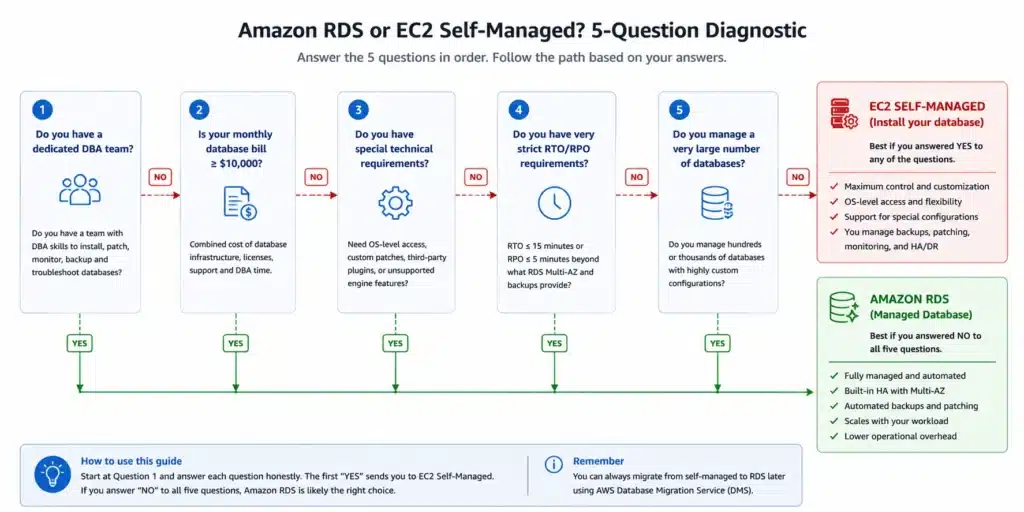
The Five-Question Decision Framework
Answer these questions in sequence. They produce a defensible recommendation for your specific team configuration.
Question 1: Does your team have a dedicated database administrator?
A dedicated DBA — someone whose primary role is database administration, not application development or platform engineering — can absorb the operational overhead of self-managed EC2 databases because that overhead is their job description. Without a dedicated DBA, the operational work falls on engineers whose primary value to the organization is elsewhere. Every hour a senior application engineer spends on database patching, backup configuration, or incident response is an hour not spent on product development.
If no: RDS is almost always the correct choice below the scale where a dedicated DBA hire is justified by infrastructure cost savings alone.
If yes: continue to Question 2.
Question 2: What is your current or projected monthly RDS bill per database?
The infrastructure cost difference between EC2 and RDS — the compute rate gap and the storage premium — translates to a dollar saving per database per month. At small database sizes, the monthly saving from self-hosting is small relative to the time investment required to set up and maintain the EC2 deployment correctly.
The correct threshold is specific to your team’s blended engineering rate and database configuration. The general principle from the AWS Well-Architected Framework: managed services are cost-effective when the operational overhead of the alternative exceeds the managed service premium. Source: AWS Well-Architected Framework, Operational Excellence pillar.
Question 3: Does the workload require a capability that RDS cannot provide?
RDS restricts certain database configurations that require OS-level or kernel-level access. If your workload requires: custom database plugins that need OS-level installation, superuser access to modify pg_hba.conf or similar OS-visible configuration, custom storage configurations beyond what RDS exposes, or database engines that RDS does not support (RDS supports MySQL, PostgreSQL, MariaDB, Oracle, SQL Server, and Db2 — if you need something else, EC2 is required) — then the decision is made for you. Source: AWS official RDS documentation.
If a technical requirement genuinely cannot be met by RDS: EC2 is the correct choice regardless of cost. If there is no such requirement: continue to Question 4.
Question 4: What is your recovery time objective (RTO) and recovery point objective (RPO)?
RDS Multi-AZ provides automatic failover with typical RTO of 60-120 seconds and near-zero RPO (synchronous replication to standby). RDS automated backups with PITR provide RPO to within seconds of any point in the retention window. Source: AWS official RDS documentation.
Achieving equivalent RTO and RPO on EC2 requires correctly implemented HA tooling, tested failover, and continuous transaction log archiving. Each of these requires engineering effort to implement correctly and periodic testing to verify they work under real failure conditions. If your RTO and RPO requirements are strict, evaluate whether your team has implemented and tested the EC2 equivalent to the same standard that RDS provides by default.
Question 5: How many database instances will this decision apply to?
The operational overhead of EC2 self-management scales with the number of database instances. A single EC2 database instance requires the initial setup work once. Five EC2 database instances require the same setup work five times and ongoing maintenance five times. The economics of a dedicated DBA team improve as the number of databases grows — the fixed cost of DBA expertise is distributed across more instances.
If 1-5 databases: RDS. If 20+ databases with a dedicated DBA team at a high monthly RDS spend per database: EC2 is worth evaluating with a complete TCO model including DBA time.
When EC2 Is the Correct Choice: The Specific Cases
Four scenarios where self-managed EC2 is the defensible choice, each with specific criteria that must be true for the recommendation to hold.
Large-scale deployments with an existing DBA platform team
For organizations running tens of database instances with a dedicated platform team that has already built and tested the tooling for patching, backup, HA, and monitoring, adding new EC2 instances to the existing managed fleet is incremental work. The fixed cost of the platform team is already incurred. The marginal cost per additional EC2 database is low relative to the infrastructure saving.
This scenario requires: a team that already manages EC2 databases in production, proven tooling for automated patching and failover tested under real failure conditions, a backup and recovery process that has been exercised end-to-end, and a monitoring and alerting framework that reliably detects issues before they become incidents.
Also read: RDS vs Self-Managed EC2 Database
Technical requirements that RDS cannot satisfy
As described in Question 3, some workloads genuinely require capabilities RDS does not provide: custom database extensions needing OS-level installation, superuser access for specific administrative operations, custom kernel tuning for database workloads, or specific database engines not supported by RDS. In these cases, EC2 is not a cost optimization decision — it is a technical requirement decision.
Commercial database engines with BYOL on EC2
For Oracle and SQL Server workloads, Bring Your Own License (BYOL) on EC2 can significantly reduce costs compared to RDS License Included pricing, particularly when the organization holds existing licenses under Software Assurance or equivalent agreements. RDS for Oracle supports BYOL, but EC2 provides additional flexibility for organizations with complex licensing arrangements. Source: AWS official RDS Custom documentation.
See exactly what you’re overpaying on RDS in under 60 seconds. Try the Calculator for free →
Local NVMe storage for I/O latency requirements
For workloads requiring sub-millisecond storage latency beyond what EBS provides, EC2 instance types with local NVMe instance store offer the lowest possible storage latency. RDS does not support local NVMe instance store — all RDS storage is EBS-based. For databases where storage latency is the primary performance constraint, EC2 with local NVMe may be the only viable AWS-hosted option. Source: AWS official EC2 instance types documentation.
How Usage.ai Optimizes RDS Cost Without the EC2 Trade-Off
The RDS vs EC2 comparison typically frames the choice as paying the managed service premium or accepting the operational overhead. Usage.ai approaches it differently: reduce the RDS cost stack to the point where the managed service premium narrows significantly, while retaining all the operational benefits that RDS provides.
For RDS cost optimization, Usage.ai operates across four levers:
Reserved Instance purchase: RDS Reserved Instances reduce the on-demand compute rate by a meaningful percentage depending on engine, term, and payment option. Usage.ai identifies the stable baseline of RDS instance spend and purchases Reserved Instances through billing-layer access. The platform’s Insured Flex Reserved Instances include a buyback guarantee — if an instance is decommissioned, migrated to Aurora, or the instance class changes during the RI term, the unused commitment is bought back and the value returned as cashback in real money.
Right-sizing: Usage.ai pulls CloudWatch utilization metrics for every RDS instance (CPU, FreeableMemory, DatabaseConnections) and surfaces specific right-sizing recommendations with the exact annual dollar saving. Reducing the instance size before purchasing an RI maximizes the combined saving.
Extended Support detection: Usage.ai identifies any RDS instance running MySQL 5.7 or PostgreSQL 11 and flags the Extended Support charge with the exact monthly cost. For MySQL 5.7, the Year 3 charge from March 1, 2026 is $0.200/vCPU-hr (AWS official). A 4-vCPU instance accumulates $584/month. Usage.ai prioritizes this flag above RI recommendations — an RI does not lock an instance to MySQL 5.7 or force Extended Support for the RI term. Upgrading to a major version in standard support ends the surcharge, while the RI benefit continues if its matching attributes remain eligible. RI discounts do not cover Extended Support.
Database Savings Plans: for RDS fleets where configuration is evolving (instance class migration, engine upgrades, regional changes), Database Savings Plans provide a more flexible commitment path than per-instance RIs.
Usage.ai identifies the eligible floor spend and sizes the DSP commitment accordingly.
Fee: percentage of realized savings only. $0 if Usage.ai saves nothing. 30-minute setup, billing-layer access only. No infrastructure changes required.

Frequently Asked Questions
1. Is running a database on EC2 cheaper than Amazon RDS?
Equivalent self-managed EC2 compute and EBS storage can have lower direct prices, but compare the same capacity, performance, availability, licensing and commitment term. Include backup storage, network charges and engineering time. RDS automates administration; storage, extra backup retention, standby capacity and paid monitoring features can still add charges.
2. What does RDS include that EC2 does not?
RDS manages backups, patching and configurable failover and storage scaling. These features do not make all usage free: Multi-AZ capacity, growing storage, excess backups, monitoring and other add-ons must be included in the estimate. Standard Database Insights includes seven days of supported performance history; Advanced mode and CloudWatch usage have separate pricing.
3. What is the RDS Extended Support charge for MySQL 5.7 in 2026?
Starting March 1, 2026, the Extended Support charge for MySQL 5.7 in US East (Ohio) is $0.200 per vCPU-hour. This applies on top of the standard on-demand instance rate and is charged per vCPU of each running instance. For a 4-vCPU instance: $0.200 x 4 = $0.800/hr additional = $584/month. This charge continues until the MySQL version is upgraded to a supported major version. Source: AWS official: ‘Starting March 1, 2026, you will be charged $0.200 per vCPU-hr’ (aws.amazon.com/rds/mysql/pricing/). Upgrade to a major version still within RDS standard support to end the surcharge. This is not permanent protection: each major version has its own support end date.
4. When should I use EC2 instead of RDS for a database?
Four scenarios where EC2 is the correct choice: (1) the workload has a technical requirement RDS cannot satisfy — custom database extensions requiring OS-level installation, superuser access for specific operations, or a database engine not supported by RDS; (2) your organization has an existing, mature DBA platform team already managing multiple self-hosted databases at high monthly RDS spend per instance; (3) you are running Oracle or SQL Server with existing licenses under BYOL where EC2 provides greater licensing flexibility; (4) the workload requires local NVMe instance store storage for sub-millisecond latency that EBS cannot provide. Source: AWS official RDS and EC2 documentation.
5. How do RDS Reserved Instances reduce the cost gap with EC2?
Amazon RDS Reserved Instances let you commit to a DB instance for a 1 or 3-year term at a significant discount versus on-demand pricing. Three payment options (No Upfront, Partial Upfront, All Upfront) offer different discount levels. Applying Reserved Instances to stable RDS instances reduces the compute rate while retaining all managed service benefits — automated backups, patching, failover, and monitoring. The combined effect narrows the infrastructure cost gap between RDS and EC2, often to the point where the remaining premium is justified by the operational time RDS saves. Source: AWS official RDS Reserved Instances documentation (aws.amazon.com/rds/postgresql/pricing/).
6. Does Amazon EBS gp3 cost the same as RDS storage?
No. In N. Virginia, EBS gp3 is $0.08/GB-month and Single-AZ RDS gp3 for MySQL, PostgreSQL and MariaDB is $0.115/GB-month. At 1,000 GB, that is $80 versus $115 monthly before extra performance or other charges. Included IOPS and throughput differ, especially at the RDS 400-GB threshold. Multi-AZ RDS has separate storage pricing.




