New See exactly what you're overpaying AWS in under 60 seconds. Try the Calculator for free →

RDS Optimized Reads (NVMe Cache): What It Actually Costs and When It Pays Off

Updated May 29, 2026
22 min read
On this page

The AWS documentation is clear that Optimized Reads is included at no additional charge. What is less clear is that the phrase ‘no additional charge’ means no charge beyond the standard instance rate for the ‘d’-family instance — and that instance costs more than the equivalent non-NVMe instance.

Understanding the full cost picture requires distinguishing between the feature and the hardware it runs on. The NVMe cache is free to use. The local NVMe SSD that makes it possible is built into a specific set of instance classes that carry a premium over their non-NVMe counterparts. You cannot get the NVMe cache on a db.r8g instance — you need a db.r8gd instance, which costs more.

This guide covers the complete pricing picture for Optimized Reads: what the premium is, how the NVMe mechanism works for each supported engine, when the performance gain justifies the cost, and how to purchase Reserved Instances on NVMe-enabled instance families.

What Is RDS Optimized Reads?

Optimized Reads is a capability on AWS RDS and Aurora that uses local NVMe-based SSD block storage — physically attached to the host server rather than accessed over the network — to accelerate specific database operations.

Standard RDS instances use EBS (Elastic Block Store) for all storage, including the temporary work areas databases need for complex query processing. EBS is high-quality network-attached storage, but it has higher latency than local NVMe for small random reads that complex queries generate intensively.

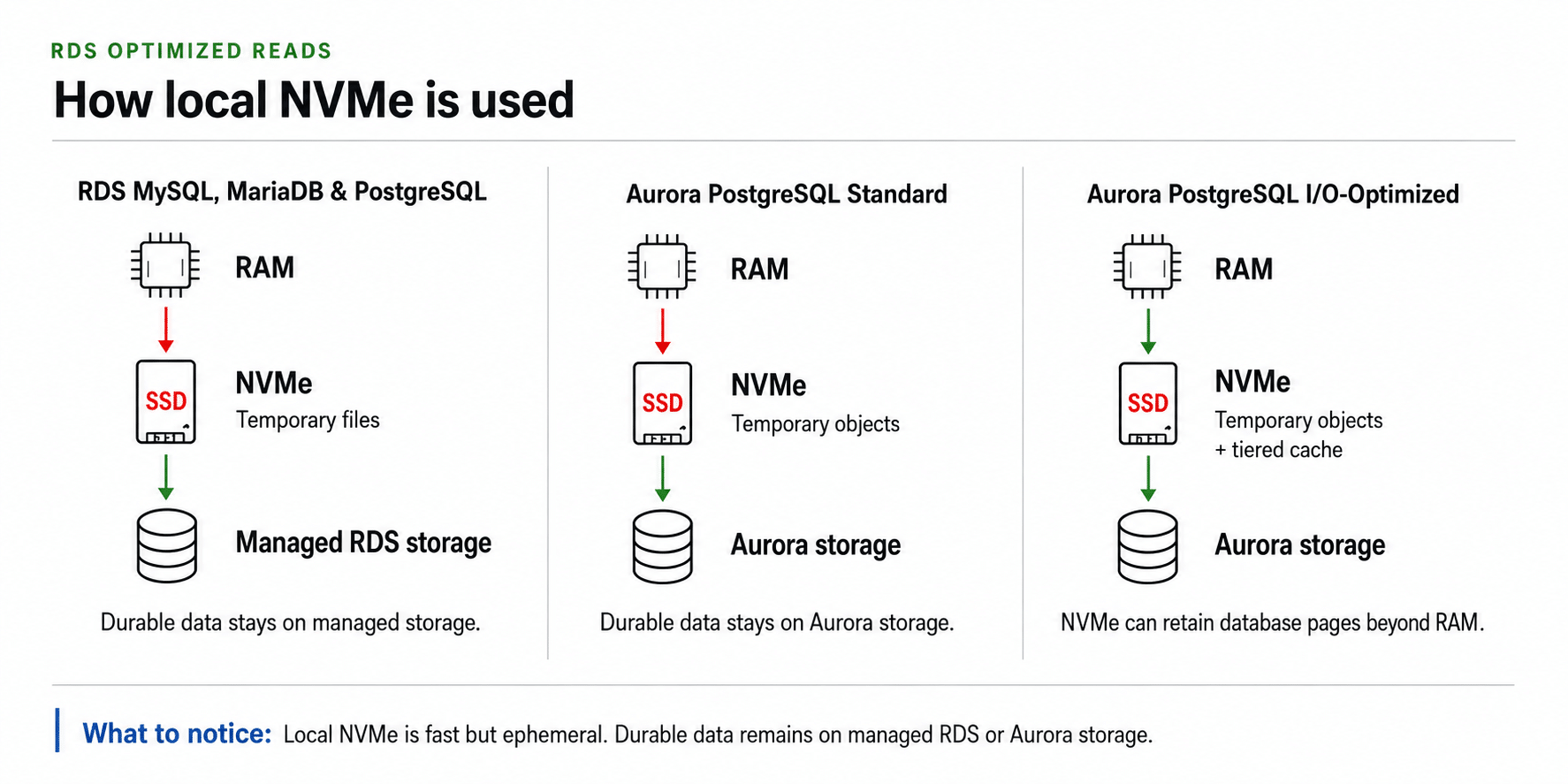
Optimized Reads addresses this by putting two specific types of work on local NVMe rather than EBS. The first is temporary table operations: when a complex query needs to sort large datasets, build hash tables for aggregations, or process joins that exceed available memory, the database creates temporary tables in storage. Routing these to local NVMe rather than EBS reduces the I/O latency for those operations. The second is tiered buffer pool caching, which is available only on Aurora PostgreSQL with I/O-Optimized configuration: database pages evicted from the in-memory buffer pool are written to local NVMe rather than being completely discarded, so they can be quickly retrieved if needed again before being fetched from EBS.

These two mechanisms address different bottlenecks. The temporary table mechanism helps queries that exceed memory capacity. The tiered caching mechanism helps workloads where the active dataset is larger than the buffer pool but smaller than the total NVMe capacity, allowing the combined memory-plus-NVMe working set to absorb more of the database than memory alone.

Related: RDS MySQL Reserved Instances — pricing, instance families, and Graviton selection

The Actual Cost of Optimized Reads: ‘d’ Instance Premium

Every instance that supports Optimized Reads has a ‘d’ in its name — db.r8gd, db.m8gd, db.r6gd, db.r6id, db.m6id. The ‘d’ indicates local NVMe SSD storage is physically attached to the instance. You pay for that NVMe hardware as part of the instance hourly rate. There is no way to use Optimized Reads without paying the ‘d’ instance premium.

Here is the precise premium for each instance class, all verified from Vantage.sh (AWS API, May 2026, MySQL, US East N. Virginia). Verify at aws.amazon.com/rds/mysql/pricing — rates change.

Instance (NVMe ‘d’) On-Demand/hr Non-NVMe Equivalent/hr NVMe Premium/hr Monthly Premium
db.r8gd.large $0.273 db.r8g.large $0.239 +$0.034 (+14.2%) +$24.82/month
db.m8gd.large $0.1976 db.m8g.large $0.168 +$0.030 (+17.9%) +$21.72/month
db.r6gd.large $0.257 db.r6g.large $0.225 +$0.032 (+14.2%) +$23.36/month
db.r6gd.xlarge $0.514 db.r6g.xlarge ~$0.450 +$0.064 (+14.2%) +$46.72/month
db.r8gd.8xlarge $4.368 db.r8g.2xlarge ~$3.824 Verify at AWS Verify at AWS

Source: Vantage.sh (AWS API), May 2026. Non-NVMe equivalent is the same vCPU/RAM configuration without ‘d’ designation. Monthly premium = (NVMe rate – non-NVMe rate) x 730 hours. Verify all rates at aws.amazon.com/rds/pricing — rates change. The ‘d’ instance includes local NVMe SSD storage at no separate line item; the hardware cost is folded into the higher hourly rate.

The pricing reality: ‘Optimized Reads at no additional charge’ means no charge on top of the instance’s hourly rate. The hourly rate itself is higher because the instance includes physically-attached NVMe storage that non-d instances do not have. Paying $0.273/hr for a db.r8gd.large versus $0.239/hr for a db.r8g.large is paying $0.034/hr for the NVMe hardware capability — whether you use Optimized Reads or not. Source: Vantage.sh (AWS API), May 2026.

How the NVMe Cache Works: Two Different Mechanisms

Mechanism 1: Temporary Table Acceleration (All Supported Engines)

When a database executes a complex query requiring a sort, hash aggregation, or multi-table join, it often needs to store intermediate results in temporary tables. On standard RDS instances, these temporary tables go to EBS. On Optimized Reads instances, they are routed to local NVMe storage instead.

The performance difference comes from the latency and throughput characteristics of local NVMe versus network-attached EBS. Local NVMe provides sub-millisecond access times for random I/O. EBS gp3 provides low latency relative to other network storage, but the network hop still adds latency compared to directly-attached NVMe. For queries that generate large temporary tables — complex aggregations, wide range scans requiring in-storage sorting, high-load joins on unindexed columns — this latency difference can translate to significant query time reduction.

AWS documentation states that RDS for MySQL, PostgreSQL, and MariaDB execute complex queries up to 2x faster on Optimized Reads instances compared to standard instances. The actual speedup in production depends entirely on whether your specific queries generate large temporary tables. A point-query SELECT by primary key never generates a temporary table and sees zero benefit from Optimized Reads.

Supported engines for the temporary table mechanism: RDS for MySQL (8.0 and higher), RDS for PostgreSQL, RDS for MariaDB, Amazon Aurora MySQL, Amazon Aurora PostgreSQL. Source: AWS official documentation.

Mechanism 2: Tiered Buffer Pool Caching (Aurora PostgreSQL I/O-Optimized Only)

The second mechanism is more powerful and more specific. In a standard database, when the in-memory buffer pool fills up, pages that have not been recently accessed are evicted — meaning they are removed from memory and must be re-read from EBS the next time they are needed. On Aurora PostgreSQL Optimized Reads instances using the I/O-Optimized configuration, evicted pages are written to local NVMe rather than simply discarded. The NVMe acts as a second tier of cache between memory and EBS.

This tiered caching is particularly valuable for workloads where the active working set exceeds available instance memory but is smaller than the combined memory-plus-NVMe capacity. A database with 100 GB of frequently-accessed data on an instance with 64 GB of RAM would normally have 36 GB of data constantly cycling between memory and EBS. With tiered caching on an NVMe instance with 0.9 TB of local storage, most of those evicted pages are served from NVMe rather than EBS, dramatically reducing the volume of EBS I/O and improving access times for the evicted data.

AWS announced that Aurora PostgreSQL Optimized Reads delivers up to 8x improved query latency compared to standard Aurora PostgreSQL instances for applications where datasets exceed instance memory. For Aurora PostgreSQL with pgvector (vector search workloads), Optimized Reads increases queries per second by up to 9x in workloads that exceed available instance memory. Source: AWS announcement, November 2023.

Important distinction: tiered buffer pool caching requires Aurora PostgreSQL with I/O-Optimized configuration. Standard Aurora PostgreSQL on ‘d’ instances gets only the temporary table acceleration. The two mechanisms are not interchangeable. If you are running standard Aurora PostgreSQL billing mode (not I/O-Optimized), you will not get the tiered caching behavior even on a ‘d’ instance.

Two-panel architecture diagram illustrating the RDS Optimized Reads mechanisms: the left panel labeled Temporary Table Acceleration shows a query execution flow where complex sort and aggregation operations that would normally write temporary tables to the EBS network storage are instead redirected to the local NVMe SSD attached to the d-family instance, reducing I/O latency for those operations across all supported RDS and Aurora engines; the right panel labeled Tiered Buffer Pool Caching shows a three-layer storage hierarchy with the in-memory InnoDB buffer pool at the top, a local NVMe SSD layer below it labeled second-tier cache receiving database pages evicted from memory, and the EBS volume at the bottom, with a note indicating this tiered caching architecture is available only on Aurora PostgreSQL instances using the I/O-Optimized billing configuration

Which Instance Classes Support Optimized Reads?

Optimized Reads is available on the following RDS and Aurora instance families as of May 2026. All instances in these families include local NVMe SSD storage. Source: AWS official documentation and aws.amazon.com/about-aws/whats-new/ announcements.

Graviton-Based NVMe Instances (Recommended for Most Workloads)

R8gd (Graviton4, memory-optimized): the newest generation, launched November 2025 for Aurora PostgreSQL and RDS MySQL, PostgreSQL, MariaDB. Delivers up to 165% better throughput and up to 120% better price-performance versus R6g. Available in US East (N. Virginia, Ohio), US West (Oregon), Europe (Spain, Frankfurt), Asia Pacific (Tokyo). NVMe storage per instance: 0.9 TB (large) to 26.7 TB (16xlarge) — verify exact NVMe sizes at aws.amazon.com/rds.

M8gd (Graviton4, general-purpose): same launch timeline as R8gd, same regional availability. General-purpose memory-to-vCPU ratio (4 GB per vCPU versus R8gd’s 8 GB per vCPU). Appropriate when workloads are compute-intensive rather than memory-intensive.

R6gd (Graviton2, memory-optimized): the previous generation. Broader regional availability than R8gd. Supported for RDS MySQL, PostgreSQL, MariaDB, Aurora MySQL, Aurora PostgreSQL. Still a valid choice for teams needing NVMe in regions where R8gd is not yet available.

M6gd (Graviton2, general-purpose): same generation as R6gd. Lower per-instance cost than R6gd but less memory per vCPU.

Intel-Based NVMe Instances

R6id (Intel Ice Lake, memory-optimized): launched for RDS MySQL, PostgreSQL, MariaDB in September 2023. Up to 24% performance improvement and up to 13% price-performance improvement versus the R5d generation. Supports local NVMe up to 7.6 TB. Available in US East (Ohio, N. Virginia), US West (Oregon), Europe (Frankfurt, Ireland).

M6id (Intel Ice Lake, general-purpose): same generation as R6id. Appropriate for workloads requiring Intel-specific features or licensing tied to Intel processors.

R5d, M5d: the previous Intel generation with NVMe. Still functional but not recommended for new deployments — the R6id and R6gd generations offer better price-performance.

Not Supported

SQL Server instances do not support RDS Optimized Reads regardless of instance family. Oracle RDS instances: verify current support at aws.amazon.com/rds/oracle/pricing as availability may vary. Shared-core burstable instances (T-family) do not support Optimized Reads.

AWS RDS console create database screen showing the DB instance class selection dropdown with the d-family Graviton instances grouped together, each showing an orange Optimized Reads badge: db.r8gd.large with 2 vCPUs and 16 GB memory at $0.273 per hour, db.r8gd.xlarge with 4 vCPUs and 32 GB at a higher rate, and db.m8gd.large with 2 vCPUs and 8 GB at $0.1976 per hour, followed by the standard non-NVMe instances db.r8g.large and db.r8g.xlarge without the badge and at lower hourly rates, clearly showing the instance premium associated with enabling Optimized Reads capability

Also read: RDS Reserved Instances: How to Save 33-69%

The Break-Even Analysis: When Does the NVMe Premium Pay Off?

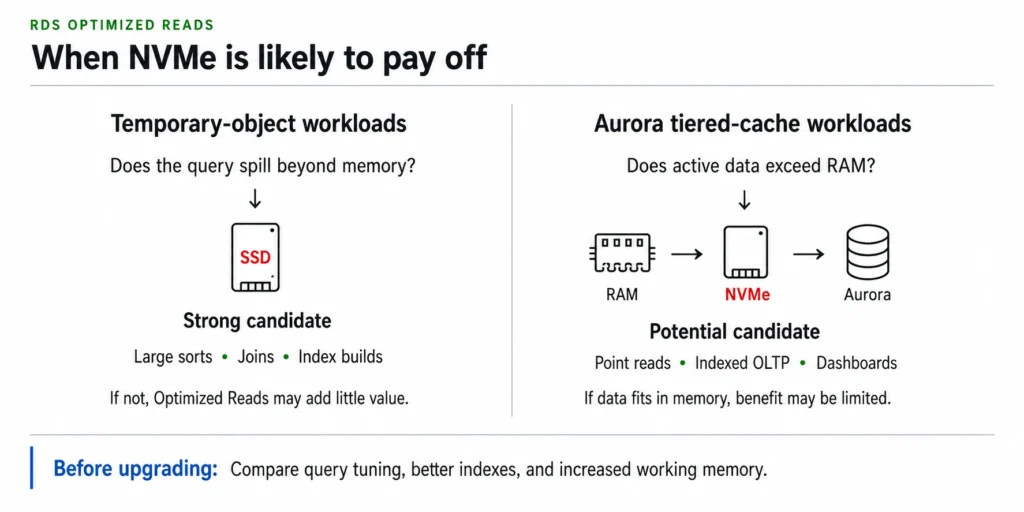
The NVMe premium for an Optimized Reads instance is a fixed cost paid every hour whether or not any Optimized Reads work is happening. For a db.r8gd.large, you pay $24.82/month more than a db.r8g.large regardless of your query mix. The question is whether the queries that benefit from NVMe acceleration are generating enough value to justify that premium.

Workloads That Clearly Benefit

Reporting and analytics queries on OLTP databases. A MySQL or PostgreSQL database handling transactional work during business hours and reporting queries at night frequently generates large temporary tables for those reports. If the reporting queries account for 20-30% of database CPU time and run 2x faster on NVMe, the effective query throughput gain is 40-60% on the reporting workload. For databases where reporting query latency directly affects end-user experience or batch completion windows, the $24.82/month premium is easily justified.

AI and vector search workloads on Aurora PostgreSQL. The 9x improvement in queries per second for pgvector workloads that exceed instance memory is a significant multiplier for teams building vector-search-backed applications. If your Aurora PostgreSQL instance is running embedding similarity searches on datasets larger than instance memory, Optimized Reads with I/O-Optimized configuration is likely the highest-ROI single instance change you can make. Source: AWS announcement November 2023.

Complex aggregations on large tables. GROUP BY queries on tables with hundreds of millions of rows that require full-table scans and in-storage sorting are exactly the workload profile Optimized Reads was built for. If EXPLAIN ANALYZE shows ‘Sort Method: external merge Disk’ on your PostgreSQL queries, your sort operations are hitting storage. Moving to a ‘d’ instance routes those disk sorts to NVMe instead of EBS.

Index rebuild operations. RDS documentation notes that Optimized Reads improves index rebuild speeds. For large tables requiring frequent index maintenance — write-heavy tables with multiple non-clustered indexes — faster index rebuilds reduce maintenance window duration and the performance impact of online index operations.

Workloads That Do Not Benefit

Primary-key lookups and simple indexed queries. A query that uses an index and accesses a small number of rows from the buffer pool never generates a temporary table and never forces buffer pool eviction during its execution. These queries are served from memory and see no difference on an NVMe instance.

Write-heavy OLTP with small transaction sizes. Insert-heavy workloads processing individual rows or small batches in rapid succession are primarily write-bound. Optimized Reads accelerates reads — writes still go to EBS. The doublewrite buffer optimization for writes is a separate feature called Optimized Writes.

Workloads where the full dataset fits comfortably in the buffer pool. If your active dataset is 12 GB and your instance has 16 GB of RAM, buffer pool eviction is minimal and tiered caching provides little benefit. The temporary table mechanism can still help if you run complex queries, but without both mechanisms contributing, the value case weakens.

The Break-Even Formula

Monthly NVMe premium for db.r8gd.large: $24.82. If the NVMe acceleration reduces your query processing time on a database that would otherwise require an instance 25% larger: db.r8gd.large versus db.r8g.xlarge. db.r8g.xlarge on-demand: $0.478/hr = $348.94/month. db.r8gd.large on-demand: $0.273/hr = $199.29/month. In this scenario, the Optimized Reads instance costs $149.65/month less than the next-tier non-NVMe instance while delivering sufficient query throughput. The break-even is not whether the NVMe premium is worth paying — it is whether the NVMe acceleration allows you to run a smaller (and therefore cheaper) instance class. Verify at aws.amazon.com/rds/pricing — rates change.

Practical decision guide: run your current database for 30 days. Pull slow query logs and identify the top 10 queries by total execution time. If the majority show sort operations accessing storage (EXPLAIN shows ‘Using filesort’ in MySQL or ‘Sort Method: external merge Disk’ in PostgreSQL), or if your buffer pool hit rate is below 95% indicating consistent eviction, Optimized Reads will deliver measurable improvement. If all slow queries are full-table scans without sorts, index optimization or partitioning will help more than NVMe.

Reserving NVMe-Enabled Instances: RI Purchasing for ‘d’ Families

Reserved instances for ‘d’-family instances follow the same mechanics as all RDS RIs. Key points specific to NVMe-enabled instances:

Size Flexibility Applies Within Each Family

For MySQL, PostgreSQL, and MariaDB (engines with size flexibility): a db.r8gd.xlarge RI covers 2x db.r8gd.large instances via normalization units, or partially covers a db.r8gd.2xlarge. Size flexibility applies within the r8gd family — it does not cross between r8gd and r8g. A db.r8g RI cannot cover a db.r8gd instance and vice versa. They are separate families for reservation purposes.

The normalization units are the same as all other RDS families: large = 4, xlarge = 8, 2xlarge = 16, and so on. The cross-deployment type flexibility (Single-AZ RI covering Multi-AZ instances at 50% normalization credit) also applies to ‘d’ family instances exactly as it does for standard families.

The Generation Boundary Applies to ‘d’ Families Too

A db.r6gd RI does not cover db.r8gd instances. A db.r8gd RI does not cover db.r6gd instances. The generation constraint is the same as for non-NVMe instances: size flexibility is strictly within the same family and generation. If you are currently on r6gd with active RIs and are evaluating a migration to r8gd, plan the migration around RI expiration dates to avoid paying for unmatched reservations on both generations simultaneously.

The NVMe Premium Compounds Over the RI Term

The db.r8gd.large 1-year RI saves approximately 33% on the $0.273/hr on-demand rate (consistent with the savings rate for non-NVMe Graviton4 instances — verify at aws.amazon.com/rds/mysql/pricing). At 33% savings, the reserved rate is approximately $0.183/hr versus $0.160/hr for the db.r8g.large 1-year No Upfront RI. The $0.023/hr difference over a 1-year term: $201.55/year in NVMe premium even after the RI discount. You are committing to paying the NVMe premium for the full term. Confirm your workload benefits from NVMe before purchasing a 3-year RI on a ‘d’ instance.

How to save on RDS Reserved Instances: the complete 6-step process (live)

Enabling and Configuring Optimized Reads

Optimized Reads is enabled by selecting a ‘d’-family instance class when creating or modifying an RDS database. There is no separate feature toggle — the capability is present on the instance and active by default once the correct instance class is running.

Via the AWS Console

For new databases: in the Create database wizard, select the DB instance class section and choose an instance with the ‘d’ designation (db.r8gd, db.r6gd, etc.). The console does not display a separate Optimized Reads toggle — the instance class selection activates the feature.

For existing databases: navigate to the database in the RDS console, click Modify, and change the DB instance class to a ‘d’-family instance. The modification requires a reboot — schedule it for a maintenance window or accept the immediate reboot if your workload tolerates brief downtime.

Via the AWS CLI

For a new database: aws rds create-db-instance –db-instance-identifier mydb –db-instance-class db.r8gd.large –engine mysql –engine-version 8.0 [other parameters]

For modifying an existing instance: aws rds modify-db-instance –db-instance-identifier mydb –db-instance-class db.r8gd.large –apply-immediately

Verifying Optimized Reads Is Active

After modifying to a ‘d’-family instance, confirm Optimized Reads is active via the AWS CLI: aws rds describe-db-instances –db-instance-identifier mydb –query ‘DBInstances[*].PerformanceInsightsEnabled’. For Aurora clusters, check the cluster’s I/O-Optimized configuration status to confirm whether tiered caching is also active.

In the RDS console, the database details page for a ‘d’-family instance will show the instance class with the ‘d’ designation. There is no separate Optimized Reads status indicator in the console — the instance class itself is the indicator.

AWS RDS console Modify DB Instance interface showing the DB instance class section with the dropdown open and displaying a list of available instance types, with db.r8gd.xlarge highlighted in the selection showing 4 vCPUs and 32 GiB RAM with the Optimized Reads capability indicator, and below the instance class section showing the Maintenance window settings with the option to apply changes During the next scheduled maintenance window selected, and a warning banner indicating that changing instance class requires a reboot of the database instance

Does Optimized Reads Affect EBS Storage Costs?

No. Enabling Optimized Reads by selecting a ‘d’-family instance does not reduce your EBS storage charges. Your database’s primary data still lives on EBS. The local NVMe storage handles temporary tables and cached pages — it is not a replacement for EBS. Your gp3 or io1/io2 storage costs remain exactly as they were before.

The local NVMe storage on ‘d’-family instances is ephemeral — it is not backed up, not replicated, and not preserved across instance stops or reboots. It is purely a performance cache. Any data in the NVMe cache (temporary tables, cached buffer pool pages) is regenerated automatically on instance restart or failure. There is no data durability concern associated with the NVMe storage because it holds no primary data.

For Multi-AZ deployments: the NVMe cache operates independently on both the primary and standby instances. When a failover occurs, the new primary starts with a cold NVMe cache — the temporary tables and cached pages from the old primary do not transfer to the standby. Initial query performance after a failover may be slightly below steady-state as the NVMe cache warms up, but this is a brief transient effect.

Optimized Reads and Optimized Writes: Related But Separate Features

AWS RDS offers a separate feature called Optimized Writes, available on RDS for MySQL 8.0.30 and higher and RDS for MariaDB. Optimized Writes improves write transaction throughput by up to 2x at no additional cost by eliminating the doublewrite buffer overhead. Source: AWS announcement December 2022.

Optimized Writes is also available on ‘d’-family instances but is not exclusive to them. It is available on standard Graviton instances (R6g, M6g) as well. Having both Optimized Reads and Optimized Writes on the same ‘d’-family instance provides acceleration for both read-intensive complex queries and write-heavy transaction processing.

The two features address different bottlenecks and are complementary rather than overlapping. A write-heavy OLTP database on a ‘d’-family instance gets Optimized Writes by default (MySQL 8.0.30+) and gets Optimized Reads for any complex reporting queries run on the same instance. Choosing a ‘d’-family instance for a mixed read-write workload captures both optimizations for the cost of the NVMe instance premium.

How Usage.ai Handles NVMe Instance Cost Optimization

The NVMe instance premium represents an ongoing cost commitment that requires the same analysis as any other RDS cost decision: is this instance class delivering sufficient value per dollar to justify the hourly premium?

Usage.ai analyzes your RDS fleet’s query patterns, buffer pool hit rates, and temporary table generation (via Performance Insights data) to identify whether instances are on ‘d’-family classes for good reason or whether they were selected by default without the workload analysis that justifies the premium.

For instances where the workload genuinely benefits from NVMe — high temporary table usage, buffer pool eviction rates above 5%, large analytics queries — Usage.ai recommends Reserved Instances for the ‘d’-family instance class and handles the purchase automatically. The RI recommendation correctly accounts for the NVMe generation boundary: r6gd reservations are not suggested as coverage for r8gd running instances, and vice versa.

For instances where the workload does not show evidence of NVMe benefit — low temporary table generation, buffer pool hit rate above 99%, primarily point queries — Usage.ai flags the ‘d’-family instance as a potential right-sizing opportunity and surfaces the cost comparison between the current ‘d’ instance and the equivalent non-NVMe instance. The analysis is refreshed every 24 hours, so if workload patterns change and NVMe benefit becomes evident later, the recommendation updates accordingly.

If a Reserved Instance on a ‘d’-family instance becomes underutilized — because a database is migrated, resized, or moved to a different generation — Usage.ai provides cashback on the unused commitment in real money. Fee: percentage of realized savings only.

See how Usage.ai analyzes your RDS fleet for NVMe and RI optimization


Set up Usage AI in 30 minutes. Save from day one.No infrastructure changes. No lock-in. If Usage.ai doesn’t save you money, you pay nothing.FIND MY SAVINGS


Frequently Asked Questions

1. Is RDS Optimized Reads free?

The NVMe cache feature itself is included at no additional charge on compatible ‘d’-family instances. There is no separate feature fee for Optimized Reads. However, the ‘d’-family instance that provides NVMe storage costs 14-18% more per hour than the equivalent non-NVMe instance in the same generation. A db.r8gd.large at $0.273/hr costs $0.034/hr more than a db.r8g.large at $0.239/hr (Vantage.sh, AWS API, May 2026). Verify at aws.amazon.com/rds/pricing — rates change.


2. Which RDS instances support Optimized Reads?

Instances with ‘d’ in their name include local NVMe storage that enables Optimized Reads. Current supported families: db.r8gd (Graviton4), db.m8gd (Graviton4), db.r6gd (Graviton2), db.m6gd (Graviton2), db.r6id (Intel Ice Lake), db.m6id (Intel Ice Lake), db.r5d (Intel), db.m5d (Intel). The R8gd and M8gd families were launched in November 2025. Not supported: T-family burstable instances, SQL Server instances, shared-core instances. Source: AWS official documentation.


3. What is the difference between RDS Optimized Reads and Optimized Writes?

Optimized Reads uses local NVMe SSD to accelerate complex read queries by processing temporary tables on NVMe and (for Aurora PostgreSQL I/O-Optimized) caching evicted buffer pool pages on NVMe. Optimized Writes eliminates the MySQL doublewrite buffer overhead, improving write transaction throughput by up to 2x. Both are available on ‘d’-family instances. Optimized Writes is additionally available on standard Graviton instances (R6g, M6g) and is enabled by default on MySQL 8.0.30 and higher.


4. How much faster are queries on Optimized Reads instances?

AWS official benchmarks: RDS MySQL, PostgreSQL, MariaDB execute complex queries up to 2x faster. Aurora PostgreSQL delivers up to 8x improved query latency for workloads where datasets exceed instance memory. Aurora PostgreSQL with pgvector achieves up to 9x improvement in vector search queries per second. R8gd instances deliver up to 165% better throughput versus R6g instances for Aurora PostgreSQL. These improvements apply to workloads with heavy temporary table usage or buffer pool pressure. Point queries and simple indexed reads see no improvement.


5. Does Optimized Reads work with Reserved Instances?

Yes. ‘d’-family instances support Reserved Instances with the same discount structure as non-NVMe instances. For MySQL, PostgreSQL, and MariaDB, size flexibility applies within the ‘d’ family: a db.r8gd.xlarge RI covers 2x db.r8gd.large. Size flexibility does not cross between ‘d’ and non-‘d’ families — db.r8g RIs do not cover db.r8gd instances. Generation boundaries also apply: db.r6gd RIs do not cover db.r8gd instances.


6. Does Optimized Reads reduce EBS storage costs?

No. EBS storage costs remain unchanged when using Optimized Reads. The local NVMe storage handles temporary tables and buffer pool cache overflow — it is not a replacement for EBS. Your database’s primary data, transaction logs, and automated backups all continue to use EBS and are billed at standard EBS rates. The NVMe storage is ephemeral and is not reflected in any storage billing line item.


7. Is the Optimized Reads NVMe storage backed up?

No. Local NVMe storage on ‘d’-family instances is ephemeral. It is not included in automated backups, snapshots, or point-in-time recovery. This is by design: the NVMe holds only temporary tables and cached buffer pool pages that can be regenerated from the primary EBS data store. There is no data durability concern because no primary or irreplaceable data is stored on the NVMe volume.


8. Which regions support R8gd and M8gd instances?

As of November 2025, R8gd and M8gd RDS instances are available in: US East (N. Virginia, Ohio), US West (Oregon), Europe (Spain, Frankfurt), Asia Pacific (Tokyo). Broader regional rollout is expected. For teams requiring NVMe in regions not yet supporting R8gd, the R6gd generation remains available in more regions. Source: AWS announcement November 2025. Verify current availability at aws.amazon.com/rds.

Cut cloud cost with automation
Latest from our blogs