RDS Optimized Writes is one of the few AWS features that genuinely delivers its headline claim with no caveats on pricing: up to 2x write throughput at no additional cost. There is no surcharge, no premium instance required, and no separate feature toggle that adds to your bill. If your database meets the three eligibility conditions, it is already enabled.
Two things are missing from every existing guide on this topic. First: the incompatibility error. ‘RDS Optimized Writes is incompatible with the storage configuration’ is the most-searched phrase in the Optimized Writes keyword cluster — meaning many teams hit this error and cannot find a clear explanation of why it happens or how to fix it. Second: the IOPS cost angle. Eliminating the doublewrite buffer halves the write I/O your database generates. For instances provisioning IOPS on io1 or io2 storage, this has a direct billing implication that most guides ignore entirely.
This guide covers the full picture: how the feature works technically, what the eligibility conditions are, why the incompatibility error happens and the specific remediation paths, and what the IOPS reduction means for your storage bill.
See exactly what you’re overpaying in under 60 seconds. Try the Calculator for free →
What Is the MySQL/MariaDB Doublewrite Buffer and Why Does It Limit Performance?
The doublewrite buffer is a MySQL and MariaDB data safety mechanism that has existed in InnoDB since its early versions. Understanding it is essential to understanding why Optimized Writes matters.
InnoDB writes data in 16 KiB pages. When a database crashes mid-write — due to power failure, OS crash, or storage failure — a page that was only partially written to disk becomes corrupted. During crash recovery, InnoDB cannot determine whether a partial page represents valid data or corruption. The traditional solution is the doublewrite buffer: before InnoDB writes a 16 KiB page to its final location in the data file, it first writes a copy of the page to a dedicated sequential buffer (the doublewrite buffer). If a crash occurs during the actual data file write, InnoDB uses the clean copy from the doublewrite buffer for recovery.
The performance cost of this approach: every page write generates two writes. The first is the sequential write to the doublewrite buffer (efficient per write, but adds an fsync system call). The second is the actual write to the data file. Total I/O for every data modification: 2x the theoretical minimum. On write-heavy workloads — high-volume INSERT operations, batch updates, financial transaction processing — this additional I/O load directly caps write throughput.
Technical detail from AWS official documentation: ‘The writes to the doublewrite buffer are performed in a large sequential chunk using a single fsync() system call, which causes additional overhead on the engine and limits the overall throughput of the database system.’
How RDS Optimized Writes Eliminates the Doublewrite Buffer
The AWS Nitro System provides a hardware-level capability called torn write prevention. Torn writes occur when a 16 KiB database page is only partially written to storage before a failure — the page is split, or ‘torn’, between old and new data. The Nitro System guarantees that 16 KiB writes are atomic: either the full 16 KiB page is written to the storage volume or nothing is written. There is no partial page state possible at the hardware layer.
Because the Nitro System eliminates the possibility of torn writes at the hardware level, InnoDB no longer needs the doublewrite buffer as a software-level protection mechanism. RDS Optimized Writes disables the doublewrite buffer (sets innodb_doublewrite = 0 internally) and relies entirely on Nitro torn write prevention for crash safety. The result: every data modification now requires one write instead of two. Write throughput can increase up to 2x for workloads that were previously bottlenecked by doublewrite buffer I/O.
ACID compliance is fully maintained. The Nitro hardware guarantee is equivalent to the software guarantee provided by the doublewrite buffer — crash recovery works correctly, and no data loss occurs in any failure scenario that the doublewrite buffer previously protected against.
This is why a non-Nitro instance cannot support Optimized Writes: without the hardware-level torn write prevention, disabling the doublewrite buffer would create data corruption risk during crash recovery. The Nitro hardware is not an optional component of Optimized Writes — it is what makes the feature safe to enable.

See exactly what you’re overpaying in under 60 seconds. Try the Calculator for free →
Eligibility Requirements: Three Conditions Must All Be Met
RDS Optimized Writes activates automatically when three conditions are satisfied simultaneously. All three must be true — meeting two out of three does not enable the feature.
Condition 1: Engine Version
MySQL: version 8.0.30 or higher, or MySQL 8.4 (all minor versions). The feature launched November 27, 2022. Source: docs.aws.amazon.com/AmazonRDS/latest/UserGuide/rds-optimized-writes.html.
MariaDB: version 10.6.10 or higher, or MariaDB 11.8 and all higher major releases. The feature launched March 7, 2023. Source: docs.aws.amazon.com/AmazonRDS/latest/UserGuide/rds-optimized-writes-mariadb.html.
Not supported: MySQL 5.7, MySQL 5.6, MariaDB versions below 10.6.10, PostgreSQL (any version), Oracle, SQL Server. Optimized Writes is a MySQL and MariaDB exclusive feature.
Condition 2: Nitro-Based Instance Class
The instance must be a Nitro-based instance class. The following instance families support Optimized Writes as of May 2026:
Memory-optimized: db.r5d, db.r6i, db.r6g, db.r6gd, db.r7g, db.r8g, db.r8gd. General-purpose: db.m5d, db.m6i, db.m6g, db.m6gd, db.m7g, db.m8g, db.m8gd. Also supported: db.x2g (high-memory), db.x2idn, db.x2iedn. Verify the complete current list at aws.amazon.com/rds/mysql/pricing — AWS adds new instance families periodically.
Not supported: db.t3, db.t4g (burstable instances do not use the Nitro torn write prevention architecture required for Optimized Writes), db.m5 standard (not Nitro-based in the required configuration), db.r5 standard.
Condition 3: Database Created After the Feature Launch Date
This is the condition most teams do not know about — and it is the root cause of the incompatibility error. The underlying file system of an RDS instance is formatted differently depending on whether it was created before or after Optimized Writes launched. Instances created before the launch date (before November 27, 2022 for MySQL, before March 7, 2023 for MariaDB) use a file system layout that is not compatible with atomic writes. This is a storage-layer format difference, not a parameter setting. It cannot be changed on a running instance.
Upgrading the engine version of a pre-launch instance from MySQL 8.0.28 to MySQL 8.0.31 does NOT make it compatible with Optimized Writes. The engine version requirement is met, but the file system layout remains from the original instance creation and cannot be retroactively reformatted.
The Incompatibility Error: What It Means and How to Fix It
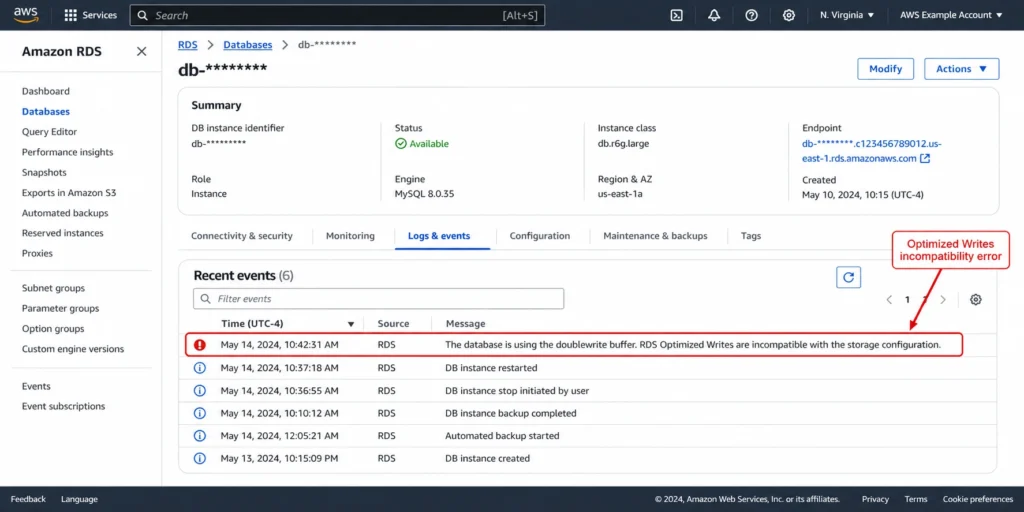
If you see this in your RDS Recent Events: ‘The database is using the doublewrite buffer. RDS Optimized Writes is incompatible with the storage configuration. For more information, see the RDS Optimized Writes for MYSQL documentation’ — your database meets the engine version and instance class requirements but was created before the feature launched.
This error appears most commonly after: (1) upgrading an older instance’s MySQL engine version to 8.0.30+ without creating a new instance; (2) changing instance class to a supported Nitro instance on a pre-launch database; (3) applying a parameter group with rds.optimized_writes=AUTO on a pre-launch database. In all cases, the file system incompatibility is the blocker, not the parameter or instance class.
Why the File System Cannot Be Updated In-Place
The underlying storage layer of an RDS instance is formatted at creation time. When Optimized Writes launched in late 2022 and early 2023, AWS formatted new instances with a file system configuration that supports atomic 16 KiB writes at the storage layer. Existing instances retained their original file system format. AWS does not retroactively reformat the storage volume of running or stopped instances because doing so would require taking the database offline, detaching the storage volume, reformatting it at the block level, and reattaching it — a destructive process that cannot be done safely on a live database volume with data on it.
The parameter innodb_doublewrite on pre-launch instances also is not user-modifiable. Even if you could set it to 0 (disabled), the underlying storage layer would not provide the atomic write guarantee that Optimized Writes depends on, making the configuration unsafe.
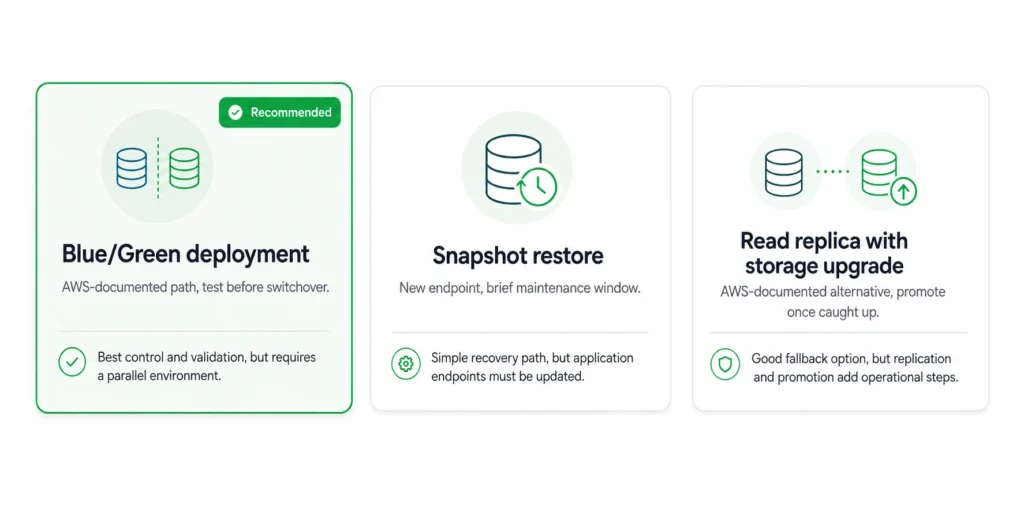
Remediation Path 1: Snapshot and Restore to a New Instance
This is the simpler path. Take an RDS snapshot of the existing instance. Restore the snapshot to a new RDS instance, specifying a supported Nitro instance class and a MySQL 8.0.30+ or MariaDB 10.6.10+ engine version. Because the new instance is created after the feature launch date, it receives the correct underlying file system configuration. RDS Optimized Writes activates automatically on the new instance.
Downtime consideration: the snapshot restore creates a new endpoint. Your application must be updated to point to the new instance endpoint. Plan for a maintenance window where the application is briefly unavailable or read-only during the endpoint cutover. For databases where even brief downtime is unacceptable, use Remediation Path 2.
Remediation Path 2: Replication-Based Migration
Create a new RDS instance with a supported configuration (post-launch date, correct Nitro instance class, supported engine version). Use MySQL native replication to replicate data from the old instance to the new one while both are running. Once the new instance is fully caught up and synchronized, perform an application-side endpoint cutover with minimal or zero downtime. This approach eliminates the extended outage associated with snapshot restore for large databases but requires additional engineering effort to configure and monitor the replication.
Source: AWS re:Post community guidance (repost.aws, December 2022): ‘Looks like the only way is to create a new instance and move all the data (or do it with replication). Maybe it’s also possible to make a snapshot and restore from it to a new instance.’

The IOPS Cost Angle: What Optimized Writes Means for Your Storage Bill
Every guide covering Optimized Writes mentions the zero-cost feature angle. None cover the IOPS cost reduction that follows from eliminating the doublewrite buffer.
The doublewrite buffer generates write I/O that counts against your provisioned IOPS. For every 16 KiB page written to the data file, InnoDB also writes a copy to the doublewrite buffer. This means on a pure write workload, the database is consuming approximately 2x the IOPS that the actual data writes require.
The IOPS Reduction Math
A write-heavy RDS MySQL workload generating 3,000 actual data page writes per second is consuming approximately 6,000 IOPS including the doublewrite buffer writes. If you provision 6,000 IOPS on io1 storage to handle the workload, enabling Optimized Writes reduces actual IOPS consumption to approximately 3,000 — the data writes only, with no doublewrite overhead.
io1 storage pricing: approximately $0.065/provisioned IOPS/month in US East (verify at aws.amazon.com/rds/pricing — rates change). The difference between 6,000 and 3,000 provisioned IOPS: 3,000 x $0.065 = $195/month saved on provisioned IOPS alone, purely from enabling Optimized Writes. For large write-heavy databases running io1 or io2, this is meaningful.
Important caveat: this saving is only achievable if you actually reduce your provisioned IOPS after enabling Optimized Writes. Enabling the feature reduces actual IOPS consumption, but your provisioned IOPS setting remains unchanged until you modify it. Monitor your database’s consumed IOPS in CloudWatch (WriteIOPS metric) for 7 days after enabling Optimized Writes. If the WriteIOPS P99 is consistently below 50% of your provisioned IOPS, you have room to reduce provisioned IOPS and reduce your storage bill.
Storage billing implication: Optimized Writes reduces actual write I/O. For gp3 storage (baseline 3,000 IOPS included, additional IOPS at $0.02/IOPS/month above baseline — verify at aws.amazon.com/rds/pricing): if your database was provisioning extra IOPS beyond the 3,000 gp3 baseline specifically to handle doublewrite buffer overhead, enabling Optimized Writes may let you drop back to baseline IOPS and eliminate that additional charge entirely.
Related: RDS Optimized Reads — NVMe cache pricing and break-even analysis
Optimized Writes vs Optimized Reads: Different Features, Different Benefits
These two features are frequently confused. They address completely different bottlenecks and have different hardware requirements.
| Dimension | Optimized Writes | Optimized Reads | Can you have both? |
| What it optimizes | Write throughput (eliminates doublewrite buffer) | Read performance (NVMe cache for temp tables and buffer pool) | Yes, on d-family instances |
| Hardware needed | Nitro torn write prevention (most modern Nitro instances) | Local NVMe SSD (only d-family: r8gd, r6gd, m8gd, etc.) | d-family has both Nitro and NVMe |
| Instance requirement | Any supported Nitro instance (r6g, m6i, r7g, r8g, etc.) | Must be d-family instance (r8gd, r6gd, m8gd) | Only on d-family instances |
| Instance premium | $0 — works on standard Nitro instances | +14-18% instance cost for NVMe hardware | d-family premium applies |
| Feature cost | $0 additional | $0 additional | $0 additional |
| Engines supported | MySQL 8.0.30+ and MariaDB 10.6.10+ only | MySQL, PostgreSQL, MariaDB, Aurora | MySQL 8.0.30+ and MariaDB 10.6.10+ |
| Creation date required | After Nov 27, 2022 (MySQL) / Mar 7, 2023 (MariaDB) | No creation date restriction | Same as Writes restriction |
Sources: AWS official documentation (docs.aws.amazon.com/AmazonRDS), AWS announcements November 2022 (MySQL Optimized Writes), March 2023 (MariaDB), November 2023 (Optimized Reads Aurora PostgreSQL). Verify at aws.amazon.com/rds.
The practical implication of the table: if you are running a write-heavy MySQL 8.0.30+ workload on a db.r8g.xlarge (standard Graviton4 without NVMe), Optimized Writes is already active and delivering its benefit at no instance premium. Moving to db.r8gd.xlarge (NVMe) adds Optimized Reads but costs 14-18% more per hour. Whether to move to the ‘d’ instance for Optimized Reads is a separate, workload-specific decision. Whether Optimized Writes is active is simply a matter of verifying the three eligibility conditions.
Also read: RDS MySQL Reserved Instances: Graviton instance selection and RI strategyÂ
How to Verify Whether Optimized Writes Is Active on Your Database
Three methods to confirm whether Optimized Writes is enabled:
Method 1: Check the Parameter Group
In the RDS console, navigate to your database instance and click Configuration. Find the DB parameter group link and click it. Search for rds.optimized_writes. The value should show AUTO if the parameter is set correctly. Note: a value of AUTO does not guarantee the feature is active — it means the feature will activate if the other conditions (Nitro instance, supported engine version, post-launch creation date) are all met.
Method 2: Check the MySQL Variable
Connect to your database and run: SHOW VARIABLES LIKE ‘innodb_doublewrite’; If the result is ON, the doublewrite buffer is still active — Optimized Writes is NOT enabled. If the result is OFF or 0, the doublewrite buffer has been disabled and Optimized Writes is active.
Method 3: Check Recent Events
In the RDS console, navigate to your database, click Logs and events, then Recent events. If Optimized Writes is active, you should see a message confirming it was enabled. If you see the incompatibility error message, the feature is not active and the instance needs to be recreated to enable it.
Checking via CLI
To check the parameter value: aws rds describe-db-parameters –db-parameter-group-name your-param-group –query ‘Parameters[?ParameterName==`rds.optimized_writes`]’
To verify the innodb_doublewrite status directly: use mysql -h your-endpoint -u admin -p -e “SHOW VARIABLES LIKE ‘innodb_doublewrite’;”
Performance Impact: Which Workloads Benefit Most?
The 2x throughput improvement is the upper bound, observed on workloads that are purely write-bottlenecked by doublewrite buffer I/O. In practice, the improvement depends on how much of the total database workload is write-bound versus CPU-bound, memory-bound, or read-bound.
Workloads With Maximum Benefit
High-volume INSERT-only workloads: event streams, clickstream data, IoT sensor ingestion, log aggregation. These workloads are dominated by sequential writes and have minimal read activity. The doublewrite buffer overhead is a direct cap on throughput. Removing it can deliver close to 2x improvement on write transactions per second.
Financial transaction processing: payment processing systems with high-frequency small-transaction writes (INSERT + UPDATE patterns at high concurrency). Each transaction generates multiple InnoDB page writes. The doublewrite overhead per transaction is significant at scale.
Online gaming: player state updates, score writes, inventory changes. Similar to financial processing — high concurrency, small writes, frequency-driven bottleneck.
Workloads With Moderate Benefit
Mixed read-write OLTP: a typical web application database with balanced reads and writes. The 2x write throughput improvement applies only to the write portion of the workload. If writes represent 30% of database operations, the overall query throughput improvement is less than 30%.
Reporting databases with periodic bulk writes: a database that runs analytical queries most of the time and receives bulk data loads periodically. The benefit is significant during load windows and minimal during read-heavy reporting periods.
Workloads With Minimal Benefit
Read-heavy databases: a replica serving primarily analytical reads with minimal writes. The doublewrite buffer overhead on writes is a small fraction of total I/O. Optimized Writes improves the write fraction only.
CPU-bound workloads: databases where the bottleneck is CPU utilization from complex queries rather than I/O. Removing doublewrite buffer overhead reduces I/O pressure but does not address a CPU bottleneck.
Databases on very fast NVMe storage (d-family instances): if the underlying NVMe storage is already fast enough that doublewrite buffer writes complete in microseconds, the relative improvement from eliminating them is smaller than on network-attached EBS storage where each fsync has measurable latency.

Optimized Writes and Reserved Instances: The Sizing Implication
Optimized Writes changes the write throughput profile of your database, which has an implication for RI purchasing strategy: right-sizing before reserving should account for the Optimized Writes improvement.
If you are planning to purchase an RI for a MySQL or MariaDB database that currently has Optimized Writes disabled (due to the pre-launch creation date issue), and you plan to recreate the instance to enable it, do the following: recreate the instance first, enable Optimized Writes, monitor performance for 30 days, then purchase the RI.
The workload may run adequately on a smaller instance class once write I/O overhead is halved. Purchasing an RI on the current (larger, non-optimized) instance and then migrating to a smaller instance after enabling Optimized Writes wastes the RI term on an over-sized baseline.
Specific scenario: a database running on db.r7g.xlarge at 70% WriteIOPS utilization with Optimized Writes disabled. After enabling Optimized Writes, WriteIOPS drops by approximately 40-50%. The instance may now run comfortably at db.r7g.large (half the normalization units, half the RI cost). Purchasing the db.r7g.xlarge RI before the migration locks in the larger size for 1-3 years.
Sequencing recommendation: (1) Recreate the instance if needed to enable Optimized Writes. (2) Monitor CloudWatch WriteIOPS and CPUUtilization for 30 days on the Optimized Writes-enabled instance. (3) Right-size based on the new, lower IOPS consumption. (4) Purchase the Reserved Instance on the correctly-sized, Optimized Writes-enabled baseline. This sequence can result in the RI being one instance size smaller — which is $1,384-2,768/year cheaper depending on the instance family. Source: verified pricing from Vantage.sh May 2026.
Also read: How to save on RDS Reserved Instances: the 6-step process
Magnetic Storage Deprecation: Another Incompatibility Source in 2026
A separate incompatibility issue affecting some older databases in 2026: AWS is deprecating magnetic storage on April 30, 2026. After that date, RDS begins forced migration of magnetic storage volumes to gp3. Source: AWS official storage documentation (docs.aws.amazon.com/AmazonRDS/latest/UserGuide/CHAP_Storage.html, May 2026).
Databases on magnetic storage are also incompatible with Optimized Writes. Magnetic storage does not support the atomic write characteristics required by the feature. If your database is on magnetic storage and you see the incompatibility error, upgrading the storage type to gp3 is the correct remediation — but the creation date constraint still applies. A pre-launch-date database migrated from magnetic to gp3 remains incompatible because the underlying file system format has not changed.
Practical advice for 2026: if your database is still on magnetic storage, migrate to gp3 immediately regardless of Optimized Writes. Magnetic storage is being forcibly migrated by AWS anyway, and the gp3 baseline (3,000 IOPS, 125 MBps throughput included) almost certainly outperforms magnetic storage for your workload.
How Usage.ai Incorporates Optimized Writes Into RDS Optimization
Usage.ai analyzes your RDS fleet’s configuration to identify instances where Optimized Writes is eligible but not yet active. The platform flags databases running MySQL 8.0.30+ or MariaDB 10.6.10+ on supported Nitro instance classes where the incompatibility error indicates a pre-launch creation date, and surfaces the estimated write throughput improvement and IOPS reduction that would follow from recreating the instance.
For databases where Optimized Writes is already active, Usage.ai uses the actual reduced IOPS consumption for RI right-sizing recommendations — not the pre-Optimized-Writes consumption pattern. This prevents the common mistake of purchasing an RI on an oversized instance whose I/O profile was inflated by doublewrite buffer overhead.
The platform’s 24-hour analysis refresh catches new databases that qualify for Optimized Writes within one business day of creation. For databases requiring recreation (the pre-launch date scenario), Usage.ai documents the specific remediation path — snapshot restore versus replication migration — based on the database’s size and acceptable downtime window.
If a Reserved Instance on a database is later right-sized smaller after Optimized Writes enablement reveals the instance was over-provisioned, the buyback guarantee covers the unused commitment. Fee: percentage of realized savings only.
See how Usage.ai right-sizes RDS instances using actual Optimized Writes performance data

Frequently Asked Questions
1. What is RDS Optimized Writes?
RDS Optimized Writes is a feature for MySQL 8.0.30+ and MariaDB 10.6.10+ that eliminates the InnoDB doublewrite buffer using AWS Nitro System torn write prevention. The doublewrite buffer writes every 16 KiB page twice for crash protection. Nitro hardware guarantees atomic 16 KiB writes, making the doublewrite buffer unnecessary. Removing it delivers up to 2x write throughput improvement at no additional cost. Feature launched November 27, 2022 for MySQL and March 7, 2023 for MariaDB. Source: AWS official documentation.
2. Why does ‘RDS Optimized Writes is incompatible with the storage configuration’ appear?
The database was created before Optimized Writes launched (before November 27, 2022 for MySQL, before March 7, 2023 for MariaDB). The underlying file system format of older instances is not compatible with atomic writes. Upgrading the engine version does not fix this — the file system format must change. Resolution: create a new instance (snapshot restore or replication migration). An in-place fix is not possible. Source: AWS re: Post knowledge center (repost.aws/knowledge-center/rds-mysql-rds-optimized-writes, February 2026).
3. How do I fix the RDS Optimized Writes incompatibility error?
Two options. (1) Snapshot restore: take a snapshot of the existing instance, restore it to a new instance specifying a supported Nitro instance class and MySQL 8.0.30+ or MariaDB 10.6.10+. The new instance is created after the launch date and will have the correct file system configuration. Requires an endpoint change and brief downtime during cutover. (2) Replication migration: create a new compatible instance, set up MySQL native replication from the old to the new instance, and cut over after the replica is fully caught up. Minimal downtime. More engineering effort.
4. Is RDS Optimized Writes free?
Yes. There is no additional charge for enabling Optimized Writes beyond the standard instance rate. The feature is available on supported Nitro instance classes without requiring a premium ‘d’-family instance. Unlike Optimized Reads, which requires a ‘d’-family instance costing 14-18% more, Optimized Writes works on standard Nitro instances at no price increase. Source: AWS official RDS pricing documentation and November 2022 launch announcement.
5. Which instances support RDS Optimized Writes?
Any supported Nitro-based instance class: db.m5d, db.r5d, db.m6i, db.r6i, db.m6g, db.r6g, db.m6gd, db.r6gd, db.m7g, db.r7g, db.m8g, db.r8g, db.m8gd, db.r8gd, db.x2g, db.x2idn, db.x2iedn. Not supported: db.t3, db.t4g (burstable), or instances not based on the Nitro System. Verify the complete current list at docs.aws.amazon.com/AmazonRDS/latest/UserGuide/rds-optimized-writes.html — AWS adds new instance families.
6. Does Optimized Writes reduce my provisioned IOPS requirement?
Yes, in practice. Eliminating the doublewrite buffer halves the write I/O per transaction. If your database was provisioning extra IOPS to handle doublewrite overhead, you may be able to reduce provisioned IOPS after enabling Optimized Writes. Monitor CloudWatch WriteIOPS for 7 days post-enablement. If P99 WriteIOPS is consistently below 50% of your provisioned IOPS, reduce provisioning. For io1 storage at $0.065/IOPS/month, reducing provisioned IOPS by 1,000 saves $65/month. Verify at aws.amazon.com/rds/pricing — rates change.
7. What is the difference between RDS Optimized Writes and Optimized Reads?
Optimized Writes eliminates the doublewrite buffer to improve write throughput. Works on any supported Nitro instance at no price premium. MySQL and MariaDB only. Optimized Reads uses local NVMe SSD to accelerate complex read queries and buffer pool caching. Requires ‘d’-family instances that cost 14-18% more. Available for MySQL, PostgreSQL, MariaDB, and Aurora. Both can be active simultaneously on ‘d’-family MySQL or MariaDB instances that meet all eligibility conditions.
8. Does Optimized Writes work on existing databases?
Only if the database was created after the feature launched. For MySQL: created after November 27, 2022. For MariaDB: created after March 7, 2023. Existing databases created before those dates are incompatible due to file system format differences. You cannot enable Optimized Writes on a pre-launch database by upgrading the engine version or changing parameters. A new instance must be created.