Oracle on AWS RDS is the most expensive engine option AWS offers. A db.r6i.large running Oracle Database Standard Edition 2 with License Included costs approximately $0.70 per hour — roughly $511 per month before storage, I/O, and backups. That is 2.5x the cost of an equivalent MySQL instance on the same hardware, and the premium is entirely the Oracle license AWS bundles into the hourly rate.
If you already own Oracle licenses — whether perpetual licenses with active Software Update License and Support (SULS), an Unlimited License Agreement (ULA), or licenses carried over from a hardware refresh — BYOL eliminates that $0.45/hr license premium. The same db.r6i.large under BYOL costs approximately $0.25/hr: pure compute with no license surcharge.
This guide covers when BYOL is the right choice, how Oracle counts licenses in the AWS cloud environment, the correct RI purchasing strategy for BYOL versus LI, and two 2026 developments — bare metal instances and the Optimize CPU feature — that change the BYOL cost math in ways most guides have not yet addressed.
See exactly what you’re overpaying in under 60 seconds. Try the Calculator for free →
RDS Oracle BYOL vs License Included: The Core Decision
Two licensing models exist for RDS Oracle. Understanding the precise differences determines whether BYOL saves money or creates compliance risk.
| Dimension | License Included (LI) | Bring Your Own License (BYOL) |
| What you pay AWS | Compute + Oracle license bundled in hourly rate | Compute only. Oracle license cost is yours to manage. |
| Database editions | SE2 only | SE2 and Enterprise Edition (EE) |
| Permitted use | Internal use only. No third-party hosting (AWS Service Terms 10.3.1) | Internal and hosting permitted with correct license entitlements |
| Size-flexible RIs | NOT available — exact size only | Available for SE2 and EE BYOL |
| Oracle Support | AWS Premium Support handles Oracle queries. No CSI for My Oracle Support. | Your Oracle SULS entitlement. Direct Oracle Support access. |
| Who manages license compliance | AWS (for the bundled license terms) | You — Oracle audits still apply |
| Bare metal instances | Not available under LI model | Available (September 2025 for EE, January 2026 for SE2) |
| Approximate hourly rate (db.r6i.large, US East) | ~$0.70/hr (source: oneuptime.com Feb 2026) | ~$0.25/hr compute only (source: Vantage.sh May 2026) |
Sources: Redress Compliance (April 2026), Cintra (December 2024), AWS Service Terms Section 10.3.1, AWS official RDS Oracle pricing, oneuptime.com (February 2026), Vantage.sh (May 2026). All rates approximate and subject to change. Verify at aws.amazon.com/rds/oracle/pricing.
Step 1: Audit Your Existing Oracle License Position Before Making Any Decision
BYOL only saves money if you have qualifying licenses available to assign to the AWS deployment. Buying new Oracle licenses for an AWS BYOL deployment defeats the purpose — you would pay full Oracle list price plus AWS compute and end up more expensive than LI in most scenarios.
What Makes an Oracle License Eligible for BYOL on AWS
Perpetual Oracle Database licenses with active SULS (Software Update License and Support): the most common eligible license type. Active SULS means you are current on Oracle’s annual support fees and have a valid CSI (Customer Support Identifier). You must maintain active SULS while the database runs on AWS under BYOL. Lapsing SULS invalidates the license for cloud deployment.
Unlimited License Agreements (ULAs): a ULA gives you the right to deploy as many Oracle licenses as needed during the ULA term for a fixed fee. During an active ULA, deploying Oracle on AWS RDS BYOL consumes units from the ULA at no incremental license cost. If the ULA is expiring, the licenses certified at ULA expiry become your perpetual entitlement — and those licenses can be used for RDS BYOL post-expiry.
Shelfware: unused perpetual licenses sitting idle because on-premises hardware was decommissioned or workloads were consolidated. These can be redirected to AWS RDS BYOL. License portability to AWS is permitted by Oracle for standard perpetual licenses, subject to the cloud licensing policy conditions described in Step 2.
What Does NOT Qualify
Term licenses (subscription-based, not perpetual): cannot be ported to AWS under Oracle’s cloud licensing policy without specific contractual permission. Licenses without active SULS: expired support contracts make the license ineligible for new deployments. Licenses tied to a ULA that has not yet been certified (mid-term ULA): consult your Oracle representative before deploying — mid-term ULA counting rules on AWS are complex.
Oracle audit exposure: Oracle Cloud Licensing Policy applies when using BYOL on AWS. Oracle considers AWS an authorized cloud environment for its BYOL policy. However, Oracle audits of cloud deployments do occur. Running Oracle on AWS RDS BYOL is an audit trigger. Ensure your license count is accurate before deployment and maintain continuous license compliance documentation. Source: Cintra (December 2024): ‘Be prepared for Oracle audits, as using Oracle on AWS RDS can be a significant audit trigger.’
Step 2: Understand How Oracle Counts Licenses on RDS
Oracle’s cloud licensing policy applies a specific rule when counting processor licenses in the AWS environment. This is the most common source of unexpected compliance gaps for teams new to Oracle BYOL on cloud.
The Core Rule: 2 vCPUs = 1 Oracle Processor License
Oracle’s Cloud Licensing Policy states that each vCPU on an AWS RDS instance counts as 0.5 Oracle processor licenses when hyper-threading is enabled (the standard configuration for all modern Intel and AMD instances). In practice: a db.r6i.xlarge has 4 vCPUs and requires 2 Oracle processor licenses. A db.r6i.8xlarge has 32 vCPUs and requires 16 Oracle processor licenses.
This 2:1 vCPU-to-license ratio is consistent across all shared tenancy RDS instances using Intel and AMD processors. Source: Cintra (December 2024) and Redress Compliance (April 2026) both citing Oracle’s official Cloud Licensing Policy.
Multi-AZ Deployments: Does the Standby Need Licenses?
This is a common question with a nuanced answer. For RDS Multi-AZ instance deployments, the standby instance is a passive replica that does not process queries and is not accessible to applications. Oracle’s licensing requirement applies to running, active software. The guidance from licensing specialists generally treats the passive standby as not requiring active licenses — but this is an area where Oracle’s official position and common practice diverge, and individual Oracle agreements may have different terms. Consult your Oracle licensing counsel or account team before deploying Multi-AZ BYOL and assuming the standby is license-free.
Graviton Instances: Same 2-vCPU Rule
AWS Graviton (ARM-based) instances follow the same 2 vCPUs = 1 Oracle processor license rule under Oracle’s Cloud Licensing Policy. Some teams assume Graviton instances have different licensing treatment because they use ARM architecture rather than Intel x86. They do not — Oracle’s cloud licensing policy applies uniformly regardless of processor architecture on shared-tenancy instances. Source: Redress Compliance (April 2026).
Step 3: Calculate the True BYOL Savings vs License Included
The comparison requires accounting for your existing Oracle license cost — specifically, the annual SULS fee you are already paying on the licenses you would bring to AWS.
If you are already paying SULS on idle or on-premises licenses, the marginal cost of using those licenses on AWS RDS BYOL is essentially zero (you are paying SULS regardless). In this scenario, the BYOL saving equals the full LI license premium: approximately $0.45/hr on a db.r6i.large.
If you would need to purchase new Oracle licenses specifically for the AWS deployment, add the annualized license acquisition cost back into the BYOL total cost. Oracle processor licenses for Enterprise Edition have list prices in the tens of thousands of dollars per processor. In most cases, buying new Oracle EE licenses to run on AWS BYOL is more expensive than LI SE2 for comparable workloads.
Worked Example: Existing License Pool Scenario
Scenario: your organization runs Oracle EE on-premises with 16 active processor licenses and active SULS. You are migrating 8 databases to AWS RDS. Each database runs on a db.r6i.xlarge (4 vCPUs, 2 Oracle processor licenses). Total Oracle licenses consumed on AWS: 8 databases x 2 licenses = 16 licenses. Your existing on-premises license pool is 16 licenses. After migration, 16 licenses are redirected to AWS and 0 remain on-premises.
RDS BYOL compute cost: 8 x db.r6i.xlarge at $0.50/hr x 730 hours = $2,920/month. Annual SULS on 16 Oracle EE processor licenses: variable, typically 22% of license list price per year, roughly $70,000-140,000/year depending on original license purchase price. This annual SULS cost continues regardless of whether the licenses are on-premises or on AWS.
LI SE2 equivalent (if your workloads only require SE2 features): 8 x db.r6i.xlarge LI SE2 at approximately $0.952/hr (verify at aws.amazon.com/rds/oracle/pricing) x 730 = $5,561/month = $66,732/year. No Oracle SULS obligation.
The decision: if EE features are required, BYOL is the only option regardless of cost. If SE2 features are sufficient and you do not have idle licenses, LI SE2 may be simpler. If you have idle EE licenses with active SULS, BYOL on AWS is essentially free from a license perspective and saves the full LI premium.

Also read: RDS Reserved Instances: 1-Year vs 3-Year Break-EvenÂ
Step 4: Choose the Right Instance Class for Oracle BYOL
Not all instance classes are equal for Oracle workloads. Two factors specific to Oracle on RDS drive the right instance class selection: memory-to-vCPU ratio (which determines license efficiency) and the new bare metal option.
Memory-Optimized Instances: R-Family Over M-Family
Oracle databases are memory-intensive. A high memory-to-vCPU ratio means you can fit more database working set into a smaller vCPU count, which directly reduces Oracle license requirements. The r-family instances (db.r6i, db.r7i, db.r8g) provide 8 GB RAM per vCPU. The m-family provides 4 GB RAM per vCPU. For an Oracle database requiring 128 GB of RAM: on a db.r6i instance, that is a db.r6i.2xlarge (8 vCPUs, 4 Oracle licenses). On a db.m6i instance, that is a db.m6i.4xlarge (16 vCPUs, 8 Oracle licenses) — double the license count at the same memory footprint.
For Oracle BYOL workloads, always start with the r-family. The goal is maximum memory at minimum vCPU count to minimize Oracle processor license consumption. Source: House of Brick (March 2026): ‘We usually recommend R5 and R5B for Oracle databases, due to the ratio of memory-to-vCPU.’
The Optimize CPU Feature: Reduce vCPU Count Without Reducing Memory
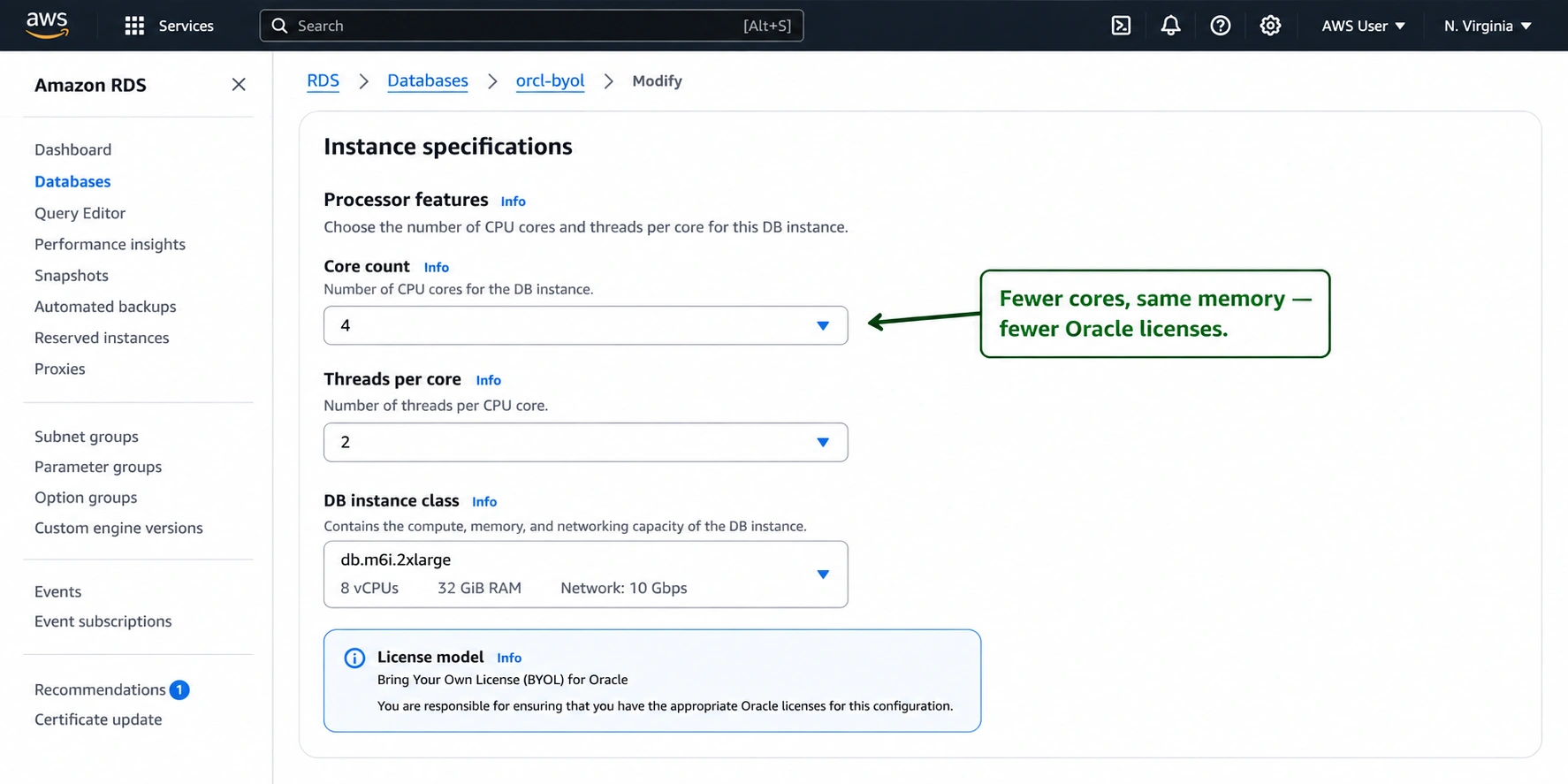
This is a 2026 optimization angle that almost no Oracle BYOL guide addresses. The Optimize CPU feature on M7i and R7i instance classes lets you reduce the number of active vCPUs in the instance while keeping the full memory capacity. You can set vCPU count to as low as 2 on many instance sizes.
For Oracle licensing: a db.r7i.2xlarge has 8 vCPUs and 64 GB RAM — 4 Oracle processor licenses required. Using Optimize CPU to reduce to 4 vCPUs at the same 64 GB RAM: 2 Oracle processor licenses required. You halved the Oracle license count while keeping the memory the Oracle database processes against. Source: CloudBurn (April 2026).
Optimize CPU on RDS Oracle is available through the AWS console when creating or modifying an instance. Navigate to Additional configuration > Enable CPU optimization. Set the desired vCPU count. The instance still runs at the full instance size’s memory capacity. Verify that your Oracle workload’s CPU utilization at the reduced vCPU count stays below 80% P95 before committing. Source: AWS RDS documentation.
Bare Metal Instances: 25% Cheaper Compute and Potential License Reduction
In September 2025, AWS launched bare metal instances for RDS Oracle (Enterprise Edition BYOL). In January 2026, bare metal support was extended to Standard Edition 2 BYOL. Bare metal instances cost 25% less than equivalent virtualized instances. Source: AWS official announcements September 2025 and January 2026.
Bare metal instances provide full visibility into the physical CPU core count and socket count of the underlying server. This matters for Oracle licensing in two ways: first, the 25% compute cost reduction directly reduces the AWS infrastructure component of your BYOL total cost. Second, on bare metal Oracle may allow licensing based on physical cores and socket count rather than vCPU count, potentially reducing license requirements for EE workloads. Source: AWS January 2026 announcement: ‘You may be able to reduce your commercial database license and support costs by using bare metal instances since they provide full visibility into the number of CPU cores and sockets.’
Important caveat: the licensing treatment of bare metal instances under Oracle’s agreements requires legal review. AWS states explicitly: ‘Consult your legal or licensing partner to determine if you can use bare metal instances with Oracle Standard Edition 2 and if you can reduce license and support costs.’ Do not assume bare metal automatically reduces your Oracle license count without verifying with your Oracle account team or an Oracle licensing specialist.

Step 5: Buy Reserved Instances — BYOL Has Size Flexibility, LI Does Not
This difference between BYOL and License Included is critical for RI purchasing strategy and almost no Oracle guide covers it explicitly.
Oracle BYOL (both SE2 and EE): Reserved Instances are size-flexible. A db.r6i.xlarge BYOL RI can cover 2x db.r6i.large BYOL instances or 0.5x db.r6i.2xlarge via normalization units — the same system as MySQL, PostgreSQL, and MariaDB. Source: CloudBurn (April 2026): ‘Size-flexible RIs are available for MySQL, PostgreSQL, MariaDB, Oracle BYOL, Db2, and Aurora.’
Oracle License Included (SE2): Reserved Instances are NOT size-flexible. An LI RI is locked to the exact instance size purchased. If you resize the instance, the RI no longer applies. This is the same constraint as SQL Server LI and Oracle LI — the license is bundled into a specific instance configuration and cannot transfer.
RI Strategy for Oracle BYOL
Follow the same Single-AZ smallest-size strategy as MySQL and PostgreSQL BYOL: purchase Single-AZ RIs at the smallest size in the target family. A db.r6i.large Single-AZ BYOL RI covers a db.r6i.large Single-AZ instance, or 50% of a db.r6i.large Multi-AZ instance (two Single-AZ RIs = full Multi-AZ coverage), or proportionally smaller fractions of larger instances via normalization units.
This size flexibility is particularly valuable for Oracle deployments where the right-sizing process often involves several instance changes during the first year of cloud operation. Purchasing a db.r6i.xlarge BYOL RI and later discovering the database runs adequately on a db.r6i.large does not strand the RI — the xlarge RI simply covers two large instances.
RDS Oracle BYOL RI discount: consistent with other engines at similar terms. 1-year No Upfront: approximately 33% off on-demand. 3-year All Upfront: approximately 58-65%. Verify exact rates at aws.amazon.com/rds/oracle/pricing — rates change.
Step 6: Monitor Compliance and Oracle Support Entitlements
BYOL shifts Oracle license compliance responsibility entirely to you. Unlike LI where AWS manages the license terms, BYOL means you are running Oracle software under your own agreement with Oracle, on AWS infrastructure. The following compliance disciplines are non-negotiable.
Maintain Active SULS on All BYOL Licenses
SULS (Software Update License and Support) is Oracle’s annual support contract. You must maintain active SULS on every Oracle Database license used in your AWS BYOL deployment. Lapsing SULS does not immediately invalidate the software from running, but it makes the deployment non-compliant and creates back-payment exposure when you need to renew. Oracle audits target BYOL cloud deployments specifically because the combination of cloud elasticity and license counting is a known audit trigger.
Track your SULS renewal dates in your Oracle support portal. Align AWS RDS instance launches with available licensed seats. Do not assume that licenses freed up by an on-premises decommission are automatically available for cloud use without verifying the license agreement transfer terms.
Account for Automatic Scaling Events
RDS Auto Scaling for Oracle storage is enabled by default on most configurations. Storage scaling does not affect Oracle license count. However, if your organization uses RDS Multi-AZ or launches read replicas, each instance consumes Oracle licenses if you intend to use Oracle software on those instances. Replicas used for Oracle workloads require licenses. Passive Multi-AZ standbys: consult your Oracle licensing agreement.
Oracle Audit Preparation
Oracle audits of AWS deployments look at vCPU counts across all running instances on the AWS account. Maintain a license position document that maps each running RDS Oracle instance to its license entitlements: instance ID, vCPU count, Oracle license required (vCPU count / 2), and the perpetual license serial numbers assigned. Update this document whenever instances are launched, modified, or terminated.
SE2 limitation: Oracle Standard Edition 2 has a hard cap of 16 vCPUs total across all instances in a database cluster. You may not use Oracle SE2 on any server that has more than 16 vCPUs enabled, regardless of whether all vCPUs are assigned to the database. On a bare metal instance with 24 physical cores, SE2 is only licensable if you are using no more than 8 processor licenses (16 vCPUs). Source: CloudBurn (April 2026) and Redress Compliance (April 2026).
The 2026 Development That Changes the BYOL Cost Math: Bare Metal Instances
Most Oracle BYOL guides written before 2026 are missing the most significant RDS Oracle development in years. Bare metal instances for RDS Oracle launched September 2025 and changed the BYOL economics in two ways.
The 25% compute discount is straightforward: bare metal RDS Oracle instances cost 25% less than equivalent virtualized instances. For an Oracle EE deployment running on db.r7i.8xlarge at approximately $4.60/hr, the equivalent bare metal (db.r7i.metal-24xl, which consolidates multiple virtualized workloads) reduces the compute component significantly. Verify current bare metal pricing at aws.amazon.com/rds/oracle/pricing — rates change.
The license consolidation angle is more complex but potentially more valuable. Bare metal instances expose the physical core count to Oracle’s license auditing. Most bare metal instances in the AWS RDS Oracle catalog have 2 CPU sockets. Some (db.m7i.metal-24xl and db.r7i.metal-24xl) have a single socket. Oracle’s SE2 license is socket-limited for some license configurations. Consult an Oracle licensing specialist before assuming any specific license reduction is permissible — this is an area where individual contract terms vary and incorrect assumptions create audit exposure.
The bare metal support was extended to SE2 BYOL in January 2026 specifically to enable the consolidation scenario: multiple SE2 databases can run as pluggable databases on a single bare metal instance, consolidating Oracle license requirements while maintaining RDS managed service benefits.
Also read: How to Save on RDS Reserved Instances: the complete 6-step processÂ
When License Included SE2 Is the Right Choice
BYOL is not always the correct answer. For some Oracle deployments, License Included SE2 is simpler and potentially less expensive when the full license ecosystem is considered.
New Oracle workloads with no existing licenses: if your organization has no perpetual Oracle licenses and is evaluating Oracle on AWS for the first time, purchasing Oracle licenses to run under BYOL costs significantly more than LI SE2 at launch. LI amortizes the license cost into the hourly rate — you do not need an Oracle procurement relationship, a CSI, or SULS management. If SE2 features are sufficient for the workload, LI SE2 is the lower-friction path.
Small deployments where SULS management overhead exceeds savings: for a single db.r6i.large Oracle database, the LI premium is approximately $328/month ($3,936/year). The engineering time required to set up BYOL compliance documentation, manage Oracle support relationships, and prepare for audits may cost more than $3,936/year for small teams. Evaluate the full overhead cost of BYOL, not just the hourly rate difference.
Workloads requiring Oracle’s managed service experience without Oracle support obligations: LI instances use AWS Premium Support for Oracle queries. If your team prefers a single support vendor relationship and does not use My Oracle Support for other purposes, LI simplifies the support model.
SaaS and hosted service restriction: if your workload does NOT host Oracle databases for external third parties, LI is permitted. If any portion of your Oracle deployment serves external customers as a hosted service, LI is explicitly prohibited under AWS Service Terms 10.3.1 and BYOL is required regardless of cost.
How Usage.ai Handles Oracle BYOL Reserved Instance Optimization
Oracle BYOL RI management on AWS is more complex than open-source engine RI management for three reasons: the license cost is external to the AWS bill (making true cost-per-query analysis harder), size flexibility is available for BYOL but not LI (creating an asymmetric strategy depending on which model a team uses), and bare metal and Optimize CPU configurations require separate analysis from standard virtualized instances.
Usage.ai analyzes Oracle BYOL RDS instances separately from LI instances. For BYOL instances, the platform identifies size flexibility opportunities: teams that purchased exact-size BYOL RIs may not realize they can use a single larger RI to cover multiple smaller instances via normalization. For LI instances, the platform flags over-provisioned instances as right-sizing candidates before RI purchase — since LI RIs are not size-flexible, a wrong-sized LI RI generates waste for the full term with no normalization rescue.
For organizations evaluating the LI-to-BYOL transition, Usage.ai surfaces the compute cost delta between current LI instances and equivalent BYOL instances on the same hardware, allowing direct comparison of the AWS infrastructure saving against the organization’s existing Oracle SULS obligations. The analysis is based on actual running instances, not hypothetical configurations.
If any Oracle BYOL RI becomes underutilized — because an instance is resized, decommissioned, or migrated to a different engine — Usage.ai provides cashback on the unused commitment in real money. Fee: percentage of realized savings only. Zero savings means zero fee.
See how Usage.ai handles Oracle BYOL and LI RI optimization

Frequently Asked Questions
1. What is RDS Oracle BYOL?
BYOL (Bring Your Own License) for Amazon RDS Oracle allows you to apply your existing perpetual Oracle Database licenses to AWS RDS instances, paying AWS only for compute, storage, and managed service costs. The Oracle license cost is outside the AWS bill and covered by your existing Oracle agreements. BYOL supports both SE2 and Enterprise Edition. Requires active SULS on the licenses used. Source: AWS RDS Oracle documentation.
2. How much cheaper is Oracle BYOL vs License Included on RDS?
A db.r6i.large License Included SE2 costs approximately $0.70/hr. The same instance BYOL costs approximately $0.25/hr. The $0.45/hr difference ($328/month) is the Oracle license premium embedded in the LI rate. On larger instances the dollar gap is proportionally larger. For EE workloads, LI is not available at all — BYOL is the only option. Verify exact rates at aws.amazon.com/rds/oracle/pricing — rates change. Source: oneuptime.com (February 2026) and Vantage.sh (May 2026).
3. How does Oracle count licenses on AWS RDS BYOL?
Oracle’s Cloud Licensing Policy applies: 2 vCPUs = 1 Oracle processor license on shared-tenancy AWS RDS instances (when hyper-threading is enabled, which is the default). A db.r6i.xlarge (4 vCPUs) requires 2 Oracle processor licenses. A db.r6i.8xlarge (32 vCPUs) requires 16 licenses. This 2:1 ratio applies to Intel, AMD, and Graviton instances alike on shared tenancy. Source: Cintra (December 2024) and Redress Compliance (April 2026).
4. Does Multi-AZ Oracle RDS require double the licenses?
The passive standby in a Multi-AZ RDS Oracle deployment does not actively run Oracle workloads and most licensing specialists treat it as license-exempt under Oracle’s BYOL policy. However, Oracle’s official position on this can vary by agreement type, and the Multi-AZ standby is still running Oracle software in standby mode. Consult your Oracle account team or licensing counsel before assuming the standby does not consume licenses. Do not deploy Multi-AZ Oracle BYOL without explicit legal review of the license position.
5. Are size-flexible Reserved Instances available for Oracle BYOL?
Yes. Oracle BYOL (both SE2 and EE) supports size-flexible RIs using the same normalization unit system as MySQL and PostgreSQL. A db.r6i.xlarge BYOL RI (8 normalization units) can cover 2x db.r6i.large (4 units each). Oracle License Included does NOT support size-flexible RIs — LI RIs are exact-size only. This is a key RI purchasing strategy difference between BYOL and LI. Source: CloudBurn (April 2026).
6. What are Oracle BYOL bare metal instances on RDS and how do they help?
AWS launched bare metal instances for RDS Oracle EE BYOL in September 2025 and extended to SE2 BYOL in January 2026. Bare metal instances cost 25% less than equivalent virtualized instances. They also provide full visibility into physical core count and socket count, which may allow Oracle license optimization based on physical rather than virtual core counting. SE2 databases can be consolidated as pluggable databases on a single bare metal instance. Consult your Oracle licensing partner before assuming any specific license reduction. Source: AWS official announcements September 2025 and January 2026.
7. Can I run Oracle Enterprise Edition on RDS BYOL?
Yes. Oracle Enterprise Edition requires BYOL — it is not available under the License Included model on RDS. With EE BYOL, you can use all EE features including Real Application Clusters (RAC is not supported on RDS but other EE options are), Advanced Security Option, Partitioning, and Diagnostics and Tuning Pack. The compute rate charged by AWS is the same for EE BYOL and SE2 BYOL on the same instance — you pay only for infrastructure, not the edition. Your Oracle EE license entitlement covers the edition premium externally.
8. Can Oracle audit me for running BYOL on AWS?
Yes. Oracle audits of AWS BYOL deployments do occur and cloud deployments are a known audit trigger. Oracle audits examine vCPU counts across all running instances. Maintain a license position document mapping each running RDS Oracle instance to its license entitlements, vCPU count, and Oracle processor licenses consumed. Update it whenever instances change. Source: Cintra (December 2024): ‘Be prepared for Oracle audits, as using Oracle on AWS RDS can be a significant audit trigger.’