.png)



After rightsizing resources, eliminating idle infrastructure, and adopting Auto Scaling, many organizations find that their largest remaining cloud cost is predictable compute usage.
That’s where AWS Savings Plans deliver the greatest value.
AWS Savings Plans reduce the cost of eligible usage by exchanging a fixed hourly spend commitment for discounted pricing over a one- or three-year term.
This guide focuses specifically on Compute Savings Plans and EC2 Instance Savings Plans, which are the two Savings Plans options relevant to AWS compute workloads.
Unlike Reserved Instances (RIs), Compute Savings Plans automatically apply to eligible Amazon EC2, AWS Fargate, and AWS Lambda usage without requiring you to commit to a specific instance family, size, operating system, or AWS Region.
As explained in the AWS Savings Plans Overview, this flexibility makes them well suited to organizations that continuously modernize their infrastructure.
The challenge isn’t deciding whether Savings Plans reduce costs, they clearly do for predictable workloads. The challenge is determining how much to commit, which Savings Plan to choose, and how to justify the investment to engineering and finance stakeholders.
The short answer
AWS automatically applies Savings Plans benefits according to its billing rules: Reserved Instance benefits are applied first, followed by EC2 Instance Savings Plans and then Compute Savings Plans.
AWS applies the highest available discount to eligible usage until your hourly commitment is exhausted. Any remaining eligible usage is billed at standard On-Demand rates.
The strongest business case comes from committing only your stable compute baseline, validating future infrastructure plans, and regularly reviewing commitment performance as workloads evolve.
Why AWS Savings Plans Make Business Sense
At that point, the remaining AWS bill is largely made up of workloads that must continue running. Web applications, container platforms, internal services, and production infrastructure often represent a stable level of compute consumption throughout the year.
For these workloads, continuing to pay On-Demand rates means paying for flexibility that the business may not actually need.
AWS Savings Plans address this by exchanging pricing flexibility for a predictable hourly spend commitment. Rather than committing to specific instances, you commit to a dollar amount per hour, allowing AWS to automatically apply discounted pricing to eligible compute usage.
Moreover, Savings Plans are billing discounts, not capacity reservations. Compute Savings Plans apply only to eligible compute usage and don’t reduce costs for Spot Instances, Amazon EBS volumes, snapshots, data transfer, Elastic Load Balancing, or other non-compute AWS charges.
Usage already covered by Reserved Instances also doesn’t receive additional Savings Plans discounts.
For organizations with stable production workloads, Savings Plans often become one of the highest-impact cost optimization opportunities after operational efficiency improvements have already been completed.
Also see: Cloud Cost Optimization by Country: Regional Pricing, and the Right Tools
AWS Savings Plans vs. Reserved Instances
AWS also offers Convertible Reserved Instances, which allow configuration exchanges over time through manual modifications.
This comparison focuses on Standard Reserved Instances, as they’re the most common alternative evaluated alongside Compute Savings Plans.
| Feature | Compute Savings Plans | EC2 Instance Savings Plans | Standard Reserved Instances |
|---|---|---|---|
| Commitment | Hourly spend ($/hour) | Hourly spend for one EC2 instance family | Specific EC2 configuration |
| Maximum discount* | Up to 66% | Up to 72% | Up to 72% |
| Covers Amazon EC2 | ✓ | ✓ | ✓ |
| Covers AWS Fargate | ✓ | ✗ | ✗ |
| Covers AWS Lambda | ✓ | ✗ | ✗ |
| Region flexibility | ✓ | ✗ | Limited |
| Instance family flexibility | ✓ | Limited to one family | Limited |
| Capacity reservation | No | No | Zonal RIs only |
For most organizations, Compute Savings Plans offer the best balance between savings and operational flexibility because the commitment follows eligible compute spend rather than individual EC2 instances.
Engineering teams can continue upgrading instance generations, adopting AWS Graviton processors, or moving workloads between Amazon EC2, AWS Fargate, and AWS Lambda without replacing commitments.
Standard Reserved Instances remain valuable for highly predictable EC2 workloads, while organizations that require guaranteed capacity should also evaluate On-Demand Capacity Reservations. Also check out Zonal Reserved Instances, since Savings Plans reduce compute costs but don’t reserve capacity.
Learn more about AWS Savings Plans vs Reserved Instances.
Calculating the ROI of
AWS Savings Plans
Unlike rightsizing or deleting idle resources, Savings Plans don’t reduce infrastructure usage, they reduce the price you pay for eligible compute that would have run anyway.
Three factors determine the financial return:
- Your predictable eligible compute usage
- The Savings Plan type and commitment term you choose
- The effective discount your workloads qualify for
| Example workload | Value |
|---|---|
| Monthly eligible On-Demand compute spend | $50,000 |
| Stable On-Demand compute baseline | $35,000 |
| Variable compute usage | $15,000 |
Instead, use AWS Cost Explorer Savings Plans Recommendations or your own rate modeling to convert your stable On-Demand baseline into an appropriate hourly Savings Plans commitment.
For example, a workload with $35,000/month in stable eligible On-Demand spend may require a Savings Plans commitment of around $24,150/month (about $33/hour), depending on the applicable Savings Plans rates.
Don’t calculate the commitment by simply applying the expected discount to your historical bill. Use AWS recommendations or modeled rate data to determine the appropriate commitment.
Before purchasing a Savings Plan, AWS recommends reviewing historical usage and validating recommendations using AWS Cost Explorer Savings Plans Recommendations.
These recommendations use historical usage over configurable 7-, 30-, or 60-day lookback periods and should be reviewed alongside planned infrastructure changes before making a long-term commitment.
AWS Savings Plan Commitment Framework
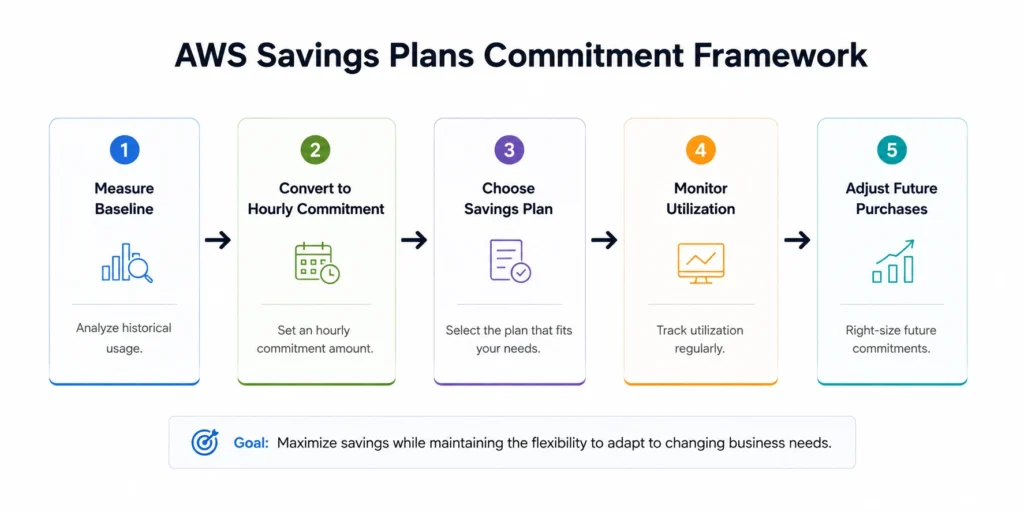
A practical framework consists of four steps.
1. Measure your stable compute baseline
Because Savings Plans are purchased as an hourly dollar commitment, identify the portion of compute usage that remains consistently active rather than relying on monthly averages.
2. Convert baseline usage into a Savings Plans commitment
Rather than committing your historical On-Demand spend, use AWS Cost Explorer Savings Plans Recommendations or modeled Savings Plans rates to estimate the hourly commitment required to cover your predictable workload. Many organizations also leave a small buffer below their theoretical maximum commitment to reduce the risk of underutilization if demand decreases unexpectedly.
3. Choose the appropriate Savings Plan
| Savings Plan | Best suited for |
|---|---|
| Compute Savings Plans | Mixed Amazon EC2, AWS Fargate, and AWS Lambda environments that evolve over time |
| EC2 Instance Savings Plans | Stable EC2 workloads expected to remain within the same instance family and Region |
- 1-year or 3-year commitment terms
- No Upfront, Partial Upfront, or All Upfront payment options
Once purchased, a Savings Plan can’t be modified or cancelled before it expires, making accurate commitment sizing more important than selecting the payment option.
Also read: EC2 Savings Plans: 1-Year vs 3-Year Commitment ROI Analysis
4. Monitor and refine your commitments
As workloads evolve, regularly review:
- Savings Plan utilization
- Savings Plan coverage
- Remaining eligible On-Demand spend
- Updated AWS recommendations
High-performing FinOps teams use these metrics to determine whether commitments should be expanded, maintained, or allowed to expire as workloads evolve.
Common Mistakes to Avoid
| Mistake | Better approach |
|---|---|
| Using historical On-Demand spend as the Savings Plans commitment | Convert the stable baseline into a Savings Plans-rate hourly commitment using AWS recommendations or modeled rates. |
| Committing based on total AWS spend | Commit only predictable eligible compute usage. |
| Relying only on historical recommendations | Validate recommendations against future infrastructure plans. |
| Treating Savings Plans as a one-time purchase | Review utilization, coverage, and existing RI commitments regularly. |
Migrating from Reserved Instances
to Savings Plans
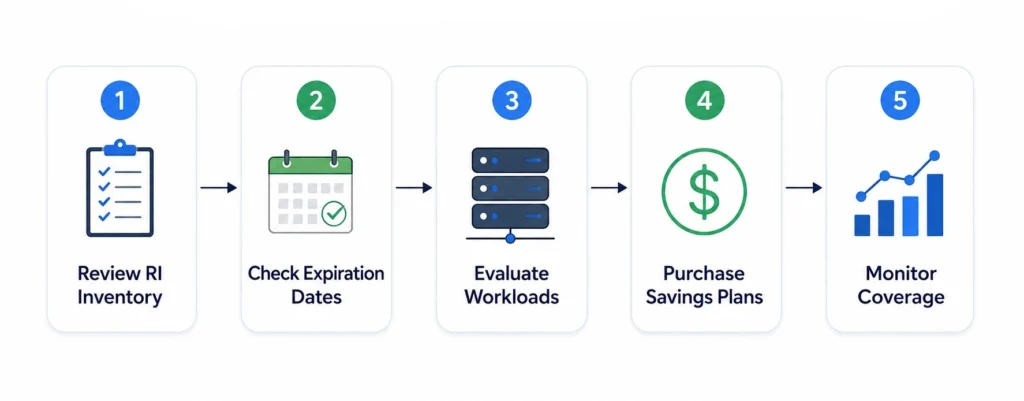
For dynamic cloud environments, Compute Savings Plans often provide greater operational flexibility while maintaining significant savings.
However, migration decisions shouldn’t be based solely on expiring RIs, but they should begin with an inventory of your existing commitments.
Before purchasing additional Savings Plans, review:
- Active Reserved Instances and their expiration dates
- Whether they’re Regional, Zonal, or Convertible RIs
- Discount-sharing settings across AWS accounts
- Current Savings Plans coverage and utilization
- Remaining eligible On-Demand compute spend
AWS also applies commitment benefits in a defined order. Reserved Instance benefits are applied first, followed by EC2 Instance Savings Plans and then Compute Savings Plans. Existing commitments should therefore be considered before accepting new Savings Plans recommendations to avoid unnecessary overlap.
A practical migration strategy is straightforward:
- Evaluate workload stability. Identify which applications are expected to remain relatively unchanged and which are likely to migrate to newer EC2 generations, AWS Graviton processors, AWS Fargate, or AWS Lambda.
- Replace commitments gradually. Rather than replacing an entire RI portfolio at once, many organizations transition incrementally as Reserved Instances expire. This allows teams to validate utilization before expanding commitments.
- Review coverage after migration. Continue monitoring utilization, coverage, and remaining On-Demand spend to ensure commitments remain aligned with evolving workloads.
When Reserved Instances Still Make Sense
Highly predictable EC2 workloads
Convertible Reserved Instances allow exchanges across eligible instance attributes over time, providing more flexibility than Standard Reserved Instances, although they require ongoing management.
Capacity assurance
Organizations that require guaranteed capacity in a specific Availability Zone should evaluate On-Demand Capacity Reservations or Zonal Reserved Instances, depending on whether they require flexible capacity management or a fixed-term commitment with an associated pricing benefit.
Building the Business Case for Leadership
- How much can we realistically save?
- What level of compute should we commit?
- What are the financial risks?
- How will those risks be managed?
| Metric | Example |
|---|---|
| Monthly eligible On-Demand compute spend | $60,000 |
| Stable compute baseline | $42,000 |
| Recommended Savings Plans commitment | Based on AWS Cost Explorer recommendations and modeled Savings Plans rates |
| Estimated annual savings* | ≈ $156,000 |
The discussion should focus on annual cost reduction rather than discount percentages alone. Savings Plans don’t require application changes and allow infrastructure to continue evolving, but they also represent a long-term financial commitment.
The primary risk is underutilization. If eligible compute usage permanently falls below the committed hourly spend, part of the commitment may remain unused until the plan expires.
Organizations can reduce this risk by:
- Purchasing against a stable compute baseline rather than peak demand.
- Reviewing engineering roadmaps before committing.
- Using AWS Cost Explorer recommendations as a starting point rather than a final purchasing decision.
- Expanding commitments only after observing consistent utilization.
How Usage.ai Helps Optimize
AWS Savings Plans
Instead of relying on manual forecasting and one-time commitment decisions, Usage.ai continuously optimizes commitments based on changing usage patterns.
Flex Insured Commitments provide cashback protection, helping teams secure the ~57% savings of a 3 year commitment with none of the commitment.
The result is a managed Savings Plans strategy that combines AWS commitment discounts with automation, flexibility, and protection as cloud environments evolve.
Automate Savings Plans commitments with Usage.ai and get cashback protection if your usage changes
Frequently asked questions
What is the business case for AWS Savings Plans?
AWS Savings Plans reduce the cost of predictable eligible compute usage by exchanging a fixed hourly spend commitment for discounted pricing.
For organizations with stable Amazon EC2, AWS Fargate, or AWS Lambda workloads, they can significantly reduce compute costs without requiring infrastructure changes. The strongest business case comes from accurately sizing the commitment and maintaining high utilization over time.
How are Savings Plans different from Reserved Instances?
Compute Savings Plans automatically apply discounted pricing across eligible Amazon EC2, AWS Fargate, and AWS Lambda usage regardless of instance family, size, operating system, or AWS Region.
Reserved Instances apply only to Amazon EC2 and remain appropriate for certain highly predictable workloads or capacity reservation scenarios. Organizations with existing Reserved Instance portfolios should also consider how RI benefits interact with Savings Plans before purchasing additional commitments.
How do I determine the right Savings Plan commitment?
Start by identifying your stable eligible compute usage using historical billing data. Then use AWS Cost Explorer Savings Plans Recommendations or modeled Savings Plans rates to translate that baseline into an appropriate hourly Savings Plans commitment.
Historical recommendations should also be validated against planned infrastructure changes before purchase.
Can I change or cancel a Savings Plan after purchase?
No. Savings Plans are purchased for a fixed one-year or three-year term, and the commitment can't be cancelled or modified before it expires. Selecting the right commitment size is therefore more important than maximizing the initial discount.
What happens if my compute usage decreases?
If eligible compute usage falls below your committed hourly spend, AWS continues charging the committed amount until the Savings Plan expires. Purchasing conservatively, reviewing utilization regularly, and accounting for planned infrastructure changes can help reduce the risk of underutilized commitments.