 AWS
 Microsoft Azure
 Google Cloud

The proposed reservation offers a lower capacity rate than pay-as-you-go, and Engineering expects storage demand to remain stable.
But one question remains unanswered:
Will this purchase deliver additional savings, or are existing Blob reservations already covering some of the same storage?
Azure Blob Storage and Data Lake Storage Gen2 can use the same qualifying storage reservation benefits. Buying commitments separately without checking shared coverage can create unnecessary costs.
Before approving another one- or three-year reservation, Finance needs evidence that the additional purchase will save money after existing coverage and future demand are considered.
Short answer
Approve additional ADLS Gen2 reserved capacity only when eligible storage remains uncovered after existing reservations and the expected pay-as-you-go charges avoided exceed the cost of the new commitment.If a scope adjustment can improve existing coverage, or the additional purchase does not meet your financial approval criteria, reduce the proposed purchase or defer it.
What must match before buying another ADLS Gen2 reservation?
Microsoft confirms that Azure Storage reserved capacity can cover qualifying Blob and ADLS Gen2 data.An existing Blob reservation can therefore discount ADLS Gen2 storage without requiring a separate purchase, provided the storage matches the reservation configuration.
| Requirement | What Finance must verify |
|---|---|
| Region | Eligible storage matches the purchased Azure Region |
| Access tier | Hot, Cool, and Archive use separate matching reservation tiers |
| Redundancy | Storage matches the purchased redundancy option |
| Scope | The eligible subscription or resource group falls within the reservation's permitted billing scope |
Treat each region, access tier, and redundancy combination as a separate purchasing pool, then apply the relevant scope.
Microsoft lists Hot, Cool, and Archive as eligible reservation tiers. Cold is a supported Azure storage tier but is not listed among the available Blob reserved-capacity purchase options.
Premium storage accounts, Premium SSD and Premium SSD v2 managed disks, page blobs, Queue Storage, and Table Storage are outside this reservation product. P30–P80 disk counts belong to a different reservation mechanism.
Operations, bandwidth, data transfers, and early-deletion charges also remain outside the capacity discount.
The Azure Blob Storage reserved capacity buying checklist provides additional information on qualifying storage and purchasing requirements.
Purchase example: Does 145 TiB of uncovered storage justify another reservation?
Microsoft sells eligible Azure Storage reserved capacity in 100 TiB and 1 PiB blocks, with one- or three-year terms.Consider an enterprise operating Blob and ADLS Gen2 workloads in East US.
Its Finance team receives the following capacity report:
| Storage pool | Blob | ADLS Gen2 | Existing coverage | Uncovered |
|---|---|---|---|---|
| East US, Hot, LRS | 80 TiB | 70 TiB | 100 TiB | 50 TiB |
| East US, Cool, LRS | 25 TiB | 70 TiB | 0 TiB | 95 TiB |
| Total | 105 TiB | 140 TiB | 100 TiB | 145 TiB |
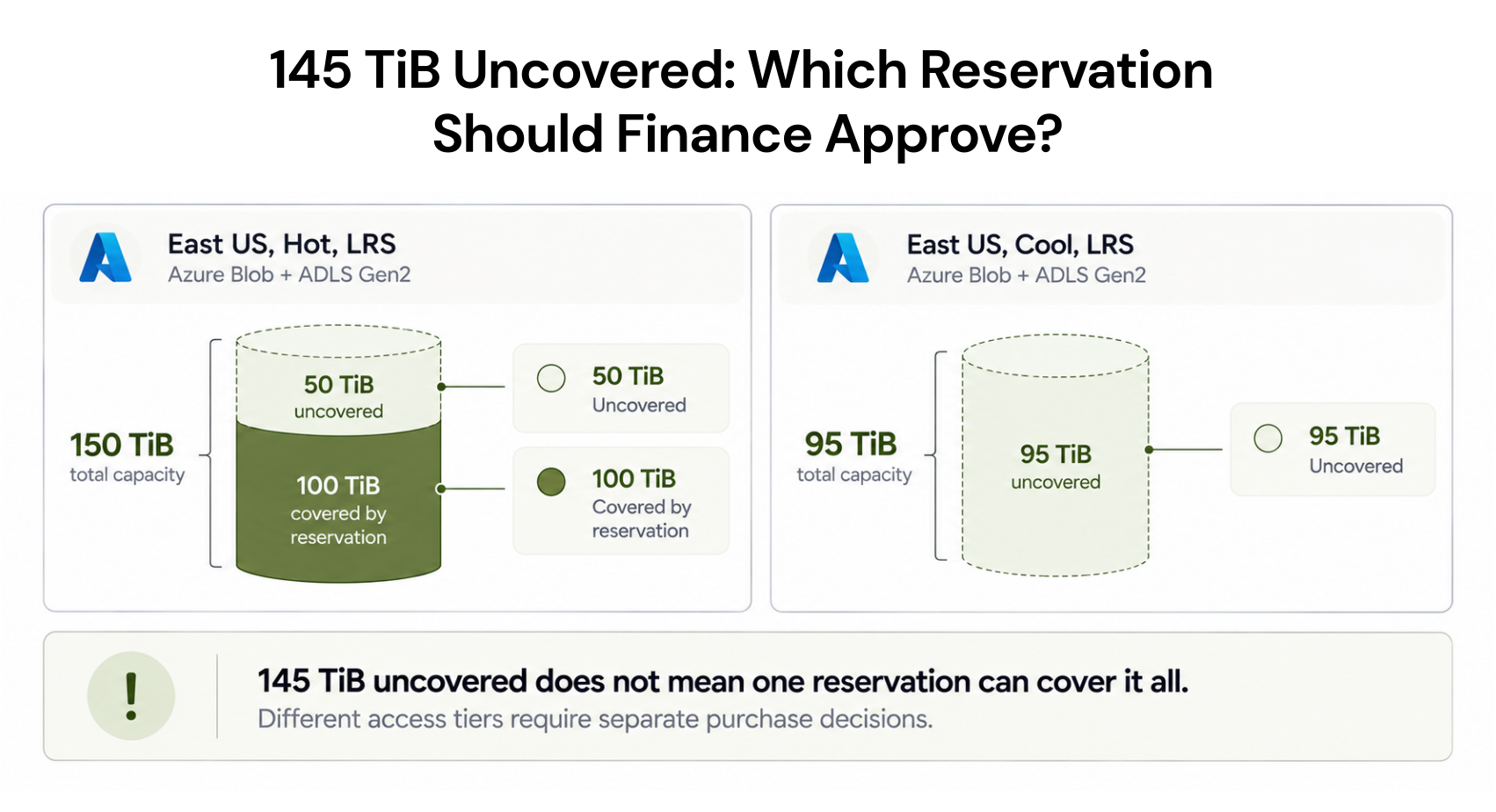
The Hot and Cool configurations require separate reservations.
The available purchase decisions are:
Hot reservation: Another 100 TiB block would have 50 TiB of matching usage at the illustrated level.
Cool reservation: A 100 TiB block could have 95 TiB of matching usage.
Keep pay-as-you-go: Either pool can remain uncovered if another reservation would not produce sufficient savings.
The approval must be based on incremental savings, not which storage pool has the most uncovered capacity.
What evidence must Finance receive before approval?
A reservation purchase should not be approved from a recommendation screenshot alone.Require a purchase record containing these five items.
| Evidence | Required result |
|---|---|
| Existing commitments | Reservation IDs, quantities, configurations, scopes, and remaining terms |
| Eligible uncovered demand | Blob and ADLS capacity not already covered, separated by matching pool |
| Future capacity forecast | Engineering-confirmed usage after expected migrations and storage changes |
| Financial comparison | Additional reservation cost versus pay-as-you-go charges avoided |
| Purchase authorization | Approved quantity, term, billing scope, and monitoring owner |
Validate the numbers in Azure Portal
First, open Reservations in the Azure Portal and review existing storage reservations, utilization, and expiration dates.Then open Cost Management and examine the relevant billing records.
For supported billing arrangements, use:
Actual Cost to reconcile reservation purchases and invoice charges.
Amortized Cost to distribute reservation costs over their benefit periods.
UnusedReservation records in applicable amortized usage exports to identify unused value.
Reservation IDs to connect purchases with benefit usage.
Before recommending another purchase, also ask whether an existing reservation can be moved to an eligible broader scope.
A scope change may allow additional qualifying storage to consume unused benefits. It cannot make capacity from another region, tier, or redundancy configuration eligible.
Finally, review the proposed purchase in Azure Portal under Azure Blob Storage, which is the purchasing category for qualifying Blob and ADLS Gen2 reserved capacity.
Confirm the displayed price before authorizing the transaction.
How much additional capacity is financially worth reserving?
The minimum reservation block is 100 TiB, but that does not mean every 100 TiB of uncovered capacity deserves a commitment.Finance should calculate the incremental savings for each matching pool.
Step 1: Calculate uncovered eligible capacity.
For each hour:
Step 2: Calculate the pay-as-you-go charges avoided.
For each hour, determine the eligible residual storage capacity that the proposed reservation would cover, capped at the purchased quantity. Apply the equivalent pay-as-you-go capacity rate using consistent units, then sum the avoided charges across the reservation term.
Step 3: Compare the full purchase cost.
Microsoft confirms that unused storage reservation benefits cannot be carried forward to future hours.
Finance should therefore calculate expected savings and repeat the calculation using a realistic lower-demand forecast.
Existing reservation discounts must remain in the baseline. The same principle is covered in incremental Azure savings measurement, where benefits already captured are separated from additional savings.
When should Finance approve, reduce, or reject the purchase?
After checking eligibility, usage, and pricing, Finance should make a documented decision.| Decision | Approval condition |
|---|---|
| Approve | Positive incremental savings meet the organization's required financial threshold |
| Reduce | Fewer whole reservation blocks provide a stronger financial outcome |
| Choose one year | One-year savings justify the commitment, but three-year demand is uncertain |
| Use existing coverage | A permitted scope adjustment can absorb additional eligible usage |
| Defer or reject | Expected savings are insufficient or the downside risk is unacceptable |
Examples include planned dataset deletions, lifecycle transitions between access tiers, application retirement, region migrations, and redundancy changes.
An existing reservation may continue to cover other matching storage within scope. But if qualifying usage declines without replacement demand, unused hourly reservation benefits are lost.
What if the forecast turns out to be wrong?
Microsoft permits eligible reservation exchanges and refunds subject to applicable conditions.According to Microsoft’s reservation exchange and refund policy, last updated July 29, 2026, eligible reservation refunds are subject to a USD 50,000 canceled-commitment limit within a rolling 12-month period.
The limit applies at the relevant billing scope, such as an Enterprise Agreement enrollment or Microsoft Customer Agreement billing profile. For CSP customers, Microsoft specifies a per-customer limit, with refund requests handled through the partner.
Microsoft is not currently charging early-termination fees for reservation refunds, but it may introduce them in the future.
Before purchasing, confirm the applicable cancellation eligibility, remaining refund allowance, exchange restrictions, and fees with your Azure billing administrator or Microsoft partner. The process and refund treatment depend on the purchasing arrangement.
A potential refund does not replace a financially justified purchase.
The final sign-off: What should be approved?
Before Procurement completes the transaction, the purchase authorization should contain the exact region, access tier, redundancy, scope, reservation quantity, and term.It should also document the existing reservation benefits considered, expected incremental savings, lower-demand financial outcome, approved cost, and responsible owner.
The final decision should answer one question:
How Usage.ai Helps Optimize Azure Commitments
Usage.ai helps FinOps, Finance, and cloud engineering teams identify savings opportunities and optimize supported Azure commitments using actual billing and usage data.With a read-only Savings Test, teams can evaluate potential savings before granting purchasing permissions. For eligible services, Usage.ai supports automated commitment management and ongoing savings optimization.
For ADLS Gen2 reserved capacity, teams should first verify existing Blob reservation coverage and confirm whether the purchase is supported by Usage.ai. Unsupported storage reservations require direct evaluation and approval through Azure.
This helps businesses make informed commitment decisions while avoiding unnecessary purchases and financial exposure.
Final verdict: Approve the savings, not overlapping capacity
An additional ADLS Gen2 reservation is worth purchasing only when existing Blob and ADLS coverage, stable demand, and applicable Azure prices support the financial case.Avoid approving capacity twice in separate team forecasts. Evaluate each qualifying storage pool independently and confirm that the proposed reservation saves more than it costs.
Approve when the incremental savings justify the commitment. Otherwise, use existing coverage more effectively or defer the purchase.
Review supported savings opportunities, financial exposure, and commitment-management options with our team.
Frequently asked questions
Can an existing Blob Storage reservation cover ADLS Gen2?
Yes. Qualifying Blob and ADLS Gen2 capacity can share reservation benefits when the region, access tier, redundancy, and scope match.
Can Hot, Cool, and Archive storage share one reservation?
No. Each supported access tier requires a separately matching reservation configuration.
Can Blob and ADLS Gen2 share reservations across subscriptions?
Yes, when the relevant subscriptions are included in an eligible shared or management-group scope and applicable billing context.
Can buying a 100 TiB reservation make sense with less than 100 TiB uncovered?
Yes. A partially utilized reservation may still save money when avoided pay-as-you-go charges exceed the full reservation cost.
What happens if ADLS Gen2 storage usage drops after purchasing a reservation?
The reservation can continue discounting other eligible Blob or ADLS Gen2 capacity within its scope. Any unmatched hourly benefit is lost, so future demand should be evaluated before committing.