AWS
AWS Microsoft Azure
 Google Cloud

This is a FinOps-focused selection of Azure April 2026 updates. The goal is to separate changes that can affect your bill today from those that require migration planning, cost modeling, or further evaluation
AI: New model options increase the need for cost governance
Microsoft continued expanding AI model availability through Microsoft Foundry and Azure’s AI services in April.The important FinOps implication is not simply that newer models are available. It is that teams now have more model choices, making workload-level model selection increasingly important.
Microsoft’s current Azure AI Foundry model catalog provides the authoritative source for available models, providers, deployment options, regions, and current availability.
For teams evaluating models such as GPT-series and Claude models, availability and deployment status should be checked in the catalog before production rollout because model availability can differ by region and deployment method.
What FinOps teams should do
Before moving an existing workload to a newer or more capable model:- Define the quality requirement for the workload.
- Benchmark representative prompts rather than relying only on published benchmarks.
- Compare latency and token consumption.
- Check regional availability and quotas.
- Calculate the cost using representative production traffic.
Storage: the 128 KiB billing change needs careful timing
Microsoft announced a 128 KiB minimum billable object size for objects stored in the Cool, Cold, and Archive tiers.The relevant Azure Blob Storage access-tier documentation explains the billing model and the minimum billable object-size change. The timing and applicability should be checked against Microsoft’s current documentation before making storage-budget decisions.
For April readers, the appropriate FinOps action was to understand exposure and monitor the rollout, particularly for workloads containing very large numbers of small objects.
What to audit
Teams with substantial Cool, Cold, or Archive usage should examine:Object counts by access tier
Object-size distribution
Storage-account configuration
Lifecycle policies
The proportion of objects below 128 KiB
Whether aggregation or different lifecycle policies would improve economics
Premium SSD v2: more granular performance provisioning
Premium SSD v2 became generally available for supported Azure database workloads, including Azure Database for PostgreSQL Flexible Server.Microsoft’s April 2026 PostgreSQL release notes identify Premium SSD v2 availability, while the Premium SSD v2 documentation explains its performance and configuration model.
The major FinOps change is the ability to provision storage capacity, IOPS, and throughput with greater independence than traditional Premium SSD configurations.
That can create a right-sizing opportunity when a workload previously required additional capacity primarily to obtain the required performance.
However, Premium SSD v2 is not automatically a cheaper migration target. Teams need to validate region availability, supported PostgreSQL versions and compute configurations, backup requirements, high availability, and other service limitations before changing storage.
Microsoft’s storage-performance guidance provides additional information on how storage performance is configured and scaled.
What to do next
Compare the current storage configuration with an equivalent Premium SSD v2 configuration using the same:- Required capacity
- IOPS
- Throughput
- Compute configuration
- Availability requirements
- Backup requirements
Related read: AWS in April 2026 Updates
AKS: Ubuntu 22.04 requires migration planning
AKS teams using Ubuntu 22.04 node images should treat the lifecycle change as a migration-planning item rather than an April 2026 shutdown.Microsoft’s AKS operating-system version guidance documents the supported Ubuntu versions and migration timelines.
Teams should inventory node pools, identify the operating-system image in use, test Ubuntu 24.04 against production workloads, and schedule migration before the applicable support deadline.
Here is a recommended migration sequence
- Identify AKS node pools using Ubuntu 22.04.
- Test workloads on the supported replacement image.
- Validate application compatibility, agents, DaemonSets, and networking.
- Upgrade non-production environments first.
- Schedule production migration with an appropriate rollback plan.
Azure Functions: plan the move from v3 Linux Consumption
Azure Functions v3 on Linux Consumption was another lifecycle item requiring forward planning.Microsoft’s Azure Functions version guidance documents supported runtime versions and migration requirements.
For teams still running affected applications, the April planning priority was to inventory v3 applications, test them on the supported runtime, identify dependency issues, and schedule production migration before the applicable retirement deadline.
The migration should be treated primarily as a continuity and supportability exercise, rather than as a FinOps optimization.
SQL Server: distinguish licensing from lifecycle decisions
SQL Server licensing and lifecycle planning require separate decisions.Microsoft’s SQL Server Extended Security Updates guidance for Azure VMs explains how ESUs apply to supported SQL Server versions running on Azure VMs.
For SQL Server 2016 workloads approaching end of support, teams should determine whether the appropriate response is:
- Upgrade to a supported SQL Server version
- Migrate to an appropriate Azure database service
- Continue temporarily with an eligible ESU arrangement
Licensing: review Azure Hybrid Benefit eligibility
Azure Hybrid Benefit can reduce the effective cost of eligible Windows Server and SQL Server workloads when customers have qualifying licenses.Microsoft’s Azure Hybrid Benefit documentation should be used to validate current eligibility, licensing requirements, and applicable workloads.
For FinOps teams, the important point is that licensing optimization and infrastructure commitment optimization are separate decisions. A team can evaluate:
- Whether the workload qualifies for Azure Hybrid Benefit.
- Whether the underlying VM or database workload is stable enough for a commitment.
- Which commitment mechanism is appropriate.
- Whether the combined configuration produces a better effective cost.
What should Azure teams do with the April updates?
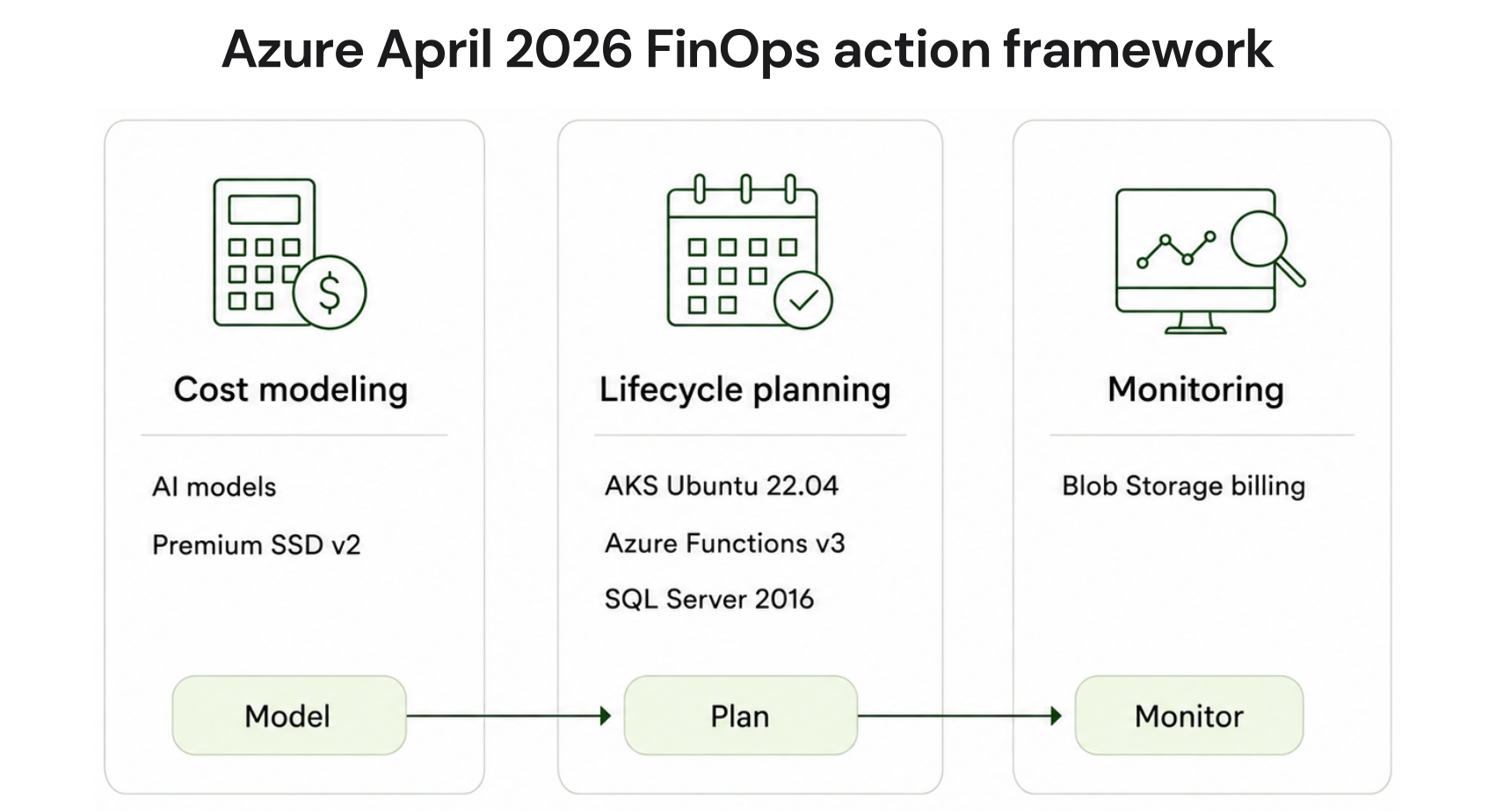
A practical April review can be organized into three buckets:| Category | April focus | Recommended action |
|---|---|---|
| Cost modeling | Premium SSD v2, AI model selection | Compare current and proposed configurations |
| Lifecycle planning | AKS Ubuntu, Functions v3, SQL Server | Inventory affected workloads and create migration plans |
| Monitoring | Blob Storage billing change | Identify potentially affected small-object workloads and follow Microsoft's rollout guidance |
Where Usage.ai Can Help With Azure Commitments
Cloud optimization starts with understanding the workload before choosing a commitment.Usage.ai analyzes your Azure usage, recommends eligible commitment opportunities, and once you approve a recommendation, automates the purchase through the Azure API.
Microsoft offers up to 35% savings through Azure Savings Plans for databases. With Flex Insured Commitments, Usage.ai layers on automated management and monitoring of that commitment. It also offers cashback protection for losses associated with the commitment if it becomes underutilized or otherwise costs more than the equivalent pay-as-you-go usage.
This gives teams a combination of Microsoft’s commitment savings, automated management, and Usage.ai’s protection, while keeping the commitment strategy aligned with how their Azure workloads evolve.
Automate Azure Reservations and Savings Plans with Usage.ai and get cashback protection — without the risk of long-term commitments.
Frequently asked questions
What were the most important Azure updates in April 2026?
The most relevant changes for FinOps and engineering teams included new AI model availability, Premium SSD v2 for supported database workloads, Blob Storage billing changes requiring monitoring, and upcoming AKS, Azure Functions, and SQL Server lifecycle milestones.
Did the Blob Storage 128 KiB rule increase costs in April 2026?
It should not be presented as an active April 2026 billing increase. The timing and account applicability of the minimum billable object-size change should be checked against Microsoft's current Blob Storage access-tier documentation.
Is Premium SSD v2 automatically cheaper than Premium SSD?
No. Premium SSD v2 provides more granular performance provisioning, which can create cost-efficiency opportunities for some workloads. Actual savings depend on capacity, IOPS, throughput, compute configuration, region, and service limitations.
Should every Azure workload move to a newer AI model?
No. Model selection should be based on the quality, latency, availability, quota, and cost requirements of each workload. Benchmark representative production traffic before making a model migration decision.
What should FinOps teams prioritize after the April Azure updates?
Start with three actions: audit workloads affected by upcoming lifecycle deadlines, model storage and database configuration changes against current usage, and establish workload-level cost controls for new AI deployments.