AWS
AWS Microsoft Azure
 Google Cloud


Two line items appear on almost every AWS bill and confuse almost every engineer the first time they try to understand them. EBS snapshot costs accumulate silently in the background — every snapshot you create keeps charging until you explicitly delete it. ELB pricing looks simple (a flat hourly rate) but the capacity unit charges that sit on top of it can triple the headline cost under real traffic.
This guide covers both clearly. No padding, no unnecessary tables — just the numbers that matter and the decisions that reduce the bill.
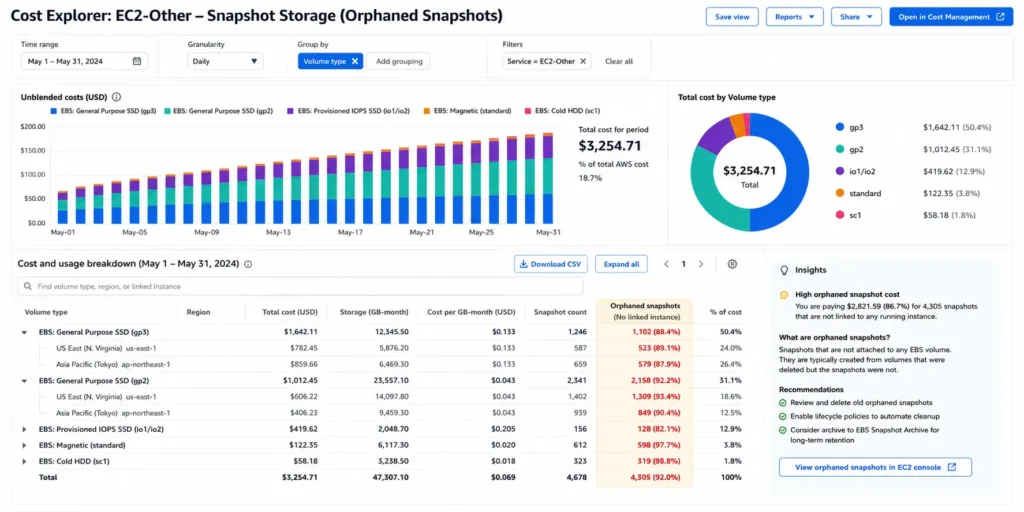
EBS Snapshot Cost: How It Actually Works
An EBS snapshot is a point-in-time backup of a volume, stored in S3 behind the scenes. The first snapshot of any volume is a full copy of all used blocks. Every subsequent snapshot is incremental — only the blocks that changed since the last snapshot are stored. You are billed for the total stored data across all snapshots, not per snapshot count.
This means the cost math is not intuitive. If you have 10 snapshots and delete 9 of them, you do not save 90% of the cost. Each snapshot in the chain holds the unique blocks that were changed at that point. Deleting a snapshot merges its changed blocks into adjacent snapshots in the chain. The total stored data changes, but not proportionally to the number of snapshots deleted.
Standard Tier: $0.05/GB-month
The default storage tier for EBS snapshots. All snapshots go here unless you explicitly archive them. For a 500 GB gp3 volume with moderate change rates: your first snapshot might store 200 GB of used blocks ($10/month). After 3 months of daily incremental snapshots, the total stored data might grow to 350 GB ($17.50/month) as daily changes accumulate. The cost grows with change rate and retention period, not with snapshot count alone.
Where this gets expensive: automated backup policies with 30-day or 90-day retention running on large, frequently-written volumes. A 2 TB database with 10% daily change rate accumulates 200 GB of incremental snapshot data per day. Over 30 days: 30 x 200 GB = 6,000 GB of cumulative snapshot data at $0.05 = $300/month in snapshots alone, on top of the volume’s compute and storage costs. Verify at aws.amazon.com/ebs/pricing — rates change.
Also read: How Compute Savings Plans Work (Step-by-Step)
Archive Tier: $0.0125/GB-month (With a Restore Cost)
Snapshot Archive reduces long-term storage cost by 75% versus Standard tier — from $0.05 to $0.0125/GB-month. The trade-off: restoring an archived snapshot costs $0.03/GB of data restored, and there is a 24-72 hour retrieval delay before the snapshot is available. There is also a 90-day minimum retention period — if you delete before 90 days, you are charged pro-rated for the remaining days of the minimum period.
Archive is the right tier for snapshots you are keeping for compliance or disaster recovery purposes but genuinely never expect to restore. For snapshots you might need quickly (recent backups, production DR), stay on Standard tier. The $0.03/GB restore cost on a 1 TB snapshot = $30.72 one-time fee. If you restore once in the period when Archive would save you $0.0375/GB/month vs Standard, the break-even on that restore is 820 days. Archive saves money over time only for snapshots with very long retention horizons and low restore probability.
The Three Common Snapshot Cost Mistakes
Keeping snapshots indefinitely without a deletion policy is the most common cause of snapshot cost growth. A volume that was deleted 18 months ago may still have its snapshots running up charges. Use Amazon Data Lifecycle Manager (DLM) or AWS Backup to set automatic retention windows. Check your snapshot inventory quarterly: aws ec2 describe-snapshots –owner-ids self –query ‘Snapshots[*].[SnapshotId,StartTime,VolumeId,State]’ –output table
Not accounting for cross-region snapshot copies. Cross-region disaster recovery policies copy snapshots to a second region. Each copy costs $0.01/GB transferred (US East) plus Standard tier storage ($0.05/GB-month) in the destination region. A 500 GB snapshot copied monthly to us-west-2 costs $5 per copy plus $25/month ongoing storage — $30/month for one snapshot’s DR coverage. That is acceptable for production. Doing this for development databases is a common source of avoidable spend.
Using Fast Snapshot Restore (FSR) when you do not need instant restore. FSR eliminates the cold-start performance penalty when launching from a snapshot, but it costs an additional charge per availability zone per hour the snapshot has FSR enabled. For most snapshots, standard restore performance is acceptable. Reserve FSR for production snapshots that back critical auto-scaling groups where cold-start latency would be user-visible.
ELB Pricing: The Base Rate Plus the LCU Surprise
Every Elastic Load Balancer — Application (ALB), Network (NLB), or Gateway (GWLB) — charges a base hourly rate of $0.0225/hr, which is approximately $16.43/month running 730 hours. A load balancer that exists but routes zero traffic still costs $16.43/month minimum. That is the floor.
The actual cost is the base rate plus capacity unit charges, and for busy applications the capacity units are where most of the bill lives.
ALB: LCU-Based Billing
Application Load Balancers use Load Balancer Capacity Units (LCUs) at $0.008/LCU-hour. Each LCU represents a specific amount of capacity across four dimensions simultaneously: 25 new connections per second, 3,000 active connections, 1 GB per hour of processed bytes (for EC2 and IP targets), and 1,000 rule evaluations per second. AWS measures all four dimensions every hour and charges based on the single highest dimension.
What this means in practice: a typical web application generating 50 new connections per second uses 2 LCUs (50/25) from the new connection dimension. If that same application processes 3 GB/hour of traffic, the bandwidth dimension charges 3 LCUs (3/1). The LCU charge is whichever is higher — 3 LCUs — at $0.024/hr. Over a month: $17.52 in LCU charges plus $16.43 base = approximately $34/month total for a moderate web application. Verify at aws.amazon.com/elasticloadbalancing/pricing — rates change.
NLB: Simpler, Cheaper Per Unit
Network Load Balancers use NLB Capacity Units (NLCUs) at $0.006/NLCU-hour — 25% cheaper than ALB LCUs. NLCUs measure new flows, active flows, and processed bytes, but not rule evaluations (since NLB has no content-based routing rules). NLB is the right choice for pure TCP/UDP traffic, static IP requirements, extreme connection rates, or workloads where you do not need HTTP-level routing features. For a workload that would cost $35/month on ALB, the equivalent NLB cost with similar traffic patterns is roughly $27-30/month — a meaningful saving on large fleets.
CLB: The Legacy Option You Should Be Migrating Away From
Classic Load Balancers bill per hour plus per GB of data processed ($0.008/GB in US East — verify at AWS). They support both Layer 4 and Layer 7 traffic but lack the routing capabilities of ALB and NLB. AWS has not deprecated CLB but recommends migration to ALB or NLB. CLB does not benefit from modern features like WebSocket support, gRPC, or HTTP/2. If you have running CLBs, the migration to ALB is typically straightforward for web applications and reduces operational complexity even if the cost difference is small.
The Single Biggest ELB Cost Optimization: Consolidate Load Balancers
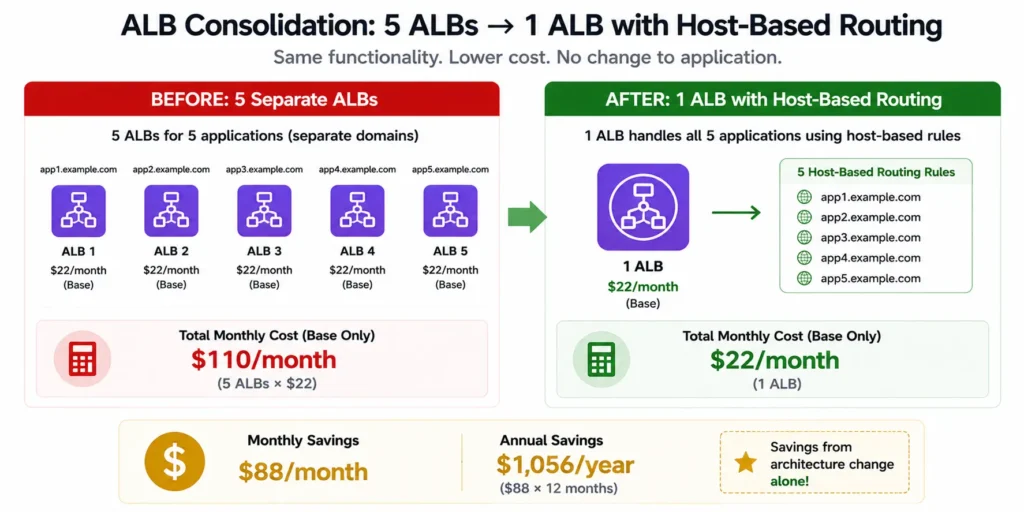
The most common source of avoidable ELB spend is running multiple ALBs when one would suffice. Each ALB costs $22/month minimum before any traffic. An engineering team running one ALB per microservice — say, 8 services — pays $176/month in base charges alone before a single request is processed.
A single ALB supports up to 100 listener rules and can route to different target groups based on host headers, paths, query parameters, HTTP headers, and source IP. One ALB serving 8 microservices via host-based routing costs $22/month base. Eight individual ALBs cost $176/month base. The $154/month difference from this single consolidation is $1,848/year — from architecture, not optimization tools. Source: Wring.co ELB pricing guide (March 2026) and AWS documentation.
The practical consolidation path: audit your ALBs with aws elbv2 describe-load-balancers –output table. For each ALB, check how many target groups and listener rules it has. Any ALB with a single listener rule forwarding to a single target group is a consolidation candidate. Migrate those target groups into a multi-rule ALB and delete the redundant load balancers.
Snapshot sprawl and orphaned load balancers are exactly the kind of background costs that compound unnoticed for months. They do not show up as a single alarming line item — they grow quietly inside EC2-Other while the team is focused on compute.
Usage.ai surfaces these patterns as part of its full-fleet cost analysis: snapshots from deleted volumes, load balancers routing no live traffic, and EBS volumes provisioned at sizes the workload has never used. The platform identifies the waste, quantifies the exact monthly dollar impact, and flags it alongside your Savings Plan and Reserved Instance optimization opportunities — so your team can act on everything in one place, not chase five separate cost reports.
For organizations spending $50,000/month or more on AWS, the supporting infrastructure costs alone — snapshots, load balancers, unattached volumes — typically represent 8-15% of the total bill. That is money sitting in a cost category most optimization programs never reach.
Book a demo to see what Usage.ai finds in your account.
How Savings Plans and Commitments Relate to EBS and ELB Costs
Compute Savings Plans cover neither EBS snapshots nor ELB charges. Savings Plans cover EC2 instance compute, Fargate compute, and Lambda duration — not block storage, load balancers, or data transfer.
This is worth stating clearly because teams sometimes assume a Compute Savings Plan will reduce their full EC2-adjacent bill. It reduces compute. EBS volumes, EBS snapshots, ALB charges, and data transfer are separate line items that require their own cost optimization actions.
For the compute portion of your bill — the EC2 instances behind those load balancers, or the Fargate tasks being balanced by them — a Compute Savings Plan is the right lever. The two optimizations are independent and complementary: right-size and commit the compute, then audit and reduce the supporting infrastructure costs separately.
Also read: The Complete Guide to Compute Savings Plans (AWS and Azure)
Quick Reference: EBS Snapshot and ELB Pricing
EBS Snapshots: Standard $0.05/GB-month | Archive $0.0125/GB-month (90-day minimum, $0.03/GB restore fee) | Cross-region copy $0.01/GB (US East) | Fast Snapshot Restore: additional charge per AZ per hour (verify at AWS — varies).
ALB: $0.0225/hr base ($16.43/month) + $0.008/LCU-hour | Minimum: ~$22/month at zero traffic | LCU dimensions: new connections (25/sec), active connections (3,000), bytes (1 GB/hr), rule evaluations (1,000/sec) — highest dimension billed.
NLB: $0.0225/hr base + $0.006/NLCU-hour | 25% cheaper LCU rate than ALB | No rule evaluation dimension.
CLB (legacy): $0.0225/hr + $0.008/GB processed | Migrate to ALB or NLB for modern features.
Free Tier: 750 hours/month of ALB or CLB + 15 LCUs per month for 12 months on new accounts.