.png)



Every engineering team considering containers on AWS hits the same decision: EC2 launch type or Fargate. The pitch for Fargate is compelling — no instance management, no cluster capacity planning, pay only for what you use. The pitch against it is equally real: Fargate’s per-vCPU-hour rate is higher than equivalent EC2, and for high-utilization workloads the premium compounds into serious money.
Neither pitch is wrong. They describe the same product at different utilization levels. Fargate and EC2 are not two competing products where one is universally better. They are two pricing models that each win in a specific part of the utilization curve. The job is to know where your workload sits on that curve.
This guide gives you the exact numbers to make that call, the hidden costs that shift the comparison, and the workload patterns that settle the debate cleanly.
What You Are Actually Paying for on Each Model
The difference between EC2 and Fargate is not a feature difference. It is an infrastructure ownership model. With EC2, you rent instances. With Fargate, you rent task-level compute. The implications for cost are significant.
EC2: You Pay for the Instance, Not the Tasks
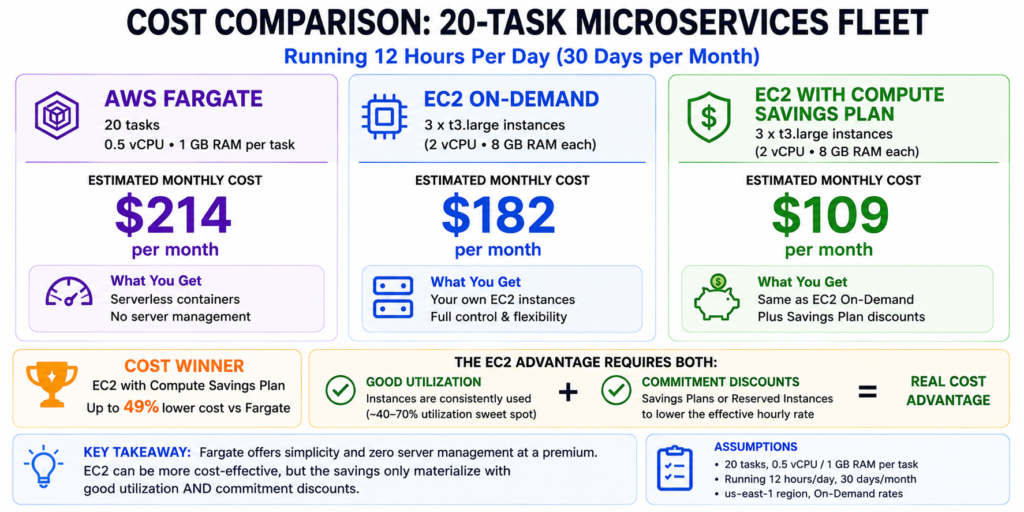
When you run ECS on EC2, you provision EC2 instances into your cluster and schedule containers onto them. You pay for the EC2 instances continuously, whether or not all their capacity is being used by containers. A c6i.2xlarge instance with 8 vCPUs and 16 GB RAM running 8 small containers at 1 vCPU each is 100% utilized. The same instance running 4 containers is 50% utilized. You pay the same either way.
The cost advantage of EC2 is that it lets you capture the economy of scale: when you do pack instances efficiently, you pay less per vCPU of actual container work than Fargate charges. You can also apply Reserved Instances and Savings Plans to EC2 instances, unlocking discounts of 33-72% that Fargate does not offer in the same depth.
The cost risk of EC2 is idle capacity. If your workload is variable — high traffic during business hours, near-zero overnight — your EC2 instances are running and billing at the same rate at 3 a.m. as at 2 p.m. The idle capacity is pure waste.
Fargate: You Pay per Second of Task Runtime
Fargate charges by vCPU-second and GB-second from the moment a task starts to the moment it stops. No task running means no charge. A task that runs for 10 minutes pays for 10 minutes of compute, not for the hour in which it ran.
The rate: $0.04048/vCPU-hour and $0.004445/GB-hour in us-east-1 for Linux/x86. A standard web service task at 0.5 vCPU and 1 GB running 24/7 costs $0.02024/hr x 730 = $14.78/month on vCPU plus $0.004445 x 730 = $3.24/month on memory. Total: approximately $18/month for a small always-on task. Source: aws.amazon.com/fargate/pricing, verified May 2026. Verify — rates change.
The cost advantage of Fargate is that you can scale to zero. A batch job that runs for 2 hours each weekday morning pays for 2 x 22 = 44 hours of compute per month, not 730 hours. For bursty, short-duration workloads, this is transformative. For 24/7 steady-state services, it erodes Fargate’s case quickly.
Also read: How Compute Savings Plans apply to Fargate tasks and reduce the per-vCPU rate
The Exact Numbers: Fargate vs EC2 Head to Head
All rates: Linux/x86, us-east-1, May 2026. Verify at aws.amazon.com/fargate/pricing and aws.amazon.com/ec2/pricing/on-demand — rates change.
| Config | Fargate On-Demand/month | Equivalent EC2 On-Demand/month | Break-Even Utilization |
| 0.5 vCPU / 1 GB (small task) | $17.87 | t3.micro ($7.59) or t3.small ($15.18) | t3.micro: 42% | t3.small: ~85% |
| 1 vCPU / 2 GB | $35.74 | t3.medium ($30.37, 2 vCPU/4 GB) | ~85% task utilization of t3.medium |
| 2 vCPU / 4 GB | $71.48 | t3.large ($60.74, 2 vCPU/8 GB) | ~85% |
| 4 vCPU / 16 GB | $160.60 | m7i.xlarge ($147.17, 4 vCPU/16 GB) | ~92% at on-demand rates |
| 4 vCPU / 16 GB (with 1-yr Savings Plan) | $128.48 (CSP 20% off Fargate) | m7i.xlarge ~$88 (33% RI discount) | EC2 still wins at steady state |
Sources: Fargate rates from aws.amazon.com/fargate/pricing (May 2026). EC2 rates from LeanOps (May 2026) and prior verified research. Break-even = minimum EC2 instance utilization where Fargate costs equal EC2 costs at on-demand rates. Compute Savings Plans save approximately 20% on Fargate at 1-year term (up to 52% at 3-year). Verify all rates — rates change.
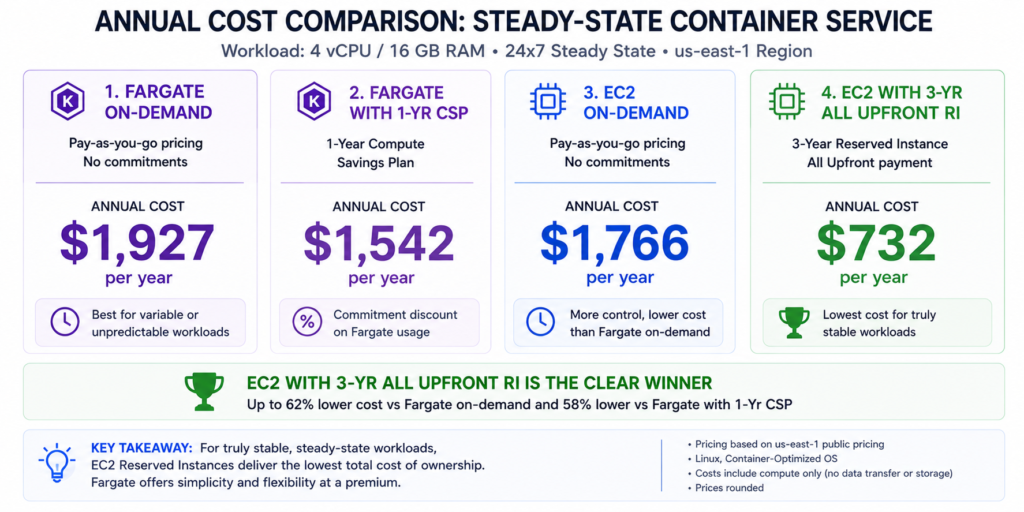
The table makes one thing clear: Fargate on-demand and EC2 on-demand for a 4-vCPU task are within 10% of each other at list price — provided the EC2 instance runs at near-100% utilization. The gap widens significantly once EC2 commitment discounts enter the picture. A 1-year No Upfront RI on an m7i.xlarge saves 33%, dropping the monthly cost from $147 to approximately $98. The same Fargate task with a 1-year Compute Savings Plan drops from $161 to approximately $128. EC2 with RI is still cheaper at steady state.
The Break-Even Utilization Calculation
The single most useful number in the EC2 vs Fargate decision is your average EC2 instance utilization if you chose EC2. If you would consistently run your instances above the break-even utilization level, EC2 wins on cost. Below it, Fargate wins.
For a 4 vCPU / 16 GB workload: Fargate on-demand costs $160.60/month. An m7i.xlarge at $147.17/month bills regardless of utilization. If you run 10 containers each needing 0.4 vCPU on a 4-vCPU instance, you are at 100% utilization and EC2 saves $13.43/month. If you run 4 containers at 0.4 vCPU each (40% utilization), you are paying $147.17/month EC2 for $58.88/month of actual container compute — Fargate at $58.88 would cost the same and require no cluster management.
The break-even formula: (Fargate monthly cost) = (EC2 monthly cost) x (break-even utilization). Solve for utilization: $160.60 / $147.17 = 1.09. You need to exceed 109% of EC2 capacity to make Fargate cheaper at pure on-demand rates — which means for always-on 24/7 services, EC2 on-demand beats Fargate on-demand when the instance is reasonably packed. The break-even shifts meaningfully toward Fargate for bursty workloads where tasks run for hours, not days.
Practical rule: if your containers run less than 20 hours per day on average, Fargate is likely cheaper or comparable. If your containers run 20+ hours per day at consistent load, EC2 on-demand is likely cheaper, and EC2 with Reserved Instances or Savings Plans is almost certainly cheaper. Source: LeanOps (May 2026) and CloudBurn (March 2026) analysis of ECS cost patterns.
Real Question: I moved from EC2 to Fargate for simplicity — why did my bill go up?
Almost certainly because your workloads were running 24/7 at high utilization on EC2. Fargate’s billing model is efficient for variable workloads and terrible for always-on steady-state services. A microservice that runs 730 hours per month on a single task at 1 vCPU / 2 GB costs $35.74/month on Fargate.
The equivalent EC2 t3.medium at $30.37/month was 17% cheaper — and with a Reserved Instance at $17.52/month (approximately 42% 1-yr discount on t3), it was 50% cheaper. If you migrated to Fargate without applying Compute Savings Plans, the cost gap is larger still. The fix: apply a Compute Savings Plan to your Fargate tasks immediately.
A 1-year Compute Savings Plan saves approximately 20% on Fargate, reducing the $35.74 task to approximately $28.59 — now under the t3.medium on-demand rate. Source: AWS Savings Plans documentation.
What is a Compute Savings Plan? (covers Fargate, EC2, and Lambda)
The Hidden Costs That Shift the Comparison
NAT Gateway: The Most Overlooked Fargate Cost
If your Fargate tasks run in a private subnet — the standard security configuration — they need a NAT Gateway to reach the internet, ECR for image pulls, or any AWS API. NAT Gateway charges $0.045/GB of data processed in addition to its base hourly cost of approximately $0.045/hr ($32.85/month base). For a microservices architecture where tasks are constantly pulling configuration, calling external APIs, or streaming logs, the NAT Gateway data processing charge can approach or exceed the Fargate compute cost itself.
A service with 50 ECS tasks each pulling a 500 MB container image monthly: 50 x 500 MB = 25 GB x $0.045 = $1.13 in NAT Gateway data charges per month just for image pulls. That sounds small. Add continuous outbound API calls at 10 GB/month: $0.45/month. CloudWatch logs at $0.50/GB ingestion: depends on log verbosity. The NAT Gateway base charge plus moderate traffic quickly adds $50-100/month that never appears in a Fargate pricing estimate. Source: LeanOps (May 2026), CloudBurn (March 2026).
The alternative: use VPC Endpoints for ECR, CloudWatch Logs, S3, and other frequently-used AWS services. VPC Endpoints eliminate the NAT Gateway cost for those services at a flat $0.01/GB data processed rate (versus $0.045/GB for NAT Gateway). For ECR-heavy workloads, the VPC Endpoint for ECR pays for itself quickly.
Fargate Task Size Limits
Fargate has a maximum task size of 16 vCPU and 120 GB memory per task (as of May 2026 — verify at aws.amazon.com/fargate). For most application workloads this is sufficient. For compute-intensive jobs that require 32+ vCPU equivalents, Fargate requires splitting across multiple tasks and designing a coordination layer. EC2 instances are available up to 192 vCPU on the largest types. For high-compute batch processing, EC2 is architecturally simpler at the large end.
EC2 Management Overhead: What It Actually Costs in Engineering Time
EC2 launch type requires: AMI patching and rotation, ECS agent updates, launch configuration or launch template management, cluster capacity management (ensuring enough instances for demand without over-provisioning), Spot interruption handling if using Spot, and node group management for EKS. A conservative estimate for a well-managed 50-instance ECS cluster: 8-12 hours per month of dedicated operational engineering. At $150/hr effective engineering cost, that is $1,200-1,800/month in operational cost that never appears on the AWS bill.
Fargate eliminates all of this. No AMI patching, no cluster capacity planning, no node group management. AWS manages the underlying infrastructure entirely. For small to medium teams where infrastructure management time has high opportunity cost, this is a real dollar advantage for Fargate — one that is often larger than the compute cost premium.
Real question: What if I switch from Fargate to EC2 to save money — what changes?
Three things become your responsibility that Fargate handled automatically. First, cluster capacity: you now own the EC2 instances and must ensure there is always enough capacity for your tasks to schedule. Under-provisioning means tasks fail to schedule during traffic spikes. Over-provisioning means you pay for idle instances. Auto Scaling Groups on EC2 solve this but require configuration and tuning. Second, AMI and OS patching: your EC2 instances need regular patching. ECS-optimized AMIs are maintained by AWS but you need to roll them into your instances. Third, Spot interruption handling: if you use Spot instances to reduce EC2 cost, your tasks must be designed to handle the 2-minute interruption notice gracefully. None of these are insurmountable, but each is work that Fargate does silently. Budget the operational overhead before assuming the EC2 cost saving is pure gain.
Fargate Spot and EC2 Spot: The Discount Options
Fargate Spot
Fargate Spot offers up to 70% discount on Fargate pricing for interrupt-tolerant tasks. Fargate Spot is available for ECS tasks on Linux/x86 and ARM. When AWS needs the capacity back, your tasks receive a 2-minute warning and are stopped. For batch processing, background jobs, and non-critical asynchronous workloads, Fargate Spot changes the economics dramatically: the $35.74/month 1 vCPU / 2 GB task drops to approximately $10.72/month on Fargate Spot at maximum discount.
Fargate Spot is not available for EKS on Fargate (EKS Fargate always uses on-demand capacity). For ECS on Fargate, Spot is the most cost-effective option for any workload that can tolerate interruptions. Source: aws.amazon.com/fargate/pricing (May 2026).
EC2 Spot for Containers
EC2 Spot instances offer 60-90% discounts on EC2 on-demand pricing, with the same 2-minute interruption warning. For ECS on EC2, Spot instances within an Auto Scaling Group provide the lowest possible cost for container compute. The combination of Spot EC2 and high bin packing efficiency (multiple small containers per instance) produces the cheapest possible container infrastructure — often 70-80% below equivalent Fargate on-demand.
The catch: Spot interruption handling requires application-level resilience. Tasks must checkpoint work, drain connections gracefully, and the cluster must have Spot instance diversification across instance types and availability zones to reduce correlated interruption risk. This is non-trivial engineering. Fargate Spot is simpler — AWS handles the infrastructure; you just need graceful task shutdown logic.
Real question: My Fargate costs are growing faster than our traffic. What is happening?
Three common causes. First: task right-sizing creep. Tasks are typically defined with round-number vCPU and memory values (1 vCPU / 2 GB) but real container usage is often 0.2 vCPU / 0.8 GB. You are paying for 1 vCPU but using 0.2. Fix: use Container Insights or Datadog to measure actual P95 vCPU and memory usage per task, then right-size task definitions to match. Even a 50% right-sizing on 100 tasks saves $1,786/month. Second: task count growth without corresponding traffic growth. If your task count grows proportionally to deployments rather than traffic, auto-scaling configuration is incorrect. Third: NAT Gateway charges growing with task count. Every additional task increases NAT Gateway data processing. Review the EC2-Other line in Cost Explorer and filter for NatGateway usage type.
Commitment Discounts: How Each Model Benefits
The commitment discount gap between EC2 and Fargate is real and significant. It is one of the strongest arguments for EC2 at steady-state workloads.
EC2: Reserved Instances Up to 72%, Savings Plans Up to 66%
EC2 Reserved Instances and Savings Plans reduce the base EC2 cost by 33-72% depending on term and payment option. For a stable 4-vCPU steady-state service on an m7i.xlarge, a 3-year All Upfront RI can reduce the monthly cost from $147 to approximately $61 — a 58% reduction. At that price, EC2 is dramatically cheaper than any Fargate configuration. The EC2 commitment discount advantage is the strongest single argument for EC2 on long-running, stable workloads.
EC2 Instance Savings Plans: up to 72% off with family-specific commitment
AWS Savings Plans vs Reserved Instances: which discount structure saves more?
Fargate: Compute Savings Plans Up to 52%
Compute Savings Plans apply to Fargate tasks automatically. A 1-year No Upfront Compute Savings Plan saves approximately 20% on Fargate. A 3-year Compute Savings Plan saves approximately 52% on Fargate. Source: Usage.ai Compute Savings Plans guide (live).
The 3-year Fargate discount (52%) is comparable to a 3-year EC2 Reserved Instance on the same instance family. The difference: the Fargate Savings Plan covers any Fargate task in any region, and there is no cluster management overhead. If your workload is Fargate-based and steady-state, a 3-year Compute Savings Plan is genuinely compelling — the cost gap between EC2 and Fargate narrows significantly at the 3-year commitment tier.
The Complete Guide to Compute Savings Plans — includes Fargate discount mechanics
ARM/Graviton: 20% Cheaper on Both Models
Both Fargate and EC2 offer ARM/Graviton pricing at approximately 20% below x86 rates. For Fargate: $0.0000089944/vCPU-second ARM versus $0.0000112077/vCPU-second x86. For EC2: Graviton3 and Graviton4 instances (c7g, m7g, r8g) are priced 10-20% below comparable Intel instances. Source: aws.amazon.com/fargate/pricing, May 2026.
Most modern container images support ARM64 with multi-arch builds. If your image has been built for linux/amd64 only, rebuilding for linux/arm64 typically takes under an hour for most applications. The 20% compute cost reduction is worth the build pipeline update.
ARM Fargate Spot compounds the savings: 20% from ARM architecture plus up to 70% from Spot = roughly 76% below x86 Fargate on-demand for interrupt-tolerant batch workloads. For ETL jobs, image processing, and non-critical batch, this is the cheapest serverless container pricing available on AWS.
The Decision Framework: Choose EC2 or Fargate
Choose Fargate when: your containers run intermittently (batch jobs, event-driven processing, scheduled tasks). Traffic is highly variable with significant overnight or weekend troughs. Your team is small and infrastructure management time is a premium. You are launching a new service and do not yet know steady-state resource requirements. Your workload is multi-tenant and you need the security isolation of separate underlying VM-level infrastructure per task.
Choose EC2 launch type when: containers run 24/7 at predictable load. You can commit to Reserved Instances or Savings Plans for the fleet.
Your workload requires GPU instances, specific instance families, or larger instance sizes than Fargate supports. Your team has the capacity to manage cluster infrastructure and the cost savings justify it. You are running existing EC2-based workloads and containerizing in place.
Consider a hybrid: use EC2 for your steady-state core services (highest utilization, most predictable traffic), and Fargate for batch, scheduled, and bursty services. Many mature ECS environments run both launch types simultaneously. The cost optimization strategy differs: EC2 core services get Reserved Instance coverage; Fargate batch services get Fargate Spot configuration. Source: CloudBurn (March 2026) and LeanOps (May 2026).
Real question: What if I have some services on EC2 and some on Fargate — does a Compute Savings Plan cover both?
Yes. A single Compute Savings Plan covers EC2 instances, Fargate tasks, and Lambda functions simultaneously. You commit to a dollar-per-hour spend level and AWS applies the discount to whichever eligible usage you generate in that hour — EC2, Fargate, or Lambda — at the highest discount rate first.
If your EC2 usage has a higher discount rate than your Fargate usage, the SP covers EC2 first. This means a hybrid EC2/Fargate architecture can be covered by a single Compute Savings Plan commitment without needing separate plans for each compute type. Source: AWS Savings Plans documentation, confirmed from Usage.ai Compute Savings Plans guide (live).
How Compute Savings Plans are applied across EC2, Fargate, and Lambda in one hour
How Usage.ai Optimizes EC2 and Fargate Spend Together
The commitment discount calculation for a hybrid EC2/Fargate architecture is genuinely complex. You need to size EC2 Reserved Instances for the stable EC2 core, size a Compute Savings Plan to cover the remaining EC2 plus Fargate spend, and avoid over-committing on either such that you generate waste on low-traffic periods. Most teams under-commit on Fargate specifically because the utilization patterns are harder to predict — and that under-commitment leaves 20-52% on the table on Fargate compute.
Usage.ai analyzes your EC2 and Fargate usage separately and in combination, with a 24-hour refresh cycle. The platform identifies the correct split between EC2 Reserved Instance coverage (for the stable EC2 core) and Compute Savings Plan coverage (for EC2 overflow plus all Fargate and Lambda). It purchases both automatically within parameters you approve.
The buyback guarantee is particularly valuable for Fargate workloads where task counts fluctuate. If a Compute Savings Plan commitment becomes underutilized because a Fargate service is scaled down or deprecated, Usage.ai provides cashback on the unused commitment in real money. For organizations spending $50,000+/month across EC2 and Fargate, the combined Reserved Instance plus Compute Savings Plan optimization consistently delivers the 30-50% savings range verified across 300+ enterprise customers.
See how Usage.ai optimizes EC2 and Fargate commitments for your fleet
Frequently Asked Questions
1. Is Fargate more expensive than EC2?
Per vCPU-hour at on-demand rates: yes. Fargate costs $0.04048/vCPU-hr in us-east-1. An equivalent EC2 instance (m7i.xlarge at 4 vCPU) costs $0.0504/vCPU-hr but only if you use all 4 vCPUs. At partial utilization, Fargate becomes cheaper because you pay only for running task compute. The break-even is approximately 40-60% average EC2 instance utilization. Above that: EC2 wins. Below it: Fargate wins. Source: LeanOps May 2026 and CloudBurn March 2026.
2. When should I use Fargate instead of EC2?
Use Fargate when: containers run intermittently or with high variability. You want to eliminate EC2 cluster management overhead. Your workload is bursty and you do not want to provision for peak capacity. You need per-task security isolation (Fargate gives each task its own underlying VM kernel). You are running batch or scheduled jobs where scale-to-zero matters. Fargate Spot for interrupt-tolerant batch workloads is often the cheapest compute option available on AWS at up to 70% discount.
3. Can Compute Savings Plans reduce Fargate costs?
Yes. Compute Savings Plans apply to Fargate tasks automatically. A 1-year Compute Savings Plan saves approximately 20% on Fargate. A 3-year plan saves approximately 52%. The plan covers EC2, Fargate, and Lambda simultaneously under one hourly spend commitment. For teams with steady Fargate workloads, a 3-year Compute Savings Plan can close most of the cost gap between Fargate and EC2 Reserved Instances. Source: AWS Savings Plans documentation, Usage.ai Compute Savings Plans guide (live).
4. What is Fargate Spot and when should I use it?
Fargate Spot offers up to 70% discount on standard Fargate pricing for interrupt-tolerant ECS tasks. When AWS needs the underlying capacity, tasks receive a 2-minute warning and are stopped. Fargate Spot is best for batch jobs, scheduled processing, background tasks, and asynchronous workloads that can be restarted from a checkpoint. Not suitable for stateful services, user-facing APIs, or any workload where task interruption is not handled gracefully. ARM Fargate Spot (20% cheaper than x86 Fargate Spot) is the cheapest serverless container option on AWS.
5. What is the maximum task size on Fargate?
As of May 2026, Fargate supports up to 16 vCPU and 120 GB memory per task. For workloads requiring more than 16 vCPUs, you must use EC2 launch type or split the workload across multiple Fargate tasks with a coordination layer. EC2 instances are available up to 192 vCPU on the largest types. Source: aws.amazon.com/fargate — verify for current limits, as AWS periodically increases Fargate task maximums.
6. What hidden costs should I include in my EC2 vs Fargate comparison?
For Fargate: NAT Gateway charges ($0.045/GB processed) for tasks in private subnets — can equal or exceed compute cost for image-pull-heavy or API-heavy services. VPC Endpoints reduce this. CloudWatch Logs ingestion ($0.50/GB) for verbose logging. For EC2: ALB listener and LCU charges if using a load balancer (same cost for both). Cluster management engineering time (8-12 hours per month for a 50-instance cluster). AMI patching and rotation. For both: data transfer charges for cross-AZ or cross-region traffic.
7. How do I right-size Fargate tasks to reduce cost?
Pull Container Insights or Prometheus metrics showing actual P95 vCPU and memory usage per task over 30 days. Compare to the vCPU and memory defined in your task definition. Most teams find actual usage is 30-60% below the configured value. Right-sizing from 1 vCPU / 2 GB to 0.5 vCPU / 1 GB where actual usage supports it cuts the per-task cost by 50%. On 100 tasks running 24/7 at 0.5 vCPU / 1 GB instead of 1 vCPU / 2 GB: savings = 100 x ($35.74 – $17.87) = $1,787/month.