.png)


A successful exit therefore requires more than canceling a subscription. It must preserve financial continuity, prevent conflicting automation, settle contractual obligations, and leave verifiable evidence that the former provider can no longer access or change your environment.
Short Answer
To exit a cloud cost optimization platform, inventory what the vendor observes, recommends, executes, and bills for. Then review your contract and active commitments, export essential data, transfer operational ownership, and disable automated actions.After the handoff, remove the vendor’s identities, roles, policies, API access, and data-sharing permissions across every connected cloud environment. Do not assume that canceling the platform automatically cancels cloud-provider commitments or removes all access.
Leaving a Cloud Cost Optimization Platform
Start by separating assets owned by your organization or cloud provider from capabilities supplied by the platform.| Normally remains in place | May need to be exported, transferred, or replaced |
|---|---|
| Cloud accounts, subscriptions, and projects | Vendor dashboards and reporting views |
| Running workloads and infrastructure | Custom allocation rules and virtual tags |
| Customer-owned billing exports | Forecasts, budgets, and anomaly policies |
| Native resource tags and account hierarchy | Recommendations and action history |
| Provider commitments held in your account | Automated purchasing or modification workflows |
| Provider invoices and billing relationships | Vendor-specific savings calculations |
Confirm who legally owns each commitment and where it appears before applying the general rule. If a vendor holds an instrument or resells the benefit, the exit may involve a commercial transition rather than simply leaving a provider-native commitment in your account.
Identify What the Platform Currently Controls
Build a control inventory before giving notice. For every cloud account and service, classify the platform’s role:Observe: Reads billing, usage, utilization, or configuration data.
Recommend: Produces forecasts, rightsizing actions, or commitment recommendations.
Execute: Purchases commitments or changes cloud resources and settings.
Manage financial risk: Provides buyback, cashback, insurance, credits, or another remedy for underutilization.
This inventory establishes the exit scope. Without it, a team may remove dashboard access but leave an IAM role, service principal, dataset permission, scheduled purchase, or third-party workflow active.
Review Contracts, Fees, and Active Commitments
Review the executed agreement, not only the vendor’s pricing page, for:Notice periods and automatic renewal dates
Minimum terms, spend commitments, and termination fees
The final invoice calculation and adjustment window
Fees attributed to savings realized after termination
Pending purchases or recommendations already approved
Unpaid credits, cashback, guarantees, or rebates
Transition assistance and data-export obligations
Data retention, deletion timing, and deletion evidence
Dispute, cure, and contractual remedy provisions
For example, AWS permits returns only for eligible Savings Plans within seven days and the same calendar month, with a commitment of no more than $100 per hour and other restrictions.
Only qualifying EC2 Standard Reserved Instances can be sold through the RI Marketplace; Convertible RIs and reservations for services such as RDS and ElastiCache cannot be sold there.
Microsoft states that Azure savings plans cannot be canceled, exchanged, or refunded, although supported transfers may be available.
Azure Reservations have different rules, including a USD 50,000 rolling 12-month refund limit at the billing-scope level.
Google Cloud CUDs similarly represent one- or three-year resource or spend commitments. Leaving the tool that recommended or managed a CUD does not, by itself, end that provider obligation.
Export Your Data and Preserve the FinOps Baseline
Export data while the platform remains fully accessible. Preserve both the underlying records and the methodology required to reproduce reported results.Your handoff package should include:
Raw and normalized cost-and-usage data
Actual, amortized, billed, and effective cost views
Allocation rules, virtual tags, exclusions, and shared-cost logic
Commitment inventory, coverage, utilization, and expiration dates
Savings recommendations and completed-action history
Budgets, forecasts, alerts, and anomaly records
Monthly reports, invoices, credits, and cashback records
Savings formulas, comparison rates, currencies, time zones, and data cutoffs
The FinOps Open Cost and Usage Specification can improve billing-data portability by normalizing fields across technology providers. It does not preserve a platform’s proprietary allocation logic, forecasting models, recommendations, or savings methodology, so document those separately.
Transfer FinOps Ownership Without Overlapping Automation
Choose the destination for every responsibility: a replacement platform, an internal team, cloud-native tooling, or a temporary manual process. Assign a named owner and cutover date for commitment management, reporting, forecasting, anomaly response, and executive communication.Read-only tools can sometimes overlap during validation. Two platforms with purchasing or resource-modification permissions should not independently control the same scope. Competing automation can duplicate purchases, reverse actions, change coverage unexpectedly, or make savings attribution impossible to reconcile.
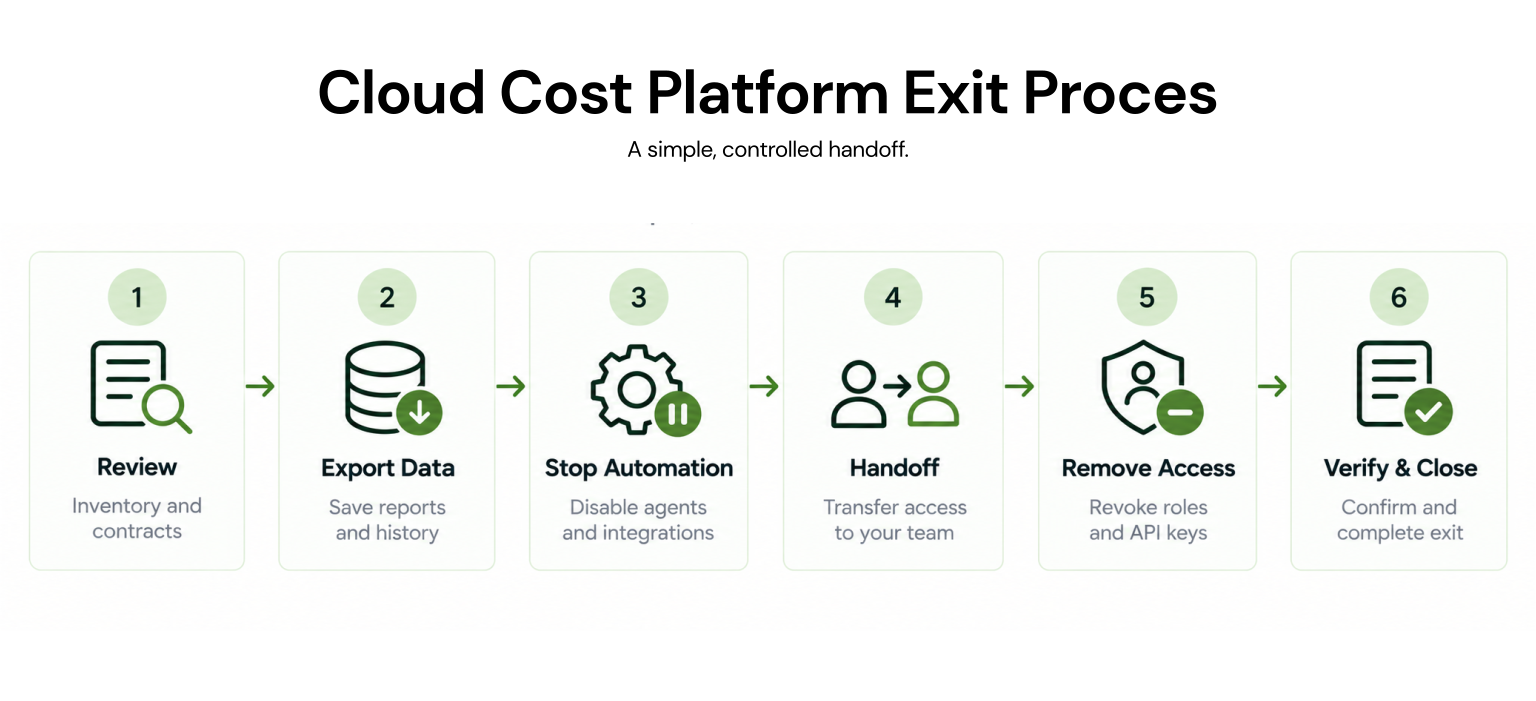
Use this sequence:
Inventory controls and contractual obligations.
Preserve data and freeze the comparison baseline.
Stop scheduled or autonomous actions.
Complete the operational handoff.
Remove the former provider’s access.
Verify the result and close financial reconciliation.
Revoke Vendor Access Across AWS, Azure, and Google Cloud
Use the original onboarding record as the removal checklist. Disconnecting an integration in the vendor interface may not delete identities and permissions created inside your cloud environment.| Provider | Access paths to check | Exit action |
|---|---|---|
| AWS | Cross-account IAM roles, trust policies, attached policies, access keys, shared S3 access, and IAM resources managed through CloudFormation, StackSets, or Terraform | Stop automation, revoke active role sessions when immediate cutoff is required, remove trust and policy attachments, and delete customer-created resources after checking dependencies |
| Azure | Service principals, enterprise applications, guest users, custom roles, role assignments, secrets, and storage permissions | Inspect every relevant scope, remove each assignment at the scope where it was created, disable or delete the service principal where appropriate, remove the guest identity, and retire unused custom roles |
| Google Cloud | External service-account principals, organization, folder, and project IAM bindings, custom roles, BigQuery dataset access, other resource-level policies, and credentials | Revoke each IAM and dataset binding, remove unused customer-created roles, and confirm the external principal no longer has access |
For Azure, check the management group, subscription, resource group, and resource levels because inherited assignments may exist outside the scope first inspected. Removing Azure RBAC role assignments
For Google Cloud, remove the former platform’s principal from organization, folder, project, BigQuery dataset, and other resource-level policies. Remove inherited access at its source, and revoke rather than delete vendor-owned service accounts.
Do not attempt to delete a service account owned by the vendor; revoke its access from resources your organization controls.
Verify That the Exit Is Complete
Treat the exit as complete only when the responsible owners accept it against documented evidence.Confirm that:
Automated purchases and infrastructure actions have stopped.
No queued or previously approved action remains unresolved.
Required reports and historical data open outside the old platform.
Allocation and savings baselines can be reproduced.
Every active commitment has an owner through expiration.
Former vendor identities fail access tests.
New billing data continues arriving after the cutover.
The final invoice, credits, and cashback are reconciled.
Contractual deletion or retention obligations are documented.
Finance, procurement, security, engineering, and FinOps approve closure.
How We Approach Platform Transitions at Usage.ai
Usage.ai is most relevant when the departing platform manages cloud commitments. If it also provides broader capabilities such as resource rightsizing or Kubernetes optimization, those functions may require another owner or platform.We analyze usage at the billing layer and offer read-only access for the initial savings test. In manual mode, we call the applicable cloud provider API after a customer approves a recommendation. Customers can also enable Autopilot to automate commitment actions.
Managed commitments and realized savings are reported through the dashboard.
With Flex Insured Commitments, teams can access 30–50% savings on covered AWS, Azure, and Google Cloud workloads with none of the commitment risk.
If an eligible Flex Commitment costs more than equivalent On-Demand usage, we provide cashback protection for the calculated loss, subject to current program eligibility and terms.
Customers pay an agreed percentage of realized savings, billed monthly in arrears after provider billing data is finalized.
Our public documentation explains how cashback works but does not currently specify a complete offboarding process. Buyers should confirm how pending purchases, post-termination cashback, data exports, access removal, and final billing are handled in their executed agreement.
Final Verdict: Make Exit Readiness a Buying Requirement
A safe exit preserves financial history, assigns every continuing obligation, prevents conflicting automation, and proves that access has been removed. Evaluate these requirements during procurement, not only when dissatisfaction or renewal pressure makes a transition urgent.Review access, active commitments, reporting dependencies, commercial terms, and handoff responsibilities before changing platforms.
Frequently asked questions
Does canceling a cloud cost platform affect running workloads?
Usually not. Most platforms operate through billing data, APIs, and cloud identities rather than hosting workloads, but confirm whether the vendor also manages infrastructure or billing relationships.
What happens to existing cloud commitments?
Provider-native commitments generally continue until expiration unless the provider permits a specific return, refund, exchange, sale, or transfer. Confirm who legally owns each commitment and whether the vendor contract provides a separate financial remedy.
What data should be exported before leaving?
Export raw and normalized billing data, allocation rules, commitment records, savings calculations, forecasts, action history, reports, invoices, credits, cashback records, and audit logs.
Can the old and new platforms run simultaneously?
Read-only evaluation may be practical. Avoid giving two platforms independent authority to purchase commitments or modify the same resources.
When should vendor access be revoked?
Revoke access after essential data is preserved, automated actions are stopped, and operational ownership has transferred. Then test each cloud environment to confirm that the former vendor’s identities can no longer connect.