.png)


The good news is, you don’t have to start over. Your AWS workloads stay where they are, and your existing cloud commitments don’t simply disappear when you change the platform managing them.
What does change is the way you manage commitments going forward. Who evaluates your usage, who makes new purchasing decisions, and how you control the risk of getting those decisions wrong.
That means the safest migration isn’t a big-bang switch. It’s a step-by-step cutover. Here’s how to do it without creating unnecessary financial or operational risk.
What actually changes when you move from Zesty to Usage.ai?
The practical question is what you’re handing off, what you’re keeping, and what needs to change before the cutover.Zesty’s Commitment Manager can manage eligible AWS Reserved Instances when the required permissions are enabled, and its documented setup includes AWS billing data and RI Marketplace access. See Zesty’s Commitment Manager documentation
So before switching, identify:
- which commitments and workflows Zesty currently manages,
- which remain under your team’s control, and
- whether any Zesty-specific products or obligations will continue after the platform cutover.
What happens to your existing commitments?
Before changing anything, take stock of what you already have. Not every commitment needs to be replaced or even touched.Existing AWS commitments remain subject to their applicable AWS terms, regardless of which platform manages your commitment strategy. See AWS Savings Plans documentation and AWS Reserved Instances documentation.
| Existing asset | What to do during migration |
|---|---|
| Healthy commitments | Keep and monitor |
| Near expiration | Reassess using current usage |
| Underutilized commitments | Review utilization and applicable options |
| Zesty-managed commitments | Identify and review separately |
| Self-managed commitments | Keep under existing controls unless there's a reason to change them |
| Zesty refund/buyback arrangements | Review applicable Zesty terms |
| New commitments | Wait until purchasing authority is confirmed |
Lock a neutral baseline
Before changing access, establish what your current Zesty setup is actually delivering. A projected savings figure isn’t the same as savings you’ve already realized.Zesty notes that its 12-month potential-savings projection can include assumptions about replacing commitments as they expire. See Zesty’s Potential Savings Report documentation.
So separate realized performance from future projections.
Your baseline should capture:
- cloud spend over a defined period;
- commitment coverage and utilization;
- realized savings;
- unused commitment exposure;
- applicable Zesty fees;
- refunds or credits, where applicable;
- upcoming commitment expirations.
Use that figure as the reference point for your Usage.ai evaluation.
Inventory existing commitments
Now build a commitment-level inventory so you know exactly what is in place before changing the management layer.For each commitment, capture:
- commitment ID;
- AWS account;
- service and region/scope;
- commitment type;
- purchase and expiration dates;
- utilization and remaining term;
- current savings;
- whether it is managed by your team or through Zesty.
Use this inventory to separate the AWS commitments you own from the management activities Zesty performs around them.
That distinction matters during the handoff: you’re not transferring every existing commitment to a new vendor. You’re deciding which commitments to keep, which to reassess, and which management responsibilities need to change.
Confirm Zesty’s obligations
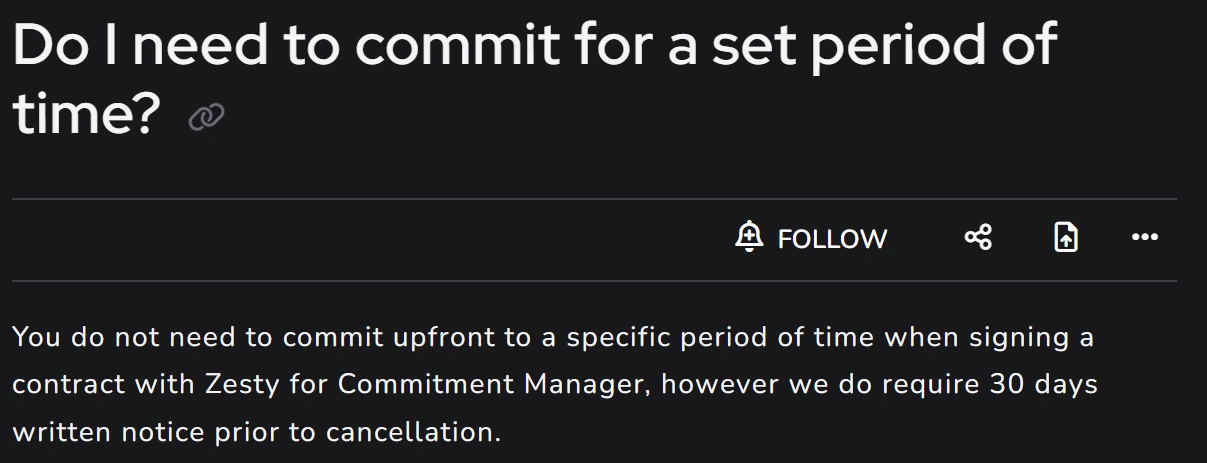
Before changing access or giving notice, understand what remains tied to your Zesty relationship.Zesty’s public Commitment Manager documentation says there is no fixed initial commitment period, but 30 days’ written notice is required for cancellation.
Your agreement and applicable product terms control your actual obligations. See Zesty’s cancellation documentation.
- your Zesty agreement and cancellation terms;
- applicable fees and outstanding invoices;
- active Zesty products;
- pending transactions;
- commitment-related obligations;
- applicable refund or buyback provisions.
Map what Zesty currently touches
Before the handoff, document the workflows and infrastructure your team relies on:| Dependency | Owner | Migration decision |
|---|---|---|
| Commitment management | FinOps | Replace / retain |
| Commitment reporting | FinOps | Replace / retain |
| IAM permissions | Cloud / Security | Remove after validation |
| Cost and Usage Report | Cloud / FinOps | Retain / modify |
| RI Marketplace setup, if applicable | Cloud / Finance | Review |
| Terraform configuration | Platform | Update / remove |
| Other Zesty products | Product owner | Review separately |
Classify the portfolio
This is where the inventory becomes useful. Before deciding what changes under the new model, separate commitments that are performing well from those that genuinely need attention.Healthy
Commitments with strong utilization and sound economics should generally stay in place. A vendor change alone isn’t a reason to replace them.Near expiration
Commitments approaching expiration deserve a fresh review. Reassess them against current usage, expected growth, and any planned workload changes rather than automatically renewing the same coverage.Underutilized
Commitments with declining utilization or weaker economics need closer scrutiny. Look at the remaining term, the cause of the underutilization, and any applicable AWS or vendor options before deciding what to do next.Run a read-only Usage.ai evaluation
Now test the alternative before giving it purchasing authority.Our read-only Savings Test lets you evaluate potential savings without first granting us permission to purchase commitments. See Usage.ai security and compliance documentation.
Use the baseline you built in Step 1 as the reference point and understand whether the proposed strategy would produce a better outcome for your actual portfolio.
Look at:
- which existing commitments should remain in place;
- where new coverage may make sense;
- what assumptions drive the recommendations;
- how the economics compare with your current baseline;
- what changes if usage declines.
Treat the result as evidence for the migration decision, not a promise of future savings. If the proposed approach doesn’t hold up against your baseline, including the downside case, there’s no reason to rush the cutover.
Compare like-for-like net economics
This is where migration decisions can easily go wrong. A lower headline fee or a higher projected savings percentage doesn’t necessarily mean a better financial outcome.Instead of comparing what Zesty charges with what Usage.ai charges, compare what your organization actually retains after all relevant costs and recoveries.
A consistent framework is:
| Scenario | Question |
|---|---|
| Base | What happens if usage stays broadly consistent? |
| Downside | What happens if committed usage falls? |
| Growth | What happens if usage grows faster than expected? |
| Current model | Proposed model | |
|---|---|---|
| Gross commitment savings | $100,000 | $105,000 |
| Vendor fees | -$25,000 | -$21,000 |
| Commitment exposure | -$8,000 | -$3,000 |
| Applicable recovery | +$2,000 | +$5,000 |
| Net benefit | $69,000 | $86,000 |
The important point is that higher gross savings don’t automatically mean higher retained value.
For Usage.ai, model any cashback or protection only where the commitment qualifies and according to the applicable Flex Insured Commitment Program terms. Don’t include it as guaranteed savings.
Also read: Usage.ai vs Zesty: Which Cloud Commitment Platform Fits Your Risk?
Decide whether you should actually migrate
By this point, you should have enough information to make a go/no-go decision.Move forward if:
- your commitment inventory reconciles;
- Zesty’s obligations are clear;
- healthy commitments can remain in place;
- the Usage.ai evaluation shows a credible improvement in net economics;
- the downside case is acceptable;
- you can establish one clear purchasing authority;
- the cutover plan prevents overlapping purchases.
Stop and reassess if:
- your baseline or commitment inventory doesn’t reconcile;
- contractual or product obligations remain unclear;
- the business case depends on replacing healthy commitments early;
- the downside case doesn’t work;
- purchasing authority can’t be clearly separated;
- required billing or commitment data is missing.
You don’t have to migrate just because you’ve started the process. If the existing model is working well and the proposed change doesn’t create a meaningful improvement, waiting is a perfectly valid FinOps decision.
Approve the operating model
If the migration passes the go/no-go check, agree on how commitment decisions will work going forward.Define:
- who has final approval;
- which AWS accounts and commitment types are in scope;
- who can authorize purchases;
- which purchases require additional approval;
- what Finance needs to review;
- what conditions should pause new purchases.
The important part is that the technology doesn’t decide your approval model for you. Before the cutover, everyone involved should know who can recommend, approve, and execute a commitment purchase, and when that authority should be paused.
Plan the handoff
There should be one active purchasing authority at a time.Before the handoff:
Pause non-essential new commitment purchases for a defined transition window.
Identify the last Zesty-initiated purchasing activity.
Reconcile any pending purchases, sales, refunds, or other transactions.
Confirm the Usage.ai accounts, scope, and required permissions.
Confirm who has final purchasing approval.
Set the cutover time and verification steps.
Restrict or disable the outgoing purchasing authority before enabling the new one.
If your Zesty deployment uses Terraform, review the configuration and state before removing anything. Zesty documents Terraform configurations that can provision IAM roles, automation permissions, Cost and Usage Report infrastructure, and related resources. See Zesty’s Terraform onboarding documentation.
Don’t remove customer-owned billing or IAM infrastructure simply because Zesty used it. First confirm what it supports, whether anything else depends on it, and whether it is still required after the cutover.
Cut over, verify, and then clean up
The cutover is complete when the AWS environment matches the approved plan.During the first billing cycle, verify:
- commitment coverage and utilization;
- new or duplicate purchases;
- realized savings and vendor fees;
- applicable cashback;
- AWS billing;
- remaining Zesty activity.
- the inventory doesn’t reconcile;
- purchasing authority is unclear;
- an unexpected commitment purchase occurs;
- billing materially diverges from the approved case;
- required data is missing;
- the economics no longer match the approved scenario.
What does rollback mean?
Rollback doesn’t mean reversing commitments already purchased. AWS commitments generally can’t simply be undone.It means:
Then remove obsolete IAM permissions, integrations, and vendor-specific infrastructure where appropriate.
Finally, retain the migration record:
- original baseline;
- commitment inventory;
- Zesty invoices and applicable terms;
- Usage.ai evaluation results;
- approved economic model;
- cutover record;
- post-cutover reconciliation.
Also read: Archera Pricing & Hidden Costs Explained: What Does Archera Really Cost?
So, should you migrate from Zesty to Usage.ai?
Yes, if Usage.ai gives you a better risk-adjusted economic outcome and you can make the switch without disrupting healthy commitments or creating operational risk.The decision should come down to four questions:
Are your existing commitments understood? Healthy commitments should stay in place; expiring or underutilized ones should be reassessed.
Is the economics better? Compare net realized value against your current Zesty baseline, not headline savings or fees.
Does the downside still work? If usage falls, the new model should still make financial sense.
Can you make a clean handoff? One purchasing authority, clear approvals, no overlapping purchases, and a plan for Zesty's remaining obligations.
Bring your current commitment inventory, historical usage data, applicable Zesty fees or commercial terms, remaining commitment terms, and one realistic downside scenario.
We’ll model the economics of staying versus migrating, identify what should remain untouched, and show where the difference comes from.
Talk to an Expert
See how Usage.ai combines cloud savings with protection against commitment risk.
Frequently asked questions
How do I migrate from Zesty to Usage.ai?
Start by establishing a neutral baseline, inventorying your AWS commitments, reviewing Zesty's obligations, and classifying the portfolio. Then run a read-only Usage.ai evaluation, compare net economics, approve the new operating model, and complete a controlled handoff.
Will my existing AWS commitments be cancelled when I leave Zesty?
No. Moving from Zesty to another management platform does not itself cancel AWS commitments. Existing Savings Plans and Reserved Instances remain subject to their applicable AWS terms.
Do I need to replace my Zesty-managed commitments?
No. Healthy commitments can remain in place. Review commitments based on utilization, remaining term, expiration, economics, and applicable AWS and vendor terms.
How much notice does Zesty require for cancellation?
Zesty's public Commitment Manager documentation currently states that customers must provide 30 days' written notice before cancellation. Your Zesty agreement and applicable terms control your specific situation.
Can I evaluate Usage.ai before giving it purchasing authority?
Yes. Our read-only evaluation is designed to let you assess potential savings before granting commitment-purchasing permissions. See Usage.ai security and compliance documentation.