
 AWS
AWS Microsoft Azure
 Google Cloud

A long HeartbeatTimeout does not automatically mean you pay for the whole timeout. If cleanup finishes and calls CompleteLifecycleAction, the instance can move on immediately. Cost grows when cleanup stalls, completion is never signaled, or retention keeps an abandoned instance running.
Check whether hooks affect your bill
Use this two-step diagnostic.Check lifecycle-state duration. Review Auto Scaling activity history, instance states, and application logs. Look for instances spending longer than expected in Pending:Wait, Terminating:Wait, or a retained state. Compare that duration with measured cleanup time and HeartbeatTimeout.
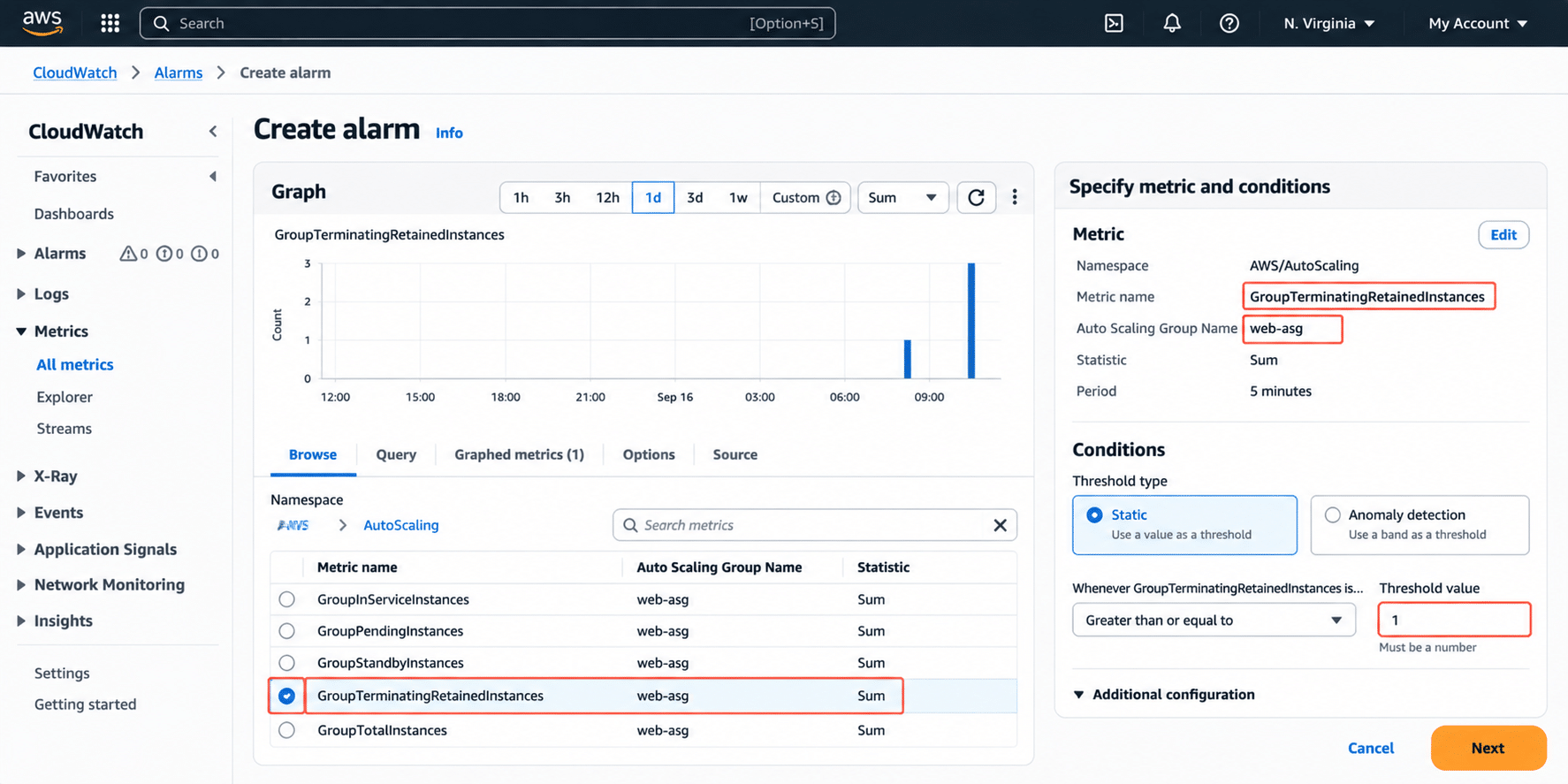
Check retained capacity and EC2 spend. Enable GroupTerminatingRetainedInstances and investigate any non-zero value. Use EC2 tags, Cost Explorer, or your Cost and Usage Report to trace spend to affected instances. AWS documents this CloudWatch metric specifically for instances in Terminating:Retained. (docs.aws.amazon.com)
What lifecycle hooks actually cost
A lifecycle hook pauses an instance transition while work such as bootstrap, draining, checkpointing, or state persistence finishes. AWS documents lifecycle hooks for instance launch, termination, Instance Refresh replacements, Capacity Rebalancing replacements, and warm-pool transitions. (docs.aws.amazon.com)A launch hook holds a new instance in Pending:Wait. AWS bills EC2 from launch, including time before InService, so slow initialization creates paid time before useful capacity is available. (docs.aws.amazon.com)
A termination hook holds an outgoing instance in Terminating:Wait. That does not always create double billing. The cost pattern depends on why Auto Scaling is terminating the instance.
| Termination trigger | Replacement behavior | Cost implication |
|---|---|---|
| Normal scale-in | Desired capacity decreases | No replacement is required solely to preserve the old capacity level |
| Unhealthy replacement | Capacity must be restored | Old and replacement capacity can overlap |
| Instance Refresh | Old capacity is replaced | Rollout behavior can create overlap |
| Capacity Rebalancing | Spot replacement starts proactively | Old and replacement Spot instances can overlap |
| Retention after hook failure | Retained instance leaves desired-capacity accounting | Replacement launches while retained capacity keeps billing |
How timeout settings change cost
HeartbeatTimeout is how long Auto Scaling waits for lifecycle completion or another heartbeat before applying DefaultResult. AWS currently allows 30 to 7,200 seconds when configuring the timeout, and put-lifecycle-hook defaults to 3,600 seconds when no value is specified. (docs.aws.amazon.com)GlobalTimeout is the outer limit across heartbeat extensions: 48 hours or 100 times HeartbeatTimeout, whichever is smaller.
These are ceilings, not target runtimes. If shutdown finishes in two minutes, call CompleteLifecycleAction at two minutes. For variable work, RecordLifecycleActionHeartbeat can restart the heartbeat window instead of forcing every event to use an oversized fixed timeout. (docs.aws.amazon.com)
Worked example: failed completion signal
This example is illustrative only. The $0.192 per hour rate is an assumption for showing the math, not a claim about the current public rate for every m5.xlarge configuration. EC2 prices vary by Region, operating system, tenancy, and purchase model. Validate your current rate with AWS pricing before using this estimate for budgeting.Assumptions
Instance rate: $0.192 per hour
Affected terminations: 20 per day
HeartbeatTimeout: 3,600 seconds
Actual cleanup: 120 seconds
Failure: CompleteLifecycleAction is never successfully called
Avoidable wait per event:
The default timeout itself does not create that bill. Repeated failed completion signaling does.
For broader EC2 cost modeling, see our Amazon EC2 pricing guide.
Retention changes the risk profile
AWS instance lifecycle policies can retain an instance when a termination lifecycle action is abandoned. Retention requires an instance lifecycle policy plus a termination lifecycle hook. With TerminateHookAbandon set to retain, an ABANDON result or qualifying timeout can move the instance to Terminating:Retained. (docs.aws.amazon.com)Retained instances do not count toward desired capacity. Auto Scaling launches replacement capacity while the retained instance continues to incur standard EC2 charges until manually terminated. (docs.aws.amazon.com)
For attribution, use consistent tags for the ASG, application, environment, and owner, then activate those tags for cost reporting. Our AWS cost allocation tags guide explains that workflow.
Monitor retained instances directly
AWS exposes GroupTerminatingRetainedInstances when Auto Scaling group metrics are enabled. Alarm when the count rises above your expected baseline, inspect activity history, complete any manual recovery, then terminate the retained instance with TerminateInstanceInAutoScalingGroup. (docs.aws.amazon.com)This gives engineers an operational signal before the cost is discovered on a later bill.
Automation cost needs its own math
Lifecycle-hook automation can use EventBridge, Lambda, SNS, SQS, or direct Lambda notification targets.AWS supports Lambda as a direct lifecycle-hook target through the CLI, CloudFormation, or SDK. The console uses EventBridge notifications by default. EventBridge remains useful for filtering, routing, and multiple destinations. (docs.aws.amazon.com)
Do not assume this automation is always free or negligible. Lambda cost depends on requests, duration, memory, architecture, and remaining free-tier allowance. AWS currently includes 1 million requests and 400,000 GB-seconds per month in the Lambda free tier. (aws.amazon.com)
EventBridge cost depends on event category, ingestion path, and delivery pattern. AWS management events are ingested by the EventBridge event bus at no charge, while other event types and routing patterns can be billable. (aws.amazon.com)
For a small lifecycle-hook workflow, automation charges may be modest relative to EC2 spend, but that is an inference, not a universal rule. Calculate the automation layer from your actual event volume and execution profile.
Spot instances have a harder deadline
Lifecycle hooks cannot prevent a Spot interruption. AWS documents an approximately two-minute interruption window, and the instance can still terminate while a lifecycle hook is running.Capacity Rebalancing can launch replacement Spot capacity after a rebalance recommendation. That can provide more time to move work, but it can also create temporary overlap while both instances run.
Design Spot cleanup to finish inside the interruption window rather than relying on a long HeartbeatTimeout.
Choose safer lifecycle-hook settings
Measure cleanup duration under production-like load.
Set HeartbeatTimeout around an observed high percentile plus operational margin.
Use heartbeats for legitimately variable work.
Choose CONTINUE when timeout should allow termination.
Use ABANDON with retention only when failure requires manual intervention.
Alarm on retained instances before enabling retention.
Test missing completion calls, automation failures, and timeout paths.
Fix waste before making commitments
Lifecycle-hook waste and commitment optimization are separate decisions.First remove unnecessary wait-state time, forgotten retained instances, and other avoidable capacity. Then evaluate the stable EC2 baseline that remains. Our EC2 pricing guide covers broader purchase-model tradeoffs, while our Auto Scaling and Savings Plans guide explains how commitment sizing interacts with changing fleet demand.
That sequence matters. Buying a Savings Plan against a fleet inflated by retained instances or short-lived replacement overlap can convert an operational problem into longer-lived commitment exposure. Our guide to common EC2 Savings Plan mistakes similarly recommends rightsizing before purchasing a commitment.
How Usage.ai reduces Auto Scaling waste
Fix lifecycle-hook and retained-instance waste first. Then we help optimize the stable EC2 spend that remains through our Flex Commitment Program.For eligible AWS workloads, Flex Commitments can provide up to 57% savings associated with a three-year AWS commitment while reducing long-term commitment exposure. Eligible commitments may also include cashback protection, and our fee is based on realized savings.
Flex Commitments do not fix misconfigured HeartbeatTimeout settings or retained instances, so resolve those issues first, then optimize commitment coverage on the remaining stable workload.
Fix lifecycle-hook waste, then optimize stable EC2 spend with less commitment exposure.
Frequently asked questions
Do Auto Scaling lifecycle hooks cost money?
Lifecycle hooks do not have a separate EC2 Auto Scaling service fee. You still pay for EC2 instances and any other AWS services used by the workflow.
Does a long HeartbeatTimeout automatically increase my bill?
No. If your action finishes early and calls CompleteLifecycleAction, the instance can leave the wait state before timeout. A long timeout becomes costly when the action stalls or fails to signal completion.
When does a termination hook create replacement overlap?
Overlap is relevant when Auto Scaling is replacing capacity, including unhealthy-instance replacements, Instance Refresh, Capacity Rebalancing, or retained-instance scenarios. Normal scale-in reduces desired capacity and does not require a replacement solely to preserve the previous fleet size.
How can I detect retained instances?
Enable Auto Scaling group metrics and monitor GroupTerminatingRetainedInstances. Investigate non-zero values with activity history, then terminate retained instances after required recovery or investigation.
Should I buy Savings Plans before fixing lifecycle-hook waste?
Treat them as separate steps. First remove waste and confirm your post-optimization EC2 baseline. Then size commitments around stable eligible usage so temporary capacity does not distort the decision.




