
 AWS
AWS Microsoft Azure
 Google Cloud

Replicated writes, regional reads, storage, GSIs, replica count, and optional features can all change the final cost. Adding Regions improves resilience and locality, but it also increases the amount of usage AWS has to bill.
For FinOps and engineering teams, the key question is not just how much one write costs. It is how that write is replicated, where reads are served, which indexes are updated, and which costs multiply across Regions.
In this guide, we break down DynamoDB Global Tables pricing, show how rWRUs and rWCUs are calculated, explain GSI and replica costs, and cover the AWS discount options that may reduce eligible spend.
What does DynamoDB Global Tables pricing include?
For planning, start with five core cost areas.| Cost component | How it is billed | Main cost driver |
|---|---|---|
| Replicated writes | rWRUs or rWCUs in every full replica | Write volume × replica count |
| Reads | RRUs or RCUs in the Region serving the read | Read volume and consistency |
| Storage | GB-month in every full replica | Table size × replicas |
| GSI writes | Standard WRUs or WCUs in every replica Region | Index count, item size, projections |
| Adding replicas | Restore charge per GB | Existing table size |
Other charges to check
The table above covers the main Global Tables cost model, not every possible DynamoDB charge.Depending on your configuration, also check:
point-in-time recovery and on-demand backups
DynamoDB Streams
CDC to Kinesis Data Streams or AWS Glue
exports and imports
DynamoDB Accelerator
AWS KMS requests
other enabled AWS services
How are replicated write costs calculated?
For an on-demand Global Table:For example, assume:
42.5 million 1 KB writes per month
two full replicas
DynamoDB Standard
$0.625 per million write units in US East (N. Virginia)
85M ÷ 1M × $0.625 = $53.13/month
This is an estimate using current N. Virginia pricing. Actual costs vary by Region, table class, item size, capacity mode, and enabled features.
If you are choosing a capacity model, see our DynamoDB On-Demand vs Provisioned guide.
How do GSIs affect Global Tables cost?
Global Secondary Index updates use standard WRUs or WCUs rather than replicated write units.Because Global Tables maintain the same GSI definition across replicas, index updates can create write consumption in every replica Region.
Suppose 42.5 million base-table writes update one GSI across two Regions:
Actual GSI consumption depends on item size, projection type, capacity mode, and whether the write changes indexed data.
Ways to reduce unnecessary GSI cost include:
use KEYS_ONLY or INCLUDE when full projection is unnecessary
remove overlapping indexes
use sparse indexes where appropriate
avoid indexes that support rarely used access patterns
What changed after the 2024 price reduction?
AWS reduced DynamoDB on-demand throughput pricing by 50% and Global Tables pricing by up to 67%, effective November 1, 2024.As AWS explains in its DynamoDB pricing reduction announcement, rWRUs and rWCUs now use the same unit pricing as equivalent standard write units.
The important point for a 2026 cost model is that adding replicas still multiplies the replicated write consumption.
Reserved capacity vs Database Savings Plans
These two commitment options work differently.| Option | Eligible DynamoDB usage | AWS-published savings |
|---|---|---|
| Reserved provisioned capacity | Eligible Standard-class RCUs and WCUs | Up to 54% for 1 year, 77% for 3 years |
| Database Savings Plans | Eligible DynamoDB usage | Up to 18% on-demand, 12% provisioned |
| Reserved capacity for rWCUs | Not supported | N/A |
Database Savings Plans instead use a 1-year dollar-per-hour spend commitment that can apply across eligible database usage and Regions.
AWS lists DynamoDB as eligible on its Database Savings Plans pricing page and publishes DynamoDB-specific discount ranges on the DynamoDB pricing page.
For Global Tables, validate the exact usage types covered by your applicable Savings Plans rates before sizing a commitment.
If reserved capacity and a Database Savings Plan can both apply to the same provisioned usage, reserved capacity is applied first.
For a deeper commitment comparison, read our DynamoDB Reserved Capacity guide.
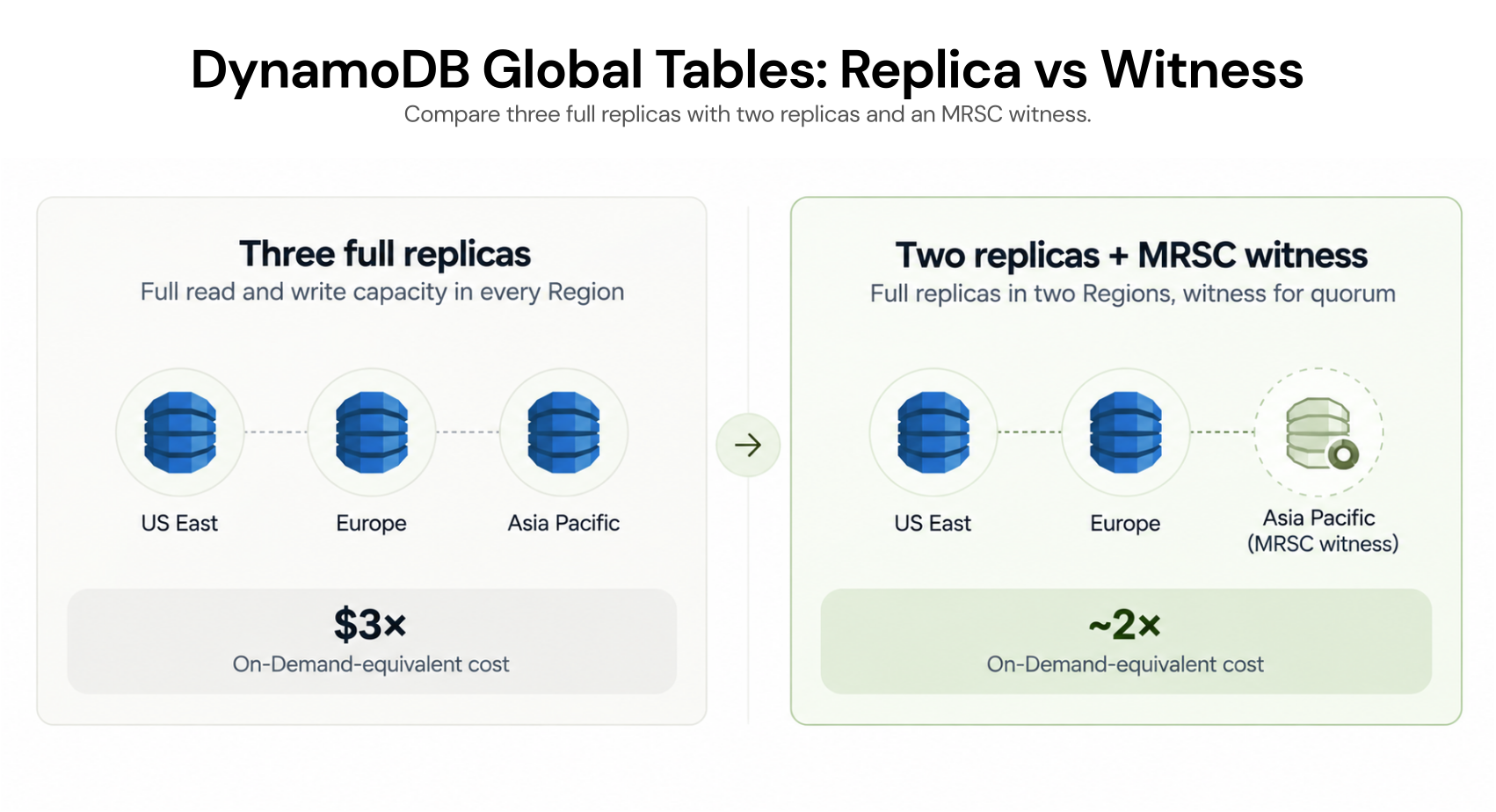
What does MRSC change?
DynamoDB Global Tables support Multi-Region Strong Consistency, or MRSC, in supported configurations.MRSC requires exactly three participating Regions. You can deploy:
three full replicas, or
two full replicas plus one witness
The witness cannot serve application reads or writes.
AWS states that the witness does not incur replicated write or storage costs.
How to estimate your Global Tables bill
Step 1: Measure writes
Start with application writes, item size, and write type.Standard writes consume units in 1 KB increments. Transactional writes consume more write units.
For MREC tables, TTL deletion is free in the Region where it occurs, but AWS charges replicated write usage when that deletion propagates to other replica Regions. MRSC does not support TTL.
Step 2: Count full replicas
Multiply replicated write usage by the number of full replicas.Step 3: Add reads by Region
Reads use 4 KB increments and vary by eventual, strong, or transactional consistency.Step 4: Add storage and table class
Confirm whether each replica uses DynamoDB Standard or Standard-IA before applying storage and request rates.Step 5: Calculate GSIs
Model each GSI separately from base-table replicated writes.Step 6: Include replica creation
Adding a replica containing existing data can trigger a restore charge based on the data restored.Step 7: Evaluate commitments
Compare on-demand, provisioned capacity, reserved capacity, and Database Savings Plans against the stable usage floor rather than short-term peaks.Worked monthly cost example
Consider a simplified two-Region on-demand Global Table using DynamoDB Standard:42.5M 1 KB writes
42.5M strongly consistent 4 KB reads, served from one Region
one GSI updated by every write
27 GB average storage in each Region
one 25 GB replica added during the month
| Component | Estimated cost |
|---|---|
| Replicated writes | $53.13 |
| One GSI across two replicas | $53.13 |
| Reads | $5.31 |
| Storage, 54 GB total | $13.50 |
| One-time 25 GB replica restore | $3.75 |
| Estimated first-month total | $128.81 |
Total calculated from unrounded components: $53.125 + $53.125 + $5.3125 + $13.50 + $3.75 = $128.8125, rounded to $128.81. The replica restore is one-time; recurring charges in this illustration total $125.06/month. Storage assumes free allowances are already consumed.
DynamoDB Global Tables cost checklist
Before adding another Region:Measure average and peak writes
Account for item size and transactional writes
Confirm the number of full replicas
Map reads by Region and consistency type
Confirm Standard or Standard-IA table class
Calculate storage per replica
Inventory every GSI
Model replicated TTL deletes where applicable
Include replica restore costs
Review optional DynamoDB features
Compare commitment options against stable usage
How Usage.ai Optimizes DynamoDB Costs
We analyze your DynamoDB usage and help size eligible commitments around stable database spend.With Flex Insured Commitments, teams can reduce commitment risk while taking advantage of eligible AWS commitment discounts.
If eligible usage drops and part of a qualifying Flex Commitment goes unused, cashback protection can cover the qualifying unused commitment exposure according to the Flex Commitment program terms. Cashback may be provided as cash or credits, depending on the applicable arrangement.
Our fee is based on realized savings, so if we do not generate savings, you do not pay a savings-based fee.
We are a cloud cost optimization and commitment-management company. DynamoDB, Global Tables, reserved capacity, and Database Savings Plans are AWS products. AWS controls pricing, eligibility, discounts, and billing mechanics. Rates and program rules can change, so verify current AWS documentation before making purchasing decisions.
Review your Global Tables usage, capacity model, existing coverage, and stable database spend before increasing commitment coverage.
Frequently asked questions
How are DynamoDB Global Tables writes billed?
AWS bills Global Table writes as rWRUs in on-demand mode or rWCUs in provisioned mode in every Region containing a full replica.
Does Global Tables replication have a cross-Region transfer fee?
No. AWS states that DynamoDB does not charge cross-Region data transfer fees for Global Tables replication.
Can DynamoDB reserved capacity cover replicated writes?
No. Reserved provisioned capacity cannot be purchased for rWCUs. It can cover eligible standard RCUs and WCUs.
Do GSIs increase DynamoDB Global Tables cost?
Yes. GSI updates use standard WRUs or WCUs in each replica Region and should be modeled separately from base-table replicated writes.
Can Database Savings Plans reduce DynamoDB costs?
Yes, for eligible usage. AWS currently publishes savings of up to 18% for DynamoDB on-demand throughput and 12% for provisioned throughput. Actual savings depend on eligibility, rates, commitment size, and utilization.




