
What Is AWS Billing and Cost Management? The Complete Guide for Cloud Cost Control

Cloud computing made infrastructure incredibly flexible, but it also made cloud spending harder to control. With just a few clicks, teams can launch hundreds of virtual machines, databases, and services across regions. While this agility accelerates development, it often leads to rapidly growing and unpredictable cloud bills.

This is where AWS Billing and Cost Management becomes essential. Using tools like Cost Explorer, AWS Budgets, Cost & Usage Reports, and Savings Plans recommendations, companies can monitor usage patterns, set spending alerts, and identify ways to reduce cloud costs.

However, while AWS provides strong visibility into cloud spending, many organizations still struggle with actively optimizing commitments and maximizing savings. This is why modern FinOps teams often combine AWS native billing tools with automation platforms that help increase commitment coverage and reduce risk.

By the end of this guide, you’ll have a complete understanding of what AWS Billing and Cost Management is, how it works, the key tools included in the suite, and best practices organizations use to monitor and optimize their AWS cloud spending.

What Is AWS Billing and Cost Management?

Image Source: AWS 

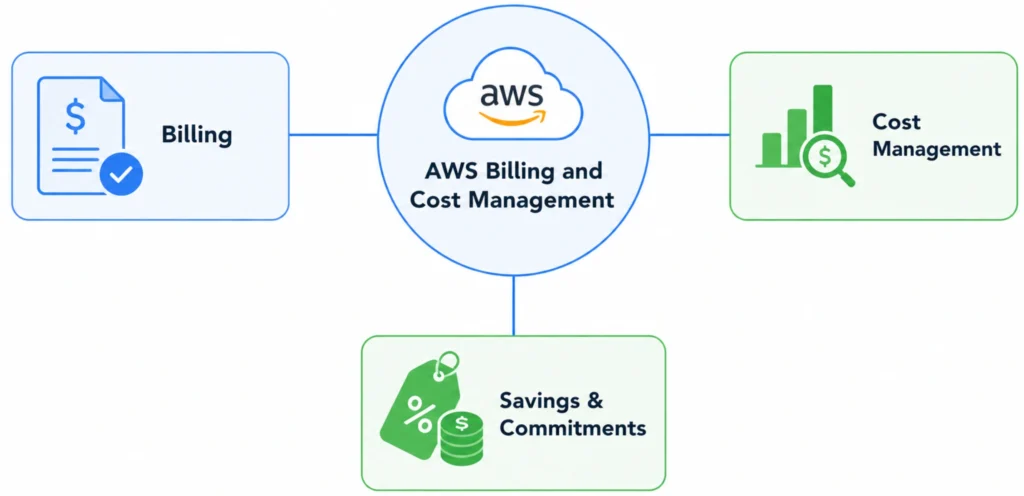
AWS Billing and Cost Management is a suite of tools provided by Amazon Web Services that helps organizations track, analyze, forecast, and control their cloud spending. It acts as the financial control center of an AWS account, giving teams visibility into how much they are spending, which services are generating costs, and how those costs change over time.

Through the AWS Billing and Cost Management console, users can:

  • Track real-time cloud spending
  • Analyze usage trends across AWS services
  • Set budgets and receive spending alerts
  • Generate detailed cost and usage reports
  • Manage commitments such as Savings Plans and Reserved Instances

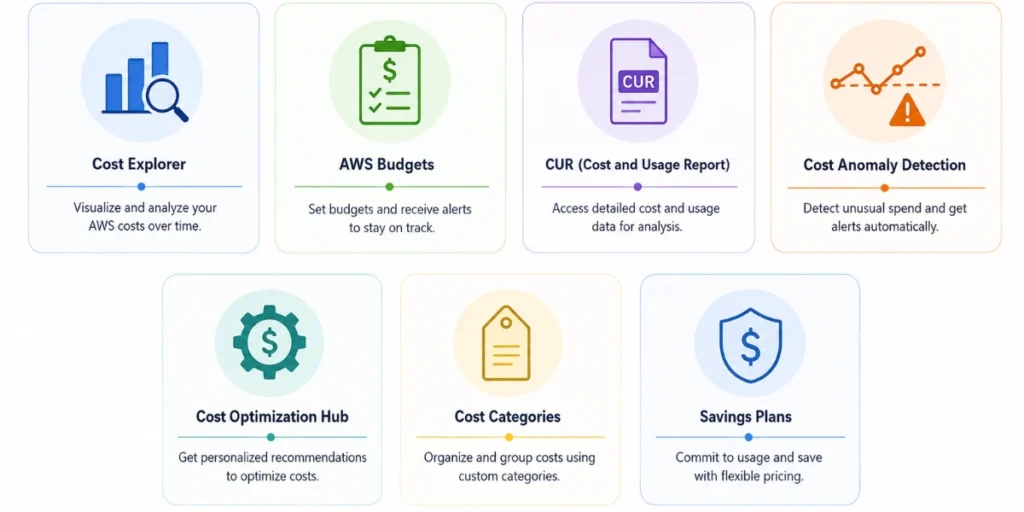
AWS Billing and Cost Management includes several integrated tools, such as Cost Explorer, AWS Budgets, Cost and Usage Reports, and Savings Plans recommendations that allow organizations to monitor spending trends, and identify opportunities to optimize cloud infrastructure.

Key Components of AWS Billing and Cost Management

AWS Billing and Cost Management includes several tools that help organizations monitor cloud spending across their AWS environments. Each tool focuses on a different part of cloud financial management, from cost visibility to budget alerts and detailed billing analysis.

Understanding how these tools work together is essential for building an effective AWS cost management strategy.

1. AWS Cost Explorer

Image Source: AWS

AWS Cost Explorer is a visualization and analytics tool that allows users to explore their AWS spending over time. It provides interactive charts and reports that show cost trends across services, regions, accounts, and usage types.

Teams can use Cost Explorer to identify which services are driving costs, analyze usage patterns, and forecast future cloud spending based on historical data.

Key capabilities include:

  • Visualizing AWS spending trends over time
  • Filtering costs by service, account, tag, or region
  • Identifying cost spikes or unusual usage patterns
  • Forecasting future cloud spending

For many organizations, Cost Explorer is the first place they go to investigate changes in their AWS bill.

2. AWS Budgets

Image Source: AWS

AWS Budgets allows organizations to set spending thresholds and receive alerts when costs exceed predefined limits. This helps teams proactively manage their cloud spending and avoid unexpected charges.

Budgets can be configured for different cost dimensions, such as:

  • Monthly total spending
  • Service-level costs
  • Account-level spending
  • Savings Plans or Reserved Instance usage

When spending reaches a specified percentage of the budget, such as 80% or 100%, AWS can automatically send notifications through email or Amazon SNS.

This makes AWS Budgets an essential tool for maintaining financial accountability across engineering teams.

3. AWS Cost and Usage Report (CUR)

Image Source: AWS 

The AWS Cost and Usage Report (CUR) is the most detailed billing dataset AWS provides. It contains comprehensive information about resource usage, service costs, pricing details, and discounts applied across an AWS account.

The report includes data such as:

  • Hourly resource usage
  • Service-level cost breakdowns
  • Reserved Instance and Savings Plan discounts
  • Resource IDs and account-level billing details

Because of its granularity, CUR is widely used by FinOps teams, data analysts, and cost optimization platforms to build custom cost dashboards and analytics pipelines.

4. AWS Savings Plans and Reserved Instances

Image Source: AWS

AWS also provides commitment-based pricing models that help organizations reduce cloud costs. Two of the most common options are Savings Plans and Reserved Instances (RIs).

These pricing models allow customers to commit to using a certain level of compute capacity for one or three years in exchange for significantly lower hourly rates compared to on-demand pricing. Savings can reach up to 66–72% depending on the workload and commitment term. 

Savings Plans offer more flexibility than Reserved Instances, as they apply across instance families and regions in many cases.

5. AWS Billing Dashboard

Image Source: AWS

The AWS Billing Dashboard serves as the main entry point for monitoring cloud costs. It provides a high-level overview of current spending, service-level costs, and usage trends across an AWS account.

From this dashboard, users can quickly navigate to:

  • Cost Explorer
  • Budgets
  • Cost and Usage Reports
  • Payment and invoice information
  • Savings Plans and Reserved Instances management

For many organizations, this dashboard acts as the central hub for cloud financial visibility.

Also read: Cloud Cost Analysis: How to Measure, Reduce, and Optimize Spend

AWS Billing vs AWS Cost Management: What’s the Difference?

Many AWS users use the terms AWS Billing and AWS Cost Management interchangeably, but they actually refer to two different aspects of cloud financial management. Understanding this distinction is important for organizations that want to effectively monitor and optimize their AWS spending.

In simple terms, AWS Billing focuses on how you are charged, while AWS Cost Management focuses on understanding and optimizing those charges.

AWS Billing

AWS Billing is responsible for tracking charges and generating invoices for all AWS services used within an account. It records the cost of every resource consumed, such as EC2 instances, storage, data transfer, and databases and aggregates them into a monthly bill.

The billing system calculates charges based on several factors, including:

  • Service pricing models (on-demand, reserved, or savings plans)
  • Resource usage duration (per second, per hour, or per request)
  • Data transfer and storage consumption
  • Regional pricing differences

AWS then compiles this information into invoices that organizations can view through the Billing Dashboard.

Key capabilities of AWS Billing include:

  • Viewing invoices and payment history
  • Tracking service-level charges
  • Managing payment methods and tax settings
  • Accessing billing reports and transaction records

These billing records provide the financial foundation for all AWS cost analysis.

AWS Cost Management

While billing tracks charges, AWS Cost Management focuses on analyzing and controlling cloud spending. It provides tools that allow organizations to understand usage patterns, forecast costs, and identify opportunities to reduce expenses.

AWS Cost Management includes services such as:

  • AWS Cost Explorer – interactive visualization of spending trends
  • AWS Budgets – alerts when costs exceed defined thresholds
  • AWS Cost and Usage Reports (CUR) – detailed datasets for cost analysis
  • Savings Plans and Reserved Instance recommendations – commitment optimization tools

These tools help teams answer questions such as:

  • Which AWS services are driving the highest costs?
  • How are costs trending over time?
  • Where can we reduce spending or improve efficiency?
  • Are we fully utilizing our commitment discounts?

For FinOps teams, cost management tools provide the operational insights needed to control cloud spending and improve financial efficiency.

Key Differences Between AWS Billing vs AWS Cost Management
Feature AWS Billing AWS Cost Management
Primary purpose Generate invoices and track charges Analyze and optimize cloud spending
Focus Financial transactions Cost visibility and optimization
Data provided Service charges and billing records Usage analytics and forecasting
Key tools Billing dashboard, invoices, payment management Cost Explorer, Budgets, CUR, Savings Plans
Main users Finance and accounting teams FinOps, DevOps, and engineering teams

Many organizations initially focus only on billing visibility, but controlling cloud costs requires deeper analysis of usage patterns and pricing models.

For example, AWS billing might show that a company spent $50,000 on EC2 in a month, but cost management tools reveal:

  • Which workloads generated those costs
  • Whether instances are underutilized
  • If commitment discounts such as Savings Plans or Reserved Instances are being fully leveraged

This is why modern cloud teams adopt FinOps practices, combining billing transparency with cost optimization strategies to maintain efficient cloud spending.

Also read: AWS Budgets vs Cost Explorer: Key Differences Explained

How AWS Billing and Cost Management Works

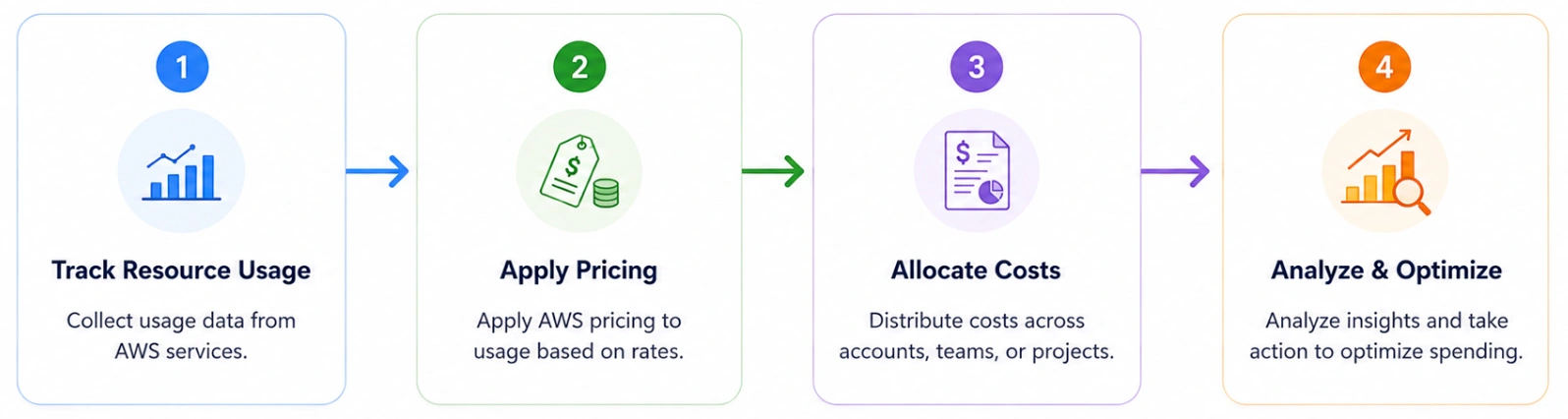
AWS Billing and Cost Management works by collecting usage data from every AWS service in your account, applying the relevant pricing model, and aggregating those charges into a centralized billing system. This system continuously tracks resource consumption, such as compute hours, storage usage, and network traffic and converts that usage into costs based on AWS pricing rules.

AWS billing workflow follows four key steps: usage tracking, cost calculation, cost allocation, and reporting. Understanding this flow helps organizations better interpret their AWS invoices and identify opportunities to optimize spending.

1. AWS Tracks Resource Usage

Every time you run a workload on AWS, such as launching an EC2 instance, storing files in S3, or running a database on RDS, AWS automatically records the usage of that resource.

This usage data may include:

  • Compute hours consumed by virtual machines
  • Storage used in services like Amazon S3 or EBS
  • Data transferred between services or regions
  • API requests made to AWS services

Each service reports its usage to the AWS billing system, which continuously aggregates the data across your entire account.

For example:

  • Running an EC2 instance for 10 hours generates compute usage charges
  • Storing 1 TB of data in S3 generates storage charges
  • Transferring data between regions generates data transfer costs

These usage records form the basis for AWS billing calculations.

2. AWS Applies Pricing Models

Once usage is recorded, AWS calculates costs based on the pricing model associated with each service.

The most common pricing models include:

AWS Pricing Models
Pricing Model Description
On-Demand Pricing Pay only for the resources you use, with no long-term commitment
Savings Plans Commit to a consistent level of usage for 1–3 years in exchange for discounted pricing
Reserved Instances (RIs) Reserve specific instance capacity for a fixed term at a reduced rate
Spot Instances Use spare AWS capacity at significantly discounted prices

These pricing models allow organizations to balance flexibility and cost efficiency depending on their workload patterns. For example, an on-demand EC2 instance may cost significantly more per hour than the same instance covered by a Savings Plan or Reserved Instance commitment.

3. AWS Allocates Costs Across Accounts and Resources

AWS allows organizations to allocate and categorize costs using tagging and account structures. This helps companies understand how cloud spending is distributed across teams, projects, or environments.

Two key mechanisms are used for cost allocation:

1. Cost Allocation Tags

Tags are metadata labels applied to AWS resources. AWS can group and report costs based on these tags. For example:

  • Environment: Production
  • Team: Data Engineering
  • Project: Analytics Platform

2. AWS Organizations (Consolidated Billing)

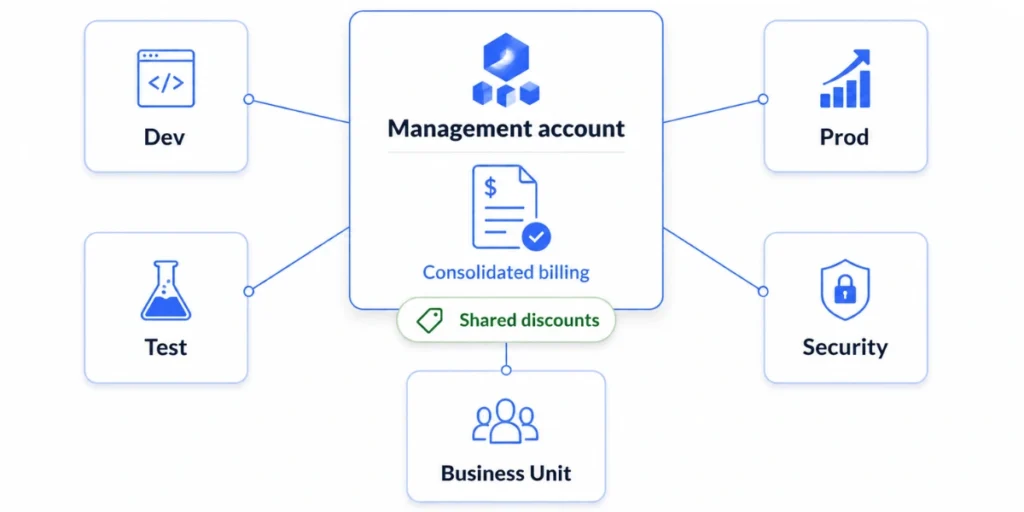
Large companies often operate multiple AWS accounts. AWS Organizations allows these accounts to be grouped under a single billing structure so organizations can consolidate invoices, share Savings Plans across accounts and track costs across departments. 

This approach gives organizations more visibility into which teams or workloads are responsible for specific costs.

4. AWS Generates Billing Reports and Analytics

After usage is recorded, pricing applied, and costs allocated, AWS generates billing reports that allow organizations to analyze their cloud spending. These reports are accessible through the AWS Billing and Cost Management console, where users can explore spending through tools such as:

  • Cost Explorer for interactive cost analysis
  • AWS Budgets for cost alerts
  • Cost and Usage Reports (CUR) for detailed billing datasets

These tools provide the insights needed to understand cost drivers, forecast future spending, and identify areas for optimization.

While AWS provides powerful billing visibility, many organizations discover that visibility alone does not automatically reduce cloud costs. Teams still need to actively manage commitments, monitor usage changes, and continuously optimize infrastructure to maximize savings.

This is why modern FinOps practices combine AWS billing insights with automated optimization strategies to ensure that cloud spending remains efficient as workloads scale.

How to Access the AWS Billing and Cost Management Console

You can access AWS Billing and Cost Management through the AWS Management Console. This dashboard provides a centralized place to view your AWS charges, invoices, and cost analysis tools.

To open the Billing and Cost Management console:

  1. Sign in to the AWS Management Console.
  2. In the top-right corner, choose your account name or account ID.
  3. From the dropdown menu, select Billing and Cost Management.
  4. The Billing Dashboard will open, where you can view current charges, invoices, and cost summaries.

From the left navigation menu in the Billing console, you can access key tools such as:

  • Cost Explorer – analyze and visualize spending trends
  • AWS Budgets – set cost thresholds and alerts
  • Cost and Usage Reports (CUR) – download detailed billing datasets
  • Savings Plans – view and manage commitment discounts
  • Bills and Payments – review invoices and payment history

Why FinOps Teams Focuses on AWS Billing and Cost Management

As organizations scale their cloud infrastructure, managing costs becomes significantly more complex. Modern cloud environments often consist of hundreds or thousands of resources across multiple services, regions, and accounts. Without proper cost visibility, it becomes difficult for engineering and finance teams to understand where money is being spent and how those costs evolve over time.

AWS operates on a usage-based pricing model, meaning organizations pay for the exact resources they consume. While this model provides flexibility and scalability, it can also lead to unpredictable monthly bills if usage patterns change rapidly. For example, a sudden spike in traffic, a misconfigured resource, or unused infrastructure left running can significantly increase cloud spending.

AWS Billing and Cost Management provides the visibility needed to address these challenges. By offering tools that track spending, analyze cost drivers, and forecast future usage, AWS enables organizations to monitor their cloud financial performance more effectively. Teams can identify which services contribute the most to costs, detect anomalies in spending patterns, and implement controls such as budgets and alerts.

For FinOps teams, these capabilities are especially important. FinOps is the practice of bringing engineering, finance, and operations together to manage cloud spending efficiently. AWS billing and cost management tools provide the data foundation FinOps teams rely on to improve accountability, allocate costs across teams, and continuously optimize infrastructure spending as cloud environments grow.

Best Practices for Managing AWS Billing and Cost Management

While AWS provides powerful billing and cost visibility tools, organizations still need the right processes and strategies to effectively control and optimize their cloud spending. Without clear governance, even well-monitored environments can experience unnecessary cost growth.

Below are some best practices that FinOps teams commonly follow to improve cost control within AWS environments.

1. Implement Cost Allocation Tags

Cost allocation tags allow organizations to categorize cloud resources based on teams, projects, environments, or business units. By applying consistent tagging policies, companies can break down AWS costs and understand which workloads or departments are responsible for specific expenses.

Common tagging structures include:

  • Environment: Production / Staging / Development
  • Team: Data / Platform / Marketing
  • Project: Analytics / AI Platform

Once these tags are activated in AWS Billing, cost management tools such as Cost Explorer and Cost and Usage Reports can generate reports that attribute spending to specific teams or workloads.

2. Set Budgets and Cost Alerts

One of the simplest ways to prevent unexpected charges is to configure AWS Budgets with automated alerts.

Organizations typically set:

  • Monthly cost budgets
  • Service-specific spending limits
  • Usage thresholds for critical resources

For example, a team may configure a budget alert to notify stakeholders when spending reaches 80% of the monthly limit. These alerts allow teams to investigate cost increases early rather than discovering them after the billing cycle ends.

3. Monitor Cost Trends Regularly

Cloud costs can change rapidly due to new deployments, traffic spikes, or configuration changes. Regularly reviewing spending trends helps teams detect anomalies and identify optimization opportunities.

Using AWS Cost Explorer, teams can analyze:

  • Daily or monthly cost trends
  • Service-level spending breakdowns
  • Region-level cost distribution
  • Changes in usage patterns over time

Frequent cost monitoring is a core FinOps practice that helps organizations maintain financial accountability across engineering teams.

4. Optimize Pricing Models and Commitments

Many organizations rely heavily on on-demand pricing, which provides flexibility but is typically the most expensive option. AWS offers discounted pricing models such as Savings Plans and Reserved Instances that can significantly reduce compute costs for predictable workloads.

These commitment-based pricing options can deliver savings of up to 66–72% compared to on-demand pricing when used correctly.

However, selecting the right commitment level requires careful analysis of usage patterns. Overcommitting may lead to unused commitments, while undercommitting results in lost savings opportunities.

5. Establish FinOps Governance

As cloud usage grows, organizations benefit from establishing a FinOps framework that brings engineering, finance, and operations teams together.

A strong FinOps practice typically includes:

  • Regular cost review meetings
  • Shared accountability between engineering and finance teams
  • Automated cost reporting and dashboards
  • Continuous optimization of infrastructure usage

This collaborative approach ensures cloud spending remains aligned with business objectives while enabling teams to scale infrastructure efficiently.

Challenges With AWS Native Billing and Cost Management Tools

While AWS provides powerful tools for tracking and analyzing cloud spending, many organizations discover that visibility alone does not automatically lead to cost optimization. Native AWS billing tools are primarily designed to help teams understand their spending, but they often require significant manual analysis and ongoing operational effort to translate insights into real cost savings.

One of the most common challenges is the complexity of cloud pricing models. AWS services offer multiple pricing options, such as on-demand pricing, Savings Plans, Reserved Instances, and Spot Instances, each with different discount structures and commitment terms. Determining the optimal pricing strategy for dynamic workloads can be difficult, particularly for organizations running hundreds or thousands of resources across multiple services.

Another challenge is commitment management. Savings Plans and Reserved Instances can significantly reduce cloud costs, but they require organizations to predict future usage and commit to a certain level of spending for one or three years. If usage decreases unexpectedly, companies may end up paying for commitments they no longer fully utilize. On the other hand, under-committing means leaving potential savings unrealized.

Many teams also struggle with data fragmentation and operational overhead. While tools like Cost Explorer and Cost and Usage Reports provide valuable insights, they often require additional analytics, dashboards, and manual monitoring to identify optimization opportunities. FinOps teams frequently spend substantial time analyzing billing data instead of implementing cost improvements.

Because of these challenges, many organizations augment AWS’s native cost management tools with automation platforms and FinOps tooling that help continuously analyze usage patterns, optimize commitments, and reduce the operational burden of cloud cost management.

Also read: What Is the Difference Between Cloud Cost Optimization and Cloud Cost Management?

AWS Billing and Cost Management Use Cases

Organizations use AWS Billing and Cost Management in different ways depending on the size of their cloud environment, the number of teams involved, and the complexity of their infrastructure. From startups running a few workloads to enterprises managing thousands of resources, these tools help teams maintain financial visibility and control over cloud spending.

Below are some of the most common real-world use cases.

1. Monitoring Cloud Spending Across Services

One of the primary use cases of AWS Billing and Cost Management is tracking how much different AWS services cost over time. As organizations adopt more services, such as compute, storage, databases, and analytics, it becomes important to understand which services contribute the most to overall cloud spending.

Using tools like Cost Explorer, teams can:

  • Analyze spending trends across AWS services
  • Identify the largest cost drivers in their infrastructure
  • Detect unexpected increases in usage or spending
  • Forecast future cloud costs based on historical data

This level of visibility allows organizations to investigate cost anomalies and optimize workloads more effectively.

2. Allocating Cloud Costs Across Teams and Projects

Large organizations often run multiple teams, applications, and environments within the same AWS account structure. AWS Billing and Cost Management enables companies to allocate costs across departments using cost allocation tags and account-level billing structures.

For example, organizations can track costs by:

  • Team or department
  • Product or application
  • Environment (production, staging, development)
  • Business unit or project

This helps finance and engineering teams understand which parts of the organization are responsible for specific cloud costs, improving accountability and internal cost reporting.

3. Setting Budgets and Preventing Unexpected Charges

Another common use case is setting spending limits and alerts to prevent unexpected cloud bills. AWS Budgets allows organizations to define cost thresholds and automatically notify teams when spending approaches or exceeds those limits.

Teams commonly configure budgets for:

  • Monthly total cloud spending
  • Service-specific costs
  • Account-level budgets
  • Savings Plans and Reserved Instance usage

These alerts help teams detect issues early, such as misconfigured resources or sudden spikes in traffic before they result in significantly higher cloud bills.

How Modern FinOps Teams Optimize AWS Costs

Modern FinOps teams treat cloud cost management as a continuous process that combines cost visibility, engineering collaboration, and automated optimization strategies.

The first priority for most FinOps teams is improving cost visibility across services, teams, and environments. By using tools such as AWS Cost Explorer and Cost and Usage Reports, organizations analyze spending patterns and identify the services or workloads responsible for the largest share of cloud costs. This visibility allows teams to detect anomalies, investigate unexpected spending increases, and prioritize optimization efforts.

Another critical focus area is commitment optimization. AWS offers discounted pricing models such as Savings Plans and Reserved Instances that can reduce compute costs significantly compared to on-demand pricing. FinOps teams analyze historical usage data to determine how much infrastructure demand is predictable and safe to cover with commitments. Increasing commitment coverage for stable workloads is one of the most effective ways to lower long-term cloud spending.

However, commitment management can be difficult because cloud workloads are dynamic. Traffic patterns change, services evolve, and infrastructure requirements shift over time. To address this, many organizations continuously evaluate their usage patterns and adjust commitments as their environments evolve.

Automation also plays a growing role in modern cloud cost optimization. Instead of relying solely on manual analysis of billing data, organizations increasingly adopt tools that automatically analyze usage trends, generate commitment recommendations, and help teams capture savings opportunities faster. This approach reduces the operational burden on FinOps teams while ensuring that optimization decisions keep pace with changes in infrastructure usage.

As a result, today FinOps practices combine AWS billing insights, usage analytics, and automated optimization workflows to ensure that cloud spending remains efficient while organizations continue to scale their infrastructure.

How Usage.ai Extends AWS Billing and Cost Management

AWS Billing and Cost Management provides the data foundation for understanding cloud spending, but many organizations still struggle to translate billing insights into consistent cost savings. Native AWS tools primarily focus on monitoring and reporting usage, which means teams often need additional processes and expertise to actively optimize cloud costs.

Usage.ai extends AWS’s billing capabilities by helping organizations automate commitment optimization and safely increase coverage of discounted pricing models. Instead of relying on manual analysis of billing reports, the platform continuously analyzes cloud usage patterns and identifies opportunities to capture additional savings.

Key capabilities include:

  • Automated commitment recommendations: Usage.ai continuously analyzes billing and usage data to recommend the optimal mix of Savings Plans, Reserved Instances, or flexible commitments.
  • Commitment purchase automation: Teams can approve recommended commitments directly through the platform, reducing the manual effort required to manage commitment strategies.
  • 24-hour recommendation refresh cycle: Usage.ai updates optimization recommendations daily, allowing organizations to react faster to changing infrastructure usage compared to slower update cycles in some native tools.
  • Cashback protection for unused commitments: If cloud usage drops and commitments become underutilized, Usage.ai provides cashback according to contract terms, helping reduce the financial risk associated with long-term commitments.
  • Increased commitment coverage: By reducing commitment risk, organizations can safely increase the percentage of infrastructure covered by discounted pricing models.

In practice, many organizations use AWS Billing and Cost Management tools to monitor and analyze cloud spending, while platforms like Usage.ai help automate optimization decisions and continuously improve cost efficiency.

Discover how much you could actually save on AWS with better commitment coverage. Run a free AWS Savings Test to uncover optimization opportunities in your cloud spending.

Frequently Asked Questions

1. What is AWS Billing and Cost Management?

AWS Billing and Cost Management is a set of tools in the AWS console that helps organizations track cloud spending, analyze usage patterns, and manage costs. It provides dashboards, reports, and alerts that allow teams to monitor AWS charges, forecast spending, and optimize infrastructure costs.

2. What tools are included in AWS Billing and Cost Management?

AWS Billing and Cost Management includes several tools for monitoring and analyzing cloud spending, such as AWS Billing Dashboard, AWS Cost Explorer, AWS Budgets, Cost and Usage Reports (CUR) and Savings Plans and Reserved Instance management. 

3. What is AWS Cost Explorer?

AWS Cost Explorer is a visualization tool that helps users analyze and forecast AWS spending. It provides interactive charts that show cost trends by service, region, account, or tag. Teams use Cost Explorer to identify cost drivers, monitor spending patterns, and forecast future cloud costs.

4. What is AWS Cost and Usage Report (CUR)?

The AWS Cost and Usage Report (CUR) is the most detailed billing dataset provided by AWS. It includes granular information about resource usage, service charges, pricing details, and applied discounts. Organizations often export CUR data to analytics tools to build custom dashboards and perform advanced cost analysis.

5. What is the difference between AWS Billing and AWS Cost Management?

AWS Billing focuses on tracking charges and generating invoices, while AWS Cost Management provides tools to analyze and optimize cloud spending. Billing shows what you owe, while cost management tools like Cost Explorer and Budgets help teams understand and control their cloud costs.

6. How often does AWS update billing data?

AWS billing data is typically updated multiple times per day, allowing users to monitor near real-time spending trends. However, some detailed datasets, such as Cost and Usage Reports may take longer to process depending on configuration and reporting schedules.

7. What is AWS consolidated billing?

AWS consolidated billing allows organizations using AWS Organizations to combine billing across multiple AWS accounts into a single payment structure. This enables centralized cost visibility, shared Savings Plan discounts, and simplified financial reporting for companies managing multi-account cloud environments.

This is some text inside of a div block.

Get started for free

Book  Demo

Share this post

You may like these articles

See all
What Are Commitment-Based Discounts in Multi-Cloud Services?
All Articles
Cloud Cost Optimization

What Are Commitment-Based Discounts in Multi-Cloud Services?

Learn what commitment-based discounts are, how AWS, GCP, and Azure offer them, and how modern FinOps teams use automated platforms to maximize savings and reduce risk.

March 16, 2026
3
 min read
What Is AWS Billing and Cost Management? The Complete Guide for Cloud Cost Control
All Articles
New-Releases
AWS

What Is AWS Billing and Cost Management? The Complete Guide for Cloud Cost Control

Learn how AWS Billing and Cost Management works, including Cost Explorer, Budgets, Savings Plans, and best practices to monitor and optimize AWS cloud spending.

March 16, 2026
3
 min read
Introduction to Cloud Unit Economics: A Comprehensive Guide for DevOps and FinOps Teams
All Articles
New-Releases

Introduction to Cloud Unit Economics: A Comprehensive Guide for DevOps and FinOps Teams

Learn what cloud unit economics is, how to calculate cost per user or request, and how DevOps and FinOps teams optimize infrastructure efficiency.

March 11, 2026
3
 min read

Save towards your growth

Thank you! Your submission has been received!
Oops! Something went wrong while submitting the form.