.png)



Amazon Aurora DSQL is the most architecturally different database AWS has launched since DynamoDB. It is not a managed version of PostgreSQL. It is not Aurora PostgreSQL Serverless v2 with a different billing model. It is a ground-up redesign of a relational database for a single purpose: globally distributed, active-active OLTP workloads that need PostgreSQL compatibility, strong consistency across regions, and serverless economics.
Aurora DSQL entered preview at AWS re:Invent in November 2024 and reached general availability on May 27, 2025. It is available in select AWS regions with expansion continuing through 2026. The service addresses a genuinely hard problem: providing strongly consistent SQL transactions across multiple geographically separated regions without the performance penalties that traditional distributed databases impose.
For most teams, the relevant questions are: what does it actually do, what does it cost, what standard PostgreSQL features does it not support, and when is it the right choice over Aurora Serverless v2 or RDS PostgreSQL? This guide answers all four.
See exactly what you’re overpaying in under 60 seconds. Try the Calculator for free →
What Problem Aurora DSQL Is Built to Solve
The traditional approach to global database availability is active-passive replication: one primary region handles all writes, and secondary regions receive replicated read copies. A user in Tokyo reading from a replicated copy gets fast reads. A user in Tokyo writing to the database has that write routed to us-east-1, processed there, and replicated back — introducing cross-region write latency of 100-300ms and making the application fundamentally dependent on a single primary region.
Active-active multi-region databases solve this by allowing writes in any region. But providing strong consistency (ensuring that a read in any region sees the most recent committed write from any other region) across geographically distributed nodes is the fundamental challenge of distributed databases. Most solutions either sacrifice strong consistency (eventual consistency) or impose significant write latency penalties (synchronous replication across regions for every commit).
Aurora DSQL’s approach: disaggregate the database into separate components, use Optimistic Concurrency Control to allow transactions to proceed without locks, and check for conflicts at commit time rather than during execution. This allows reads to be served locally in any region at low latency, while writes are validated globally at commit time. The trade-off: conflicting writes fail with an error code (SQLSTATE 40001) that the application must handle with a retry.
Also read: AWS Database Savings Plans
The Disaggregated Architecture: Four Components
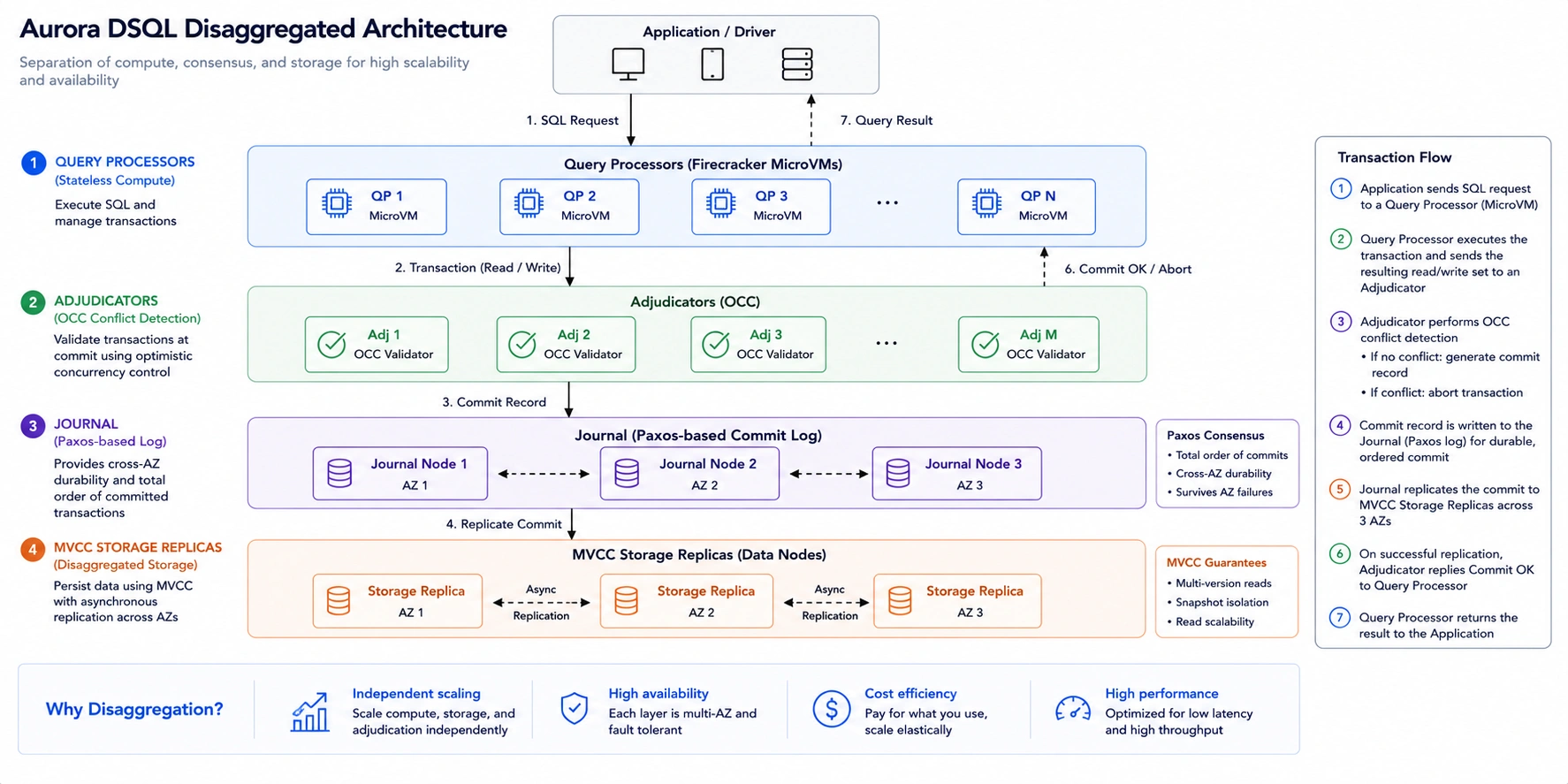
Aurora DSQL separates the functions of a traditional database into four independent components. Understanding this architecture explains both its strengths and its constraints. Source: GitHub deep dive by RDarrylR (March 2026) and AWS official documentation.
Query Processors (Firecracker MicroVMs)
Query Processors are stateless compute units that handle SQL parsing, query planning, and execution. They run in AWS Firecracker MicroVMs — the same lightweight virtualization used by AWS Lambda. Because Query Processors are stateless, they can be instantiated and terminated instantly, enabling true scale-to-zero behavior. When no queries are running, no Query Processors are active and no compute charges accrue.
This is why Aurora DSQL scales to zero when idle — there are no instances keeping warm. The first query after an idle period has a brief cold-start latency as Query Processors are instantiated. For applications with periodic activity separated by idle periods, this cold-start is a minor one-time cost per session that scales better than paying for instances 24/7.
Adjudicators
Adjudicators are the conflict detection layer. When a write transaction is committed, the Adjudicator validates whether the transaction’s read set is still current — meaning no other transaction has modified the same data since this transaction began reading. If the read set is current, the commit succeeds. If another transaction has committed a conflicting change, the Adjudicator rejects the transaction with SQLSTATE 40001 (serialization failure), and the application must retry.
This is Optimistic Concurrency Control: the system is optimistic that most transactions will not conflict, so it does not acquire locks during execution. Conflicts are detected and resolved at commit time rather than blocking execution. For workloads where the same rows are rarely written by concurrent transactions (which is the majority of well-designed OLTP schemas), OCC delivers better throughput than pessimistic locking by eliminating lock contention entirely.
The Journal (Paxos-Based Log)
The Journal is a Paxos-consensus-based write-ahead log that provides cross-AZ durability. Every committed transaction is written to the Journal before being acknowledged to the application. The Journal’s Paxos protocol ensures that the committed transaction record is replicated across multiple AZs before the commit is confirmed. For multi-region clusters, the Journal coordinates between regions through a witness region that stores only encrypted Journal entries for quorum — not full data copies.
MVCC Storage Replicas
MVCC (Multi-Version Concurrency Control) storage replicas maintain the actual table data across three AZs in each active region. The storage layer is separate from the compute layer, which is why Aurora DSQL storage continues to exist and accrue charges even when the database is idle (no Query Processors are running). Storage is $0.33/GB-month, billed continuously regardless of query activity. Source: cloudburn.io (April 2026) and andrewbaker.ninja (April 2026) both citing AWS official.
Optimistic Concurrency Control: What It Means for Your Application
OCC is the most important architectural choice in Aurora DSQL for application developers to understand. It changes the transaction behavior in ways that require explicit application code changes compared to standard PostgreSQL.
How OCC Works in DSQL
In standard PostgreSQL, write transactions acquire row-level locks. When two transactions try to modify the same row, the second transaction waits for the first to commit or roll back before proceeding. This prevents conflicts but can cause lock contention and deadlocks.
In Aurora DSQL, write transactions execute without acquiring locks. Both transactions run in parallel against their respective snapshots of the data. At commit time, the Adjudicator checks whether another concurrently committed transaction has modified any row read by a transaction. If yes: the later transaction receives SQLSTATE 40001 and must be retried by the application. If no: the commit succeeds immediately. Source: AWS official Aurora DSQL concurrency control documentation.
What Applications Must Handle
Every write transaction in your application code must be wrapped in a retry loop that catches SQLSTATE 40001 and retries the entire transaction with exponential backoff. AWS recommends implementing idempotent transaction logic where possible — designing transactions so that retrying them produces the same result. Source: AWS official Aurora DSQL documentation.
Read-only transactions are conflict-free by design. They do not go through the Adjudicator conflict check. Read-only transactions complete without any possibility of a serialization error and with zero commit latency. For read-heavy workloads with occasional writes, this means most application operations are immune to OCC retries.
OCC and high-write contention: Aurora DSQL is NOT appropriate for workloads where many concurrent transactions frequently modify the same rows. Examples: inventory counters for a popular item, real-time leaderboard updates, high-frequency account balance modifications. In these patterns, OCC retry rates become very high, causing retry amplification that degrades throughput and increases latency. For high-contention write patterns, Aurora PostgreSQL Serverless v2 with pessimistic locking is the correct choice.
Isolation Level
Aurora DSQL provides one isolation level equivalent to PostgreSQL’s REPEATABLE READ. You cannot choose a different isolation level. Specifically: SERIALIZABLE isolation is not supported (DSQL’s OCC provides a different consistency model), and READ COMMITTED isolation is not supported. If your application relies on READ COMMITTED behavior (which is the default PostgreSQL isolation level), you will need to evaluate whether REPEATABLE READ semantics are acceptable for your workload. Source: AWS Database Blog (May 2026).
Aurora DSQL Pricing: The DPU Model
Aurora DSQL uses a fundamentally different pricing model from all other Aurora variants. There are no ACUs, no instance types, no provisioned capacity. Billing uses two components: DPUs (Distributed Processing Units) for all database activity, and storage for data retained. Source: AWS official Aurora DSQL pricing page.
Last verified: June 2026. All rates from cloudburn.io (April 2026) and andrewbaker.ninja (April 2026) citing AWS official. Verify current rates at aws.amazon.com/rds/aurora/dsql/pricing/ — rates change.
| Component | Rate (US East) | Notes |
| DPU (Distributed Processing Unit) | $8.00/million | Unified metric: covers ALL compute AND I/O. No separate I/O line item unlike other Aurora variants. DPUs sub-divide into ComputeDPU and I/O-DPU visible in CloudWatch. |
| Storage | $0.33/GB-month | Billed continuously even when database is idle (no DPU charges). Independent of query activity. |
| Multi-region write replication | ~50% more DPUs | Cross-region replication of write transactions. Single-region base DPU x 1.5 for 2-region active-active clusters. Source: cloudburn.io pricing calculator. |
| Idle state | $0.00 DPU | True scale-to-zero. No hourly minimum. Only storage billed when no queries are running. |
| Free tier (permanent) | 100,000 DPUs + 1 GB storage/month | No 12-month expiry. Permanent ongoing free tier. One of the most generous free tiers in AWS managed database services. |
| Data transfer | Standard AWS rates | Same data transfer rates as other AWS services. Verify at aws.amazon.com/rds/aurora/dsql/pricing/. |
DPU rate $8.00/million and storage $0.33/GB-month verified from cloudburn.io (April 2026) and andrewbaker.ninja (April 2026) both citing AWS official Aurora DSQL pricing. Multi-region ~50% DPU premium from cloudburn.io pricing calculator (January 2026). Verify all current rates at aws.amazon.com/rds/aurora/dsql/pricing/ — rates change.
What Is a DPU and How Many Will You Consume?
A DPU (Distributed Processing Unit) is a unified metric that combines compute and I/O into a single billing number. Unlike standard Aurora, which bills compute (ACU-hours) and I/O (per million requests) separately, DSQL rolls both into DPUs. This simplifies cost modeling but makes it harder to estimate costs before running the workload, because DPU consumption depends on query complexity, transaction size, and concurrency.
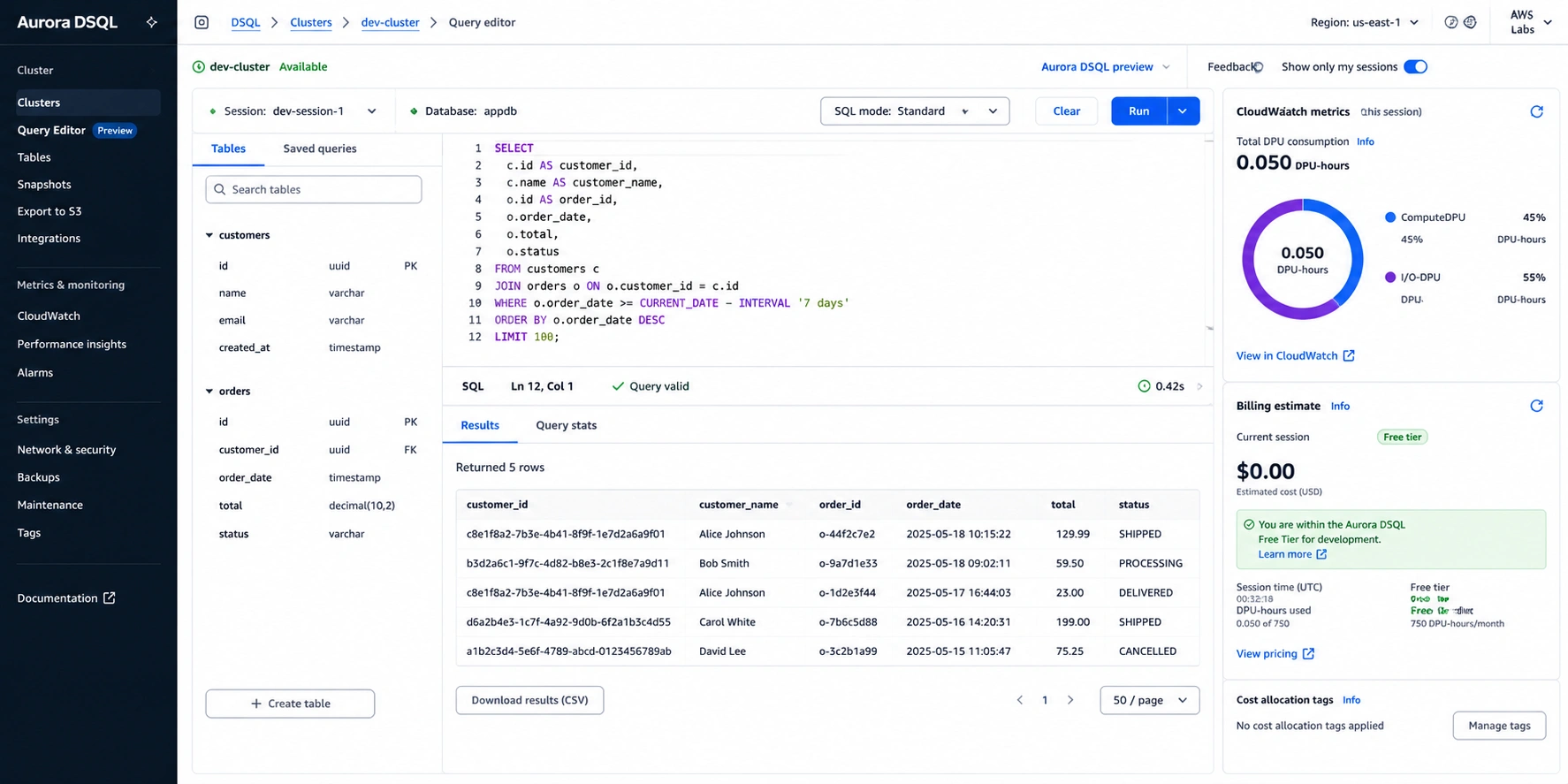
DPU sub-components visible in CloudWatch: ComputeDPU measures query execution work (joins, aggregations, function execution) and I/O-DPU measures data read and write activity. These are informational metrics for understanding your workload breakdown, not separate billing dimensions. You are billed only on total DPUs. Source: cloudburn.io (April 2026) citing AWS official.
DPU consumption guidelines from the AWS Database Blog: a simple primary key lookup consumes significantly fewer DPUs than a multi-table join with filtering and sorting. Write transactions consume more DPUs than equivalent reads because they go through the Adjudicator conflict check and the Journal write path in addition to the Query Processor. OCC retries consume DPUs for each retry attempt.
Cost forecasting challenge: DPU consumption is workload-dependent in a way that makes pre-deployment cost estimation difficult. The most reliable approach: run your workload against Aurora DSQL for 30 days using the free tier to establish baseline DPU consumption, then project monthly cost at $8.00/million DPUs. The free tier’s 100,000 DPUs per month is sufficient for low-traffic development workloads and initial testing without incurring charges.
Also read: Amazon Keyspaces Serverless: The Complete Guide
PostgreSQL Compatibility: What DSQL Supports and What It Does Not
Aurora DSQL uses the PostgreSQL wire protocol and is compatible with PostgreSQL clients, drivers, and ORMs. But it is not a standard PostgreSQL database — it runs a PostgreSQL 16-compatible subset with significant feature limitations required by its distributed architecture. Source: AWS official Aurora DSQL documentation.
What DSQL Supports
Standard SQL DML: SELECT, INSERT, UPDATE, DELETE. DDL: CREATE TABLE, ALTER TABLE, CREATE INDEX, DROP TABLE (each DDL statement must be in its own transaction with an explicit commit — asynchronous DDL). Joins, aggregations, window functions, CTEs (common table expressions). JSON operators and basic JSON types. Most standard PostgreSQL data types. Standard PostgreSQL authentication via IAM. PostgreSQL drivers including psycopg2, asyncpg, node-postgres, and JDBC. Source: AWS official Aurora DSQL documentation.
What DSQL Does Not Support
The following PostgreSQL features are not supported in Aurora DSQL as of June 2026. These are architectural limitations of the distributed design, not temporary gaps being filled — they require application-level workarounds. Source: AWS official Aurora DSQL unsupported features documentation and cloudvisor.co (May 2026).
| Unsupported Feature | Impact | Workaround |
| Foreign keys | No DB-level referential integrity enforcement | Implement referential integrity in application code or service layer |
| Triggers | Cannot use triggers for audit logging, cascade updates, or validation | Move trigger logic to application code. Use EventBridge or SQS for event-driven patterns. |
| Sequences | Native PostgreSQL SERIAL / SEQUENCE not supported | Use UUIDs (gen_random_uuid()) or application-generated IDs instead of auto-increment. |
| Stored procedures | Cannot create server-side procedural logic | Move all business logic to application layer. Aurora DSQL is a storage layer, not a compute layer for application logic. |
| Materialized views | Cannot pre-compute and cache complex query results | Pre-compute in application code and store results in separate tables. Use a caching layer. |
| Views | Standard views not supported | Use application-level query abstraction. Build query functions in your ORM or data access layer. |
| PostGIS / geospatial | No geospatial extensions | Use DynamoDB with geospatial indexing, or a dedicated geospatial database for location data. |
| pgvector (vector types) | No vector data type or similarity search | Use RDS PostgreSQL with pgvector extension for vector workloads. |
| Explicit locking (SELECT FOR UPDATE) | No row-level advisory locks | Redesign using OCC retry pattern. Use application-level distributed locks (Redis) for coordination. |
| SERIALIZABLE isolation | Only REPEATABLE READ equivalent available | Evaluate whether REPEATABLE READ semantics are acceptable. Most OLTP workloads do not require SERIALIZABLE. |
| Many PostgreSQL extensions | Most pg_* extensions not available | Verify each required extension at the AWS Aurora DSQL unsupported features documentation page. |
| 10,000-row transaction limit | Bulk inserts/updates/deletes over 10K rows fail | Batch all bulk operations into sub-10K-row transactions. Adds complexity for ETL workloads. |
Source: AWS official Aurora DSQL unsupported features documentation (docs.aws.amazon.com/aurora-dsql/latest/userguide/working-with-postgresql-compatibility-unsupported-features.html) and cloudvisor.co (May 2026). This list reflects features unsupported as of June 2026. Verify current limitations at the AWS documentation link — AWS is actively expanding DSQL capabilities.
Migration assessment rule: before attempting to migrate any existing PostgreSQL application to Aurora DSQL, run through this checklist: (1) Does the application use foreign keys? (2) Does it use triggers? (3) Does it use sequences or SERIAL columns? (4) Does it use stored procedures? (5) Does it use PostGIS, pgvector, or other extensions? (6) Does it have transactions touching more than 10,000 rows? If any answer is yes, Aurora DSQL requires application refactoring before migration. For most existing PostgreSQL workloads, Aurora Serverless v2 or RDS PostgreSQL is the correct migration target. Source: cloudvisor.co (May 2026) and AWS official DSQL migration documentation.
Aurora DSQL Free Tier: The Most Generous in AWS Managed Databases
Aurora DSQL has a permanent free tier: 100,000 DPUs and 1 GB of storage per month with no 12-month expiry. This is the only Aurora variant with an ongoing free tier that does not expire after the initial AWS account period. Source: cloudburn.io (April 2026) confirming this is an ongoing free tier, not a time-limited new account benefit.
100,000 DPUs provides meaningful development and testing capacity. At $8.00/million DPUs, 100,000 DPUs is equivalent to $0.80 in monthly compute value — sufficient for running application tests, schema experiments, and light development workloads at zero cost. For teams evaluating whether DSQL fits their use case, the permanent free tier means they can integrate their staging environment with DSQL and test it thoroughly before committing to production use.
The 1 GB storage free tier covers initial schema design and test data sets. For development environments using DSQL to test an application that will later run against a larger production dataset, the 1 GB free storage is typically sufficient for representative test data.
Multi-Region Active-Active: The Core Use Case
Multi-region active-active is the scenario Aurora DSQL was specifically designed for. In an active-active DSQL deployment, two or more AWS regions each host a full copy of the database and can accept reads and writes. Writes in any region are committed with strong consistency — a write committed in us-east-1 is visible to reads in eu-west-1 as soon as the next transaction begins.
The architecture uses a witness region: a third region that participates in the Paxos quorum for the Journal without storing full user data. The witness region ensures that the Paxos protocol can reach consensus even if one of the two active regions becomes unavailable. This provides 99.999% availability for multi-region configurations. Source: cloudvisor.co (May 2026) and AWS official DSQL documentation.
Cost of multi-region: approximately 50% more DPUs for write transactions, because cross-region replication requires the Journal to achieve consensus across regions on each committed write. Read transactions in each region are served locally without cross-region DPU overhead. For a workload where 80% of traffic is reads and 20% is writes, the effective total DPU increase for a 2-region active-active deployment is approximately 10% (50% premium on 20% of traffic). For write-heavy workloads, the DPU premium is more significant. Source: cloudburn.io pricing calculator (January 2026).
Compared to running comparable Aurora Global Database with provisioned instances sized for the equivalent workload: Aurora DSQL multi-region active-active typically costs $2,500-4,000/month less per month for variable workloads while eliminating the capacity planning and management overhead of provisioned Global Database instances. Source: cloudvisor.co (May 2026).
Aurora DSQL vs Aurora Serverless v2: The Decision Framework
These two products share the Aurora name and PostgreSQL compatibility but serve fundamentally different use cases. Use this framework to decide.
| Factor | Aurora DSQL | Aurora Serverless v2 | Recommendation |
| Architecture | Disaggregated, distributed. OCC. No locks. | Standard Aurora engine. Pessimistic locking. ACU-based scaling. | Global distributed: DSQL. Standard single-region: v2. |
| Multi-region active-active | Yes. Built-in. 99.999% availability. | No. Single-region only (Global Database is active-passive). | Multi-region writes required: DSQL. |
| Scale to zero | Yes. True zero when idle. No hourly charge. | Yes (since November 2024 with version requirements). ~15-second resume. | Both scale to zero for eligible versions. |
| Pricing model | Per DPU ($8/million). Compute + I/O unified. | Per ACU-hour ($0.12/hr). Storage + I/O separate. | Unpredictable workload: DSQL. Sustained load: v2. |
| PostgreSQL compatibility | Subset only. No foreign keys, triggers, sequences, many extensions. | Full Aurora PostgreSQL feature set. | Existing PG apps: v2. Greenfield: evaluate DSQL. |
| Transaction concurrency | OCC. No deadlocks. Retries on conflict. | Standard locking. Transactions may wait or deadlock. | Low contention: DSQL. High contention writes: v2. |
| Migration path for existing apps | Complex. Requires removing FK, triggers, sequences, procs. | Straightforward. Drop-in from RDS PostgreSQL. | Migrating existing PG app: v2. |
| Free tier | Yes. Permanent. 100K DPUs + 1 GB/month. | No permanent free tier. Standard AWS account credits only. | Low-cost dev/test evaluation: DSQL. |
| Discount options | None currently (DPU-based, no DSP or RI confirmed). | Database Savings Plans (up to 35%). | Cost commitment: v2 has DSP advantage. |
Source: AWS official documentation for both products. cloudvisor.co (May 2026) for multi-region availability. cloudburn.io pricing calculator (January 2026) for DPU multi-region estimate. Aurora Serverless v2 scale-to-zero from AWS official announcement November 2024.
Amazon Keyspaces Pricing: The Complete 2026 Cost Guide
When to Use Aurora DSQL: The Four Right Scenarios
Greenfield Global OLTP Applications
Aurora DSQL is designed from the ground up for applications that need to serve users in multiple regions with write latency measured in tens of milliseconds rather than hundreds. If you are building a new booking system, a collaborative SaaS tool, a multi-region authentication service, or any application where active-active global writes are a first-class requirement, DSQL is worth evaluating first — before defaulting to Aurora Global Database or a custom active-active setup.
Frontdoor (a home services marketplace) was mentioned in AWS case studies as a production DSQL customer, using it for scheduling applications. The use case: a globally distributed scheduling system where writes from multiple regions need strong consistency. Source: cloudvisor.co (May 2026) citing AWS case study.
Applications With Low-Contention Write Patterns
OCC performs best when write transactions rarely conflict — meaning different transactions almost always operate on different rows. User profile updates (each transaction touches one user’s data), order creation (each order is a new row), event logging (append-only), and appointment scheduling (each slot is a distinct row) are all low-contention patterns where OCC delivers better throughput than pessimistic locking.
Development and Testing Environments
The permanent free tier (100,000 DPUs and 1 GB storage per month with no expiry) makes Aurora DSQL the cheapest option for development environments that use it within the free tier limits. For teams building on DSQL for production, the permanent free tier enables persistent development and staging environments at $0 compute cost. The scale-to-zero behavior means development databases that are only active during business hours incur no charges overnight.
Serverless Application Backends With Spiky Global Traffic
Applications built on AWS Lambda, API Gateway, and other serverless compute services that need a database backend naturally pair with Aurora DSQL’s per-request billing and scale-to-zero behavior. When no Lambda functions are executing, no DSQL DPUs are being consumed. When a global marketing campaign drives sudden traffic spikes from multiple regions simultaneously, DSQL scales to handle the traffic without pre-provisioning — and the active-active multi-region architecture ensures users in each region are served locally.
When NOT to Use Aurora DSQL
Aurora DSQL is not the right choice for every PostgreSQL workload. The following scenarios require Aurora Serverless v2 or RDS PostgreSQL instead.
Migrating existing PostgreSQL applications that use foreign keys, triggers, sequences, stored procedures, or materialized views requires significant refactoring work before DSQL is viable. The migration is not lift-and-shift. For most existing PostgreSQL workloads, Aurora Serverless v2 is the correct migration target with zero application changes required. Source: cloudvisor.co (May 2026) explicitly recommending against DSQL for existing PG application migration.
High write-contention workloads — inventory systems for popular items, leaderboard updates, account balance modifications, any pattern where many concurrent transactions modify the same rows — generate high OCC retry rates in DSQL. The retry amplification makes throughput unpredictable and latency inconsistent. Standard pessimistic locking in Aurora Serverless v2 handles these patterns more predictably. Source: AWS official DSQL concurrency documentation and andrewbaker.ninja performance analysis.
Analytics and reporting workloads that require complex aggregations over large datasets, window functions across millions of rows, or OLAP-style queries are not the intended use case for DSQL. DSQL is optimized for OLTP transaction throughput, not analytical query performance. Amazon Redshift or Aurora PostgreSQL with read replicas is more appropriate for analytics.
Applications requiring pgvector, PostGIS, or other PostgreSQL extensions — a growing category given the rise of AI-powered applications — cannot currently use DSQL. RDS PostgreSQL with the relevant extensions is the correct choice for extension-dependent workloads.
See exactly what you’re overpaying in under 60 seconds. Try the Calculator for free →
How Usage.ai Handles Aurora DSQL Costs
Aurora DSQL does not currently have a commitment-based discount mechanism equivalent to Reserved Instances or Database Savings Plans. The DPU billing model is pay-per-request with a permanent free tier — there is no committed spend product for DSQL as of June 2026. Verify the current discount availability at aws.amazon.com/rds/aurora/dsql/pricing/ as AWS expands DSQL’s pricing options.
Usage.ai monitors DSQL clusters through CloudWatch DPU metrics (ComputeDPU and I/O-DPU) to surface cost efficiency opportunities. For teams running both DSQL clusters and other Aurora variants or database services, the platform provides unified cost visibility across all database services.
The primary cost optimization for DSQL is architectural: ensuring that the application query patterns are designed for low DPU consumption. Write transactions that generate frequent OCC retries multiply DPU consumption for the same work. Usage.ai identifies tables and time periods with high retry rates from CloudWatch as signals of high-contention patterns that could be redesigned for lower DPU cost. High retry rates are both a performance problem and a cost problem — each retry consumes DPUs without completing productive work.
For teams evaluating DSQL for a new application: Usage.ai’s 24-hour recommendation refresh monitors DPU consumption patterns from the first week of production traffic and projects monthly cost against the free tier thresholds, flagging when production growth will start incurring charges and at what rate.
Frequently Asked Questions
1. What is Aurora DSQL?
Amazon Aurora DSQL (Distributed SQL) is a serverless, distributed SQL database with PostgreSQL wire protocol compatibility. It uses a disaggregated architecture (Query Processors, Adjudicators, Journal, and MVCC Storage Replicas) and Optimistic Concurrency Control instead of traditional row locking. It supports active-active multi-region deployments with 99.999% availability and scales to zero when idle. It went into general availability on May 27, 2025. It is not a flavor of Aurora PostgreSQL — it is a distinct product with different architecture, pricing, and compatibility. Source: AWS official Aurora DSQL documentation.
2. How much does Aurora DSQL cost?
$8.00 per million DPUs (Distributed Processing Units, covering compute AND I/O) and $0.33/GB-month for storage in US East. Scale to zero when idle — $0.00 in DPU charges when no queries are running. Only storage billed continuously. Free tier: 100,000 DPUs and 1 GB storage per month permanently (no 12-month expiry). Multi-region active-active adds approximately 50% to DPU costs for write replication. Verify current rates at aws.amazon.com/rds/aurora/dsql/pricing/. Source: cloudburn.io April 2026, andrewbaker.ninja April 2026.
3. What PostgreSQL features does Aurora DSQL not support?
As of June 2026: foreign keys, triggers, views, sequences (SERIAL columns), stored procedures, materialized views, PostGIS geospatial extension, pgvector, explicit locking (SELECT FOR UPDATE), SERIALIZABLE isolation level, most PostgreSQL extensions, and transactions exceeding 10,000 rows. Each DDL statement (CREATE TABLE, ALTER TABLE, CREATE INDEX) must be in its own transaction. Source: AWS official DSQL unsupported features documentation.
4. What is Optimistic Concurrency Control (OCC) in Aurora DSQL?
OCC means write transactions execute without acquiring locks and are checked for conflicts at commit time. If two concurrent transactions modify the same data, the one with the earlier commit timestamp succeeds. The other receives SQLSTATE 40001 (serialization failure) and must be retried. Read-only transactions are conflict-free and never fail due to OCC. Applications must implement retry logic for write transactions. OCC prevents deadlocks but increases retry rates for high-contention workloads. Source: AWS official Aurora DSQL concurrency control documentation.
5. How is Aurora DSQL different from Aurora Serverless v2?
Architecturally: DSQL uses a disaggregated distributed architecture with OCC; Serverless v2 uses standard Aurora engine with ACU-based auto-scaling. Compatibility: DSQL is a PostgreSQL subset (no foreign keys, triggers, sequences); Serverless v2 is full Aurora PostgreSQL. Multi-region: DSQL supports active-active; Serverless v2 is single-region only. Pricing: DSQL bills per DPU; Serverless v2 bills per ACU-hour. Discounts: Serverless v2 has Database Savings Plans; DSQL has no confirmed commitment discount as of June 2026. Source: AWS official documentation for both products.
6. What is the Aurora DSQL free tier?
100,000 DPUs and 1 GB of storage per month, permanently (no 12-month expiry). This is one of the most generous ongoing free tiers in AWS managed databases. At $8.00/million DPUs, 100,000 free DPUs = $0.80 of monthly compute at no charge. Sufficient for development environments, schema testing, and light application development. The permanent nature means development clusters can use DSQL indefinitely within the free tier without time pressure. Source: cloudburn.io April 2026 confirming permanent free tier status.
7. Is Aurora DSQL production-ready?
Yes. Aurora DSQL reached general availability on May 27, 2025 and is in production use. AWS has documented production customers including Frontdoor (home services marketplace) using it for scheduling applications. It provides 99.999% multi-region availability and 99.99% single-region availability SLA. For production use, evaluate the PostgreSQL compatibility gaps and OCC retry requirements against your specific application’s feature dependencies and write contention patterns before migrating. Source: cloudvisor.co May 2026, AWS official documentation.