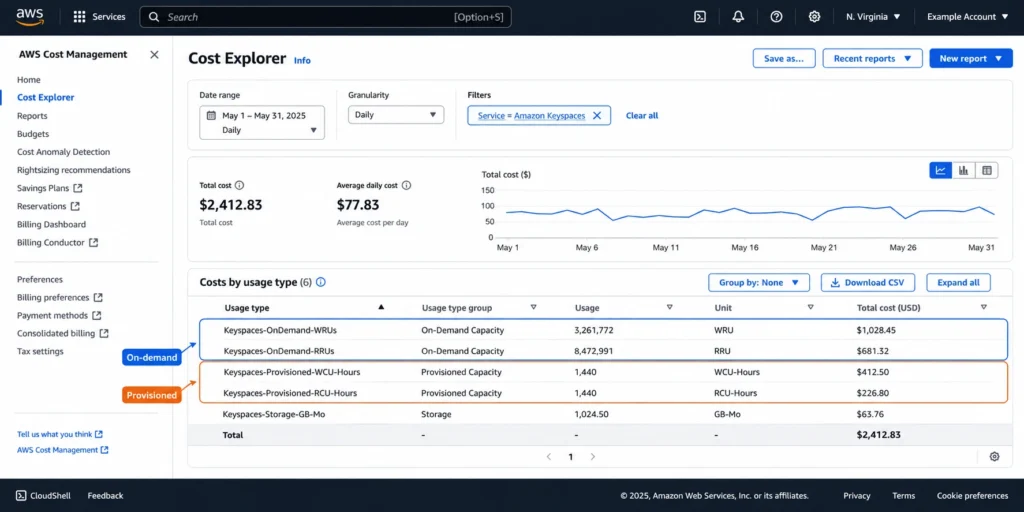
Last updated: June 2026. All rates from AWS official pricing page (aws.amazon.com/keyspaces/pricing) and AWS official announcement (November 14, 2024). Exact per-million WRU/RRU dollar rates are not reproduced here because they render dynamically on the AWS pricing page and may have changed. Verify all throughput rates directly at aws.amazon.com/keyspaces/pricing before estimating costs.
Amazon Keyspaces has six billing dimensions. Most guides cover two of them. The other four — backup, TTL, Streams, and data transfer — can meaningfully change your bill depending on your access patterns and configuration choices. The November 2024 price cut (up to 56% on on-demand single-region writes) also changed which mode is cheaper for most workloads, rendering pre-2025 pricing guides unreliable.
This guide covers every billing dimension, provides worked examples for three common workload types, explains the on-demand versus provisioned break-even calculation, and explains the Database Savings Plans path for stable Keyspaces spend.
See exactly what you’re overpaying in under 60 seconds. Try the Calculator for free →
The Six Billing Dimensions of Amazon Keyspaces
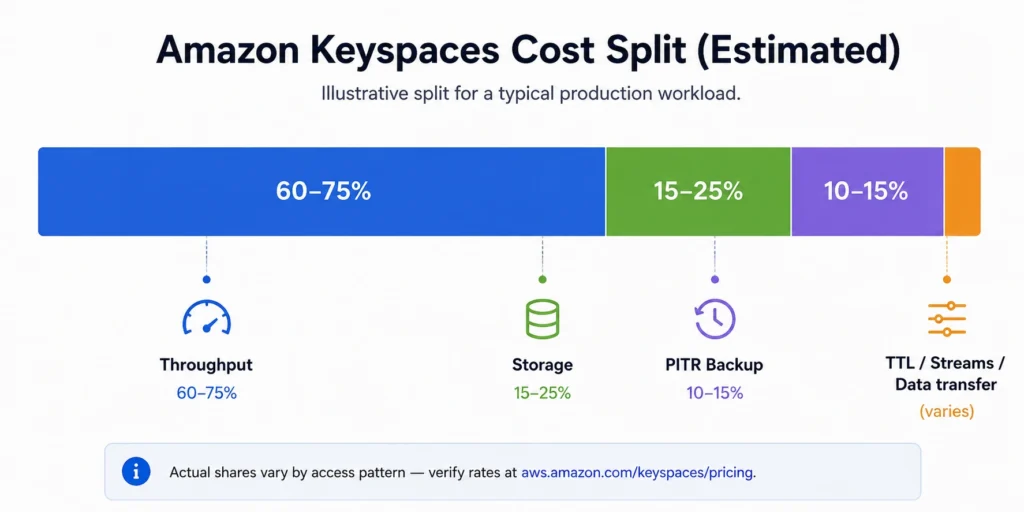
Estimated cost split for a typical production workload: throughput (on-demand or provisioned) is the largest component at 60-75% of total spend. Storage is second at 15-25%. PITR backup adds 10-15% if enabled. TTL, Streams, and data transfer are secondary costs that vary by application pattern. Source: estimated from billing structure analysis based on AWS official pricing page and typical workload patterns.
Billing Dimension 1: Read and Write Throughput
Throughput is always the largest line item for active Keyspaces workloads. You choose one of two modes per table: on-demand (pay per request) or provisioned (pay for capacity reserved per second per hour). You can switch modes once per day. Source: AWS official Keyspaces documentation.
On-Demand Mode (Recommended Default Since November 2024)
On-demand mode charges per read or write request. Writes are billed in Write Request Units (WRUs): 1 WRU handles one write of up to 1 KB of row data using LOCAL_QUORUM consistency. Reads are billed in Read Request Units (RRUs): 1 RRU handles one LOCAL_QUORUM read of up to 4 KB of row data, or equivalently two LOCAL_ONE reads of up to 4 KB each.
Rows larger than the base size consume proportionally more units. A 3 KB write requires 3 WRUs. A 10 KB LOCAL_QUORUM read requires 3 RRUs (ceiling of 10/4). A 10 KB LOCAL_ONE read requires 1.5 RRUs. If a query returns multiple rows, billing is based on aggregate data size returned, not row count. Source: AWS official Keyspaces pricing page (aws.amazon.com/keyspaces/pricing).
Exact per-million WRU and RRU rates: verify current rates at aws.amazon.com/keyspaces/pricing — rates change and the November 2024 price reduction changed them significantly. Writes are priced at a 5:1 ratio over reads (the same structure as Amazon DynamoDB’s on-demand pricing). This means write-heavy workloads pay substantially more per unit than read-heavy workloads. Source: rate ratio derived from AWS official pricing structure; exact dollar amounts require verification at AWS official pricing page.
Important: on-demand mode WRU and RRU rates dropped by up to 56% for single-region workloads and up to 65% for multi-region workloads on November 14, 2024. Source: AWS official announcement. Any pricing estimate based on pre-November 2024 rates overstates Keyspaces on-demand costs by more than double in some cases.
Two Specific On-Demand Cost Advantages
Lightweight Transactions (LWTs) at no extra charge: Keyspaces does not add a premium for conditional write operations (IF NOT EXISTS, IF conditions on updates) in on-demand mode. LWTs are billed at the standard WRU rate for the data written. For workloads that rely heavily on conditional writes for uniqueness guarantees or optimistic concurrency, this is a meaningful cost advantage compared to services that charge a 2x premium for conditional operations.
Zero cost during idle periods: on-demand tables have no minimum charge when no requests are active. A table that receives no reads or writes for an entire month incurs $0 in throughput charges (storage charges still apply). For development environments, staging tables, and tables with seasonal or event-driven traffic, this makes on-demand the natural starting point.
Provisioned Mode (For Stable High-Throughput Workloads)
Provisioned mode charges per Read Capacity Unit (RCU) per hour and per Write Capacity Unit (WCU) per hour, regardless of whether you consume the full provisioned capacity. 1 RCU provides one LOCAL_QUORUM read per second for rows up to 4 KB, or two LOCAL_ONE reads per second. 1 WCU provides one LOCAL_QUORUM write per second for rows up to 1 KB. Source: AWS official Keyspaces provisioned capacity mode documentation.
Provisioned mode with auto scaling sets minimum and maximum WCU/RCU bounds. Keyspaces adjusts provisioned capacity within those bounds based on actual traffic, typically taking 1-2 minutes to react. This means brief spikes above the provisioned level may cause throttling. Teams with predictable traffic that occasionally spikes should account for this throttling risk when setting provisioned capacity minimums. Source: oneuptime.com (February 2026) citing AWS official documentation.
Exact per-unit-hour RCU and WCU rates: verify at aws.amazon.com/keyspaces/pricing. These also changed in November 2024 (provisioned rates reduced up to 13% single-region, up to 20% multi-region). The write-to-read rate ratio for provisioned mode is also 5:1. Source: AWS official announcement and pricing page structure.
On-Demand vs Provisioned Break-Even (2026 Framework)
The November 2024 price reduction changed the break-even point between on-demand and provisioned modes. Before the cut, on-demand was more expensive at high sustained throughput. After the cut, on-demand is now competitive or cheaper for most workload patterns. The break-even formula is:
Break-even point: on-demand mode becomes more expensive than provisioned mode when the cost of per-request billing at your actual request volume exceeds the cost of provisioning that throughput sustained for a full month.
For writes: if you sustain N writes per second for a full 730-hour month, the monthly provisioned cost is N x (WCU hourly rate) x 730 hours. The monthly on-demand cost is (N writes/second x 2,628,000 seconds/month) x WRU rate. The break-even N is where these equal. For most practical workloads after the November 2024 reduction, on-demand is cheaper for average sustained throughput below approximately 0.5-1.0 WRU/second sustained. Above that, provisioned is typically cheaper. Calculate your specific break-even using the current rates at aws.amazon.com/keyspaces/pricing. Source: derived from pricing structure; verify exact break-even with current rates.
The simplest decision rule after November 2024: start with on-demand. Switch to provisioned only if your CloudWatch ConsumedWriteCapacityUnits and ConsumedReadCapacityUnits metrics show consistent sustained throughput and your cost estimate shows provisioned would be cheaper at that sustained level. You can switch modes once per day without data loss or cluster interruption. Source: AWS official Keyspaces documentation.
Billing Dimension 2: Storage
Keyspaces charges $0.25 per GB-month for data storage. You do not provision storage in advance — storage scales automatically and AWS monitors your table size continuously to determine charges. Source: AWS official Keyspaces pricing page (verified from multiple independent sources including oneuptime.com February 2026 and AWS official).
Storage billing includes the encoded row data plus associated indexes. Keyspaces compresses row data using LZ4 compression, which means the billable storage size is often 20-50% lower than the raw uncompressed data size for typical text-based workloads. For binary data or already-compressed content, compression savings are minimal. Source: AWS official Keyspaces documentation.
Storage grows continuously as data is written and is reduced when rows expire via TTL or are explicitly deleted. Unlike some database services that charge for provisioned storage capacity, Keyspaces charges only for actual data stored. A table that shrinks from 100 GB to 50 GB through TTL expirations is billed for 50 GB going forward.
Billing Dimension 3: PITR Backup
PITR (Point-In-Time Recovery) provides continuous, automatic backups of Keyspaces table data with per-second granularity. When enabled, you can restore the table to any second within the preceding 35 days. PITR must be explicitly enabled on each table — it is not on by default.
PITR pricing: approximately $0.15 per GB-month based on the table size at the time PITR is enabled. AWS monitors table size continuously and bills accordingly. The charge continues until PITR is explicitly disabled on the table. Source: oneuptime.com (February 2026) citing AWS official pricing.
Cost example: a 100 GB Keyspaces table with PITR enabled adds approximately $15/month in backup charges on top of the $25/month storage cost — a 60% increase to the base storage bill. Before enabling PITR on every table, evaluate whether the 35-day restore capability is required for compliance or operational purposes for each specific table.
Restoring a table from PITR incurs an additional charge per GB of data restored. Source: AWS official Keyspaces pricing page. Verify current restore rate at aws.amazon.com/keyspaces/pricing.

Also read: What Is Amazon ElastiCache? The Complete 2026 Guide
Billing Dimension 4: TTL Deletes
Amazon Keyspaces Time to Live (TTL) automatically deletes rows or attributes after a configured expiration time. TTL pricing is based on the size of data deleted, not the number of rows or deletion events.
TTL billing unit: 1 TTL delete unit = 1 KB of data deleted per row. For a row containing 2.5 KB of data, deleting the entire row requires 3 TTL delete units (ceiling of 2.5). If multiple attributes within the same row expire simultaneously, only one TTL delete unit per KB of the row is consumed — not one per expired attribute. Source: AWS official Keyspaces pricing page.
The November 2024 price reduction cut TTL delete prices by 75%. Source: AWS official announcement (November 14, 2024). This makes TTL the most cost-effective data expiration mechanism for bounded datasets. For applications storing session data, temporary records, or any data with a defined retention window, enabling TTL is now significantly cheaper than performing explicit DELETE operations (which consume WRUs at full on-demand or provisioned rates).
TTL vs explicit DELETE cost comparison: explicitly deleting a 3 KB row consumes 3 WRUs. The same deletion via TTL consumes 3 TTL delete units at a rate that is significantly lower per unit than WRUs after the 75% TTL price reduction. For workloads that expire millions of rows per day, TTL is the correct deletion mechanism on both operational simplicity and cost grounds.
TTL cost estimate: the exact per-million TTL delete unit rate is available at aws.amazon.com/keyspaces/pricing. At a typical production workload expiring 50 million 1 KB rows per month (50 million TTL delete units): multiply 50 by the current per-million rate to get the monthly TTL delete cost. Verify the current rate before estimating.
Billing Dimension 5: Keyspaces Streams
Amazon Keyspaces Streams captures a time-ordered sequence of item-level modifications in a Keyspaces table. Applications can consume the stream to replicate data, trigger downstream processing, or maintain audit trails.
Keyspaces Streams pricing: each GetRecords API call is billed as one stream read request unit. Each GetRecords call returns up to 1 MB of data from the stream. Stream read request units are priced separately from table RRUs and WRUs — reading from a stream does not count against your table’s on-demand read billing. Source: AWS official Keyspaces pricing page.
Streams are an optional feature. If your application does not use Keyspaces Streams, you incur no stream charges. Enable Streams only on tables where downstream consumers require change-data-capture (CDC) capability. Source: AWS official Keyspaces Streams documentation.
Billing Dimension 6: Data Transfer
Data transfer into Keyspaces is always free. Data transfer between Keyspaces and other AWS services within the same AWS Region is also free ($0.00 per GB). Source: AWS official Keyspaces pricing page.
Data transfer out to the internet: standard AWS data transfer rates apply. The first 100 GB per month is free (aggregated across all AWS services). Beyond the free tier: approximately $0.09/GB for the first 10 TB/month, with tiered pricing for higher volumes. Source: AWS official Keyspaces pricing page and AWS data transfer pricing.
Multi-region data transfer for Multi-Region Replication: Amazon Keyspaces does not charge for data transfer across AWS Regions when using its native Multi-Region Replication feature. Writes are billed per WRU per region (covered under throughput billing), but the replication data transfer itself is free. Source: AWS official Keyspaces pricing page.
Multi-Region Replication: The Write Cost Multiplier
Multi-Region Replication is Amazon Keyspaces’ active-active replication feature, allowing writes to any region with automatic propagation to all other regions in the keyspace. The billing implication is significant and often underestimated.
Multi-region write billing: you are billed 1 WRU (on-demand) or 1 WCU (provisioned) per KB of data written per region. A 3 KB write to a single-region keyspace costs 3 WRUs. The same 3 KB write to a 2-region keyspace costs 6 WRUs (3 per region x 2 regions). A 3-region keyspace costs 9 WRUs for the same write. Source: AWS official Keyspaces pricing page.
The cost multiplier is exactly equal to the number of regions in the keyspace. A 3-region active-active keyspace costs 3x the single-region write throughput cost. Multi-region read costs are not multiplied — reads are local to the region where the query is executed. Source: AWS official Keyspaces documentation.
Multi-region write cost example: an application writing 10 million 1 KB rows per day to a 3-region keyspace. Single-region equivalent write cost: 10M WRUs per day. Multi-region write cost: 30M WRUs per day (10M x 3 regions). At the November 2024 post-cut rates, this triples write costs for the global availability benefit. Evaluate whether the active-active multi-region availability requirement justifies the 3x write cost before enabling multi-region replication.
Also read: What Is Amazon Keyspaces: Complete Guide to Cassandra-compatible managed database on AWS
The Complete Pricing Summary Table
| Billing Component | Rate | Notes |
| On-demand write (WRU) | Verify at aws.amazon.com/keyspaces/pricing | 1 WRU = 1 KB write, LOCAL_QUORUM. Writes always LOCAL_QUORUM. 5:1 write/read ratio. No extra charge for LWTs. |
| On-demand read LOCAL_QUORUM (RRU) | Verify at aws.amazon.com/keyspaces/pricing | 1 RRU = 4 KB LOCAL_QUORUM read. Rows > 4 KB consume additional RRUs proportionally. |
| On-demand read LOCAL_ONE | 0.5 RRU per 4 KB read | Half the cost of LOCAL_QUORUM. Eventual consistency. Best for read-heavy workloads tolerating slightly stale data. |
| Multi-region on-demand writes | WRU rate x number of regions | 3 KB write to 2-region keyspace = 6 WRUs. Write cost multiplies by region count. |
| Provisioned read (RCU per hour) | Verify at aws.amazon.com/keyspaces/pricing | 1 RCU/second = 1 LOCAL_QUORUM read up to 4 KB per second. Billed continuously 24/7 at provisioned level. |
| Provisioned write (WCU per hour) | Verify at aws.amazon.com/keyspaces/pricing | 1 WCU/second = 1 write up to 1 KB per second. 5:1 write/read rate ratio. |
| Storage | $0.25/GB-month | No provisioning. Auto-scales. LZ4 compression applied. Billed on actual data stored. |
| PITR backup | ~$0.15/GB-month | Optional, must enable per table. 35-day restore window, per-second granularity. Bill continues until disabled. |
| Table restore (from PITR) | Verify at aws.amazon.com/keyspaces/pricing | Per GB of data restored per restore request. |
| TTL deletes | Verify at aws.amazon.com/keyspaces/pricing | Per million TTL delete units. 1 unit = 1 KB deleted per row. Reduced 75% in November 2024. Much cheaper than explicit DELETE writes. |
| Keyspaces Streams reads | Verify at aws.amazon.com/keyspaces/pricing | Per GetRecords API call. Each call returns up to 1 MB. Separate from table RRU billing. |
| Data transfer (same region) | $0.00 | No charge within same region. |
| Data transfer (internet egress) | ~$0.09/GB after 100 GB free/month | Same tiered rate as all AWS services. First 100 GB/month free. |
| Multi-region transfer | $0.00 for native replication | No charge for cross-region data transfer when using Keyspaces Multi-Region Replication. |
| Free tier (3 months, new accounts) | 30M WRUs + 30M RRUs + 1 GB/month | Starts from first resource creation. One per payer account. |
All rates: US East (N. Virginia), June 2026. Throughput rates (WRU, RRU, WCU, RCU) must be verified at aws.amazon.com/keyspaces/pricing — rates changed November 14, 2024 and may change again. Non-throughput rates (storage, PITR, restore) are confirmed from AWS official and independent sources. Verify all rates before estimating costs.
Storage $0.25/GB-month and PITR ~$0.15/GB-month verified from AWS official pricing page and oneuptime.com (February 2026). Throughput rates require direct verification at aws.amazon.com/keyspaces/pricing due to November 2024 price reduction. Data transfer rates from AWS official.
Worked Example 1: Small Event Logging Application
Scenario: a mobile app writing user event logs. 5 million events written per day, average 1 KB per row. Read pattern: 500,000 reads per day for analytics, rows average 2 KB, using LOCAL_ONE consistency. All in a single region. No PITR (logs are append-only, no recovery requirement). TTL set to 90 days. Total stored data at steady state: ~150 GB (after 90 days of accumulation). Source: constructed example from verified billing mechanics.
Monthly write throughput: 5 million events/day x 30 days = 150 million WRUs (1 KB rows, 1 WRU each). Monthly read throughput: 500,000 reads/day x 30 days = 15 million RRUs — but at LOCAL_ONE for 2 KB rows: each read consumes 0.5 RRU (2 KB under 4 KB threshold, LOCAL_ONE = 0.5x). Total RRUs: 15M x 0.5 = 7.5 million RRUs.
Monthly storage: 150 GB x $0.25 = $37.50/month. TTL deletes: at steady state (90-day TTL), same volume written is being deleted — 150 million TTL delete units per month at the November 2024 reduced rate. Verify current TTL rate at aws.amazon.com/keyspaces/pricing for exact monthly TTL cost.
Key observation: LOCAL_ONE on 2 KB rows halves read costs versus LOCAL_QUORUM. For event log reads where exact consistency is not critical (the events are already written), LOCAL_ONE is the correct consistency choice and materially reduces the read bill.
Worked Example 2: High-Throughput Session Store
Scenario: a web application storing user sessions. 50,000 active sessions at any time. Session data: 3 KB per session. Write pattern: session created or updated 5 times per minute per active session (login, page loads, state changes). Read pattern: 10 reads per minute per active session (authentication checks, state reads). 24/7 consistent traffic. Single region.
Sustained writes: 50,000 sessions x 5 writes/minute = 250,000 writes/minute = 4,167 writes/second. Each write is 3 KB = 3 WRUs. Sustained WRU rate: 4,167 x 3 = 12,500 WRUs per second. This is significant sustained throughput. Monthly WRUs: 12,500 x 2,628,000 seconds = 32.85 billion WRUs.
Sustained reads: 50,000 sessions x 10 reads/minute = 500,000 reads/minute = 8,333 reads/second. Session data 3 KB with LOCAL_QUORUM: ceiling(3/4) = 1 RRU each. Monthly RRUs: 8,333 x 2,628,000 = 21.9 billion RRUs.
This is a workload where the provisioned mode break-even analysis matters most. At 12,500 WRUs/second sustained, provisioned mode likely delivers significantly lower monthly cost than on-demand at this scale. Calculate: monthly provisioned cost = 12,500 WCUs x WCU-hourly-rate x 730 hours. Monthly on-demand cost = 32.85 billion WRUs x WRU-per-million-rate / 1,000,000. Use current rates from aws.amazon.com/keyspaces/pricing to determine which is cheaper for this workload. Provisioned with auto-scaling is the recommended mode for sustained high-throughput patterns like this. Source: derived from AWS official capacity mode guidance.
The session store pattern is exactly where TTL delivers maximum value: sessions expire after inactivity. Setting TTL to 30-60 minutes on session rows means all session data self-deletes without requiring application-level DELETE operations. At the November 2024 TTL rate reduction, automated session expiration is far cheaper than explicit deletes, which would consume full WRUs at the sustained provisioned rate.

Worked Example 3: Multi-Region IoT Platform
Scenario: an industrial IoT platform collecting sensor readings from manufacturing equipment across two continents. Requirements: active-active writes from US and EU facilities, 2-region keyspace (us-east-1 and eu-west-1). Write volume: 1 million sensor readings per hour, each reading 500 bytes (rounds up to 1 KB = 1 WRU per write). Read volume: 200,000 reads per hour, 1 KB per read, LOCAL_ONE consistency. Single region reads (sensors read locally). 500 GB total data. PITR enabled for compliance.
Multi-region write billing: 1 million writes/hour x 2 regions = 2 million WRUs/hour. Monthly WRUs: 2 million x 730 = 1.46 billion WRUs. If this were single-region: 730 million WRUs — exactly half the cost. The 2-region replication doubles write costs for global availability.
Storage: 500 GB x $0.25 = $125/month (same in both regions if data is replicated — verify whether storage is billed per-region or once for the keyspace; for multi-region keyspaces, storage is typically billed per region since each region stores a full copy). Source: AWS official Keyspaces documentation.
PITR: 500 GB x ~$0.15 = $75/month per region if enabled in both regions. Total PITR: $150/month for a 2-region keyspace with PITR enabled. This is the hidden cost of multi-region compliance backup: PITR charges per region where it is enabled.
The multi-region IoT platform example illustrates the three largest cost drivers working together: write throughput (amplified by 2x for multi-region), storage (per-region), and PITR (per-region). Reads are relatively cheap in this pattern because IoT reads are local (single region) and use LOCAL_ONE consistency. The platform’s cost is dominated by the write path.
The Database Savings Plans Path for Keyspaces
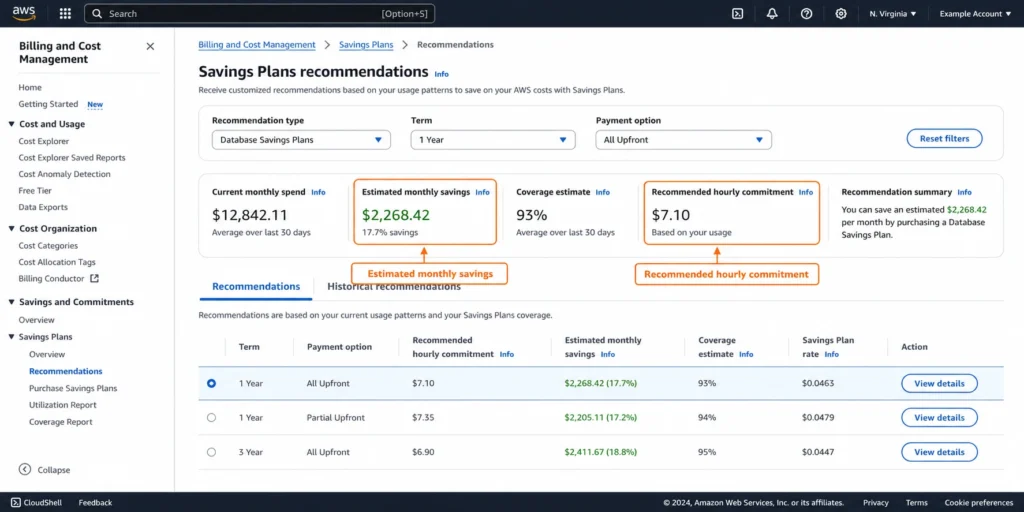
Database Savings Plans cover Amazon Keyspaces with up to 35% savings on a 1-year commitment. The commitment is a dollar-per-hour spend level, not tied to specific tables, capacity modes, or request volumes.
Who Benefits Most From Keyspaces DSP
Teams with stable Keyspaces monthly throughput spend benefit most. If your WRU/RRU consumption or provisioned WCU/RCU costs are consistent month-over-month with low variance, the DSP commitment delivers 35% savings with no operational changes required. The discount applies automatically to eligible Keyspaces usage.
Teams actively iterating on table design, capacity mode selection, or access patterns benefit less from a DSP commitment until their spend stabilizes. Wait until your Keyspaces usage pattern has been consistent for at least 60-90 days before purchasing a DSP.
Sizing the Commitment
The correct DSP commitment level is the floor of your hourly Keyspaces spend — the level at which your costs are consistently above, across your minimum usage periods. Over-committing beyond your average spend wastes the committed amount during lower-traffic periods. Under-committing captures partial savings but leaves the remainder on on-demand pricing.
Usage.ai analyzes your historical AWS Cost and Usage Report data to identify the consistent hourly floor of your Keyspaces spend and recommends the commitment amount. For workloads with day-of-week patterns (lower on weekends, higher on weekdays), the recommended commitment level is the weekend floor, with the weekday premium handled by on-demand.
See exactly what you’re overpaying in under 60 seconds. Try the Calculator for free →
Cost Optimization Tactics for Amazon Keyspaces
Use LOCAL_ONE for Read Paths That Tolerate Eventual Consistency
LOCAL_ONE reads consume 0.5 RRUs instead of 1 RRU for the same data — a 50% read cost reduction. Identify which read paths in your application do not require strongly consistent data (user profile reads after a few seconds of eventual propagation, recommendation results, cached lookups) and configure those paths to use LOCAL_ONE consistency. For applications doing hundreds of millions of reads per month, this is the largest single cost optimization lever.
Use TTL for All Bounded Data
With the November 2024 75% price reduction on TTL deletes, automated data expiration via TTL is dramatically cheaper than explicit DELETE operations. Set TTL on all rows with a defined retention window at write time using the USING TTL clause. The TTL value is stored per row and does not require schema changes. Session data, event logs, temporary computation results, and compliance records with defined retention periods should all use TTL.
Batch Writes to Reduce API Call Overhead
While Keyspaces does not provide a per-batch WRU discount, batching multiple inserts into a single BATCH CQL statement reduces the number of API calls, connection overhead, and latency for write-heavy workloads. Keep batches within a single partition key for optimal performance — cross-partition batches can cause throttling on individual partition nodes.
Evaluate Provisioned Mode at High Sustained Throughput
For tables with consistent 24/7 throughput, calculate the provisioned mode cost versus on-demand at current rates. At high sustained request volumes (thousands of WRUs or RRUs per second sustained), provisioned mode is typically cheaper. Use CloudWatch metrics — ConsumedWriteCapacityUnits and ConsumedReadCapacityUnits — to measure actual hourly consumption and calculate whether provisioned would save money at your specific volume.
Right-Size PITR Coverage
PITR adds approximately 60% to the base storage cost (for a $0.25/GB-month table, PITR adds ~$0.15). Enable PITR only on tables where the 35-day continuous restore capability is required for compliance or operational recovery. For tables that are append-only (event logs, audit trails) where point-in-time restore is never needed, disabling PITR eliminates the backup charge without operational risk.
How Usage.ai Handles Amazon Keyspaces Cost Optimization
Usage.ai analyzes Keyspaces throughput consumption patterns from the AWS Cost and Usage Report and identifies the correct DSP commitment level for stable Keyspaces workloads. The platform also surfaces capacity mode mismatches — on-demand tables where sustained throughput would be cheaper on provisioned, and provisioned tables where low utilization would be cheaper on on-demand given the November 2024 pricing changes.
For teams running Keyspaces alongside other AWS managed database services (RDS, Aurora, Neptune, ElastiCache, Timestream), Usage.ai evaluates a unified DSP commitment covering all eligible services under one commitment rather than separate per-service commitments. Keyspaces DSP eligibility is confirmed as broadly available for both on-demand and provisioned mode usage.
If a DSP commitment for Keyspaces becomes underutilized — because a table is decommissioned, traffic drops permanently, or capacity mode is changed — Usage.ai provides cashback on the unused commitment in real money. Fee: percentage of realized savings only.
See how Usage.ai optimizes Keyspaces Database Savings Plans and capacity mode selection

Frequently Asked Questions
1. How much does Amazon Keyspaces cost?
Keyspaces charges across six dimensions. On-demand throughput: per WRU (write request unit) and RRU (read request unit). Storage: $0.25/GB-month. PITR backup: approximately $0.15/GB-month when enabled. TTL deletes: per million TTL delete units (reduced 75% in November 2024). Keyspaces Streams: per GetRecords API call. Data transfer: $0.00 within same region, standard AWS rates for internet egress. Exact WRU/RRU/WCU/RCU rates changed in November 2024 — verify current rates at aws.amazon.com/keyspaces/pricing.
2. What changed in Keyspaces pricing in November 2024?
AWS reduced Keyspaces prices across three dimensions on November 14, 2024: on-demand mode by up to 56% (single-region) and 65% (multi-region); provisioned mode by up to 13% (single-region) and 20% (multi-region); TTL delete prices by 75%. AWS stated that on-demand mode is now the recommended default for most Keyspaces workloads. Any pricing estimate based on pre-November 2024 rates significantly overstates current costs. Source: AWS official announcement (November 14, 2024).
3. When is provisioned mode cheaper than on-demand?
Provisioned mode is cheaper than on-demand at sustained high throughput where the per-capacity-unit-hour provisioned rate is less than the per-request on-demand rate at your actual request volume. After the November 2024 reduction, on-demand is competitive for most variable workloads. For tables with very consistent, high-volume sustained throughput (thousands of writes/reads per second sustained 24/7), calculate the provisioned vs on-demand cost at current rates from aws.amazon.com/keyspaces/pricing. Switch modes once per day without operational impact.
4. How does multi-region replication affect pricing?
Multi-region writes are billed per WRU per region — a 2-region keyspace doubles write throughput costs, a 3-region keyspace triples them. Read costs are not multiplied (reads are local to the queried region). Data transfer for native Multi-Region Replication is free ($0.00 cross-region). Storage is billed per region since each region stores a full data copy. PITR, if enabled, is billed per region where it is active. Source: AWS official Keyspaces pricing page.
5. What is the Keyspaces free tier?
New Keyspaces accounts get a 3-month free tier: 30 million WRUs per month, 30 million RRUs per month, and 1 GB of storage per month. The free tier begins from the first month a Keyspaces resource is created and is limited to one per payer account. After 3 months, all usage is billed at standard rates. Source: AWS official Keyspaces pricing page.
6. Do Database Savings Plans cover Keyspaces?
Yes. Database Savings Plans cover Amazon Keyspaces broadly for both on-demand and provisioned mode usage. The commitment is a dollar-per-hour spend level on a 1-year term, providing up to 35% savings. Coverage applies automatically across Keyspaces usage without being tied to specific tables or capacity modes. Source: Usage.ai live blog (usage.ai/blogs/aws/database-savings-plans) confirming Keyspaces as a broadly eligible service.
7. How much does PITR cost on Keyspaces?
PITR (Point-In-Time Recovery) costs approximately $0.15/GB-month based on the table size where it is enabled. For a 100 GB table: approximately $15/month in PITR charges on top of the $25/month storage cost. PITR enables restoration to any second within the preceding 35 days. It must be explicitly enabled per table and costs continue until it is disabled. Table restore from PITR incurs an additional per-GB charge. Verify current PITR and restore rates at aws.amazon.com/keyspaces/pricing. Source: oneuptime.com (February 2026) citing AWS official.