Apache Cassandra is one of the most widely used NoSQL databases in production. Its distributed architecture, tunable consistency, and ability to scale horizontally across nodes made it the database of choice for high-throughput workloads at companies like Apple, Netflix, and Uber. The operational cost of running it has always been its main drawback: managing a Cassandra cluster requires provisioning nodes, configuring replication factors, tuning compaction strategies, managing upgrades, and monitoring cluster health at the infrastructure level.
Amazon Keyspaces eliminates that operational burden. It is a fully managed, serverless Apache Cassandra-compatible database service on AWS. You write the same CQL (Cassandra Query Language) code, use the same Cassandra drivers, and connect to the same familiar API — but AWS manages all the underlying infrastructure. There are no nodes to provision, no replication to configure, no compaction to tune, and no upgrades to plan. Tables scale automatically in response to traffic.
This guide explains what Keyspaces is, how its billing model works, the November 2024 price reduction that changes the on-demand vs provisioned decision, and the cost optimization path, including Database Savings Plans.
See exactly what you’re overpaying in under 60 seconds. Try the Calculator for free →
Important 2024 update that most guides miss: On November 14, 2024, AWS reduced Amazon Keyspaces prices by up to 75% across several pricing dimensions. On-demand mode pricing dropped by up to 56% for single-Region workloads. AWS stated: ‘This change transforms on-demand mode into the recommended and default choice for the majority of Keyspaces workloads.’
What Is Amazon Keyspaces and How Is It Different From Self-Managed Cassandra?
Amazon Keyspaces is a fully managed database service that provides Apache Cassandra-compatible API access without the infrastructure overhead. You connect using any standard Cassandra driver (DataStax Java driver, Python driver, Go driver, Node.js driver), use CQL for queries and data manipulation, and interact with familiar Cassandra constructs: keyspaces, tables, partition keys, clustering columns, secondary indexes.
The key word in AWS’s description is serverless. Keyspaces does not require you to choose instance types, configure node counts, or manage replication factor settings. AWS handles the distributed storage layer transparently. Data is automatically replicated across three Availability Zones using a replication factor of three, providing high durability and availability without configuration.
What this means in practice for a team running Cassandra today: you can update the connection endpoint to point to the Keyspaces service endpoint and the application continues to work. The CQL API is compatible. The drivers are compatible. The schema design principles are compatible. What disappears: the nodes, the operational runbooks, the compaction jobs, the repair operations, the capacity planning for cluster growth.
What Keyspaces Does NOT Support
CQL compatibility is broad but not complete. The following Cassandra features are not currently supported on Amazon Keyspaces: user-defined functions (UDFs), user-defined aggregates (UDAs), materialized views (not yet generally available), storage-attached indexes (SAI), and some advanced Cassandra configuration parameters. For workloads that depend on these features, self-managed Cassandra on EC2 remains the alternative.
Keyspaces also uses server-side timestamps for ordering, which differs from client-side timestamp behavior in some Cassandra configurations. Applications that write conflicting updates to the same row from multiple clients simultaneously should understand how Keyspaces resolves write conflicts before migrating.
Also read: AWS Savings Plans: complete guide to types and buying strategy
The Two Capacity Modes: On-Demand and Provisioned
Keyspaces offers two billing modes for read and write throughput. The mode you choose determines how you are charged for every read and write operation your application performs. You can switch the capacity mode of a table once per day.
On-Demand Mode (Recommended for Most Workloads Since November 2024)
In on-demand mode, you pay for each read and write request your application actually performs. There is no pre-commitment, no minimum throughput, and no charge when tables are idle. Keyspaces scales capacity instantly to accommodate any traffic level without throttling.
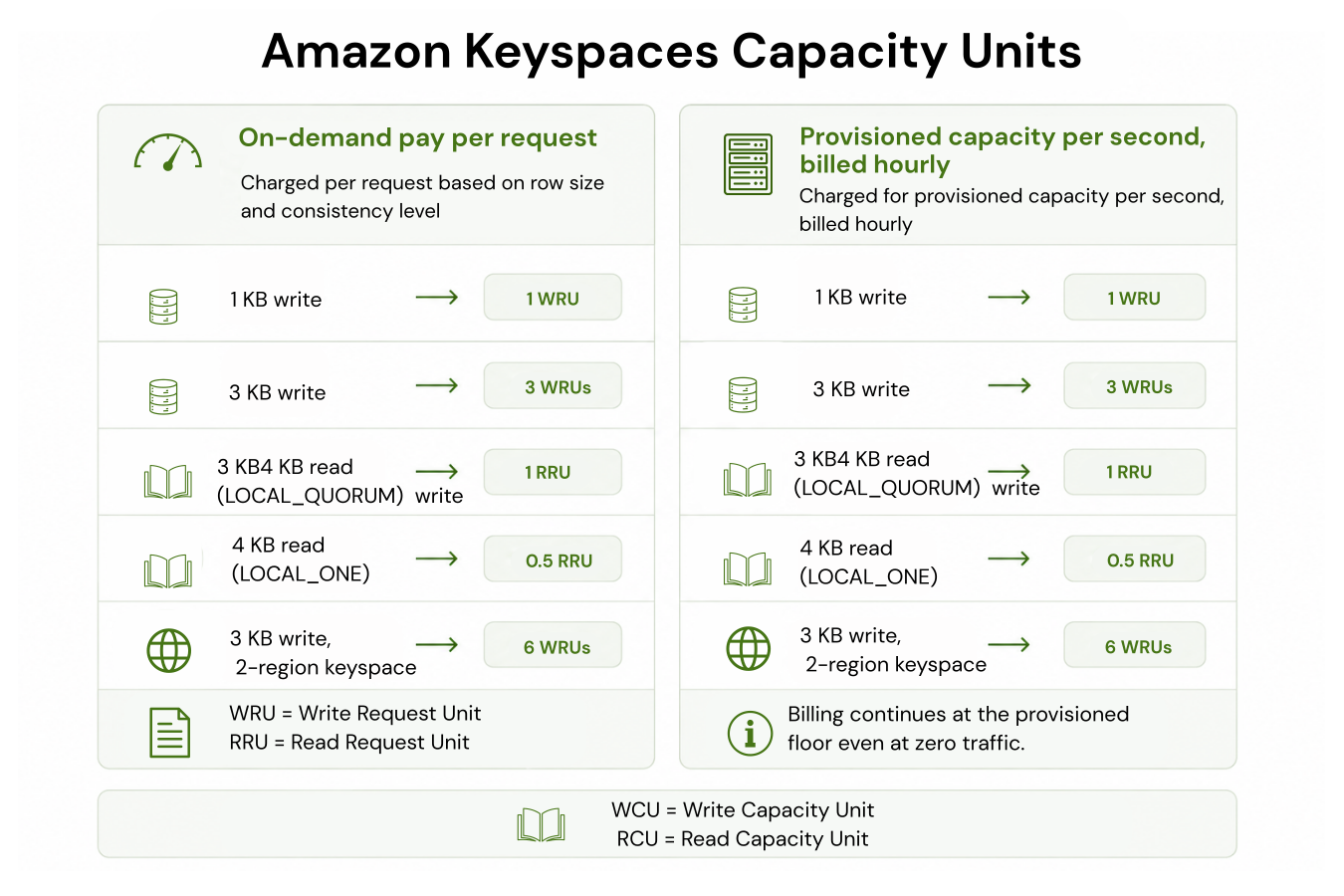
Billing in on-demand mode uses two units: Write Request Units (WRUs) and Read Request Units (RRUs). One WRU provides enough capacity to write up to 1 KB of data per row using LOCAL_QUORUM consistency. One RRU provides enough capacity to read up to 4 KB of data using LOCAL_QUORUM consistency, or up to 8 KB using LOCAL_ONE consistency (which consumes 0.5 RRU per 4 KB read). If a row is larger than these thresholds, additional units are consumed proportionally. Source: AWS official Keyspaces documentation.
On-demand mode is $0 when tables have no traffic. This makes it the right default for new tables, development environments, tables with infrequent or unpredictable access, and seasonal applications that have bursts of activity followed by quiet periods. Before the November 2024 price reduction, on-demand was significantly more expensive than provisioned for stable high-throughput workloads. After the reduction of up to 56%, on-demand is now competitive with provisioned for most workload patterns.
No charge for Lightweight Transactions (LWTs) in on-demand mode: Keyspaces’ on-demand pricing does not add a separate charge for using lightweight transactions (conditional writes with IF NOT EXISTS or IF conditions). In DynamoDB, transactional operations cost 2x normal WRU/RRU. In Keyspaces on-demand mode, LWTs are charged at the standard WRU rate.
Provisioned Mode (For Stable, High-Throughput Workloads)
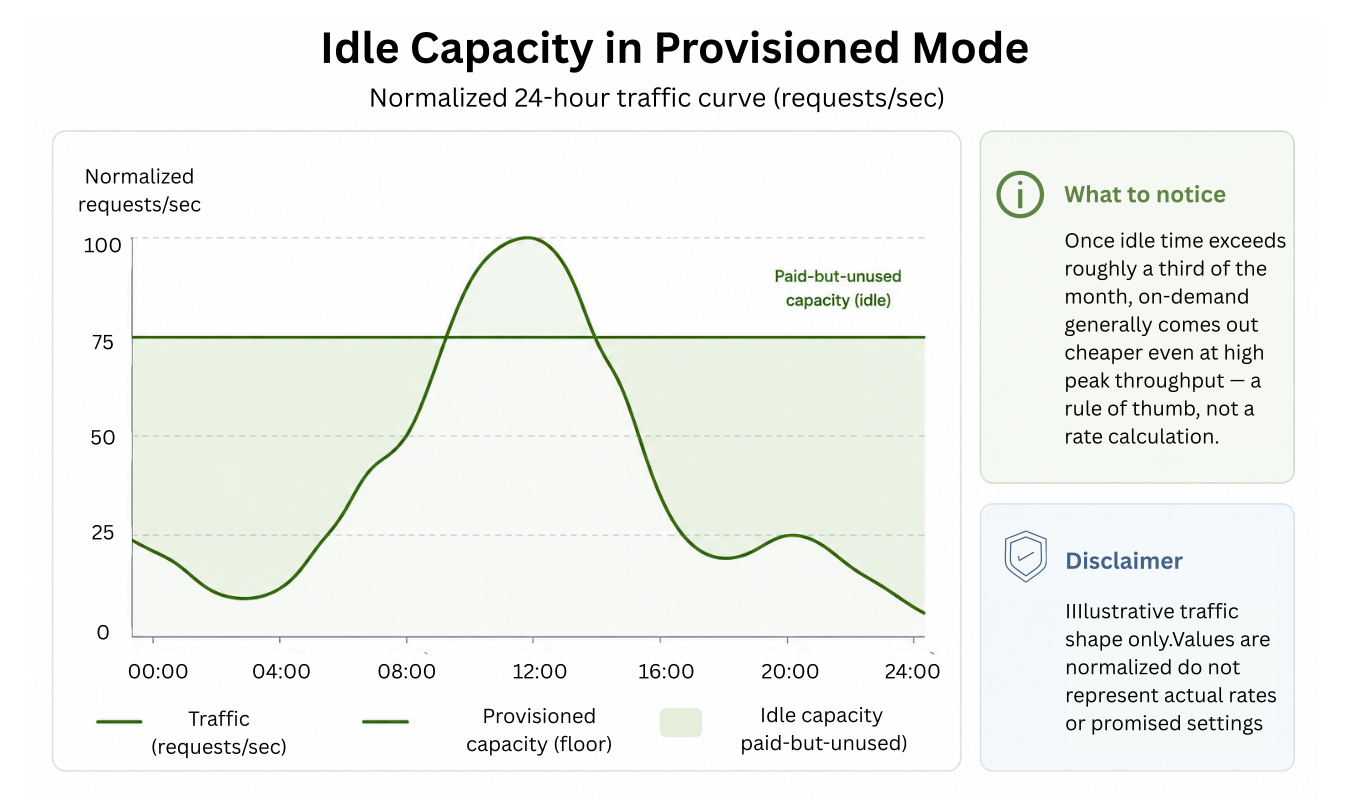
In provisioned mode, you specify the number of read capacity units (RCUs) and write capacity units (WCUs) your table requires per second. You are billed per capacity unit per hour regardless of whether you use the full provisioned capacity. AWS charges the provisioned rate even during idle periods.
The distinction between RRUs/WRUs (on-demand) and RCUs/WCUs (provisioned) is important: on-demand charges per request, provisioned charges per unit of sustained throughput per second per hour. One RCU provides one LOCAL_QUORUM read per second for rows up to 4 KB, or two LOCAL_ONE reads per second. One WCU provides one LOCAL_QUORUM write per second for rows up to 1 KB.
Provisioned mode supports auto scaling: you configure minimum and maximum RCU/WCU bounds, and Keyspaces adjusts provisioned capacity automatically within those bounds based on actual traffic. Auto scaling takes 1-2 minutes to react to traffic changes, which means brief spikes may still cause throttling if they exceed the current provisioned level. For workloads with sudden sharp spikes, on-demand mode avoids this throttling risk.
Provisioned mode is most cost-effective when: your read/write traffic is stable and predictable, you can forecast capacity requirements 24+ hours in advance, and the workload runs at consistently high throughput where the per-unit provisioned rate is cheaper than the per-request on-demand rate.
Consistency Levels: LOCAL_QUORUM and LOCAL_ONE
Amazon Keyspaces supports two read consistency levels that directly affect both correctness and cost. Understanding the difference is essential for both application design and cost estimation.
LOCAL_QUORUM (Strong Consistency)
LOCAL_QUORUM requires that at least two of the three storage replicas return a consistent value before the read is returned to the application. This guarantees that the data returned is the most recently written value — reads are strongly consistent. All writes in Keyspaces use LOCAL_QUORUM consistency, ensuring durability before acknowledging the write to the application. 1 RRU (on-demand) provides one LOCAL_QUORUM read for rows up to 4 KB. Source: AWS official Keyspaces documentation.
LOCAL_ONE (Eventual Consistency)
LOCAL_ONE returns the first value received from any storage replica, which may not be the most recently written value if a recent write has not yet propagated to all replicas. Reads using LOCAL_ONE are eventually consistent. The cost advantage: each RRU (on-demand) provides two LOCAL_ONE reads for rows up to 4 KB, effectively halving read costs for workloads that accept eventual consistency. For applications like user activity feeds, recommendation results, or session data where slightly stale reads are acceptable, LOCAL_ONE can cut read costs by 50%.
Read consistency cost example: an application reading 1 KB user profile records 100 million times per month. With LOCAL_QUORUM: 100 million RRUs consumed. With LOCAL_ONE: 50 million RRUs consumed (each RRU covers 2 LOCAL_ONE reads for rows up to 4 KB). If you can tolerate eventual consistency on read paths, LOCAL_ONE is a meaningful cost lever. Source: AWS official Keyspaces pricing examples.

Also read: What Is Amazon ElastiCache?
Amazon Keyspaces Pricing in 2026
All rates: US East (N. Virginia), June 2026. Effective pricing reflects the November 14, 2024 price reduction (up to 56% on-demand single-region reduction). Verify all current rates at aws.amazon.com/keyspaces/pricing — rates change.
| Pricing Component | Rate | Notes |
| On-demand write (WRU) | Per million WRUs (verify at aws.amazon.com/keyspaces/pricing) | 1 WRU = write up to 1 KB, LOCAL_QUORUM. Rows above 1 KB use proportionally more WRUs. |
| On-demand read LOCAL_QUORUM (RRU) | Per million RRUs (verify at aws.amazon.com/keyspaces/pricing) | 1 RRU = read up to 4 KB, LOCAL_QUORUM. |
| On-demand read LOCAL_ONE | 0.5 RRU per 4 KB read | Half the cost of LOCAL_QUORUM for eventual consistency reads. |
| Multi-region on-demand writes | 1 WRU per KB per region | 2-region keyspace: writes billed in both regions. 3 KB row x 2 regions = 6 WRUs. |
| Storage | $0.25/GB-month | No provisioning required. Billed for actual data stored, monitored continuously. |
| PITR (continuous backups) | ~$0.15/GB-month | Point-in-time recovery to any second in the preceding 35 days. Optional — must be enabled per table. |
| Table restore (from PITR) | Per GB restored | Charged per total data size restored. Verify current rate at aws.amazon.com/keyspaces/pricing. |
| TTL deletes | Per TTL delete unit (1 unit = 1 KB deleted per row) | Reduced 75% in November 2024. Source: AWS official announcement. |
| Data transfer (same region) | $0.00 | No charge for data transfer between Keyspaces and other AWS services in the same region. |
| Data transfer (out to internet) | Standard AWS data transfer rates | Same tier as EC2, RDS, S3 egress. First 100 GB/month free. |
| Free tier (3 months) | 30M WRUs + 30M RRUs + 1 GB storage/month | Available for new Keyspaces accounts. Starts from first resource creation. |
Note: exact per-million WRU and RRU rates are not reproduced here because the November 2024 price cut changed them significantly and rates vary by region. Verify current rates directly at aws.amazon.com/keyspaces/pricing before estimating costs. The rates cited above for storage ($0.25/GB-month) and PITR (~$0.15/GB-month) are verified from AWS official and oneuptime.com (February 2026).
The November 2024 Price Cut: What Changed and Why It Matters
AWS reduced Keyspaces prices across three dimensions on November 14, 2024. Understanding what changed is essential for any team evaluating Keyspaces in 2026, because most published guides reflect pre-cut pricing.
On-Demand Mode: Up to 56% Reduction (Single-Region), 65% (Multi-Region)
Before November 2024, on-demand mode was the obvious choice only for spiky or unpredictable workloads. For stable workloads, provisioned mode was cheaper because the per-unit provisioned rate was significantly lower than the per-request on-demand rate. The up to 56% reduction on single-region on-demand writes changed that equation. AWS explicitly stated that on-demand is now ‘the recommended and default choice for the majority of Keyspaces workloads.’ This is the most important change for cost estimation.
Provisioned Mode: Up to 13% Reduction (Single-Region), 20% (Multi-Region)
Provisioned mode pricing also decreased, but by a smaller margin. For teams already running provisioned mode for stable high-throughput workloads, this is a direct cost reduction without any configuration change required. For teams evaluating whether to use on-demand or provisioned, the recommendation from AWS is clear: start with on-demand, and consider provisioned only for workloads where the sustained throughput volume makes the per-capacity-unit provisioned rate cheaper than the per-request on-demand rate.
TTL Deletes: 75% Reduction
Time-to-Live (TTL) is Keyspaces’ mechanism for automatically deleting data after a specified expiration time — used for session data, cache entries, event logs with retention windows, and any time-bounded data. Keyspaces charges per TTL delete unit (1 unit = 1 KB of deleted data per row). The 75% reduction makes TTL significantly more cost-effective for workloads that rely on automated data expiration. Source: AWS official announcement (November 14, 2024).
On-Demand vs Provisioned: The 2026 Decision Framework
The November 2024 price reduction changes the default recommendation. Here is the framework for 2026.
| Workload Pattern | Recommended Mode | Reason | Key consideration |
| New table, unknown traffic | On-demand | No capacity planning needed. $0 when idle. | Switch to provisioned later if sustained throughput makes it cheaper |
| Unpredictable or spiky traffic | On-demand | No throttling on spikes. Scales instantly. | Provisioned auto-scaling takes 1-2 min to react — still throttles on sudden spikes |
| Variable with idle periods (nights, weekends) | On-demand | $0 compute during idle. Provisioned bills 24/7 for minimum capacity. | Savings grow with longer idle periods |
| Stable, high-throughput, sustained 24/7 | Evaluate provisioned + auto-scaling | At sustained high volume, per-unit provisioned rate may be cheaper than per-request on-demand. | Calculate break-even at your specific volume. Switch mode once/day if testing. |
| Development and testing | On-demand | $0 when no test runs active. No capacity waste. | Free tier covers first 3 months for new accounts |
| Seasonal events (marketing campaigns, product launches) | On-demand or switch to on-demand before event | On-demand handles burst without pre-provisioning for peak. Can switch mode once/day. | Switch back to provisioned after event if stable baseline resumes |
Source: AWS official announcement (November 14, 2024) and AWS official Keyspaces capacity modes documentation. oneuptime.com (February 2026) citing AWS: auto scaling ‘takes 1-2 minutes to react.’ Verify current per-unit rates at aws.amazon.com/keyspaces/pricing before calculating break-even for your specific workload.
Amazon Keyspaces Use Cases: When Cassandra Compatibility Matters
Migrating Existing Cassandra Workloads to AWS
The primary value proposition of Keyspaces for teams already running Cassandra: zero migration of application logic. You change the connection endpoint, update authentication (Keyspaces uses SigV4 with IAM or service-specific credentials via SSL), and the application runs. The same CQL statements, the same partition key design, the same clustering column definitions — all carry over directly. What you eliminate: the infrastructure management burden of operating a Cassandra cluster.
Practical migration checklist: audit your Cassandra schema for features not supported in Keyspaces (materialized views, user-defined functions, SAI indexes). Plan alternatives for any unsupported features. Test query patterns against Keyspaces using the AWS Keyspaces local cassandra-driver and a staging keyspace. Switch production traffic using a dual-write period where both the old Cassandra cluster and Keyspaces receive writes, then cut over reads once the Keyspaces table is confirmed current.
High-Scale IoT and Telemetry Data
IoT applications generating millions of events per second at unpredictable rates — sensor bursts, device connectivity events, alert triggers — are a natural fit for Keyspaces on-demand mode. The partition key design follows standard Cassandra patterns (device_id + time bucket as composite partition key, timestamp as clustering column). Keyspaces scales instantly when a fleet of 100,000 devices simultaneously comes online, without pre-provisioning or capacity management. Storage grows automatically without manual volume resizing.
User Session and Profile Storage
Web applications storing user sessions, preferences, or profiles need fast key-value lookups at high concurrency. Keyspaces partition key reads return results in single-digit milliseconds. For session storage where the access pattern is always a direct partition key lookup (get session by session_id), Keyspaces provides Cassandra-compatible access at scale without a dedicated Cassandra cluster. TTL (now 75% cheaper) handles automatic session expiration.
Time-Series Event Logs With Retention Windows
Application event logs, audit trails, and user activity streams naturally fit Cassandra’s data model: a composite key of user_id or entity_id with a time-bucketed clustering key, rows ordered by timestamp, TTL on older rows. Keyspaces’ TTL pricing reduction (75% in November 2024) makes automated log expiration significantly more cost-effective than before. The table grows as new events arrive, old rows expire automatically via TTL, and storage remains bounded without manual cleanup jobs.
Multi-Region Active-Active Applications
Keyspaces Multi-Region Replication provides active-active replication across AWS Regions with automated, fully managed replication — no need to configure Cassandra’s native multi-datacenter replication or manage Cassandra node topology across regions. Write to any region; reads are local; replication is transparent. Multi-region write costs are higher (billed per WRU per region), but the operational elimination of self-managed multi-datacenter Cassandra is significant for teams that need global distribution. Source: AWS official Keyspaces Multi-Region Replication documentation (aws.amazon.com/keyspaces/multi-region-replication/).

Amazon Keyspaces Security and Compliance
Keyspaces encrypts all data at rest by default using AWS Key Management Service (KMS). You can use AWS-managed keys or your own customer-managed KMS keys. All data in transit between your application and Keyspaces is encrypted using TLS. Source: AWS official Keyspaces documentation.
IAM integration provides both authentication and fine-grained authorization. You can create IAM policies that grant access to specific keyspaces, tables, or CQL operations (SELECT, INSERT, UPDATE, DELETE). Applications running on EC2 or Lambda use IAM roles to authenticate to Keyspaces without managing passwords. Keyspaces also supports service-specific credentials for legacy applications that use CQL username/password authentication. Source: AWS official Keyspaces documentation.
Keyspaces is HIPAA-eligible, PCI DSS-compliant, and SOC 1/2/3-certified. It supports VPC endpoints via AWS PrivateLink, allowing your application instances to connect to Keyspaces without traffic traversing the public internet. Source: AWS official Keyspaces compliance documentation. Verify current compliance certifications at aws.amazon.com/compliance/services-in-scope.
Point-in-time recovery (PITR) provides continuous backups with per-second granularity, allowing table restoration to any second within the preceding 35 days. PITR is optional and charged separately at approximately $0.15/GB-month when enabled. Source: oneuptime.com (February 2026) citing AWS official.
See exactly what you’re overpaying in under 60 seconds. Try the Calculator for free →
Keyspaces vs DynamoDB: When to Use Which
Amazon Keyspaces and DynamoDB are both managed NoSQL databases on AWS. The core difference is the API and data model. Keyspaces uses CQL (Cassandra Query Language) and a table-based data model with partition keys, clustering columns, and row-based storage. DynamoDB uses its own API and a key-value/document data model with partition keys, optional sort keys, and attribute-based storage.
| Factor | Amazon Keyspaces | Amazon DynamoDB | Choose based on |
| API | CQL (Cassandra Query Language) | DynamoDB API (AWS SDK) | Existing Cassandra code uses Keyspaces. Net-new apps: DynamoDB has broader AWS native integration. |
| Data model | Table with partition key + clustering columns, row-based | Table with partition key + optional sort key, item-based | Cassandra-style wide rows and clustering queries: Keyspaces |
| Secondary indexes | Secondary indexes (limited in Keyspaces vs full Cassandra) | Global Secondary Indexes (GSIs), Local Secondary Indexes (LSIs) | Complex secondary index requirements: DynamoDB |
| Consistency | LOCAL_ONE (eventual) or LOCAL_QUORUM (strong) | Eventually consistent or strongly consistent reads | Both support strong consistency. DynamoDB offers transactional reads at 2x cost. |
| Migrations | Drop-in for existing Cassandra: change endpoint | Requires application rewrite from Cassandra | Migrating self-managed Cassandra: always Keyspaces |
| AWS native integration | Growing (DMS support, Glue, Lambda triggers in preview) | Deep (Streams, Lambda triggers, DAX caching, Global Tables) | Heavy AWS service integration: DynamoDB |
| Pricing model | WRU/RRU (on-demand) or WCU/RCU (provisioned). LWTs no extra charge in on-demand. | WRU/RRU (on-demand) or WCU/RCU (provisioned). Transactional ops cost 2x. | LWT-heavy workloads: Keyspaces on-demand is cheaper (no transaction premium) |
Source: AWS official documentation for both services. Use Keyspaces when you have existing Cassandra workloads, Cassandra-trained engineers, or require CQL compatibility. Use DynamoDB for net-new NoSQL applications on AWS where deep native integration (Streams, DAX, Global Tables) is valuable.
How to Reduce Amazon Keyspaces Costs
Use LOCAL_ONE Consistency on Eligible Read Paths
The simplest cost optimization for read-heavy Keyspaces workloads: switch read operations from LOCAL_QUORUM to LOCAL_ONE on paths where eventual consistency is acceptable. Each LOCAL_ONE read of a row up to 4 KB consumes 0.5 RRUs instead of 1 RRU — a 50% read cost reduction. Identify which application read paths use results that do not need to reflect the most recent writes (user profile reads, cached recommendation results, historical event queries) and configure those paths to use LOCAL_ONE consistency.
Enable TTL for Bounded Data Sets
Any data that should not be retained indefinitely — sessions, logs, events with a retention window, temporary cache rows — should have TTL set at write time. With the 75% TTL delete price reduction from November 2024, automated expiration via TTL is now the most cost-effective approach to bounded data management. Manual delete operations consume write capacity. TTL deletes are charged per KB of deleted data at a much lower rate than write capacity. Enable PITR only on tables where point-in-time recovery is required for compliance or operational purposes. PITR adds ~$0.15/GB-month to your storage cost.
Batch Write Operations to Reduce WRU Consumption
Cassandra’s BATCH statement allows grouping multiple insert or update operations into a single CQL call. In Keyspaces, batched writes still consume WRUs per row written (not per batch), but batching reduces the API call overhead and can reduce latency for write-heavy workloads. Note: Keyspaces does not support unlogged batches that span multiple partition keys efficiently — keep batches within a single partition or a small number of partitions for best performance. Source: AWS official Keyspaces developer guide.
Database Savings Plans for Stable Keyspaces Workloads
Database Savings Plans cover Amazon Keyspaces and provide up to 35% savings on a 1-year commitment. The commitment is a dollar-per-hour spend level — not tied to specific tables, capacity modes, or read/write volumes. For production Keyspaces workloads with predictable monthly spend, the DSP commitment delivers savings while retaining flexibility to change table configuration, capacity modes, or table counts within the commitment period.
Keyspaces is listed as broadly eligible for Database Savings Plans across deployment types — both on-demand and provisioned mode usage counts toward the DSP commitment. Source: Usage.ai live blog (usage.ai/blogs/aws/database-savings-plans): ‘For DynamoDB, Neptune, DocumentDB, Keyspaces, Timestream, and DMS, eligibility is broadly available across deployment types.’
Also read: AWS Database Savings Plans: Complete GuideÂ
How Usage.ai Optimizes Amazon Keyspaces Costs
Usage.ai analyzes Amazon Keyspaces spend across tables and identifies Database Savings Plans commitment opportunities. For Keyspaces workloads with stable monthly spend, the platform models the DSP commitment level that captures savings without over-committing based on historical hourly spend patterns from your AWS Cost and Usage Report.
For teams running Keyspaces in provisioned mode with auto-scaling, Usage.ai identifies whether the workload’s actual request volume and traffic pattern would be cheaper on on-demand mode given the November 2024 price reduction. The analysis compares your actual consumed RCUs/WCUs against the on-demand equivalent cost at current per-request rates. Many teams that moved to provisioned mode before November 2024 are now paying more than they would on on-demand mode at the updated rates.
The platform surfaces these opportunities as part of its 24-hour recommendation refresh — catching capacity mode mismatches and DSP commitment gaps as they emerge rather than on a monthly review cycle. For teams running multiple AWS database services (RDS, ElastiCache, Neptune, Keyspaces, Timestream), a single DSP commitment can cover all eligible spend under one commitment rather than separate RI purchases per service.
If a DSP commitment for Keyspaces becomes underutilized — because a table is decommissioned, traffic drops permanently, or workloads migrate to a different service — Usage.ai provides cashback on the unused commitment in real money. Fee: percentage of realized savings only.
See how Usage.ai optimizes Keyspaces Database Savings Plans

Frequently Asked Questions
1. What is Amazon Keyspaces Serverless?
Amazon Keyspaces is always serverless — there are no servers to manage, provision, or patch. ‘Keyspaces Serverless’ typically refers to Keyspaces in on-demand capacity mode, where you pay per read and write request (using Read Request Units and Write Request Units) without pre-committing to throughput capacity. On-demand mode is the recommended default for most workloads since the November 2024 price reduction of up to 56% on single-region on-demand writes. Source: AWS official Keyspaces documentation and AWS announcement (November 14, 2024).
2. Is Amazon Keyspaces compatible with Apache Cassandra?
Yes. Amazon Keyspaces is API-compatible with Apache Cassandra and uses the same Cassandra Query Language (CQL). Existing Cassandra applications can connect to Keyspaces by changing the endpoint to the Keyspaces service endpoint and updating authentication. No changes to CQL queries, table schemas, or Cassandra drivers are required for compatible workloads. Unsupported features include: user-defined functions (UDFs), user-defined aggregates (UDAs), materialized views, and storage-attached indexes (SAI). Source: AWS official Keyspaces features page.
3. What changed in November 2024 for Keyspaces pricing?
AWS reduced Amazon Keyspaces prices across three dimensions: on-demand mode by up to 56% (single-region) and 65% (multi-region), provisioned mode by up to 13% (single-region) and 20% (multi-region), and TTL delete prices by 75%. AWS stated that on-demand is now ‘the recommended and default choice for the majority of Keyspaces workloads.’ Teams using provisioned mode for predictable workloads should recalculate whether on-demand is now cheaper given the updated rates. Source: AWS official announcement (November 14, 2024).
4. What is the difference between RRU/WRU and RCU/WCU in Keyspaces?
RRU (Read Request Unit) and WRU (Write Request Unit) are used in on-demand capacity mode — you are charged per request. 1 RRU = one LOCAL_QUORUM read for rows up to 4 KB (or two LOCAL_ONE reads). 1 WRU = one write for rows up to 1 KB. RCU (Read Capacity Unit) and WCU (Write Capacity Unit) are used in provisioned capacity mode — you pre-provision throughput per second and are billed per unit per hour. The mechanics are similar but the billing model is fundamentally different: per-request versus per-sustained-capacity. Source: AWS official Keyspaces pricing and capacity modes documentation.
5. How does Amazon Keyspaces handle multi-region replication?
Amazon Keyspaces Multi-Region Replication provides active-active, fully managed replication across multiple AWS Regions. Writes can be sent to any region and are automatically replicated to all other regions in the keyspace. For on-demand mode, multi-region writes are billed per WRU per region: writing a 3 KB row to a 2-region keyspace requires 3 WRUs x 2 regions = 6 WRUs. There is no additional charge for the replication data transfer across regions. Source: AWS official Keyspaces Multi-Region Replication documentation.
6. Do Database Savings Plans cover Amazon Keyspaces?
Yes. Amazon Keyspaces is eligible for Database Savings Plans coverage, broadly available across both on-demand and provisioned capacity mode usage. Database Savings Plans provide up to 35% savings on a 1-year commitment. The commitment is a dollar-per-hour spend level that applies automatically across eligible Keyspaces usage and other covered database services (RDS, Aurora, Neptune, DynamoDB, DocumentDB, Timestream, DMS). Source: Usage.ai live blog (usage.ai/blogs/aws/database-savings-plans) and AWS official Database Savings Plans documentation.
7. What is Amazon Keyspaces PITR and how much does it cost?
PITR (Point-In-Time Recovery) is Amazon Keyspaces’ continuous backup feature. When enabled, Keyspaces automatically backs up table data with per-second granularity, allowing restoration to any second within the preceding 35 days. PITR must be explicitly enabled per table and is charged at approximately $0.15/GB-month based on the table size. Table restoration from PITR incurs an additional charge per GB of data restored. For compliance or operational recovery requirements, PITR is the standard backup mechanism for Keyspaces. Source: oneuptime.com (February 2026) and AWS official Keyspaces pricing. Verify current rates at aws.amazon.com/keyspaces/pricing.
8. What is the free tier for Amazon Keyspaces?
New Amazon Keyspaces accounts receive a 3-month free tier: 30 million on-demand write request units per month, 30 million on-demand read request units per month, and 1 GB of storage per month. The free tier begins from the first month when you create your first Keyspaces resource and is limited to one free tier per payer account. After 3 months, all usage is billed at standard on-demand rates. Source: AWS official Keyspaces pricing page.