.png)



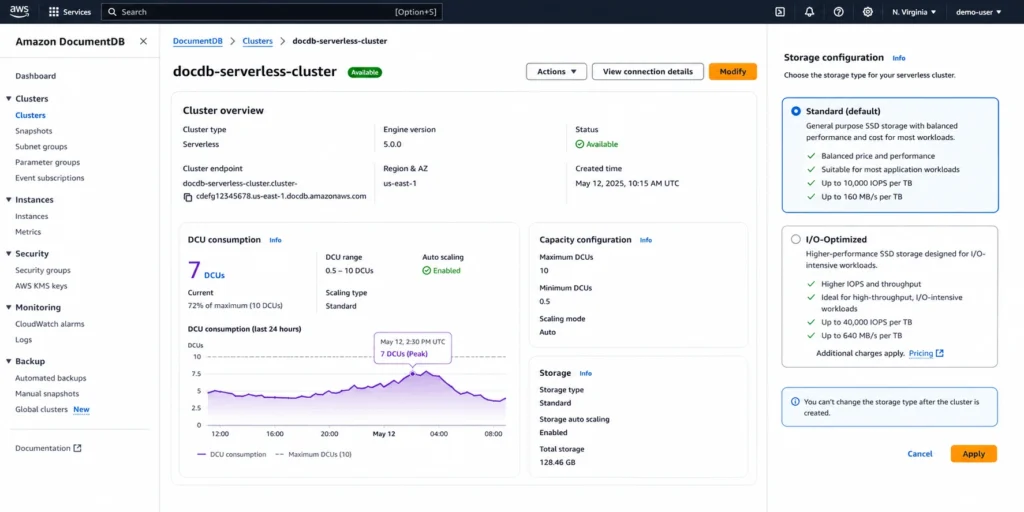
DocumentDB Serverless prices compute in DocumentDB Capacity Units (DCUs) billed per second. Unlike Aurora DSQL, which uses a single unified DPU metric, DocumentDB Serverless keeps I/O as a separate billing line under Standard storage — meaning your total bill has three components when running Standard: DCU compute, storage, and I/O. Under I/O-Optimized, the higher DCU rate absorbs I/O, reducing it to two components: DCU compute and storage.
This guide covers every billing dimension, the Standard vs I/O-Optimized decision framework, the two AWS official worked examples with exact numbers, the break-even versus provisioned, the Extended Support trap for version 3.6 users, and the Database Savings Plans path.
See exactly what you’re overpaying in under 60 seconds. Try the Calculator for free →
DocumentDB Serverless: Complete Pricing Table
| Billing Component | Rate (US East) | Notes |
| DCU compute — Standard | $0.0822/DCU-hr | Billed per second. Minimum 0.5 DCU always running. I/O billed separately. |
| DCU compute — I/O-Optimized | $0.0905/DCU-hr | 10% higher DCU rate. No separate I/O charges. Predictable billing for I/O-heavy apps. |
| Minimum capacity | 0.5 DCU | No scale-to-zero. At 0.5 DCU continuous (Standard): ~$30/month compute baseline. |
| Capacity granularity | 0.5 DCU increments | Scales instantly up; approximately 3 minutes to scale down to minimum. |
| Storage — Standard | $0.10/GB-month | Includes 3-AZ replication. Auto-scales. Covers data, indexes, change stream data. |
| Database I/O — Standard only | Per million I/O requests | Read: 8K pages = 1 I/O. Write: 4K transaction log units = 1 I/O. Verify rate at aws.amazon.com/documentdb/pricing/. |
| Storage — I/O-Optimized | Higher than Standard | I/O included. No per-request charge. Choose when I/O would exceed 25% of total spend under Standard. |
| Backup storage (free tier) | Free to 100% of DB size | Automated backups free up to your total cluster storage. Manual snapshots charged from creation. |
| Backup storage (above free) | $0.02/GB-month | Only charged above the 100% free tier threshold. |
| Inter-AZ data transfer | $0.00 | Data transferred between cluster instances across AZs is free. |
| T3/T4g CPU credit overage | $0.09/vCPU-hr | Only when average CPU over a rolling 24-hr period exceeds baseline. Same across all T3/T4 sizes and regions. |
| Database Savings Plans | Eligible | Explicitly listed on AWS pricing page. Up to 35% savings on 1-year commitment. |
| 30-day free trial (new customers) | 750 hrs t3.medium + 30M IOs + 5 GB storage | One-month trial for new DocumentDB accounts. Not available in GovCloud or China (Ningxia). |
All rates: US East (N. Virginia), June 11, 2026. Source: AWS official DocumentDB pricing page. Verify at aws.amazon.com/documentdb/pricing/ — rates change.
Source: AWS official DocumentDB pricing page (aws.amazon.com/documentdb/pricing/), verified June 11, 2026. Exact per-million I/O rate renders dynamically on the pricing page — verify before estimating.
Also read: Amazon Keyspaces Serverless: The Complete 2026 Guide
Standard vs I/O-Optimized: The Decision That Shapes Your Entire Bill
This is the single most important configuration choice for DocumentDB Serverless. It determines whether I/O appears as a separate, variable cost or is absorbed into a higher, fixed DCU rate. Source: AWS official pricing page.
Choose Standard when
Your application reads its working set from memory most of the time. DocumentDB only hits storage when data is not already in the instance memory cache. Well-indexed collections where your instance has enough memory to hold the working set generate minimal read I/Os — cached data does not incur additional I/O charges. If your expected I/O cost under Standard would be less than 25% of total cluster spend, Standard is cheaper.
The I/O mechanics under Standard: read I/Os are charged at 8K page granularity — one I/O per 8K page read from storage. Once a page is read and cached in memory, repeated reads of the same data do not incur additional I/Os. Write I/Os are only consumed when pushing transaction log records to storage for durability, charged in 4K units. DocumentDB never pushes modified database pages to the storage layer, which reduces write I/O consumption compared to traditional database engines. Concurrent writes with transaction logs under 4K can be batched together, further reducing I/O consumption.
Choose I/O-Optimized when
Your workload is I/O-intensive. Scanning large unindexed collections, running aggregation pipelines that process more data than fits in memory, bulk insert or update operations, or working with change streams and TTL indexes all generate significant I/O. If I/O costs under Standard would exceed 25% of total cluster spend, switch to I/O-Optimized. Source: AWS official pricing page.
The 10% DCU rate premium ($0.0905 vs $0.0822) is offset by zero I/O charges at the 25% crossover point. Beyond that crossover, I/O-Optimized saves money on every additional I/O. To evaluate: pull your current I/O consumption from CloudWatch (ReadIOPS, WriteIOPS metrics) for 30 days, calculate the Standard I/O cost, compare against the DCU rate premium. Switch to I/O-Optimized if the I/O cost exceeds the premium.
Garbage collection I/O: DocumentDB uses MVCC (multi-version concurrency control) and creates a new versioned document for every update. When old document versions are no longer needed, a garbage collector reclaims them — generating read and write I/Os. For write-heavy workloads with frequent updates to the same documents, garbage collection I/O can be a significant share of total I/O. Remove unused indexes and ensure your instance is right-sized so indexes fit in memory to minimize garbage collection overhead. Source: AWS official pricing page.
The Two AWS Official Worked Examples
Scenario: a workload that needs 7 DCUs, runs for 30 minutes at peak, then scales down from 7 DCUs to 0.5 DCUs over approximately 3 minutes. Source: AWS official DocumentDB pricing page, verified June 11, 2026.
Example 1: Standard Storage
The cluster scales from 0.5 DCUs to 7 DCUs instantly at workload start.
| Usage | Calculation | Cost |
| Run at 7 DCUs for 30 minutes | 7 x $0.0822/hr x 30/60 hr | $0.29 |
| Scale down 7 to 0.5 DCUs over 3 minutes | 7 x $0.0822/hr x 3/60 hr | $0.03 |
| Compute total — Standard | $0.32 |
Storage and I/O are additional. I/O at per-million rates (Standard) and storage at $0.10/GB-month are not included in this compute-only example. Source: AWS official pricing page.
Example 2: I/O-Optimized Storage
Same scenario at the I/O-Optimized DCU rate. No separate I/O charges apply.
| Usage | Calculation | Cost |
| Run at 7 DCUs for 30 minutes | 7 x $0.0905/hr x 30/60 hr | $0.32 |
| Scale down 7 to 0.5 DCUs over 3 minutes | 7 x $0.0905/hr x 3/60 hr | $0.03 |
| Compute total — I/O-Optimized | $0.35 |
I/O charges are included in the DCU rate. Storage at I/O-Optimized rate (higher than $0.10/GB-month Standard) billed separately. Source: AWS official pricing page.
Comparing the two examples: I/O-Optimized adds $0.03 to the 30-minute compute cost ($0.35 vs $0.32). Whether that premium pays off depends entirely on how much I/O the workload generates during those 30 minutes. For an I/O-heavy workload that would have generated $1.00+ in I/O charges under Standard, I/O-Optimized saves $0.97 in that same window. For a memory-resident workload with minimal I/O, Standard is cheaper by $0.03. Source: derived from AWS official worked examples.
Full-Month Cost Estimate: A Real Application Scenario
A content management system using DocumentDB Serverless. Access pattern: bursty writes and reads during business hours (9am-6pm weekdays), near-idle overnight and weekends. Peak load: 8 DCUs. Average during business hours: 5 DCUs. Off-hours: 0.5 DCU minimum. Storage: 40 GB. Working set mostly fits in memory (low I/O). Standard storage configuration.
Business hours DCU cost (8 hr/day x 22 days = 176 hours): 5 DCUs x $0.0822 x 176 = $72.34/month. Off-hours DCU cost (730 – 176 = 554 hours): 0.5 DCU x $0.0822 x 554 = $22.77/month. Storage: 40 GB x $0.10 = $4.00/month. I/O (estimate for memory-resident workload): approximately $3-8/month. Backup storage (40 GB free tier covers 40 GB): $0. Total: approximately $102-107/month.
Equivalent provisioned db.r5.large (16 GB, ~8 DCU equivalent) on-demand at approximately $0.277/hr: $0.277 x 730 = $202/month. Serverless saves approximately $95-100/month for this variable workload pattern — about 50% savings versus running a right-sized provisioned instance 24/7. Source: break-even math from verified rates.
Also read: DocumentDB Serverless: Complete Guide to DCU scaling
The 0.5 DCU Minimum: What It Costs and How to Work Around It
DocumentDB Serverless does not scale to zero. The 0.5 DCU minimum is always maintained, meaning the cluster is always ready to accept connections without cold-start delay. The baseline compute cost at 0.5 DCU running continuously: 0.5 x $0.0822 x 730 = $30.00/month (Standard). For 30 days, that is $1.00/day in baseline compute even with zero application queries.
For development and staging environments that are genuinely idle for days at a time, the stop-cluster feature eliminates this baseline cost. You can temporarily stop compute instances for up to 7 days. During the stopped period, no DCU charges apply — only storage continues billing. The cluster restarts automatically after 7 days, or you can restart it manually before then. Source: AWS official pricing page.
Stop-cluster workflow for dev environments: stop the cluster each Friday evening, restart Monday morning. Saves approximately 64 hours of 0.5 DCU baseline per week = 0.5 x $0.0822 x 64 = $2.63/week = $10.52/month saved on the compute baseline alone. For a team with multiple dev clusters, this adds up. Source: derived from AWS official pricing and stop-cluster documentation.
DocumentDB Version 3.6 Extended Support: Act Before July 1, 2026
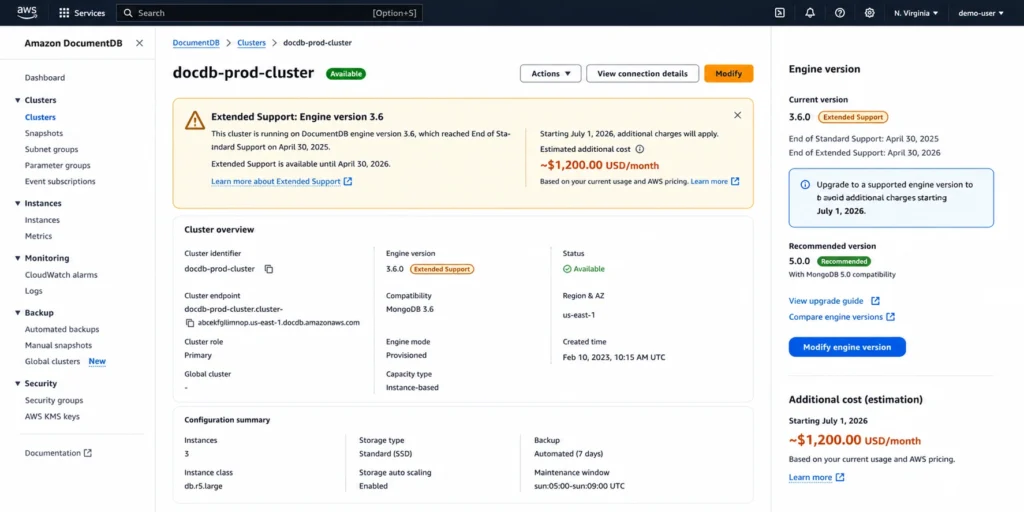
DocumentDB version 3.6 entered Extended Support on March 31, 2026. Extended Support billing starts July 1, 2026 — which is 20 days from now. This affects both Serverless and Provisioned clusters running version 3.6.
Extended Support surcharge: July 1, 2026 to March 31, 2028 — $0.111/vCPU-hour on top of standard rates. April 1, 2028 to March 31, 2029 — $0.222/vCPU-hour. For a provisioned db.r5.large (2 vCPUs) at $0.277/hr: Extended Support adds $0.222/hr, raising the effective rate to $0.499/hr — an 80% increase. For Serverless clusters, the surcharge applies per DCU-hour consumed, proportionally to DCU CPU allocation. Source: AWS official DocumentDB pricing page.
If your cluster is on version 3.6, upgrade to a supported version before July 1, 2026. The upgrade avoids the Extended Support surcharge entirely and is the single highest-ROI action available for affected clusters right now. Source: AWS official pricing page.
Break-Even: Serverless vs Provisioned
The break-even between Serverless and Provisioned is driven by average DCU utilization relative to the provisioned equivalent. At sustained high utilization, provisioned is cheaper because the per-instance-hour rate is lower than the equivalent sustained DCU cost.
For a db.r5.large (16 GB, ~8 DCU equivalent) at $0.277/hr on-demand: Serverless at sustained 8 DCUs costs 8 x $0.0822 = $0.658/hr — 2.4x more expensive. The break-even is approximately 3.4 DCUs average sustained (where $0.277 = DCU count x $0.0822). Below 3.4 DCUs average, Serverless is cheaper. Above 3.4 DCUs average, provisioned on-demand is cheaper. With Reserved Instances (up to 60% savings on provisioned), the gap widens further in favor of provisioned for steady workloads.
Monitor CloudWatch DCUUtilization for 30 days after deploying Serverless. If average utilization consistently runs above 3-4 DCUs and the pattern is predictable, evaluate migrating to provisioned with Reserved Instances or Database Savings Plans.
Also read: AWS Database Savings Plans
Database Savings Plans for DocumentDB Serverless
Database Savings Plans are explicitly listed in the Cost optimization section of the AWS DocumentDB pricing page: ‘A flexible pricing model that offers savings in exchange for a commitment to a specific amount of usage (measured in $/hour) over a 1-year term.’ Source: AWS official pricing page, June 11, 2026.
Usage.ai added native Database Savings Plans support in January 2026. DocumentDB eligibility for DSP was planned for the same quarter as DynamoDB, Keyspaces, Neptune, and Timestream. For DocumentDB Serverless workloads with a stable minimum DCU spend floor, the DSP commitment delivers up to 35% savings on that consistent base. The variable DCU spend above the floor remains on on-demand pricing. Source: Usage.ai live Database Savings Plans blog.
Sizing the DSP commitment: identify the minimum hourly DCU spend your cluster maintains consistently — the floor it never drops below across all hours. Commit at that level. For a cluster that runs at 0.5 DCU minimum every night and weekend (floor spend: 0.5 x $0.0822 = $0.0411/hr), committing at $0.0411/hr captures 35% savings on every one of those baseline hours.
See exactly what you’re overpaying in under 60 seconds. Try the Calculator for free →
How Usage.ai Handles DocumentDB Serverless Costs
Usage.ai monitors DocumentDB Serverless DCU consumption from CloudWatch and identifies two primary cost signals: clusters running at sustained average DCU utilization where provisioned instances with Reserved Instances would be cheaper, and clusters eligible for Database Savings Plans commitment on their stable DCU spend floor.
For DocumentDB version 3.6 clusters, Usage.ai flags the Extended Support billing start (July 1, 2026) and surfaces the upgrade recommendation before the surcharge activates. The 24-hour recommendation refresh catches new clusters created on version 3.6 and flags them immediately rather than on a monthly review cycle.
For dev and staging clusters sitting idle at the 0.5 DCU minimum, Usage.ai identifies the stop-cluster opportunity — flagging clusters that have been running at minimum capacity for extended periods where manual stop would eliminate the baseline compute cost. If any DSP commitment becomes underutilized, Usage.ai provides cashback in real money. Fee: percentage of realized savings only.
Start your free DocumentDB savings analysis with Usage.ai
Frequently Asked Questions
1. How much does DocumentDB Serverless cost per month?
It depends on DCU consumption, storage, and I/O. Minimum baseline: approximately $30/month in compute (0.5 DCU x $0.0822 x 730 hours, Standard). A content management system averaging 5 DCUs during business hours and 0.5 DCU off-hours (40 GB storage, Standard) costs approximately $102-107/month total. A workload sustained at 8 DCUs 24/7 would cost approximately $481/month in compute alone — at which point provisioned instances are cheaper. Verify rates at aws.amazon.com/documentdb/pricing/. Source: AWS official pricing page, June 11, 2026.
2. What is the difference between Standard and I/O-Optimized for DocumentDB Serverless?
Standard: $0.0822/DCU-hr, storage $0.10/GB-month, I/O billed separately per million requests. I/O-Optimized: $0.0905/DCU-hr (10% higher), higher storage rate, no separate I/O charges. Choose Standard when I/O is less than 25% of total cluster spend. Choose I/O-Optimized when I/O would exceed 25% of total spend or you need predictable billing. Source: AWS official pricing page, June 11, 2026.
3. Does DocumentDB Serverless scale to zero?
No. The minimum capacity is 0.5 DCUs, always maintained. At 0.5 DCU continuously, the compute baseline is approximately $30/month (Standard). To temporarily eliminate compute charges, stop the cluster manually for up to 7 days — storage charges continue. After 7 days, AWS automatically restarts the cluster. Source: AWS official pricing page.
4. What is a DCU?
A DocumentDB Capacity Unit provides approximately 2 GiB of memory with corresponding CPU and networking. Capacity scales in 0.5 DCU increments, billed per second at the currently allocated DCU level. 7 DCUs provides approximately 14 GiB. The minimum is 0.5 DCU; scaling down from peak takes approximately 3 minutes. Source: AWS official pricing page.
5. Does DocumentDB version 3.6 have extra charges in 2026?
Yes. Extended Support billing for DocumentDB version 3.6 starts July 1, 2026. The surcharge is $0.111/vCPU-hour (July 2026 to March 2028) and $0.222/vCPU-hour (April 2028 to March 2029), adding approximately 80% to the hourly rate for a db.r5.large (2 vCPU). For Serverless clusters on version 3.6, the charge applies proportionally per DCU-hour. Upgrade to a supported version before July 1, 2026 to avoid the surcharge. Source: AWS official pricing page, June 11, 2026.
6. Do Database Savings Plans cover DocumentDB Serverless?
Yes. Database Savings Plans are explicitly listed in the Cost optimization section of the AWS DocumentDB pricing page. They provide up to 35% savings on a 1-year commitment at a dollar-per-hour spend level. The commitment auto-applies to eligible DocumentDB usage without being tied to specific DCU ranges or instance types. Source: AWS official pricing page, June 11, 2026.