.png)



Aurora Serverless v2 launched in general availability in April 2022. It solves a specific problem with provisioned RDS instances: you choose a fixed instance size (db.r6g.large, db.r5.xlarge, etc.) and pay for that capacity 24 hours a day, 7 days a week, whether your database is processing thousands of queries per second or sitting completely idle at 3am.
For workloads with predictable, stable traffic, that fixed cost is fine. For workloads with significant variation between peak and off-peak — development environments, event-driven applications, workloads with clear day/night patterns — the fixed cost model means paying for headroom that is only used occasionally.
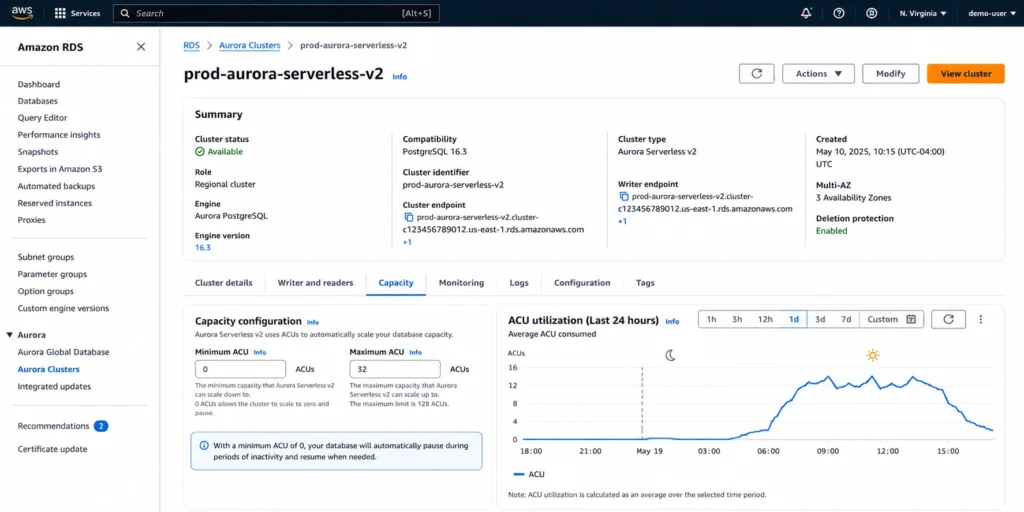
Aurora Serverless v2 replaces the fixed instance model with Aurora Capacity Units (ACUs) that scale automatically within a range you configure. You set a minimum ACU and a maximum ACU. Aurora adjusts the database’s compute capacity in 0.5 ACU increments between those bounds in response to actual load.
You are billed per ACU per second for the capacity that is actively assigned to your database. At peak, you use more ACUs and pay more. During off-hours, you use fewer ACUs and pay less — potentially zero if scale-to-zero is enabled.
See exactly what you’re overpaying in under 60 seconds. Try the Calculator for free →
2024 Changes That Every Guide Published Before 2025 Misses
Three significant changes to Aurora Serverless v2 happened between October and December 2024. Any guide written before 2025 is missing all three.
1. Scale to Zero: November 20, 2024
Aurora Serverless v2 now supports scaling down to 0 ACUs — true pause-and-resume behavior.
Before this launch, the minimum capacity for Aurora Serverless v2 was 0.5 ACUs, which costs approximately $0.06/hr = $43.80/month continuously — even when no connections were active. This was a major complaint that separated Aurora Serverless v2 from true serverless behavior. With scale-to-zero, a database that has no active connections for a configurable idle period pauses automatically. During the paused state, no ACU charges apply. Only storage charges continue.
When the first connection request arrives, the database resumes automatically. Resume time: approximately 15 seconds. This cold-start latency makes scale-to-zero appropriate for development and testing environments, and for applications where a 15-second reconnect delay on first use is acceptable. It is not appropriate for production applications with strict latency SLOs where users cannot tolerate a 15-second wait.
Version requirements for scale-to-zero: Aurora PostgreSQL 13.15+, 14.12+, 15.7+, or 16.3+. Aurora MySQL 3.08+. If your cluster runs an older version, upgrade the engine version before enabling 0 ACU minimum capacity. Source: AWS official announcement (November 20, 2024).
2. Maximum 256 ACUs: October 3, 2024
Aurora Serverless v2 expanded its maximum capacity from 128 ACUs to 256 ACUs. Source: AWS official announcement (aws.amazon.com/about-aws/whats-new/2024/10/amazon-aurora-serverless-v2-256-acus, October 3, 2024). 256 ACUs provides approximately 512 GiB of memory with proportional CPU and networking — equivalent to very large provisioned instances. This expansion makes Aurora Serverless v2 viable for high-demand production workloads that previously required provisioned instances at the top of the Aurora instance catalog.
3. Aurora Serverless v1 Retired: December 31, 2024
Aurora Serverless v1 — the original serverless Aurora offering, which could scale to zero and was popular for development environments and infrequently-used applications — reached end-of-support on December 31, 2024. AWS provided 12 months notice before the retirement. Any cluster still running v1 after that date has been automatically migrated by AWS or is in an unsupported state. Source: AWS official announcement and InfoQ (January 2024).
The key difference between v1 and v2 that frustrated many teams: v1 could scale to zero from its launch, while v2 required a minimum of 0.5 ACUs from its April 2022 GA. The November 2024 scale-to-zero launch for v2 resolved this gap, but teams who migrated from v1 to v2 between 2022 and November 2024 paid the 0.5 ACU minimum for an extended period.
How Aurora Capacity Units (ACUs) Work
Aurora Serverless v2 measures compute capacity in Aurora Capacity Units (ACUs). Each ACU provides approximately 2 GiB of memory with corresponding CPU and networking resources similar to provisioned Aurora instances. The relationship is consistent: 4 ACUs provides approximately 8 GiB of memory, 16 ACUs provides approximately 32 GiB, 128 ACUs provides approximately 256 GiB, 256 ACUs provides approximately 512 GiB. Source: AWS official Aurora documentation.
Aurora Serverless v2 scales in 0.5 ACU increments. This fine-grained scaling means capacity adjustments are smooth — the database does not jump from 2 ACUs to 4 ACUs in one step. It can be at 2.5, 3.0, 3.5 ACUs as load increases. Scaling up happens within seconds in response to increased connection counts, query load, or memory pressure. Scaling down happens more gradually (over several minutes) to avoid thrashing caused by brief load spikes.
Billing is per second for the ACUs actually assigned to the database. If the database runs at exactly 3.5 ACUs for 10 minutes, the charge is 3.5 ACUs x (600 seconds / 3600 seconds per hour) x $0.12/ACU-hour = $0.07 for those 10 minutes. The per-second billing means you pay precisely for what you use — not rounded to the nearest hour as with some legacy AWS services.
The ACU-to-instance equivalence: 1 ACU is approximately equivalent to the compute in a db.serverless.small instance, roughly between a db.t3.medium and a db.t3.large. 8 ACUs is roughly comparable to a db.r6g.xlarge (32 GiB). This equivalence is approximate and Aurora Serverless v2 may deliver different performance characteristics from provisioned instances at the same memory footprint due to differences in how the scaling engine allocates CPU.
Also read: RDS Reserved Instances: Complete Guide
Aurora Serverless v2 Pricing in 2026
| Configuration | ACU Rate/hr | Storage | I/O | Min monthly cost |
| Aurora Standard (MySQL or PostgreSQL) | $0.12/ACU-hr | $0.10/GB-month | $0.20/million | $0 (scale-to-zero) |
| Aurora I/O-Optimized | $0.156/ACU-hr | $0.225/GB-month | Included | $0 (scale-to-zero) |
| At 0.5 ACU minimum (no scale-to-zero) | $0.12/ACU-hr | $0.10/GB-month | $0.20/million | ~$43.80/month |
| At 4 ACU average | $0.12/ACU-hr | $0.10/GB-month | $0.20/million | ~$350/month compute |
| At 16 ACU average | $0.12/ACU-hr | $0.10/GB-month | $0.20/million | ~$1,401/month compute |
| At 256 ACU maximum | $0.12/ACU-hr | $0.10/GB-month | $0.20/million | ~$22,425/month compute |
All rates: US East (N. Virginia), June 2026. Verify at aws.amazon.com/rds/aurora/pricing — rates change.
Sources: ACU rate $0.12/hr — consistent across JusDB (May 2023), bytebase (February 2026), wring.co (March 2026), cloudburn.io (April 2026) — all citing AWS official Aurora pricing. I/O-Optimized ACU rate $0.156/hr from cloudburn.io (April 2026). Storage and I/O rates from AWS official Aurora pricing page. Monthly compute = ACU rate x ACU count x 730 hours. Verify at aws.amazon.com/rds/aurora/pricing — rates change.
Comparing ACU Cost to Equivalent Provisioned Aurora
The most common question about Aurora Serverless v2 pricing: at what ACU load does provisioned Aurora become cheaper? This is the break-even point, and it depends entirely on your workload’s utilization pattern.
Provisioned Aurora db.r5.large (2 vCPU, 16 GiB): approximately $0.29/hr on-demand in US East. Monthly: $0.29 x 730 = $211.70/month. Serverless v2 equivalent (8 ACUs = ~16 GiB): $0.12 x 8 = $0.96/hr. Monthly at sustained 8 ACUs: $0.96 x 730 = $700.80/month. Provisioned is $489 cheaper at sustained 8 ACU equivalence.
But workloads are rarely at sustained peak all month. A development database that runs at 8 ACUs for 8 business hours per day, 22 workdays per month, and idles at 0.5 ACU overnight and on weekends: (8 ACU x $0.12 x 8 x 22) + (0.5 ACU x $0.12 x (730-176)) = $168.96 + $33.24 = $202.20/month. Versus provisioned db.r5.large at $211.70/month. Serverless v2 saves approximately $9/month here — marginal. But if the team enables scale-to-zero on a version-eligible cluster, the off-hours cost drops to $0 (storage only): (8 ACU x $0.12 x 8 x 22) = $168.96/month. Serverless v2 with scale-to-zero saves approximately $42/month.
The clearer win for Serverless v2: an application with 3x traffic on weekdays versus weekends, where the database needs 16 ACUs during peak and 2 ACUs off-peak. Average: 9 ACUs. Monthly cost: $0.12 x 9 x 730 = $788.40/month. Provisioned equivalent for peak (db.r5.2xlarge, 8 vCPU, 64 GiB): $1.16/hr x 730 = $846.80/month. Serverless v2 saves $58/month here while also eliminating the manual resize operations.
The correct general rule: if your average ACU utilization across the full month is less than 60-65% of your peak, Serverless v2 is likely cheaper than provisioned. If average utilization is consistently above 70% of peak (or above 70% of provisioned capacity), provisioned Aurora with Reserved Instances is almost always cheaper.
Aurora Standard vs I/O-Optimized: Which to Choose for Serverless v2
Aurora Serverless v2 is available in both Aurora Standard and Aurora I/O-Optimized configurations — the same storage options as provisioned Aurora. The choice matters significantly for I/O-intensive workloads.
Aurora Standard
Storage: $0.10/GB-month. I/O: $0.20 per million requests, billed separately. For workloads with moderate I/O, Standard is cheaper because you only pay for the I/O you consume. A Serverless v2 cluster storing 100 GB with 500 million I/O requests per month: $10 storage + $100 I/O = $110/month in storage and I/O charges.
Aurora I/O-Optimized
Storage: $0.225/GB-month. I/O: included, no separate charge. ACU rate higher at $0.156/hr versus $0.12/hr. I/O-Optimized is cheaper when I/O charges under Standard would exceed approximately 25% of your total Aurora bill. The break-even is approximately 500,000 I/O requests per instance-hour, consistent with the provisioned Aurora I/O-Optimized break-even.
For Aurora Serverless v2 specifically: at low ACU utilization (1-4 ACUs), the per-ACU-hour premium for I/O-Optimized ($0.036/hr per ACU additional) is small relative to I/O savings for I/O-intensive workloads. At high ACU utilization (16+ ACUs), the premium becomes more significant. Evaluate by pulling your actual I/O cost from CloudWatch (VolumeReadIOPs, VolumeWriteIOPs) before switching configurations.
Also read: What Is Amazon ElastiCache?
Features: What Aurora Serverless v2 Supports That v1 Did Not
A major limitation of Aurora Serverless v1 was feature parity with provisioned Aurora. v1 did not support read replicas, Global Database, or several other production features. Aurora Serverless v2 was specifically designed to have full feature parity with provisioned Aurora. Source: AWS official Aurora documentation.
Multi-AZ
Aurora Serverless v2 supports Multi-AZ deployments with writer and reader instances in different Availability Zones. A Multi-AZ cluster has a writer Serverless v2 instance and at least one reader Serverless v2 instance. Each instance scales independently based on its own load. The writer handles write traffic and scales based on write workload; readers scale based on read workload. Both instances are billed separately per ACU per second.
Read Replicas
Serverless v2 instances can serve as Aurora read replicas. A provisioned Aurora cluster can have Serverless v2 read replicas that scale capacity based on read traffic — useful for burst read scenarios where provisioned reader instances would be over-provisioned most of the time. The inverse is also supported: an Aurora cluster with a provisioned writer and Serverless v2 readers, or a fully Serverless v2 cluster with writer and readers all using ACU-based scaling.
Global Database
Aurora Serverless v2 is compatible with Aurora Global Database, enabling a single Aurora cluster to span multiple AWS Regions with sub-second replication lag. Secondary region clusters can use Serverless v2 instances for read scaling in those regions. Source: lushbinary (February 2026) and AWS official Aurora documentation.
Aurora Backtrack
Aurora Backtrack allows you to rewind a database cluster to a specific point in time without restoring from a backup. This is supported for Serverless v2. Backtrack window size is configurable; larger windows incur storage costs.
RDS Proxy
RDS Proxy is a fully managed database proxy that pools and shares database connections, improving application scalability and resilience. It is available for Aurora Serverless v2 and is billed per ACU-hour consumed by the database (not per proxy instance, as with provisioned instances). RDS Proxy is particularly valuable for Lambda-based applications connecting to Serverless v2, where connection establishment latency and connection pool exhaustion are common challenges. Source: AWS official RDS Proxy pricing page.
Performance Insights
Performance Insights provides visibility into database load by SQL query, wait event, user, and host. It is available for Aurora Serverless v2. Enabling Performance Insights at 7-day retention is free. Longer retention periods incur additional charges.
When to Use Aurora Serverless v2 vs Provisioned Aurora + Reserved Instances
This is the decision that determines whether Serverless v2 saves or costs more for your specific workload. The answer depends on three variables: your workload’s peak-to-average utilization ratio, whether your version supports scale-to-zero, and whether your minimum required ACU count makes Serverless v2 economically viable.
| Scenario | Recommended Choice | Reason | Approx saving |
| Dev/test environment, infrequent use, version supports 0 ACU | Serverless v2 (scale-to-zero) | Pay $0 compute when no connections. Only storage billed. | Up to 100% of compute vs provisioned |
| Variable workload, average < 60% of peak, no strict cold-start SLO | Serverless v2 | Scales down during off-hours, saving vs fixed provisioned cost. | 30-50% vs provisioned on-demand |
| Steady-state production workload, predictable load, 12+ months stable | Provisioned + Reserved Instances | Sustained ACU cost at high utilization exceeds provisioned RI rate. | RI provides 40-72% vs on-demand; Serverless would be more expensive |
| Spiky workload: 10x traffic bursts multiple times daily | Serverless v2 | Scales in seconds to handle burst. No pre-provisioning for peak. | Avoid over-provisioning cost of sizing for peak |
| Mixed baseline + burst: high steady baseline with occasional spikes | Provisioned (baseline) + Serverless v2 readers (burst) | RI covers predictable baseline. Serverless handles burst cheaply. | Best of both: RI savings on base + Serverless flexibility for bursts |
| Microservice with Lambda, unpredictable connections | Serverless v2 + RDS Proxy | Serverless scales with function invocations. Proxy pools connections. | No idle provisioned cost. Connection pooling prevents exhaustion. |
Source: break-even analysis derived from verified rates. RI savings of 40-72% from AWS official Aurora pricing. Serverless v2 ACU rate $0.12/hr from verified sources. All US East (N. Virginia), June 2026. Verify at aws.amazon.com/rds/aurora/pricing — rates change.
The Hidden Costs: What Is Not Included in the ACU Rate
The ACU rate covers compute only. Three additional cost categories apply and are not reduced by the ACU billing rate.
Storage Charges
Aurora storage is billed independently of ACU usage. Under Aurora Standard, storage costs $0.10/GB-month. Aurora auto-scales storage in 10 GB increments as your data grows, up to 128 TB. You are billed for storage consumed, not storage allocated. Even when the Serverless v2 cluster is paused at 0 ACUs, storage charges continue. A cluster storing 50 GB at Aurora Standard: $5/month in storage charges continuously, regardless of whether the database processed zero queries that month.
I/O Charges (Aurora Standard Only)
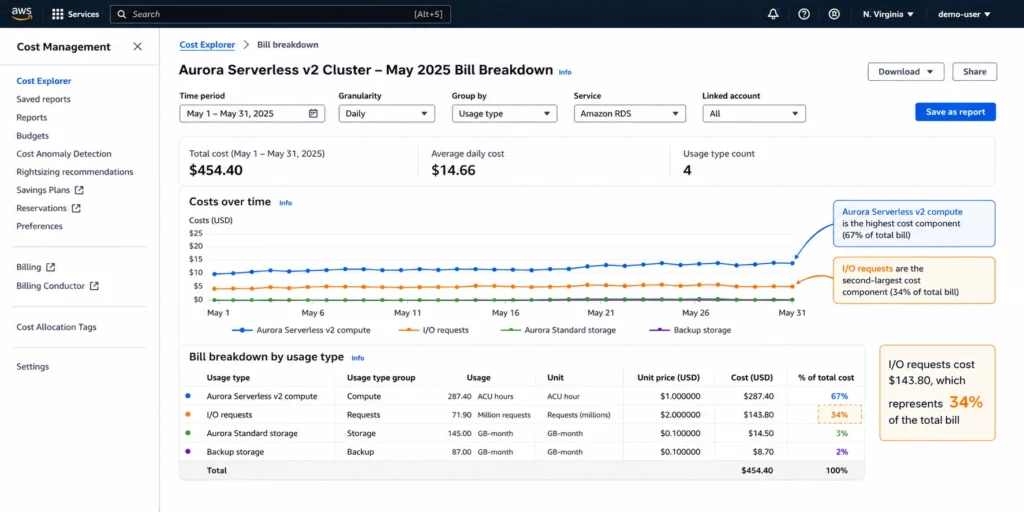
Under Aurora Standard, each I/O request is charged at $0.20 per million. For OLTP workloads with high read and write rates, I/O charges can exceed ACU charges. A heavily loaded Serverless v2 cluster processing 2 billion I/O requests per month: 2,000 x $0.20 = $400/month in I/O charges alone. Monitor VolumeReadIOPs and VolumeWriteIOPs in CloudWatch to evaluate whether switching to I/O-Optimized reduces total cost. Source: AWS official Aurora pricing page.
Backup Storage
Aurora automated backups are free up to 100% of the total database storage size. Above that threshold, backup storage is charged at approximately $0.021/GB-month. For a database with 100 GB storage and a 30-day backup retention window, backup storage can grow to 500 GB-1 TB, adding $8.40-$21/month in backup charges. Source: AWS official Aurora pricing page. Verify at aws.amazon.com/rds/aurora/pricing — rates change.
RDS Proxy (Optional)
If you enable RDS Proxy for your Serverless v2 cluster (recommended for Lambda workloads), it is billed per ACU-hour consumed by the database instance — the same ACU-hour rate as the database itself. This effectively doubles the ACU-based billing for proxy-enabled clusters. For Lambda-based architectures where connection pooling is essential, this cost is typically justified by the reduction in connection overhead and improved reliability. Source: AWS official RDS Proxy pricing page.
Discount Options for Aurora Serverless v2
Database Savings Plans: The Only Commitment Discount for Serverless v2
Reserved Instances do not apply to Aurora Serverless v2. Reserved Instances are specific to provisioned instance types and do not cover ACU-based billing. For Aurora Serverless v2, the only commitment-based discount mechanism is Database Savings Plans.
Database Savings Plans launched at AWS re:Invent 2025 and cover Aurora Serverless v2 with up to 35% savings on a 1-year commitment. The commitment is a dollar-per-hour spend level — not tied to a specific ACU range or cluster configuration. If your Serverless v2 cluster scales from 4 ACUs to 16 ACUs during the commitment period, the DSP discount continues applying across the full range. Source: wring.co (March 2026), lushbinary (February 2026), both citing AWS official.
For a Serverless v2 cluster running at an average of 8 ACUs: on-demand ACU cost = $0.12 x 8 x 730 = $700.80/month. With 35% DSP savings: $455.52/month. Annual saving: $2,943. For teams with Serverless v2 as their primary production database configuration, the DSP commitment delivers meaningful savings with full flexibility to scale ACUs up or down within the commitment period.
Usage.ai added native Database Savings Plans support in January 2026. For Aurora Serverless v2 workloads, the platform evaluates whether DSP delivers better net savings than staying on on-demand ACU pricing, accounting for the workload’s actual utilization pattern and whether scale-to-zero reduces the effective monthly ACU spend below the DSP commitment level. The recommendation: if your Serverless v2 cluster runs at consistent average ACU utilization above 2 ACUs for more than 600 hours per month, DSP will almost always deliver positive net savings.
How to Configure Aurora Serverless v2: Min, Max, and Scale-to-Zero
Setting Minimum Capacity
The minimum ACU determines the lowest capacity the database will maintain. For production workloads where cold-start latency is unacceptable: set minimum to at least 0.5 ACUs (or higher based on your baseline traffic). This ensures the database always has some compute capacity and can respond to queries without a resume delay. For development and testing environments where cold-start latency is acceptable: set minimum to 0 ACUs (requires supported engine version) to enable scale-to-zero and eliminate compute charges during idle periods.
Setting minimum too high wastes money. Setting minimum too low (0 ACU on a production database without acceptable cold-start handling) creates user-facing latency when the database resumes. The right minimum for production: monitor your P1 CPU utilization during off-peak periods. If the database never drops below 20% CPU at 4 ACUs, your minimum should be 2-4 ACUs to avoid unnecessary scaling cycles.
See exactly what you’re overpaying in under 60 seconds. Try the Calculator for free →
Setting Maximum Capacity
The maximum ACU determines the upper bound of automatic scaling. Setting maximum too low means the database is constrained during traffic spikes and query latency increases. Setting maximum too high does not cost more (you only pay for ACUs actually consumed) but removes cost predictability since an unexpectedly large query or runaway connection pool could temporarily scale to a very high ACU count.
Recommended approach: set maximum to at least 2-4x your expected peak ACU consumption, verified from load testing. For new workloads with no baseline data: start at 16 ACUs maximum, monitor for 30 days, and adjust. CloudWatch metric: ServerlessDatabaseCapacity shows current ACU consumption in real time. Source: AWS official Aurora documentation.
Enabling Scale-to-Zero on Eligible Clusters
For new clusters: in the AWS Console, set minimum capacity to 0 ACU. Verify the selected engine version meets requirements (Aurora PostgreSQL 13.15+, 14.12+, 15.7+, 16.3+, or Aurora MySQL 3.08+). For existing clusters: update the engine version if necessary, then modify the cluster to set minimum capacity to 0.
Configure your application to handle the 15-second resume latency. For applications using connection pools with configurable timeout settings: set the connect timeout to at least 20 seconds. For Lambda functions: configure the connection timeout to exceed the resume duration. AWS recommends configuring client timeout settings such as connectTimeout and sslResponseTimeout to exceed the 15-second resume time. Source: AWS Database Blog (November 2024).
How Usage.ai Handles Aurora Serverless v2 Cost Optimization
Aurora Serverless v2 creates a specific challenge for commitment purchasing: the ACU consumption varies, making it harder to size a Database Savings Plan commitment than a fixed-instance RI purchase. Committing too much wastes money if the workload scales down. Committing too little leaves savings on the table.
Usage.ai analyzes 30 days of ACU consumption from CloudWatch (ServerlessDatabaseCapacity metric) and identifies the minimum hourly spend floor — the level at which ACU costs are consistently above — as the DSP commitment baseline. This approach captures the benefit of DSP on the predictable portion of ACU spend while leaving the variable portion on on-demand pricing.
For Serverless v2 clusters still running at the 0.5 ACU minimum without scale-to-zero enabled, Usage.ai identifies engine version upgrade opportunities that unlock the 0 ACU minimum — particularly valuable for dev and staging clusters. A cluster running at 0.5 ACU minimum 24/7 costs $43.80/month in compute. Enabling scale-to-zero on a cluster that is active 8 hours per day reduces that to approximately $0 during off-hours, with full ACU billing only during active periods.
If a DSP commitment for Serverless v2 becomes underutilized — because a cluster is decommissioned, migrated to provisioned, or the application traffic drops permanently — Usage.ai provides cashback on the unused commitment in real money. Fee: percentage of realized savings only.
See how Usage.ai optimizes Aurora Serverless v2 and Database Savings Plans
Frequently Asked Questions
1. What is RDS Serverless?
‘RDS Serverless’ refers to Aurora Serverless v2 — the on-demand, auto-scaling configuration of Amazon Aurora, which is an engine of Amazon RDS. There is no standalone product called RDS Serverless. Aurora Serverless v2 scales database capacity in Aurora Capacity Unit (ACU) increments between a configurable minimum (0 for scale-to-zero, supported since November 2024) and maximum (up to 256 ACUs). It supports Aurora MySQL and Aurora PostgreSQL. Aurora Serverless v1 retired December 31, 2024. Source: AWS official Aurora documentation.
2. How much does Aurora Serverless v2 cost?
Aurora Serverless v2 charges $0.12 per ACU-hour for Aurora Standard configuration (MySQL or PostgreSQL, US East N. Virginia). Storage: $0.10/GB-month. I/O: $0.20 per million requests. Minimum cost with scale-to-zero enabled: $0 compute during fully idle periods (storage charges continue). At 0.5 ACU minimum (no scale-to-zero): approximately $43.80/month compute. At 4 ACU average: approximately $350/month compute. At 16 ACU average: approximately $1,401/month compute. No Reserved Instances available — Database Savings Plans provide up to 35% savings. Verify at aws.amazon.com/rds/aurora/pricing — rates change.
3. Can Aurora Serverless v2 scale to zero?
Yes, since November 20, 2024. Aurora Serverless v2 now supports a minimum capacity of 0 ACUs for supported engine versions: Aurora PostgreSQL 13.15+, 14.12+, 15.7+, 16.3+, and Aurora MySQL 3.08+. With 0 ACU minimum, the database pauses automatically after a configurable idle period (no active connections). Resume time when the first connection arrives: approximately 15 seconds. During the paused state, no compute charges apply — only storage. Source: AWS official announcement (November 20, 2024).
4. What is an Aurora Capacity Unit (ACU)?
An ACU is the billing unit for Aurora Serverless v2. Each ACU provides approximately 2 GiB of memory with corresponding CPU and networking resources. Aurora Serverless v2 scales in 0.5 ACU increments. 8 ACUs provides approximately 16 GiB of memory — roughly equivalent to a db.r6g.large provisioned instance. Billing is per second: if the database runs at 3.5 ACUs for one hour, the charge is 3.5 x $0.12 = $0.42. Source: AWS official Aurora documentation.
5. Do Reserved Instances apply to Aurora Serverless v2?
No. Reserved Instances apply to provisioned Aurora instances (db.r6g.large, db.r7g.xlarge, etc.) but do not cover ACU-based Serverless v2 billing. The commitment discount mechanism for Aurora Serverless v2 is Database Savings Plans, which provide up to 35% savings on a 1-year commitment. DSP applies automatically to eligible ACU usage without being tied to a specific ACU range or cluster. Source: AWS official Aurora pricing and multiple independent analyses consistent with this.
6. What is the difference between Aurora Serverless v1 and v2?
Aurora Serverless v1 retired December 31, 2024 and is no longer supported. Key differences: v1 could scale to zero from its initial launch; v2 required a 0.5 ACU minimum until November 2024. v2 supports features v1 did not: read replicas, Global Database, Multi-AZ, Performance Insights, Aurora Backtrack. v2 scales more finely (0.5 ACU increments versus larger v1 scaling steps) and scales more quickly in response to load. v2 has full feature parity with provisioned Aurora. Any cluster still running v1 should have been migrated by December 31, 2024. Source: AWS official Aurora documentation and InfoQ.
7. When is Aurora Serverless v2 more expensive than provisioned Aurora?
Aurora Serverless v2 becomes more expensive than provisioned Aurora when average ACU utilization consistently exceeds 60-70% of the equivalent provisioned instance capacity. At high sustained load (e.g., 8 ACUs average all month, equivalent to db.r6g.large): Serverless v2 at $0.12 x 8 x 730 = $700.80/month vs provisioned db.r6g.large on-demand at approximately $211/month or RI at approximately $120-140/month. For high-utilization, stable workloads, provisioned Aurora with Reserved Instances is significantly cheaper. Source: break-even analysis derived from verified rates.