
RDS Custom: Self-Managed DB Engine on RDS — Pricing and Tradeoffs

Updated May 4, 2026
18 min read
RDS Custom: Self-Managed DB Engine on RDS -- Pricing and Tradeoffs
On this page

Amazon RDS Custom sits between standard RDS and a self-managed database on EC2. You get the managed infrastructure benefits of RDS (automated backups, Multi-AZ failover, monitoring) while retaining privileged access to the underlying EC2 instance and operating system. 

That combination costs more than standard RDS. For a db.m5.xlarge Oracle BYOM Single-AZ, RDS Custom charges approximately $0.410/hr versus approximately $0.266/hr for standard Oracle BYOL on the same instance type. The premium is roughly 54%, and it persists every hour the instance runs.

The RDS Custom premium is not arbitrary. It reflects the additional operational complexity AWS absorbs when you have OS-level access: the automation system must coexist with your custom changes, backup and recovery must account for potential OS-level modifications, and the instance topology is more complex to monitor and protect. 

Whether that 54% premium is worth paying depends entirely on one question: does your application actually require OS-level access to function?

What Is RDS Custom and Who Is It For?

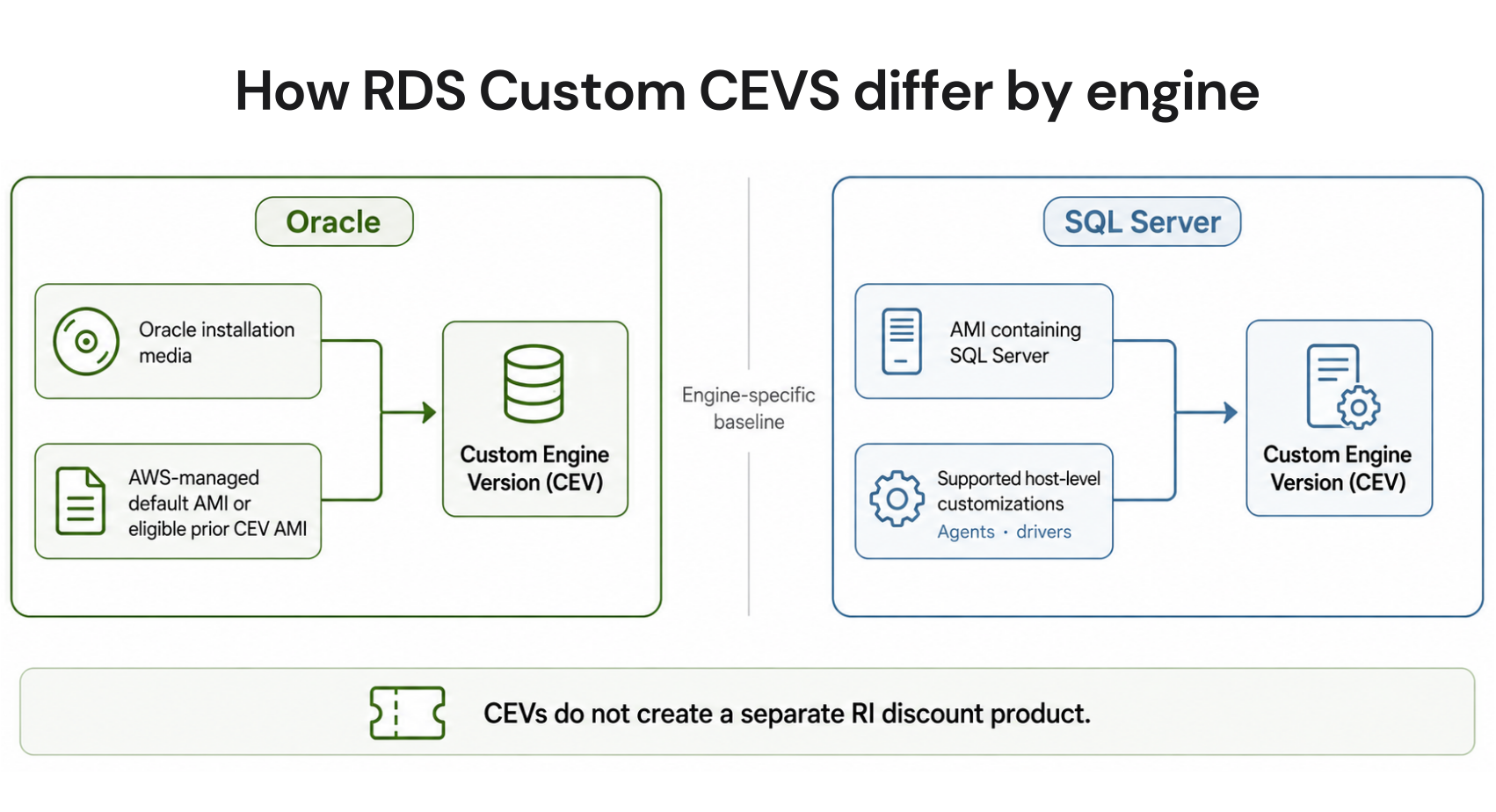
RDS Custom was launched to address a specific gap: enterprise applications that require Oracle or SQL Server but also need access to the underlying OS or database engine that standard RDS does not expose. 

Standard RDS manages everything below the SQL engine level on your behalf. You cannot install custom Oracle patches, modify OS-level parameters, or install companion software (like Oracle Forms or Oracle Application Server) alongside the database.

RDS Custom exposes the underlying EC2 instance to you via SSH or SSM. You can install custom Oracle patches provided by Oracle support, modify OS-level configuration files, install companion applications in the same OS environment, and customize the Oracle home directory layout. AWS continues managing automated backups, snapshots, Multi-AZ configuration, and basic instance health monitoring.

Target Use Cases for RDS Custom

Oracle E-Business Suite (EBS): Oracle EBS requires specific filesystem configurations, companion software installations, and Oracle home modifications that cannot be performed on standard RDS. It is one of the primary drivers for RDS Custom Oracle adoption.

Oracle Forms and Reports: Legacy Oracle Forms applications require custom Oracle configurations and OS-level software alongside the database.

Custom Oracle patches: Organizations under specific Oracle support contracts may need to apply Oracle-provided patches directly rather than waiting for the AWS-managed RDS patch cycle.

SQL Server with custom agents: Applications that require SQL Server Agent jobs with OS-level integration, custom linked server configurations, or specific Windows-level service dependencies.

If your application runs on Oracle or SQL Server without any of these requirements, standard RDS is almost certainly the right choice. The 50-60% compute premium for RDS Custom is only justified when your application genuinely cannot function within standard RDS constraints.

What Are the Exact RDS Custom Pricing Rates?

Here is the complete RDS Custom pricing structure for US East (N. Virginia) as of April 2026 (verify at aws.amazon.com/rds/custom/pricing — rates change).

Engine / Instance RDS Custom On-Demand/hr Standard RDS Equivalent/hr Premium RI Available? Max RI Savings
Oracle BYOM db.m5.xlarge Single-AZ $0.410 ~$0.266 (Oracle BYOL) ~54% Yes (1-yr and 3-yr) Up to ~55%
Oracle BYOM db.m5.xlarge Multi-AZ ~$0.820 ~$0.532 (Oracle BYOL Multi-AZ) ~54% Yes Up to ~55%
Oracle BYOM db.r5.xlarge Single-AZ ~$0.480 ~$0.312 (Oracle BYOL) ~54% Yes Up to ~55%
SQL Server SE2 LI db.m5.xlarge Single-AZ ~$0.510 ~$0.461 (Standard RDS SQL SE) ~11% Yes (1-yr only) Up to ~34%
SQL Server EE LI db.m5.xlarge Single-AZ ~$1.285 ~$1.162 (Standard RDS SQL EE) ~11% Yes (1-yr only) Up to ~34%
SQL Server BYOM db.m5.xlarge Single-AZ ~$0.410 N/A (no standard BYOM SQL Server) N/A Yes (1-yr only) Up to ~34%

The Oracle premium (~54%) is significantly higher than the SQL Server License Included premium (~11%). This is because standard RDS Oracle BYOL already strips out the Oracle license cost, leaving pure compute pricing as the baseline. RDS Custom Oracle adds the OS-access premium on top of that low baseline. For SQL Server License Included, the base rate already includes the Microsoft license cost, so the RDS Custom premium is smaller in percentage terms but applied to a higher absolute rate.

Amazon RDS Custom create database instance page with Oracle as the selected engine, Bring Your Own Media (BYOM) licensing model, db.m5.xlarge instance class, Single-AZ deployment, and a configuration summary panel showing the on-demand hourly rate of $0.410 with an annotation comparing it to the standard Oracle BYOL rate of $0.266 to illustrate the 54% RDS Custom premium


Also read: RDS Reserved Instances: Engine-by-Engine Pricing and Commitment Guide 

How Does RDS Custom Compare to Standard RDS and Self-Managed EC2 in Cost?

The RDS Custom decision exists on a spectrum between standard fully managed RDS and fully self-managed Oracle or SQL Server on EC2. Here is a three-way cost comparison for a production Oracle BYOL/BYOM database at db.m5.xlarge Single-AZ in US East (verify all rates — rates change).

Cost Component Standard RDS Oracle BYOL RDS Custom Oracle BYOM EC2 + Oracle Self-Managed Notes
Compute (monthly) $194/month (db.m5.xlarge) $300/month (db.m5.xlarge) $123/month (m5.xlarge EC2) EC2 on-demand; RDS rates from pricing page
Storage (500 GB gp3) $57.50/month $57.50/month (EBS gp3) $57.50/month (EBS gp3) Same storage pricing across all three
Automated backups Included (managed by RDS) Included (managed by RDS) Manual — AWS Backup or scripted EC2 backup requires separate solution
OS patching Managed by AWS Shared: AWS handles OS baseline, you apply custom patches Fully your responsibility DBA time required for EC2
Multi-AZ failover Automated (< 2 min) Automated (< 2 min) Manual or custom scripts EC2 HA requires significant engineering
DBA labor estimate (hrs/month) 2-4 hrs (monitoring, RI mgmt) 8-15 hrs (OS patches, custom config) 20-40 hrs (all DB ops) At $120/hr senior DBA rate
Monthly DBA labor cost $240-480/month $960-1,800/month $2,400-4,800/month Estimated at $120/hr
Total monthly (compute + storage + DBA) ~$492-732/month ~$1,318-2,158/month ~$2,581-4,981/month Wide range due to DBA labor variance

The correct framing for the RDS Custom decision is not ‘RDS Custom versus standard RDS’ but ‘RDS Custom versus self-managed EC2.’ Against EC2, RDS Custom is almost always cheaper in total cost of ownership when DBA labor is included. Against standard RDS, RDS Custom costs 50-60% more in compute but saves 6-30 hours of DBA labor per month on OS management.

What Is the Automation Pause Mechanic and Why Does It Matter for Billing?

RDS Custom automation is the system that monitors instance health, performs automated backups, manages Multi-AZ failover, and applies OS-level maintenance. To perform OS-level changes (applying custom patches, modifying OS configuration), you must pause RDS Custom automation first.

Pausing automation is simple: use the AWS CLI (aws rds modify-db-instance –db-instance-identifier mydb –automation-mode all-paused). When automation is paused, RDS Custom stops performing health checks, automated backups, and Multi-AZ failover operations. The instance continues running and billing at the same hourly rate.

Cost Implications of Automation Pause

During a pause window, automated backups do not run. If your backup retention is set to 7 days and you pause automation for 24 hours, you have a 24-hour gap in your continuous backup coverage. PITR (Point-in-Time Recovery) is not possible for the pause window. This does not increase your billing, but it reduces the recovery capability you are paying for in the RDS Custom premium.

The recommended practice is to keep automation pauses as short as possible, to the specific window required for the OS-level change. AWS provides a configurable automation resume timeout: if you forget to resume automation, RDS Custom automatically resumes it after a configurable period (up to 72 hours). Set this timeout to match your expected maintenance window plus a buffer, not the maximum.

The Pause and Resume Billing Behavior

Billing does not change during an automation pause. You pay the same hourly rate whether automation is active or paused. The pause affects service quality (fewer automated protections) without affecting the cost structure. This is worth understanding clearly: there is no financial incentive to keep automation paused, and keeping it paused for extended periods reduces the value you receive from the RDS Custom premium.

What Are the Reserved Instance Options for RDS Custom?

RDS Custom supports reserved instances for both Oracle BYOM and SQL Server. The RI discount ranges and payment options differ slightly between the two engines.


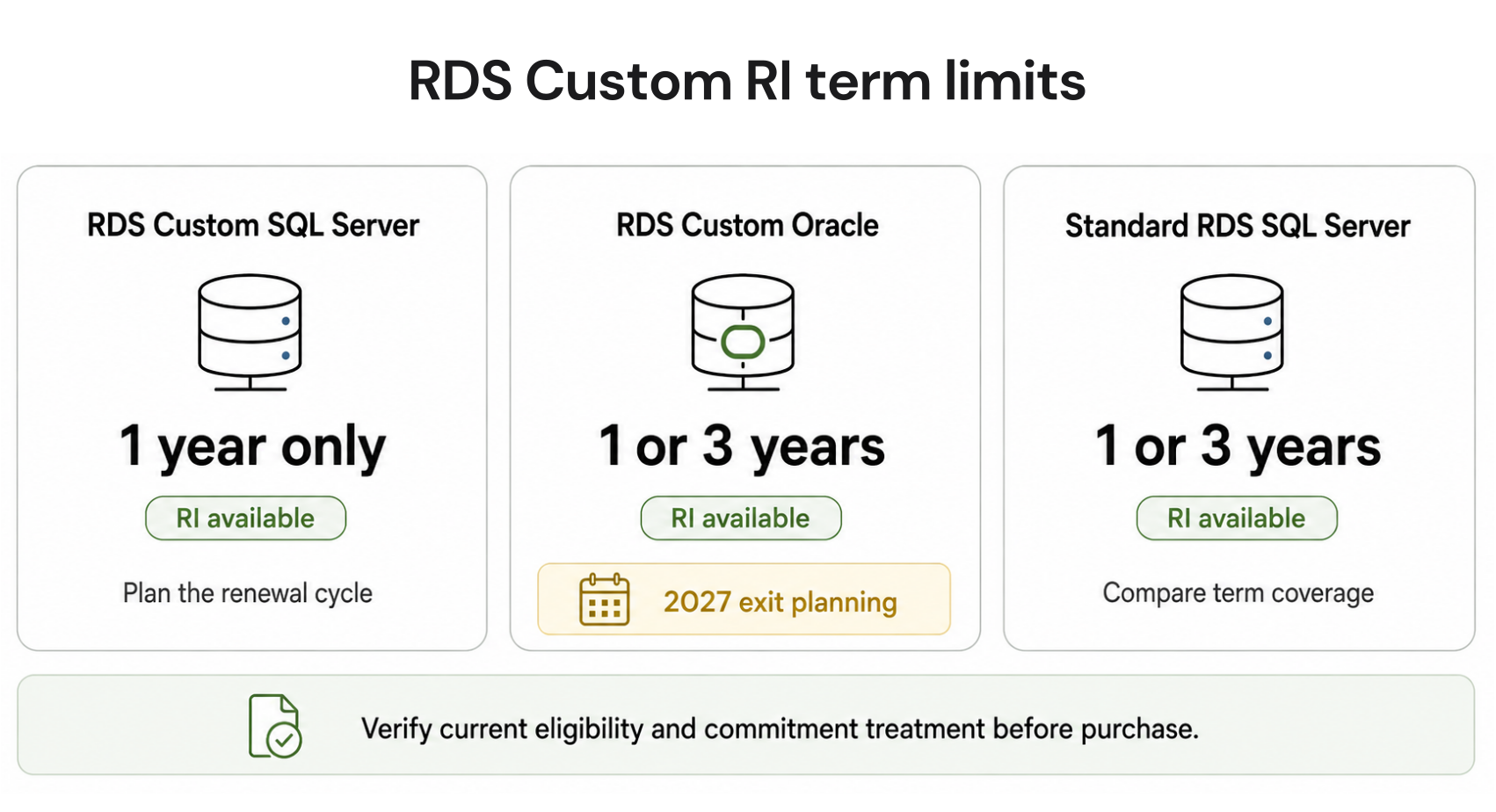
RDS Custom for Oracle: 1-Year and 3-Year RIs Available

RDS Custom Oracle supports 1-year and 3-year reserved instances with all three payment options (No Upfront, Partial Upfront, All Upfront). The savings rates are comparable to standard RDS Oracle BYOL reservations: approximately 35% on 1-year Partial Upfront and up to 55% on 3-year All Upfront. Since RDS Custom Oracle has a higher on-demand base rate than standard Oracle BYOL, the absolute dollar savings from an RI are larger even if the percentage savings are similar.

Example: db.m5.xlarge Oracle BYOM Single-AZ on-demand at $0.410/hr ($299/month). With 3-year All Upfront: approximately $0.185/hr effective ($135/month). Annual savings versus on-demand: $199/year per instance. For a production Oracle E-Business Suite deployment with 6 RDS Custom instances, the 3-year RI savings are approximately $1,194/year.


RDS Custom for SQL Server: 1-Year RI Only

RDS Custom for SQL Server supports only 1-year reserved instances. There is no 3-year RI option for RDS Custom SQL Server. This is a notable difference from both standard RDS SQL Server (which has 3-year RIs) and RDS Custom Oracle (which has both). For long-running SQL Server Custom deployments, the lack of a 3-year option limits the maximum savings to approximately 25-34% versus the 41-55% available on comparable Oracle Custom or standard RDS instances. Plan reservation purchases accordingly: buy 1-year RDS Custom SQL Server RIs and evaluate annually rather than locking into a 3-year plan that does not exist for this engine.

How Does RDS Custom Differ From Standard RDS by Engine Feature?

The specific features available in RDS Custom versus standard RDS determine whether your application requires the Custom version. Here is the feature comparison for both supported engines.

Feature Standard RDS Oracle RDS Custom Oracle Standard RDS SQL Server RDS Custom SQL Server
OS-level SSH/SSM access No Yes No Yes
Custom Oracle patches (from Oracle support) No Yes N/A N/A
Oracle E-Business Suite support No Yes N/A N/A
BYOL (Bring Your Own License) Yes BYOM (Bring Your Own Media) Yes (BYOL) Yes (BYOM)
Oracle Enterprise Edition support Yes (LI or BYOL) Yes (BYOM only) N/A N/A
Automated backups Yes (always on) Yes (except during automation pause) Yes (always on) Yes (except during automation pause)
Multi-AZ deployment Yes Yes Yes Yes
Read replicas Yes Limited Limited Limited
Performance Insights Yes Yes Yes Yes
Database Savings Plans eligible Yes (Oracle BYOL, Gen 7+) Verify at DSP pricing page No (SQL Server not in DSP) Verify at DSP pricing page

When Should You Choose RDS Custom Over Standard RDS?

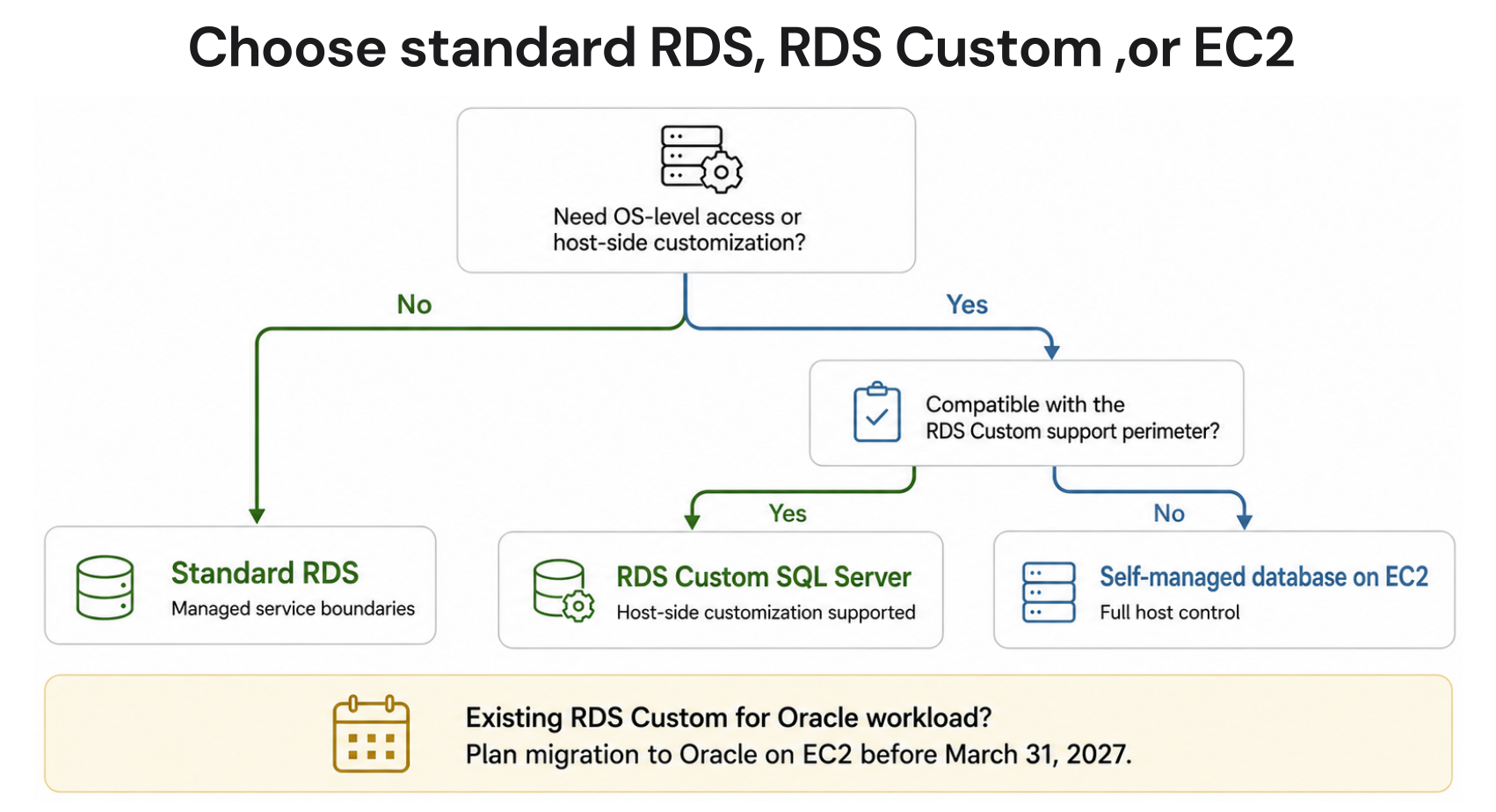
RDS Custom is not a universal upgrade from standard RDS. It is a targeted solution for a specific set of enterprise Oracle and SQL Server requirements. The decision framework is simple.


Choose RDS Custom When:

Your application is Oracle E-Business Suite (EBS) or another Oracle Forms-based application that requires OS-level filesystem modifications, companion software, or non-standard Oracle home layouts. You are under an Oracle support contract that provides custom patches not yet available in the standard AWS RDS patch cycle. 

Your SQL Server deployment requires OS-level Windows agent integrations, specific DTC (Distributed Transaction Coordinator) configurations, or custom Windows services running alongside the database. You need to install third-party monitoring or management agents directly on the DB host. Your application requires specific Oracle or SQL Server configurations that are blocked by standard RDS parameter groups and cannot be achieved through parameter group settings.


Choose Standard RDS When:

Your application runs standard Oracle SE2 or EE without requiring OS access. Standard Oracle workloads on RDS BYOL are approximately 54% cheaper per compute-hour than RDS Custom BYOM and deliver the same database functionality. Your SQL Server workload uses standard licensing without OS-level customization. 

You do not need custom patches beyond what AWS provides through the standard RDS maintenance cycle. You want the deepest possible reserved instance discounts, including 3-year terms for SQL Server (not available on RDS Custom SQL Server). The vast majority of Oracle and SQL Server workloads fall into this category.


Consider EC2 Self-Managed When:

Your Oracle application requires configurations that even RDS Custom does not support, such as Oracle RAC (Real Application Clusters), Oracle Data Guard with custom topologies, specific Oracle licensing models that require non-standard deployment architectures, or full OS customization beyond what RDS Custom permits. 

EC2 self-managed is the highest-cost total ownership option when DBA labor is included, but is the only path for workloads with these extreme customization requirements.


Also read: RDS Reserved Instances: 1-Year vs 3-Year Break-Even Across All Engines

How Do You Right-Size and Migrate RDS Custom Instances to Reduce Cost?

RDS Custom instances are often provisioned for worst-case Oracle or SQL Server workloads and then never right-sized as requirements change. Since the compute premium in RDS Custom is 50-60% above standard RDS BYOL, the absolute cost of running an oversized RDS Custom instance is significantly higher than the equivalent over-provisioning on standard RDS.


Right-Sizing RDS Custom Instances

Pull CloudWatch CPUUtilization and FreeableMemory for your RDS Custom instances over 30 days. For Oracle BYOM instances: if average CPU is under 20% and FreeableMemory is consistently above 50% of total instance RAM, the instance is over-provisioned. Downsizing from db.m5.2xlarge to db.m5.xlarge saves $0.410/hr ($299/month) at RDS Custom on-demand rates. With a 3-year All Upfront RI, the savings are still approximately $135/month per downsized instance. For SQL Server Custom: the same 20%/50% thresholds apply, but check SQL Server memory manager metrics specifically (Buffer Pool size and Stolen memory) before downsizing, as SQL Server aggressively claims available RAM for buffer caching, which can make FreeableMemory appear higher than practical headroom allows.


Migrating from RDS Custom Oracle to Standard RDS Oracle

If your Oracle E-Business Suite deployment was an early adopter of RDS Custom, evaluate whether the current Oracle version now supports standard RDS. AWS continues expanding standard RDS Oracle compatibility over time. Some applications that required RDS Custom in 2022 may now run on standard RDS with the same functionality, at 54% lower compute cost. Run the Oracle EBS pre-upgrade advisor against standard RDS to check compatibility before committing to a migration.

Migration path: create a standard RDS Oracle BYOL instance in the same region, size, and version. Export the RDS Custom database using Data Pump (expdp/impdp) or AWS Database Migration Service. Test the application against the standard RDS endpoint. If functionality is confirmed, update connection strings and terminate the RDS Custom instance. The migration eliminates the 54% compute premium permanently.


Evaluating the RDS Custom to Aurora Path

For Oracle and SQL Server workloads that genuinely need to reduce licensing and infrastructure costs long-term, the migration path that produces the largest savings is not standard RDS — it is re-platforming to an open-source engine on Aurora. 

Aurora MySQL or Aurora PostgreSQL eliminates the Oracle or SQL Server license entirely and delivers Aurora compute at approximately $0.163/hr (3-year All Upfront reserved) versus $0.185/hr for RDS Custom Oracle (same term). The compute cost reduction is modest, but the license cost elimination is substantial for teams with high Oracle or SQL Server license fees.

Re-platforming from Oracle to PostgreSQL or MySQL involves schema conversion, application code changes, and stored procedure rewrites that can take months to years for complex Oracle applications. Use the AWS Schema Conversion Tool (SCT) to generate a compatibility report before committing to this path. 

For Oracle E-Business Suite specifically, Oracle does not support running on non-Oracle database engines, so this path is only viable for custom Oracle applications, not packaged Oracle software.

What Are the Extended Support Cost Implications for RDS Custom?

RDS Custom Oracle and SQL Server instances running end-of-life engine versions incur Extended Support charges exactly as standard RDS instances do. The $0.10-0.20 per vCPU-hour Extended Support surcharge applies on top of the RDS Custom compute rate and is not covered by reserved instances.

For a db.m5.xlarge (4 vCPUs) RDS Custom Oracle BYOM instance running an EOL Oracle version: Base RDS Custom rate: $0.410/hr. Extended Support surcharge (year 1-2): 4 vCPUs x $0.20/hr = $0.80/hr. Combined: $1.21/hr, approximately 3x the base rate. Compare to standard Oracle BYOL on the same instance without Extended Support: $0.266/hr. The team paying for RDS Custom plus Extended Support is paying 4.5x what a team running standard RDS on a current Oracle version pays for the same compute.

This compounding of RDS Custom premium plus Extended Support surcharge is one of the most expensive states an RDS instance can be in. If you are running RDS Custom on EOL Oracle or SQL Server versions, upgrading to a supported version is the highest-priority cost optimization available. The combination of RDS Custom premium and Extended Support surcharge can easily exceed $2.00/hr, effective on larger instances.

AWS Cost Explorer monthly cost breakdown for an RDS Custom Oracle db.m5.xlarge instance showing three cost components: the base RDS Custom hourly rate contributing $299/month, the Extended Support vCPU surcharge contributing $584/month, and the total of $883/month compared to a reference line showing standard Oracle BYOL without Extended Support at $194/month, illustrating the 4.5x cost multiple of running RDS Custom on an EOL engine version


Also read: AWS Database Savings Plans Explained for DB Teams

How Does Usage.ai Optimize RDS Custom Costs?

RDS Custom instances are standard RDS billing objects from AWS’s cost management perspective. They appear in Cost Explorer, support reserved instances, and can be optimized with the same toolkit as standard RDS. Usage.ai Flex Reserved Instances monitor RDS Custom instances alongside standard RDS instances and identify opportunities for reservation purchases.

For RDS Custom Oracle with 1-year and 3-year RI availability, Usage.ai evaluates the same utilization stability, engine version support window, and architectural trajectory signals as for standard RDS before recommending a reservation. For RDS Custom SQL Server (1-year RI only), Usage.ai recommends 1-year reservations on consistently running instances and flags the lack of a 3-year option as a savings ceiling when modeling future spend.

The platform also surfaces RDS Custom instances running on EOL engine versions, where the Extended Support surcharge is being applied on top of the RDS Custom premium. These instances have the highest per-hour effective cost in the entire RDS portfolio and are the highest-priority targets for engine version upgrade recommendations. Usage.ai refreshes this analysis every 24 hours versus AWS Cost Explorer’s 72+ hour cycle. If a reservation becomes underutilized, Usage.ai provides cashback and credits. The fee is a percentage of realized savings only.

See how much you can save on RDS Custom with Usage.ai


Set up Usage AI in 30 minutes. Save from day one.No infrastructure changes. No lock-in. If Usage.ai doesn’t save you money, you pay nothing.FIND MY SAVINGS


Frequently Asked Questions

1. What is the difference between RDS Standard and RDS Custom?

Standard RDS is fully managed: AWS controls the OS, database software, and infrastructure below the SQL engine. You interact only with the database. RDS Custom gives you SSH and SSM access to the underlying EC2 instance and OS, allowing custom patches, companion software, and OS-level configuration. RDS Custom costs approximately 50-60% more than standard RDS Oracle BYOL for the same instance type. Use Custom only when your application genuinely requires OS access.


2. What is AWS RDS pricing?

AWS RDS pricing charges per instance-hour based on engine, instance type, Single-AZ or Multi-AZ, and licensing model. Open-source engines (MySQL, PostgreSQL) are cheapest. Oracle and SQL Server add a license cost in the License Included model. BYOL reduces Oracle and SQL Server costs to near open-source levels. RDS Custom adds a 50-60% premium over standard BYOL for OS access. Reserved instances reduce any RDS instance rate by 29-69% (verify at aws.amazon.com/rds/pricing — rates change).


3. Which RDS pricing option is most cost-effective for 3 years?

For standard RDS and RDS Custom Oracle: 3-year All Upfront provides up to 55-69% savings. For RDS Custom SQL Server: only 1-year terms are available, capping savings at approximately 25-34%. Across all RDS engine types, the 3-year All Upfront consistently delivers the lowest total cost for stable production workloads with confident long-term plans.


4. Does RDS Custom support reserved instances?

Yes. RDS Custom for Oracle supports 1-year and 3-year reserved instances with No Upfront, Partial Upfront, and All Upfront payment options. RDS Custom for SQL Server supports 1-year reserved instances only (No Upfront, Partial Upfront, All Upfront). The 3-year term is not available for RDS Custom SQL Server.


5. What is the Bring Your Own Media (BYOM) model in RDS Custom?

BYOM means you supply your Oracle Database software binaries and license to AWS. Unlike RDS License Included (where AWS bundles the Oracle license cost into the hourly rate), BYOM lets you use an existing Oracle license you already own. You upload the Oracle media to an S3 bucket, and RDS Custom installs it. BYOM pricing reflects compute cost only, without an Oracle license premium.


6. Is RDS Custom more expensive than EC2 for Oracle?

On compute alone, EC2 is cheaper than RDS Custom by approximately 30-40% for the same instance type. But total cost of ownership including DBA labor typically makes RDS Custom cheaper: EC2 self-managed Oracle requires 20-40 hours/month of DBA time for backups, patching, failover setup, and monitoring. At $120/hr senior DBA cost, that is $2,400-4,800/month in labor that RDS Custom largely eliminates.


7. What happens during an RDS Custom automation pause?

Automated backups, Multi-AZ failover, and health monitoring are suspended during the pause. Billing continues at the full RDS Custom rate. The pause is necessary to perform OS-level changes without conflicting with AWS automation. Resume automation as soon as the OS change is complete. AWS provides an automatic resume timeout (configurable, up to 72 hours) to prevent indefinite pause states.


8. Can I use Database Savings Plans for RDS Custom?

Potentially for RDS Custom Oracle on Gen 7+ instances, as standard Oracle BYOL Gen 7+ is eligible for Database Savings Plans. Verify specific eligibility at aws.amazon.com/savingsplans/database-pricing. RDS Custom SQL Server is not eligible for Database Savings Plans (SQL Server is excluded from DSP). Reserved instances remain the primary discount path for both RDS Custom engines.

Cut cloud cost with automation
Latest from our blogs